2018 NISSAN NV PASSENGER VAN cruise control
[x] Cancel search: cruise controlPage 15 of 426
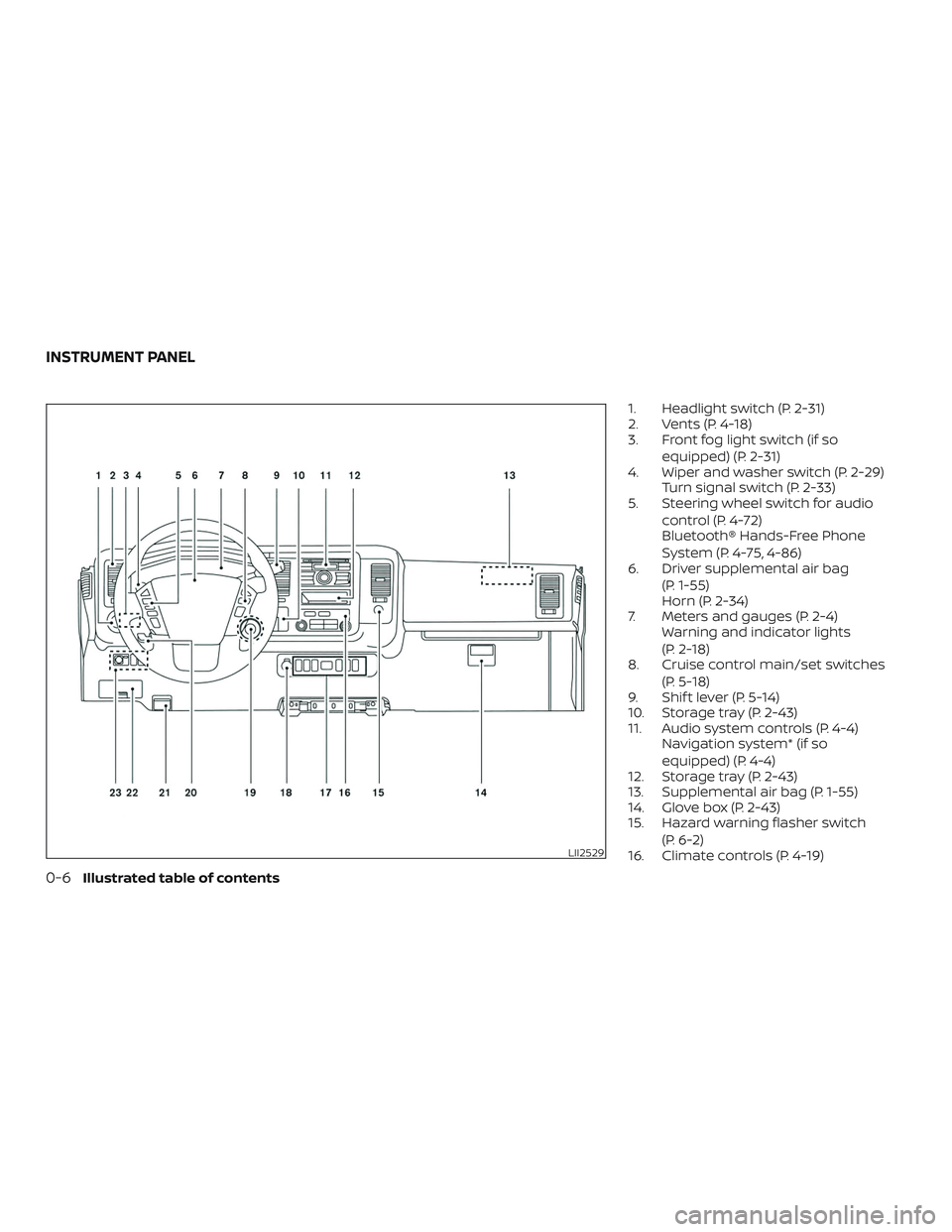
1. Headlight switch (P. 2-31)
2. Vents (P. 4-18)
3. Front fog light switch (if soequipped) (P. 2-31)
4. Wiper and washer switch (P. 2-29) Turn signal switch (P. 2-33)
5. Steering wheel switch for audio
control (P. 4-72)
Bluetooth® Hands-Free Phone
System (P. 4-75, 4-86)
6. Driver supplemental air bag
(P. 1-55)
Horn (P. 2-34)
7. Meters and gauges (P. 2-4) Warning and indicator lights
(P. 2-18)
8. Cruise control main/set switches
(P. 5-18)
9. Shif t lever (P. 5-14)
10. Storage tray (P. 2-43)
11. Audio system controls (P. 4-4) Navigation system* (if so
equipped) (P. 4-4)
12. Storage tray (P. 2-43)
13. Supplemental air bag (P. 1-55)
14. Glove box (P. 2-43)
15. Hazard warning flasher switch
(P. 6-2)
16. Climate controls (P. 4-19)
LII2529
INSTRUMENT PANEL
0-6Illustrated table of contents
Page 91 of 426
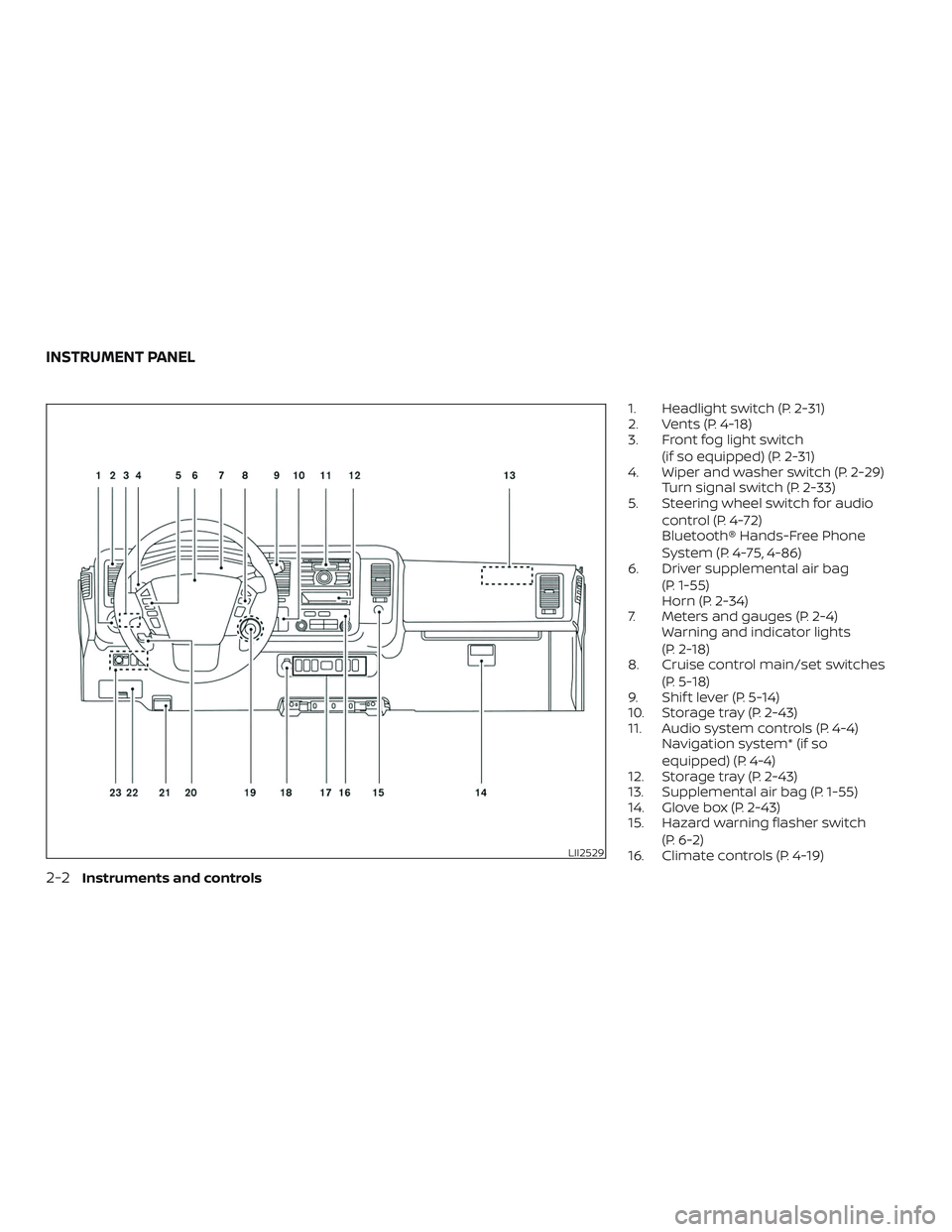
1. Headlight switch (P. 2-31)
2. Vents (P. 4-18)
3. Front fog light switch(if so equipped) (P. 2-31)
4. Wiper and washer switch (P. 2-29) Turn signal switch (P. 2-33)
5. Steering wheel switch for audio
control (P. 4-72)
Bluetooth® Hands-Free Phone
System (P. 4-75, 4-86)
6. Driver supplemental air bag
(P. 1-55)
Horn (P. 2-34)
7. Meters and gauges (P. 2-4) Warning and indicator lights
(P. 2-18)
8. Cruise control main/set switches
(P. 5-18)
9. Shif t lever (P. 5-14)
10. Storage tray (P. 2-43)
11. Audio system controls (P. 4-4) Navigation system* (if so
equipped) (P. 4-4)
12. Storage tray (P. 2-43)
13. Supplemental air bag (P. 1-55)
14. Glove box (P. 2-43)
15. Hazard warning flasher switch
(P. 6-2)
16. Climate controls (P. 4-19)
LII2529
INSTRUMENT PANEL
2-2Instruments and controls
Page 107 of 426
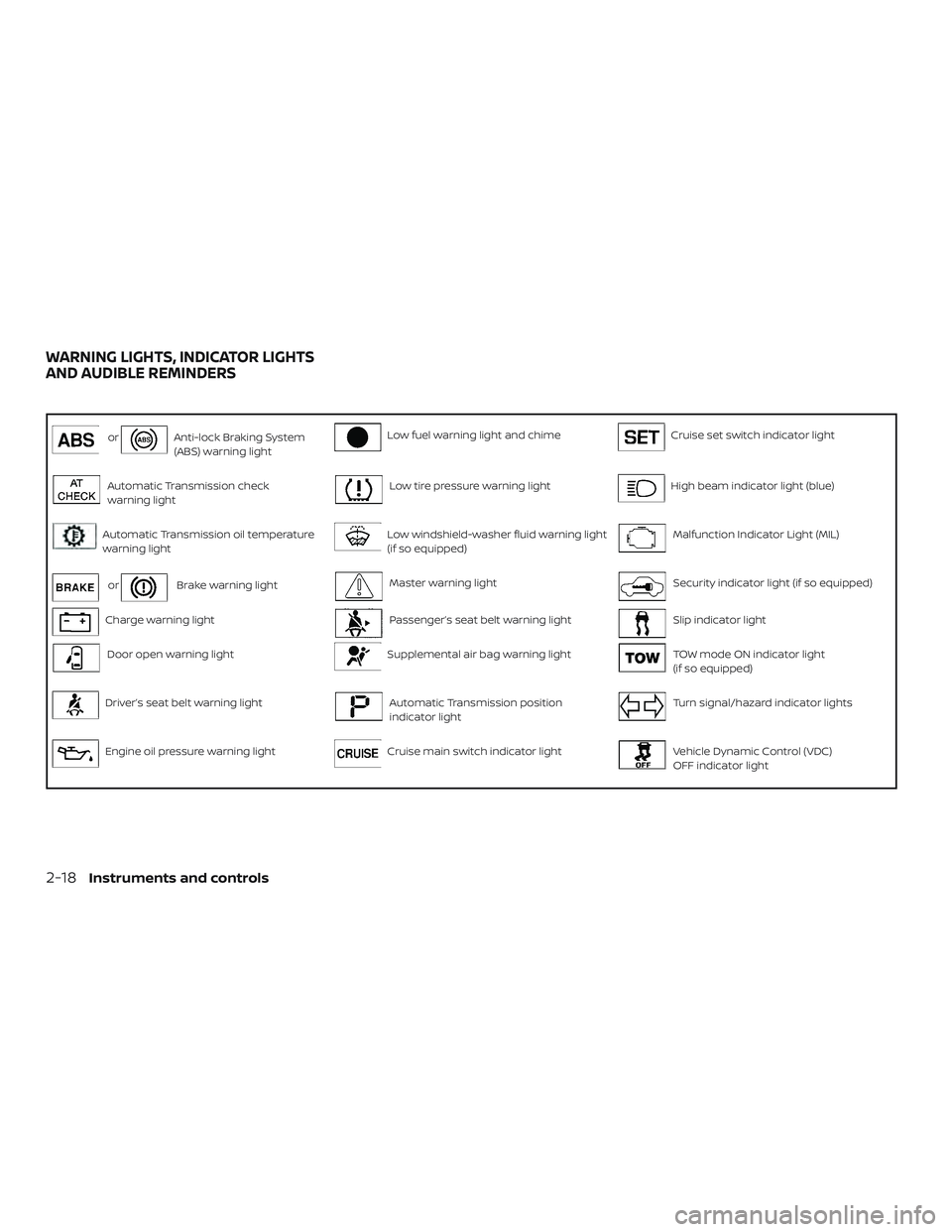
orAnti-lock Braking System
(ABS) warning lightLow fuel warning light and chimeCruise set switch indicator light
Automatic Transmission check
warning lightLow tire pressure warning lightHigh beam indicator light (blue)
Automatic Transmission oil temperature
warning lightLow windshield-washer fluid warning light
(if so equipped)Malfunction Indicator Light (MIL)
orBrake warning lightMaster warning lightSecurity indicator light (if so equipped)
Charge warning lightPassenger’s seat belt warning lightSlip indicator light
Door open warning lightSupplemental air bag warning lightTOW mode ON indicator light
(if so equipped)
Driver’s seat belt warning lightAutomatic Transmission position
indicator lightTurn signal/hazard indicator lights
Engine oil pressure warning lightCruise main switch indicator lightVehicle Dynamic Control (VDC)
OFF indicator light
WARNING LIGHTS, INDICATOR LIGHTS
AND AUDIBLE REMINDERS
2-18Instruments and controls
Page 113 of 426
INDICATOR LIGHTS
This vehicle has various indicator lights
that may illuminate to indicate a system
status. For additional information, refer to
the specific light in this section.
Automatic Transmissionposition indicator light
When the ignition switch is placed in the ON
position, this indicator light shows the shif t
lever position. For additional information,
refer to “Driving the vehicle” in the “Starting
and driving” section of this manual.
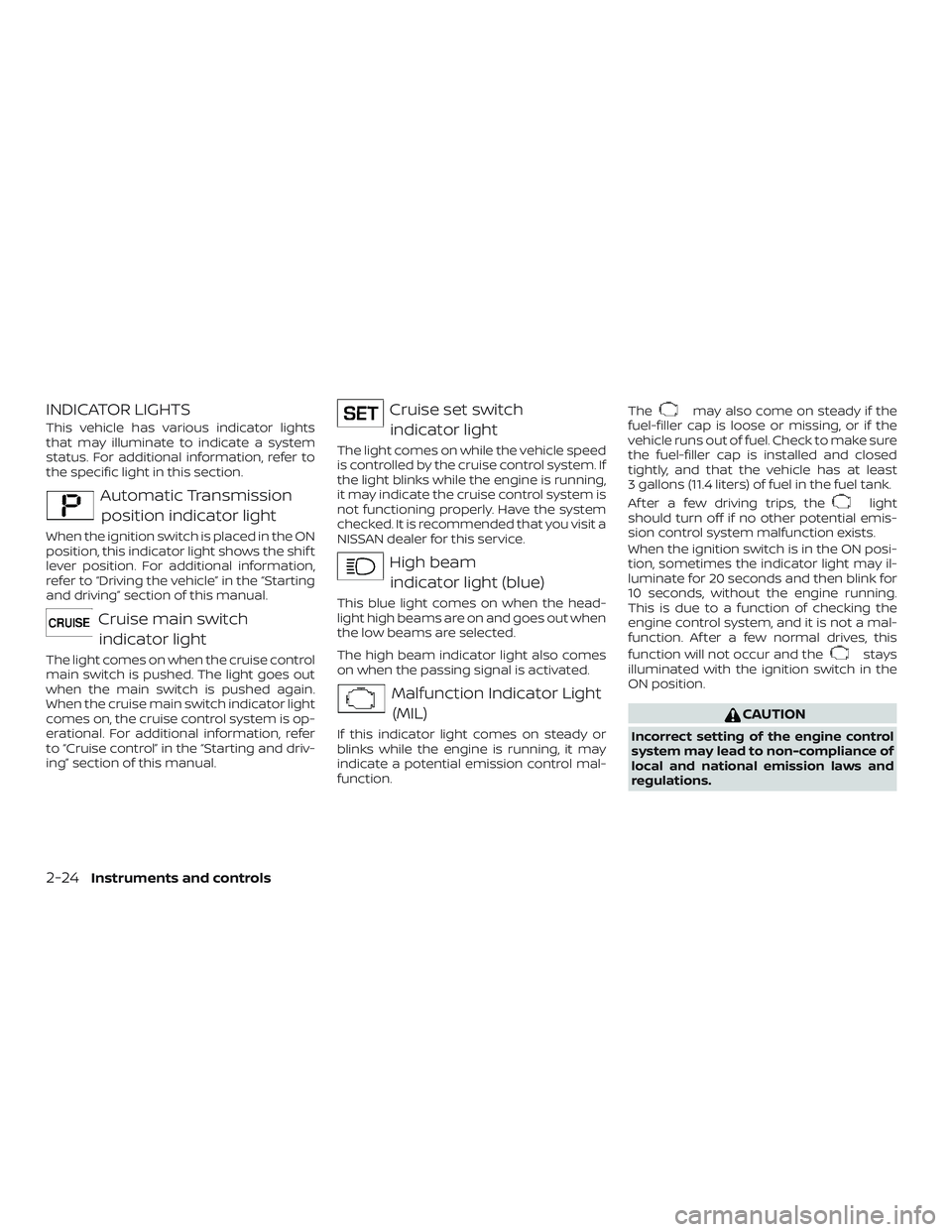
Cruise main switchindicator light
The light comes on when the cruise control
main switch is pushed. The light goes out
when the main switch is pushed again.
When the cruise main switch indicator light
comes on, the cruise control system is op-
erational. For additional information, refer
to “Cruise control” in the “Starting and driv-
ing” section of this manual.
Cruise set switchindicator light
The light comes on while the vehicle speed
is controlled by the cruise control system. If
the light blinks while the engine is running,
it may indicate the cruise control system is
not functioning properly. Have the system
checked. It is recommended that you visit a
NISSAN dealer for this service.
High beamindicator light (blue)
This blue light comes on when the head-
light high beams are on and goes out when
the low beams are selected.
The high beam indicator light also comes
on when the passing signal is activated.
Malfunction Indicator Light(MIL)
If this indicator light comes on steady or
blinks while the engine is running, it may
indicate a potential emission control mal-
function. The
may also come on steady if the
fuel-filler cap is loose or missing, or if the
vehicle runs out of fuel. Check to make sure
the fuel-filler cap is installed and closed
tightly, and that the vehicle has at least
3 gallons (11.4 liters) of fuel in the fuel tank.
Af ter a few driving trips, the
light
should turn off if no other potential emis-
sion control system malfunction exists.
When the ignition switch is in the ON posi-
tion, sometimes the indicator light may il-
luminate for 20 seconds and then blink for
10 seconds, without the engine running.
This is due to a function of checking the
engine control system, and it is not a mal-
function. Af ter a few normal drives, this
function will not occur and the
stays
illuminated with the ignition switch in the
ON position.
CAUTION
Incorrect setting of the engine control
system may lead to non-compliance of
local and national emission laws and
regulations.
2-24Instruments and controls
Page 264 of 426
5 Starting and driving
Precautions when starting and driving..........5-2
Exhaust gas (carbon monoxide) ..............5-2
Three-way catalyst ...........................5-2
Driving precautions ...........................5-3
Tire Pressure Monitoring System
(TPMS)........................................5-4
Avoiding collision and rollover ................5-6
Off-roadrecovery ............................5-7
Rapid air pressure loss .......................5-7
Drinking alcohol/drugs and driving ...........5-8
Ignition switch ...................................5-8
Automatic transmission ......................5-9
Ignition switch positions .....................5-10
NISSAN Vehicle Immobilizer System
(if so equipped) .............................. 5-10
Before starting the engine ......................5-10
Starting the engine .............................. 5-11
Driving the vehicle .............................. 5-12
Engine protection mode .....................5-12
Automatic transmission (A/T) ...............5-13
Parking brake .................................. 5-18
Cruise control .................................. 5-18
Precautions on cruise control ................5-18
Cruise control operations ....................5-19Break-in schedule
.............................. 5-20
Fuel efficient driving tips ........................5-20
Increasing fuel economy .......................5-22
Parking/parking on hills ........................5-22
Power steering ................................. 5-23
Brake system ................................... 5-24
Brake precautions ........................... 5-24
Anti-lock Braking System (ABS) ..............5-24
Brake assist ................................. 5-25
Active brake limited slip (ABLS) system ..........5-26
Vehicle Dynamic Control (VDC) system .........5-27
Brake force distribution ......................5-28
Rear Sonar System (RSS) (if so equipped) .......5-29
Front and rear sonar system (if so equipped) . . . 5-30
Cold weather driving ........................... 5-32
Freeing a frozen door lock ...................5-32
Antifreeze ................................... 5-32
B
attery...................................... 5-32
Draining of coolant water ....................5-32
Tire equipment .............................. 5-32
Special winter equipment ...................5-33
Driving on snow or ice .......................5-33
Engine block heater (if so equipped) .........5-33
Page 281 of 426
WARNING
∙ Be sure the parking brake is fully re-leased before driving. Failure to do so
can cause brake failure and lead to an
accident.
∙ Do not release the parking brake from outside the vehicle.
∙ Do not use the shif t lever in place of the parking brake. When parking, be
sure the parking brake is fully
engaged.
∙ To help avoid risk of injury or death through unintended operation of the
vehicle and/or its systems, do not
leave children, people who require the
assistance of others or pets unat-
tended in your vehicle. Additionally,
the temperature inside a closed ve-
hicle on a warm day can quickly be-
come high enough to cause a signifi-
cant risk of injury or death to people
and pets. To engage:
Firmly depress the parking
brake.
To release:
1. Firmly apply the foot brake.
2. Move the shif t lever to the P (Park) po- sition.
3. Firmly depress the parking brake pedal and it will release.
4. Before driving, be sure the brake warn- ing light goes out.
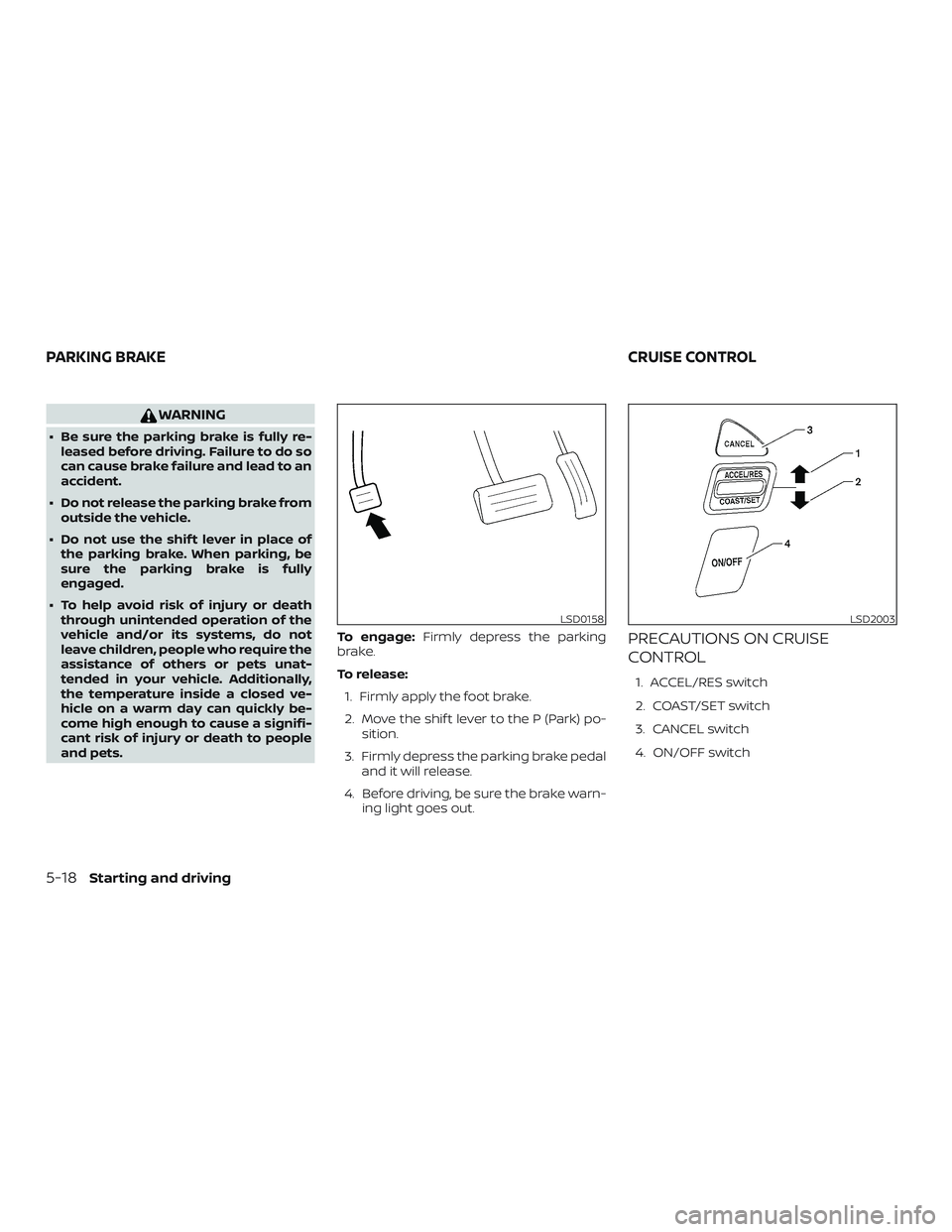
PRECAUTIONS ON CRUISE
CONTROL
1. ACCEL/RES switch
2. COAST/SET switch
3. CANCEL switch
4. ON/OFF switch
LSD0158LSD2003
PARKING BRAKE CRUISE CONTROL
5-18Starting and driving
Page 282 of 426
∙ If the cruise control system malfunc-tions, it cancels automatically. The SET
indicator light illuminates in the trip
computer then blinks to warn the driver.
For additional information, refer to
“Cruise set switch indicator light” in the
“Instruments and controls” section of
this manual.
∙ If the SET indicator light blinks, push the ON/OFF switch off and have the system
checked. It is recommended that you
visit a NISSAN dealer for this service.
∙ The SET indicator light may blink when the ON/OFF switch is pushed on while
pushing the ACCEL/RES, COAST/SET, or
CANCEL switch. To properly set the
cruise control system, use the following
procedures.
WARNING
Do not use the cruise control when driv-
ing under the following conditions:
∙ When it is not possible to keep thevehicle at a set speed.
∙ In heavy traffic or in traffic that varies in speed.
∙ On winding or hilly roads. ∙ On slippery roads (rain, snow, ice, etc.).
∙ In very windy areas.
Doing so could cause a loss of vehicle
control and result in an accident.
CRUISE CONTROL OPERATIONS
The cruise control allows driving at a speed
between 25 - 89 mph (40 - 144 km/h) without
keeping your foot on the accelerator pedal.
To turn on the cruise control,
push the
ON/OFF switch on. The CRUISE indicator
light in the trip computer will illuminate.
To set cruising speed, accelerate the ve-
hicle to the desired speed, push the
COAST/SET switch and release it. The SET
indicator light in the trip computer will illu-
minate. Take your foot off the accelerator
pedal. Your vehicle maintains the set
speed.
∙ To pass another vehicle, depress the
accelerator pedal. When you release the
pedal, the vehicle returns to the previ-
ously set speed.
∙ The vehicle may not maintain the set speed when going up or down steep
hills. If this happens, drive without the
cruise control. To cancel the preset speed,
use one of the
following three methods:
∙ Push the CANCEL switch; the SET indi- cator light in the trip computer goes
out.
∙ Tap the brake pedal; the SET indicator light goes out.
∙ Push the ON/OFF switch off. Both the CRUISE indicator light and SET indicator
light in the trip computer go out.
The cruise control is automatically can-
celed and the SET light in the trip computer
goes out if: ∙ You depress the brake pedal while pushing the ACCEL/RES or SET/COAST
switch. The preset speed is deleted
from memory.
∙ The vehicle slows down more than 8 mph (13 km/h) below the set speed.
∙ You move the shif t lever to N (Neutral).
To reset at a faster cruising speed, use
one of the following three methods:
∙ Depress the accelerator pedal. When the vehicle attains the desired speed,
push and release the COAST/SET
switch.
Starting and driving5-19
Page 284 of 426
3.Use Air Conditioning (A/C) at Higher
Vehicle Speeds
∙ Below 40 mph (64 km/h), it is more efficient to open windows to cool the
vehicle due to reduced engine load.
∙ Above 40 mph (64 km/h), it is more efficient to use A/C to cool the vehicle
due to increased aerodynamic drag.
∙ Recirculating the cool air in the cabin when the A/C is on reduces cooling
load.
4. Drive at Economical Speeds and
Distances
∙ Observing the speed limit and not exceeding 60 mph (97 km/h) (where
legally allowed) can improve fuel effi-
ciency due to reduced aerodynamic
drag.
∙ Maintaining a safe following distance behind other vehicles reduces un-
necessary braking.
∙ Safely monitoring traffic to anticipate changes in speed permits reduced
braking and smooth acceleration
changes.
∙ Select a gear range suitable to road conditions. 5.
Use Cruise Control
∙ Using cruise control during highway driving helps maintain a steady
speed.
∙ Cruise control is particularly effective in providing fuel savings when driving
on flat terrains.
6. Plan for the Shortest Route
∙ Utilize a map or navigation system to determine the best route to save
time.
7. Avoid Idling
∙ Shutting off your engine when safe for stops exceeding 30–60 seconds
saves fuel and reduces emissions.
8.
Buy an Automated Pass for Toll Roads
∙ Automated passes permit drivers to use special lanes to maintain cruis-
ing speed through the toll and avoid
stopping and starting. 9.
Winter Warm Up
∙ Limit idling time to minimize impact to fuel economy.
∙ Vehicles typically need no more than 30 seconds of idling at start-up to
effectively circulate the engine oil be-
fore driving.
∙ Your vehicle will reach its ideal oper- ating temperature more quickly
while driving versus idling.
10. Keeping your Vehicle Cool
∙ Park your vehicle in a covered parking area or in the shade whenever pos-
sible.
∙ When entering a hot vehicle, opening the windows will help to reduce the
inside temperature faster, resulting in
reduced demand on your A/C sys-
tem.
Starting and driving5-21