2018 NISSAN NV PASSENGER VAN sensor
[x] Cancel search: sensorPage 293 of 426
∙ The system is designed as an aid tothe driver in detecting large station-
ary objects to help avoid damaging
the vehicle. The system will not detect
small objects below the bumper, and
may not detect objects close to the
bumper or on the ground.
∙ If your vehicle sustains damage to the rear bumper fascia, leaving it mis-
aligned or bent, the sensing zone may
be altered causing inaccurate mea-
surement of obstacles or false alarms.
The RSS sounds a tone to warn the driver of
obstacles near the rear bumper when the
shif t lever is in R (Reverse). The system may
not detect objects at speeds above 3 mph
(5 km/h) and may not detect certain angu-
lar or moving objects.
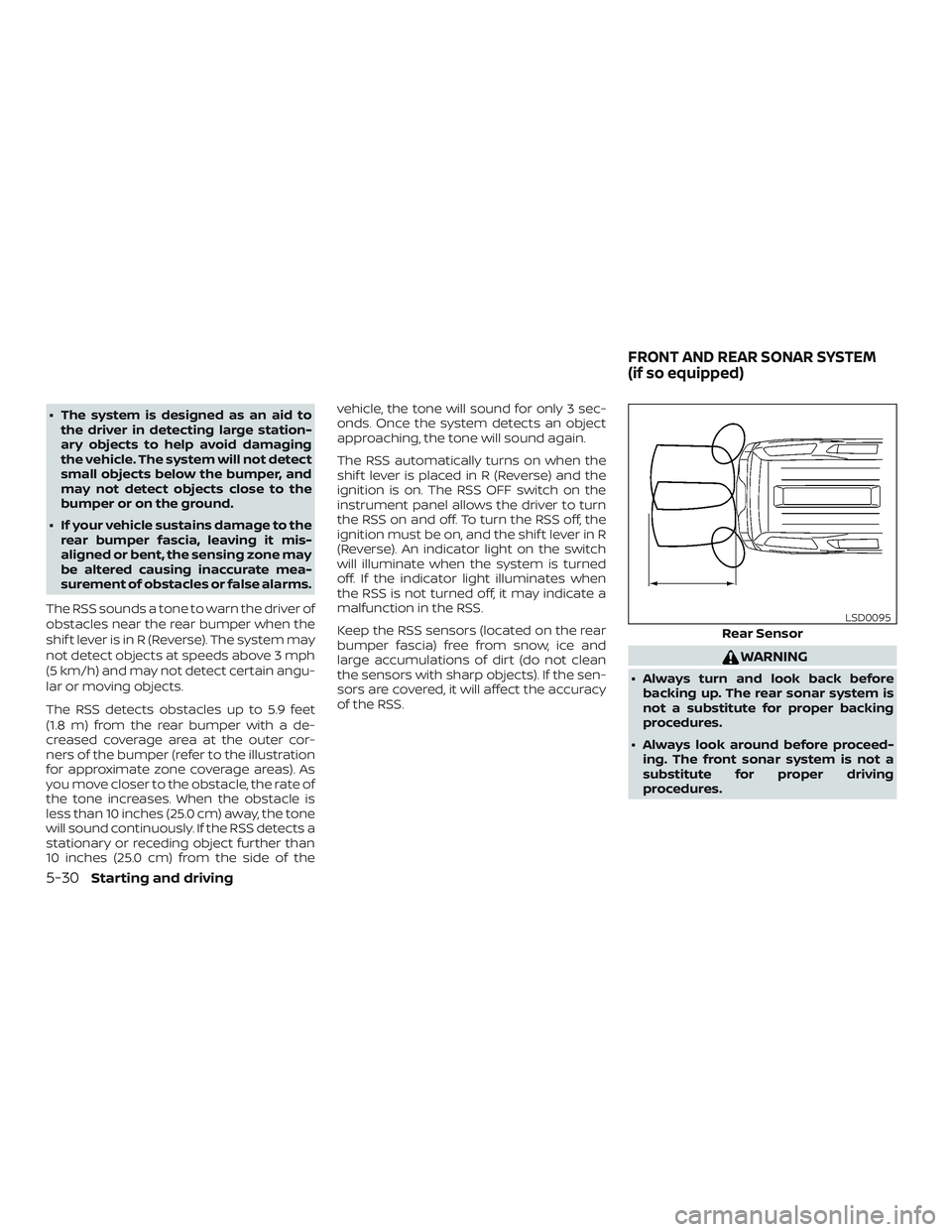
The RSS detects obstacles up to 5.9 feet
(1.8 m) from the rear bumper with a de-
creased coverage area at the outer cor-
ners of the bumper (refer to the illustration
for approximate zone coverage areas). As
you move closer to the obstacle, the rate of
the tone increases. When the obstacle is
less than 10 inches (25.0 cm) away, the tone
will sound continuously. If the RSS detects a
stationary or receding object further than
10 inches (25.0 cm) from the side of the vehicle, the tone will sound for only 3 sec-
onds. Once the system detects an object
approaching, the tone will sound again.
The RSS automatically turns on when the
shif t lever is placed in R (Reverse) and the
ignition is on. The RSS OFF switch on the
instrument panel allows the driver to turn
the RSS on and off. To turn the RSS off, the
ignition must be on, and the shif t lever in R
(Reverse). An indicator light on the switch
will illuminate when the system is turned
off. If the indicator light illuminates when
the RSS is not turned off, it may indicate a
malfunction in the RSS.
Keep the RSS sensors (located on the rear
bumper fascia) free from snow, ice and
large accumulations of dirt (do not clean
the sensors with sharp objects). If the sen-
sors are covered, it will affect the accuracy
of the RSS.
WARNING
∙ Always turn and look back before
backing up. The rear sonar system is
not a substitute for proper backing
procedures.
∙ Always look around before proceed- ing. The front sonar system is not a
substitute for proper driving
procedures.
Rear Sensor
LSD0095
FRONT AND REAR SONAR SYSTEM
(if so equipped)
5-30Starting and driving
Page 294 of 426
∙ Read and understand the limitationsof the front and rear sonar system as
contained in this section. Inclement
weather may affect the function of
the sonar system; this may include re-
duced performance or a false
activation.
∙ This system is not designed to pre- vent contact with small or moving
objects. ∙ The system is designed as an aid to
the driver in detecting large station-
ary objects to help avoid damaging
the vehicle. The system will not detect
small objects below the bumper, and
may not detect objects close to the
bumper or on the ground.
∙ If your vehicle sustains damage to the front bumper fascia or the rear bum-
per fascia, leaving it misaligned or
bent, the sensing zone may be altered
causing inaccurate measurement of
obstacles or false alarms.
The rear sonar system sounds a tone to
warn the driver of obstacles near the rear
bumper. The rear sonar system automati-
cally turns on when the shif t lever is placed
in R (Reverse) and the ignition is ON. The
system may not detect objects at speeds
above 3 mph (5 km/h) and may not detect
certain angular or moving objects.
The rear sonar system detects obstacles
up to 5.9 f t (1.8 m) from the rear bumper
with a decreased coverage area at the
outer corners of the bumper. As you move
closer to the obstacle, the rate of the tone
increases. When the obstacle is less than
10 in (25 cm) away, the tone will sound con-
tinuously. If it detects a stationary or reced- ing object further than 10 in (25 cm) from
the side of the vehicle, the tone will sound
for only 3 seconds. Once the system de-
tects an object approaching, the tone will
sound again.
The front sonar system sounds a tone to
warn the driver of obstacles near the front
bumper. The front sonar system automati-
cally turns on when the shif t lever is placed
in a forward gear and the ignition switch is
in the ON position. The system may not
detect objects at speeds above 3 mph
(5 km/h) and may not detect certain angu-
lar or moving objects.
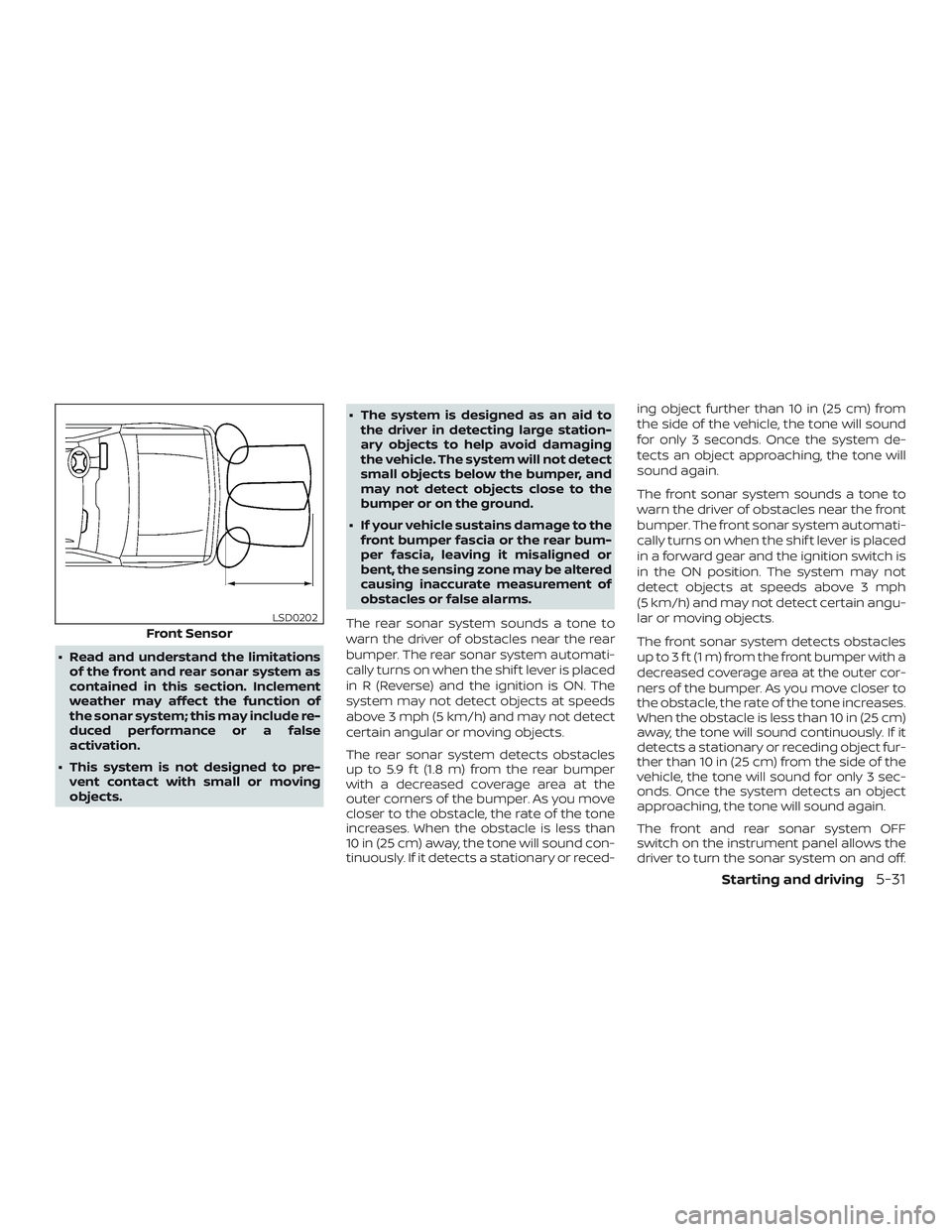
The front sonar system detects obstacles
up to 3 f t (1 m) from the front bumper with a
decreased coverage area at the outer cor-
ners of the bumper. As you move closer to
the obstacle, the rate of the tone increases.
When the obstacle is less than 10 in (25 cm)
away, the tone will sound continuously. If it
detects a stationary or receding object fur-
ther than 10 in (25 cm) from the side of the
vehicle, the tone will sound for only 3 sec-
onds. Once the system detects an object
approaching, the tone will sound again.
The front and rear sonar system OFF
switch on the instrument panel allows the
driver to turn the sonar system on and off.
Front Sensor
LSD0202
Starting and driving5-31
Page 295 of 426
To turn the system off, the ignition must be
ON and the shif t lever in R (Reverse) or D
(Drive). An indicator light on the switch will
illuminate when the system is turned off. If
the indicator light illuminates when the
system is not turned off, it may indicate a
failure in the sonar system.
Keep the front and rear sonar sensors (lo-
cated on the bumper fascia) free from
snow, ice and large accumulations of dirt
(do not clean the sensors with sharp ob-
jects). If the sensors are covered, it will af-
fect the accuracy of the sonar system.FREEING A FROZEN DOOR LOCK
To prevent a door lock from freezing, apply
de-icer through the key hole. If the lock
becomes frozen, heat the key before in-
serting it into the key hole or use the re-
mote keyless entry key fob (if so equipped).
ANTIFREEZE
In the winter when it is anticipated that the
temperature will drop below 32°F (0°C),
check the antifreeze to assure proper win-
ter protection. For additional information,
refer to “Engine cooling system” in the “Do-
it-yourself ” section of this manual.
BATTERY
If the battery is not fully charged during
extremely cold weather conditions, the
battery fluid may freeze and damage the
battery. To maintain maximum efficiency,
the battery should be checked regularly.
For additional information, refer to “Battery”
in the “Do-it-yourself ” section of this
manual.
DRAINING OF COOLANT WATER
If the vehicle is to be lef t outside without
anti-freeze, drain the cooling system, in-
cluding the engine block. Refill before oper-
ating the vehicle. For additional informa-
tion, refer to “Changing engine coolant” in
the “Do-it-yourself ” section of this manual.
TIRE EQUIPMENT
1. SUMMER tires have a tread designed toprovide superior performance on dry
pavement. However, the performance
of these tires will be substantially re-
duced in snowy and icy conditions. If
you operate your vehicle on snowy or
icy roads, NISSAN recommends the use
of MUD & SNOW or ALL SEASON TIRES
on all four wheels. It is recommended
that you visit a NISSAN dealer for the tire
type, size, speed rating and availability
information.
2. For additional traction on icy roads, studded tires may be used. However,
some U.S. states and Canadian prov-
inces prohibit their use. Check local,
state and provincial laws before install-
ing studded tires.
COLD WEATHER DRIVING
5-32Starting and driving
Page 300 of 426
WARNING
∙ Radio waves could adversely affectelectric medical equipment. Those
who use a pacemaker should contact
the electric medical equipment
manufacturer for the possible influ-
ences before use.
∙ If the low tire pressure warning light illuminates while driving, avoid sud-
den steering maneuvers or abrupt
braking, reduce vehicle speed, pull off
the road to a safe location and stop
the vehicle as soon as possible. Driv-
ing with under-inflated tires may per-
manently damage the tires and in-
crease the likelihood of tire failure.
Serious vehicle damage could occur
and may lead to an accident and could
result in serious personal injury.
Check the tire pressure for all four
tires. Adjust the tire pressure to the
recommended COLD tire pressure
shown on the Tire and Loading Infor-
mation label to turn the low tire pres-
sure warning light OFF. If you have a
flat tire, replace it with a spare tire as
soon as possible. ∙ When replacing a wheel without TPMS
such as the spare tire, TPMS will not
function and the low tire pressure
warning light will flash for approxi-
mately 1 minute. The light will remain
on af ter 1 minute. Have your tires re-
placed and/or TPMS system reset as
soon as possible. It is recommended
that you visit a NISSAN dealer for
these services.
∙ Replacing tires with those not origi- nally specified by NISSAN could affect
the proper operation of the TPMS.
∙ Do not inject any tire liquid or aerosol tire sealant into the tires, as this may
cause a malfunction of the tire pres-
sure sensors.
CHANGING A FLAT TIRE
If you have a flat tire, follow the instructions
below:
Stopping the vehicle
1. Safely move the vehicle off the road and
away from traffic.
2. Turn on the hazard warning flashers. 3. Park on a level surface and apply the
parking brake. Move the shif t lever to P
(Park).
4. Turn off the engine.
5. Raise the hood to warn other traffic and to signal professional road assis-
tance personnel that you need assis-
tance.
6. Have all passengers get out of the ve- hicle and stand in a safe place, away
from traffic and clear of the vehicle.
WARNING
∙ Make sure the parking brake is se-curely applied and the shif t lever is
shif ted into P (Park).
∙ Never change tires when the vehicle is on a slope, ice or slippery areas. This is
hazardous.
∙ Never change tires if oncoming traffic is close to your vehicle. Wait for pro-
fessional road assistance.
In case of emergency6-3
Page 361 of 426
damaged and/or vehicle handling and
performance may be adversely affected.
Tire chains must be installed only on the
rear wheels and not on the front wheels.
Do not use tire chains on dry roads. Driving
with chains in such conditions can cause
damage to the various mechanisms of the
vehicle due to some overstress.
CHANGING WHEELS AND TIRES
Tire rotation
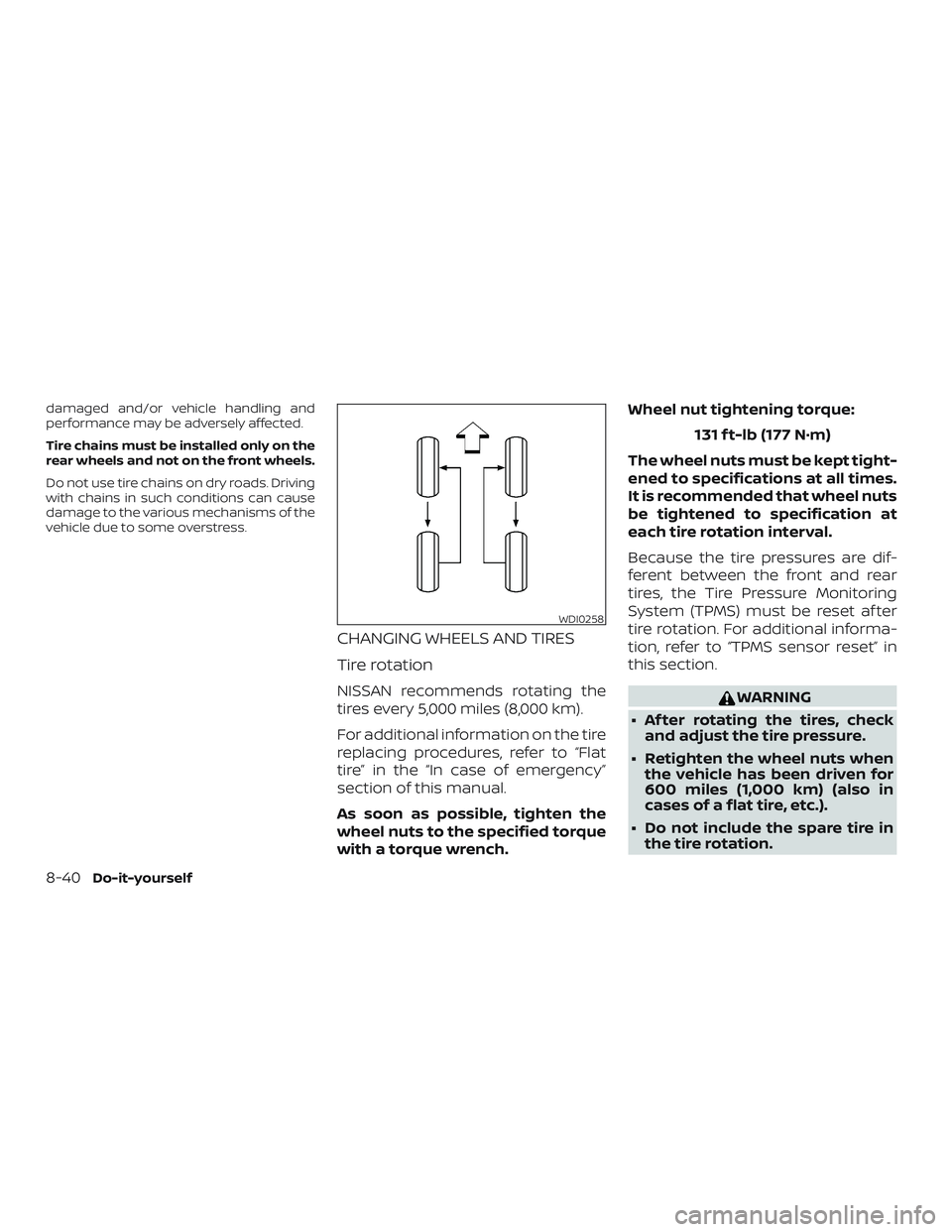
NISSAN recommends rotating the
tires every 5,000 miles (8,000 km).
For additional information on the tire
replacing procedures, refer to “Flat
tire” in the “In case of emergency”
section of this manual.
As soon as possible, tighten the
wheel nuts to the specified torque
with a torque wrench.Wheel nut tightening torque:
131 f t-lb (177 N·m)
The wheel nuts must be kept tight-
ened to specifications at all times.
It is recommended that wheel nuts
be tightened to specification at
each tire rotation interval.
Because the tire pressures are dif-
ferent between the front and rear
tires, the Tire Pressure Monitoring
System (TPMS) must be reset af ter
tire rotation. For additional informa-
tion, refer to “TPMS sensor reset” in
this section.WARNING
∙ Af ter rotating the tires, check and adjust the tire pressure.
∙ Retighten the wheel nuts when the vehicle has been driven for
600 miles (1,000 km) (also in
cases of a flat tire, etc.).
∙ Do not include the spare tire in the tire rotation.
WDI0258
8-40Do-it-yourself
Page 362 of 426
∙ For additional information re-garding tires, refer to “Impor-
tant Tire Safety Information”
(US) or “Tire Safety Information”
(Canada) in the Warranty Infor-
mation Booklet.
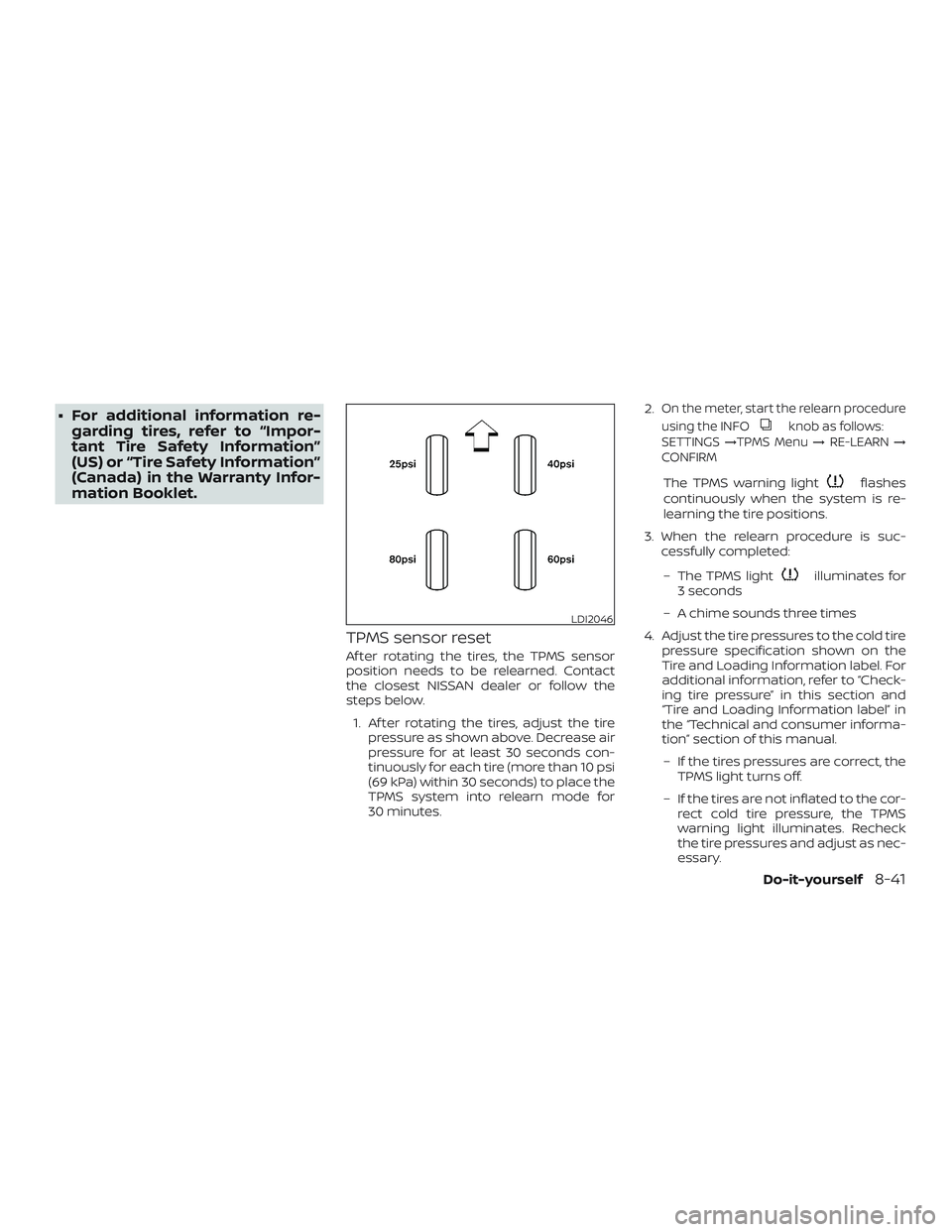
TPMS sensor reset
Af ter rotating the tires, the TPMS sensor
position needs to be relearned. Contact
the closest NISSAN dealer or follow the
steps below.
1. Af ter rotating the tires, adjust the tire pressure as shown above. Decrease air
pressure for at least 30 seconds con-
tinuously for each tire (more than 10 psi
(69 kPa) within 30 seconds) to place the
TPMS system into relearn mode for
30 minutes. 2.
On the meter, start the relearn procedure
using the INFO
knob as follows:
SETTINGS →TPMS Menu →RE-LEARN →
CONFIRM
The TPMS warning lightflashes
continuously when the system is re-
learning the tire positions.
3. When the relearn procedure is suc- cessfully completed:
– The TPMS light
illuminates for
3 seconds
– A chime sounds three times
4. Adjust the tire pressures to the cold tire pressure specification shown on the
Tire and Loading Information label. For
additional information, refer to “Check-
ing tire pressure” in this section and
“Tire and Loading Information label” in
the “Technical and consumer informa-
tion” section of this manual.
– If the tires pressures are correct, the TPMS light turns off.
– If the tires are not inflated to the cor- rect cold tire pressure, the TPMS
warning light illuminates. Recheck
the tire pressures and adjust as nec-
essary.
LDI2046
Do-it-yourself8-41
Page 365 of 426
could cause premature tire wear, de-
grade vehicle handling characteris-
tics, affect the VDC system and/or in-
terference with the brake discs. Such
interference can lead to decreased
braking efficiency and/or early brake
pad wear. For additional information
on wheel off-set dimensions, refer to
“Wheels and tires” in the “Technical
and consumer information” section of
this manual.
∙ When replacing a wheel without the TPMS, such as the spare tire, the TPMS
will not function and the low tire pres-
sure warning light will flash for ap-
proximately one minute. The light will
remain on af ter one minute. Have
your tires replaced and/or TPMS sys-
tem reset as soon as possible. It is rec-
ommended that you visit a NISSAN
dealer for this service.
∙ Replacing tires with those not origi- nally specified by NISSAN could affect
the proper operation of the TPMS.
∙ The TPMS sensor may be damaged if it is not handled correctly. Be careful
when handling the TPMS sensor. ∙ When replacing the TPMS sensor, the
ID registration may be required. It is
recommended that you visit a NISSAN
dealer for ID registration.
∙ Do not use a valve stem cap that is not specified by NISSAN. The valve stem
cap may become stuck.
∙ Be sure that the valve stem caps are correctly fitted. Otherwise the valve
may be clogged up with dirt and
cause a malfunction or loss of
pressure.
∙ Do not install a damaged or deformed wheel or tire even if it has been re-
paired. Such wheels or tires could
have structural damage and could fail
without warning.
∙ The use of retread tires is not recommended.
∙ For additional information regarding tires, refer to “Important Tire Safety
Information” (US) or “Tire Safety Infor-
mation” (Canada) in the Warranty In-
formation Booklet.
Wheel balance
Unbalanced wheels may affect vehicle
handling and tire life. Even with regular use, wheels can get out of balance. Therefore,
they should be balanced as required.
Wheel balance service should be per-
formed with the wheels off the vehicle.
Spin balancing the wheels on the vehicle
could lead to mechanical damage.
∙ For additional information regarding
tires, refer to “Important Tire Safety
Information” (US) or “Tire Safety In-
formation” (Canada) in the Warranty
Information Booklet.
Care of wheels
∙ Wash the wheels when washing the ve- hicle to maintain their appearance.
∙ Clean the inner side of the wheels when the wheel is changed or the underside
of the vehicle is washed.
∙ Do not use abrasive cleaners when washing the wheels.
∙ Inspect wheel rims regularly for dents or corrosion. Such damage may cause
loss of pressure or poor seal at the tire
bead.
∙ NISSAN recommends waxing the road wheels to protect against road salt in
areas where it is used during winter.
8-44Do-it-yourself