2018 MERCEDES-BENZ SPRINTER fog light
[x] Cancel search: fog lightPage 141 of 294

XCheck the wheels and tires and wheel archesfor trapped foreign objects and remove them.
Trapped foreign objects can damage the
wheels and tires or may beflung out from the
veh icle when you continue driving.
XCheck the underbo dyfor trapped branches or
other parts of plants and remove them.
XClean the brake disks, brake padsand axle
jo ints, particular lyafter operation insand,
mud, grit and gravel, water or similarly dirt y
conditions.
XCheck the entire floor assembly, the tires,
wheels, bodywork structure, brakes, steering,
chassis and exhaust system for any damage.
XCheck the service brake for operating safety,
e.g. carry out a brake test.
XIf you notice strong vibrations after driving off-
road, check the wheels and drive train for for-
eign objects again. Remove any foreign
objects which can lead to imbalances and
thus cause vibrations.
Driving systems
Cruise control
General notes
Cruise control maintains the speed of the veh i-
cle for you.
Use cruise control ifroad and traff icconditions
make itappropriate to maintain a steady speed
for a prolonged period. You can set any speed
from 20 mph upwards inincrements of 1 mph.
iIfyou have set km /has the unit for the dig-
ital speedometer (Ypage 168), you can set
any speed from 30 km /hupwards inincre-
ments of 1 km/h.
Cruise control should not beactivated when
driv ing off-road or on construction sites.
Cruise control may not be ableto maintain the
stored speed on uphillordownhill gradients. If
the gradient evens out and the veh icle's speed
does not fall below 20 mph (30 km/h), the
stored speed is resumed.
iThe speed shown in the speedometer may
differ slightly from the speed stored by cruise
control.
Important safety notes
If you fail to adapt your driving style or if you are
inattentive, cruise control can neither reduce
the risk of an accident nor override the laws of
physics. Cruise control cannot take road,
weather and traffic conditions into account.
Cruise control is only an aid. You are responsible
for the distance to the vehicle in front, for vehi-
cle speed, for braking in good time and for stay-
ing in lane.
Do not use cruise control:
Rin traffic conditions that are unsuitable for
driving at a constant speed, e.g. in heavy traf-
fic, on winding roads or off-road
Ron slippery roads. Braking or accelerating can
cause the drive wheels to lose traction and
the vehicle could then skid
Rwhen visibility is poor, e.g. due to fog, heavy
rain or snow
If there is a change of drivers, make sure that
you inform the new driver about the set cruise
speed.
Cruise control lever
Operating cruise control
:To activate and store the current speed or a
higher speed
;To activate at the last stored speed
=To activate and store the current speed or a
lower speed
?To deactivate cruise control
The cruise control lever is the upper lever on the
left of the steering column.
Displaying the cruise control speed
Vehicles with steering wheel buttons: when
you activate cruise control, the text field in the
display briefly shows the Cr.
controlmessage
Driving systems139
Driving and parking
Z
Page 146 of 294

Monitoring range of the sensors
In particular, the detection of obstacles can be
impaired in the case of:
Rdirt, ice or anything else covering the sensors
Rpoor visibility, e.g. due to fog, heavy rain or
snow
Rnarrow and short vehicles, e.g. motorcycles
or bicycles
Rvery wide lanes
Rnarrow lanes
Rvehicles not driving in the middle of their lane
Rbarriers or other road boundaries
Vehicles in the monitoring range are then not
indicated.
Blind Spot Assist monitors the area approx-
imately 10 ft (3.0 m) behind your vehicle and
approximately 1.6 ft (0.5 m) to 11.5 ft (3.5 m)
each side of it. The monitoring range behind the
vehicle may also be larger depending on the sit-
uation.
If the lanes are narrow, vehicles driving in the
lane beyond the lane next to your vehicle may be
indicated, especially if the vehicles are not driv-
ing in the middle of their lane. This may be the
case if the vehicles are driving on the inner side
of their lane.
Due to the nature of the system:
Rwarnings may be issued in error when driving
close to crash barriers or similar solid lane
borders.
Rwarnings may be interrupted when driving
alongside particularly long vehicles, for exam-
ple trucks, for a prolonged time. The two sensors for Blind Spot Assist are inte-
grated into the sides of the rear bumper. Make
sure that the bumper is free of dirt, ice or slush
in the vicinity of the sensors. The radar sensors
must not be covered, for example by rear-moun- ted cycle racks or overhanging loads. Following
a severe impact or in the event of damage to the
bumper, have the function of the radar sensors
checked at a qualified specialist workshop.
Blind Spot Assist may otherwise not work prop- erly.
Indicator and warning display
Blind Spot Assist is not active at speeds below
approximately 20 mph (30 km/h). Vehicles in
the monitoring range are then not indicated.
:Yellow indicator lamp and red warning lamp
If yellow indicator lamp :lights up:
Ryou are driving at less than 20 mph (30 km/h)
RBlind Spot Assist is deactivated
RBlind Spot Assist is malfunctioning
Blind Spot Assist is active from a speed of
20 mph (30 km/h). If a vehicle is detected in the
blind spot monitoring range, red warning
lamp :on the corresponding side lights up.
This warning occurs when a vehicle enters the
blind spot monitoring range from behind or from
the side. When you overtake a vehicle, the warn- ing only occurs if the difference in speed is less
than 14 mph (22 km/h).
Yellow indicator lamp :goes out if reverse gear
is engaged. Blind Spot Assist is then deactiva-
ted.
The brightness of the indicator/warning lamps
is adjusted automatically according to the
brightness of the ambient light.
144Driving systems
Driving and parking
Page 148 of 294

Lane Keeping Assist does not keep your vehicle
in its lane.
The system may be impaired or may not function
if:
Rif the vehicle is incorrectly loaded
(Ypage 213)
Rthere is poor visibility, e.g. due to insufficient
illumination of the road, or due to snow, rain,
fog or spray
Rthere is glare, e.g. from oncoming traffic, the
sun or reflection from other vehicles (e.g. if
the road surface is wet)
Rthe windshield is dirty, fogged up, damaged or
covered, for instance by a sticker, in the vicin-
ity of the camera
Rno, or several, unclear lane markings are pres-
ent for one lane, e.g. in a construction area
Rthe lane markings are worn away, dark or cov-
ered up, e.g. by dirt or snow
Rthe distance to the vehicle in front is too small
and the lane markings thus cannot be detec-
ted
Rthe lane markings change quickly, e.g. lanes
branch off, cross one another or merge
Rthe road is narrow and winding
Rthere are highly variable shade conditions on
the road
A warning may be given if a front wheel passes
over a lane marking. In addition, a warning tone
sounds and the Ãindicator lamp in the
instrument cluster flashes red.
Activating/deactivating Lane Keeping
Assist
Lane Keeping Assist is automatically activated
when you start the engine.
XTo deactivate: press thejbutton in the
center console (Ypage 37).
On vehicles without steering wheel but-
tons:
OFF
flashes briefly in the display and the Ã
indicator lamp in the instrument cluster
flashes yellow and then lights up continu-
ously.
On vehicles with steering wheel buttons:
The Lane
Keep.AssistDeactivatedmes-
sage appears in the display and the Ã
indicator lamp in the instrument cluster
flashes yellow and then lights up continu-
ously. Lane Keeping Assist is deactivated.
XTo activate:
press thejbutton in the
center console again (Ypage 37).
On vehicles without steering wheel but-
tons:
on
flashes briefly in the display and the Ã
indicator lamp in the instrument cluster goes
out. If a lane marking is detected, the Ã
indicator lamp lights up green.
On vehicles with steering wheel buttons:
The Lane Keep. Assist Activated
mes-
sage appears in the display and the Ã
indicator lamp in the instrument cluster goes
out. If a lane marking is detected, the Ã
indicator lamp lights up green.
Lane Keeping Assist is activated.
A Lane Keeping Assist warning is suppressed if:
Ra driving safety system intervenes, such as
ABS, BAS or ESP®.
Ryou have set the turn signal and a lane change is detected. In this case, the warnings are
suppressed for a certain period of time.
Ryou accelerate hard, e.g. kickdown on vehi-
cles with an automatic transmission.
Ryou brake hard.
Ryou steer actively, e.g. swerve to avoid an
obstacle or change lane quickly.
Ryou cut the corner on a sharp bend.
In order that you are warned only when neces-
sary and in good time if you cross the lane mark-
ing, the system recognizes certain conditions
and warns you accordingly.
Lane Keeping Assist warns you earlier if:
Ryou approach the outer lane marking on a
bend.
Rthe road has very wide lanes, e.g. a freeway.
Rthe system recognizes solid lane markings.
Warnings are given later if:
Rthe road has narrow lanes.
Ryou cut the corner on a bend.
All-wheel drive
Important safety notes
!Never tow the vehicle with one axle raised.
This may damage the transfer case. Damage
of this sort is not covered by the Mercedes-
Benz Limited Warranty. All wheels must
146Driving systems
Driving and parking
Page 173 of 294

You will see the following message in the dis-
play:Setting only possible at stand‐
still.
Switching surround lighting on or off
Using the steering wheel buttons
XPress the VorU button repeatedly
until the Settingsmenu appears in the dis-
play.
XPress the 9button to switch to the sub-
menu selection.
XPress the WorX button to select the
Lightingsubmenu.
XPress the 9button to select the Loc.lightingfunction.
The selection marker is on the current setting.
XPress the WorX button to switch the
surround lighting OnorOff.
If you switch the surround lighting to On
, the fol-
lowing lamps light up in the dark after you have
unlocked the vehicle using the key:
Rthe parking lamps
Rthe tail lamps
Rthe license plate lamps
Rthe fog lamps
The surround lighting automatically switches off
after 40 seconds or if you:
Ropen the driver's door
Rinsert the key into the ignition lock
Rlock the vehicle using the key
Setting the delayed switch-off time for the
exterior lighting
In the Headlampssubmenu, you can set
whether and for how long you wish the exterior
lighting to remain on after closing the doors.
Using the steering wheel buttons
XPress the VorU button repeatedly
until the Settingsmenu appears in the dis-
play.
XPress the 9button to switch to the sub-
menu selection.
XPress the WorX button to select the
Lightingsubmenu.
XPress the 9button to select the Head‐lampsfunction.
The selection marker is on the current setting.
XPress the WorX button to select
whether and for how long you wish the exte-
rior lighting to remain on.
If you have set the delayed switch-off and switch
off the engine, the following remain lit:
Rthe parking lamps
Rthe tail lamps
Rthe license plate lamps
Rthe fog lamps
iYou can reactivate this function by opening
a door within 10 minutes.
If, after switching off the engine, you do not
open a door or close an open door, the exte-
rior lighting switches off after 60 seconds.
Vehicle submenu
Setting the windshield wiper sensitivity
You can use the Wipe sensorfunction to set
the sensitivity of the rain/ light sensor.
Using the steering wheel buttons
XPress the VorU button repeatedly
until the Settingsmenu appears in the dis-
play.
XPress the 9button to switch to the sub-
menu selection.
On-board computer (vehicles with steering wheel buttons)171
On-board computer and displays
Z
Page 182 of 294
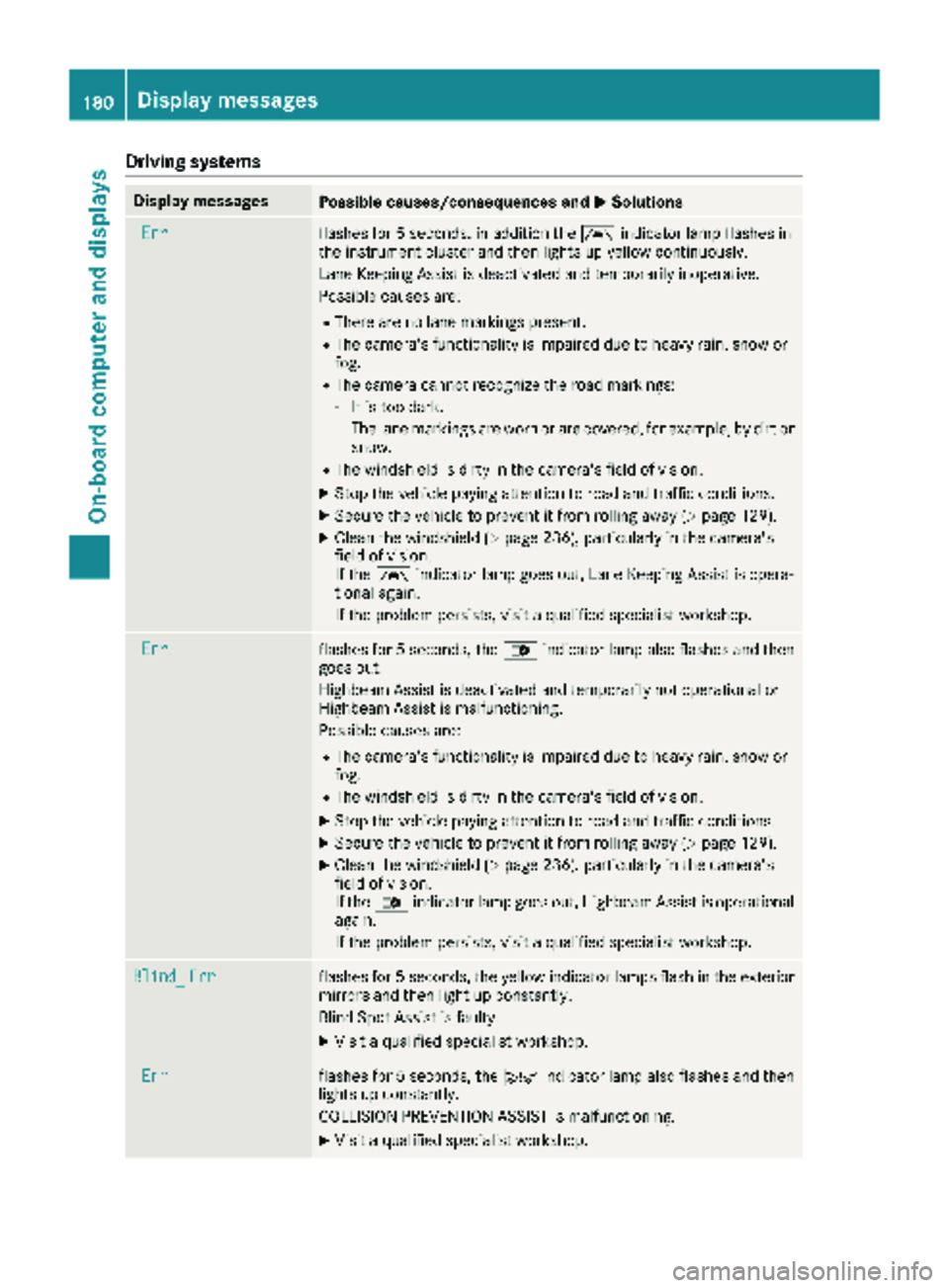
Drivingsystems
Display messagesPossible causes/consequences an dMSolutions
Errflashe sfo r 5 seconds, in addition th eà indicator lamp flashes in
th einstrumen tcluster and then lights up yello wcontinuously.
Lan eKeepin gAssis tis deactivated and temporarily inoperative .
Possible causes are :
RThere are no lanemarking spresent.
RThe camera's functionalit yis impaire ddue to heav yrain ,snow or
fog.
RThe camera canno trecogniz eth eroad markings:
-It is to odark.
-The lan emarking sare wor nor are covered, fo rexample, by dir tor
snow.
RThe windshield is dirty in th ecamera's field of vision .
XStop thevehicle payin gattention to road and traffic conditions.
XSecur eth evehicle to preven tit from rollin gaway (Ypage 129).
XClean th ewindshield (Ypage 236), particularly in th ecamera's
field of vision .
If th eà indicator lamp goe sout ,Lan eKeepin gAssis tis opera-
tional again .
If th eproblem persists ,visit aqualified specialis tworkshop .
Errflashesfo r 5 seconds ,th e_ indicator lamp also flashes and then
goe sout .
Highbeam Assis tis deactivated and temporarily no toperational or
Highbeam Assis tis malfunctioning.
Possible causes are :
RThe camera's functionalit yis impaire ddue to heav yrain ,snow or
fog.
RThe windshield is dirty in th ecamera's field of vision .
XStop thevehicle payin gattention to road and traffic conditions.
XSecur eth evehicle to preven tit from rollin gaway (Ypage 129).
XClean th ewindshield (Ypage 236), particularly in th ecamera's
field of vision .
If th e_ indicator lamp goe sout ,Highbeam Assis tis operational
again .
If th eproblem persists ,visit aqualified specialis tworkshop .
Blind_Errflashesfo r 5 seconds ,th eyello windicator lamp sflas hin th eexterio r
mirrors and then ligh tup constantly.
Blin dSpot Assis tis faulty.
XVisit aqualified specialis tworkshop .
Errflashesfo r 5 seconds ,th eÄ indicator lamp also flashes and then
lights up constantly.
COLLISION PREVENTION ASSIST is malfunctioning.
XVisit aqualified specialis tworkshop .
180Display messages
On-board computer and displays
Page 188 of 294

Display messagesPossible causes/consequences andMSolutions
b
Highbea mright
The right-hand high beam headlamp is fault y3.
XReplaceth ebulb as soo nas possibl e (Ypage 90).
b
Licenseplate lam p
Alicense plat elamp is faulty.3
XReplac eth ebulb as soo nas possibl e (Ypage 93).
b
Switch off lights
You haveforgotte nto switch off th elights when leaving th evehicle.
XTurn th eligh tswitch to $.
b
Foglampfront lef t
The left-han dfron tfog lamp is faulty.3
XHav eth ebulb replace das soo nas possibl eat aqualified specialist
workshop .
b
Foglampfront right
The right-hand fron tfog lamp is fault y3.
XHaveth ebulb replace das soo nas possibl eat aqualified specialist
workshop .
b
Rearfoglam p
The rear fog lamp is fault y3.
XReplaceth ebulb as soo nas possibl e (Ypage 92).
b
Parkinglam pfrontlef t
The left-han dfron tparking lamp/standin glamp is fault y3.
XReplaceth ebulb as soo nas possibl e (Ypage 91).
b
Parkinglam pfrontright
The right-hand fron tparking lamp/standin glamp is fault y3.
XReplaceth ebulb as soo nas possibl e (Ypage 91).
b
Reverselam p
Abackup lamp is fault y3.
XReplaceth ebulb as soo nas possibl e (Ypage 92).
b
Taillam plef t
The left-han dtai llamp is faulty.3
XReplac eth ebulb as soo nas possibl e (Ypage 92).
b
Taillam pright
The right-hand tai llamp is faulty.3
XReplac eth ebulb as soo nas possibl e (Ypage 92).
b
Marker lam p
Aperimete rlamp is fault y3.
XReplaceth ebulb as soo nas possibl e (Ypage 94).
3Dependin gon th eequipment, th ebulb-failure indicato rmay no tbe featured for any lamp sother than th etur n
signals.
186Display messages
On-board computer and displays
Page 189 of 294

Display messagesPossible causes/consequences andMSolutions
Highbeam AssistInoperativeHighbeamAssis tis faulty.
XVisit aqualified specialist workshop .
HighbeamAssistTem‐porarily Unavaila‐ble
Highbea mAssis tis deactivated and temporarily inoperative.
Possibl ecauses are:
RThe camera' sfunctionalit yis impaire ddue to heav yrain ,snow or
fog .
RThe windshield is dirty in th ecamera' sfield of vision .
XStop thevehicl epayin gattention to roa dand traffic conditions.
XSecur eth evehicl eto preven tit from rollin gaway (Ypage 129).
XClean th ewindshield (Ypage 236), particularly in th ecamera' s
field of vision .
If th emalfunction has been rectified, th emessage Highbeam
Assist Available Againappears.
Engine
Diesel Exhaust Flui d(DEF)
Vehicles wit hpassenger vehicle approva l
Display messagesPossible causes/consequences and MSolutions
Check DieselExhaustFluid seeOperator' sManual
The DE Fsupply has dropped belo w1.5US gal (5. 5l).
XAd dDE Fsupply (Ypage 128).
The display message only disappear swhen th evehicl eis stationary,
at th elatest after 20 seconds as soo nas you switch on th eignition
or start th eengin eafter toppin gup.
å
XX starts remaining
Three short warning tone salso sound.
Afte rth emessage appear sfor th efirst time, th eremaining DE Fsupply
will last for approximately 1200 mile s(1900 km). The engin ecan then
only be started another 16 times .
The number of remaining engin estart sxx
(16to 0)is shown in th e
message every time th eengin eis started.
XAd dat least 1. 5US gal (5.5l)of DEF (Ypage 128).
å
Idle Mode
The yellow ;engine diagnostic indicator lamp also lights up and
three short warning tones sound.
You cannot drive the vehicle at a speed exceeding 5 mph (8 km/h).
XAdd at least 1.5 US gal (5.5 l)of DEF (Ypage 128).
The display message and the yellow ;engine diagnostic indi-
cator lamp only disappear when the vehicle is stationary, at the
latest after 20 seconds as soon as you switch on the ignition or start
the engine after topping up.
Display messages187
On-board computer and displays
Z
Page 194 of 294

Display messagesPossible causes/consequences andMSolutions
LaneKeep. Assisttemporarilyunavailable
and th eà indicator lamp lights up yellow.
Lan eKeepin gAssis tis deactivated and temporarily inoperative.
Possibl ecauses are:
RThere are no lan emarking spresent.
RThe camera' sfunctionalit yis impaire ddue to heav yrain ,snow or
fog .
RThe camera canno trecogniz eth eroa dmarkings:
-It is to odark .
-The lan emarking sare wor nor are covered, for example, by dir tor
snow.
RThe windshield is dirty in th ecamera' sfield of vision .
XStop thevehicl epayin gattention to roa dand traffic conditions.
XSecur eth evehicl eto preven tit from rollin gaway (Ypage 129).
XClean th ewindshield (Ypage 236), particularly in th ecamera' s
field of vision .
If th eà indicator lamp goe sout ,Lan eKeepin gAssis tis opera-
tional again .
LaneKeep. AssistinoperativeLan eKeepin gAssis tis faulty.
XHav eLan eKeepin gAssis tchecke dat aqualified specialist work-
shop.
Blind Spo tAssistinoperativeBlind Spot Assis tis faulty.
XHav eBlind Spot Assis tchecke dat aqualified specialist workshop .
Collision Preven‐tionAssist inoper ‐ative
COLLISION PREVENTION ASSIST is faulty.
XHaveCOLLISION PREVENTION ASSIST checke dat aqualified spe -
cialist workshop .
Recognition by th eradar sensor system can be impaire din th ecas eof:
Rdirt, ice or anythin gelse covering th esensor s
Rsnow or heav yrain
Rinterferenc efrom other radar source s
Rthere are strongradar reflections, for exampl ein parking garages
Ranarrow vehicl etraveling in front, e.g. amotorbik e
Ravehicl etraveling in fron ton adifferen tlin e
XClean th eradar sensor system area .
Intervention Cross‐windAssistThe d indicator lamp also flashes in th einstrumen tcluster.
Crosswin dAssis thas intervened perceptibly.
192Display messages
On-board computer and displays