2018 MERCEDES-BENZ SPRINTER fog light
[x] Cancel search: fog lightPage 91 of 294

Changing bulbs
Important safety notes
GDANGER
Xenon bulbs carry a high voltage. You can get an electric shock if you remove the cover of
the Xenon bulb and touch the electrical con-
tacts. There is a risk of fatal injury.
Never touch the parts or the electrical con-
tacts of the Xenon bulb. Always have work on
the Xenon bulbs carried out at a qualified spe-
cialist workshop.
GWARNING
Bulbs, lamps and connectors can get very hot
when operating. If you change a bulb, you
could burn yourself on these components.
There is a risk of injury.
Allow these components to cool down before
changing a bulb.
!Make sure the bulbs are always securely
installed.
If your vehicle is equipped with Bi-Xenon bulbs,
you can recognize this by the following: the cone
of light from the Xenon bulbs moves from the
top to the bottom and back again when you start
the engine. For this to be observed, the low-
beam headlamps must be switched on before
starting the engine.
The bulbs and lamps are an essential compo-
nent of vehicle safety. You must therefore make
sure that these function correctly at all times.
Have the headlamp setting checked regularly.
RAlways switch off the vehicle's lighting sys-
tem before changing a bulb.
This will prevent a short circuit.
RDo not touch the glass tube of new bulbs with your bare hands. Always use a clean, lint-free
cloth or only touch the base of the bulb when
installing.
Even minor contamination can burn into the
glass surface and reduce the service life of the
bulbs.
RDo not use a bulb that has been dropped or
that has scratches on its glass tube.
The bulb could explode.
ROnly use bulbs in closed lamps which have
been designed for this purpose.
ROnly use spare bulbs of the same type and
with the prescribed voltage
RProtect the bulbs from moisture when in use.
If the new bulb still does not light up, consult a
qualified specialist workshop.
RHave the LEDs and bulbs of the following
lamps changed at a qualified specialist work-
shop:
-the additional turn signals in the exterior
mirrors
-the high-mounted brake lamp
-LED daytime running lamps (Bi-Xenon
headlamps)
-Bi-Xenon lamps (Bi-Xenon headlamps)
-front fog lamps
If you require assistance changing bulbs, con-
sult a qualified specialist workshop.
Front bulbs
Overview of bulb replacement – bulb
types
The following bulbs can be replaced. Bulb types can be found in the legend.
Vehicle swit hhalogen headlamps
:
Turn signal lamp, parking lamp, side marker
lamp: NAK 3457
;Daytime running lamps: W21W
=Low-beam headlamps: H7 55W
?High-beam headlamps: H7 55W
Changing bulbs89
Lights and windshield wipers
Z
Page 94 of 294
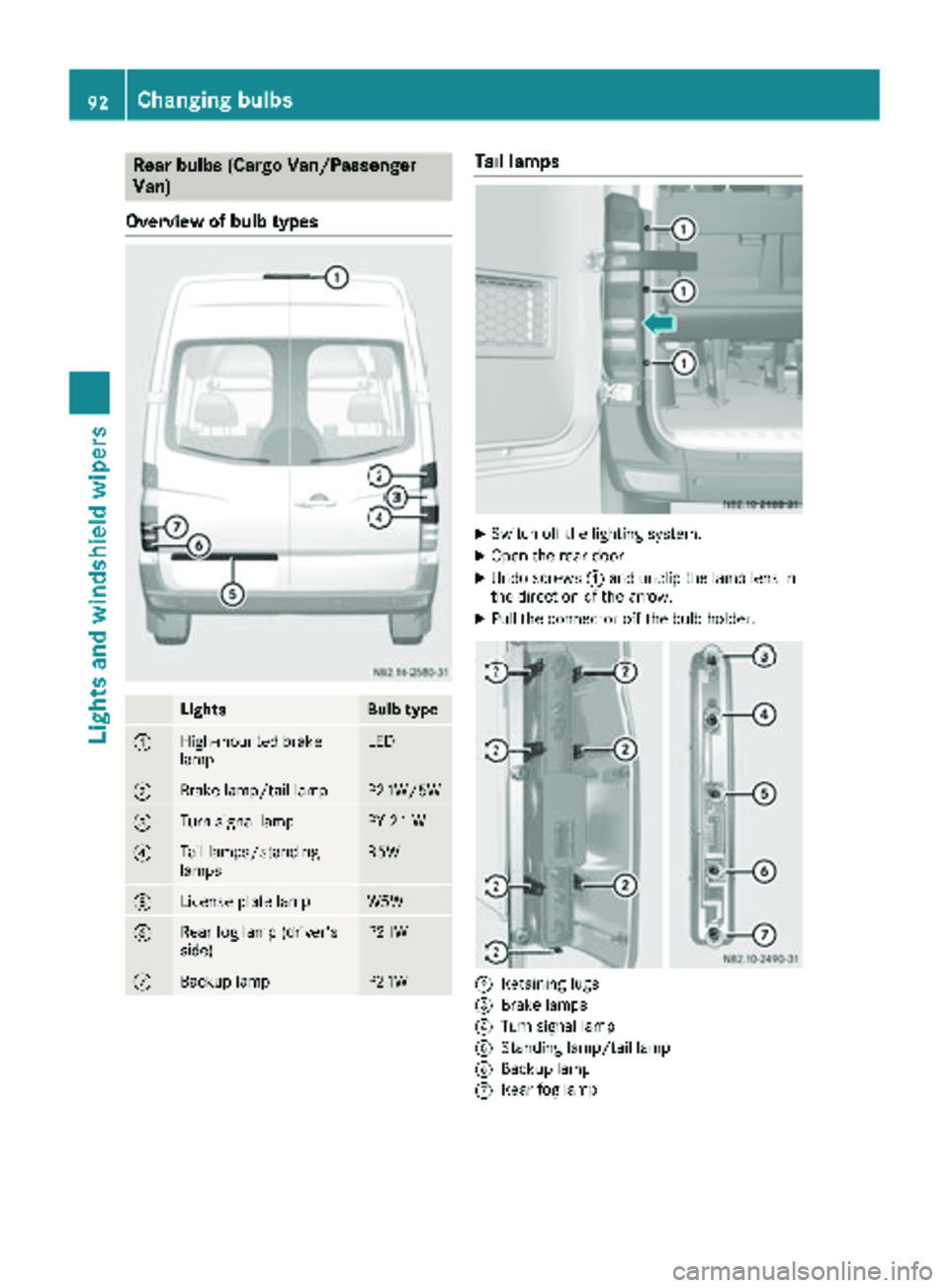
Rear bulbs (Cargo Van/Passenger
Van)
Overview of bulb types
LightsBulb type
:High-mounted brake
lampLED
;Brake lamp/tail lampP21W/5W
=Turn signal lampPY 21 W
?Tail lamps/standing
lampsR5W
ALicense plate lampW5W
BRear fog lamp (driver's
side)P21W
CBackup lampP21W
Tail lamps
XSwitch off the lighting system.
XOpen the rear door.
XUndo screws :and unclip the lamp lens in
the direction of the arrow.
XPull the connector off the bulb holder.
;Retaining lugs
=Brake lamps
?Turn signal lamp
AStanding lamp/tail lamp
BBackup lamp
CRear fog lamp
92Changing bulbs
Lights and windshield wipers
Page 95 of 294

XReleaseretaining lugs ;and tak eth ebulb
holder out of th etai llamp .
XApplyin gligh tpressur eto th ebulb, tur nit
counter-clockwise and remove it from th e
bulb holder.
XPress th ene wbulb int oth ebulb holder and
screw it in clockwise.
XPress th econnecto rint oth ebulb holder.
XInser tth elamp lens.
To do this, cli pth ebulb holder int oth ethree
hole sprovide dat th eside and tighten
screws :.
License plate lamp
XSwitchoff th elighting system.
XInser t ascrewdriver or similar implement int o
recess ;and carefully pry off lamp len s:.
XPull th ebulb out of th ebulb holder.
XInser t anewbulb.
XAlign lamp len s: and cli pit in so that it
engages.
Rear bulbs (Cab Chassis)
Overview of bulb types
Chassis (example: Cab Chassis)
LightsBulb type
:Perimete rlamp/stand-
ing lampR 5 W
;Tail lamp sR 5 W
=Brake lamp sP21 W
?Turn signal lamp sPY 21W
ABackup lamp sP21 W
BRear fog lamp s(driver's
side )P21 W
CLicense plat elampR 5 W
Tail lamps
:Screws
;Lam plen s
=Perimete rlamp/standin glamp
?Turn signal lamp
ABrake lamp s
BTail lamps
Changing bulbs93
Lights and windshield wipers
Z
Page 96 of 294

CRear fog lamp
DLicense platelamp
EBackup lamp
XSwitc hoff th elighting system.
XUndo screws :and remove lamp len s;.
XApplyin gligh tpressur eto th ebulb, tur nit
counter-clockwise and remove it from th e
bulb holder.
XPress th ene wbulb int oth ebulb holder and
screw it in clockwise.
XPosition lamp len s; and tighten screws :.
Additional lamps
Additional turn signal lamp on the roof
Type of lamp : P21 W
XSwitc hoff th elighting system.
XUndo screws :and remove lamp len s;.
XApplyin gligh tpressur eto th ebulb, tur nit
counter-clockwise and remove it from th e
bulb holder.
XPress th ene wbulb int oth ebulb holder and
screw it in clockwise.
XPosition lamp len s; and tighten screws :
again .
Perimeter lamp (Cab Chassis)
Type of lamp : W 5 W
XSwitchoff th elighting system.
XUndo screws :and remove th elamp unit.
XTurn bulb holder ;and remove it .
XRemove thebulb from bulb holder ;.
XPress thene wbulb int obulb holder ;.
XScrew bulb holder ;intoth elamp unit.
XCarefully position th elamp housing and
tighten screws :.
Courtesy lights, rear compartment
Bulb type: W5W
XPress in thelatching spring of courtesy
ligh t: with a suitable implement ,e.g. a
screwdriver.
XPry off courtesy ligh t:.
XDisconnect cable connecto r=.
XUnscrew bulb holder ;.
94Changing bulbs
Lights and windshield wipers
Page 103 of 294

Optimum use of the air-conditioning
system
Below, you can find a number of notes and rec-
ommendations to help you use the air-condi-
tioning system optimally.
RSwitch on the cooling with air dehumidifica-
tion function. The indicator lamp above the
rocker switch lights up.
RSet the temperature to 72 ‡ (22 †). Only
change the temperature in small increments.
ROnly use the "Windshield defrosting" function
briefly until the windshield is clear again.
ROnly use air-recirculation mode briefly, e.g. if
there are unpleasant outside odors or when in
a tunnel. The windows could otherwise fog up
as no fresh air is drawn into the vehicle in air-
recirculation mode.
ROnly use reheat mode until the windows are
clear again.
Rear-compartment heating control panel
:i Switches rear-compartment heating on and off (Ypage 102)
;KSets the airflow (Ypage 103)
=Sets the temperature (Ypage 103)
Optimum use of rear-compartment
heating
For optimum climate control, set the tempera-
ture control to the middle level. Only change the
temperature in small increments.
Overview of climate control systems101
Climate control
Page 105 of 294

Vehicle with rear-compartment heating/
rear-compartment air conditioning
XTo switch on/off:press theiswitch.
If the indicator lamp in the button lights up,
the rear-compartment heating/rear-com-
partment air conditioning is switched on.
Switching the cooling with air dehu-
midification function on/off
Important information
If you switch off the "Cooling with air dehumid-
ification" function, the air inside the vehicle will
not be cooled (in warm weather) or dehumidi-
fied. The windows could fog up more quickly.
The cooling with air dehumidification function is
only available when the engine is running. The
air inside the vehicle is cooled and dehumidified
according to the temperature selected.
Condensation may appear on the underside of
the vehicle when in cooling mode. This is normal
and not a sign that there is a malfunction.
Switching on and off
Vehicle with air conditioning
XPress the ¿button.
If the indicator lamp in the button lights up,
cooling with air dehumidification is switched
on.
Setting the temperature
Increasing and reducing temperature in
the front compartment via the control
panel
Only change the temperature in small incre-
ments. Start at the center position, or at 72 ‡
(22 †).
XSwitch on climate control (Ypage 102).
XTurn temperature control :clockwise to
increase or counterclockwise to reduce the
temperature (
Ypage 100).
Increasing and reducing temperature in
the rear compartment via the control
panel
Only change the temperature in small incre-
ments.
XSwitch on climate control (Ypage 102).
XTurn rear-compartment temperature control
= (Ypage 101) or rear-compartment air-
conditioning system ;(Ypage 102) clock-
wise to increase or counterclockwise to
reduce the temperature.
iVehicles with additional air conditioning and
heating in the rear compartment: if you set
the temperature control to the center posi-
tion, only one of the two climate control sys-
tems works in the rear compartment and in
air-recirculation mode (
Ypage 105).
Setting the air distribution
Air distribution settings
The air distribution symbols have the following
meanings:
m Directs air through the center and side
air vents
s
z Directs air to the windshield and the air
vents
q Directs air to the windshield, the air
vents and into the footwell
r Directs air to the air vents and into the
footwell
Adjusting
XSwitch on climate control (Ypage 102).
XSet air-distribution control ?for the heating
(Ypage 99) or air-conditioning system A
(Ypage 100) to the corresponding symbol.
Setting the airflow
XSwitch on climate control (Ypage 102).
XVehicle with heating/rear-compartment
heating: set airflow control ;of the heating
(
Ypage 99) or of the rear-compartment heat-
ing (Ypage 101) to the desired level.
XVehicle with air conditioning/rear-com-
partment air conditioning: press theI
Operating the climate control system103
Climate control
Page 106 of 294

button to reduce or theKbutton to
increase the airflow.
The blower speeds are shown in bars next to
the buttons.
Defrosting the windows
You can use the "defrosting" function to defrost
the windshield or to demist the inside of the
windshield and the side windows.
Only use the following settings until the win-
dows are clear again.
XVehicle with window heating: switch on the
front (Ypage 105) and/or rear window
defroster (Ypage 105) .
XSwitch on climate control (Ypage 102).
Vehicle with heating
XSet temperature control :and airflow con-
trol ;toz (Ypage 99).
XSet air-distribution control ?tosz
(Ypage 99).
XClose the center air vents (Ypage 106) and
the air outlets for the headroom and the rear compartment (
Ypage 107).
XDirect the side air vents towards the side win-dows and open the defroster vents for the
side windows (
Ypage 107).
Vehicle with air conditioning
XSet temperature control :to
z (Ypage 100).
XPress the Kbutton until the maximum
blower output is reached.
All bars in the display next to the button light
up.
XSet air-distribution control Atosz
(Ypage 100).
XClose the center air vents (Ypage 106) and
the air outlets for the headroom and the rear
compartment (
Ypage 107).
XDirect the side air vents towards the side win-
dows and open the defroster vents for the
side windows (
Ypage 107).
Clearing condensation from the win-
dows
Windows fogged up on the inside
You should only select this setting until the win-
dows are clear again.
XVehicle with window heating: switch on the
front (Ypage 105) and/or rear window
defroster (Ypage 105) .
XSwitch on climate control (Ypage 102).
XSwitch off air-recirculation mode
(Ypage 105).
Vehicle with heating
XSet temperature control :to a higher tem-
perature (Ypage 99).
XSet airflow control ;to a higher blower set-
ting. It should be set at least to level two
(
Ypage 99).
XSet air-distribution control ?tosz
(Ypage 99).
iIf the windows still fog up, set the control as
described for defrosting (Ypage 104).
Vehicle with air conditioning
XActivate cooling with air dehumidification
(Ypage 103).
XPress the ¨button (Ypage 100).
Reheat mode is activated. The indicator lamp
in the switch lights up.
To deactivate reheat mode, press the ¨
button again. The indicator lamp in the button
goes out.
Windows fogged up on the outside
You should only select this setting until the
windshield is clear again.
XSwitch on the windshield wipers (Ypage 96).
XSwitch on climate control (Ypage 102).
XAdjust air distribution to the footwell
(Ypage 103).
XClose the air vents (Ypage 106).
104Operating the climate control system
Climate control
Page 107 of 294

Window heating
Windshield heater
Windshield heater switch
The windshield heater consumes a lot of power.
You should therefore switch it off as soon as the
windshield is clear. Otherwise, the windshield
heating only switches off automatically after five minutes.
XStart the engine.
XTo switch on/off: press thezswitch.
The indicator lamp in the zbutton comes
on when the windshield heating is switched
on.
If the indicator lamp in the zwindshield
heating button flashes, the on-board voltage is
too low. The windshield heating has switched off
prematurely or cannot be activated.
XSwitch off any consumers that are not
required, e.g. reading lamps or interior light-
ing.
If the on-board voltage is sufficient again within
30 seconds, the windshield heating switches on
again automatically. It otherwise remains
switched off.
Rear window defroster
Rear window defroster switch
The rear window defroster consumes a lot of
power. You should therefore switch it off as
soon as the window is clear. The rear window
heating otherwise only switches off automati-
cally after 12 minutes.
XStart the engine.
XTo activate and deactivate: press the|
button.
The indicator lamp in the |button comes
on when the rear window defroster is
switched on.
If the indicator lamp in the |rear window
defroster button flashes, the on-board voltage is
too low. The rear window defroster has switched off prematurely or cannot be activated.
XSwitch off any consumers that are not
required, e.g. reading lamps or interior light-
ing.
If enough on-board voltage is available again
within 30 seconds, the rear window heating
automatically switches on again. It otherwise
remains switched off.
Switching air-recirculation mode
on/off
Important safety notes
When you switch on air-recirculation mode, the windows could fog up more quickly, in particular
at low outside temperatures. Only switch on air-
recirculation mode for a short time.
You can deactivate the intake of fresh air if
unpleasant odors enter the vehicle from out-
side. The air inside the vehicle will only be cir-
culated.
Operating the climate control system105
Climate control