2018 MERCEDES-BENZ SPRINTER ECO mode
[x] Cancel search: ECO modePage 159 of 294

ing to. Information is available from the police
and local authorities.
Observe the following when towing a trailer:
RPractice driving around bends, stopping and
backing up at a place where there is no traffic.This enables you to gain experience and get
used to the new handling characteristics.
RBefore driving, check:
-that the trailer tow hitch and ball coupling
are secure
-that the safety switch for a braked trailer is
functioning properly
-that the safety chains are secure and not
damaged
-that the electrical connections are secure
-that the lights are working
-that the wheels are in good order and the
tire pressure is correct
RAdjust the exterior mirrors to provide an
unobstructed view of the rear section of the
trailer.
RIf the trailer is equipped with an individual
braking system, check before each journey
whether the brakes are functioning correctly.
RIf the trailer has electronically controlled
brakes, pull the vehicle/trailer combination
away carefully. Brake manually using the
brake controller and check that the brakes
are working.
RSecure the load on the trailer according to the
applicable specifications and current stand-
ards on securing loads (
Ypage 215).
RWhen driving with a trailer, check at regular
intervals that the load is secured and that the
brakes and lights are working.
RBear in mind that the handling will be less
stable when towing a trailer than when driving
without one. Avoid sudden steering move-
ments.
RThe vehicle/trailer combination is heavier,
accelerates more slowly and has a decreased
gradient climbing capability and a long er
brak
ing distance.
It is more susceptible to crosswinds and
requires cautious steering.
RIf possible, do not brake suddenly, but rather
moderately at first so that the trailer can acti-
vate its brakes. Then increase the force on the
brake pedal.
RIf the automatic transmission repeatedly
shifts between gears when driving on inclines, restrict the shift range. Select shift range
4,3,
2 or 1.
Driving in a low gear and at a low speed
reduces the risk of damaging the engine.
RWhen driving on a downhill gradient, shift to a
low gear and take advantage of the engine's
braking effect.
Avoid continuous brake application as this
may overheat the vehicle brakes and, if instal-
led, the trailer brakes.
RIf the coolant temperature increases dramat-
ically while the air-conditioning system is
switched on, switch off the air-conditioning
system.
Coolant heat can also be dissipated by
switching the airflow and the temperature of
the heater/air conditioning to the maximum
level. Open the windows if necessary.
RWhen overtaking, pay particular attention to
the extended length of your vehicle/trailer
combination.
Due to the length of your vehicle/trailer com-
bination you need an additional distance
before you can return to your original lane.
Uncoupling a trailer
GWARNING
If you uncouple a trailer with the overrun
brake engaged, you could trap your hand
between the vehicle and the trailer drawbar.
There is a risk of injury.
Do not uncouple a trailer if the overrun brake
is engaged.
!Do not disconnect a trailer with an engaged
overrun brake. Otherwise, your vehicle could
be damaged by the rebounding of the overrun
brake.
XMake sure the selector lever of the automatic
transmission is in position P.
XApply the parking brake of the vehicle.
XClose all doors.
XApply the parking brake of the trailer.
XIn addition, secure the trailer against rolling
away with a wheel chock or similar object.
XRemove the trailer cable and safety chains
and decouple the trailer.
Towing a trailer157
Driving and parking
Z
Page 162 of 294

Useful information
This Operator's Manual describes all models as
well as standard and optional equipment of your
vehicle that were available at the time of going
to print. Country-specific variations are possi-
ble. Note that your vehicle may not be equipped
with all of the described functions. This also
applies to systems and functions relevant to
safety.
Read the information on qualified specialist
workshops (
Ypage 27).
Important safety notes
GWARNING
If you are driving and reach through the steer- ing wheel to operate the adjustment knob,
you could lose control of the vehicle. There is
a risk of an accident and injury.
Only operate the adjustment knobs when thevehicle is stationary. Do not reach through the
steering wheel when driving.
GWARNING
If you operate information systems and com-
munication equipment integrated in the vehi-
cle while driving, you will be distracted from
traffic conditions. You could also lose control
of the vehicle. There is a risk of an accident.
Only operate the equipment when the traffic
situation permits. If you are not sure that this
is possible, park the vehicle paying attention
to traffic conditions and operate the equip-
ment when the vehicle is stationary.
GWARNING
If the instrument cluster has failed or mal-
functioned, you may not recognize function
restrictions in systems relevant to safety. The
operating safety of your vehicle may be
impaired. There is a risk of an accident.
Drive on carefully. Have the vehicle checked
at a qualified specialist workshop immedi-
ately. You must observe the legal requirements for the
country in which you are currently driving when
operating the on-board computer.
The on-board computer display only shows mes-
sages and warnings from certain systems. You
should therefore make sure your vehicle is oper-
ating safely at all times. If the operating safety of
your vehicle is impaired, stop the vehicle as
soon as possible, paying attention to road and
traffic conditions. Then consult a qualified spe-
cialist workshop.
Instrument cluster
Overview
:Instrument cluster on vehicles without
steering wheel buttons
;Instrument cluster in vehicles with steering-
wheel buttons
=Adjustment buttons fand g
?Reset button 9
AService button Ë(engine oil level check)
BMenu button 4
You will find a full overview of the instrument
cluster in the "At a glance" section (
Ypage 34).
The display in the instrument cluster is activated when you:
Ropen the driver's door
Rturn the key to position 2in the ignition lock
Rpress the 9reset button
Rswitch on the lights
160Instrument cluster
On-board computer and displays
Page 163 of 294

The display switches off automatically after
approximately 30 seconds if:
Rthe key is in position0in the ignition lock.
Rthe vehicle lighting is not switched on.
Instrument lighting
When the lights are switched on, you can adjust
the brightness of the instrument cluster lighting
using the fand gbuttons.
XTo brighten: press thefbutton.
XTo dim: press the gbutton.
iVehicles with automatic headlamp mode:
the instrument lighting also adapts to auto-
matic headlamp mode.
Tachometer
!
Do not drive in the overrevving range, as this
could damage the engine.
HEnvironmental note
Avoid driving at high engine speeds. This
unnecessarily increases the fuel consumption
of your vehicle and harms the environment as
a result of increased emissions.
The red band in the tachometer indicates the
engine's overrevving range.
To protect the engine, the fuel supply is inter-
rupted when the red band is reached.
Outside temperature
You should pay special attention to road condi-
tions when temperatures are around the freez-
ing point.
On vehicles without steering wheel buttons
(
Ypage 162) and on vehicles with steering
wheel buttons (Ypage 166), the outside tem-
perature display is in the display.
Changes in the outside temperature are dis-
played after a short delay.
Speedometer
The speed can also be shown in the display. You
can find information on the digital speedometer for vehicles without steering wheel buttons
under (
Ypage 162) and for vehicles with steer-
ing wheel buttons under (Ypage 166).
iIn some countries, a warning sounds when
the vehicle reaches the maximum speed limit,
e.g. at 75 mph (120 km/h).
Trip odometer
XTo reset: make sure that the display is show-
ing the trip odometer if you have a vehicle with
steering wheel buttons (
Ypage 166).
XPress and hold the 9reset button until the
trip odometer is reset to 0.0.
Fuel gauge
:Fuel gauge on vehicles without steering
wheel buttons
;Fuel gauge on vehicles with steering wheel
buttons
=Fuel filler flap location indicator t: the
fuel filler flap is on the left-hand side. Fuel
filler flap location indicator u: the fuel
filler flap is on the right-hand side
?Reserve fuel warning lamp (Ypage 201)
DEF gauge
Vehicles without steering wheel but-
tons
If the DEF supply is less than 1.5 US gal (5.5 l),
the dEF Chkmessage appears in the display.
In addition, the yellow åDEF indicator lamp
lights up in the instrument cluster and a warning
tone sounds.
Instrument cluster161
On-board computer and displays
Z
Page 189 of 294

Display messagesPossible causes/consequences andMSolutions
Highbeam AssistInoperativeHighbeamAssis tis faulty.
XVisit aqualified specialist workshop .
HighbeamAssistTem‐porarily Unavaila‐ble
Highbea mAssis tis deactivated and temporarily inoperative.
Possibl ecauses are:
RThe camera' sfunctionalit yis impaire ddue to heav yrain ,snow or
fog .
RThe windshield is dirty in th ecamera' sfield of vision .
XStop thevehicl epayin gattention to roa dand traffic conditions.
XSecur eth evehicl eto preven tit from rollin gaway (Ypage 129).
XClean th ewindshield (Ypage 236), particularly in th ecamera' s
field of vision .
If th emalfunction has been rectified, th emessage Highbeam
Assist Available Againappears.
Engine
Diesel Exhaust Flui d(DEF)
Vehicles wit hpassenger vehicle approva l
Display messagesPossible causes/consequences and MSolutions
Check DieselExhaustFluid seeOperator' sManual
The DE Fsupply has dropped belo w1.5US gal (5. 5l).
XAd dDE Fsupply (Ypage 128).
The display message only disappear swhen th evehicl eis stationary,
at th elatest after 20 seconds as soo nas you switch on th eignition
or start th eengin eafter toppin gup.
å
XX starts remaining
Three short warning tone salso sound.
Afte rth emessage appear sfor th efirst time, th eremaining DE Fsupply
will last for approximately 1200 mile s(1900 km). The engin ecan then
only be started another 16 times .
The number of remaining engin estart sxx
(16to 0)is shown in th e
message every time th eengin eis started.
XAd dat least 1. 5US gal (5.5l)of DEF (Ypage 128).
å
Idle Mode
The yellow ;engine diagnostic indicator lamp also lights up and
three short warning tones sound.
You cannot drive the vehicle at a speed exceeding 5 mph (8 km/h).
XAdd at least 1.5 US gal (5.5 l)of DEF (Ypage 128).
The display message and the yellow ;engine diagnostic indi-
cator lamp only disappear when the vehicle is stationary, at the
latest after 20 seconds as soon as you switch on the ignition or start
the engine after topping up.
Display messages187
On-board computer and displays
Z
Page 191 of 294
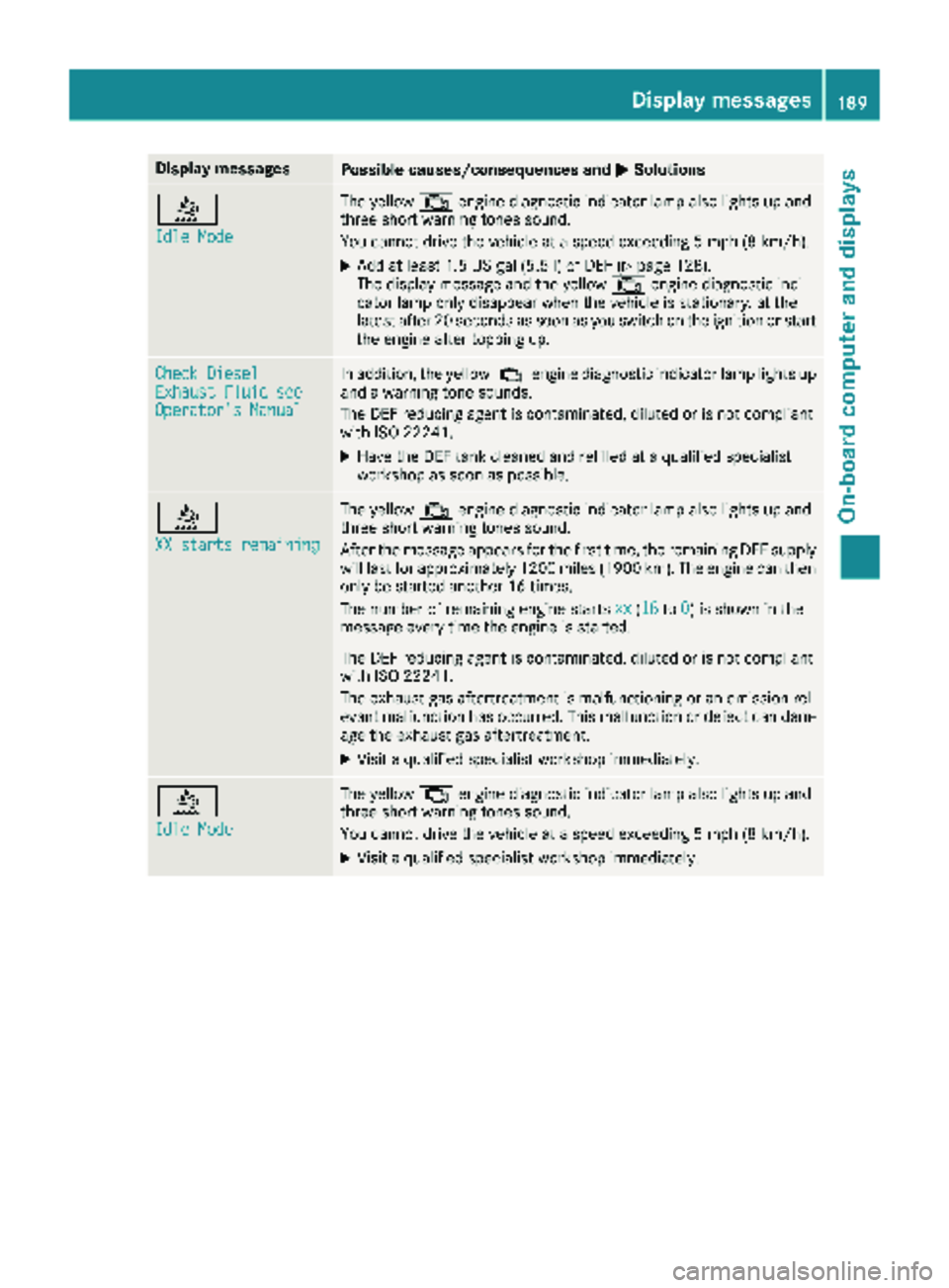
Display messagesPossible causes/consequences andMSolutions
å
IdleMod e
The yellow ;enginediagnostic indicator lamp also lights up and
three short warning tone ssound.
You canno tdrive th evehicl eat aspeed exceedin g 5mph (8 km/h).
XAddat least 1. 5US gal (5.5l)of DEF (Ypage 128).
The display message and the yellow ;engine diagnostic indi-
cator lamp only disappear when the vehicle is stationary, at the
latest after 20 seconds as soon as you switch on the ignition or start
the engine after topping up.
Check DieselExhaust Fluid seeOperator's Manual
In addition, the yellow ;engine diagnostic indicator lamp lights up
and a warning tone sounds.
The DEF reducing agent is contaminated, diluted or is not compliant
with ISO 22241.
XHave the DEF tank cleaned and refilled at a qualified specialist
workshop as soon as possible.
å
XX starts remaining
The yellow ;engine diagnostic indicator lamp also lights up and
three short warning tones sound.
After the message appears for the first time, the remaining DEF supply
will last for approximately 1200 miles (1900 km). The engine can then
only be started another 16 times.
The number of remaining engine starts xx
(16to0) is shown in the
message every time the engine is started.
The DEF reducing agent is contaminated, diluted or is not compliant
with ISO 22241.
The exhaust gas aftertreatment is malfunctioning or an emission rel-
evant malfunction has occurred. This malfunction or defect can dam-
age the exhaust gas aftertreatment.
XVisit a qualified specialist workshop immediately.
å
Idle Mode
The yellow ;engine diagnostic indicator lamp also lights up and
three short warning tones sound.
You cannot drive the vehicle at a speed exceeding 5 mph (8 km/h).
XVisit a qualified specialist workshop immediately.
Display messages189
On-board computer and displays
Z
Page 213 of 294

12-V socket
Socket on the lower section of the center console
:
12-V socket (25 A)
The 12-V sockets for accessories are:
Ron the lower section of the center console
(12 V, 25 A)
Ron the inside of the driver's seat frame (12V,
15 A)
Rin the respective corner trim next to the rear
doors in the passenger compartment (12 V,
15 A)
Rin the cargo compartment next to the left rear
door (12 V, 15 A)
You can use the 12-V sockets (15 A) for acces-
sories with a maximum power consumption of
180 W. You can connect accessories with a
maximum power consumption of 300 W to the
12-V socket (25 A) on the lower section of the
center console.
iThe sockets are supplied with power even
when the key is removed from the ignition
lock. If accessories, e.g. a coolbox, remain
connected while the engine is not running, the
battery will discharge.
Mobile phone
Important safety notes
GWARNING
If you operate information systems and com-
munication equipment integrated in the vehi-
cle when driving, you may be distracted from
the traffic situation. You could also lose con-
trol of the vehicle. There is a risk of an acci-
dent.
Only operate this equipment when the traffic
situation permits. If you are not sure that this is possible, park the vehicle paying attention
to traffic conditions and operate the equip-
ment when the vehicle is stationary.
You must observe the legal requirements for the
country in which you are currently driving when
operating mobile phones.
Bear in mind that at a speed of just 30 mph
(approximately 50 km/h), your vehicle is cov-
ering a distance of 44 feet (approximately 14 m)
every second.
You and others can suffer health-related dam-
age through electromagnetic radiation. By using
an exterior antenna, a possible health risk
caused by electromagnetic fields, as discussed
in scientific circles, is taken into account. Only
have the exterior antenna installed by a qualified
specialist workshop.
We recommend the use of an approved exterior
antenna for operating the mobile phone. Only in
this way can optimal mobile phone reception
quality in the vehicle be ensured and mutual
interference between the vehicle electronics
and mobile phones minimized.
Observe the legal requirements for each indi-
vidual country.
Mobile phone pre-installation
The mobile phone pre-installation includes a
hands-free system integrated into the vehicle.
The microphone for the hands-free system is
installed in the overhead control panel or in the
overhead stowage compartment together with
the front interior light.
In order to use the hands-free system, you will
need a special bracket. Accessories for the
Sprinter include mobile phone brackets for var-
ious phone models.
iMobile phone brackets which are available
from various manufacturers on the open mar- ket are not compatible with the Sprinter tele-
phone system. You can recognize suitable
holders for your mobile phone by the imprin-
ted star and the B6 spare part number on the
back of the bracket.
Detailed instructions for use can be found in the
operating instructions for the mobile phone
Mobile phone211
Stowing and features
Z
Page 221 of 294

Useful information
This Operator's Manual describes all models as
well as standard and optional equipment of your
vehicle that were available at the time of going
to print. Country-specific variations are possi-
ble. Note that your vehicle may not be equipped
with all of the described functions. This also
applies to systems and functions relevant to
safety.
Read the information on qualified specialist
workshops (
Ypage 27).
Engine compartment
Hood
Important safety notes
GWARNING
If the hood is unlatched, it may open up when the vehicle is in motion and block your view.
There is a risk of an accident.
Never unlatch the hood while driving.
GWARNING
Opening the hood when the engine is over-
heated or when there is a fire in the engine
compartment could expose you to hot gases
or other service products. There is a risk of
injury.
Let an overheated engine cool down before
opening the hood. If there is a fire in the
engine compartment, keep the hood closed
and contact the fire department.
GWARNING
The engine compartment contains moving
components. Certain components, such as
the radiator fan, may continue to run or start
again suddenly when the ignition is off. There is a risk of injury.
If you need to do any work inside the engine
compartment:
Rswitch off the ignition
Rnever reach into the area where there is a
risk of danger from moving components,
such as the fan rotation area
Rremove jewelry and watches
Rkeep items of clothing and hair, for exam-
ple, away from moving parts
GWARNING
The fuel injection system operates with a high
voltage. If you touch the live components, you could receive an electric shock. There is a risk
of injury.
Never touch components of the fuel injection
system when the ignition is switched on.
The live components of the fuel injection system
are, for example, the injectors.
GWARNING
Certain components in the engine compart-
ment, such as the engine, radiator and parts
of the exhaust system, can become very hot.
Working in the engine compartment poses a
risk of injury.
Where possible, let the engine cool down and touch only the components described in the
following.
If you have to carry out work in the engine com-
partment, only touch the following components:
RHood
ROil dipstick
REngine oil filler neck cap
RWasher fluid reservoir cap
RCoolant expansion tank cap
Opening the hood
!Make sure that the windshield wipers are
not folded away from the windshield. You
could otherwise damage the windshield wip-
ers or the hood.
Engine compartment219
Maintenance and care
Z
Page 250 of 294

Useful information
This Operator's Manual describes all models as
well as standard and optional equipment of your
vehicle that were available at the time of going
to print. Country-specific variations are possi-
ble. Note that your vehicle may not be equipped
with all of the described functions. This also
applies to systems and functions relevant to
safety.
Read the information on qualified specialist
workshops (
Ypage 27).
Important safety notes
GWarning
A flat tire severely impairs the driving, steer-
ing and braking characteristics of the vehicle.
There is a risk of an accident.
do not drive with a flat tire. Immediately
replace the flat tire with your spare wheel, or
consult a qualified specialist workshop.
GWARNING
If wheels and tires of the wrong size are used, the wheel brakes or suspension components
may be damaged. There is a risk of an acci-
dent.
Always replace wheels and tires with those
that fulfill the specifications of the original
part.
When replacing wheels, make sure to use the
correct:
Rdesignation
Rmodel
When replacing tires, make sure to use the
correct:
Rdesignation
Rmanufacturer
Rmodel
Accessories that are not approved for your vehi-
cle by Mercedes-Benz or are not being used cor-
rectly can impair operating safety. Before purchasing and using non-approved
accessories, visit a qualified specialist work-
shop and inquire about:
Rsuitability
Rlegal stipulations
Rfactory recommendations
Contact an authorized Sprinter dealer if you
require information on tested and recommen-
ded wheels and tires for summer and winter
driving. Advice on purchasing and caring for
tires is also available there.
Information on tire and wheel dimensions and
types as well as the recommended tire pressure
for your vehicle can be found in the "Tire pres-
sure" section (
Ypage 257).
This data can also be found on the Tire and
Loading Information placard on the B-pillar.
Modifications to the brake system or wheels are
not permitted. The use of a spacer and brake
dust shields is not permitted. This invalidates
the general operating permit for the vehicle.
iFurther information on wheels and tires can
be obtained at any qualified specialist work-
shop.
Operation
Information for a journey
If the vehicle is heavily laden, check the tire
pressures, and correct them, if necessary
(
Ypage 251).
While driving, pay attention to vibrations, noises
and unusual handling characteristics, e.g. pull-
ing to one side. This may indicate that the
wheels or tires are damaged. If you suspect that
a tire is defective, reduce your speed immedi-
ately. Stop the vehicle as soon as possible to
check the wheels and tires for damage. Hidden
tire damage could also be causing the unusual
handling characteristics. If you find no signs of
damage, have the tires and wheels checked at a
qualified specialist workshop.
When parking your vehicle, make sure that the
tires do not get deformed by the curb or other
obstacles. If it is necessary to drive over curbs,
speed humps or similar elevations, try to do so
slowly and not at a sharp angle. Otherwise, the
tires, particularly the sidewalls, can get dam-
aged.
248Operation
Wheels and tires