2018 MERCEDES-BENZ SPRINTER air condition
[x] Cancel search: air conditionPage 31 of 294

Further information can be obtained at any
authorized Sprinter Dealer.
GWARNING
The function of systems or components can
be affected by conversions or modifications
to the vehicle. They might not function prop-
erly anymore and/or jeopardize the opera-
tional safety of the vehicle. There is an
increased risk of an accident and injury.
Conversions or modifications should always
be carried out at qualified specialist work-
shop.
If you intend to make modifications to your vehi-
cle, we strongly recommend that you contact
the distributor named on the inside of the front
cover. There you will receive all the necessary
information and a charge may be levied.
You alone accept the responsibility if body man-
ufacturers or dealers make modifications that
affect the final certification of the engine, the
vehicle or the equipment. This also applies to
the identification and documentation of modifi-
cations to the affected vehicle components.
You are responsible for certification and confir-
mation that:
Rall the applicable standards and regulations
that are affected by the vehicle modification
are met
Rthe modified vehicle fulfills the vehicle safety standards and emissions laws and regula-
tions
Rthe modifications or installation of accesso-
ries does not affect the safety of the vehicle
We are not responsible for the final certification,
product liability or warranty claims which result
from the modifications. This applies to:
Rthe modified components, assemblies or sys-
tems
Rany resulting noncompliance with any of the
emissions laws and regulations or the motor
vehicle safety standards
Rany consequences arising from the changes
that make the vehicle less safe or even render it defective
We do not assume responsibility as the final-
stage manufacturer or for the consequential
product liability.
Notes on the radiator
Even seemingly small changes to the vehicle,
such as attaching a radiator trim for winter driv-
ing, is not permitted. Do not cover up the radi-
ator. Do not use thermal mats, insect protection
covers or anything similar.
Otherwise, the values of the diagnostic system
may be affected. Some of these values are
legally prescribed and must always be correct.
Information on the cargo compartment
floor
!The wooden or plastic cargo area floor fitted
at the factory is an integral component of the
vehicle structure. The vehicle body could be
damaged if you have the load area floor
removed. This then affects the securing of
loads and the maximum loading capacity of
the lashing points is no longer guaranteed.
Therefore, do not have the load area floor
removed.
Genuine Mercedes-Benz parts
!
Air bags and Emergency Tensioning Devi-
ces, as well as control units and sensors for
these restraint systems, may be installed in
the following areas of your vehicle:
Rdoors
Rdoor pillars
Rdoor sills
Rseats
Rcockpit
Rinstrument cluster
Rcenter console
Do not install accessories such as audio sys-
tems in these areas. Do not carry out repairs or welding. You could impair the operating
efficiency of the restraint systems.
Have aftermarket accessories installed at a
qualified specialist workshop.
HEnvironmental note
We supply reconditioned assemblies and
parts which are of the same quality as new
parts. The same New Vehicle Limited War-
ranty applies as for new parts.
Introduction29
Z
Page 32 of 294

The operating safety of the vehicle could be
jeopardized if you use parts, tires and wheels as
well as accessories relevant to safety which
have not been approved by Mercedes-Benz. This
could lead to malfunctions in safety-relevant
systems, e.g. the brake system. Only use genu-
ine Mercedes-Benz parts or parts of equal qual-ity. Only use tires, wheels and accessories that
have been specifically approved for your vehi-
cle.
We test genuine Sprinter parts, as well as con-
version parts and accessories that have been
specifically approved for the type of vehicle, for:
RReliability
RSafety
RSuitability
Despite ongoing market research, Mercedes-
Benz is unable to assess other parts. Therefore,
we accept no responsibility for the use of such
parts in Sprinter vehicles, even if they have been
officially approved or independently approved
by a testing center.
In some countries, certain parts are only offi-
cially approved for installation or modification if
they comply with legal requirements. All genu-
ine Sprinter parts satisfy these requirements.
Make sure that all parts are suitable for your
vehicle.
Always specify the vehicle identification number
(VIN) and engine number when ordering genuine Sprinter parts (
Ypage 276).
QR code for rescue card
The QR Code stickers are affixed to the B-pillar
on the driver's and front-passenger side.
In the event of an accident the rescue services
use the QR Code to quickly find the rescue card
for your vehicle. The current rescue card con-
tains the most important information on your
vehicle, e.g. the electric cable routes, in a com-
pact form.
Further information can be found at http://
www.mercedes-benz.de/qr-code.
Data stored in the vehicle
Information from electronic control
units
There are electronic control units installed in
your vehicle. Some of these are necessary for
your vehicle to operate safely, while some offer
support during driving (driver assistance sys-
tems). In addition, your vehicle offers comfort
and entertainment functions that are also made
possible by electronic control units.
Electronic control units contain data storage
systems that can temporarily or permanently
save technical information concerning the vehi-
cle's condition, component stress and mainte-
nance requirements as well as technical events
and malfunctions.
This information generally documents the con-
dition of a component, a module, a system or the
surroundings, for example:
ROperating conditions of system components
(e.g. levels, battery status, tire pressure)
RStatus messages concerning the vehicle or its
individual components (e.g. wheel revolution
number / speed, deceleration in movement,
lateral acceleration, display showing fastened
belts)
RMalfunctions and defects in key system com-
ponents (e.g. lights, brakes)
RInformation about events leading to vehicle
damage
RSystem responses in special driving situa-
tions (e.g. air bag deployment, intervention of
stability control systems)
RAmbient conditions (e.g. temperature, rain
sensor)
In addition to performing the actual control unit function, these data are used by manufacturers
to detect and rectify malfunctions and to opti-
mize vehicle functions. Most of these data are
volatile and processed only in the vehicle itself.
Only a small part of the data is stored in event or
malfunction memories.
When you use services, the technical data from
the vehicle can be read out by service network
employees or third parties. Service activities
include repairs, maintenance, warranty claims
and quality assurance measures. The data are
read out via the connection for OBD (on-board
diagnostics) in the vehicle, which is required by
law. The relevant offices in the service network
or third parties collect, process and use the
30Introduction
Page 33 of 294

data. These data document the vehicle's tech-
nical states, are used to help in finding malfunc-
tions and improving quality and are sent to the
manufacturer where necessary. In addition, the
manufacturer is subject to product liability. The
manufacturer needs technical data from vehi-
cles for this purpose.
Malfunction memories in the vehicle can be
reset by a service center during repair or service
work.
You can incorporate data into the vehicle's com-
fort and infotainment functions yourself as part
of the selected equipment.
These include:
RMultimedia data such as music, films or pho-
tos for playback in an integrated multimedia
system
RAddress book data for use in conjunction with
an integrated hands-free system or an inte-
grated navigation system
RNavigation destinations that have been
entered
RData about using Internet services
These data can be saved locally in the vehicle or are located on a device that you have connected
to the vehicle. If these data are saved in the
vehicle, you can delete them at any time. These data are sent to third parties only at your
request, particularly when you use online serv-
ices in accordance with the settings that you
have selected.
You can save and change comfort settings/
customizations in the vehicle at any time.
Depending on the equipment, these settings
include:
RSeat and steering wheel position settings
RSuspension and climate control settings
RCustom settings such as interior lighting
If your vehicle is equipped appropriately, you
can connect your smartphone or another mobile terminal to the vehicle. You can control this by
means of the control elements integrated in the
vehicle. The smartphone's picture and sound
can be output via the multimedia system. Spe-
cific items of information are also sent to your
smartphone.
Depending on the type of integration, such infor-
mation includes:
RGeneral vehicle information
RPosition data This allows you to use selected apps on your
smartphon
e, such as navigation or music play-
back. There is no additional interaction between
the smartphone and the vehicle, particularly
active access to vehicle data. The type of addi-
tional data processing is determined by the pro- vider of the app being used. Whether you can
configure settings for it and, if so, which ones,
depends on the app and your smartphone's
operating system.
Service provider
Wireless network connection
If your vehicle has a wireless network connec-
tion, it enables data to be exchanged between
your vehicle and other systems. The wireless
network connection is enabled by either an in-
vehicle transmitter and receiver or your own
mobile end device (e.g. smartphone). Online
functions can be used via this wireless connec-
tion. These include online services and applica-
tions/apps provided by the manufacturer or
other providers.
Manufacturer's own services
In the case of the manufacturer's online serv-
ices, the manufacturer describes the functions
in a suitable place and the associated informa-
tion subject to data protection legislation. Per-
sonal data can be used in the provision of online
services. Data are exchanged via a secure con-
nection (e.g. using the IT system specially pro-
vided for this purpose by the manufacturer).
Collecting, processing and using personal data
beyond the provision of services is permitted
only on the basis of a statutory permit or decla-
ration of consent.
You can usually activate and deactivate the serv-
ices and functions (some of which are subject to
charge). In many cases, this also applies to the
vehicle's entire data connection. However, this
does not apply in particular to legally prescribed
functions and services such as the "eCall" emer-
gency call system.
Services from third parties
If it is possible to use online services from other
providers, these services are the responsibility
of the provider in question and subject to that
provider's data protection conditions and terms
Introduction31
Z
Page 39 of 294

Steering wheel buttons
FunctionPage
:Display163
On-board computer opera-
tion
;Selects a submenu or adjusts
the volume163
WUp/increases the vol-
ume
X Down/reduces the vol-
ume
Using the telephone173
6 Accepts a call/starts
dialing
~ Ends a call/rejects an
incoming call
=Scrolls from one menu to
another163
V Forwards
UBack
Scrolls within a menu163
9Forwards
:Back
Center console
FunctionPage
:Stowage compartment206
;Audio 10 or Audio 15 (see the
separate operating instruc-
tions)
=Air-conditioning control
panel99
Paper holder1208
?Center console control
panel
cSwitches the left/right-hand
seat heating on/off79
zSwitches the windshield
heating on/off105
|Switches the rear window
defroster on/off105
fActivates/deactivates
PARKTRONIC152
£Switches the hazard warning
lamps on/off85
1Only on vehicles without rear-compartment climate control.
Center console37
At a glance
Page 56 of 294

Child-proof locks for the rear door
Rear door
:
Child safety bolt
2Door secured – then make sure that the
child-proof locks are working properly.
3Door released
The child-proof lock on the doors enable you to
secure each door individually.
A door with an activated child-proof lock cannot
be opened from the inside. If the vehicle is
unlocked, the door can be opened from the out-
side.
Pets in the vehicle
GWARNING
If you leave animals unattended or unsecured
in the vehicle, they could press buttons or
switches, for example.
As a result, they could:
Ractivate vehicle equipment and become
trapped, for example
Ractivate or deactivate systems, thereby
endangering other road users
Unsecured animals could also be flung around
the vehicle in the event of an accident or sud-
den steering or braking, thereby injuring vehi-
cle occupants. There is a risk of an accident
and injury.
Never leave animals unattended in the vehi-
cle. Always secure animals properly during
the journey, e.g. use a suitable animal trans-
port box.
Driving safety systems
Overview
In this section, you will find information about
the following driving safety systems:
RABS (Anti-lock Braking System)
RASR (Acceleration SkidControl)
RBAS (B rakeAssist System)
REBD (Electronic Brake Force Distribution)
RESP®(Electronic StabilityProgram)
Important safety notes
If you fail to adapt your driving style or if you are
inattentive, the driving safety systems can nei-
ther reduce the risk of accident nor override the
laws of physics. Driving safety systems are
merely aids designed to assist driving. You are
responsible for the distance to the vehicle in
front, for vehicle speed, braking in good time
and for staying in your lane. Always adapt your
driving style to the prevailing road and weather
conditions and maintain a sufficient, safe dis-
tance from other road users. Drive carefully.
Please note that the driving safety systems
described only work optimally when:
Rthere is adequate contact between the tires
and the road surface
Ryou use winter tires (M+S tires), with snow
chains if necessary, when the road conditions
are wintry
Pay particular attention to the information
regarding tires, tire tread and winter operation
under "Wheels and tires" (
Ypage 248).
ABS (Anti-lock Braking System)
Important safety notes
Observe the important safety guidelines for the
driving safety system (Ypage 54).
GWARNING
If ABS is faulty, the wheels could lock when
braking. The steerability and braking charac-
teristics may be severely impaired. Addition-
ally, further driving safety systems are deac-
tivated. There is an increased danger of skid-
ding and accidents.
54Driving safety systems
Safety
Page 59 of 294

4ETS (Electronic Traction System)
!A function or performance test should only
be carried out on a two-axle dynamometer.
Before you operate the vehicle on such a
dynamometer, please consult a qualified
workshop. You could otherwise damage the
drive train or the brake system.
4ETS is only active when all-wheel drive is acti-
vated (
Ypage 147).
4ETS ensures permanent drive for all four
wheels, and together with ESP
®it improves the
vehicle's traction.
If a driven wheel spins due to lack of traction:
RWhen pulling away, make use of the traction
control integrated in ESP®. Depress the
accelerator pedal as far as necessary.
RWhile driving, slowly take your foot off the
accelerator pedal.
In wintry driving conditions, always use winter
tires (M+S tires) and if necessary, snow chains
(
Ypage 251). This is the only way to get the full
benefit from the all-wheel drive system.
Crosswind Assist
Crosswind Assist does not work if ESP®is deac-
tivated or disabled because of a malfunction.
Crosswind Assist does not react:
Rin the event of severe jolts and vibrations, e.g.
as a result of uneven surfaces or potholes.
Rif the vehicle loses traction, e.g. on snow or
ice or when hydroplaning.
Rto large and sudden steering movements by
the driver.
Crosswind Assist is operational again as soon as
the driving conditions return to normal.
Crosswind Assist detects strong crosswind
gusts that can impair the road holding of your
vehicle when driving straight ahead. Crosswind
Assist intervenes depending on the direction
and strength of the crosswind.
A stabilizing brake application helps you to keep
the vehicle on track.
Information appears in the instrument cluster In
the event that Crosswind Assist intervenes
noticeably.
On vehicles without steering wheel buttons: the d indicator lamp in the instrument clus-
ter flashes. On vehicles with steering wheel buttons:
the
d indicator lamp in the instrument cluster
flashes and the message Crosswind Assist
Interventionappears in the multifunction dis-
play.
Crosswind Assist is active above a vehicle speed
of 50 mph (80 km/h) when the vehicle is driving
straight ahead or cornering gently.
Emergency exit
Emergency exit window
GWARNING
The emergency exit window cannot be locked in place. You risk injury if you exit the vehicle
through the emergency exit window.
RMake sure that nobody becomes trapped,
both when closing and when opening the
emergency exit window.
RThe opened emergency exit window must
be held in place by another person.
Pay attention to traffic conditions.
GWARNING
If the emergency exit window is unlocked
while driving, it could open and slam shut and consequently fall down. There is a risk of an
accident and injury.
Before starting off, make sure that the emer-
gency exit window is locked and the locking
pins are undamaged.
!Make sure there is sufficient clearance
when opening the emergency exit window.
Hold the open window in position. You could
otherwise damage the emergency exit win-
dow.
Emergency exit57
Safety
Z
Page 85 of 294

The daytime running lamps function must be
activated using the on-board computer:
Rvehicles with steering wheel buttons
(Ypage 170)
Rvehicles without steering wheel buttons
(Ypage 163)
XTo switch on:turn the light switch to the
$ position.
The low-beam headlamps, parking lamps and
license plate lamp are switched on when the
engine is running. The Lindicator lamp in
the instrument cluster lights up.
iUSA only:
If you turn the light switch to the TorL
position, the parking lamps or low-beam
headlamps switch on. If you turn the light
switch to the Ãposition, the daytime run-
ning lamps remain switched on.
iCanada only:
If you turn the light switch to the Lposi-
tion, the low-beam headlamps are switched
on. If you turn the light switch to the Tor
à position, the daytime running lamps
remain switched on.
Automatic headlamp mode
GWARNING
When the light switch is set to Ã, the low-
beam headlamps may not be switched on
automatically if there is fog, snow or other
causes of poor visibility due to the weather
conditions such as spray. There is a risk of an
accident.
In such situations, turn the light switch to
L.
Automatic headlamp mode is only a driving aid.
You are responsible for the vehicle lighting at all
times.
Depending on ambient light, the rain and light
sensor automatically switches on the parking
lamps, low-beam headlamps and the license
plate lamp. This excludes weather-related
impairments to visibility, such as snow, fog or
spray.
If there is fog, snow or spray, turn the light
switch quickly from ÃtoL. You could
otherwise briefly interrupt operation of the
headlamps.
XTo switch on automatic headlamp mode:
turn the light switch to Ã.
Key in position 1in the ignition lock: the park-
ing lamps switch on or off automatically
depending on the ambient light.
When the engine is running: if you activate the
"daytime running lamps" function using the
on-board computer, the daytime running
lamps are switched on. The parking lamps and
low-beam headlamps also switch on or off
automatically, depending on the ambient
light.
When the low-beam headlamps are switched
on, the Lindicator lamp in the instrument
cluster lights up.
Fog lamps/rear fog lamp
GWARNING
If you suspect that driving conditions will be
foggy, turn the light switch to Lbefore you
start your journey. Your vehicle may other-
wise not be visible and you could endanger
yourself and others.
GWARNING
In low ambient lighting or foggy conditions,
only switch from position ÃtoL with
the vehicle at a standstill in a safe location.
Switching from ÃtoL will briefly
switch off the headlamps. Doing so while driv-
ing in low ambient lighting conditions may
result in an accident.
XTurn the key to position 2in the ignition lock
or start the engine.
XTurn the light switch to LorT.
iIf your vehicle is only equipped with one rear
fog lamp, you must turn the light switch to
L.
iWhen the light switch is set to Ãyou
cannot switch on the front and rear fog lamps.
XTo switch on the front fog lamp: pull the
light switch out to the first detent.
The green Nindicator lamp on the light
switch lights up.
Exterior lighting83
Lights and windshield wipers
Z
Page 90 of 294
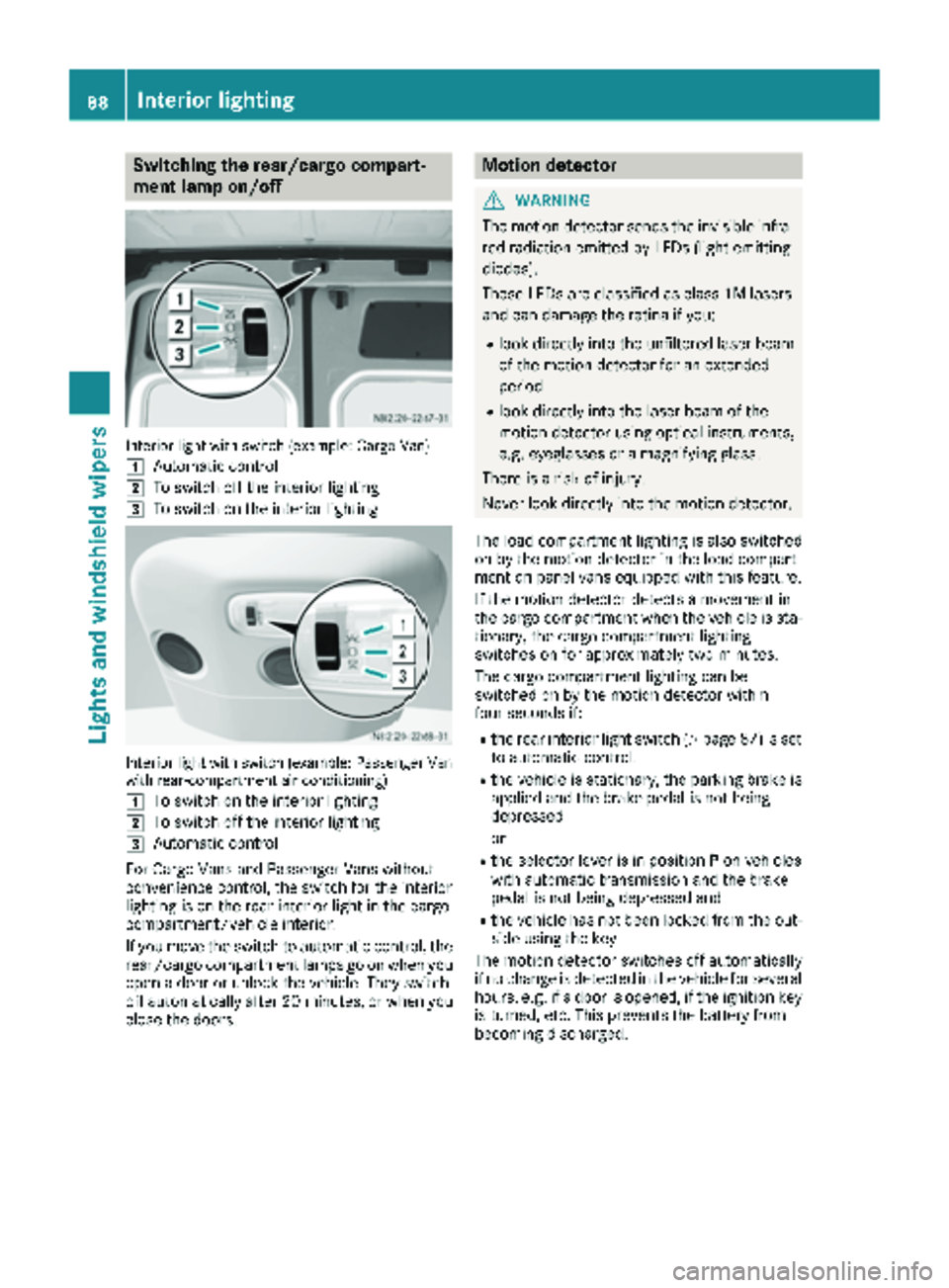
Switching the rear/cargo compart-
ment lamp on/off
Interior light with switch (example: Cargo Van)
1
Automatic control
2To switch off the interior lighting
3To switch on the interior lighting
Interior light with switch (example: Passenger Van
with rear-compartment air conditioning)
1
To switch on the interior lighting
2To switch off the interior lighting
3Automatic control
For Cargo Vans and Passenger Vans without
convenience control, the switch for the interior
lighting is on the rear interior light in the cargo
compartment/vehicle interior.
If you move the switch to automatic control, the
rear/cargo compartment lamps go on when you
open a door or unlock the vehicle. They switch
off automatically after 20 minutes, or when you
close the doors.
Motion detector
GWARNING
The motion detector sends the invisible infra- red radiation emitted by LEDs (light emitting
diodes).
These LEDs are classified as class 1M lasers
and can damage the retina if you:
Rlook directly into the unfiltered laser beam
of the motion detector for an extended
period
Rlook directly into the laser beam of the
motion detector using optical instruments,
e.g. eyeglasses or a magnifying glass.
There is a risk of injury.
Never look directly into the motion detector.
The load compartment lighting is also switched
on by the motion detector in the load compart-
ment on panel vans equipped with this feature.
If the motion detector detects a movement in
the cargo compartment when the vehicle is sta-
tionary, the cargo compartment lighting
switches on for approximately two minutes.
The cargo compartment lighting can be
switched on by the motion detector within
four seconds if:
Rthe rear interior light switch (Ypage 87) is set
to automatic control.
Rthe vehicle is stationary, the parking brake is
applied and the brake pedal is not being
depressed
or
Rthe selector lever is in position Pon vehicles
with automatic transmission and the brake
pedal is not being depressed and
Rthe vehicle has not been locked from the out-
side using the key
The motion detector switches off automatically
if no change is detected in the vehicle for several
hours, e.g. if a door is opened, if the ignition key
is turned, etc. This prevents the battery from
becoming discharged.
88Interior lighting
Lights and windshield wipers