2018 MERCEDES-BENZ SLC ROADSTER parking sensors
[x] Cancel search: parking sensorsPage 8 of 298
Brake fluidDispla ymessage ............................ 184
Notes. ............................................ 293
Brake forc edistribution
see EBD (electronicb rake force
distribution)
Brake lamps
Adaptive ........................................... 60
Displa ymessage ............................ 189
Brakes
ABS .................................................. 57
Adaptive Brake Assist ...................... 59
BAS .................................................. 57
Brake fluid (notes) ......................... 293
Displa ymessage ............................ 179
EBD .................................................. 63
High-performance brake system .... 137
Important safety notes .................. 136
Maintenance .................................. 137
Parking brake ................................ 132
Riding tip s...................................... 136
Warning lamp ................................. 204
Breakdow nassistance
Reflective safety jacke t.................. 244
Where will Ifind...? ........................ 244
see Fla ttire
see Towing away
Brightness control( instrument
clusterl ighting) ................................... 32
Bulbs
see Replacing bulbs
C
CaliforniaImportant notic efor retail cus-
tomers and lessees .......................... 24
Calling up amalfunction
see Displa ymessages
Car
see Vehicle
Care
Carw ash. ....................................... 238
Exhaus tpipe. ................................. 243
Exterior lights ................................ 242
Matte finish ................................... 240
Notes. ............................................ 238
Paint .............................................. 240 Power washer.
............................... 239
Rear vie wcamera .......................... 242
Sensors ......................................... 242
Washing by hand ........................... 239
Wheels. .......................................... 241
Window s........................................ 241
Wipe rblade s.................................. 241
CD
see also Digital Operator's Man-
ual.................................................. 211
CD player (on-board computer) ........ 169
Centerc onsole
Lower section .................................. 35
Upper section .................................. 34
Central locking
Automati cloc king (on-board com-
puter) ............................................. 173
Locking/unlocking (SmartKey). ....... 65
Changin gbulbs
Sid em arker lamps (rear) ............... 101
Child
Restraint system .............................. 55
Child seat
Forward-facing restraint system ...... 56
On the front-passenger seat. ........... 55
Rearward-facing restraint system .... 56
Children
Specia lseatb eltr etractor ............... 54
Childrenint he vehicle
Important safety notes .................... 53
Cigarette lighter ................................ 223
Cleaning
Mirror turn signa l........................... 242
Climate control
Air-conditioning system ................. 104
Automati cclimate control (dual-
zone) .............................................. 106
Controlling automaticall y............... 109
Cooling with ai rdehumidifica tion .. 108
Defrosting the window s................. 111
Defrosting the windshield .............. 110
Generaln otes ................................ 104
Indicato rlam p................................ 109
Information aboutu sing auto-
mati cclimate control ..................... 107
Ma
ximu mcooling .......................... 111
Notesonu sing the air-condition-
ing system ..................................... 105
6Index
Page 144 of 298
Do not useDistance Pilo tDISTRONIC:
Rin roa dand trafficc onditions which do not
allo wyouto maintain aconstant speed, e.g .in
heav ytrafficoronw inding roads
Ron slippery roa dsurfaces .Braking or accel-
erating could cause the drive wheels to lose
tractio nand the vehicl ecould thens kid
Rwhen there is poor visibility ,e.g.d ue to fog,
heav yrainors now
Distance Pilo tDISTRONICm aynot detect nar-
row vehicles drivin ginfront, e.g .motorcycles, or
vehicles drivin gonadifferent line.
In particular ,the detection of obstacle scan be
impaired if:
Rthere is dirt on the sensor soranything else
coverin gthe sensors
Rthere is snow or heav yrain
Rthere is interferenc ebyotherradar sources
Rthere ar estrong rada rreflections, for exam-
ple, in parkin ggarages
If Distance Pilo tDISTRONICnol ongerd etects a
vehicl einfront, it mayu nexpectedly accelerate
to the spee dstored.
Thi sspeed may:
Rbe too high if yo uaredrivin ginaf ilter lane or
an exi tlan e
Rbe so high when drivin ginthe right-hand lane
thaty ouovertake vehicles in the left-hand
lane
Rbe so high when drivin ginthe left-hand lane
thaty ouovertake vehicles in the right-hand
lane
If there is achange of drivers, advis ethe new
driver of the spee dstored.
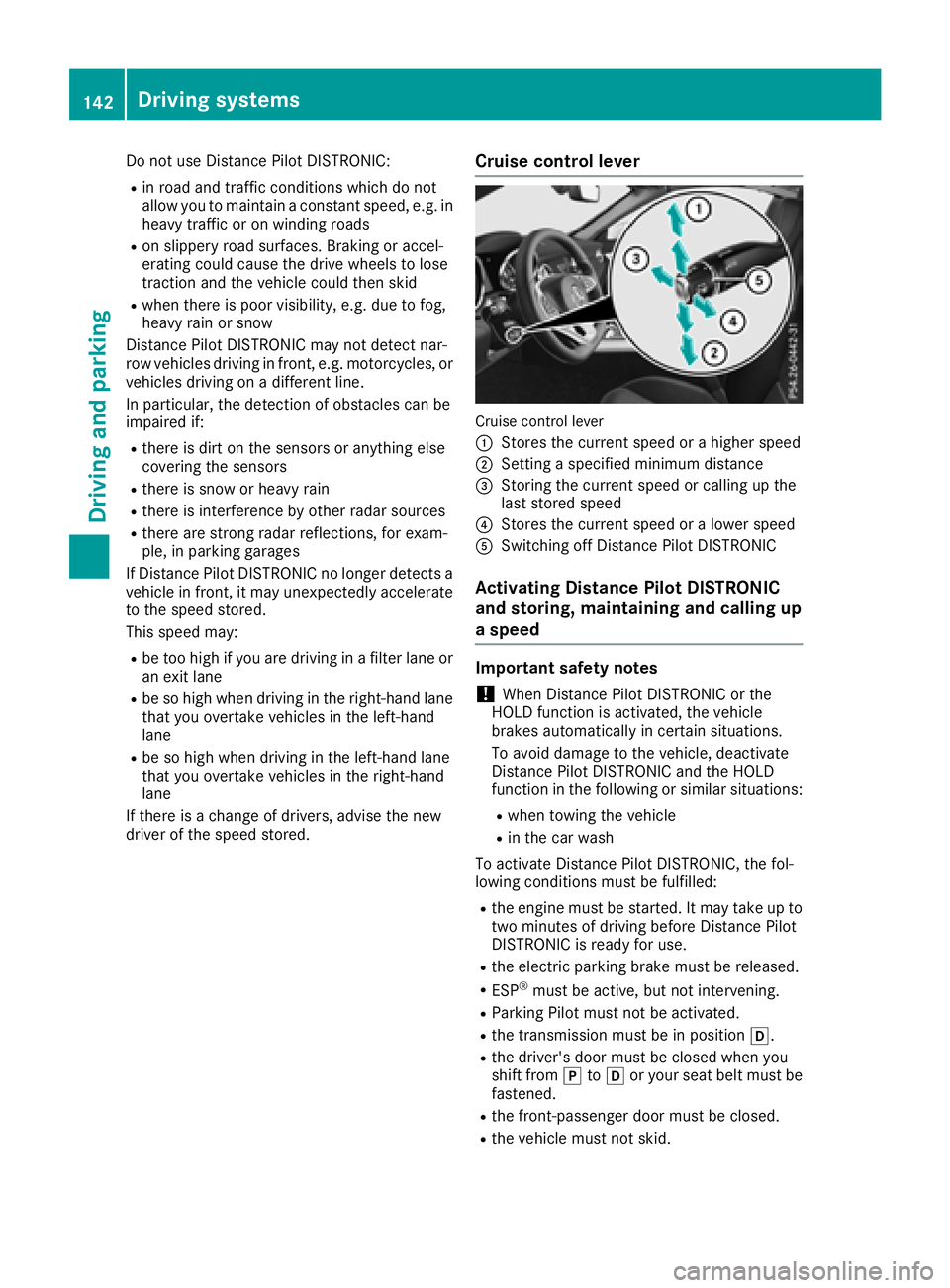
Cruis econtroll ever
Cruise control lever
:
Storest he current spee dorahighe rs peed
;Setting aspecifie dminimu mdistance
=Storing the current spee dorcalling up the
last stored speed
?Storest he current spee doralowerspeed
ASwitching off Distance Pilo tDISTRONIC
Activatin gDistance Pilo tDISTRONIC
and storing, maintainin gand callin gup
as peed
Important safety notes
!When Distance Pilo tDISTRONICort he
HOLD functio nisa ctivated ,the vehicle
brakes automaticall yincertain situations.
To avoi ddamag etothe vehicle, deactivate
Distance Pilo tDISTRONICa nd the HOLD
functio ninthe following or similar situations:
Rwhen towing the vehicle
Rin the car wash
To activate Distance Pilo tDISTRONIC, the fol-
lowing conditions must be fulfilled:
Rthe engine must be started .Itmaytake up to
two minute sofdrivingbefor eD istance Pilot
DISTRONICi sready for use.
Rthe electri cparkin gb rake must be released.
RESP®must be active, bu tnot intervening.
RParkin gPilot must not be activated.
Rthe transmission must be in position h.
Rthe driver's door must be closed when you
shift fromjtoh or your sea tbeltm ustb e
fastened.
Rthe front-passenge rdoorm ustbec losed.
Rthe vehicl emustn ot skid.
142Driving system s
Driving an dparking
Page 152 of 298
are no persons, animals or objectsinthepatho f
your vehicle when you are maneuvering or park-
ing.
!When parking ,pay particular attention to
object saboveorb elow thesensors, sucha s
flowe rpotsort railer drawbars. PARKTRONIC
does no tdetect sucho bjectswhen they are in
th ei mmediatev icinityoft hevehicle .You
coul ddamage th evehicle or th eobjects.
The sensorsm ay notdetect snow and other
object sthata bsorbu ltrasonic waves.
Ultrasonic sources suchasana utomatic car
wash, th ecompressed-air brakes on atruck
or ap neumatic drill coul dcaus ePARKTRONIC
to malfunction.
PARKTRONIC may no tfunction correctly on
uneven terrain.
Parking Assist PARKTRONIC is activated auto-
matically when you:
Rswitch on th eignition
Rshiftt hetransmission to position h,kor
i
Rrelease th eelectric parking brake
Parking Assist PARKTRONIC is deactivate dat
speeds above1 1mph (18 km/h). It is reactiva-
te datl ower speeds.
Range of th esensors
General notes
Parking Assist PARKTRONIC does no ttak ei nto
accounto bstacleslocated:
Rbelow th edetection range, e.g .people, ani-
mals or objects.
Rabovet hedetection range, e.g .overhanging
loads, truck overhangs or loadingr amps.
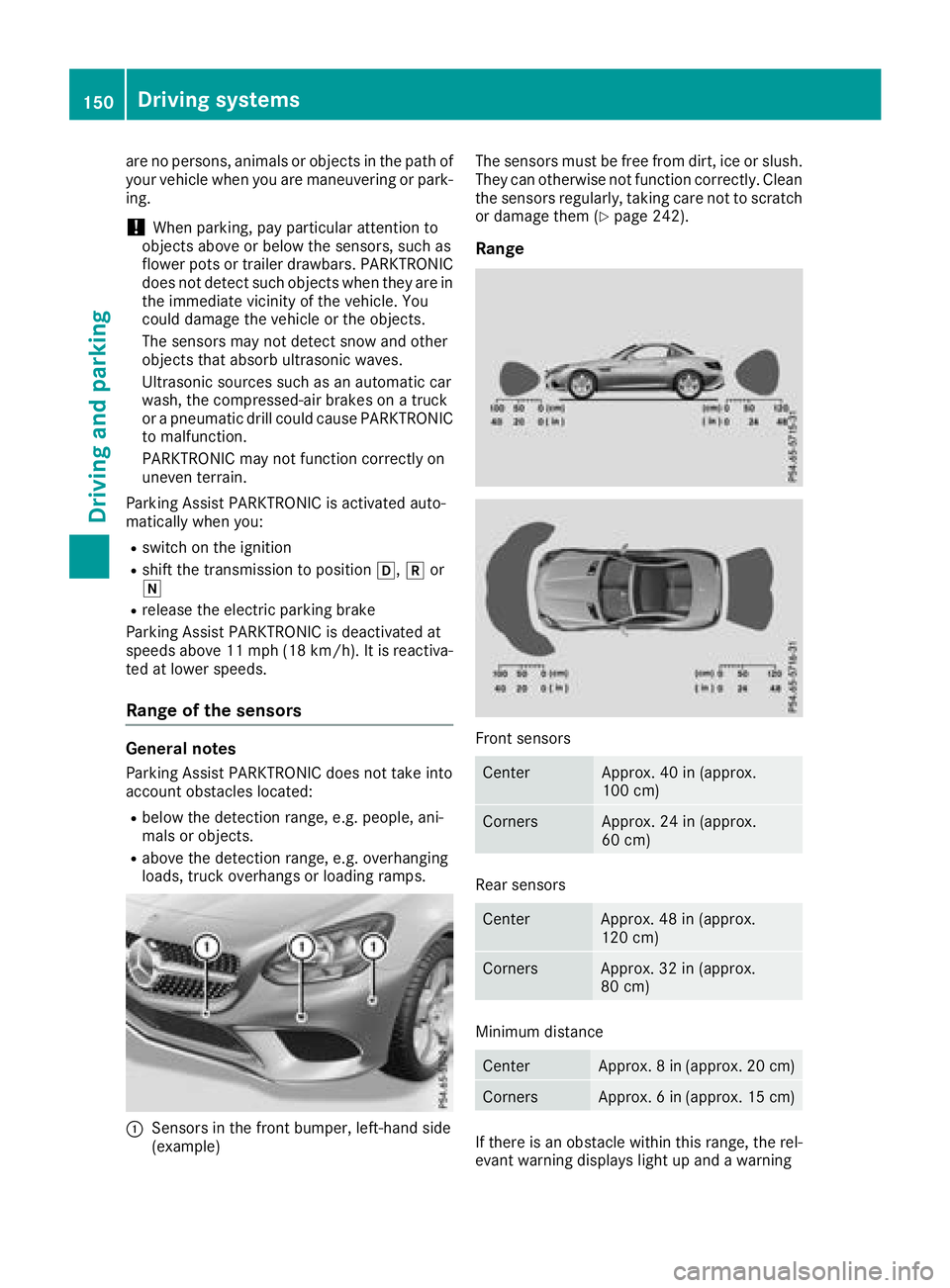
:Sensorsinthefrontb umper, left-hand side
(example) The sensorsm
ust be free from dirt ,ice or slush.
They can otherwise no tfunction correctly. Clean
th es ensorsr egularly, taking car enotto scratch
or damage them (
Ypage 242).
Range
Fronts ensors
CenterApprox .40in( approx.
10 0c m)
CornersApprox .24in( approx.
60 cm)
Rear sensors
CenterApprox .48in( approx.
12 0c m)
CornersApprox .32in( approx.
80 cm)
Minimum distance
CenterApprox .8in (approx.2 0cm)
CornersApprox .6in (approx.1 5cm)
If there is an obstacle within this range, th erel-
evantw arning displays light up and awarning
150Driving systems
Driving and parking
Page 153 of 298
tone sounds.Ifthe distance fall sbelow the min-
imum ,the distance maynol ongerbes hown.
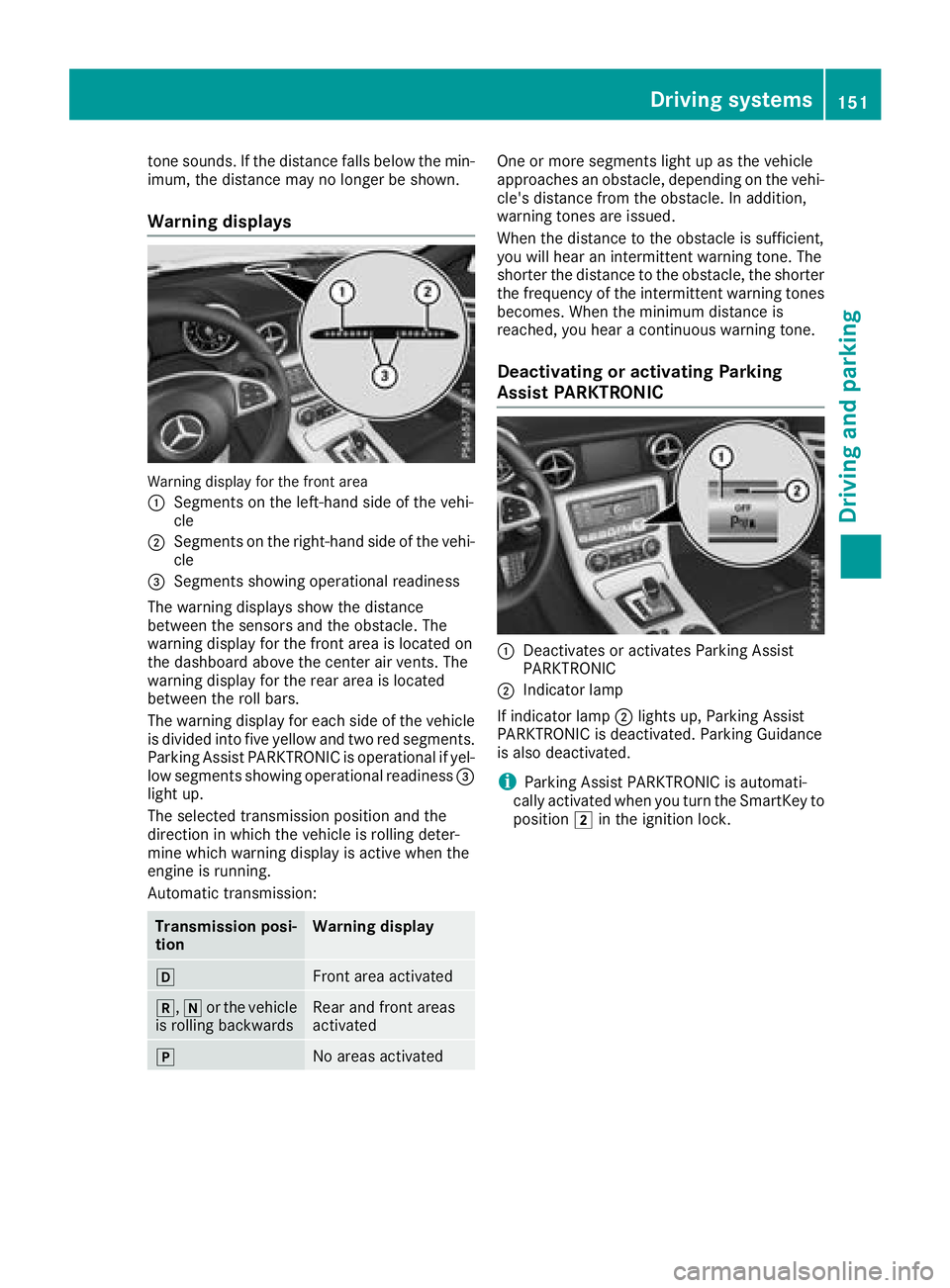
Warnin gdisplays
Warning displa yfor the front area
:
Segments on the left-hand side of the vehi-
cle
;Segments on the right-hand side of the vehi-
cle
=Segments showing operational readiness
The warning displays sho wthe distance
between the sensors and the obstacle .The
warning displa yfor the front area is locate don
the dashboard above the cente rairvents .The
warning displa yfor the rea rareaisl ocated
between the rol lbars.
The warning displa yfor each side of the vehicle
is divided into fiv eyello wand two red segments.
Parking Assist PARKTRONICiso perational if yel-
lo ws egments showing operational readiness =
light up.
The selected transmission positio nand the
direction in which the vehicl eisrolling deter-
mine which warning displa yisactive when the
engine is running.
Automatic transmission:
Transmission posi-
tionWarnin gdisplay
hFron tareaa ctivated
k, ior the vehicle
is rolling backwardsRear and front areas
activated
jNo area sactivated
One or mor esegments light up as the vehicle
approaches an obstacle ,depen ding on the vehi-
cle's distance fromt he obstacle.Inaddition,
warning tone sareissued.
When the distance to the obstacle is sufficient,
yo uw illh earani ntermittent warning tone .The
shorter th edistance to the obstacle ,the shorter
the frequency of the intermittent warning tones
becomes. When the minimum distance is
reached, yo uhearac ontinuous warning tone.
Deactivatin goractivatin gParking
Assist PARKTRONIC
:Deactivate soractivates Parking Assist
PARKTRONIC
;Indicato rlam p
If indicator lamp ;lights up ,Parking Assist
PARKTRONICisd eactivated .Parking Guidance
is also deactivated.
iParking Assist PARKTRONICisa utomati-
cally activated when yo uturnt he SmartKeyt o
position 2in the ignition lock.
Driving system s151
Driving an dparking
Z
Page 154 of 298
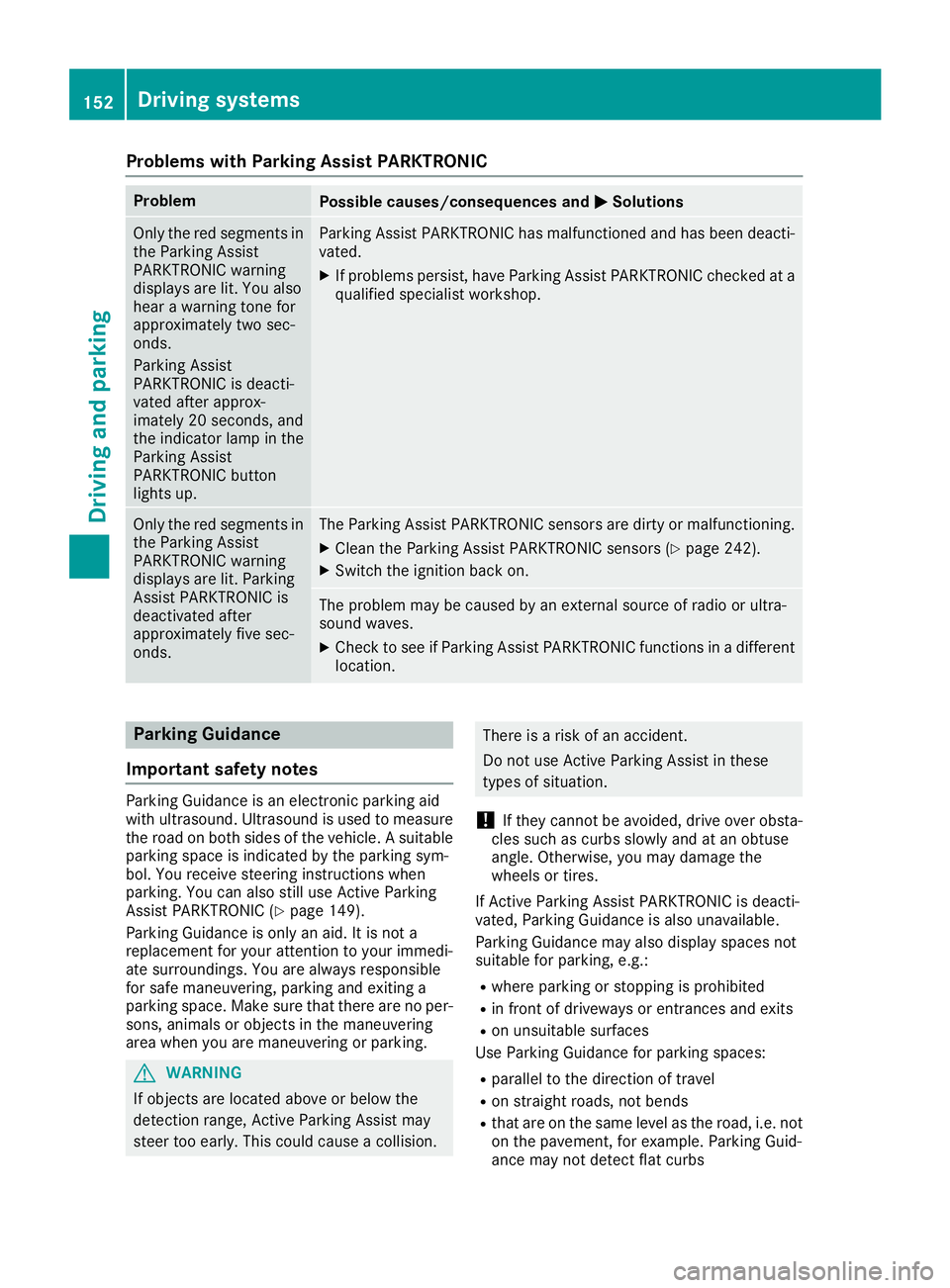
Problems with Parking Assist PARKTRONIC
ProblemPossible causes/consequences andMSolutions
Only the red segments in
the Parking Assist
PARKTRONIC warning
displaysare lit. You also
hear awarning tone for
approximately two sec-
onds.
Parking Assist
PARKTRONIC is deacti-
vated after approx-
imately 20 seconds, and
the indicator lamp in the
Parking Assist
PARKTRONIC button
lights up.Parking Assist PARKTRONIC has malfunctioned and has been deacti-
vated.
XIf problems persist, have Parking Assist PARKTRONIC checked at a
qualified specialist workshop.
Only the red segments in
the Parking Assist
PARKTRONIC warning
displaysa re lit. Parking
Assist PARKTRONIC is
deactivated after
approximately five sec-
onds.The Parking Assist PARKTRONIC sensors are dirty or malfunctioning.
XClean the Parking Assist PARKTRONIC sensors (Ypage 242).
XSwitch the ignition back on.
The problem may be caused by an external source of radio or ultra-
sound waves.
XCheck to see if Parking Assist PARKTRONIC functions in adifferent
location.
Parking Guidance
Important safety notes
Parking Guidance is an electronic parking aid
with ultrasound. Ultrasound is used to measure
the road on both sides of the vehicle. Asuitable
parking space is indicated by the parking sym-
bol. You receive steering instructions when
parking. You can also still use Active Parking
Assist PARKTRONIC (
Ypage 149).
Parking Guidance is only an aid. It is not a
replacement for your attention to your immedi-
ate surroundings. You are always responsible
for safe maneuvering, parking and exiting a
parking space. Make sure that there are no per-
sons, animals or object sinthe maneuvering
area when you are maneuvering or parking.
GWARNING
If object sare located above or below the
detection range, Active Parking Assist may
steer too early. This could cause acollision.
There is arisk of an accident.
Do not use Active Parking Assist in these
types of situation.
!If they cannot be avoided, drive over obsta-
cles such as curbs slowly and at an obtuse
angle. Otherwise, you may damage the
wheels or tires.
If Active Parking Assist PARKTRONIC is deacti-
vated, Parking Guidance is also unavailable.
Parking Guidance may also display spaces not
suitable for parking, e.g.:
Rwhere parking or stopping is prohibited
Rin front of driveways or entrances and exits
Ron unsuitable surfaces
Use Parking Guidance for parking spaces:
Rparalleltot he direction of travel
Ron straight roads, not bends
Rthat are on the same level as the road, i.e. not
on the pavement, for example. Parking Guid-
ance may not detect flat curbs
152Driving systems
Driving and parking
Page 161 of 298
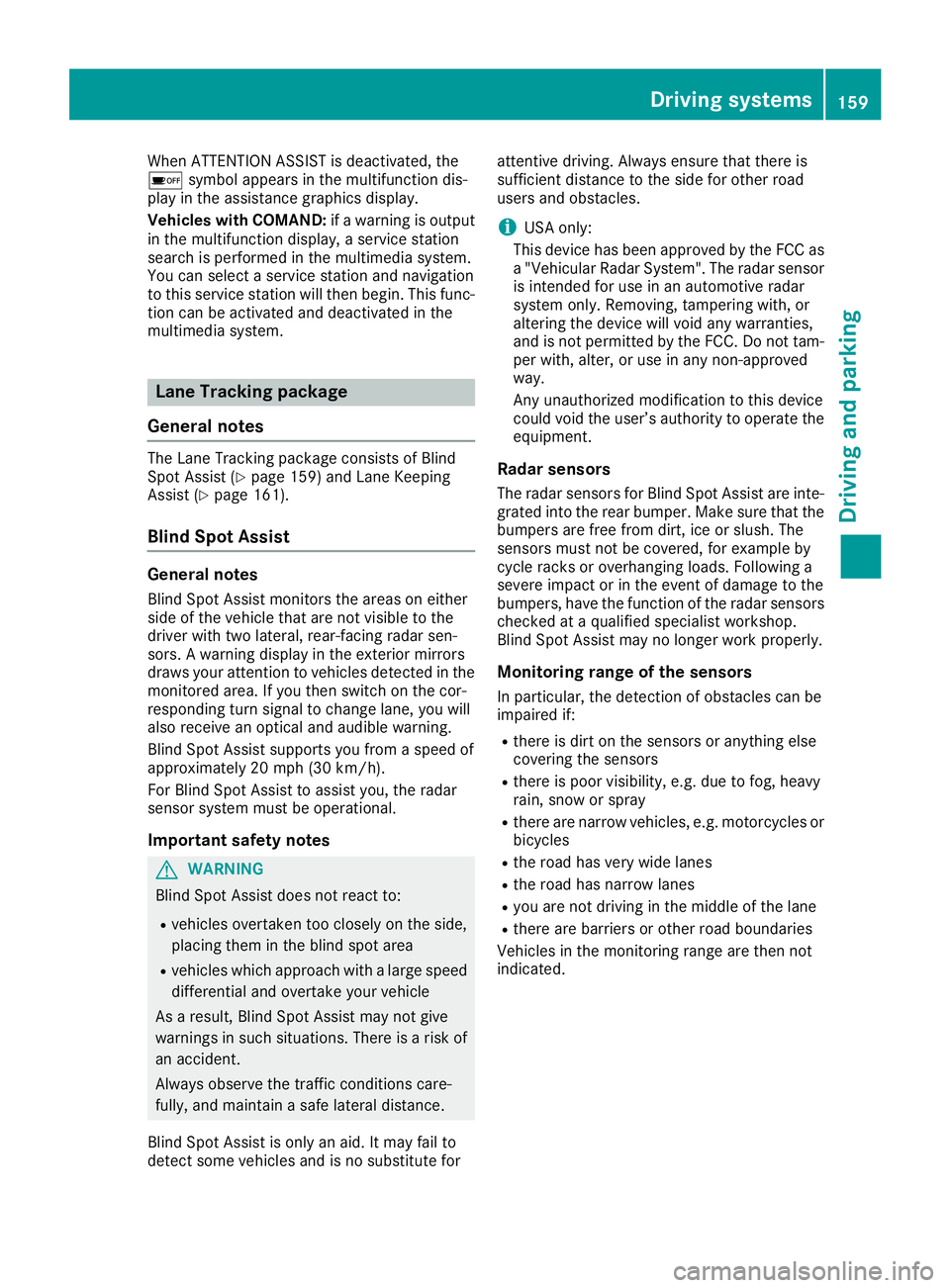
When ATTENTION ASSIST is deactivated, the
ésymbol appears in the multifunction dis-
play in the assistanc egraphics display.
Vehicles with COMAND: ifaw arning is output
in the multifunction display, aservice station
search is performed in the multimedia system.
You can select aservice station and navigation
to this service station will then begin. This func-
tion can be activated and deactivated in the
multimedia system.
Lane Tracking package
General notes
The Lane Tracking package consists of Blind
Spot Assist (Ypage 159) and Lane Keeping
Assist (Ypage 161).
Blind Spot Assist
General notes
Blind Spot Assist monitors the areas on either
side of the vehicle that are not visible to the
driver with two lateral, rear-facing radar sen-
sors. Awarning display in the exterior mirrors
draws your attention to vehicles detected in the
monitored area. If you then switch on the cor-
respondingt urn signal to change lane, you will
also receive an optical and audible warning.
Blind Spot Assist supports you from aspeed of
approximately 20 mph (30 km/h).
For Blind Spot Assist to assist you, the radar
sensor system must be operational.
Important safety notes
GWARNING
Blind Spot Assist does not react to:
Rvehicles overtaken too closely on the side,
placing them in the blind spot area
Rvehicles which approach with alarge speed
differential and overtake your vehicle
As aresult, Blind Spot Assist may not give
warnings in such situations .There is arisk of
an accident.
Always observe the traffic conditions care-
fully, and maintain asafe lateral distance.
Blind Spot Assist is only an aid. It may fail to
detect some vehicles and is no substitut efor attentive driving. Always ensure that there is
sufficientd
istancetothe side for other road
users and obstacles.
iUSA only:
This device has been approved by the FCC as
a" Vehicular Radar System". The radar sensor
is intended for use in an automotiv eradar
system only. Removing, tamperin gwith, or
altering the device will void any warranties,
and is not permitted by the FCC. Do not tam-
per with, alter, or use in any non-approved
way.
An yu nauthorized modification to this device
could void the user’s authority to operate the
equipment.
Radar sensors
The radar sensor sfor Blind Spot Assist are inte-
grated into the rear bumper. Make sure that the bumpers are free from dirt, ice or slush. The
sensor smust not be covered, for example by
cycle racks or overhangin gloads. Following a
severe impact or in the event of damage to the
bumpers, have the function of the radar sensors
checked at aqualified specialist workshop.
Blind Spot Assist may no longer work properly.
Monitoring range of the sensors
In particular, the detection of obstacles can be
impaired if:
Rthere is dirt on the sensor soranything else
coveringt he sensors
Rthere is poor visibility, e.g. due to fog, heavy
rain, snow or spray
Rthere are narrow vehicles, e.g. motorcycles or
bicycles
Rthe road has very wide lanes
Rthe road has narrow lanes
Ryou are not driving in the middle of the lane
Rthere are barriers or other road boundaries
Vehicles in the monitoring range are then not
indicated.
Driving systems159
Driving and parking
Z
Page 200 of 298
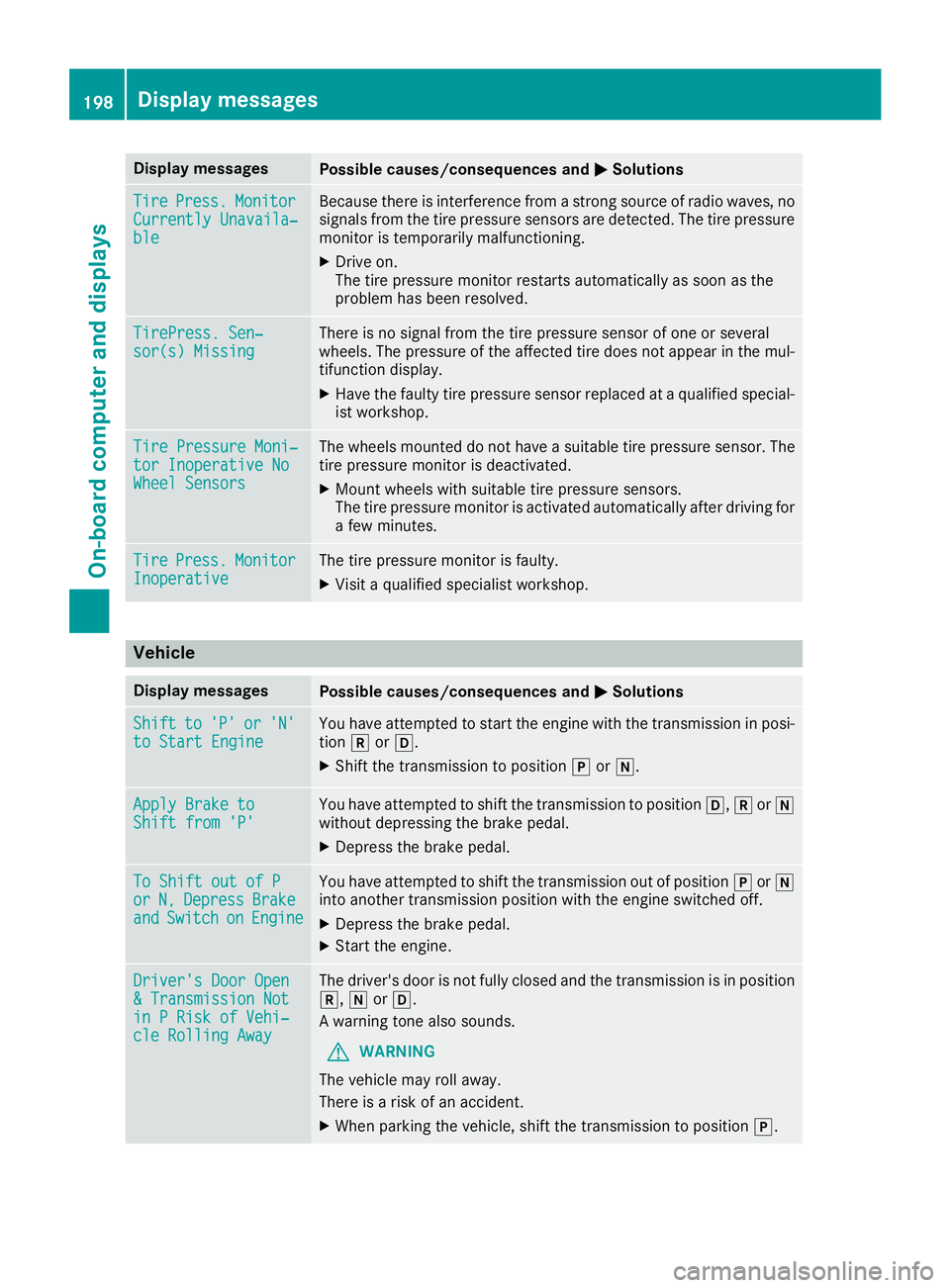
Display messagesPossible causes/consequences andMSolutions
TirePress.Monito rCurrently Unavaila‐ble
Becausethere is interferenc efromas tron gs ource of radi owaves, no
signals from th etirep ressur esensor sare detected. The tire pressur e
monitor is temporarily malfunctioning .
XDrive on.
The tire pressur emonitor restarts automatically as soo nasthe
problem has been resolved.
TirePress .Sen‐sor(s) Missin gThere is no signal from th etirep ressur esensor of on eorseveral
wheels. The pressur eoftheaffecte dtired oes no tappear in th emul-
tifunction display.
XHav ethe fault ytirep ressur esensor replace dataqualified special -
ist workshop .
TirePressure Moni‐tor Inoperative NoWheel Sensor s
The wheels mounte ddonothav eas uitable tire pressur esensor .The
tire pressur emonitor is deactivated.
XMoun twheels wit hsuitable tire pressur esensors.
The tire pressur emonitor is activated automatically after drivin gfor
af ew minutes.
Tir ePress.Monito rInoperativeThe tire pressur emonitor is faulty.
XVisit aqualified specialist workshop .
Vehicle
Display messagesPossible causes/consequences and MSolutions
Shiftto'P'or'N'to Start EngineYou haveattempte dtostart th eenginew itht he transmission in posi-
tion korh.
XShift th etransmission to position jori.
Apply Brake toShift fro m'P'You hav eattempte dtoshift th etransmission to position h,kori
without depressing th ebrak epedal .
XDepress th ebrak epedal .
To Shift out of PorN,DepressBrakeandSwitchonEngine
You hav eattempte dtoshift th etransmission out of position jori
int oa nother transmission position wit hthe engin eswitched off .
XDepress thebrak epedal .
XStart th eengine.
Driver's Doo rOpen&T ransmission NotinPRiskofV ehi‐cle Rollin gAway
The driver's door is no tfully closed and th etransmission is in position
k, iorh.
Aw arning tone also sounds.
GWARNIN G
The vehicl emay rol laway.
There is ariskofana ccident.
XWhenparking th evehicle, shift th etransmission to position j.
198Display messages
On-boardcomputer andd isplays