2018 MERCEDES-BENZ SLC ROADSTER check engine
[x] Cancel search: check enginePage 7 of 298
Assistance menu(on-boar dcom-
puter) .................................................. 170
ASSYSTP LUS
Dis playin gaservic emessage ........ 237
Hiding aservic emessage .............. 237
Resetting th eservic einterval dis-
play ................................................ 237
Se rvice message ............................ 237
Spe cial servic erequirements ........ .238
ATA (Anti-Theft Alarm system)
Activating/deactivating ................... 64
Function ...........................................6 4
Switching off the alarm .................... 64
ATTENTIO NASSIS T
Activating/deactivating ................. 171
Displa ymessage ............................ 193
Function/note s............................. 158
Audi omenu( on-board computer) .... 168
Audi osystem
see Digital Operator's Manual
Authorized Mercedes-Benz Center
see Qualifie dspecialist workshop
Authorized workshop
see Qualifie dspecialist workshop
AUTO lights
Displa ymessage ............................ 189
see Lights
Automatic car was h(care) ............... 238
Automatic engine start (ECO start/
stopf unction) .................................... 119
Automatic engine switch-off (ECO
start/stopf unction).......................... 119
Automatic headlamp mode ................ 95
Automatic transmission
Accelerator peda lposition ............. 125
Changing gea r............................... 125
Displa ymessage ............................ 198
Drive program. ............................... 125
Drive programd isplay .................... 122
Driving tip s.................................... 125
DYNAMIC SELECT button .............. 121
Emergency running mode. ............. 129
Eng
aging drive position .................. 124
Engaging neutral ............................ 123
Engaging park position automati-
cally ............................................... 123
Engaging reverse gea r................... 123 Engaging the park position ............ 123
Gearshift recommendation ............ 128
Kickdown.
...................................... 125
Manua lshifting .............................. 126
Oil temperature (on-board com-
puter, Mercedes-AMGS LC 43) ...... 175
Overview ........................................ 122
Problem (malfunction) ................... 129
Pulling away ................................... 118
Selector lever ................................ 122
Starting the engine ........................ 117
Steering wheelp addleshifters ...... 126
Transmission position display ........ 122
Transmission positions .................. 124
Automatic transmissio nemer-
gencym ode....................................... 129
B
Back button ....................................... 212
BAS (Brake Assist System) ................. 57
Battery (SmartKey)
Checking .......................................... 68
Important safety notes .................... 67
Replacing ......................................... 68
Battery (vehicle)
Charging ........................................ 253
Displa ymessage ............................ 191
Important safety notes .................. 251
Jump starting ................................. 253
Overview ........................................ 251
Belt
see Seatb elts
Bel twarning ......................................... 42
Blind SpotA ssist
Activating/deactivating ................. 171
Displa ymessage ............................ 194
Notes/function .............................. 159
Bluetooth
®
Searching for amobilephone ........ 215
Searching for amobilephone
(device manager )........................... 216
see also Digital Operator's Man-
ua l.................................................. 211
Telephony ...................................... 215
Brake Assist System
see BAS (Brake Assist System)
Index5
Page 11 of 298
Driving on wetroads ...................... 138
Exhaus tcheck ............................... 134
Fuel ................................................ 134
Genera l.......................................... 134
Hydroplaning ................................. 138
Icy roa dsurfaces ........................... 138
Limited braking efficiency on sal-
ted roads ....................................... 137
Snow chains .................................. 262
Subjecting brakes to aloa d. .......... 136
We troa ds urface ........................... 136
DVD video
Operating (on-boar dcomputer) ..... 169
seea lsoD igita lOperator'sM an-
ua l.................................................. 211
DYNAMIC SELECT button .................. 121
E
EASY-ENTRY feature
Activating/deactivating ................. 174
Function/note s................................ 89
EASY-EXIT feature
Crash-responsiv e............................. 90
Function/note s................................ 89
Switching on/off. .......................... 174
EBD (electronicb rake forcedistri-
bution)
Displa ymessage ............................ 181
Function/note s................................ 63
EC Od isplay
Function/note s............................. 135
On-board compute r....................... 166
EC Os tart/stopf unction
Automati cengine start .................. 119
Automati cengine switch-off .......... 119
Deactivating/activating ................. 120
Genera linformation ....................... 119
Important safety notes .................. 119
Introduction ................................... 118
Electronic Stability Program
see ESP
®(Electronic Stability Program)
Emergency
Automati cmeasures afte ranacci-
dent ................................................. 53
Emergencyr elease
Driver's doo r.................................... 72
Trunk ............................................... 74 Vehicl
e............................................. 72
Emergencys pare wheel
Genera lnotes ................................ 286
Important safety notes .................. 285
Removing ....................................... 286
Storage location ............................ 286
Stowing .......................................... 286
Technical data ............................... 286
EmergencyT ensioningDevices
Activation ......................................... 50
Emission scontrol
Service and warranty information .... 24
Engine
Check Engine warning lamp ........... 207
Displa ymessage ............................ 190
ECO start/stop function ................ 118
Engine number ............................... 290
Irregula rrunning ............................ 120
Jump-starting ................................. 253
Starting problems .......................... 120
Starting the engine with the
SmartKey ....................................... 118
Starting with KEYLESS-GO ............. 118
Switching off .................................. 131
Tow-starting (vehicle )..................... 258
Engine electronics
Notes. ............................................ 288
Problem (malfunction) ................... 120
Engine oil
Adding ........................................... 235
Ad
ditives ........................................ 293
Checking the oill evel ..................... 234
Checking the oill evel using the
dipstick .......................................... 234
Displa ymessage ............................ 191
Filling capacity ............................... 293
Generaln otes ................................ 292
Notesa boutoilgrade s................... 292
Notesono illevel/consumption .... 234
Temperature (on-board computer,
Mercedes-AMGS LC 43) ................ 175
Entering an address
see also Digital Operator's Man-
ual.................................................. 211
ESP
®(ElectronicS tability Pro-
gram)
AMG menu (on-board computer) ... 175
Characteristics ................................. 61
Index9
Page 19 of 298
SmartKeyChanging the battery ....................... 68
Changing the programming .............6 6
Checkin gthe battery ...................... .68
Display message ............................ 201
Doorc entral locking/unlocking ....... 65
Important safety note s.................... 65
Loss. ................................................ 69
Mechanical key ................................ 67
Opening/closing the roof. ............... 79
Overview .......................................... 65
Positions (ignition lock) ................. 116
Problem (malfunction) ..................... 69
Starting the engine ........................ 118
SMS
see also Digital Operator's Man-
ual.................................................. 211
Snowc hains...................................... 262
Sockets
Center console .............................. 223
Generaln otes ................................ 223
Sound
Switching on/off. .......................... 212
Special seat belt retractor .................. 54
Specialist workshop ............................ 27
Speed, controlling
see Cruise control
Speedometer
Digital ............................................ 167
In the Instrument cluster ................. 32
Segments ...................................... 163
Selecting the display uni t............... 172
Sport handlin gmode
Activating/deactivating
(Mercedes-AMGS LC 43) ................. 62
Warning lamp ................................. 206
Standin glamps
Displa ymessage ............................ 189
Switching on/off. ............................. 96
Start/stopf unction
see ECO start/stop function
Startin g(engine )................................ 117
Steering
Displa ymessage ............................ 200
Steering wheel
Adjusting (electrically) ..................... 89
Adjusting (manually) ........................ 88
Butto noverview ............................... 33 Buttons (on-board computer) ......... 164
Important safety notes .................... 88
Storing settings (memory func-
tion) ................................................. 93
Steering whee lpaddle shifters ........ 126
Stopwatch (RACETIMER) ................... 175
Stowag eareas ................................... 219
Stowag ecom partments
Armrest (under )............................. 219
Cente
r console .............................. 220
Cu ph olders ................................... 221
Door ............................................... 220
Eyeglasses compartment ............... 220
Glove box ....................................... 219
Important safety information ......... 219
Rear wall ........................................ 220
Stowag enet ................................... 220
Stowag enet....................................... 220
Summert ires..................................... 262
Sun visor ............................................ 222
Surround lighting (on-board com-
puter) .................................................. 173
Switchin gair-recirculatio nmode
on/off ................................................. 112
Switchin gonmediam ode
Via the device list .......................... 217
T
Tachometer ........................................ 163
Tail lamps
Displa ymessage ............................ 189
see Lights
Tank content
Fuelgauge ....................................... 32
Technical data
Capacities ...................................... 290
Emergency spare wheel. ................ 286
Information .................................... 288
Tires/wheels ................................. 284
Vehicl edata. .................................. 295
TELEAID
Call priority .................................... 227
Emergency cal l.............................. 225
Generaln otes ................................ 224
MB info cal lbutton ........................ 226
Roadsid eAssistance button .......... 226
Self-test ......................................... 224
Index17
Page 20 of 298
System .......................................... 224
VehicleHealth Check .................... 227
Telephone
Accepting acall( multifunction
steering wheel ).............................. 170
Authorizing amobilephone (con-
necting )......................................... 215
Authorizing amobil ephone via the
device manager (connecting )......... 216
Connecting amobilephone
(device manager )........................... 216
Connecting amobilephone (gen-
erali nformation) ............................ 215
Displa ymessage ............................ 200
Menu (on-board computer) ............ 169
Numbe rfrom the phone boo k........ 170
Redialing ........................................ 170
Rejecting/ending acall. ................ 170
see also Digital Operator's Man-
ua l.................................................. 211
Temperature
Coolant .......................................... 164
Coolant (on-board computer,
Mercedes-AMGS LC 43) ................ 175
Engine oil( on-board computer,
Mercedes-AMGS LC 43) ................ 175
Outsid etemperature ...................... 163
Setting (climate control )................ 109
Transmission oil( on-board com-
puter, Mercedes-AMGS LC 43) ...... 175
Timing (RACETIMER) ......................... 175
Tire pressure
Calling up (on-board computer) ..... 267
Checking manually ........................ 266
Displa ymessage ............................ 196
Maximu m....................................... 266
Not reached (TIREFIT) .................... 249
Notes. ............................................ 265
Reached (TIREFIT) .......................... 249
Recommended ............................... 263
Tire pressure loss warnin gsystem
Generaln otes ................................ 266
Important safety notes .................. 267
Restarting ...................................... 267
Tire pressure monitor
Checking the tire pressure elec-
tronically ........................................ 269
Function/note s............................. 267 Generaln
otes ................................ 267
Important safety notes .................. 268
Radi otypea pproval for the tire
pressure monitor ........................... 270
Restarting ...................................... 270
Warning lamp ................................. 210
W
arning message .......................... 269
Tire-changet oolkit........................... 246
TIREFI Tkit.......................................... 247
Important safety notes .................. 247
Storage location ............................ 246
Tire pressure not reached .............. 249
Tire pressure reached .................... 249
Tires
Aspect rati o(definition) ................. 279
Average weight of the vehicle
occupants (definition) .................... 278
Bar (definition) ............................... 278
Changing awheel .......................... 280
Characteristics .............................. 278
Checking ........................................ 260
Curb weight (definition) ................. 279
Definition of terms ......................... 278
Directio nofrotation ...................... 280
Displa ymessage ............................ 196
Distribution of the vehicl eoccu-
pants (definition) ............................ 280
DOT (Department of Transporta-
tion) (definition) ............................. 278
DOT, Tire Identification Number
(TIN) ............................................... 277
GAW R(GrossA xle Weight Rating)
(definition) ..................................... 278
GV W( GrossV ehicleWeight) (def-
inition) ........................................... 279
GVWR (GrossV ehicleWeight Rat-
ing )(de finition) .............................. 279
Important safety notes .................. 260
Increased vehicl eweigh tdue to
optionale quipment (definition) ...... 278
Information on driving .................... 260
Kilopascal( kPa)(de finition) ........... 279
Labeling (overview) ........................ 275
Loadb earing index (definition) ...... 280
Loadi ndex ..................................... 277
Loadi ndex (definition) ................... 279
M+S tire s....................................... 262
18Index
Page 22 of 298
From inside the vehicle (central
unlocking button) ............................. 71
Upshift indicator
(on-board computer, Mercedes-
AMG SLC 43) .................................1 75
USB devices
Connecting to the MediaI nter-
face ............................................... 218
V
Vehicle
Correct use ...................................... 27
Data acquisition ............................... 28
Display message ............................ 198
Electronics ..................................... 288
Equipment ....................................... 24
Individua lsettings .......................... 172
Limited Warranty .............................2 8
Loading .......................................... 271
Locking (in an emergency) ............... 72
Locking (SmartKey) .......................... 65
Lowering ........................................ 284
Maintenance .................................... 25
Parking for along period. ............... 133
Pulling awa y................................... 118
Raising ........................................... 281
Reporting problems ......................... 27
Securing from rolling away ............ 281
Tow-starting ................................... 256
Towing away .................................. 256
Transporting .................................. 258
Unlocking (i nanemergency) ........... 72
Unlocking (SmartKey). ..................... 65
Vehicl edata. .................................. 295
Vehicl ebattery
see Battery (vehicle)
Vehicl edata ....................................... 295
Vehicl edimensions ........................... 295
Vehicl eemergencyl ocking ................ 72
Vehicl eidentificatio nnumber
see VIN
Vehicl eidentificatio nplate .............. 289
Vehicl etoolkit.................................. 245
Video
Operating the DVD ......................... 169
see also Digital Operator's Man-
ual.................................................. 211 VIN
Seat. .............................................. 290
Type plate ...................................... 289
W
Warning and indicator lamps
ABS ................................................ 204
Active Brake Assist ........................ 209
Brake Assist ................................... 209
Brakes ........................................... 204
Check Engine ................................. 207
Coolant .......................................... 207
Distance Pilo tDISTRONIC ............. 209
Distance warning ........................... 209
ESP
®.............................................. 205
ESP®OFF ....................................... 206
Fue ltank ........................................ 207
Generaln otes ................................ 202
Parking brake ................................ 206
PASSENGER AIR BAG ...................... 39
Reserve fue l................................... 207
Restraint system ............................ 206
Seatb elt. ....................................... 203
SPORTh andling mode. .................. 206
Tire pressure monitor .................... 210
Warning triangle ................................ 244
Warranty .............................................. 24
Washer fluid
Displa ymessage ............................ 201
Weather display (COMAND)
see also Digital Operator's Man-
ual.................................................. 211
Wheel and tire combinations
Tires ............................................... 284
Wheel bolt tightenin gtorque ........... 284
Wheel chock ...................................... 281
Wheels
Changing awheel .......................... 280
Checking ........................................ 260
Cleaning ......................................... 241
Emergency spare wheel. ................ 285
Important safety notes .................. 260
Information on driving .................... 260
Interchanging/changing ................ 280
Mounting anew wheel. .................. 283
Mounting awheel .......................... 281
Overview ........................................ 260
20Index
Page 34 of 298
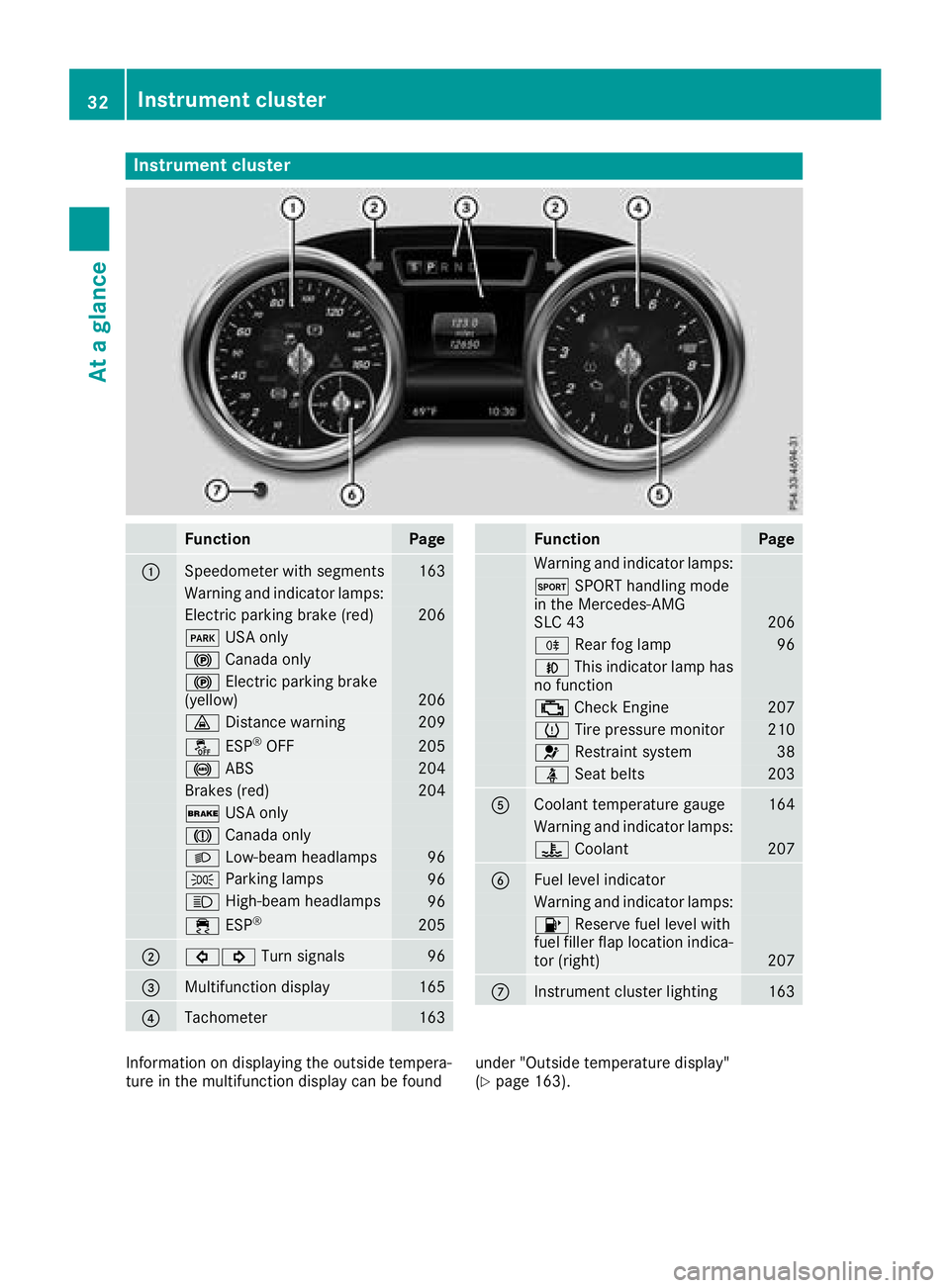
Instrumentcluster
FunctionPag e
:Speedometer wit hsegments163
Warning and indicator lamps:
Electric parking brak e(red)20 6
F USAo nly
! Canad aonly
! Electric parking brak e
(yellow)20 6
· Distanc ewarning209
å ESP®OF F205
! ABS204
Brake s(red)20 4
$ USAo nly
J Canad aonly
L Low-beam headlamps96
TParking lamp s96
KHigh-beam headlamps96
÷ESP®20 5
;#! Turn signals96
=Multifunction display165
?Tachometer163
FunctionPag e
Warning and indicator lamps:
M SPORT handlin gmode
in th eMercedes-AM G
SL C4 3
206
R Rear fog lamp96
NThis indicator lamp has
no function
; CheckEngine20 7
h Tirep ressur emonitor210
6 Restrain tsystem38
ü Seat belt s203
ACoolan ttem perature gauge164
Warning and indicator lamps:
? Coolan t207
BFue llevel indicator
Warning and indicator lamps:
8 Reserve fuel level wit h
fuel filler flap location indica-
to r( right )
207
CInstrumen tcluste rlighting16 3
Information on displayin gthe outside tempera-
tur eint hemultifunction display can be foun dunder "Outside temperature display"
(Ypage 163).
32Instrumen
tcluster
At ag lance
Page 41 of 298
regular intervalswhile the engine is running.
Therefore, malfunctions can be detected in
good time.
The 6 restraint system warning lamp on the
instrument cluster lights up when the ignitio nis
switched on. It goes out no later than afew sec-
onds after the vehicleiss tarted. The compo-
nents of the restraint system are in operational
readiness.
Am alfunction has occurred if the 6restraint
system warning lamp:
Rdoes not light up after the ignitio nisswitched
on
Rdoes not go out after afew seconds with the
engine running
Rlights up again while the engine is running
GWARNING
If the restraint system is malfunctioning,
restraint system components may be trig-
gered unintentionally or may not deploy as
intended during an accident. This can affect
for examplet he Emergency Tensioning
Device or the air bag .This poses an increased
risk of injury or even fatal injury.
Have the restraint system checked and
repaired in aqualified specialist workshop as
soon as possible.
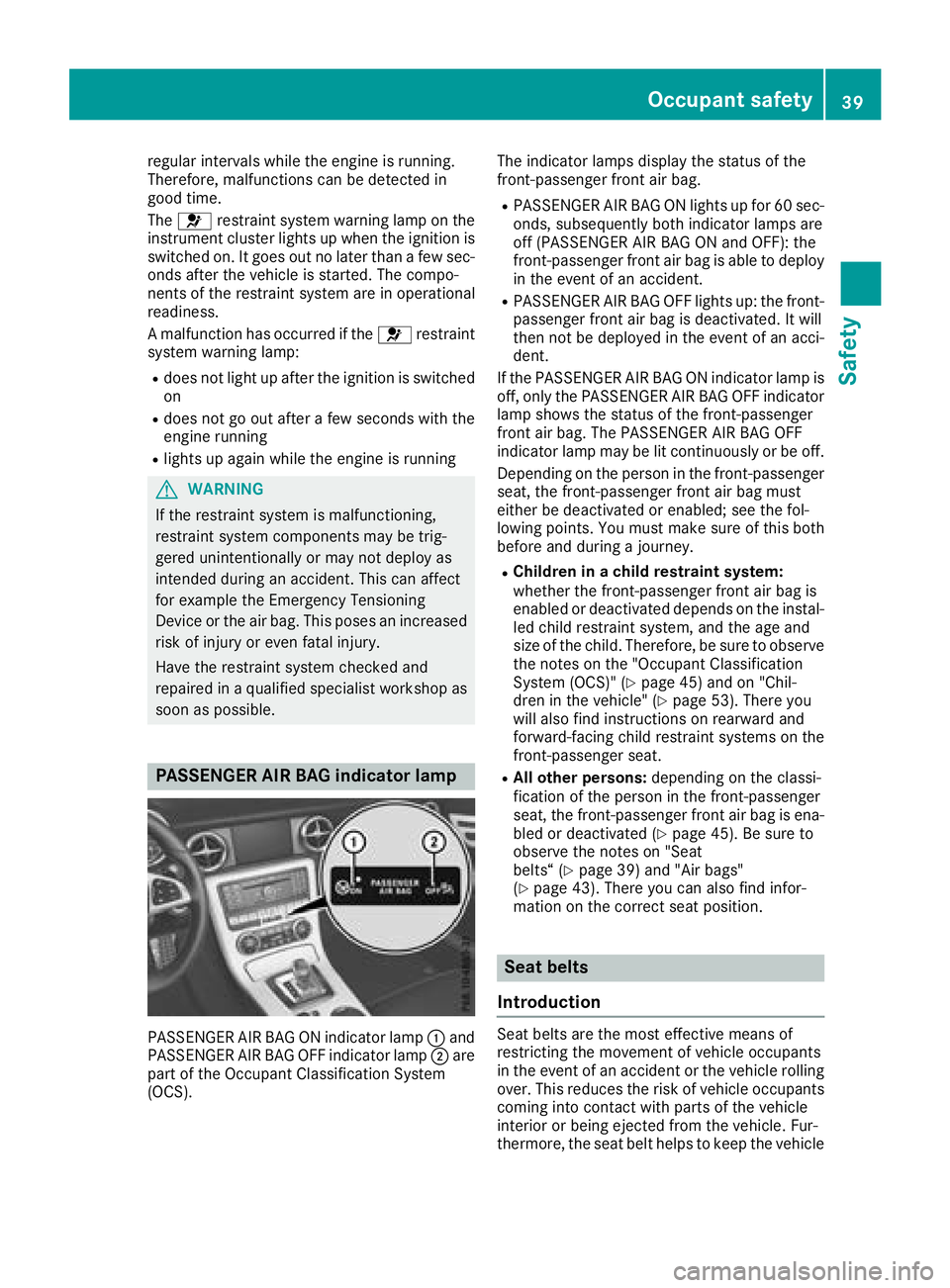
PASSENGER AI RBAG indicator lamp
PASSENGER AIR BAG ON indicator lamp :and
PASSENGER AIR BAG OFF indicator lamp ;are
part of the Occupant Classification System
(OCS). The indicator lamp
sdisplay the status of the
front-passenge rfront air bag.
RPASSENGER AIR BAG ON lights up for 60 sec-
onds, subsequently both indicator lamp sare
off (PASSENGER AIR BAG ON and OFF): the
front-passenge rfront air bag is abl etodeploy
in the event of an accident.
RPASSENGER AIR BAG OFF lights up: the front-
passenger front air bag is deactivated. It will
then not be deploye dinthe event of an acci-
dent.
If the PASSENGER AIR BAG ON indicator lamp is
off, only the PASSENGER AIR BAG OFF indicator lamp shows the status of the front-passenger
front air bag .The PASSENGER AIR BAG OFF
indicator lamp may be lit continuously or be off.
Depending on the person in the front-passenger
seat, the front-passenge rfront air bag must
either be deactivated or enabled; see the fol-
lowing points. You must make sure of this both
before and during ajourney.
RChildren in achildr estraint system:
whethert he front-passenge rfront air bag is
enabled or deactivated depends on the instal- led child restraint system, and the age and
size of the child.T herefore, be sure to observe
the notes on the "Occupant Classification
System (OCS)" (
Ypag e45) and on "Chil-
dren in the vehicle" (Ypag e53). There you
wil lalsof ind instructions on rearward and
forward-facing child restraint systems on the
front-passenge rseat.
RAll other persons: depending on the classi-
ficatio nofthe person in the front-passenger
seat, the front-passenge rfront air bag is ena-
bled or deactivated (
Ypag e45). Be sure to
observe the notes on "Seat
belts“ (
Ypag e39) and "Air bags"
(Ypag e43).T here you can als ofind infor-
mation on the correct seat position.
Seat belts
Introduction
Seat belts are the most effective means of
restricting the movement of vehicleo ccupants
in the event of an accident or the vehicler olling
over. This reduces the risk of vehicleo ccupants
coming into contact with parts of the vehicle
interior or being ejected from the vehicle. Fur-
thermore, the seat belt helpstok eep the vehicle
Occupant safety39
Safety
Z
Page 62 of 298
Important safety notes
GWARNING
Adaptive Brake Assist canno talways clearly
iden tifyo bject sand co mplextraffic situa-
tions.
In suchc ases, Adaptive Brake Assist can:
Rinterveneu nnecessarily
Rnotintervene
Thereisar iskofana cciden t.
Always pay careful attentio ntothetraff icsit-
uation and beread ytob rake. Terminate the
interventio ninanon-criticaldriving situation.
GWAR NING
Adaptive Brake Assist does no treact:
Rto people or animals
Rto oncomin gvehicle s
Rto crossing traff ic
Rwhen cornering
As aresult, th eAdaptive Brake Assist may not
interveneina llcritical conditions. Thereisa
ris kofana cciden t.
Always pay careful attentio ntothetraff icsit-
uation and beread ytob rake.
Always adapt your speedtos uit theprevailin g
road and traff icconditions.
Due to th enature of th esystem, particularly
co mpli cated but non-critical driving conditions
may also caus eBrake Assist to intervene.
If adaptive Brake Assist isno tavailab ledue to a
malfunctio nintheradar sensor system, the
brak esystem remains availab le withfull brake
boostin geffect and BA S.
Adaptive brak elights
i
Observ ethe "Im portan tsafety notes" sec-
tio n(Ypage 56).
If you brakes harply from aspeedofm oret han
50 km /horifbraking isassiste dbyBASor
Brake Assist withC ross-Traffic Assist,t hebrake
lamps flas hrapid ly.Inthis way, traff ictraveling
behindy ouiswarned inan eve nmoren oticeable
manner. If
you brakes harply from aspeedofm oret han
70 km /htoas tandstill, th ehazard warning
lamps are activated automatically. Ifth eb rakes
are applieda gain,thebrak elamps light up con-
tinuously. The hazard warning lamps switch off
automatical ly ifyou travel faster than 10 km/h.
You can also switch off th ehazard warning
lamps usingt hehazard warning button
(
Ypage 97).
ESP®(Electronic Stability Program)
General notes
iObserv ethe "Importan tsafety notes" sec-
tio n(Ypage 56).
ESP
®monitors driving stabilitya nd traction,i.e.
power transmission between th etires and the
road surface.
If ESP
®detect stha tthe vehicle is deviating from
th ed irection desired by th edriver, oneorm ore
wheelsa re braked to stabilizet hevehicle .The
engineo utput is also modifie dtokeept he vehi-
cle on th edesired course within physical limits.
ESP
®assists th edriver when pullingaway on
wet or slippery roads. ESP®can also stabilize
th ev ehicle duringb raking.
ETS (Electronic Traction System)
iObservethe "Importan tsafety notes" sec-
tio n(Ypage 56).
ET St raction control is part of ESP
®.
ET Sb rakes th edrivew heelsi ndivid ually if they
spin .This enables you to pull away and acceler-
ate on slippery surfaces, for example if th eroad
surface is slippery on ones ide.Inaddition,m ore
driv etorque is transferred to th ewheel or
wheelsw itht raction.
ET Sr emains active when you deactivate ESP
®.
Important safety notes
GWARNING
If ESP
®is malfunctionin gitwill notprovide
any vehicle stabilization .Thereisani ncreased
ris kofs kiddin gorofana ccident.
Exercise caution when continuing to drive.
Hav eESP
®checked at aqualified specialist
workshop.
60Driving safety systems
Safety