Page 86 of 502

#Save the settings with the memory function
(→page 93).
% The head restra int height is adjus ted auto‐
matically when you adjust the seat height or
th e seat fore -and-aft position.
Ad justing the front passen ger seat from the
driver's seat electrically
Re quirements:RTo select the front passenger seat: the po wer
supply is switched on.
Yo u can call up thefo llowing functions forth e
front passenger seat:
RSeat adjustment
RSeat heating
RSeat ventilation
RMemory function
#To select the front passenger seat: press
button 1.
When the indicator lamp lights up, the front
passenger seat is selected.
#Ad just the front passenger seat using the
buttons in the door control panel on the driv‐
er's side.
Head restra ints
Ad justing the front seat head restra ints man‐
ually
& WARNING Risk of injury from adjusting
th eve hicle settings while theve hicle is in
motion
Yo u could lose cont rol of theve hicle in the
fo llowing situations:
Rifyo u adjust the driver's seat, the head
re stra int, thesteering wheel or the mir ror
while theve hicle is in motion
Rifyo ufa sten your seat belt while theve hi‐
cle is in motion
84 Seats and stowing
Page 91 of 502
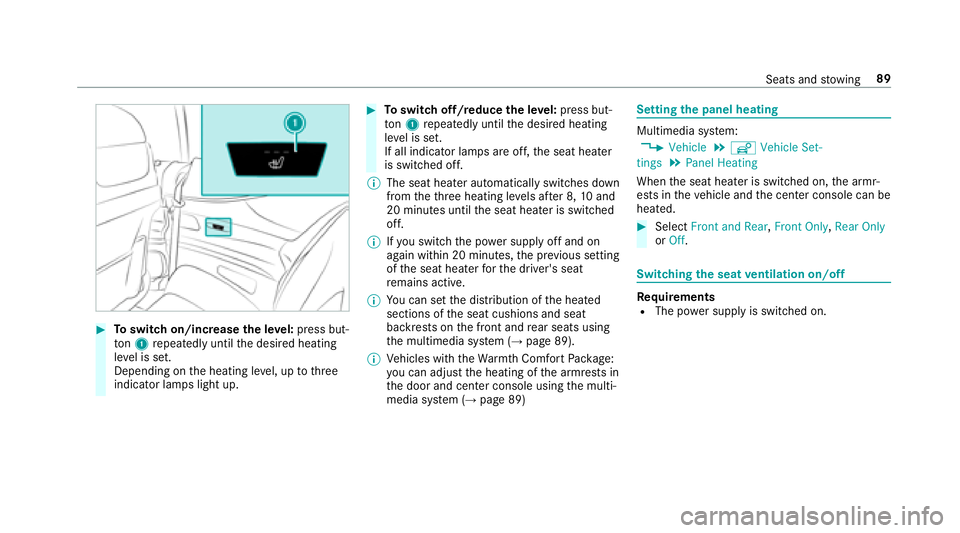
#Toswitch on/increase the le vel:press but‐
to n1 repeatedly until the desired heating
le ve l is set.
Depending on the heating le vel, up tothre e
indicator lamps light up.
#To switch off/reduce the le vel:press but‐
to n1 repeatedly until the desired heating
le ve l is set.
If all indicator lamps are off, the seat heater
is switched off.
% The seat heater automatically switches down
from theth re e heating le vels af ter 8, 10and
20 minutes until the seat heater is switched
off.
% Ifyo u switch th e power supply off and on
again within 20 minutes, the pr evious setting
of the seat heater forth e driver's seat
re mains active.
% You can set the distribution of the heated
sections of the seat cushions and seat
backrests on the front and rear seats using
th e multimedia sy stem (
→page 89).
% Vehicles with theWa rmthComfort Package:
yo u can adjust the heating of the armrests in
th e door and center console using the multi‐
media sy stem (
→page 89)
Setting the panel heating
Multimedia sy stem:
,Vehicle.î Vehicle Set-
tings.Panel Heating
When the seat heater is switched on, the armr‐
ests in theve hicle and the center console can be
heated.
#Select Front and Rear ,Front Only, Rear Only
or Off.
Switching the seat ventilation on/off
Re quirementsRThe po wer supply is switched on.
Seats and stowing 89
Page 92 of 502

#Toswitch on/increase the le vel:press but‐
to n1 repeatedly until the desired ventila‐
tion le vel is set.
Depending on theve ntilation le vel, up to
th re e indicator lamps light up.
#To switch off/reduce the le vel:press but‐
to n1 repeatedly until the desired ventila‐
tion le vel is set.
If all indicator lamps are off, the seat ventila‐
tion is switched off.
% Ifyo uswit ch th e power supply off and on
again within 20 minutes, the pr evious setting
of the seat ventilation forth e driver's seat
re mains active.
Ste ering wheel
Adjusting the steering wheel electrically
&
WARNING Risk of injury from adjusting
th eve hicle settings while theve hicle is in
motion
Yo u could lose cont rol of theve hicle in the
fo llowing situations:
Rifyo u adjust the driver's seat, the head
re stra int, thesteering wheel or the mir ror
while theve hicle is in motion
Rifyo ufa sten your seat belt while theve hi‐
cle is in motion
#Before starting the engine: adjust the
driver's seat, the head restra int, the
st eering wheel or the mir ror and fasten
yo ur seat belt.
&
WARNING Risk of entrapment forch il‐
dren when adjusting thesteering wheel
Children could injure themselves if they
adjust thesteering wheel.
#Ne ver lea vechildren unatte nded inthe
ve hicle.
#When leaving theve hicle, alw aysta ke
th e SmartK eywith you and lock the
ve hicle.
The steering wheel can be adjus ted when the
po we r supp lyis switched off.
90
Seats and stowing
Page 93 of 502
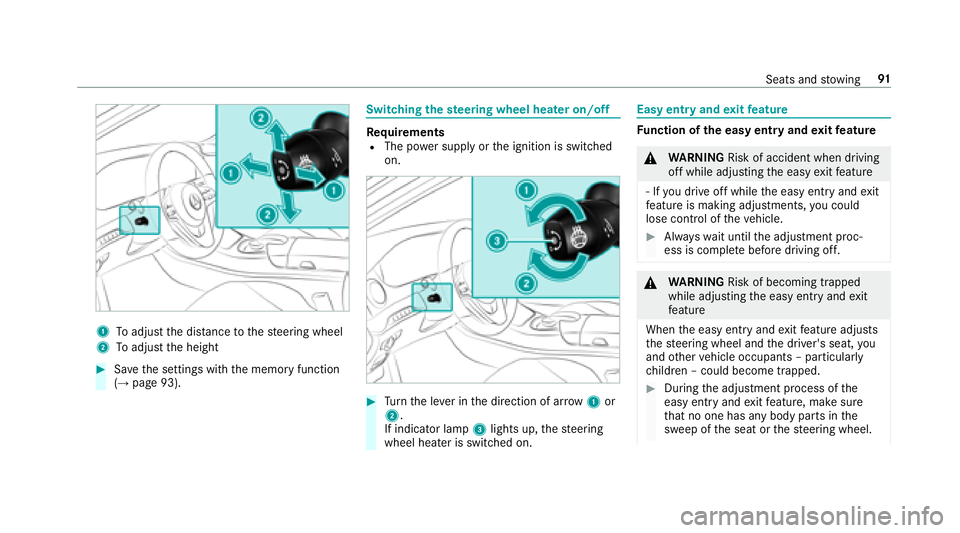
1Toadjust the dis tance tothesteering wheel
2To adjust the height
#Sa ve the settings with the memory function
(→page 93).
Switching thest eering wheel heater on/off
Re quirementsRThe po wer supply or the ignition is switched
on.
#Tu rn the le ver in the direction of ar row1or
2.
If indicator lamp 3lights up, thesteering
wheel heater is switched on.
Easy entry and exitfeature
Fu nction of the easy entry and exitfeature
&
WARNING Risk of accident when driving
off while adjusting the easy exitfeature
‑ If youdr ive off while the easy ent ryand exit
fe ature is making adjustments, you could
lose cont rol of theve hicle.
#Alw ayswa it until the adjustment proc‐
ess is comple tebefore driving off.
&
WARNING Risk of becoming trapped
while adjusting the easy ent ryand exit
fe ature
When the easy ent ryand exitfeature adjusts
th esteering wheel and the driver's seat, you
and other vehicle occupants – particular ly
ch ildren – could become trapped.
#During the adjustment process of the
easy ent ryand exitfeature, make sure
th at no one has any body parts in the
sweep of the seat or thesteering wheel.
Seats and stowing 91
Page 100 of 502
Overview ofthe luggage net hooks
Obser vethefo llowing no tes:
Rsecure the load using the luggage net hooks
Rdo not use elastic stra ps or nets tosecure a
load. These are intended only as anti-slip pro‐
te ction for light loads
Rdo not route lashing mater ialsacross sharp
edges or co rners
Rpad sharp edges for pr otection
There are up tofour luggage net hooks inthe
trunk depending on the equipment ins talled.
1Luggage net hooks
Opening theth rough-loading feature in the
re ar passenger co mpartment
* NO
TEDama getothe soft top caused by
loading
The soft top can be damaged if theth ro ugh-
loading feature is loaded in there ar
passenger compartment and the trunk sepa‐
ra tor has not been lo wered.
#Before loading theth ro ugh-loading fea‐
ture in there ar passenger compart‐
ment, lo werth e trunk separator.
98
Seats and stowing
Page 103 of 502
#Toremo ve:slide catch 2forw ards and pull
out cup holder 1.
#Toinstall: insert cup holder 1and slide
back catch 2.
% The cup holder rubber mat can be remo ved
fo r cleaning, e.g. using clean, luk ewarm
wate r.
% Obser vethe no tes on loading theve hicle
(
→page 94).
Opening the cup holder in there ar armrest
* NO
TEDama getothe cup holder
When there ar armrest is folded back the cup
holder could become damaged.
#Only fold there ar armrest back when
th e cup holder is closed.
#Press cup holder 1or2.
#Place a conta iner in orremo vea con tainer
from cup holder 1or2.
Ashtra y and cigar ette lighter
Using the ashtr ayinthe front center console
#To open: briefly press marking 4.
#Toremo vethe inser t:grip the sides of
insert 1, push it forw ard and pull it upwards
2.
#To re-install the inser t:press insert 1into
th e dr awe r until it engages.
#Toclose: pressstowage compartment 3
closed until it loc ks.
Seats and stowing 10
1
Page 104 of 502

Usingthe cigar ette lighter in the front center
console
& WARNING ‑ Risk of fire and injury from
hot cigar ette lighter
Yo u can burn yourself ifyo uto uch the hot
heating element or the soc ket of the ciga‐
re tte lighter.
In addition, flammable materials may ignite
if:
Ryo udr op the hot cigar ette lighter
Rach ild holds the hot cigar ette lighter to
objects, forex ample
#Alw ays hold the cigar ette lighter bythe
knob.
#Alw ays make sure that the cigar ette
lighter is out of reach of children.
#Ne ver lea vechildren unatte nded inthe
ve hicle.
Re quirements:RThe ignition is switched on.
#Press in cigar ette lighter 1.
The cigar ette lighter will pop out automati‐
cally when the heating element is red-hot.
Soc kets
12 V sock etinthe front center console
Re quirements:ROnly devices with up toa maximum of
18 0wa tts (15 A) are pe rmissible.
#Lift up soc ket cap 1.
#Insert the plug of the device.
If yo u ha veconnected a device tothe12 V
soc ket, le ave the co ver of thestow age compart‐
ment open.
Using the12 V sock etinthere ar passen ger
compa rtment
Re quirements:ROnly connect devices up toa maximum of
18 0wa tts (15 A).
102
Seats and stowing
Page 110 of 502

Exterior lighting
Lighting systems and your responsibility
The various lighting sy stems of theve hicle are
only aids. The driver of theve hicle is responsible
fo r cor rect vehicle illumination in accordance
with the pr evailing light and visibility conditions,
legal requirements and traf fic situation.
Light switch
Opera ting the light switch
1WLeft-hand standing lamps
2X Right-hand standing lamps
3T Parking lights and license plate lamp
4Ã Automatic driving lights (prefer red light
switch position)
5L Low beam/high beam
6RSwitches there ar fog lights on or off
When low beam is activated, theT indicator
lamp forth e parking lights is deactivated and
re placed bytheL low beam indicator lamp.
#Always park your vehicle safely and in a well-
lit area, in accordance with there leva nt le gal
st ipulations.
* NO
TEBattery discharging byoperating
th est anding lights
Operating thest anding lights over a period of
hours puts a stra in on the batter y.
#Where possible, switch on the
ri ght X or left Wparking light.
Inthe case of se vere battery discharging, the
parking lights or standing lamps are automati‐
cally switch ed offtofacilitate the next engine
st art.
The exterior lighting (e xcept parking lights and
st anding lamps) switch es off automatically when
th e driver's door is opened.
10 8
Light and visibility

