2018 MERCEDES-BENZ S-CLASS CABRIOLET manual transmission
[x] Cancel search: manual transmissionPage 131 of 502

#Therefore,check regularly that there
are no flammable materials in the
engine compartment or on theex haust
sy stem.
Re quirements:RThe SmartK eyis located in theve hicle and
th e SmartK eybattery is not dischar ged.
#To switch on the po wer supp ly:press but‐
to n1 (USA) or 2(Canada) once.
Yo u can activate the windshield wipers, for
ex ample.
The po wer supp lyis switched off again if thefo l‐
lowing conditions are me t:
RYou open the driver's door.
RYo upr ess butto n1 (USA) or 2(Canada)
twice.
#To switch on the ignition: press button 1
(USA) or 2(Canada) twice.
The indicator lamps in the instrument clus ter
light up.
The ignition is switched off again if one of the
fo llowing conditions is me t:
RYou do not start theve hicle within
15 minutes.
The transmission is in position j.
or
The electric parking brake is applied.
RYo upr ess butto n1 (USA) or 2(Canada)
once.
St arting theve hicle
Starting theve hicle with thest art/s top but‐
to n
Requ irements:
RThe SmartK eyis located in theve hicle and
th e SmartK eybattery is not dischar ged.
#Shift the transmission toposition jori.
#Depress the brake pedal and press button
1 (USA) or 2(Canada) once.
#Ifth eve hicle does not star t:switch off non-
essential consumers and press button 1
(USA) or 2(Canada) once.
#Ifth eve hicle still does not start and the
Place the Key in the Marked Space See
Operator's Manual display message also
appears in the multifunction display: start
th eve hicle in emer gency operation mode.
Yo u can switchoff the engine while driving by
pressing button 1(USA) or 2(Canada) for
about thre e seconds. Be sure toobser vethe
saf etyno tes under "Driving tips".
Driving and parking 12
9
Page 141 of 502
Whenthe automatic transmission is in transmis‐
sion position h, it shiftsthege ars automati‐
call y.This depends on thefo llowing factors:
RThe selected drive program
RThe position of the accelera tor pedal
RThe road speed
Manual gearshifting
&
WARNING Risk of skidding and of an
accident due toshifting down on slippery
ro ad sur faces
If yo u shift downonslipp eryroad sur faces to
inc rease the engine braking ef fect, the drive
wheels may lose traction.
#Do not shift down on slippery road sur‐
fa ces toinc rease the engine braking
ef fect.
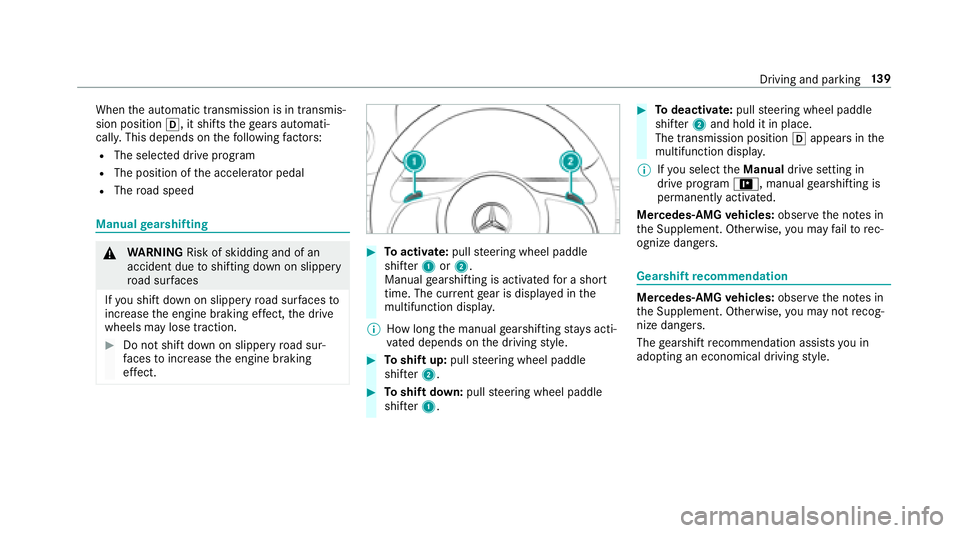
#To activate: pullsteering wheel paddle
shif ter1 or2.
Manual gearshifting is activated for a short
time. The cur rent gear is displa yed in the
multifunction displa y.
% How long the manual gearshifting stay s acti‐
va ted depends on the driving style.
#To shift up: pullsteering wheel paddle
shif ter2.
#To shift down: pullsteering wheel paddle
shif ter1.
#To deactivate: pullsteering wheel paddle
shif ter2 and hold it in place.
The transmission position happears in the
multifunction displa y.
% Ifyo u select theManual drive setting in
drive prog ram =, manual gearshifting is
permanent lyactivated.
Mercedes -AMG vehicles: observeth e no tes in
th e Supplement. Otherwise, you may failto rec‐
ognize dangers.
Gearshift recommendation
Mercedes -AMG vehicles: observeth e no tes in
th e Supplement. Otherwise, you may not recog‐
nize dangers.
The gearshift recommendation assists you in
adopting an economical driving style.
Driving and parking 13
9
Page 246 of 502

Settingthe time and da teform at
Multimedia sy stem:
,System.& Time and Date.Set
Format
#Set the date and time form at#.
Setting the time manually
Re quirement
RThe Manual Time Adjustment function is
switched on.
Multimedia sy stem:
,System.& Time and Date.Set
Time
#Set the hours.
#Na vigate totheright toset the minutes.
#Set the minutes.
#Confirm changes when exiting the menu.
The date is set automatically via GPS.
Connectivity
Switching transmission of theve hicle posi‐
tion on/off
Multimedia sy stem:
,System.ö Connectivity
#Select Transmit Vehicle Position .
#Switchthe function on Oor off ª.
Bluetooth®
Information about Blu etoo th®
Blue toot h®tech nology is a standard for short-
ra nge wi reless data transfer up toappr oximately
32.8 ft(10 m). You can use Blue tooth
®tocon‐
nect your mobile phone tothe multimedia sys‐
te m and use thefo llowing functions, forex am‐
ple:
Rhands-free sy stem with access tothefo llow‐
ing options:
-con tacts (→page 285)
-call lists (→page 288)
-text message s
RInternet connection
Rlistening tomusic via Blue tooth®audio
(→page 313)
Rtrans ferring business cards (vCards) into the
ve hicle
Blue tooth
®is a regis tere d trademark of Blue‐
toot h Special Interest Group (SIG) Inc.
% Internet connection via Blue tooth
®is not
av ailable in all countries.
Ac tivating/deactivating Blue tooth
®
Re quirementRApple CarPlay™ is not active.
Multimedia sy stem:
,System.ö Connectivity
#Activate Oor deacti vate ª Bluetoo th®.
If Android Autois active, a prom ptappears ask‐
ing whe ther Blue tooth
®should be deactivated.
#Select Yes.
Android Autois closed and Blue tooth®is
deactivated.
24 4
Multimedia sy stem
Page 388 of 502

Setting upthefo lding chock
Prepa ring theve hicle for a wheel change
Re quirementsRThe requ ired tire-change tool kit is available.
If yo ur vehicle is not equipped with the tire-
ch ange tool kit, consult a qualified specialist
wo rkshop tofind out about suitable tools.
RThe vehicle is not on a slope.
RThe vehicle is on solid, non-slippery and le vel
ground .
#Applythe electric parking brake manually.
#Mo vethe front wheels tothest ra ight-ahead
position.
#Ve hicles with automatic transmission:
shift into position j.
#Vehicles with AIR BODY CONT ROL:set the
normal vehicle le vel (→page 176).
#Switch off the engine.
#Make sure that the engine cannot bestar ted.
#Place choc ks orother suitable items under
th e front and rear of the wheel that is diago‐
nally opposite the wheel youwish tochange.
#Re mo vethe hub caps if necessary
(→page 386).
#Ra ising theve hicle (→page 387).
Re moving and in stalling hub caps
Re quirements:RThe vehicle is prepared for a wheel change
(→page 386).
Plast ic hub cap
#Toremo ve:turn the center co ver of the hub
cap counter-clockwise and remo vethe hub
cap.
#To install: make sure that the center co ver of
th e hub cap is turned counter-clockwise.
#Po sition the hub cap and turn the center
co ver clockwise until the hub cap engages
ph ysically and audibly.
386
Wheels and tires
Page 440 of 502

Displaymessages
Possible causes/consequences and MSolutions
Stop Vehicle Leave Engine
Running Wait Transmission
Cooling *T
he transmission has overheated. Pulling away can be temp orarily impaired or not possible.
#Pull over and stop theve hicle safely as soon as possible, paying attention toroad and traf fic conditions. Do not
continue driving under any circums tances.
#Lea veengine running.
#Wa it until the display message disappears before pulling away.
Auxiliary Battery Malfunc-
tion *T
he auxiliary batteryforth e transmission is no longer being charge d.
#Visit a qualified specialist workshop.
#Un tilthen, alw ays manually set the transmission toposition jbefore youswit choff the engine.
#Before leaving theve hicle, apply the electric parking brake.
Air Conditioning Malfunc-
tion See Operator's Manual *O
peration of the climate control sy stem is temp orarily restricted. Air flow and fresh air supply are set toautomatic
mode.
#Ha ve the climate control sy stem checked at a qualified specialist workshop.
438
Display messages and warning/indicator lamps
Page 467 of 502

Attention assistant
see ATTENTION ASSIST
Au dio mode
Ac tivating media mode ........................ 305
Connecting USB devices ..................... 308
Co pyright ............................................. 305
Information .......................................... 304
Inserting/ removing an SD card ...........3 05
Media searc h ....................................... 311
Overview ............................................. 307
Pa use and playback function .............. .308
Selecting a track ................................. 308
Selecting playba ckoptions .................. 308
Tr ack list .............................................. 308
Au thorized workshop
see Qualified specialist workshop
Au tomatic activation
Ac tivating/deactivating .......................2 01
Au tomatic distance control
see Active Dis tance Assist DISTRONIC
Au tomatic driving lights .........................109
Au tomatic engine start (ECO start/
sto p function) .......................................... 134 Au
tomatic front passen ger airbag
shu toff ........................................................ 43
Fu nction of the automatic front
passenger airbag shutoff ....................... 43
Au tomatic front passen ger front air
bag shu toff ................................................ 43
Au tomatic front passen ger front air‐
bag shu toff ................................................ 45
PA SSENGER AIR BAG indicator lamp .... .45
Au tomatic lateral supp ort adjustme
nt
Setting ................................................... 86
Au tomatic mir rorfo lding function
Ac tivating/deactivating ........................ 119
Au tomatic transmission
DIRECT SELECT le ver ........................... 137
Drive program display .......................... 136
Drive programs .................................... 136
DY NA MIC SELECT switch .................... 136
Engaging drive position ....................... 138
Engaging reve rsege ar ........................ .138
Kickdown ............................................. 140
Manual gearshifting ............................ .139
Selecting park position ........................ 138
Shifting toneutral ................................ 138 St
eering wheel paddle shif ters ............ 139
Tr ansmission position display .............. 137
Tr ansmission positions ........................ 137
B
BA S (Brake Assist Sy stem) .................... .151
Battery SmartK ey............................................... 59
Battery (vehicle) Charging .............................................. 350
Jump -star ting ...................................... 350
No tes .................................................. 348
Belt see Seat belts
Blind Spot Assist .....................................2 02
Ac tivating/deactivating .......................2 04
Fu nction .............................................. 202
Sy stem limitations .............................. .202
Blue tooth
®
Ac tivating/deactivating .......................2 44
Setting up an Internet connection ....... 298
Settings ............................................... 244
Switching profile (DUN/PAN) .............. 299
Index 465
Page 473 of 502

Active Steering Assist Cur rently
Un available See Operator's Manual .....4 25
Ac tive Steering Assist Inoperative .......4 26
Ad aptive Highbeam Assist Camera
Vi ew Restricted See Ope rator's Man‐
ual ....................................................... 445
Ad aptive Highbeam Assist Cur rently
Un available See Operator's Manual ....445
Ad aptive Highbeam Assist Inopera‐
tive ...................................................... 444
App lyBrake toShift from 'P' ............... 436
ÀAT TENTION ASSIST Inoperative ... 420
ÀAT TENTION ASSIS T:Take a
Break! .................................................. 420
bAu toLamp Function Inoperati ve
............................................................. 444
Au xilia ryBattery Malfunction .............. 438
Blind Spot Assist Currently Una vaila‐
ble See Opera tor's Manual .................. 423
Blind Spot Assist Inoperative ............... 423$
Check Brake Fluid Le vel.............. 414
Check Coolant Le vel See Operator's
Manual ................................................ 427
4Check Engine Oil AtNext Refu‐
eling .................................................... 429
hChe ckTire s ................................. 431
¥Check Washer Fluid .................... 443
?Coolant Too Hot Stop Vehicle
Tu rn Engine Off .................................... 427
Cruise Control Canceled ..................... 426
Cruise Contro
l Inoperati ve.................. 426
!Cur rently Una vailable See Oper‐
ator's Manual ...................................... 406
÷Cur rently Una vailable See Oper‐
ator's Manual ...................................... 408
ÂDon't Forget Your Key................ .435
Driver's Door Open & Transmission
No t in P Risk of Vehicle Rolling Away .. 436
bExample: Check Left Low Beam ............................................................. 443 _Example:
Front Left Seat Back‐
re st Not Loc ked .................................. 442
Fr ont Passenger Airbag Disabled See
Operator's Manual ...............................4 19
Fr ont Passenger Airbag Enabled See
Operator's Manual ...............................4 18
8Fu el Level Low ............................ 430
8Gas Cap Loose ............................ 429
!Inoperative See Opera tor's
Manual ................................................4 05
÷Inopera tive See Operator's
Manual ................................................ 407
TInope rative See Operator's
Manual ................................................ 409
GInope rative ................................... 414
ÂKe yNo tDe tected (red displ ay
message )............................................ .435
ÂKe yNo tDe tected (white dis‐
play message ).... ...
.............................
.434
Index 47
1
Page 474 of 502

Let fresh air intotheve hicle interior.
Air Conditioning Malf. Visit Wo rk‐
shop ....................................................4 39
Lo we ring ............................................. 426
Malfunction Drive at Max. 50 mph...... 422
bMalfunction See Operator ’s
Manual ................................................ 444
Max. Speed 22 mph............................4 26
Mercedes me connect Services Limi‐
te d See Operator's Manual ..................415
N Pe rm anently Active Risk of Rolling
Aw ay ................................................... 436
ÂObta in a NewKey........................ 43 4
ëOf f.............................................. .425
Only Shift to'P' when Vehicle is Sta‐
tionary ................................................ .436
FPa rking Brake See Opera tor's
Manual ................................................. 411
ÂPlace theKe yin the Mar ked
Space See Opera tor's Manual ............. 435 hPlease Cor
rect Tire Pressure .......430
F Please Release Parking Brake .....4 10
PRE-SAFE Inoperative See Opera‐
to r's Manual ......................................... 415
Ra dar Sensors Dirty See Operator's
Manual ................................................ .416
ÂRe placeKeyBat tery .................... 434
Re versing Not Possible Ser
vice
R
e qu ired .............................................. 437
Service Required Do Not Shift Gears
Vi sit Dealer .......................................... 437
6SRS Malfunction Service
Re quired .............................................. 417
# Start Engine See Operator's
Manual ................................................ 428
ÐSt eering Malfunction Drive
Carefully Service Required .................. 439
ÐSt eering Malfunction Inc reased
Ph ysical Ef fort See Opera tor's Man‐
ual ....................................................... 440 ÐSt
eering Malfunction Stop
Immediately See Operator's Manual ...440
St op Vehicle Lea veEngine Running
Wa itTransmission Cooling .................. 438
#St opVehicle Lea veEngine Run‐
ning ..................................................... 429
#St opVehicle See Operator's
Manual ................................................ 428
ÉSt opVehicle Vehicle Too Low ...... 421
bSwitch Off Lights .........................444
bSwitch On Headlamps .................444
Ti re Press. Monitor Cur rently
Un available .......................................... 432
Ti re Press. Monitor Inoperative ........... 433
Ti re Pressure Monitor Inoperative No
Wheel Sensors ...............
..................... 433
To De
select P or N,Dep ress Brake
and Start Engine .................................. 436
To Engage Transmiss. Position R Fir st
Dep ress the Brake .............................. .442
472
Index