2018 MERCEDES-BENZ GLS SUV sport mode
[x] Cancel search: sport modePage 7 of 398

AIRMATICpackage
ADS (Adaptive Damping System) .. .188
Function/notes .............................1 88
Alarm
ATA (Anti-Theft Alarm system) ......... 75
Switching off (ATA) .......................... 75
Switching the function on/off
(ATA) ................................................ 75
Alarm system
see ATA (Anti-Theft Alarm system)
AMG
Adaptive sport suspension sys-
tem ................................................ 191
AMG menu (on-board computer) ..... 245
Anti-lock braking system
see ABS (Anti-lock Braking System)
Anti-skid chains
see Snow chains
Anti-Theft Alarm system
see ATA (Anti-Theft Alarm system)
Approach/departure angle .............. 173
Ashtray ............................................... 311
Assistance display (on-board com-
puter) ..................................................2 41
Assistance menu (on-board com-
puter) ..................................................2 41
ASSYST PLUS
Displaying a service message ........3 29
Hiding a service message .............. 329
Resetting the service interval dis-
play ................................................ 329
Service message ............................ 329
Special service requirements ......... 330
ATA (Anti-Theft Alarm system)
Activating/deactivating ................... 75
Function ...........................................7 5
Switching off the alarm .................... 75
ATTENTION ASSIST
Activating/deactivating ................. 242
Display message ............................ 265
Function/notes ............................. 207
Audio menu (on-board computer) .... 239
Authorized Mercedes-Benz Center
see Qualified specialist workshop
Authorized workshop
see Qualified specialist workshop AUTO lights
Display message ............................ 260
see Lights
Automatic car wash (care) ............... 330
Automatic engine start (ECO start/
stop function) .................................... 145
Automatic engine switch-off (EC
O
start/stop function) .......................... 144
Automatic headlamp mode .............. 115
Automatic transmission
Accelerator pedal position ............. 150
Changing gear ............................... 150
DIRECT SELECT lever ..................... 148
Display message ............................ 275
Drive program ................................ 151
Drive program display .................... 149
Driving tips .................................... 150
DYNAMIC SELECT controller ......... 147
Emergency running mode .............. 155
Engaging drive position .................. 149
Engaging neutral ............................ 149
Engaging park position automati-
cally ............................................... 148
Engaging reverse gear ................... 148
Engaging the park position ............ 148
Important safety notes .................. 148
Kickdown ....................................... 151
Manual shifting .............................. 152
Oil temperature (on-board com-
puter, Mercedes-AMG vehicles) ..... 245
Overview ........................................ 148
Problem (malfunction) ................... 155
Pulling away ................................... 143
Starting the engine ........................ 142
Steering wheel paddle shifters ...... 152
Trailer towing ................................. 151
Transmission position display ........ 149
Transmission positions .................. 150
Automatic transmission emer-
gency mode ....................................... 155
AUX jacks
CD/DVD drive ............................... 299
Axle load, permissible (trailer tow-
ing) ...................................................... 395
B
Back button ....................................... 293
Index5
Page 23 of 398

SUV(Sport Utility Vehicle) ....................... 30
Switching air-recirculation mode
on/off .................................................1 35
Switching on media mode
Via the device list .......................... 298
T
Tachometer ........................................ 233
Tailgate
Display message ............................ 276
Emergency unlocking ....................... 88
Important safety notes .................... 84
Limiting the opening angle ............... 88
Opening dimensions ...................... 392
Opening/closing (automatically
from inside) ...................................... 87
Opening/closing (automatically
from outside) ................................... 86
Opening/closing (from outside) ....... 85
Power closing .................................. 84
Tank
see Fuel tank
Tank content
Fuel gauge ....................................... 37
Technical data
Capacities ...................................... 386
Information .................................... 384
Tires/wheels ................................. 379
Trailer loads ................................... 395
Vehicle data ................................... 392
Telephone
Accepting a call (multifunction
steering wheel) .............................. 240
Authorizing a mobile phone (con-
necting) ......................................... 296
Authorizing a mobile phone via the
device manager (connecting) ......... 297
Connecting a mobile phone
(device manager) ........................... 297
Connecting a mobile phone (gen-
eral information) ............................ 296
Display message ............................ 277
Menu (on-board computer) ............ 240
Number from the phone book ........ 240
Redialing ........................................ 240
Rejecting/ending a call ................. 240 see also Digital Operator's Man-
ual .................................................. 292
Temperature
Coolant (display in the instrument
cluster) .......................................... 234
Coolant (on-board computer,
Mercedes-AMG vehicles) ............... 245
Engine oil (on-board computer,
Mercedes-AMG vehicles) ............... 245
Outside temperature ...................... 233
Setting (climate control) ................ 132
Transmission oil (on-board com-
puter, Mercedes-AMG vehicles) ..... 245
Through-loading feature ................... 303
Timing (RACETIMER) ......................... 246
Tire pre
ssure
Calling up (on-board computer) ..... 361
Checking manually ........................ 360
Display message ............................ 273
Maximum ....................................... 360
Not reached (TIREFIT) .................... 342
Notes ............................................. 359
Reached (TIREFIT) .......................... 343
Recommended ............................... 357
Tire pressure loss warning system
General notes ................................ 360
Important safety notes .................. 361
Restarting ...................................... 361
Tire pressure monitor
Checking the tire pressure elec-
tronically ........................................ 363
Function/notes ............................. 361
General notes ................................ 361
Important safety notes .................. 362
Radio type approval for the tire
pressure monitor ........................... 364
Restarting ...................................... 364
Warning lamp ................................. 291
Warning message .......................... 363
Tire pressure table ............................ 358
TIREFIT kit
Important safety notes .................. 341
Storage location ............................ 339
Tire pressure not reached .............. 342
Tire pressure reached .................... 343
Using ............................................. 341
Tires
Aspect ratio (definition) ................. 373
Index21
Page 168 of 398
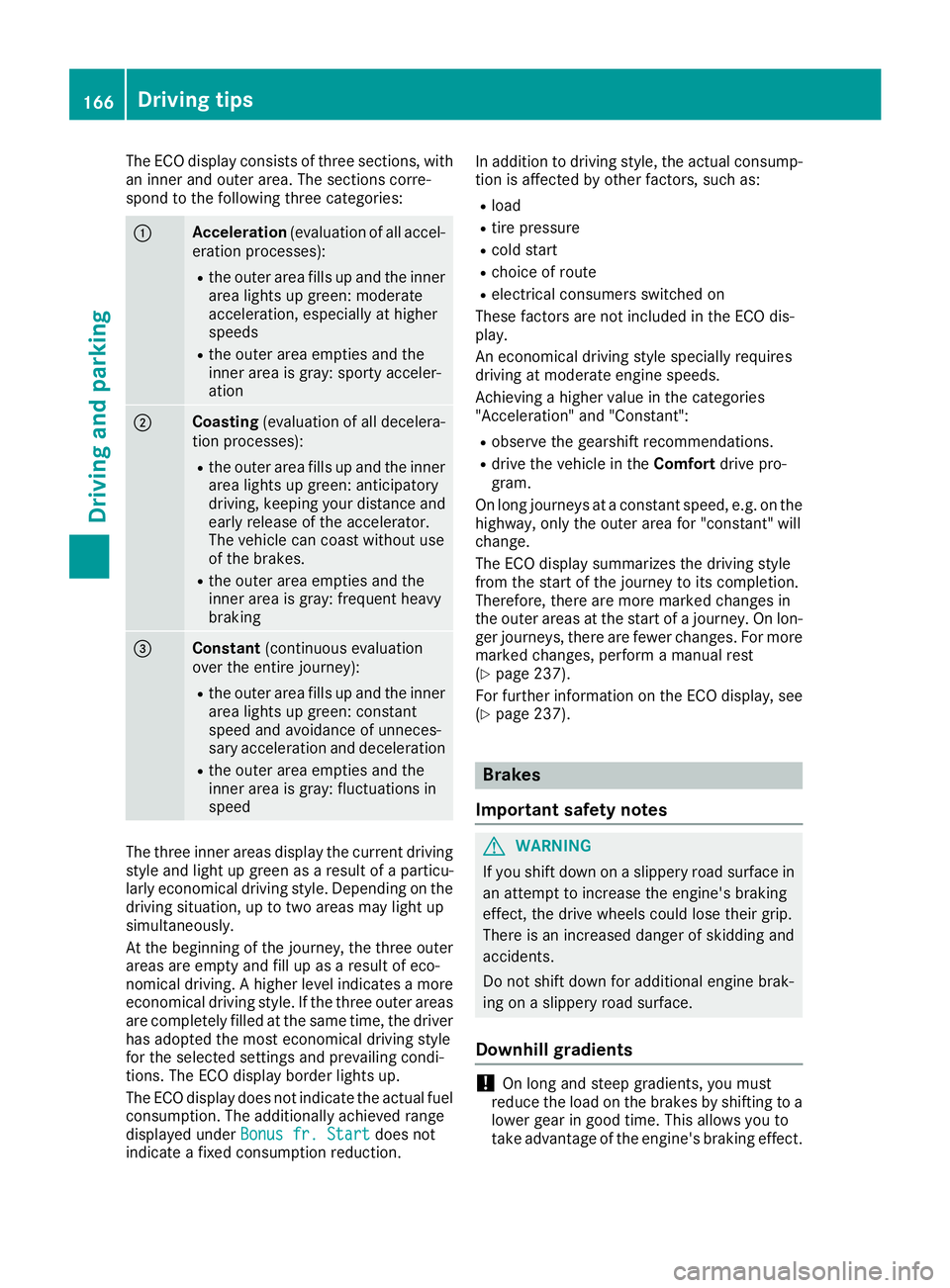
The ECO display consists of three sections, with
an inner and outer area. The sections corre-
spond to the following three categories:
:Acceleration(evaluation of all accel-
eration processes):
Rthe outer area fills up and the inner area lights up green: moderate
acceleration, especially at higher
speeds
Rthe outer area empties and the
inner area is gray: sporty acceler-
ation
;Coasting (evaluation of all decelera-
tion processes):
Rthe outer area fills up and the inner area lights up green: anticipatory
driving, keeping your distance and
early release of the accelerator.
The vehicle can coast without use
of the brakes.
Rthe outer area empties and the
inner area is gray: frequent heavy
braking
=Constant (continuous evaluation
over the entire journey):
Rthe outer area fills up and the inner area lights up green: constant
speed and avoidance of unneces-
sary acceleration and deceleration
Rthe outer area empties and the
inner area is gray: fluctuations in
speed
The three inner areas display the current driving
style and light up green as a result of a particu-
larly economical driving style. Depending on thedriving situation, up to two areas may light up
simultaneously.
At the beginning of the journey, the three outer
areas are empty and fill up as a result of eco-
nomical driving. A higher level indicates a more
economical driving style. If the three outer areas
are completely filled at the same time, the driver
has adopted the most economical driving style
for the selected settings and prevailing condi-
tions. The ECO display border lights up.
The ECO display does not indicate the actual fuel consumption. The additionally achieved range
displayed under Bonus fr. Start
does not
indicate a fixed consumption reduction. In addition to driving style, the actual consump-
tion is affected by other factors, such as:
Rload
Rtire pressure
Rcold start
Rchoice of route
Relectrical consumers switched on
These factors are not included in the ECO dis-
play.
An economical driving style specially requires
driving at moderate engine speeds.
Achieving a higher value in the categories
"Acceleration" and "Constant":
Robserve the gearshift recommendations.
Rdrive the vehicle in the Comfortdrive pro-
gram.
On long journeys at a constant speed, e.g. on the
highway, only the outer area for "constant" will
change.
The ECO display summarizes the driving style
from the start of the journey to its completion.
Therefore, there are more marked changes in
the outer areas at the start of a journey. On lon- ger journeys, there are fewer changes. For more
marked changes, perform a manual rest
(
Ypage 237).
For further information on the ECO display, see
(
Ypage 237).
Brakes
Important safety notes
GWARNING
If you shift down on a slippery road surface in an attempt to increase the engine's braking
effect, the drive wheels could lose their grip.
There is an increased danger of skidding and
accidents.
Do not shift down for additional engine brak-
ing on a slippery road surface.
Downhill gradients
!On long and steep gradients, you must
reduce the load on the brakes by shifting to a
lower gear in good time. This allows you to
take advantage of the engine's braking effect.
166Driving tips
Driving and parking
Page 190 of 398
When the HOLD function is activated, the trans-
mission is automatically shifted to positionj
if:
Rthe driver's door is open and the driver's seat
belt is unfastened
Rthe engine is switched off, unless it is auto-
matically switched off by the ECO start/stop
function
The electric parking brake secures the vehicle
automatically if the HOLD function is activated
when the vehicle is stationary and:
Ra system malfunction occurs
Rthe power supply is insufficient
On steep uphill or downhill gradients or if there
is a malfunction, the transmission may also be
automatically shifted to position j.
AIRMATIC package
General notes
AIRMATIC is an air suspension system with var-
iable damping for improved driving comfort.
Level control ensures the best possible suspen-
sion and constant ground clearance, even with a
laden vehicle. When you drive fast, the vehicle is
lowered automatically to improve driving safety
and to reduce fuel consumption. There is also
the option to manually adjust the vehicle level.
AIRMATIC consists of:
Rlevel settings
Rlevel control and
RADS or ADS PLUS (Adaptive Damping Sys-
tem)
All vehicles (except Mercedes-AMG vehi-
cles): your vehicle may also be equipped with
the ACTIVE CURVE SYSTEM (
Ypage 189).
Mercedes-AMG vehicles: your vehicle is equip-
ped with the ACTIVE CURVE SYSTEM
(
Ypage 189).
Observe the notes on driving with a trailer
(
Ypage 225).
The vehicle level can be set using the DYNAMIC
SELECT controller (
Ypage 147) or the level but-
ton (Ypage 190). The setting always corre-
sponds to the last selected function.
Important safety notes
GWARNING
When the vehicle is being lowered, people
could become trapped if their limbs are
between the vehicle body and the wheels or
underneath the vehicle. There is a risk of
injury.
Make sure no one is underneath the vehicle or
in the immediate vicinity of the wheel arches
when the vehicle is being lowered.
If you unlock the vehicle or open a door, the
vehicle begins to compensate for load discrep-
ancies while still parked. However, for signifi-
cant level changes, such as after the vehicle has
been stationary for a long period, the engine
must be on. For safety reasons, the vehicle is
only lowered when the doors are closed. Low-
ering is interrupted if a door is opened, and it
continues once the door has been closed.
ADS and ADS PLUS (Adaptive Damping
System)
General notes
The Adaptive Damping System automatically
controls the calibration of the dampers. The
damping characteristics adapt to the current
operating and driving situation.
The damping is tuned individually to each wheel
and depends on:
Ryour driving style, e.g. sporty
Rthe road surface conditions
Rthe drive program selected
Rthe vehicle level setting
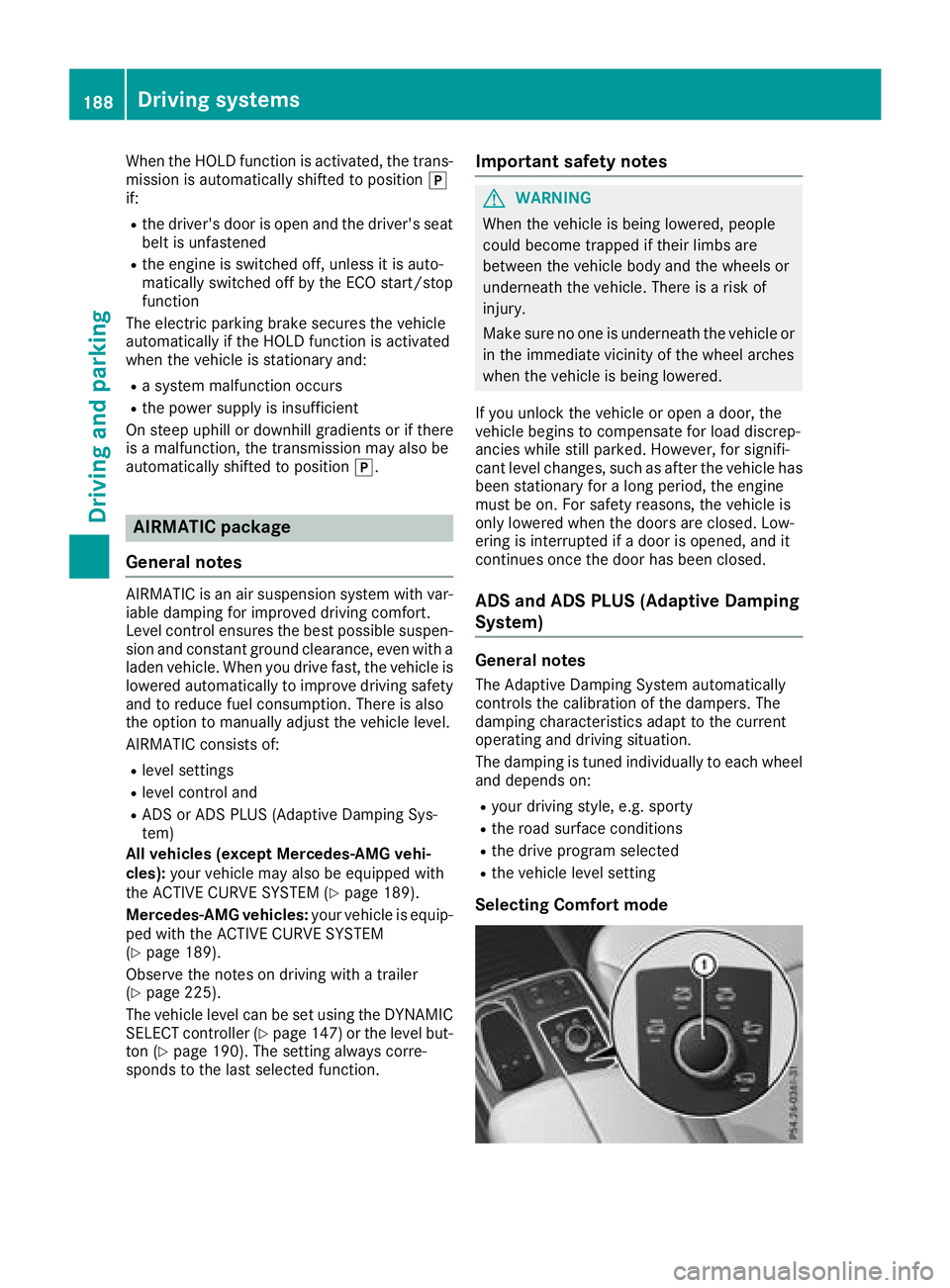
Selecting Comfort mode
188Driving systems
Driving and parking
Page 191 of 398
In theComfort drive program, the driving char-
acteristics of your vehicle are more comforta-
ble. Therefore, select this mode if you favor a
more comfortable driving style. Also select the
Comfort drive program when driving fast on
straight roads, e.g. on straight stretches of high-
way.
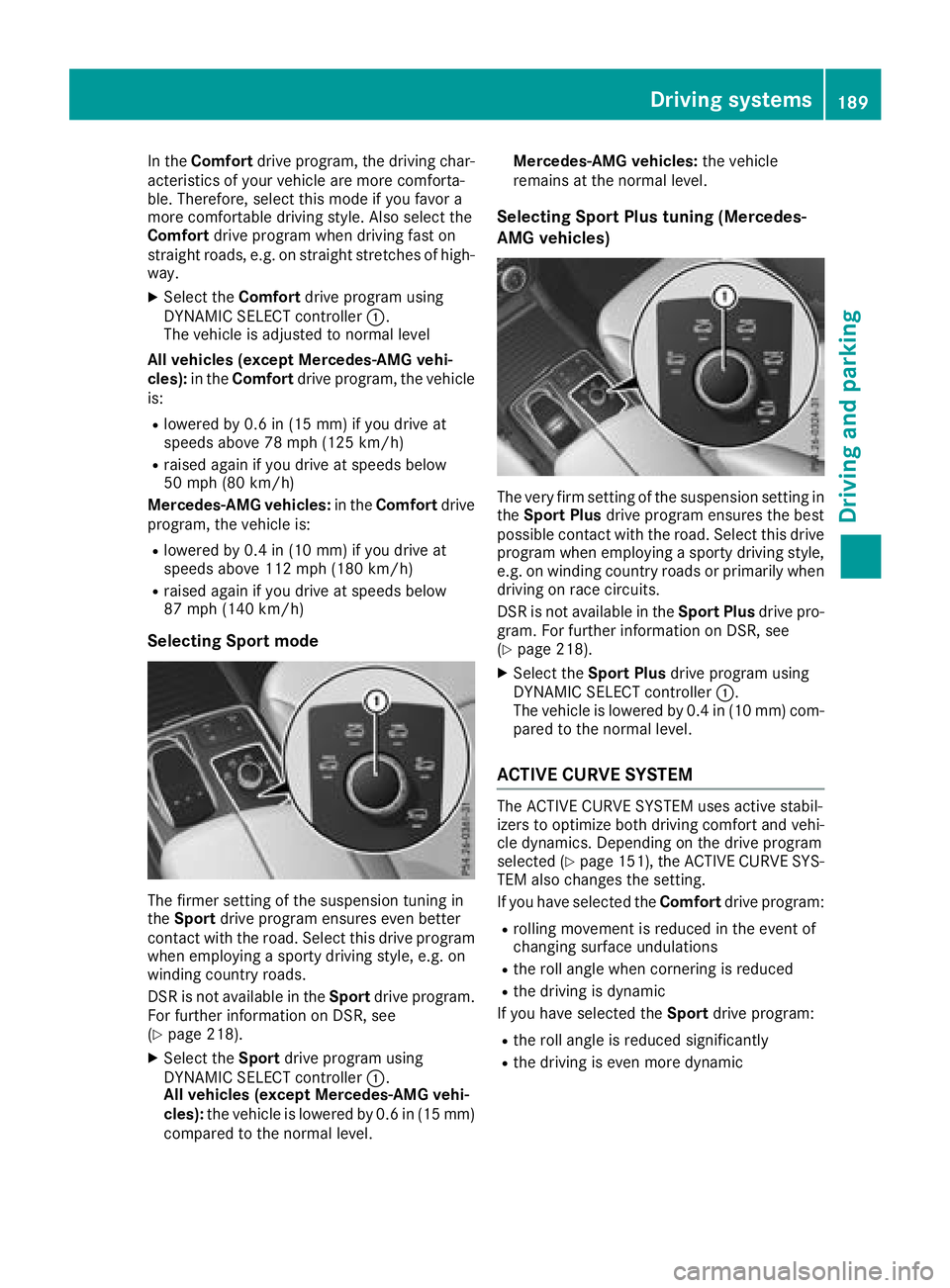
XSelect the Comfortdrive program using
DYNAMIC SELECT controller :.
The vehicle is adjusted to normal level
All vehicles (except Mercedes-AMG vehi-
cles): in theComfort drive program, the vehicle
is:
Rlowered by 0.6 in (15 mm) if you drive at
speeds above 78 mph (125 km/h)
Rraised again if you drive at speeds below
50 mph (80 km/h)
Mercedes-AMG vehicles: in theComfort drive
program, the vehicle is:
Rlowered by 0.4 in (10 mm) if you drive at
speeds above 112 mph (180 km/h)
Rraised again if you drive at speeds below
87 mph (140 km/h)
Selecting Sport mode
The firmer setting of the suspension tuning in
the Sport drive program ensures even better
contact with the road. Select this drive program
when employing a sporty driving style, e.g. on
winding country roads.
DSR is not available in the Sportdrive program.
For further information on DSR, see
(
Ypage 218).
XSelect the Sportdrive program using
DYNAMIC SELECT controller :.
All vehicles (except Mercedes-AMG vehi-
cles): the vehicle is lowered by 0.6 in (15 mm)
compared to the normal level. Mercedes-AMG vehicles:
the vehicle
remains at the normal level.
Selecting Sport Plus tuning (Mercedes-
AMG vehicles)
The very firm setting of the suspension setting in
the Sport Plus drive program ensures the best
possible contact with the road. Select this drive
program when employing a sporty driving style, e.g. on winding country roads or primarily when
driving on race circuits.
DSR is not available in the Sport Plusdrive pro-
gram. For further information on DSR, see
(
Ypage 218).
XSelect the Sport Plus drive program using
DYNAMIC SELECT controller :.
The vehicle is lowered by 0.4 in (10 mm) com-
pared to the normal level.
ACTIVE CURVE SYSTEM
The ACTIVE CURVE SYSTEM uses active stabil-
izers to optimize both driving comfort and vehi-
cle dynamics. Depending on the drive program
selected (
Ypage 151), the ACTIVE CURVE SYS-
TEM also changes the setting.
If you have selected the Comfortdrive program:
Rrolling movement is reduced in the event of
changing surface undulations
Rthe roll angle when cornering is reduced
Rthe driving is dynamic
If you have selected the Sportdrive program:
Rthe roll angle is reduced significantly
Rthe driving is even more dynamic
Driving systems189
Driving and parking
Z
Page 193 of 398
Vehicles with a trailer coupled:below a speed
of 19 mph (30 km/h), you can choose between
the normal and raised vehicle level.
Setting the raised vehicle level
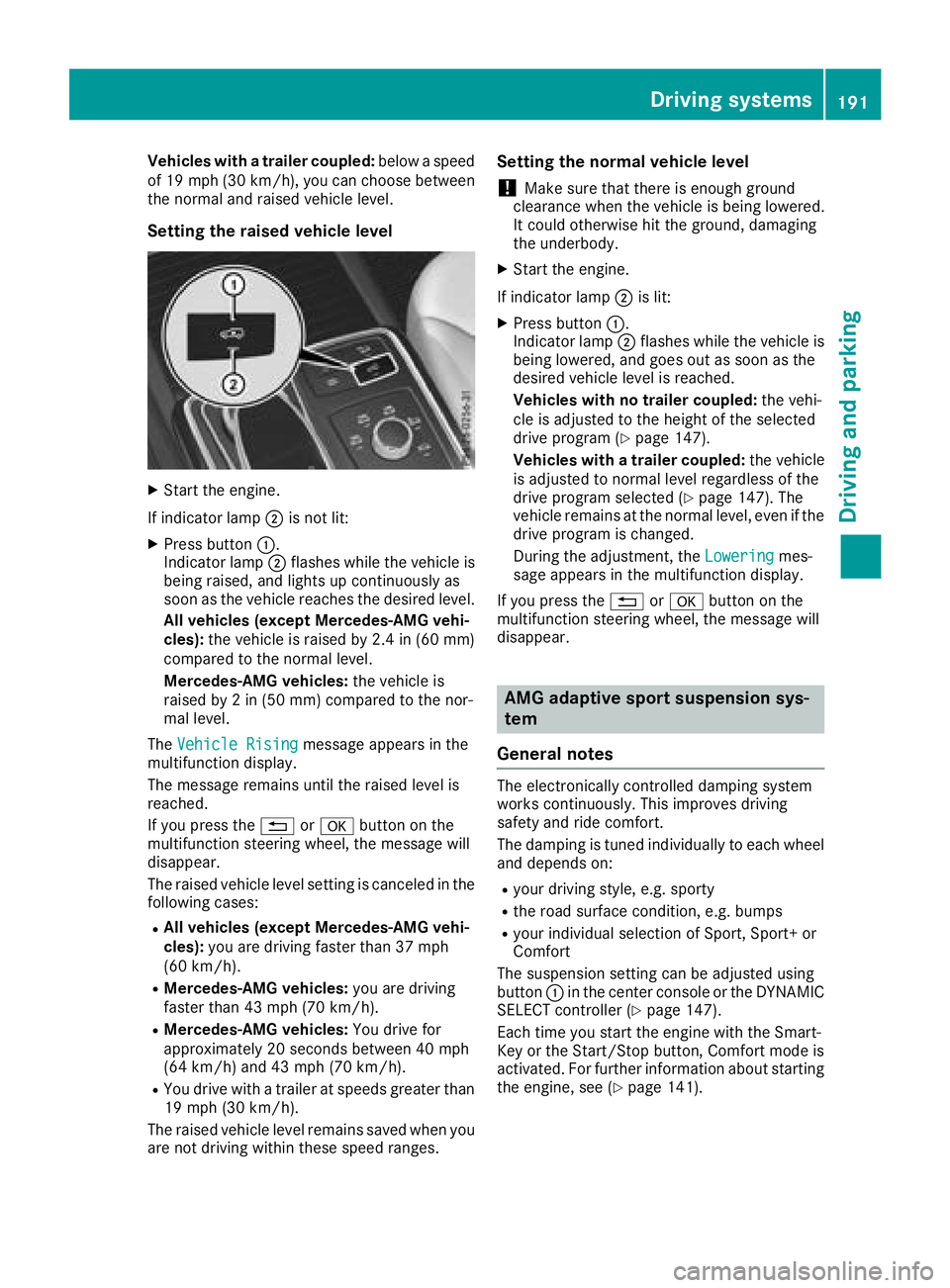
XStart the engine.
If indicator lamp ;is not lit:
XPress button :.
Indicator lamp ;flashes while the vehicle is
being raised, and lights up continuously as
soon as the vehicle reaches the desired level.
All vehicles (except Mercedes-AMG vehi-
cles): the vehicle is raised by 2.4 in (60 mm)
compared to the normal level.
Mercedes-AMG vehicles: the vehicle is
raised by 2 in (50 mm) compared to the nor-
mal level.
The Vehicle Rising
message appears in the
multifunction display.
The message remains until the raised level is
reached.
If you press the %ora button on the
multifunction steering wheel, the message will
disappear.
The raised vehicle level setting is canceled in the
following cases:
RAll vehicles (except Mercedes-AMG vehi-
cles): you are driving faster than 37 mph
(60 km/h).
RMercedes-AMG vehicles: you are driving
faster than 43 mph (70 km/h).
RMercedes-AMG vehicles: You drive for
approximately 20 seconds between 40 mph
(64 km/h) and 43 mph (70 km/h).
RYou drive with a trailer at speeds greater than
19 mph (30 km/h).
The raised vehicle level remains saved when you
are not driving within these speed ranges.
Setting the normal vehicle level
!Make sure that there is enough ground
clearance when the vehicle is being lowered.
It could otherwise hit the ground, damaging
the underbody.
XStart the engine.
If indicator lamp ;is lit:
XPress button :.
Indicator lamp ;flashes while the vehicle is
being lowered, and goes out as soon as the
desired vehicle level is reached.
Vehicles with no trailer coupled: the vehi-
cle is adjusted to the height of the selected
drive program (
Ypage 147).
Vehicles with a trailer coupled: the ve
hicle
is adjusted to normal level regardless of the
drive program selected (
Ypage 147). The
vehicle remains at the normal level, even if the
drive program is changed.
During the adjustment, the Lowering
mes-
sage appears in the multifunction display.
If you press the %ora button on the
multifunction steering wheel, the message will
disappear.
AMG adaptive sport suspension sys-
tem
General notes
The electronically controlled damping system
works continuously. This improves driving
safety and ride comfort.
The damping is tuned individually to each wheel
and depends on:
Ryour driving style, e.g. sporty
Rthe road surface condition, e.g. bumps
Ryour individual selection of Sport, Sport+ or
Comfort
The suspension setting can be adjusted using
button :in the center console or the DYNAMIC
SELECT controller (
Ypage 147).
Each time you start the engine with the Smart-
Key or the Start/Stop button, Comfort mode is
activated. For further information about starting
the engine, see (
Ypage 141).
Driving systems191
Driving and parking
Z
Page 194 of 398

Sport mode
The firmer setting of the suspension tuning in
Sport mode ensures even better contact with
the road. Select this mode when employing a
sporty driving style, e.g. on winding country
roads.
XPress button:repeatedly until indicator
lamp =lights up.
You have selected Sport mode.
The AMG Suspension System SPORT
mes-
sage appears in the multifunction display.
Sport + mode
The very firm setting of the suspension setting in
Sport + mode ensures the best possible contact
with the road. Select this mode only when driv-
ing on race circuits.
If indicator lamps ;and =are off:
XPress button :repeatedly until indicator
lamp ;lights up.
You have selected Sport + mode.
The AMG
SuspensionSystemSPORT +mes-
sage appears in the multifunction display.
In "Sport +" mode, the vehicle is lowered by
10 mm compared to the normal level.
Comfort mode
In Comfort mode, the driving characteristics of
your vehicle are more comfortable. Select this
mode if you favor a more comfortable driving
style, but also when driving fast on straight
roads, e.g. highways.
XPress button :repeatedly until indicator
lamps ;and =go out.
You have selected Comfort mode.
The AMG
SuspensionSystemCOMFORTmes-
sage appears in the multifunction display.
Parking Assist PARKTRONIC
Important safety notes
Parking Assist PARKTRONIC is an electronic
parking aid with ultrasound. It monitors the area
around your vehicle using six sensors in the
front bumper and six sensors in the rear
bumper. Parking Assist PARKTRONIC visually
and audibly indicates the distance between your
vehicle and an object.
Parking Assist PARKTRONIC is only an aid. It is
not a replacement for your attention to your
immediate surroundings. You are always
responsible for safe maneuvering, parking and
exiting a parking space. When maneuvering,
parking or pulling out of a parking space, make
sure that there are no persons, animals or
objects in the area in which you are maneuver-
ing.
!When parking, pay particular attention to
objects above or below the sensors, such as
flower pots or trailer drawbars. PARKTRONIC
does not detect such objects when they are in
the immediate vicinity of the vehicle. You
could damage the vehicle or the objects.
The sensors may not detect snow and other
objects that absorb ultrasonic waves.
Ultrasonic sources such as an automatic car
wash, the compressed-air brakes on a truck
or a pneumatic drill could cause PARKTRONIC
to malfunction.
PARKTRONIC may not function correctly on
uneven terrain.
!Fold in the ball coupling if the trailer tow
hitch is not required. PARKTRONIC measures
the minimum detection range to an obstacle
from the bumper, not the ball coupling.
Parking Assist PARKTRONIC is deactivated for
the rear area when you establish an electrical
connection between your vehicle and a trailer.
Parking Assist PARKTRONIC is activated auto-
matically when you:
Rswitch on the ignition
Rshift the transmission to position D,Ror N
Rrelease the electric parking brake
Parking Assist PARKTRONIC is deactivated at
speeds above 11 mph (18 km/h). It is reactiva-
ted at lower speeds.
192Driving systems
Driving and parking
Page 209 of 398
iYou can also select the camera setting in the
exterior mirrors for the rear-facing view.
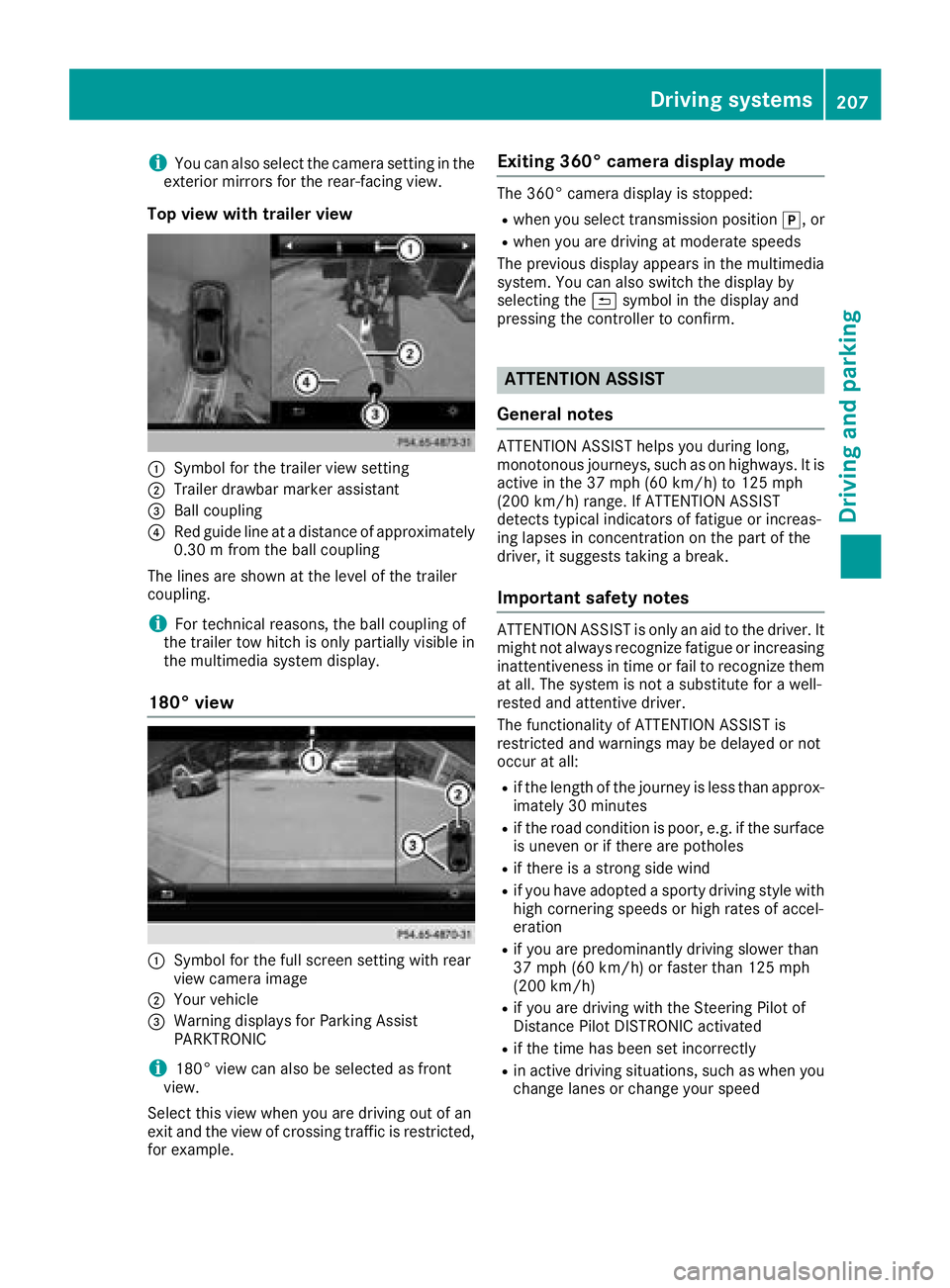
Top view with trailer view
:Symbol for the trailer view setting
;Trailer drawbar marker assistant
=Ball coupling
?Red guide line at a distance of approximately
0.30 m from the ball coupling
The lines are shown at the level of the trailer
coupling.
iFor technical reasons, the ball coupling of
the trailer tow hitch is only partially visible in
the multimedia system display.
180° view
:Symbol for the full screen setting with rear
view camera image
;Your vehicle
=Warning displays for Parking Assist
PARKTRONIC
i180° view can also be selected as front
view.
Select this view when you are driving out of an
exit and the view of crossing traffic is restricted,
for example.
Exiting 360° camera display mode
The 360° camera display is stopped:
Rwhen you select transmission position j, or
Rwhen you are driving at moderate speeds
The previous display appears in the multimedia
system. You can also switch the display by
selecting the &symbol in the display and
pressing the controller to confirm.
ATTENTION ASSIST
General notes
ATTENTION ASSIST helps you during long,
monotonous journeys, such as on highways. It is
active in the 37 mph (60 km/h) to 125 mph
(200 km/h) range. If ATTENTION ASSIST
detects typical indicators of fatigue or increas-
ing lapses in concentration on the part of the
driver, it suggests taking a break.
Important safety notes
ATTENTION ASSIST is only an aid to the driver. It
might not always recognize fatigue or increasing inattentiveness in time or fail to recognize them
at all. The system is not a substitute for a well-
rested and attentive driver.
The functionality of ATTENTION ASSIST is
restricted and warnings may be delayed or not
occur at all:
Rif the length of the journey is less than approx-
imately 30 minutes
Rif the road condition is poor, e.g. if the surface
is uneven or if there are potholes
Rif there is a strong side wind
Rif you have adopted a sporty driving style with
high cornering speeds or high rates of accel-
eration
Rif you are predominantly driving slower than
37 mph (60 km/h) or faster than 125 mph
(200 km/h)
Rif you are driving with the Steering Pilot of
Distance Pilot DISTRONIC activated
Rif the time has been set incorrectly
Rin active driving situations, such as when you
change lanes or change your speed
Driving systems207
Driving and parking
Z