2018 MERCEDES-BENZ GLS SUV key battery
[x] Cancel search: key batteryPage 8 of 398
Bag hook............................................ 305
Ball coupling
Installing ........................................ 226
Removing ....................................... 229
BAS (Brake Assist System) ................. 67
Battery (SmartKey)
Checking .......................................... 80
Important safety notes .................... 80
Replacing ......................................... 80
Battery (vehicle)
Charging ........................................ 346
Display message ............................ 262
Important safety notes .................. 344
Jump starting ................................. 346
Overview ........................................ 344
Belt
see Seat belts
Belt warning ......................................... 48
Bicycle rack ....................................... 230
Blind Spot Assist
Activating/deactivating ................. 242
Display message ............................ 269
Notes/function .............................. 209
Trailer towing ................................. 211
see Active Blind Spot Assist
BlueTEC
Adding DEF .................................... 158
BlueTEC (DEF) .................................... 389
Bluetooth
®
Searching for a mobile phone ........ 296
Searching for a mobile phone
(device manager) ........................... 297
see also Digital Operator's Man-
ual .................................................. 292
Telephony ...................................... 296
Brake Assist
see BAS (Brake Assist System)
Brake fluid
Display message ............................ 254
Notes ............................................. 390
Brake force distribution
see EBD (electronic brake force
distribution)
Brake lamps
Display message ............................ 260
Brake linings
Display message ............................ 254 Brakes
ABS .................................................. 66
BAS .................................................. 67
Brake fluid (notes) ......................... 390
Braking assistance appropriate to
the situation ..................................... 69
Display message ............................ 249
High-performance brake system .... 168
Hill start assist ............................... 143
Important safety notes .................. 166
Maintenance .................................. 167
Parking brake ................................ 162
Riding tips ...................................... 166
Warning lamp ................................. 281
Braking assistance appropriate to
the situation
Function/notes ................................ 69
Breakdo
wn
Where will I find...? ........................ 338
see Flat tire
see Towing away
Brightness control (instrument
cluster lighting) ................................... 37
Bulbs
see Replacing bulbs
C
CaliforniaImportant notice for retail cus-
tomers and lessees .......................... 28
Calling up a malfunction
see Display messages
Car
see Vehicle
Care
360° camera ................................. 334
Car wash ........................................ 330
Carpets .......................................... 337
Display ........................................... 335
Exhaust pipe .................................. 334
Exterior lights ................................ 333
Gear or selector lever .................... 336
Interior ........................................... 335
Matte finish ................................... 332
Notes ............................................. 330
Paint .............................................. 332
Plastic trim .................................... 335
6Index
Page 22 of 398

Opening/closing .............................. 93
Problem (malfunction) ..................... 96
Resetting ......................................... 94
see Panorama roof with power
tilt/sliding panel
SmartKey
Changing the battery ....................... 80
Changing the programming .............7 9
Checking the battery ...................... .80
Convenience closing feature ............ 91
Convenience opening feature .......... 90
Dis play message ............................ 278
Door central locking/unlocking ...... .77
Important safety notes .................... 77
KEYLESS-GO start function .............. 79
Loss .................................................8 1
Mechanical key ................................ 79
Overview .......................................... 77
Positions (ignition lock) ................. 140
Problem (malfunction) ..................... 81
Starting the engine ........................ 142
Smartphone
Starting the engine ........................ 142
SMS
see also Digital Operator's Man-
ual .................................................. 292
Snow chains
Information .................................... 356
Sockets
Center console .............................. 312
General notes ................................ 312
Luggage compartment ...................3 13
Rear compartment ......................... 312
Sound
Switching on/off ........................... 293
Special seat belt retractor .................. 60
Specialist workshop ............................ 31
Speed, controlling
see Cruise control
Speedometer
Digital ............................................ 237
In the Instru
ment cluster ................. 37
Segments ...................................... 233
Selecting the display unit ...............2 43
Standing lamps
Display message ............................ 260
Switching on/off ........................... 116 Start/Stop button
Starting the engine ........................ 142
Start/stop function
see ECO start/stop function
Starting (engine) ................................ 141
STEER CONTROL .................................. 75
Steering
Display message ............................ 277
Steering Pilot
Activating/deactivating ................. 241
Display message ............................ 271
Steering wheel
Adjusting (electrically) ................... 109
Adjusting (manually) ...................... 108
Button overview ............................... 38
Buttons (on-board computer) ......... 234
Cleaning ......................................... 336
Important safety notes .................. 108
Steering wheel heating .................. 109
Storing settings (memory func-
tion) ............................................... 113
Steering wheel heating
Problem (malfunction) ................... 109
Switching on/off ........................... 109
Steering wheel paddle shifters ........ 152
Stopwatch (RACETIMER) ................... 246
Stowage areas ................................... 300
Stowage compartments
Armrest (under) ............................. 301
Center console .............................. 302
Center console (rear) ..................... 302
Cup holders ................................... 308
Eyeglasses compartment ............... 302
Glove box ....................................... 301
Important safety information ......... 300
Stowage net ................................... 302
Stowage net ....................................... 302
Summer tires
In winter ........................................ 356
Sun visor ............................................ 310
Suspension setting
AIRMATIC ...................................... 188
AMG adaptive sport suspension
system ........................................... 191
Suspension tuning
SETUP (on-board computer,
Mercedes-AMG vehicles) ............... 246
20Index
Page 26 of 398

Parking .......................................... 161
Parking for a long period ................164
Pulling away ................................... 143
Raising ...........................................3 76
Reporting problems ......................... 31
Securing from rolling away ............ 375
Towing away .................................. 349
Transporting .................................. 351
Unlocking (in an emergency) ........... 84
Unlocking (SmartKey) ......................7 7
Vehicle data ................................... 392
Vehicle battery
see Battery (vehicle)
Vehicle data ....................................... 392
Vehicle data (off-road driving)
Approach/departure angle ............ 394
Fording depth ................................ 393
Maximum gradient climbing abil-
ity .................................................. 394
Vehicle dimensions ........................... 392
Vehicle emergency locking ................ 84
Vehicle identification number
see VIN
Vehicle identification plate .............. 385
Vehicle level
AIRMATIC ...................................... 190
Vehicle level (display message) ....... 265
Vehicle tool kit .................................. 339
Video
Operating the DVD .........................2 39
see also Digital Operator's Man-
ual ..................................................2 92
VIN ...................................................... 385
Seat ............................................... 386
Type plate ...................................... 385
W
Warning and indicator lamps ABS ................................................ 282
Brakes ...........................................2 81
Coolant .......................................... 288
Distance Pilot DISTRONIC ............. 290
Distance warning ........................... 290
Engine diagnostics ......................... 288
ESP
®.............................................. 284
ESP®OFF ....................................... 285
Fuel tank ........................................ 288 Overview .......................................... 37
Parking brake ................................ 287
PASSENGER AIR BAG ...................... 45
Reserve fuel ................................... 288
Restraint system ............................ 287
Seat belt ........................................ 280
Tire pressure monitor .................... 291
Warranty .............................................. 28
Washer fluid
Display message ............................ 278
Weather display (COMAND)
see also Digital Operator's Man-
ual .................................................. 292
Wheel and tire combinations
Tires ............................................... 379
Wheel bolt tightening torque ........... 378
Wheel chock ...................................... 375
Wheels
Changing a wheel .......................... 374
Checking ........................................ 354
Cleaning ......................................... 333
Emergency spare wheel ................. 380
Important safety notes .................. 354
Information on driving .................... 354
Interchanging/changing ................ 374
Mounting a new wheel ................... 377
Mounting a wheel .......................... 375
Overview ........................................ 354
Removing a wheel .......................... 377
Snow chains .................................. 356
Storing ........................................... 375
Tightening torque ........................... 378
Wheel size/tire size ....................... 379
Window curtain air bag
Display message ............................ 257
Operation ......................................... 51
Windows
see Side windows
Windshield
Defrosting ...................................... 133
Infrared reflective .......................... 324
Windshield washer fluid
see Windshield washer system
Windshield washer system
Adding washer fluid ....................... 329
Important safety notes .................. 391
Windshield wipers
Problem (malfunction) ................... 124
24Index
Page 77 of 398

The braking application of Active Brake Assist
with cross-traffic function is ended automati-
cally if:
Ryou maneuver to avoid the obstacle
Rthere is no longer a risk of collision
Rthere is no longer an obstacle detected in
front of your vehicle
STEER CONTROL
General information
STEER CONTROL helps you by transmitting a
noticeable steering force to the steering wheel
in the direction required for vehicle stabilization.
This steering assistance is provided in particular
if:
Rboth right wheels or both left wheels are on a wet or slippery road surface when you brake
Rthe vehicle starts to skid
Important safety notes
iObserve the "Important safety notes" sec-
tion (Ypage 66).
No steering assistance is provided from STEER
CONTROL, if:
RESP®is deactivated
RESP®is malfunctioning
Rthe steering is malfunctioning
If ESP®is malfunctioning, you will be assisted
further by the electrical power steering.
Protection against theft
Immobilizer
XTo activate with the SmartKey: remove the
SmartKey from the ignition lock.
XTo activate with KEYLESS-GO: switch the
ignition off and open the driver's door.
XTo deactivate: switch on the ignition.
The immobilizer prevents your vehicle from
being started without the correct SmartKey.
When leaving the vehicle, always take the
SmartKey with you and lock the vehicle. Anyone
can start the engine if a valid SmartKey has been
left inside the vehicle.
iThe immobilizer is always deactivated when
you start the engine.
In the event that the engine cannot be started
(yet the vehicle's battery is charged), the sys-
tem is not operational. Contact an authorized
Mercedes-Benz Center or call
1-800 FOR-MERCEDES (in the USA) or
1-800-387-0100 (in Canada).
ATA (anti-theft alarm system)
XTo arm: lock the vehicle with the SmartKey or
KEYLESS-GO.
Indicator lamp :flashes. The alarm system
is armed after approximately 15 seconds.
XTo switch off using the SmartKey: unlock
the vehicle with the SmartKey.
or
XInsert the SmartKey into the ignition lock.
XTo switch off using KEYLESS-GO: unlock
the vehicle with KEYLESS-GO.
or
XPress the Start/Stop button on the dash-
board. The SmartKey must be inside the vehi- cle.
A visual and audible alarm is triggered if the
alarm system is armed and you open:
Ra door
Rthe vehicle with the mechanical key
Rthe tailgate
Rthe hood
Protection against theft75
Safety
Z
Page 80 of 398
If activated in the multimedia system, the loca-
tor lighting also lights up in the dark (see the
Digital Operator's Manual).
XTo open the tailgate automatically from
outside the vehicle:press and hold theF
button until the tailgate opens.
Vehicles with KEYLESS-GO:
XTo close the tailgate automatically from
outside the vehicle: if the SmartKey is loca-
ted in the immediate vicinity of the vehicle,
press the Fbutton on the SmartKey.
When the tailgate closes you can then release
the button.
KEYLESS-GO
General notes
Bear in mind that the engine can be started by
any of the vehicle occupants if there is a KEY-
LESS-GO key in the vehicle (
Ypage 142).
Locking/unlocking centrally
You can start, lock or unlock the vehicle using
KEYLESS-GO. To do this, you only need carry the
SmartKey with you. You can combine the func-
tions of KEYLESS-GO with those of a conven-
tional SmartKey. Unlock the vehicle by using
KEYLESS-GO, for instance, and lock it using the
& button on the SmartKey.
The driver's door and the door at which the han-
dle is used, must both be closed. The SmartKey
must be outside the vehicle. When locking or
unlocking with KEYLESS-GO, the distance
between the SmartKey and the corresponding
door handle must not be greater than 3 ft (1 m).
KEYLESS-GO checks whether a valid SmartKey
is in the vehicle by periodically establishing a
radio connection between the vehicle and the
SmartKey. This happens:
Rwhen starting the engine
Rwhile driving
Rwhen the external door handles are touched
Rduring convenience closing
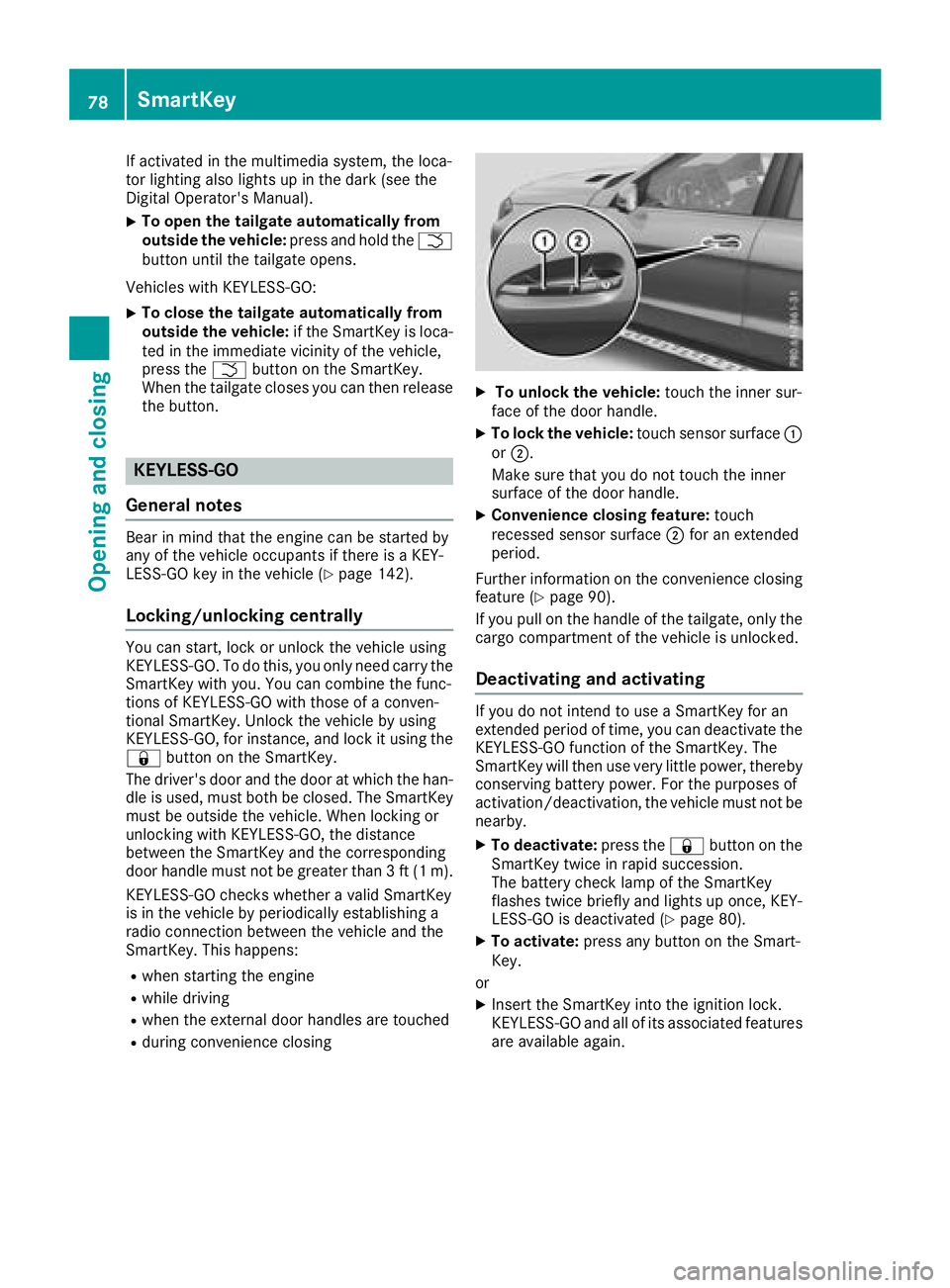
XTo unlock the vehicle: touch the inner sur-
face of the door handle.
XTo lock the vehicle: touch sensor surface :
or ;.
Make sure that you do not touch the inner
surface of the door handle.
XConvenience closing feature: touch
recessed sensor surface ;for an extended
period.
Further information on the convenience closing
feature (
Ypage 90).
If you pull on the handle of the tailgate, only the cargo compartment of the vehicle is unlocked.
Deactivating and activating
If you do not intend to use a SmartKey for an
extended period of time, you can deactivate the
KEYLESS-GO function of the SmartKey. The
SmartKey will then use very little power, thereby
conserving battery power. For the purposes of
activation/deactivation, the vehicle must not be
nearby.
XTo deactivate: press the&button on the
SmartKey twice in rapid succession.
The battery check lamp of the SmartKey
flashes twice briefly and lights up once, KEY-
LESS-GO is deactivated (
Ypage 80).
XTo activate: press any button on the Smart-
Key.
or
XInsert the SmartKey into the ignition lock.
KEYLESS-GO and all of its associated features
are available again.
78SmartKey
Opening and closing
Page 81 of 398
KEYLESS-GOstart function
Gene ral notes
Bear in min dthat th eengin ecan be started by
any of th evehicl eoccupant sif there is aSmart -
Key in th evehicl e (
Ypage 142).
Changing the settings ofthe locking
system
You can chang eth esetting sof th elocking sys-
tem. This mean sthat only th edriver's door and
th efuel filler flap are unlocke dwhen th evehicl e
is unlocked. This is useful if you frequentl ytravel
alone.
XTo change th esetting: press and hold down
th e% and& buttons simultaneousl y
for about six seconds until th ebattery indica-
to rlamp flashes twice (
Ypage 80).
If th esetting of th elocking system is changed
within th esignal range of th evehicle, pressing
th e& or% button:
Rlocks or
Runlocks th evehicl e
The SmartKey no wfunction sas follows :
XTo unlock: press the% buttononce .
XTo unlock centrally: press the% button
twice .
XTo lock centrally: press the& button.
The KEYLESS-GO function is changed as fol -
lows :
XTo unlock th edriver's door :touch th einner
surfac eof th edoor handle on th edriver's
door .
XTo unlock centrally: touch theinner surfac e
of th edoor handle on th efront-passenger
door or th erear door .
XTo lock centrally: touch theouter sensor
surfac eon on eof th edoor handles
(
Ypage 78) .
XTo restor eth efactory settings: press and
hold down th e% and& buttons simul-
taneously for approximately six seconds until
th ebattery chec klamp flashes twice
(
Ypage 80) .
Mechanical key
Gene ral notes
If th evehicl ecan no longer be locke dor
unlocke dwit hth eSmartKey or wit hKEYLESS -
GO, use th emechanical key.
If you use th emechanical ke yto unloc kand
open th edriver's door ,th eanti-thef talarm sys-
te m will be triggered .Switc hoff th ealarm
(
Ypage 75) .
If you unloc kth evehicl eusin gth emechanical
key, th efuel filler flap will no tbe unlocke dauto -
matically.
XTo unlock th efuel filler flap: insert the
SmartKey int oth eignition lock.
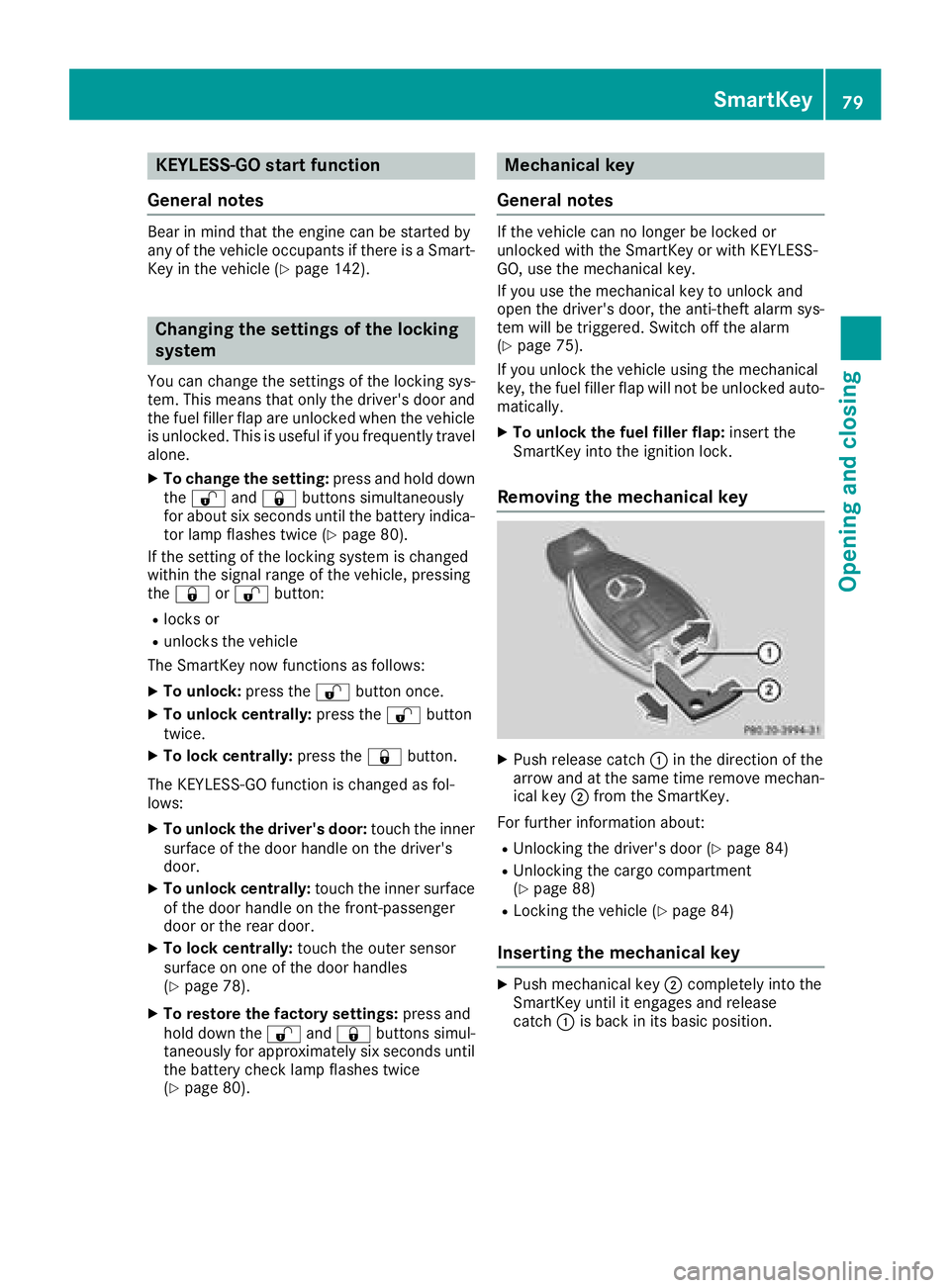
Removing the mechanical key
XPush release catch :in th edirection of th e
arrow and at th esam etime remove mechan -
ical ke y; from th eSmartKey.
Fo rfurther information about :
RUnlocking thedriver's door (Ypage 84)
RUnlocking thecargo compartmen t
(Ypage 88 )
RLocking th evehicl e (Ypage 84)
Inserting the mechanical key
XPush mechanical ke y; completely int oth e
SmartKey until it engage sand release
catch :is bac kin it sbasic position .
SmartKey79
Opening and closing
Z
Page 82 of 398
SmartKey battery
Important safety notes
GWARNING
Batteries contain toxic and corrosive substan- ces. If batteries are swallowed, it can result in
severe health problems. There is a risk of fatalinjury.
Keep batteries out of the reach of children. If
a battery is swallowed, seek medical attention immediately.
HEnvironmental note
Batteries contain dangerous
substances. It is against the
law to dispose of them with
the household rubbish. They
must be collected separatelyand recycled to protect the
environment.
Dispose of batteries in an
environmentally friendly
manner. Take discharged
batteries to a qualified spe-
cialist workshop or a special
collection point for used bat-
teries.
The SmartKey batteries contain perchlorate
material, which may require special handling
and regard for the environment. National guide-
lines must be observed during disposal. In Cal-
ifornia, see www.dtsc.ca.gov/
HazardousWaste/Perchlorate/index.cfm.
Mercedes-Benz recommends that you have the
batteries replaced at a qualified specialist work-
shop.
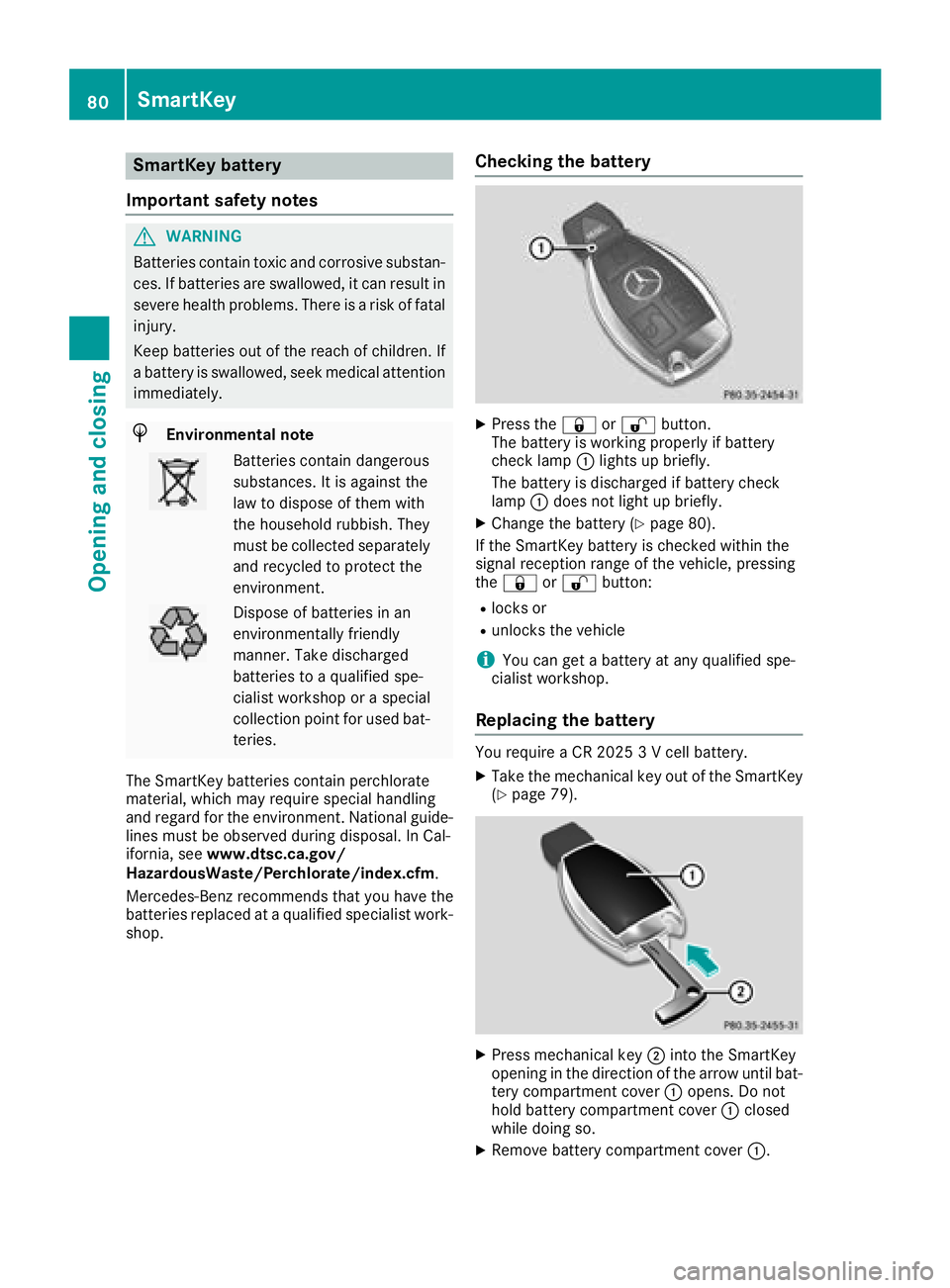
Checking the battery
XPress the &or% button.
The battery is working properly if battery
check lamp :lights up briefly.
The battery is discharged if battery check
lamp :does not light up briefly.
XChange the battery (Ypage 80).
If the SmartKey battery is checked within the
signal reception range of the vehicle, pressing
the & or% button:
Rlocks or
Runlocks the vehicle
iYou can get a battery at any qualified spe-
cialist workshop.
Replacing the battery
You require a CR 2025 3 V cell battery.
XTake the mechanical key out of the SmartKey
(Ypage 79).
XPress mechanical key ;into the SmartKey
opening in the direction of the arrow until bat-
tery compartment cover :opens. Do not
hold battery compartment cover :closed
while doing so.
XRemove battery compartment cover :.
80SmartKey
Opening and closing
Page 83 of 398
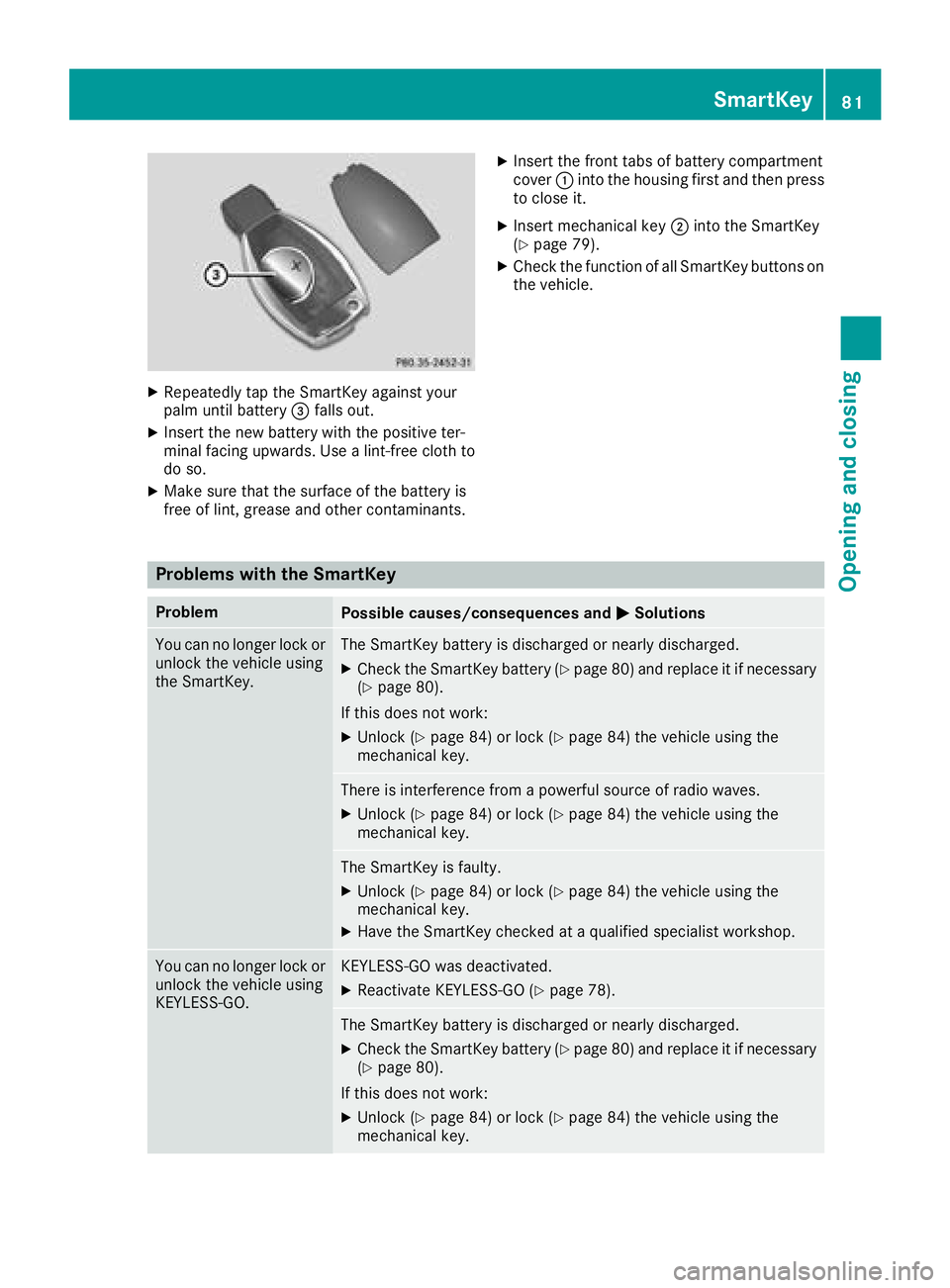
XRepeatedly tap theSmartKey against your
palm until battery =falls out .
XInsertth ene wbattery wit hth epositive ter-
minal facing upwards. Use alint-free cloth to
do so.
XMak esur ethat th esurfac eof th ebattery is
free of lint, grease and other contaminants.
XInser tth efron ttab sof battery compartmen t
cover :intoth ehousing first and then press
to close it .
XInsertmechanical ke y; intoth eSmartKey
(Ypage 79).
XChec kth efunction of all SmartKey buttons on
th evehicle.
Problems with the SmartKey
ProblemPossible causes/consequences and MSolutions
You can no longer lockor
unlock th evehicl eusin g
th eSmartKey.The SmartKey battery is discharged or nearly discharged.
XChec kth eSmartKey battery (Ypage 80) and replace it if necessar y
(Ypage 80).
If this does no twork:
XUnloc k (Ypage 84 )or loc k (Ypage 84 )th evehicl eusin gth e
mechanical key.
There is interferenc efrom apowerful source of radi owaves.
XUnloc k (Ypage 84) or loc k (Ypage 84)th evehicl eusin gth e
mechanical key.
The SmartKey is faulty.
XUnloc k (Ypage 84 )or loc k (Ypage 84) th evehicl eusin gth e
mechanical key.
XHav eth eSmartKey checke dat aqualified specialist workshop.
You can no longer loc kor
unlock th evehicl eusin g
KEYLESS-GO .KEYLESS-GO was deactivated.
XReactivateKEYLESS-GO (Ypage 78).
The SmartKey battery is discharged or nearly discharged.
XCheckth eSmartKey battery (Ypage 80) and replace it if necessar y
(Ypage 80).
If this does no twork:
XUnloc k (Ypage 84 )or loc k (Ypage 84 )th evehicl eusin gth e
mechanical key.
SmartKey81
Opening and closing
Z