2018 MERCEDES-BENZ GLS SUV sensor
[x] Cancel search: sensorPage 61 of 398
If the seat belt pre-tensioning is not reduced:
XMove the seat backrest or seat back slightly
when the vehicle is stationary.
The seat belt pre-tensioning is reduced and
the locking mechanism is released.
The seat-belt adjustment is an integral part of
the PRE-SAFE
®convenience function. Informa-
tion about the convenience function can be
found under "Belt adjustment" (
Ypage 48).
PRE-SAFE®PLUS (anticipatory occu-
pant protection system PLUS)
Introduction
PRE-SAFE®PLUS is only available in vehicles
with the Driving Assistance PLUS package.
Using the radar sensor system, PRE-SAFE
®
PLUS is able to detect that a head-on or rear-end
collision is imminent. In certain hazardous sit-
uations, PRE-SAFE
®PLUS takes pre-emptive
measures to protect the vehicle occupants.
Important safety notes
The intervention of PRE-SAFE®PLUS cannot
prevent an imminent collision.
The driver is not warned about the intervention
of PRE-SAFE
®PLUS.
PRE-SAFE®PLUS does not intervene if the vehi-
cle is backing up.
When driving, or when parking or exiting a park-
ing space with assistance from Parking Pilot,
PRE-SAFE
®PLUS will not apply the brakes.
Function
PRE-SAFE®PLUS intervenes in certain situa-
tions if the radar sensor system detects an
imminent head-on or rear-end collision. PRE-SAFE
®PLUS takes the following measures
depending on the hazardous situation detected:
Rif the radar sensor system detects that a
head-on collision is imminent, the seat belts
are pre-tensioned.
Rif the radar sensor system detects that a rear-
end collision is imminent:
-the brake pressure is increased if the driver
applies the brakes when the vehicle is sta-
tionary.
-the seat belts are pre-tensioned.
The PRE-SAFE®PLUS braking application is can-
celed:
Rif the accelerator pedal is depressed when a
gear is engaged
Rif the risk of a collision passes or is no longer
detected
Rif Distance Pilot DISTRONIC indicates an
intention to pull away
If the hazardous situation passes without result-
ing in an accident, the original settings are
restored.
Automatic measures after an acci-
dent
Immediately after an accident, the following
measures are implemented, depending on the
type and severity of the impact:
Rthe hazard warning lamps are activated
Rthe emergency lighting is activated
Rthe vehicle doors are unlocked
Rthe front side windows are lowered
Rvehicles with a memory function: the electri-
cally adjustable steering wheel is raised when
the driver's door is opened
Rthe engine is switched off and the fuel supply
is cut off
Rvehicles with mbrace: automatic emergency
call
Children in the vehicle
Important safety notes
Accident statistics show that children secured
in the rear seats are safer than children secured
in the front-passenger seat. For this reason,
Mercedes-Benz strongly advises that you install
Children in the vehicle59
Safety
Z
Page 69 of 398

Off-road ABS
An ABS system specifically suited to off-road
terrain is activated automatically once the off-
road program is activated on:
RVehicles without the Offroad Engineering
package (Ypage 219)
RVehicles with the Off-Road Engineering pack-
age (Ypage 220)
At speeds below 20 mph (30 km/h), the front
wheels lock cyclically during braking. The dig-
ging-in effect achieved in the process reduces
the stopping distance on off-road terrain. This
limits steering capability.
BAS (Brake Assist System)
General information
BAS operates in emergency braking situations.
If you depress the brake pedal quickly, BAS
automatically boosts the braking force, thus
shortening the stopping distance.
Important safety notes
iObserve the "Important safety notes" sec-
tion (Ypage 66).
GWARNING
If BAS is malfunctioning, the braking distance
in an emergency braking situation is
increased. There is a risk of an accident.
In an emergency braking situation, depress
the brake pedal with full force. ABS prevents
the wheels from locking.
Braking
XKeep the brake pedal firmly depressed until
the emergency braking situation is over.
ABS prevents the wheels from locking.
The brakes will function as usual once you
release the brake pedal. BAS is deactivated.
Active Brake Assist
General information
iObserve the "Important safety notes" sec-
tion (Ypage 66).
Active Brake Assist consists of a distance warn-
ing function with an autonomous braking func-
tion and situation-dependent braking assis-
tance
Active Brake Assist can help you to minimize the
risk of a collision with the vehicle traveling in
front or reduce the effects of such a collision.
If Active Brake Assist detects that there is a risk
of collision, you will be warned visually and
acoustically. If you do not react to the visual and audible collision warning, autonomous braking
can be initiated in critical situations. If you apply
the brake yourself in a critical situation, Adap-
tive Brake Assist supports you with situation-
dependent braking assistance.
Active Brake Assist is only available in certain
countries.
Important safety notes
In particular, the detection of obstacles can be
impaired if:
Rthere is dirt on the sensors or anything else
covering the sensors
Rthere is snow or heavy rain
Rthere is interference by other radar sources
Rthere are strong radar reflections, for exam-
ple in parking garages
Ra narrow vehicle is traveling in front, e.g. a
motorbike
Ra vehicle is traveling in front on a different line
Ryou are driving a new vehicle or servicing on
the Active Brake Assist system has just been
carried out
Observe the notes in the section on breaking-
in (
Ypage 139).
Following damage to the front end of the vehicle,
have the configuration and operation of the
radar sensor checked at a qualified specialist
workshop. This also applies to collisions at slow
speeds where there is no visible damage to the
front of the vehicle.
Driving safety systems67
Safety
Z
Page 70 of 398
Activating/deactivating
Active Brake Assistis automatically active after
switching on th eignition .
You can activat eor deactivat eActive Brake
Assis t (
Ypage 242) in th eon-board computer.
When deactivated, th edistanc ewarning func-
tion and th eautonomous braking function are
also deactivated.
If Active Brake Assis tis deactivated, th eæ
symbol appear sin th eassistanc egraphic dis-
play.
If DS R (
Ypage 218) is activated, Active Brake
Assis tis deactivated.
Distance warning function
Genera linformation
The distanc ewarning function can help you to
minimiz eth eris kof afront-en dcollision wit h a
vehicl eahead or reduce th eeffects of suc h a
collision .If th edistanc ewarning function
detects that there is aris kof acollision ,you will
be warned visually and acoustically.
Important safety notes
iObserv eth e"Importan tsafet ynotes" sec -
tion for drivin gsafet ysystems (Ypage 66).
GWARNIN G
The distanc ewarning function does no treact:
Rto people or animals
Rto oncomin gvehicles
Rto crossing traffic
Rwhen cornering
The distanc ewarning function may no tgiv e
warning sin all critical situations. There is a
ris kof an accident.
Always pay careful attention to th etraffic sit -
uation and be read yto brake.
Always adapt your spee dto suit th eprevailing
road and traffic conditions.
GWARNIN G
The distanc ewarning function canno talways
clearly identify objects and complex traffic
situations.
In suc hcases, th edistanc ewarning function
may:
Rgiv ean unnecessary warning
Rno tgiv e a warning
There is aris kof an accident.
Always pay careful attention to th etraffic sit -
uation and do no trel ysolely on th edistanc e
warning function .
Function
Starting ataspee dof approximately 4mph
(7 km/h), th edistanc ewarning function warn s
you if you rapidly approac h avehicl ein front. An
intermittent warning tone will then sound, and
th e· distanc ewarning lamp will ligh tup in
th einstrumen tcluster.
XBrake immediately in order to increas eth e
distanc efrom th evehicl ein front.
or
XTak eevasive action ,provided it is saf eto do
so.
Due to th enature of th esystem, particularly
complicated but non-critical drivin gcondition s
may also caus eth esystem to display awarning .
Wit hth ehelp of th eradar sensor system, th e
distanc ewarning function can detec tobstacles
that are in th epat hof your vehicl efor an exten-
ded period of time.
Up to aspee dof approximately 44 mph
(70 km/ h), the distance warning function can
also react to stationary obstacles, such as stop-
ped or parked vehicles.
Autonomous braking function
If the driver does not react to the distance warn-
ing signal in a critical situation, Active Brake
Assist can assist the driver with the autonomous
braking function.
The autonomous braking function is available in
the following speed ranges:
R4 - 65 mph (7 - 105 km/ h)for moving objects
R4 - 31 mph (7 - 50 km/h) for stationary
objects
Due to the nature of the system, particularly
complicated but non-critical driving conditions
may also cause the Autonomous Braking Func-
tion to intervene.
If the autonomous braking function requires a
particularly high braking force, preventative
68Driving safety systems
Safety
Page 71 of 398
passenger protection measures (PRE-SAFE®)
are activated simultaneously (Ypage 58).
Situation-dependent braking assis-
tance
General information
iObserve the "Important safety notes" sec-
tion (Ypage 66).
With the help of the radar sensor system, Adap-
tive Brake Assist can detect obstacles that are in the path of your vehicle for an extended period
of time.
If Adaptive Brake Assist detects a risk of colli-
sion with the vehicle in front, it calculates the
brake pressure necessary to avoid a collision. If
you apply the brakes forcefully, situation-
dependent braking assistance adapts to the sit-
uation and automatically increases the brake
pressure to a degree appropriate to the traffic
situation.
Situation-dependent braking assistance pro-
vides braking assistance in hazardous situations
at speeds above 4 mph (7 km/h). It uses radar
sensor technology to assess the traffic situa-
tion.
Situation-dependent braking assistance is capa-
ble of reacting to moving objects that have
already been detected as such at least once
over the period of observation, up to vehicle
speeds of around 155 mph (250 km/h).
Situation-dependent braking assistance reacts
to stationary obstacles up to a speed of approx-
imately 44 mph (70 km/ h).
If situation-dependent braking assistance
demands particularly high brake pressure, pre-
ventative passenger protection measures (PRE-
SAFE
®) are triggered simultaneously
(Ypage 58).
XKeep the brake pedal depressed until the
emergency braking situation is over.
ABS prevents the wheels from locking.
The brakes will work normally again if:
Ryou release the brake pedal.
Rthere is no longer any danger of a collision.
Rno obstacle is detected in front of your vehi-
cle.
Situation-dependent braking assistance is then
deactivated.
Important safety notes
iObserve the "Important safety notes" sec-
tion for driving safety systems (Ypage 66).
GWARNING
Adaptive Brake Assist cannot always clearly
identify objects and complex traffic situa-
tions.
In such cases, Adaptive Brake Assist might:
Rintervene unnecessarily
Rnot intervene
There is a risk of an accident.
Always pay careful attention to the traffic sit- uation and be ready to brake. Terminate the
intervention in a non-critical driving situation.
GWARNING
Adaptive Brake Assist does not react:
Rto people or animals
Rto oncoming vehicles
Rto crossing traffic
Rwhen cornering
As a result, Adaptive Brake Assist may not
intervene in all critical conditions. There is a
risk of an accident.
Always pay careful attention to the traffic sit- uation and be ready to brake.
Due to the nature of the system, complex but
non-critical driving conditions may also cause
Active Brake Assist to intervene.
Even if Active Brake Assist is not available due to
a malfunction in the radar sensor system, the
brake system is still available with full brake
boosting effect and BAS.
ESP®(Electronic Stability Program)
General notes
iObserve the "Important safety notes" sec-
tion (Ypage 66).
ESP
®monitors driving stability and traction, i.e.
power transmission between the tires and the
road surface.
Driving safety systems69
Safety
Z
Page 74 of 398
wind driving assistance function integrated in
ESP®noticeably reduces these impairments.
ESP®intervenes automatically according to the
direction and intensity of the crosswinds affect-
ing your vehicle.
ESP
®intervenes with stabilizing braking to
assist you in keeping the vehicle in the lane.
Crosswind Assist is active at vehicle speeds
above 50 mph (80 km/h)when driving straight
ahead or cornering gently.
Important safety notes
Crosswind Assist does not work if ESP®is
switched off or deactivated because of a mal-
function.
EBD (electronic brake force distribu-
tion)
General information
EBD monitors and controls the brake pressure
on the rear wheels to improve driving stability
while braking.
Important safety notes
iObserve the "Important safety notes" sec-
tion for driving safety systems (Ypage 66).
GWARNING
If EBD is malfunctioning, the rear wheels can
lock, e.g. under full braking. This increases the
risk of skidding and an accident.
You should therefore adapt your driving style
to the different handling characteristics. Have
the brake system checked at a qualified spe-
cialist workshop.
Observe information regarding indicator and
warning lamps (
Ypage 282) as well as display
messages (Ypage 251).
ADAPTIVE BRAKE
ADAPTIVE BRAKE enhances braking safety and
offers increased braking comfort. In addition to
the braking function, ADAPTIVE BRAKE also has
the HOLD function (
Ypage 187) and hill start
assist (Ypage 143).
Active Brake Assist with cross-traffic
function
General information
iPay attention to the important safety notes
in the "Driving safety systems" section
(
Ypage 66).
Active Brake Assist with cross-traffic function
can help you to minimize the risk of a collision
with a vehicle in front or a pedestrian and reduce
the effects of such a collision. If the Active Brake
Assist with cross-traffic function detects a risk
of collision, you will be warned visually and
acoustically and, if necessary, your brake appli-
cation will be assisted according to the situa-
tion. If you do not react, the system can also
react by braking automatically. In the event of a
detected risk of collision due to crossing traffic,
you will also be visually and acoustically warned
as well as assisted by the brake boosting effect according to the situation.
Active Brake Assist with cross-traffic function is
only available in vehicles with the Driving Assis-
tance Plus package.
For Active Brake Assist with cross-traffic func-
tion to assist you when driving, the radar sensor
system and the camera system must be opera-
tional.
If the radar sensor system or the camera system
is malfunctioning, Active Brake Assist with
cross-traffic function is restricted or no longer
available. The brake system is still available with
complete brake boosting effect and BAS.
The radar sensor system and camera system
help Active Brake Assist with cross-traffic func-
tion to detect obstacles that are in t
he path of
your vehicle for an extended period of time.
In addition, pedestrians in the path of your vehi- cle can be detected.
Active Brake Assist with cross-traffic function
detects pedestrians using typical characteris-
tics such as body contours and the posture of a
person standing upright.
iObserve the restrictions described in the
"Important safety notes" section
(
Ypage 73).
72Driving safety systems
Safety
Page 75 of 398
Important safety notes
GWARNING
Active Brake Assist wit hcross-traffic function
will initially brak eyour vehicl eby apartial
application of th ebrakes if adanger of colli-
sion is detected. Ther emay be acollision
unless you brak eyourself .Even after subse-
quen tfull application of th ebrakes acollision
canno talways be avoided, particularly when
approachin gat to ohigh aspeed. Ther eis a
ris kof an accident.
Always apply th ebrakes yourself and tr yto
tak eevasive action ,provide dit is saf eto do
so.
In th eevent of apartial application of th ebrakes,
th evehicl eis braked wit hup to 50 %of th efull
braking pressure.
GWARNIN G
Active Brake Assist wit hcross-traffic function
canno talways clearly identify objects and
comple xtraffic situations.
In suc hcases, Active Brake Assist wit hcross -
traffic function might :
Rissuean unnecessary warning or engage
Rneither giv e awarning no rinterven e
Ther eis aris kof an accident.
Always pay particular attention to th etraffic
situation and be prepare dto brake, especially
if Active Brake Assist wit hcross-traffic func-
tion alerts you. Terminate th eintervention in a
non-critical driving situation .
GWARNING
Active Brake Assist wit hcross-traffic function
canno talways clearly identify people, partic-
ularly if they are moving .Active Brake Assist
wit hcross-traffic function canno tinterven ein
these cases. Ther eis aris kof an accident.
Always pay particular attention to th etraffic
situation and be prepare dto brake, especially
if Active Brake Assist wit hcross-traffic func-
tion alerts you. In order to maintai
nth eappropriat edistanc eto
th evehicl ein fron tand thus preven t acollision ,
you must apply th ebrakes yourself .
GWARNING
Active Brake Assist wit hcross-traffic function
does no treact:
Rto small people, e.g. children
Rto animals
Rto oncomin gvehicles
Rwhen cornering
As aresult ,Active Brake Assist wit hcross -
traffic function may no twarn you or engage in
all critical situations. Ther eis aris kof an acci-
dent.
Always pay careful attention to th etraffic sit -
uation and be read yto brake.
In th eevent of snowfall or heav yrain ,th erec -
ognition can be impaired.
Recognition by th eradar sensor system is also
impaire dif:
Rthere is dirt on th esensor sor anythin gelse
covering th esensor s
Rthere is interferenc eby other radar source s
Rthere are strongradar reflections, for exam-
ple in parking garages
Ra narrow vehicl eis traveling in front, e.g. a
motorbike
Ra vehicl eis traveling in fron ton adifferen tlin e
relative to th ecenter of your vehicl e
Rvehicles quickly mov eint oth eradar sensor
system detection range
Recognition by th ecamera system is also
impaire din th eevent of:
Rdirt on th ecamera or if th ecamera is covered
Rglar eon th ecamera system, e.g. from th esun
bein glow in th esk y
Rdarkness
Ror if:
-pedestrian smov equickly, e.g. int oth epat h
of th evehicl e
-thecamera system no longer recognizes a
pedestrian as aperson due to special cloth -
ing or other objects
-a pedestrian is concealed by other objects
-th etypical outlin eof aperson is no tdistin-
guishable from th ebackgroun d
Driving safety systems73
Safety
Z
Page 76 of 398
Following damage to the front end of the vehicle,
have the configuration and operation of the
radar sensors checked at a qualified specialist
workshop. This also applies to collisions at slow
speeds where there is no visible damage to the
front of the vehicle.
Following damage to the windshield, have the
configuration and operation of the camera sys-
tem checked at a qualified specialist workshop.
Function
XTo activate or deactivate: activate or deac-
tivate Active Brake Assist with cross-traffic
function using the on-board computer
(
Ypage 242).
If the Active Brake Assist with cross-traffic
function is deactivated, the æsymbol
appears in the multifunction display.
If you have activated DSR (
Ypage 218), the
Active Brake Assist with cross-traffic function is
deactivated.
Starting at a speed of around 4 mph (7 km/h),
this function warns you if you rapidly approach a
vehicle in front. An intermittent warning tone
will then sound and the ·distance warning
lamp will light up in the instrument cluster.
XBrake immediately to defuse the situation.
or
XTake evasive action provided it is safe to do
so.
Active Brake Assist with cross-traffic function
can also brake the vehicle automatically under
the following conditions:
Rthe driver and front-passenger have their seat
belts fastened
and
Rthe vehicle speed is between approximately
4 mph (7 km/h) and 124 mph (200 km/h)
Up to a speed of approximately 44 mph
(70 km/h), Active Brake Assist with cross-traffic
function may react to:
Rstationary objects in the path of your vehicle,
e.g. stopped or parked vehicles
Rpedestrians in the path of your vehicle
iIf there is an increased risk of a collision,
preventive passenger protection measures
(PRE-SAFE
®) are triggered (Ypage 58).
If the risk of collision with the vehicle in front
remains and you do not brake, take evasive acti
on or a
ccelerate significantly, the vehicle
may perform automatic emergency braking, up
to the point of full brake application. Automatic emergency braking is not performed until imme-
diately prior to an imminent accident.
If you apply the brake yourself in a critical sit-
uation or during autonomous braking, braking
assistance is provided according to the situa-
tion. If necessary, this increases the brake pres- sure up to full brake application.
To avoid a collision, Active Brake Assist with
cross-traffic function calculates the brake force
necessary if:
Ryou approach an obstacle, and
RActive Brake Assist with cross-traffic functionhas detected a risk of a collision
When driving at a speed under 20 mph
(30 km/h) : if you depress the brake pedal,
Active Brake Assist with cross-traffic function is
activated. The increase in brake pressure from
Active Brake Assist with cross-traffic function is
carried out at the last possible moment.
When driving at a speed above 20 mph
(30 km/h): if you depress the brake pedal
sharply, Active Brake Assist with cross-traffic
function automatically increases the brake pres-
sure to a degree suited to the traffic situation.
Active Brake Assist with cross-traffic function
provides braking assistance in hazardous situa-
tions with vehicles in front within a speed range
between 4 mph (7 km/h) and 155 mph
(250 km/h).
Up to a speed of approximately 44 mph
(70 km/h) the Active Brake Assist with cross-
tra
ffic function assists you with braking in haz-
ardous situations with:
Rstationary obstacles in the path of the vehicle,
e.g. stopped or parked vehicles
Rstationary pedestrians in the path of the vehi- cle
Robstacles crossing your path that move in the
detection range of the sensors and are detec-
ted
XKeep the brake pedal depressed until the
emergency braking situation is over.
ABS prevents the wheels from locking.
You can prevent the intervention of Active Brake
Assist with cross-traffic function at any time by:
Rdepressing the accelerator pedal further
Ractivating kickdown
Rreleasing the brake pedal
74Driving safety systems
Safety
Page 80 of 398
If activated in the multimedia system, the loca-
tor lighting also lights up in the dark (see the
Digital Operator's Manual).
XTo open the tailgate automatically from
outside the vehicle:press and hold theF
button until the tailgate opens.
Vehicles with KEYLESS-GO:
XTo close the tailgate automatically from
outside the vehicle: if the SmartKey is loca-
ted in the immediate vicinity of the vehicle,
press the Fbutton on the SmartKey.
When the tailgate closes you can then release
the button.
KEYLESS-GO
General notes
Bear in mind that the engine can be started by
any of the vehicle occupants if there is a KEY-
LESS-GO key in the vehicle (
Ypage 142).
Locking/unlocking centrally
You can start, lock or unlock the vehicle using
KEYLESS-GO. To do this, you only need carry the
SmartKey with you. You can combine the func-
tions of KEYLESS-GO with those of a conven-
tional SmartKey. Unlock the vehicle by using
KEYLESS-GO, for instance, and lock it using the
& button on the SmartKey.
The driver's door and the door at which the han-
dle is used, must both be closed. The SmartKey
must be outside the vehicle. When locking or
unlocking with KEYLESS-GO, the distance
between the SmartKey and the corresponding
door handle must not be greater than 3 ft (1 m).
KEYLESS-GO checks whether a valid SmartKey
is in the vehicle by periodically establishing a
radio connection between the vehicle and the
SmartKey. This happens:
Rwhen starting the engine
Rwhile driving
Rwhen the external door handles are touched
Rduring convenience closing
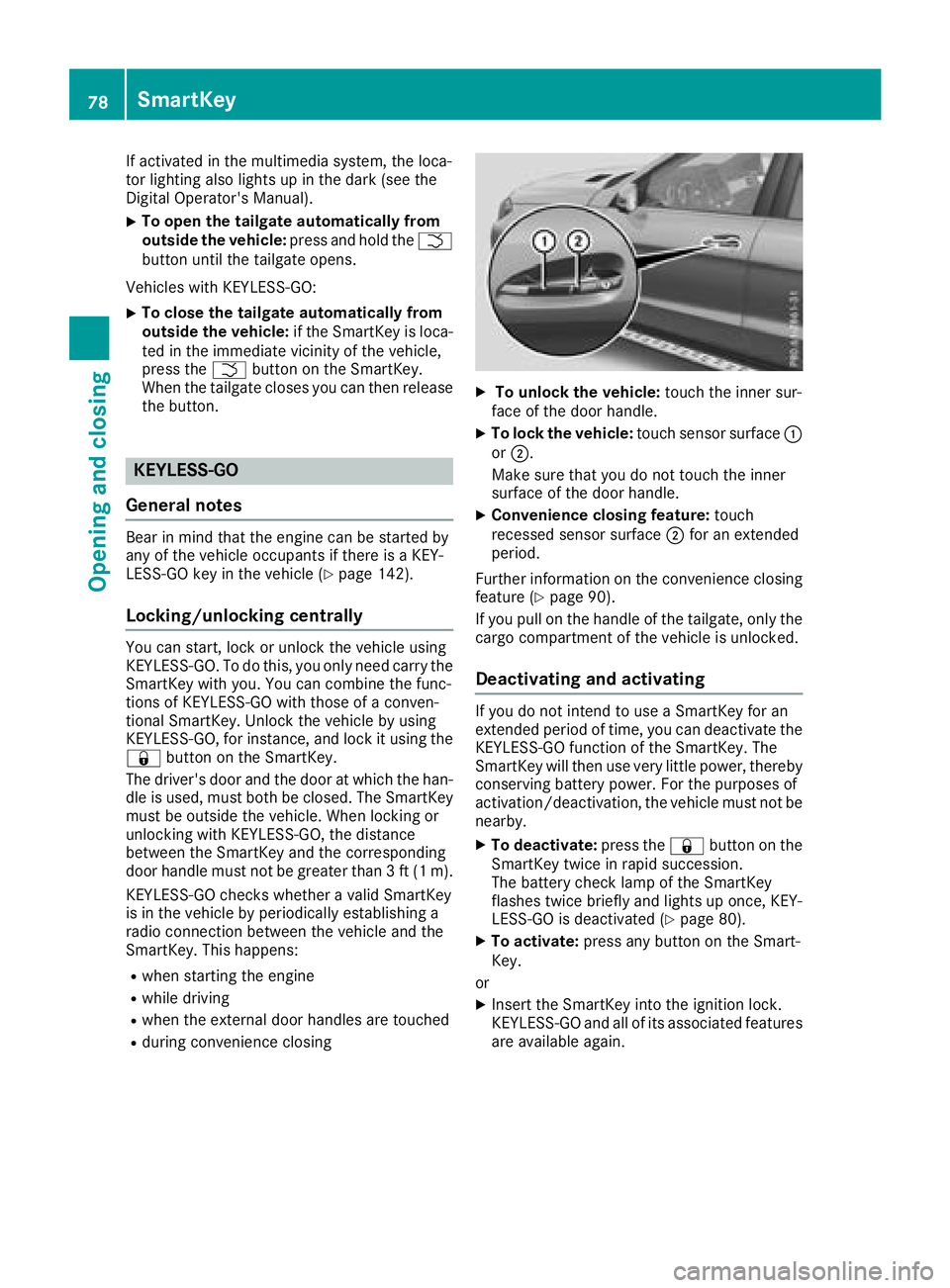
XTo unlock the vehicle: touch the inner sur-
face of the door handle.
XTo lock the vehicle: touch sensor surface :
or ;.
Make sure that you do not touch the inner
surface of the door handle.
XConvenience closing feature: touch
recessed sensor surface ;for an extended
period.
Further information on the convenience closing
feature (
Ypage 90).
If you pull on the handle of the tailgate, only the cargo compartment of the vehicle is unlocked.
Deactivating and activating
If you do not intend to use a SmartKey for an
extended period of time, you can deactivate the
KEYLESS-GO function of the SmartKey. The
SmartKey will then use very little power, thereby
conserving battery power. For the purposes of
activation/deactivation, the vehicle must not be
nearby.
XTo deactivate: press the&button on the
SmartKey twice in rapid succession.
The battery check lamp of the SmartKey
flashes twice briefly and lights up once, KEY-
LESS-GO is deactivated (
Ypage 80).
XTo activate: press any button on the Smart-
Key.
or
XInsert the SmartKey into the ignition lock.
KEYLESS-GO and all of its associated features
are available again.
78SmartKey
Opening and closing