2018 MERCEDES-BENZ G-CLASS hood open
[x] Cancel search: hood openPage 13 of 294

Genuine parts...................................... 23
Glove box ........................................... 210
Google™ Local Search
see also Digital Operator's Man-
ual .................................................. 203
GTW (Gross Trailer Weight) (defini-
tion) .................................................... 274
H
Hazard warning lamps ........................ 88
Head restraints
Adjusting .........................................7 6
Adjusting (rear) ................................ 77
Installing/removing (rear) ................ 77
Luxury .............................................. 76
Resetting (front) ............................... 76
see NECK-PRO head restraints
see NECK-PRO luxury head restraints
Headlamps
Cleaning system (function) .............. 87
Cleaning system (notes) ................ 287
Fogging up ....................................... 88
Protective grille ................................ 91
see Automatic headlamp mode
Heating
see Climate control
High beam flasher ............................... 88
High-beam headlamps
Display message ............................ 180
Switching on/off .............................. 88
Hill start assist .................................. 107
HOLD function
Activating ....................................... 143
Activation conditions ..................... 143
Deactivating ................................... 143
Function/notes ............................. 142
General notes ................................ 142
Home address
see also Digital Operator's Man-
ual .................................................. 203
Hood
Closing ........................................... 231
Display message ............................ 190
Important safety notes .................. 230
Opening ......................................... 230
Horn ...................................................... 31
Hydroplaning ..................................... 127
I
Ignition lock
see Key positions
Immobilizer .......................................... 62
Indicator lamp
Replacing bulbs (rear) ...................... 92
Insect protection on the radiator .... 231
Instrument cluster
Overview .......................................... 32
Warning and indicator lamps ........... 32
Instrument cluster lighting .............. 160
Interior lighting
Automatic control ............................ 89
Delayed switch-off (on-board
computer) ...................................... 169
Overview .......................................... 89
iPod
®
see also Digital Operator's Man-
ual .................................................. 203
J
Jack Pump lever ..................................... 276
Storage location ............................ 244
Using ............................................. 276
Jump starting (engine) ...................... 249
K
Key positions
SmartKey ....................................... 105
L
Language (on-board computer) ........ 168
Lap time (RACETIMER) ...................... 172
LATCH-type (ISOFIX) child seat
anchors ................................................ 52
License plate lamp (display mes-
sage) ................................................... 180
Light sensor (display message) ....... 180
Lights
Activating/deactivating the inte-
rior lighting delayed switch-off ....... 169
Automatic headlamp mode .............. 87
Combination switch ......................... 88
Fogged up headlamps ...................... 88
Index11
Page 33 of 294
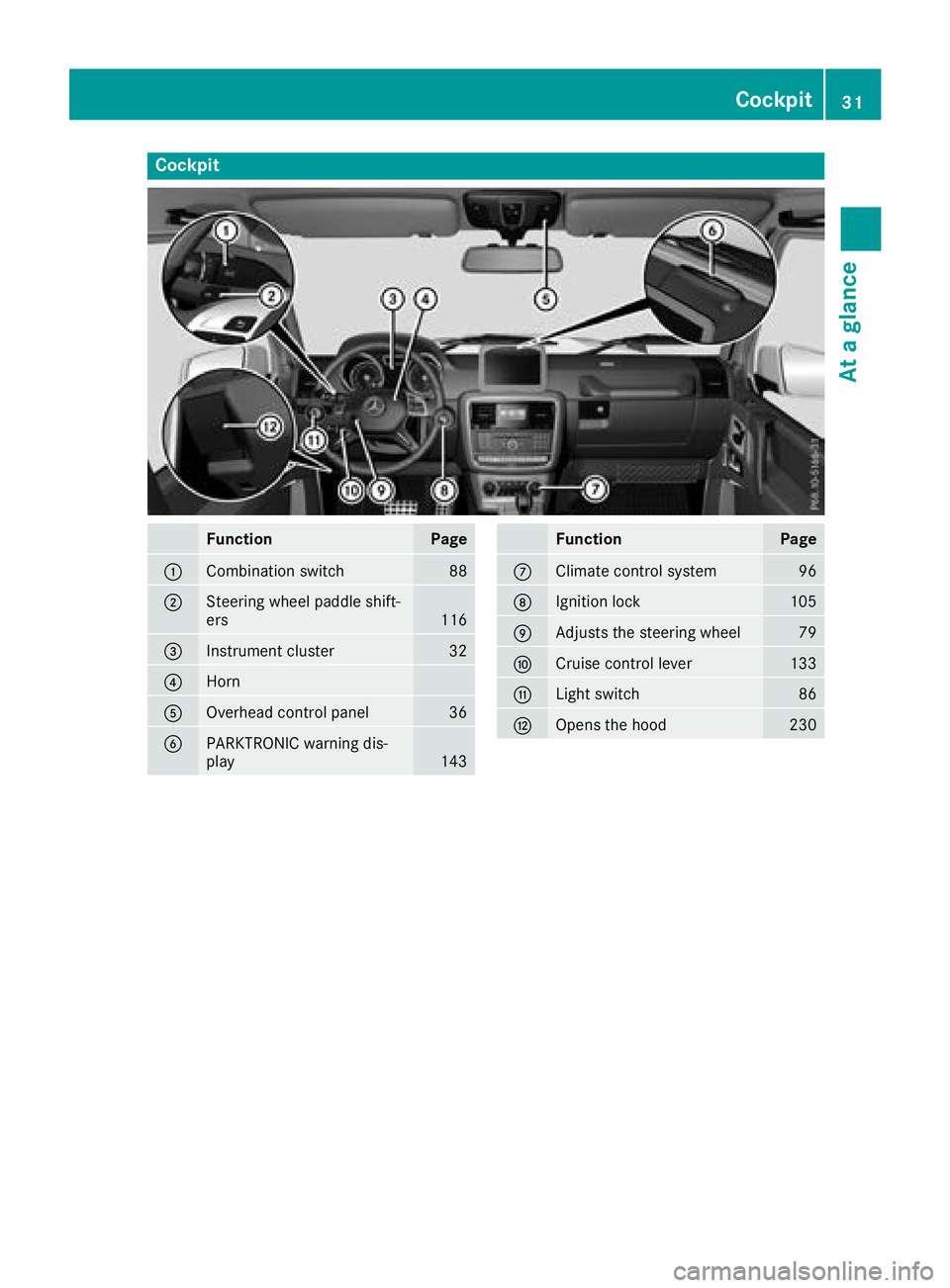
Cockpit
FunctionPage
:Combination switch88
;Steering wheel paddle shift-
ers116
=Instrument cluster32
?Horn
AOverhead control panel36
BPARKTRONIC warning dis-
play143
FunctionPage
CClimate control system96
DIgnition lock105
EAdjusts the steering wheel79
FCruise control lever133
GLight switch86
HOpens the hood230
Cockpit31
At a glance
Page 64 of 294

Protection against theft
Immobilizer
The immobilizer prevents your vehicle from
being started without the correct SmartKey.
XTo activate:remove the SmartKey from the
ignition lock.
XTo deactivate: switch on the ignition.
When leaving the vehicle, always take the
SmartKey with you and lock the vehicle. The
engine can be started by anyone with a valid
SmartKey that is left inside the vehicle.
iThe immobilizer is always deactivated when
you start the engine.
In the event that the engine cannot be started
(yet the vehicle's battery is charged), the sys-
tem is not operational. Contact an authorized
Mercedes-Benz Center or call
1-800-FOR-MERCedes (in the USA) or
1-800-387-0100 (in Canada).
ATA (anti-theft alarm system)
XTo arm: lock the vehicle with the SmartKey.
Indicator lamp :flashes. The alarm system
is armed after approximately 15 seconds.
XTo disarm: unlock the vehicle with the Smart-
Key.
iIf you then do not open a side door or the
rear door, the alarm system switches back on
again after approximately 40 seconds.
A visual and audible alarm is triggered if the
alarm system is armed and you open:
Ra door
Rthe vehicle with the mechanical key
Rthe rear door
Rthe hood The alarm is also triggered if:
Rthe position of the vehicle is changed.
Ra window is smashed.
The alarm is not switched off, even if you close the open door that triggered it, for example.
XTo stop the alarm: press the%or&
button on the SmartKey.
The alarm is stopped.
or
XInsert the SmartKey into the ignition lock.
The alarm is stopped.
iIf the alarm continues for more than
30 seconds, the mbrace emergency call sys-
tem automatically notifies the Customer
Assistance Center. This is done either by text
message or data connection.
The emergency call system sends the mes-
sage or data provided that:
Ryou have subscribed to the mbrace service.
Rthe mbrace service has been activated
properly.
Rthe necessary mobile phone network is
available.
62Protection against theft
Safety
Page 96 of 294
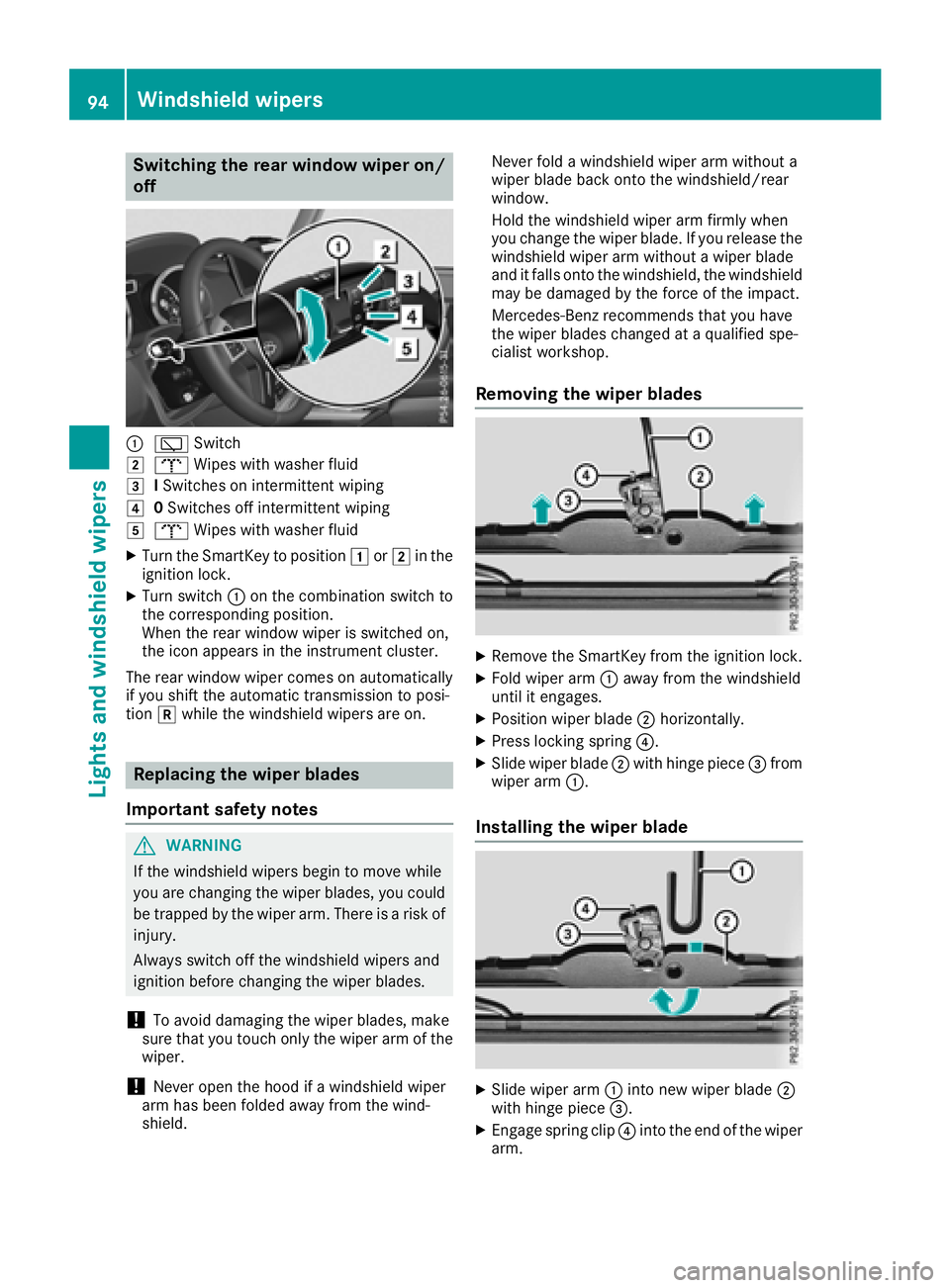
Switching the rear window wiper on/
off
:èSwitch
2bWipes with washer fluid
3ISwitches on intermittent wiping
40 Switches off intermittent wiping
5b Wipes with washer fluid
XTurn the SmartKey to position 1or2 in the
ignition lock.
XTurn switch :on the combination switch to
the corresponding position.
When the rear window wiper is switched on,
the icon appears in the instrument cluster.
The rear window wiper comes on automatically
if you shift the automatic transmission to posi-
tion kwhile the windshield wipers are on.
Replacing the wiper blades
Important safety notes
GWARNING
If the windshield wipers begin to move while
you are changing the wiper blades, you could be trapped by the wiper arm. There is a risk of
injury.
Always switch off the windshield wipers and
ignition before changing the wiper blades.
!To avoid damaging the wiper blades, make
sure that you touch only the wiper arm of the
wiper.
!Never open the hood if a windshield wiper
arm has been folded away from the wind-
shield. Never fold a windshield wiper arm without a
wiper blade back onto the windshield/rear
window.
Hold the windshield wiper arm firmly when
you change the wiper blade. If you release the
windshield wiper arm without a wiper blade
and it falls onto the windshield, the windshield
may be damaged by the force of the impact.
Mercedes-Benz recommends that you have
the wiper blades changed at a qualified spe-
cialist workshop.
Removing the wiper blades
XRemove the SmartKey from the ignition lock.
XFold wiper arm :away from the windshield
until it engages.
XPosition wiper blade ;horizontally.
XPress locking spring ?.
XSlide wiper blade;with hinge piece =from
wiper arm :.
Installing the wiper blade
XSlide wiper arm :into new wiper blade ;
with hinge piece =.
XEngage spring clip ?into the end of the wiper
arm.
94Windshield wipers
Lights and windshield wipers
Page 163 of 294

Coolant temperature gauge
GWARNING
Opening the hood when the engine is over-
heated or when there is a fire in the engine
compartment could expose you to hot gases
or other service products. There is a risk of
injury.
Let an overheated engine cool down before
opening the hood. If there is a fire in the
engine compartment, keep the hood closed
and contact the fire department.
!If the coolant temperature is too high, a dis-
play message is shown.
If the coolant temperature display is in the
area marked in red, do not continue driving.
Otherwise, the engine will be damaged.
The coolant temperature gage is in the instru-
ment cluster on the right-hand side (
Ypage 32).
Under normal operating conditions and at the
correct coolant level, the gauge may rise to the
H marking.
Operating the on-board computer
Overview
:Multifunction display
;Switches on the Voice Control System (see
the separate operating instructions)
=Right control panel
?Left control panel
ABack button
XTo activate the on-board computer: turn
the SmartKey to position 1in the ignition
lock (
Ypage 105).
You can control the multifunction display and
the settings in the on-board computer using the
buttons on the multifunction steering wheel.
Left control panel
=
;RCalls up the menu and menu bar
9
:Press briefly:
RScrolls in lists
RSelects a submenu or function
RIn the Audiomenu: selects the
previous or next station, when the
preset list or station list is active,
or an audio track or video scene
RIn the Tel(telephone) menu:
switches to the phone book and
selects a name or telephone num-
ber
9
:Press and hold:
RIn the Audiomenu: selects a pre-
set list or a station list in the
desired frequency range or an
audio track or video scene using
rapid scrolling
RIn the Tel(Telephone) menu:
starts rapid scrolling if the phone
book is open
aRConfirms a selection/display mes-
sage
RIn the Tel(Telephone) menu:
switches to the phone book and
starts dialing the selected number
Right control panel
~RRejects or ends a call
RExits phone book/redial memory
6RMakes or accepts a call
RSwitches to the redial memory
W
XRAdjusts the volume
Displays and operation161
On-board computer and displays
Z
Page 183 of 294

Display messagesPossible causes/consequences andMSolutions
?
CoolantToo HotSto pVehicl eTur nEngine Off
The coolan tis to ohot .
A warning tone also sounds.
GWARNIN G
Do no tdrive when your engin eis overheated. This can caus esom e
fluids whic hmay hav eleaked int oth eengin ecompartmen tto catch
fire.
Steam from th eoverheate dengin ecan also caus eserious burn swhic h
can occur jus tby opening th ehood.
There is aris kof injury.
XPull ove rand stop th evehicl esafely and switch off th eengine, pay-
ing attention to roa dand traffic conditions.
XSecur eth evehicl eagainst rollin gaway (Ypage 122).
XLeaveth evehicl eand keep asaf edistanc efrom th evehicl euntil th e
engin ehas cooled down .
XMakesur ethat th eair supply to th eengin eradiato ris no tblocked,
e.g. by snow, slus hor ice .
XDo no tstart th eengin eagain until th edisplay message goe sout and
th ecoolan ttemperature is belo wtheH marking .Otherwise ,th e
engin ecould be damaged.
XPay attention to th ecoolan ttemperature gauge .
XIf thetemperature increases again ,visit aqualified specialist work-
sho pimmediately.
Under normal operating condition sand at th ecorrec tcoolan tlevel,
th egauge may ris eto th eH marking .
The poly-V-belt may hav etorn .
XPull ove rand stop th evehicl esafely and switch off th eengine, pay-
ing attention to roa dand traffic conditions.
XChec kth epoly-V-belt .
If th epoly-V-belt is torn:
!Do no tcontinu edriving. The engin ecould otherwise overheat.
XConsult aqualified specialist workshop .
If th epoly-V-belt is not damaged :
XWait until thedisplay message disappear sbefore restarting th e
engine. Otherwise ,th eengin ecould be damaged.
XPay attention to th ecoolan ttemperature gauge .
XVisitaqualified specialist workshop .
Display messages181
On-board computer and displays
Z
Page 192 of 294

Vehicle
Display messagesPossible causes/consequences andMSolutions
Shiftto'P'or'N'to Start EngineYou have attempted to start the engine with the transmission in posi-
tionkorh.
XShift the transmission to position jori.
Auxiliary BatteryMalfunctionThe auxiliary battery for the automatic transmission is no longer being
charged.
XVisit a qualified specialist workshop at the next opportunity.
XUntil then, set the automatic transmission to jbefore you switch
off the engine.
XBefore leaving the vehicle, apply the parking brake.
Apply Brake toShift from 'P'You attempted to shift the transmission to position h,kori
without depressing the brake pedal.
XDepress the brake pedal.
Apply Brake toSelect RYou have attempted to shift from position hto position kwithout
applying the brakes.
XDepress the brake pedal.
XShift the transmission to position k.
AThe rear door is open.
GWARNING
When the engine is running, exhaust gases can enter the vehicle inte-
rior if the rear door is open.
There is a risk of poisoning.
XClose the rear door.
?The hood is open.
A warning tone also sounds.
GWARNING
The open hood may block your view when the vehicle is in motion.
There is a risk of an accident.
XPull over and stop the vehicle safely as soon as possible, paying
attention to road and traffic conditions.
XSecure the vehicle against rolling away (Ypage 122).
XClose the hood.
CAt least one door is open.
A warning tone also sounds.
XClose all the doors.
190Display messages
On-board computer and displays
Page 202 of 294

Warning/
indicator
lampNSignal type
Possible causes/consequences and M
Solutions
?NThe red coolant warning lamp comes on while the engine is running.
The coolant level is too low.
If the coolant level is correct, the airflow to the engine radiator may be blocked or
the electric engine radiator fan may be defective.
The coolant is too hot and the engine is no longer being cooled sufficiently.
XObserve the additional display messages in the multifunction display.
XPull over and stop the vehicle safely and switch off the engine, paying attention
to road and traffic conditions.
XSecure the vehicle against rolling away (Ypage 122).
XLeave the vehicle and keep a safe distance from the vehicle until the engine has cooled down.
XCheck the coolant level and add coolant, observing the warning notes
(Ypage 234).
XIf you have to add coolant frequently, have the engine cooling system checked.
XMake sure that the air supply to the engine radiator is not blocked, e.g. by snow,
slush or ice.
XDo not start the engine again until the coolant temperature gauge is below the H
marking (Ypage 161). Otherwise, the engine could be damaged.
XDrive to the nearest qualified specialist workshop.
XAvoid heavy loads on the engine as you do so, e.g. driving in mountainous terrain
and stop-and-go traffic.
?N The red coolant warning lamp comes on while the engine is running.
The coolant temperature gauge has exceeded the Hmarking (
Ypage 161). The
airflow to the engine radiator may be blocked or the coolant level may be too low.
GWARNING
The engine is not being cooled sufficiently and may be damaged.
Do not drive when your engine is overheated. This can cause some fluids which
may have leaked into the engine compartment to catch fire.
Steam from the overheated engine can also cause serious burns which can occur
just by opening the hood.
There is a risk of injury.
XObserve the additional display messages in the multifunction display.
XPull over and stop the vehicle safely and switch off the engine, paying attention
to road and traffic conditions.
XSecure the vehicle against rolling away (Ypage 122).
XLeave the vehicle and keep a safe distance from the vehicle until the engine has
cooled down.
XCheck the coolant level and add coolant, observing the warning notes
(Ypage 234).
XIf you have to add coolant frequently, have the engine cooling system checked.
XMake sure that the air supply to the engine radiator is not blocked, e.g. by snow,
slush or ice.
200Warning and indicator lamps in the instrument cluster
On-board computer and displays