2018 MERCEDES-BENZ E-CLASS COUPE change time
[x] Cancel search: change timePage 315 of 593
%
If a climate control setting is changed, a cli‐
mate bar appears brief ly.Showing/hiding
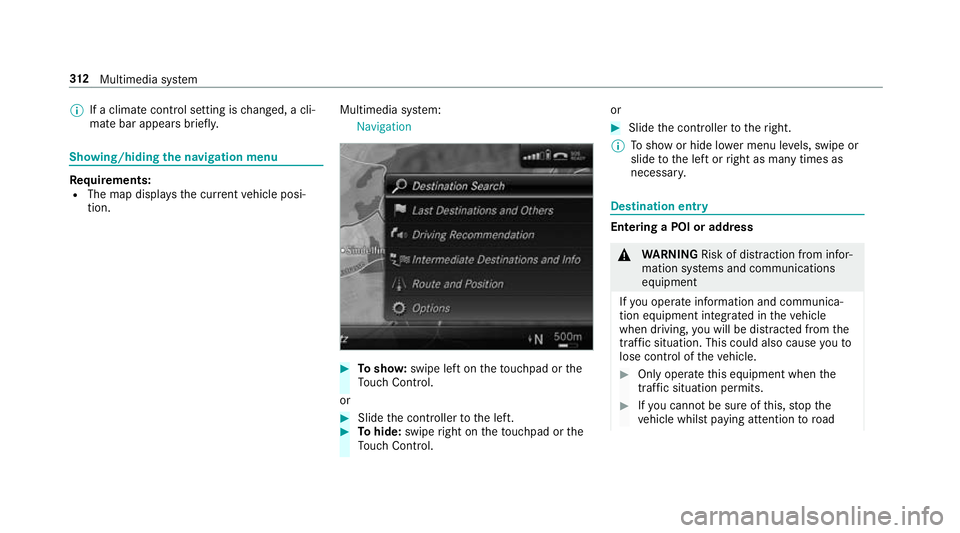
the navigation menu Re
quirements:
R The map displa ys the cur rent vehicle posi‐
tion. Multimedia sy
stem:
Navigation #
Tosho w:swipe left on theto uchpad or the
To uch Control.
or #
Slide the controller tothe left. #
Tohide: swipe right on theto uchpad or the
To uch Control. or #
Slide the controller totheright.
% Toshow or hide lo wer menu le vels, swipe or
slide tothe left or right as many times as
necessar y. Destination ent
ry Entering a POI or address
&
WARNING Risk of di stra ction from infor‐
mation sy stems and communications
equipment
If yo u operate information and communica‐
tion equipment integ rated in theve hicle
when driving, you will be distracted from the
traf fic situation. This could also cause youto
lose control of theve hicle. #
Only operate this equipment when the
traf fic situation permits. #
Ifyo u cannot be sure of this, stop the
ve hicle whilst paying attention toroad 312
Multimedia sy stem
Page 316 of 593
and traf
fic conditions and ope rate the
equipment with theve hicle stationar y. Yo
u must obse rveth e legal requirements forthe
country in whi chyou are cur rently driving when
operating the multimedia sy stem.
Re quirements:
R For the online sear ch:Mercedes me con‐
nect is available.
R You ha vea user account forth e Mercedes
me por tal.
R The service has been activated at a
Mercedes-Benz service centre.
Fu rther information can be found at: http://
www.mercedes.me
Multimedia sy stem:
Navigation #
Show the navigation menu. #
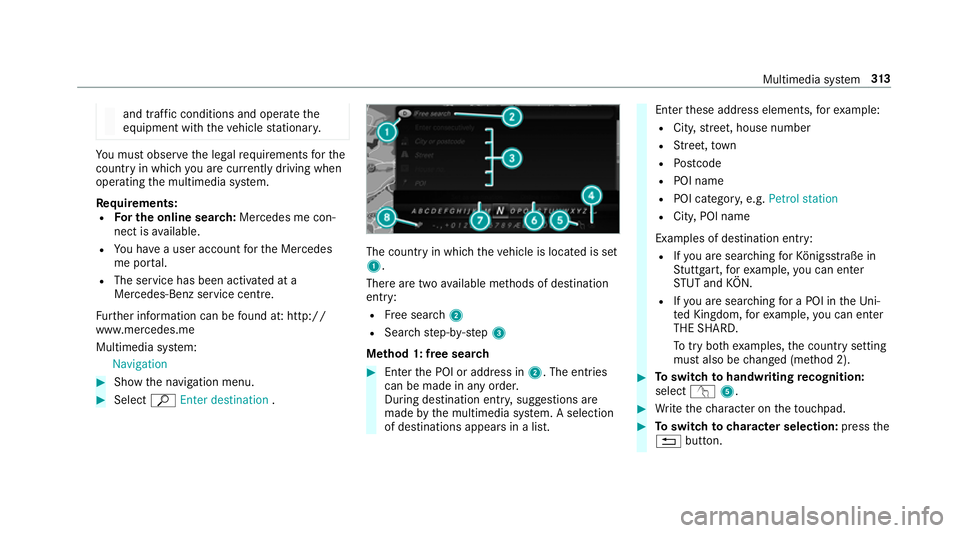
Select ªEnter destination . The count
ryin which theve hicle is located is set
1.
There are two available me thods of destination
entry:
R Free sear ch2
R Sea rchstep-b y-step 3
Me thod 1: free sear ch #
Enter the POI or address in 2. The entries
can be made in any order.
During destination entry , suggestions are
made bythe multimedia sy stem. A selection
of destinations appears in a list. Ente
rth ese address elements, forex ample:
R City, stre et, house number
R Street,to wn
R Postcode
R POI name
R POI catego ry, e.g. Petrol station
R City, POI name
Examples of destination ent ry:
R Ifyo u are sear ching forKö nigsstraße in
St utt gart,fo rex ample, you can en ter
ST UT and KÖN.
R Ifyo u are sear ching for a POI in theUni‐
te d Kingdom, forex ample, you can en ter
THE SHARD.
To try bo thexamples, the count rysetting
must also be changed (me thod 2). #
Toswitch tohandwriting recognition:
select v5. #
Write thech aracter on theto uchpad. #
Toswitch to character selection: pressthe
% button. Multimedia sy
stem 313
Page 318 of 593
An entr
y,e.g. POI, can be dele ted with
£ in astep-b y-step sear ch.Na vigate
to the left todo so.
R Calling up the online sear chfunction (if
av ailable)
R Calling up a list
The functions are desc ribed in the free
sear ch. #
Tochange the count ry:select the count ry. #
Enter the count ry.Yo u on ly need toenter the
fi rs tch aracter. #
Select the count ryon the list. #
Toadopt a destination: selectSelect desti-
nation.
If th ere are se veral listings for a destination,
a dis tance-o rientated list appears. #
Select the destination.
The destination address is shown. Selecting pr
evious destinations
Multimedia sy stem:
Navigation ¬Previous and other desti-
nations #
Select Previous destinations. #
Select the destination.
The destination address is shown.
or #
Iffavo urites ha vebeen sa ved already
(→ page 328), select From global favourites . #
Select thefa vo urite.
The destination address is shown.
Selecting a POI
Multimedia sy stem:
Navigation ¬Previous and other desti-
nation sPOIs #
Select the categor y.
or #
Select All categories andthe categor y.
If ro ute guidance is not active: the sear ch
begins in the vicinity of the cur rent vehicle position. The list is sor
tedby distance in
ascending orde r.
The POIs show thefo llowing information:
R name of POI
R linear dis tance tothe POI
R the direction of the linear dis tance tothe
POI (ar row) is displa yed when sear ching
fo rth eve hicle's cur rent position #
Select the POI. #
Route guidance is active: selectthe sear ch
position prior tochoosing a POI (see exam‐
ple). #
If intermediate destinations are set, these
can also be selected as the sear chposition
af te r selecting Near destination.
Fi ltering displa ysfor POIs #
Enter the sear chterm inª Search:.
The results list sho wsreleva nt POIs.
Entering Italyshowsthefo llowing results, for
ex ample:
R POIs which con tain Italy inthe name. Multimedia sy
stem 315
Page 320 of 593
#
Select Set as destination .
or #
Select an intermedia tedestination using
ª Enter destination duringroute guid‐
ance. #
Select Set as next intermediate destination
af te r entering the destination.
Editing intermedia tedestinations
Re quirements:
R The destination and at least one intermediate
destination ha vebeen entered.
Multimedia sy stem:
Navigation Intermediate destinations and
info #
Tocall up the map: highlight the destination
or the intermediate destination. #
Select ¥Map. #
Movethe map (→ page 333). #
Select destination on the map (→ page318). #
Tochange the order of destinations: high‐
light the destination or the intermediate des‐
tination. #
Select ¥Move . #
Movethe intermediate destination tothe
desired position. #
Press theTo uch Control, the controller or the
to uchpad. #
Todel ete a destination: highlightthe desti‐
nation or the intermediate destination. #
Select ¥Delete.
Calculating a route with intermediate desti‐
nations
Re quirements:
R The destination and at least one intermediate
destination ha vebeen entered. Multimedia sy
stem:
Navigation Intermediate destinations and
info #
Select Start new route guidance.
The route is calculated with the set inter‐
mediate destinations.
Selecting a contact for destination entry
Re quirements:
R A mobile phone is connec tedto the multime‐
dia sy stem (→ page 340).
R Contacts ha vebeen downloaded
(→ page 348).
Multimedia sy stem:
Navigation ¬Previous and other desti-
nation sC ontacts #
Select the conta ct.
The contact de tails are displa yed. #
Select the address.
Fi ltering displa ysfor contacts #
Enter a name or telephone number, forex am‐
ple, into the sear chfield. Multimedia sy
stem 317
Page 324 of 593

fi
c re ports. You can continue touse the cur‐
re nt route or use the dynamic route ins tead.
Selecting route options
Multimedia sy stem:
Navigation ÀRoute and posi-
tion Avoid options
Av oiding areas #
Select Areas(→page 335).
Av oiding mo torw ays, ferries, mo torail trains,
tunnels, unpa vedro ads #
Select Oor deselect ªavo id option.
Using routes requiring a special tollst icker #
Select Use vignette roads .#
Select Oor deselect ªAllor countries.
The route take s into account roads in the
selected countries which requ ire youto pay a
time-based fee (vignette). A vignette allo ws
fo rth e use of a route network for a limi ted
time pe riod. Using
tollro ads #
Select Use toll roads. #
Select Payment in cash orElectronic billing
or Off.
The route take s into account roads that
re qu ire the payment of a usage fee (toll).
If Off is selected, tollro ads are not take n into
account.
These route options are not available in every
countr y.
The selected route options cannot alw ays be
implemented. Therefore, a route may include a
fe rry, for ins tance, eventh ough theavo idFerries
option is enabled. A message appears and you
will hear a cor responding message.
Selecting notifications
Multimedia sy stem:
Navigation ZOption sAnnounce-
ments #
Switch an announcement on Oor off ª. Yo
u can choose from thefo llowing announce‐
ments:
R Announce traffic warnings
This function is not available in all countries.
R Announce street names
The multimedia sy stem announces the
names of thero ads that will follow the
upcoming change of direction.
This function is not available in all countries
and languages.
Displ aying destination information
Requ irements:
R A destination is entered.
Multimedia sy stem:
Navigation #
Select Intermediate destinations and info.
The following information is displa yed:
R Intermediate destinations and destination
The route can also include up tofour
intermediate destinations.
R Name, addre ss Multimedia sy
stem 321
Page 327 of 593
R
Incomple tedigital map data
Note s on GPS reception
The cor rect function of the navigation sy stem
depends amongst other things on GPS recep‐
tion. In cer tain situations GPS reception can be
impaired, defective or even not possible, e.g. in
tunnels or in multi-s torey car par ks.
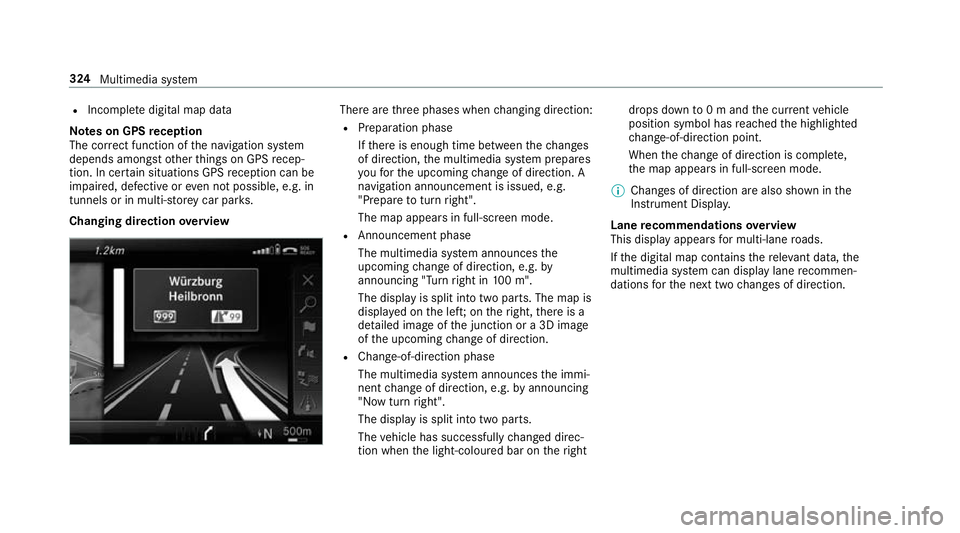
Changing direction overview There are
thre e phases when changing direction:
R Preparation phase
Ifth ere is enough time between thech anges
of direction, the multimedia sy stem prepares
yo ufo rth e upcoming change of direction. A
navigation announcement is issued, e.g.
"Prepare toturn right".
The map appears in full-screen mode.
R Announcement phase
The multimedia sy stem announces the
upcoming change of direction, e.g. by
announcing "Turn right in 100 m".
The display is split into two parts. The map is
displa yed on the lef t;on theright, there is a
de tailed image of the junction or a 3D image
of the upcoming change of direction.
R Chan ge-of-direction phase
The multimedia sy stem announces the immi‐
nent change of direction, e.g. byannouncing
"N ow turn right".
The display is split into two parts.
The vehicle has successfully changed direc‐
tion when the light-coloured bar on theright drops down
to0 m and the cur rent vehicle
position symbol has reached the highlighted
ch ange-of-direction point.
When thech ange of direction is comple te,
th e map appears in full-screen mode.
% Changes of direction are also shown in the
Instrument Displa y.
Lane recommendations overview
This display appears for multi-lane roads.
If th e digital map conta insthere leva nt da ta,the
multimedia sy stem can display lane recommen‐
dations forth e next two changes of direction. 324
Multimedia sy stem
Page 328 of 593
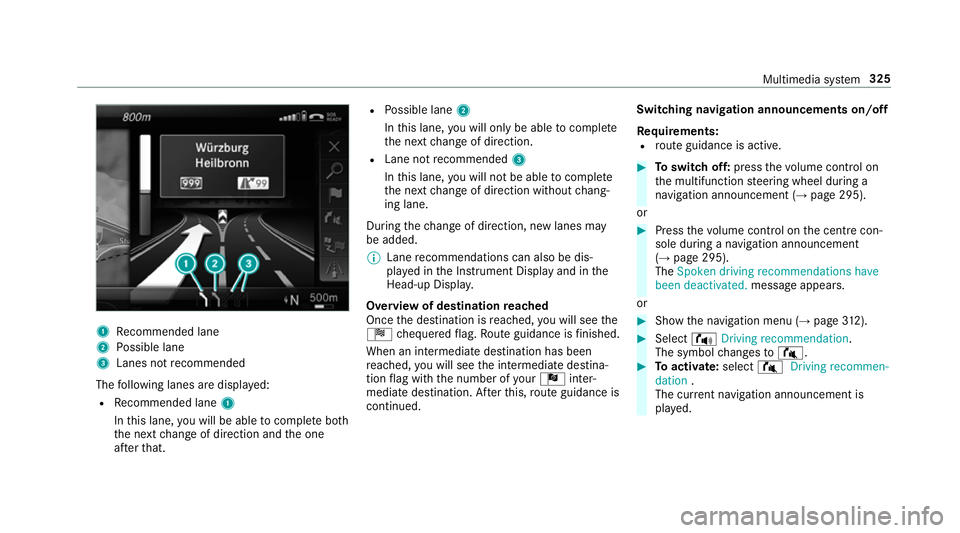
1
Recommended lane
2 Possible lane
3 Lanes not recommended
The following lanes are displa yed:
R Recommended lane 1
In this lane, you will be able tocompl ete bo th
th e next change of direction and the one
af te rth at. R
Possible lane 2
In this lane, you will on lybe able tocompl ete
th e next change of direction.
R Lane not recommended 3
In this lane, you will not be able tocompl ete
th e next change of direction without chang‐
ing lane.
During thech ange of direction, new lanes may
be added.
% Lane recommendations can also be dis‐
pl ay ed in the Instrument Display and in the
Head-up Displa y.
Overview of destination reached
Once the destination is reached, you will see the
Í chequered flag. Route guidance is finished.
When an intermedia tedestination has been
re ached, you will see the intermediate destina‐
tion flag with the number of your Î inter‐
mediate destination. Af terth is, route guidance is
continued. Swit
ching navigation announcements on/off
Re quirements:
R route guidance is active. #
Toswitch off: pressthevo lume control on
th e multifunction steering wheel during a
navigation announcement (→ page 295).
or #
Press thevo lume control on the cent recon‐
sole du ring a navigation announcement
(→ page 295).
The Spoken driving recommendations have
been deactivated. messageappears.
or #
Show the navigation menu (→ page312). #
Select !Driving recommendation .
The symbol changes to# . #
Toactivate: select#Driving recommen-
dation .
The cur rent navigation announcement is
pl ay ed. Multimedia sy
stem 325
Page 338 of 593
Av
oiding a new area
Multimedia sy stem:
Navigation ÀRoute and posi-
tion Avoid option sAreas #
Select Avoid new area . #
Tosear chfor an area via the map: select
Using map. #
Movethe map
or #
Tosear chfor an area using an address:
select Address entry . #
Enter the address. #
Select Select destination.
The map appears. #
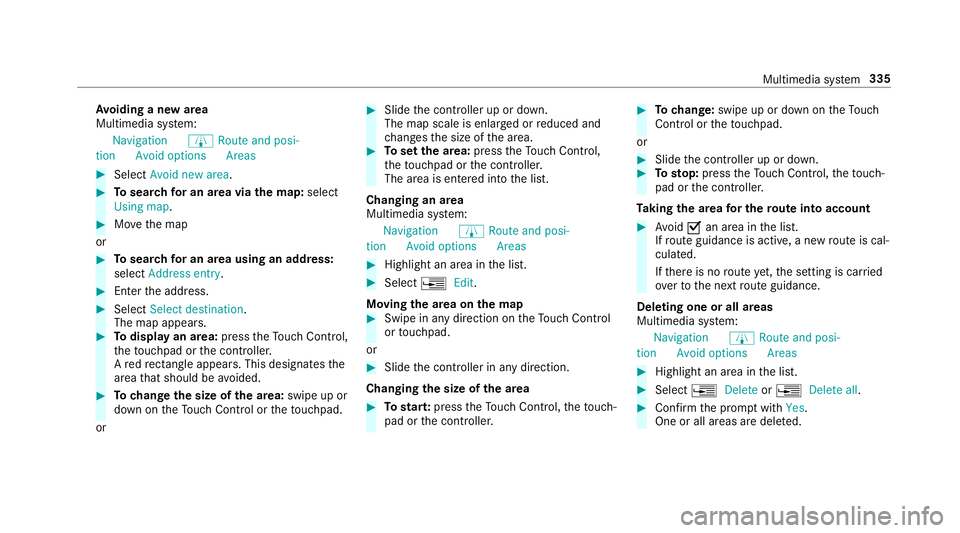
Todispl ayan area: presstheTo uch Control,
th eto uchpad or the controller.
A redre ctangle appea rs. This designates the
area that should be avoided. #
Tochange the size of the area: swipe up or
down on theTo uch Control or theto uchpad.
or #
Slide the controller up or down.
The map scale is enlar ged or reduced and
ch anges the size of the area. #
Toset the area: presstheTo uch Control,
th eto uchpad or the controller.
The area is entered into the list.
Changing an area
Multimedia sy stem:
Navigation ÀRoute and posi-
tion Avoid option sAreas #
Highlight an area in the list. #
Select ¥Edit.
Moving the area on the map #
Swipe in any direction on theTo uch Control
or touchpad.
or #
Slide the controller in any direction.
Changing the size of the area #
Tostar t:press theTo uch Control, theto uch‐
pad or the controller. #
Tochange: swipe up or down on theTo uch
Control or theto uchpad.
or #
Slide the controller up or down. #
Tosto p:press theTo uch Control, theto uch‐
pad or the controller.
Ta king the area for the route into account #
Avoid Oan area in the list.
If ro ute guidance is active, a new route is cal‐
culated.
If th ere is no route yet,th e setting is car ried
ove rto the next route guidance.
Deleting one or all areas
Multimedia sy stem:
Navigation ÀRoute and posi-
tion Avoid option sAreas #
Highlight an area in the list. #
Select ¥Delete or¥ Delete all. #
Confirm the prom ptwith Yes.
One or all areas are dele ted. Multimedia sy
stem 335