2018 MERCEDES-BENZ E-CLASS COUPE phone
[x] Cancel search: phonePage 4 of 486

Atagl ance .................................................... 6
Cockpit ........................................................... 6
Wa rning and indicator lamps .......................... 8
Overhead control panel ................................ 12
Door control panel and seat adjustment ....... 14
Emergencies and breakdowns ...................... 16
DigitalOperator' sManua l........................ .18
Callin g upthe Digital Operator's Manual ...... 18
General notes............................................. 19
Pr otecting the environment .......................... 19
Mercedes-Benz GenuineParts ....................... 19
Operator's Manual ........................................2 0
Service and vehicle operation ....................... 21
Operating saf ety.......................................... .22
Declaration of conformity for wireless
ve hicle components .....................................2 3
Diagnost ics connection ................................ 24
Qualified specialist workshop ....................... 25
Cor rect use of theve hicle ............................2 5
Problems with your vehicle ........................... 25
Re porting saf etydefects .............................. .25
Limited Warranty .......................................... 26 QR code
forre scue card ...............................2 6
Ve hicle data storage .....................................2 6
Copyright .. .................................................... 28
Occupant safety......................................... 30
Re stra int sy stem .......................................... .30
Seat belts ..................................................... 32
Airbags ......................................................... 37
PRE-SAFE
®sy stem ....................................... 44
Childr en intheve hicle ..................................4 5
Pe ts in theve hicle ........................................5 4
Opening and closing.................................. 55
SmartK ey...................................................... 55
Doors ............................................................ 59
Tr unk ............................................................ 63
Ro ller sun blinds .......................................... .69
Side windo ws............................................... 70
Sliding sunroof .............................................. 73
Anti-theft pr otection .................................... .78
Seats and stowing .................................... .80
Cor rect driver's seat position ....................... 80 Seats ............................................................
81
St eering wheel ............................................. .90
Using the memory function .......................... 92
St ow age areas .............................................. 94
Cup holder .................................................. 101
Ashtr ayand cigar ette lighter ...................... .102
Soc kets ....................................................... 103
Wi reless charging of the mobile phone
and connection with theex terior antenna .. 105
Ins talling/ removing thefloor mats .............1 07
Light and visibility................................... 108
Exterior lighting .......................................... 108
Interior lighting ............................................ 113
Wi ndshield wiper and windshield washer
sy stem ........................................................ 114
Mir rors ........................................................ 117
Operating the sun visors ............................. 119
Infrared reflective windshield ..................... .120
Climate control ......................................... 121
Overview of climate cont rol sy stems ......... .121
Operating the climate control sy stem ......... 122
2
Conte nts
Page 5 of 486

Drivingand pa rking ................................. 128
Driving ........................................................ 128
DY NA MIC SELECT switch ............................1 35
Au tomatic transmission .............................. 136
Re fueling .................................................... 140
Pa rking ...................................................... .142
Driving and driving saf etysy stems ............ .150
Instrument Display and on-board
comp uter .................................................. 205
Instrument display overview ...................... .205
Overview of the buttons on thesteering
wheel ......................................................... .206
Operating the on-board computer .............. 206
Displa ysinthe multifunction display ......... .208
Ad justing the instrument lighting ............... 208
Menus and submenus ................................ 209
Head-up Display .......................................... 215
Vo ice Control Sy stem ............................... 217
Operating saf ety.......................................... 217
Operation ....................................................2 17
Using Voice Cont rol Sy stem ef fectively ....... 219
Essential voice commands .......................... 219
Multimedia sy stem .................................. 228
Overview and operation .............................. 228
Sy stem settings .......................................... 236
Na vigation .................................................. 243
Te lephone .................................................. .264
Online and Internet functions ..................... 279
Media ......................................................... 286
Ra dio .......................................................... 298
Sound .........................................................3 05
Maintenance and care.............................308
ASS YST PLUS service inter val display ........ 308
Engine compartment .................................. 309
Cleaning and care ...................................... .315
Breakdown assistance ............................322
Emergency .................................................. 322
Flat tire ....................................................... 322
Battery (vehicle) ......................................... 328
To w starting or towing away ....................... 333
Electrical fuses ........................................... 338
Wheels and tires ...................................... 342
Noise or unusual handling characteris‐
tics ............................................................ .342
Re gular checking of wheels and tires ......... 342
No tes on snow chains ................................ 343
Ti re pressure .............................................. 343
Loading theve hicle .................................... 349
Ti re labeling ................................................ 354
Definitions for tires and loading ................. 359
Changing a wheel ....................................... 362
Te ch nical data .......................................... 372
No tes on tech nical da ta.............................. 372
Ve hicle electronics .....................................3 72
Ve hicle identification plate, VIN and
engine number ............................................ 374
Operating fluids .. ........................................ 376
Ve hicle data ................................................ 382
Display messages and warning/indi‐
cator lamps .............................................. 384
Display messages ...................................... .384
Wa rning and indicator lamps ...................... 429
Contents 3
Page 96 of 486

#Tocall up: press and hold there leva nt pre‐
set position button 1,2 or 3 until the front
seat is in thestored position.
St ow age areas
Note s on loading theve hicle
&
WARNING Risk ofexhaust gas poisoning
Combustion engines emit poisonous exhaust
ga ses such as carbon monoxide. Exhaust
ga ses can enter theve hicle interior if the
trunk lid is open when the engine is running,
especially if theve hicle is in motion.
#Alw ays switch off the engine before
opening the trunk lid.
#Ne ver drive with the trunk lid open.
&
WARNING Risk of injury from unsecured
items in theve hicle
If objects, luggage or loads are not secured
or not secured suf ficientl y,they could slip,
tip ove r or be throw n around and thereby hit
ve hicle occupants.
There is a risk of injur y,particularly in the
ev ent of sudden braking or a sudden change
in direction.
#Alw aysstow objects in such a wayth at
th ey cannot be thro wn around.
#Before the journe y,secure objects, lug‐
ga ge or loads against slipping or tipping
ove r.
&
WARNING Risk of injury from incorrectly
stowe d objects
If objects in theve hicle interior are stowed
incor rectly, they can slide or be throw n
around and hit vehicle occupants. In addi‐
tion, cup holders, open stowage spaces and
mobile phone brac kets cann otalw aysre tain
all objects they contain.
There is arisk of injur y,particularly in the
ev ent of sudden braking or a sudden change
in direction.
#Alw aysstow objects so that they can‐
not be throw n around in such situa‐
tions.
#Alw ays make sure that objects do not
pr otru de from stowage spaces, luggage
nets or stowage nets.
#Close the loc kable stow age spaces
before starting a journe y.
#Alwaysstow and secure heavy, hard,
pointe d, sharp-edged, fragile or bulky
objects in the trunk.
&
WARNING Risk of burn s fromtailpipes
and tailpipe trim
The tailpipe and tailpipe trim can become
ve ry hot. If you come into contact with these
parts of theve hicle, you could burn yourself.
#Alw ays be particular lycareful around
th eta ilpipe and theta ilpipe trim.
#Allow theve hicle parts tocool down
before youto uch them.
94
Seats and stowing
Page 97 of 486
The handlingcharacteristics of your vehicle are
dependent on the distribution of the load within
th eve hicle. You should bear thefo llowing in
mind when loading theve hicle:
RNe verex ceed the permissible gross mass or
th e permissible axle load forth eve hicle
(including occupants). The values are speci‐
fi ed on theve hicle identification plate on the
ve hicle's B-pillar.
RThe load must not pr otru de abo vethe upper
edge of the seat backrests.
RAlw ays place the load behind unoccupied
seats if possible.
RSecure the load using the tie-down eyes and
distribute the load evenly.
St ow age spaces in theve hicle interior
Overview of the front stowage compa rt‐
ments
Observ eth e no tes on loading theve hicle
(
→page 94).
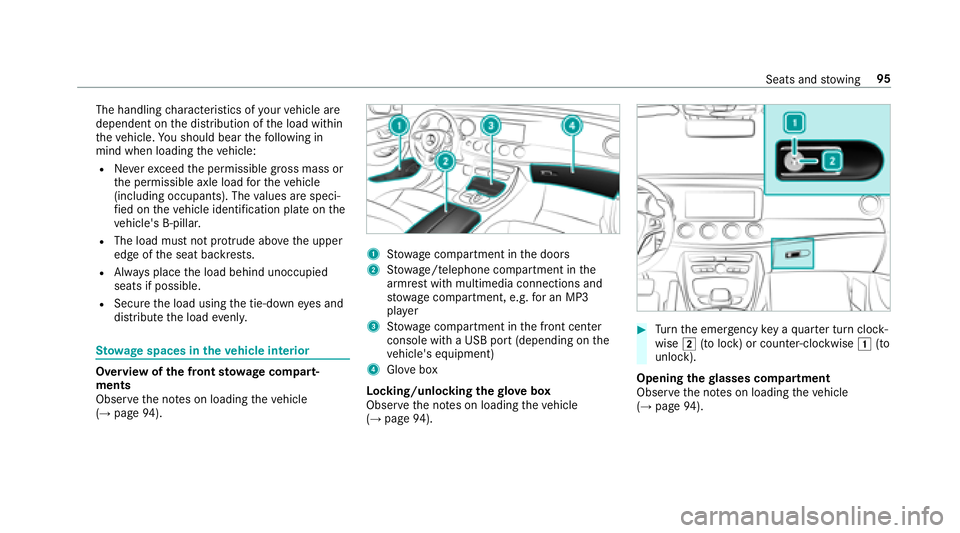
1Stow age compartment in the doors
2St ow age/telephone compartment in the
armrest with multimedia connections and
stow age compartment, e.g. for an MP3
pla yer
3Stow age compartment in the front center
console with a USB port (depending on the
ve hicle's equipment)
4Glo vebox
Locking/unlocking thegl ove box
Obser vethe no tes on loading theve hicle
(
→page 94).
#Turn the emer gency key a quarter turn clock‐
wise 2(to lock) or counter-clockwise 1(to
unlock).
Opening thegl asses co mpartment
Observ eth e no tes on loading theve hicle
(
→page 94).
Seats and stowing 95
Page 107 of 486
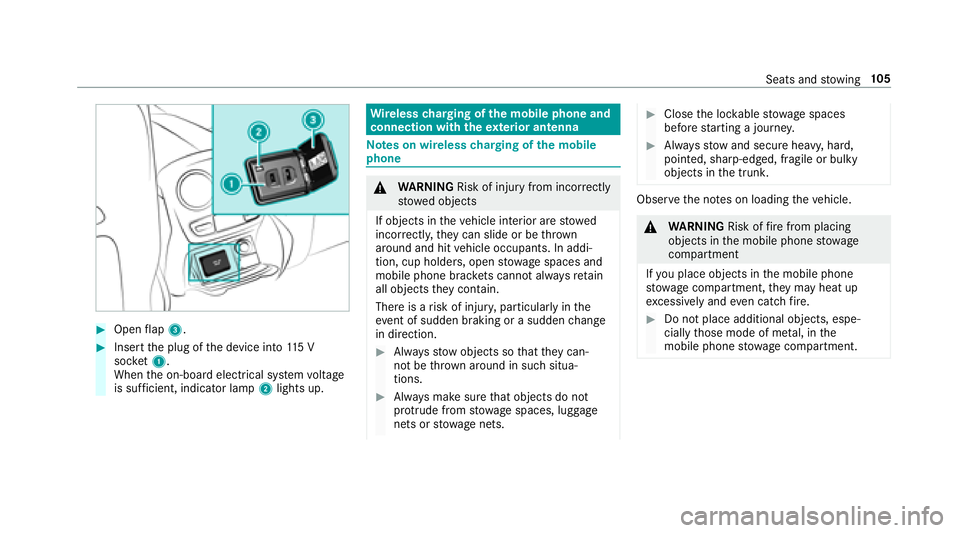
#Openflap 3.
#Insert the plug of the device into 115 V
soc ket1.
When the on-board electrical sy stem voltage
is suf ficient, indicator la mp2lights up.
Wire lesscharging of the mobile phone and
connection with theex terior antenna
Note s on wireless charging of the mobile
phone
& WARNING Risk of injury from incorrectly
stowe d objects
If objects in theve hicle interior are stowed
incor rectly, they can slide or be throw n
around and hit vehicle occupants. In addi‐
tion, cup holders, open stowage spaces and
mobile phone brac kets cann otalw aysre tain
all objects they contain.
There is arisk of injur y,particularly in the
ev ent of sudden braking or a sudden change
in direction.
#Alw aysstow objects so that they can‐
not be throw n around in such situa‐
tions.
#Alw ays make sure that objects do not
pr otru de from stowage spaces, luggage
nets or stowage nets.
#Close the loc kable stow age spaces
before starting a journe y.
#Alwaysstow and secure heavy, hard,
pointe d, sharp-edged, fragile or bulky
objects in the trunk.
Obser vethe no tes on loading theve hicle.
&
WARNING Risk offire from placing
objects in the mobile phone stowage
compartment
If yo u place objects in the mobile phone
stow age compartment, they may heat up
exc essively and even catch fire .
#Do not place additional objects, espe‐
cially those mode of me tal, in the
mobile phone stowage compartment.
Seats and stowing 10
5
Page 108 of 486
*NO
TEDama getoobjects caused by
placing them in the mobile phone stow‐
age compartment
If yo uplac e objects inthe mobile phone
stow age compartment, these may be dam‐
aged byelectromagnetic fields.
#Do not place credit cards, storage
media or other objects sensitive to
electromagnetic fields in the mobile
phone stowage compartment.
* NO
TEDama getothe mobile phone
stow age compartment caused byliquids
If liquids enter the mobile phone stowage
compartment, the compartment may be
damaged.
#Ensure that no liquids enter the mobile
phone stowage compartment.
RDepending on theve hicle equipment, the
mobile phone is connected totheve hicle's
ex terior aerial via thech arging module.
RThe charging function and wireless connec‐
tion of the mobile phone totheve hicle's
ex terior aerial are only available if the ignition
is switched on.
RSmall mobile phones may not be able tobe
ch arge d in everyposition of the mobile
phone stowage compartment.
RLargemobile phones which do not rest flat in
th e mobile phone stowage compartment may
not be able tobe charge d or connec ted with
th eve hicle's exterior aerial.
RThe mobile phone may heat up during the
ch arging process. The mobile phone can be
cooled in the mobile phone stowage com‐
partment when the air conditioning sy stem is
switched on. The cooling output in the
mobile phone stowage compartment is high‐
est when the controller in theglove box is
closed.
RTo ensure more ef ficient charging and con‐
nection with theve hicle's exterior aerial,
re mo vethe pr otective co ver from the mobile
phone.
RWhen charging, the mat should be used if
possible.
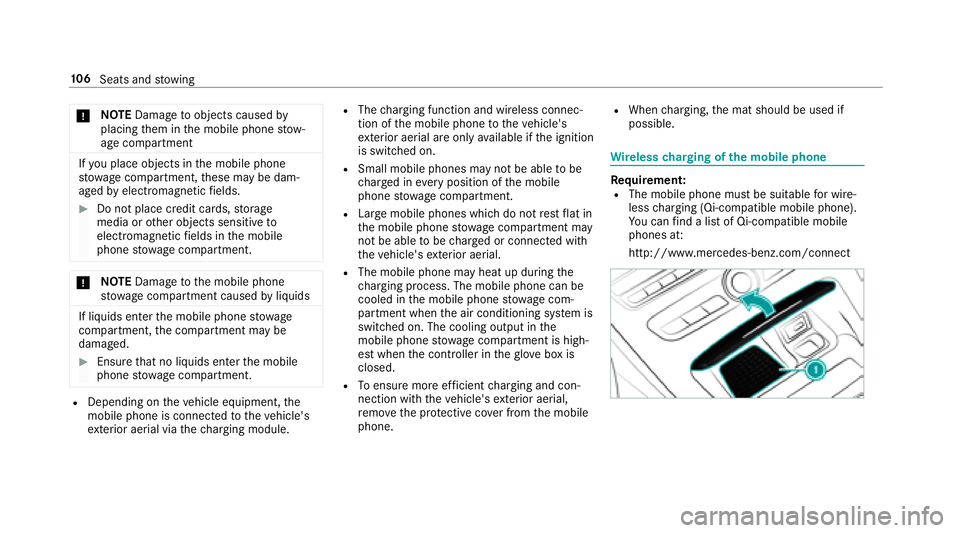
Wire lesscharging of the mobile phone
Re quirement:RThe mobile phone must be suitable for wire‐
less charging (Qi-compatible mobile phone).
Yo u can find a li stof Qi-compatible mobile
phones at:
http://www.mercedes-benz.com/connect
10 6
Seats and stowing
Page 109 of 486
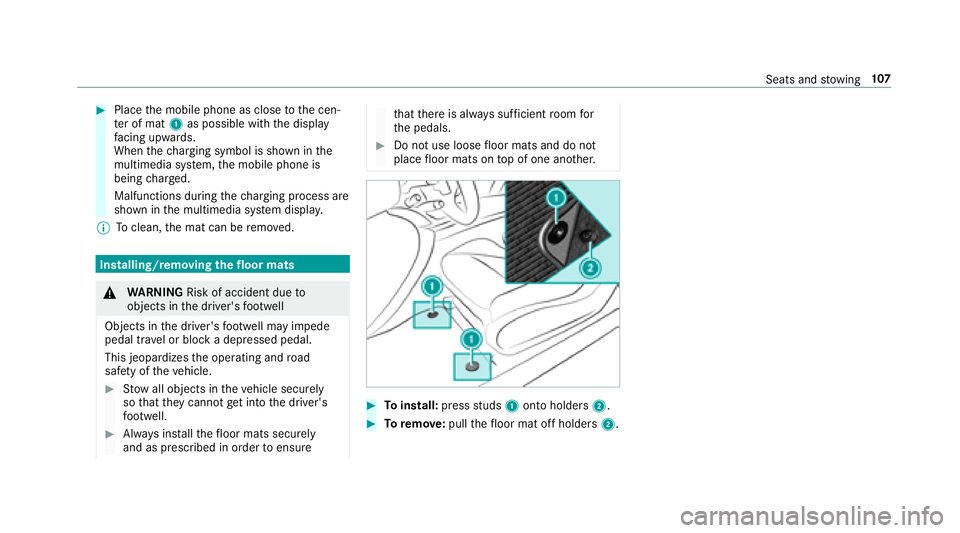
#Placethe mobile phone as close tothe cen‐
te r of mat 1as possible with the display
fa cing up wards.
When thech arging symbol is shown in the
multimedia sy stem, the mobile phone is
being charge d.
Malfunctions during thech arging process are
shown in the multimedia sy stem displa y.
% Toclean, the mat can be remo ved.
Installing/removing thefloor mats
&
WARNING Risk of accident due to
objects in the driver's foot we ll
Objects in the driver's foot we ll may impede
pedal tr avel or block a depressed pedal.
This jeopardizes the operating and road
saf etyof theve hicle.
#Stow all objects in theve hicle securely
so that they cannot getinto the driver's
fo ot we ll.
#Alw ays ins tallth efloor mats securely
and as prescribed in order toensure
that there is alw ays suf ficient room for
th e pedals.
#Do not use loose floor mats and do not
place floor mats on top of one ano ther.
#To install: pressstuds 1onto holders 2.
#Toremo ve:pull thefloor mat off holders 2.
Seats andstowing 10
7
Page 131 of 486
#Toswitch on the po wer supp ly:press but‐
to n1 (USA) or 2(Canada) once.
Yo u can act ivate the windshield wiper, for
ex ample.
The po wer supp lyis switched off again if thefo l‐
lowing conditions are me t:
RThe driver's door is open.
RYoupr ess butto n1 (USA) or 2(Canada)
twice.
#To switch on the ignition: press button 1
(USA) or 2(Canada) twice.
The indicator lamps in the instrument clus ter
light up.
The ignition is switched off again if one of the
fo llowing conditions is me t:
RYoudo not start theve hicle within
15 minutes.
RYoupr ess butto n1 (USA) or 2(Canada)
once.
St arting theve hicle
Starting theve hicle with thest art/s top but‐
to n
Requ irements:
RThe SmartK eyis located in theve hicle and
th e SmartK eybattery is not dischar ged.
#Shift the transmission toposition jori.
#Depress the brake pedal and push button 1
(USA) or 2(Canada) once.
#Ifth eve hicle does not star t:switch off non-
essential consumers and press button 1
(USA) or 2(Canada) once.
#Ifth eve hicle still does not start and the
3ODFH WKH .H\ LQ WKH 0DUNHG 6SDFH 6HH
2SHUDWRU
V 0DQXDO display message also
appears in the multifunction display: start
th eve hicle in emer gency operation mode. St
arting theve hicle via Remo teOnline serv‐
ices
Cooling or heating theve hicle interior before
st arting the journey
If yo ustart theve hicle via your smartphone, the
pr ev iously selecte d air conditioning adjustment
is active.
Before starting, make sure:
RThe legal stipulations in the area where your
ve hicle is par ked permit engine starting via
smartphone.
RIt is safe tostart and runth e engine where
yo ur vehicle is par ked.
RThe fuel tank is suff icientlyfilled.
RThe star ter battery has suf ficient charge .
Driving and pa rking 12
9