Page 288 of 486
#Press and holdtheto uchpad or cont roller
until an audible signal sounds.
The ß symbol appears bythest ation
name.
#Select ß)DYRULWHV.
The list of sa vedfavo rite stations appears.
or
#Create an account forth e online pr ovider
(TuneIn radio) and then log in on the multi‐
media sy stem.
Yo ur favo rite s are impor tedto the multimedia
sy stem.
Deleting favo rite s
#Select ß)DYRULWHV .
#Select astation.
#Press and hold theto uchpad or cont roller
until an audible signal sounds.
The ß symbol bythest ation name disap‐
pears. Setting
the Internet radio options
Multimedia sy stem:
,5DGLR.Ý ,QWHUQHW 5DGLR.7XQH,Q
UDGLR.Z 2SWLRQV
The following options are available:
R6HOHFW VWUHDP: select thest re am quality.
R/RJLQ WR 7XQH,Q DFFRXQW : loginto yourTuneIn
user account.
R/RJ RXW RI DFFRXQW: log out of your TuneIn
user account.
#Select an option.
Media
Au dio mode
Info rm ation on audio mode
&
WARNING Risk of dist raction when han‐
dling data storage medium
If yo u handle a data storage medium while
driving, your attention isdiver ted from the
traf fic conditions. This could also cause you
to lose control of theve hicle.
#Only handle a data storage medium
when theve hicle is stationar y.
Perm issible file sy stems:
RFA T32
RexFA T
RNTFS
Pe rm issible data storage medium:
RSD card
RUSB storage device
RiPod/iPhone
RMTP devices
RBlue tooth®audio equipment
% The multimedia sy stem supports a total of
up to50,000 files.
Suppor tedfo rm ats:
RMP3
RWMA
286
Multimedia sy stem
Page 291 of 486
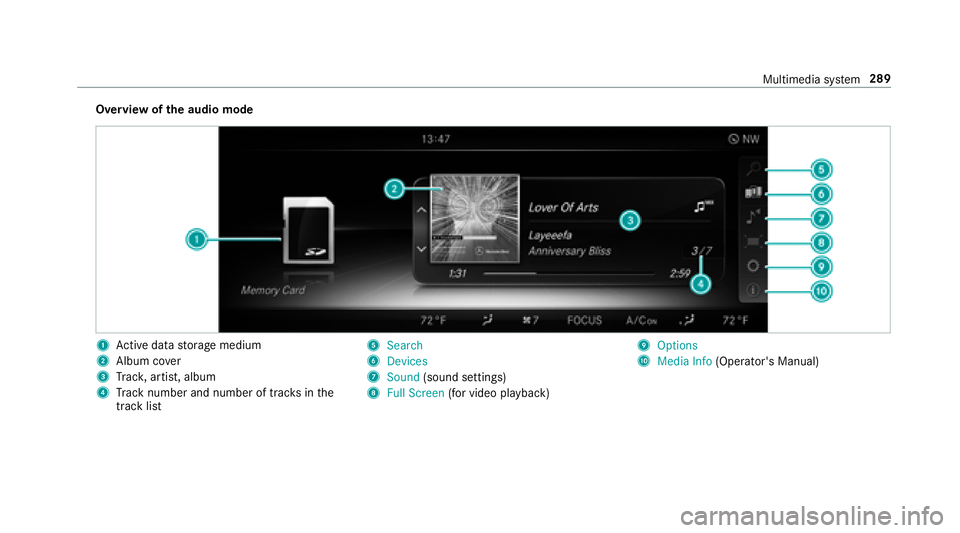
Overview ofthe audio mode
1Ac tive da tastorage medium
2Album co ver
3Trac k, artist, album
4Track number and number of trac ksinthe
track li st
56HDUFK
6'HYLFHV
76RXQG (sound settings)
8)XOO 6FUHHQ (for video pl ayback)
92SWLRQV
A0HGLD ,QIR (Operator's Manual)
Multimedia sy stem 289
Page 295 of 486
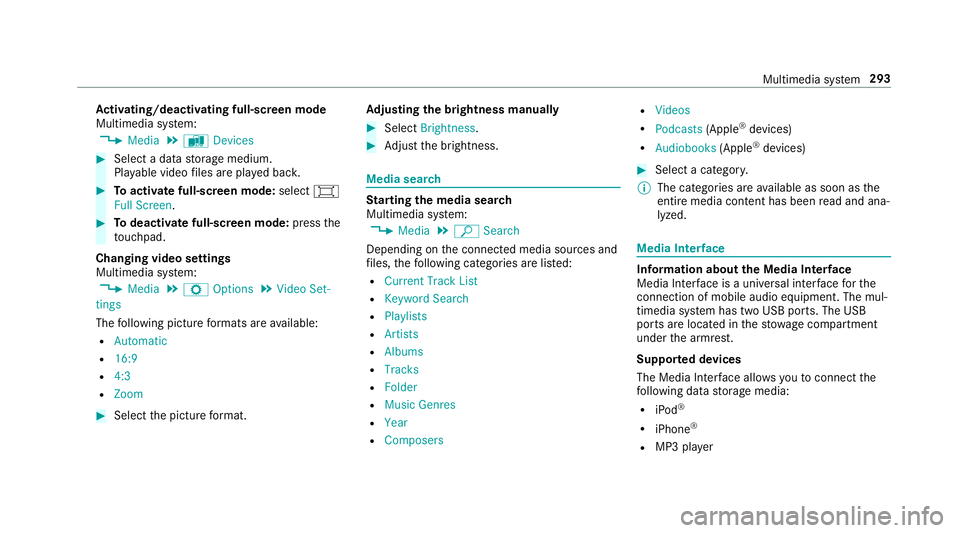
Activating/deactivating full-screen mode
Multimedia sy stem:
,0HGLD.à 'HYLFHV
#Select a data storage medium.
Pla yable video files are pla yed bac k.
#Toactivate full-screen mode: select#
)XOO 6FUHHQ.
#To deactivate full-scre en mode:pressthe
to uchpad.
Changing video settings
Multimed iasystem:
,0HGLD.Z 2SWLRQV.9LGHR 6HW�
WLQJV
The following picture form ats are available:
R$XWRPDWLF
R����
R���
R=RRP
#Select the picture form at. Ad
justing the brightness manually
#Select %ULJKWQHVV .
#Adjust the brightness.
Media sear ch
Starting the media sear ch
Multimedia sy stem:
,0HGLD.ª 6HDUFK
Depending on the connected media sources and
fi les, thefo llowing categories are lis ted:
R&XUUHQW 7UDFN /LVW
R.H\ZRUG 6HDUFK
R3OD\OLVWV
R$UWLVWV
R$OEXPV
R7UDFNV
R)ROGHU
R0XVLF *HQUHV
R
R&RPSRVHUV
R9LGHRV
R3RGFDVWV (Apple®devices)
R$XGLRERRNV (Apple®devices)
#Select a categor y.
% The categories are available as soon as the
entire media conte nt has beenread and ana‐
lyzed .
Medi a Inter face
Information about the Media Inter face
Media Inte rface is a universal inter face forth e
connection of mobile audio equipment. The mul‐
timedia sy stem has two USB ports. The USB
ports are located in thestow age compartment
under the armrest.
Suppor ted devices
The Media Inter face allo wsyouto connect the
fo llowing data storage media:
RiPod®
RiPhone®
RMP3 pla yer
Multimedia sy stem 293
Page 297 of 486
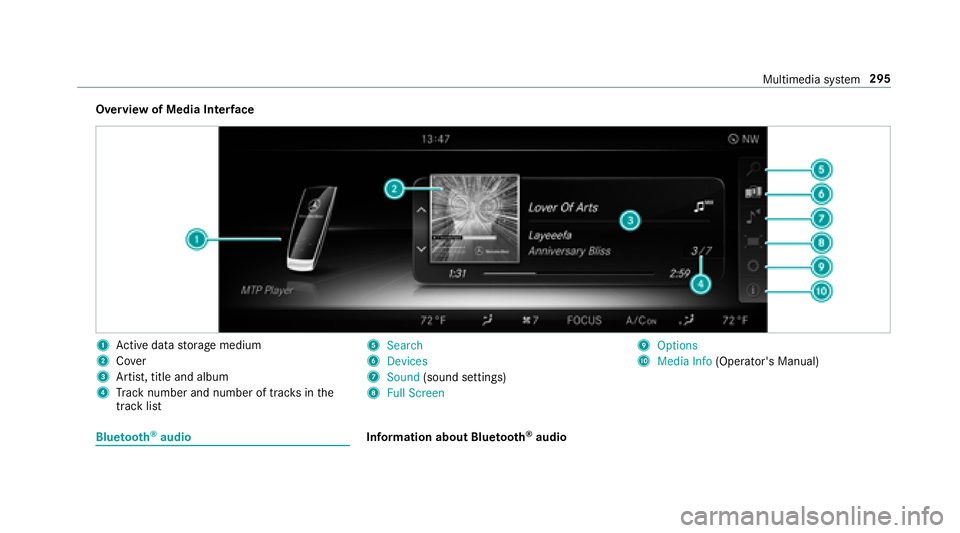
Overview of Media Interface
1Ac tive da tastorage medium
2Co ver
3Artist, title and album
4Track number and number of trac ksinthe
track li st
56HDUFK
6'HYLFHV
76RXQG (sound settings)
8)XOO 6FUHHQ
92SWLRQV
A0HGLD ,QIR (Operator's Manual)
Bluetooth®audioInformation about Blue tooth®audio
Multimedia sy stem 295
Page 298 of 486
Before usingyour Blue tooth®audio equipment
with the multimedia sy stem forth efirs t time,
yo uwill need toauthorize it (
→page 297).
Blu etoo th
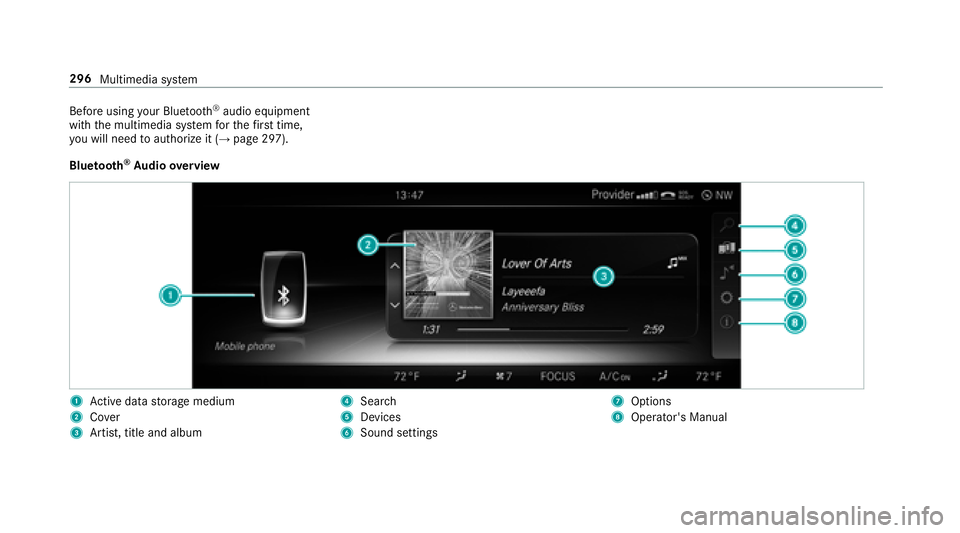
®Au dio overview
1Ac tive da tastorage medium
2Co ver
3Artist, title and album
4Searc h
5Devices
6Sound settings
7Options
8Operator's Manual
296
Multimedia sy stem
Page 299 of 486
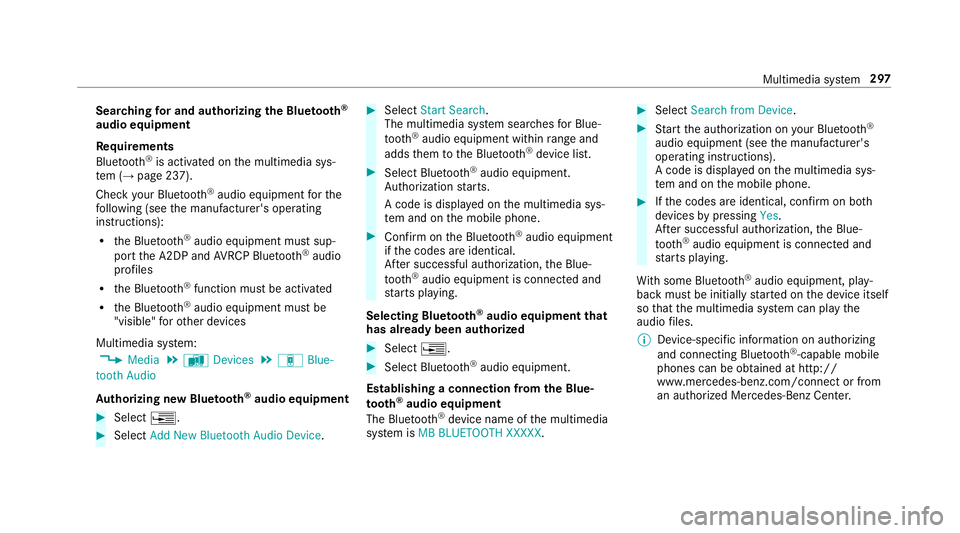
Searching for and authorizing the Blue tooth®
audio equipment
Requ irements
Blue tooth
®is activated on the multimedia sys‐
te m (→page 237).
Check your Blue tooth
®audio equipment forth e
fo llowing (see the manufacturer's operating
instructions):
Rth e Blue tooth®audio equipment must sup‐
port the A2DP and AVRC P Blue tooth®audio
profiles
Rth e Blue tooth®function must be activated
Rthe Blue tooth®audio equipment must be
"visible" forot her devices
Multimedia sy stem:
,0HGLD.à 'HYLFHV.á%OXH�
WRRWK $XGLR
Au thorizing new Blu etoo th
®audio equipment
#Select ¥.
#Select$GG 1HZ %OXHWRRWK $XGLR 'HYLFH.
#Select6WDUW 6HDUFK .
The multimedia sy stem sear ches for Blue‐
toot h
®audio equipment within range and
adds them tothe Blue tooth®device list.
#Select Blue tooth®audio equipment.
Auth orization starts.
A code is displa yed on the multimedia sys‐
te m and on the mobile phone.
#Confirm on the Blue tooth®audio equipment
if th e codes are identical.
Af ter successful au thorization, the Blue‐
toot h
®audio equipment is connec ted and
st arts playing.
Selecting Blu etoo th
®audio equipment that
has already been authorized
#Select ¥.
#Select Blue tooth®audio equipment.
Establishing a connection from the Blue‐
to oth
®audio equipment
The Blue tooth®device name of the multimedia
sy stem is 0% %/8(7227+ ;;;;;.
#Select 6HDUFK IURP 'HYLFH.
#Start the authorization on your Blue tooth®
audio equipment (see the manufacturer's
operating instructions).
A code is displa yed on the multimedia sys‐
te m and on the mobile phone.
#Ifth e codes are identical, confi rmon bo th
devices bypressing
Af ter successful au thorization, the Blue‐
toot h
®audio equipment is connec ted and
st arts playing.
Wi th some Blue tooth
®audio equipment, play‐
back must be initially star ted on the device itself
so that the multimedia sy stem can play the
audio files.
% Device-specific information on authorizing
and connecting Blue tooth
®-capable mobile
phones can be obta ined at http://
www.me rcedes-benz.com/connect or from
an authorized Mercedes-Benz Center.
Multimedia sy stem 297
Page 300 of 486
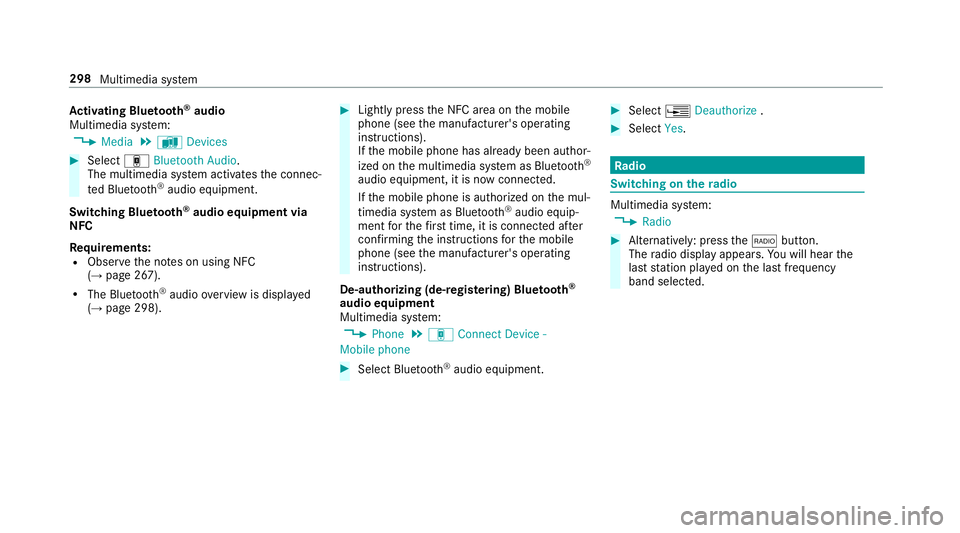
Activating Blue tooth®audio
Multimedia sy stem:
,0HGLD.à 'HYLFHV
#Select á%OXHWRRWK $XGLR.
The multimedia sy stem activates the connec‐
te d Blue tooth
®audio equipment.
Switch ing Blue tooth
®audio equipment via
NFC
Requ irements:
RObser vethe no tes on using NFC
(→page 267).
RThe Blue tooth®audio overview is displa yed
(→page 298).
#Lightly press the NFC area on the mobile
phone (see the manufacturer's operating
instructions).
If th e mobile phone has already been author‐
ized on the multimedia sy stem as Blue tooth
®
audio equipment, it is now connec ted.
If th e mobile phone is authorized on the mul‐
timedia sy stem as Blue tooth
®audio equip‐
ment forth efirs t time, it is connected af ter
confirming the instructions forth e mobile
phone (see the manufacturer's operating
instructions).
De-authorizing (de-regis tering) Blue tooth
®
audio equipment
Multimedia sy stem:
,3KRQH.á &RQQHFW 'HYLFH �
0RELOH SKRQH
#Select Blue tooth®audio equipment.
#Select ¥'HDXWKRUL]H .
#Select
Radio
Switching on the radio
Multimedia sy stem:
,5DGLR
#Alternatively: press the$ button.
The radio display appears. Youwill hear the
last station pla yed on the last frequency
band selected.
298 Multimedia sy stem
Page 303 of 486
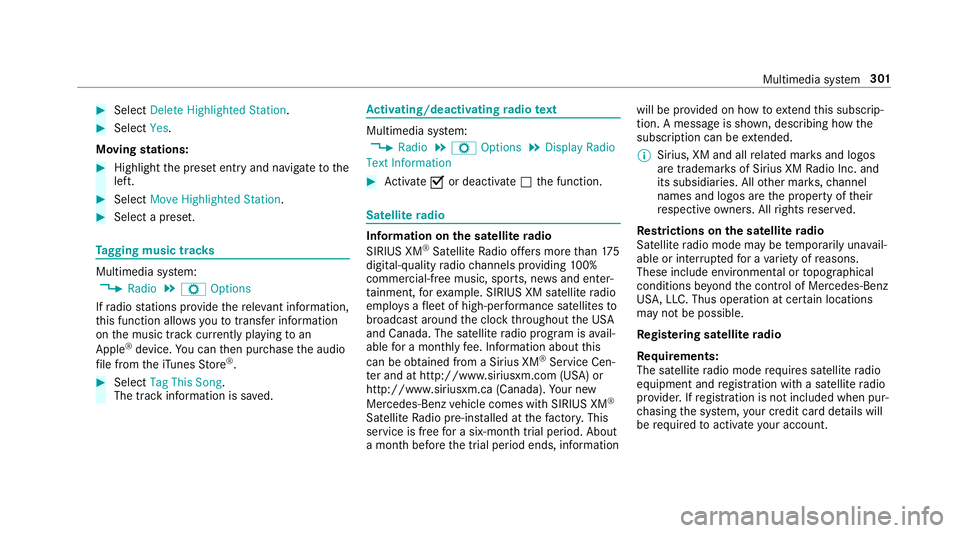
#Select'HOHWH +LJKOLJKWHG 6WDWLRQ .
#Select
Moving stations:
#Highlight the preset ent ryand navigate tothe
left.
#Select 0RYH +LJKOLJKWHG 6WDWLRQ .
#Select a preset.
Tagging music trac ks
Multimedia system:
,5DGLR.Z 2SWLRQV
If ra dio stations pr ovide there leva nt information,
th is function allo wsyouto trans fer information
on the music track cur rently pl aying toan
Apple
®device. You can then pur chase the audio
fi le from theiTunes Store®.
#Select 7DJ 7KLV 6RQJ.
The track information is sa ved.
Ac tivating/deactivating radio text
Multimedia sy stem:
,5DGLR.Z 2SWLRQV.'LVSOD\ 5DGLR
7H[W ,QIRUPDWLRQ
#Ac tivate Oor deacti vate ª the function.
Satellite radio
Info rm ation on the satellite radio
SIRIUS XM®Satelli teRadio of fers more than 175
digital-quality radio channels pr oviding 100%
commercial-free music, sports, ne wsand enter‐
ta inment, forex ample. SIRIUS XM satellite radio
emplo ysafleet of high-per form ance satellites to
broadcast around the clock thro ughout the USA
and Canada. The satellite radio program is avail‐
able for a monthly fee. Information about this
can be obtained from a Sirius XM
®Service Cen‐
te r and at http://www.siriusxm.com (USA) or
http://www.siriusxm.ca (Canada). Your new
Mercedes-Benz vehicle comes with SIRIUS XM
®
Satellite Radio pre-in stalled at thefa ctor y.This
service is free for a six-month trial period. About
a month before the trial period ends, information will be pr
ovided on how toextend this subscri p‐
tion. A message is shown, describing how the
subscription can be extended.
% Sirius, XM and all related mar ksand logos
are trademar ksof Sirius XM Radio Inc. and
its subsidiaries. All other mar ks,ch annel
names and logos are the property of their
re spective owners. All rights reser ved.
Re strictions on the satellite radio
Satelli teradio mode may be temp orarily una vail‐
able or inter rupte dfo r a variet yof reasons.
These include environmen tal or
topog raphical
condit
ions be yond the control of Mercedes-Benz
US A,LLC. Thus operation at cer tain locations
may not be possible.
Re gis tering satellite radio
Re quirements:
The satellite radio mode requ ires satellite radio
equipment and registration with a satellite radio
pr ov ider. If registration is not included when pur‐
ch asing the sy stem, your credit card de tails will
be requ ired toactivate your account.
Multimedia sy stem 301