2018 MERCEDES-BENZ E-CLASS CABRIOLET maintenance
[x] Cancel search: maintenancePage 330 of 498

Observethefo llowing information:
Note s on cleaning and car eA voiding vehicle damage
Wheels/rims Usewate r and acid-free wheel cleaners.
RDo not use acidic wheel cleaners toremo vebrake dust.
This could damage wheel bolts and brake components.
RTo avoid cor rosion of the brake discs and brake pads,
drive theve hicle for a few minutes af ter cleaning before
parking it. The brake discs and brake pads warm up and
dry out.
Wi ndo ws
Cleanthe windo wsonthe inside and outside using a damp
clo thand cleaning agents recommended byMercedes-Benz. Do not use dry clo
ths or abrasive or sol vent-based cleaning
agents toclean the inside of windo ws.
Wi per blades
Fold out the wiper blades and clean them using a damp clo th.D o not clean the wiper blades too of ten.
Ex terior lighting
Cleanthe windo wswith a wet sponge and mild cleaning
agent, e.g. car sha mpoo. Only use cleaning agents or cleaning clo
thsth at are suitable
fo r plast ic covers.
Sensors Cleanthe sensors in the front and rear bumper and in the
ra diator grille with a soft clo thand car shampoo. When using a high-pressure cleaner, mainta
in a minimum dis‐
ta nce of 11.8 in (30 cm).
328
Maintenance and care
Page 331 of 498
Notes on cleaning and car eA voiding vehicle damage
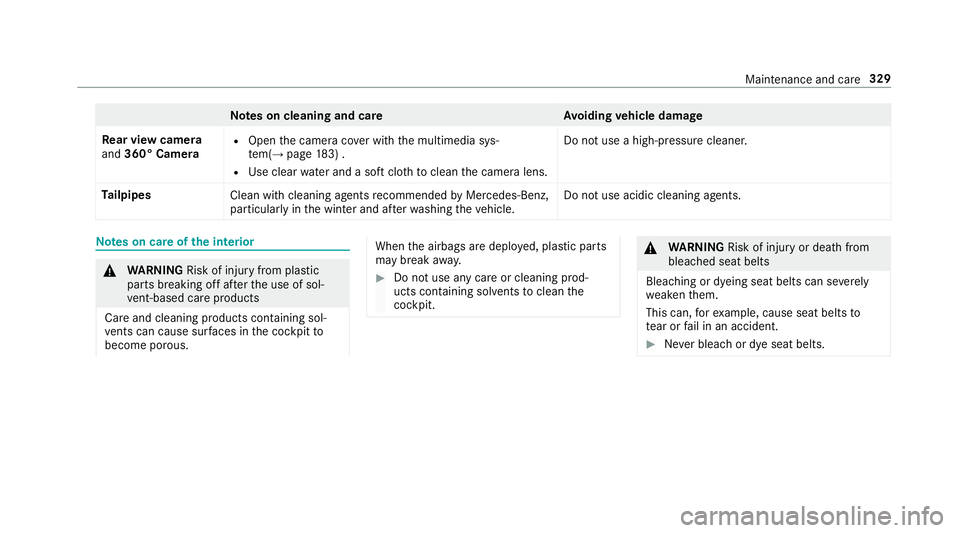
Re ar view camera
and 360° Camera
ROpen the camera co ver with the multimedia sys‐
te m(→page 183) .
RUse clear water and a soft clo thtoclean the camera lens. Do not use a high-pressure cleaner.
Ta ilpipes
Clean with cleaning agents recommended byMercedes-Benz,
particular lyin the winter and af terwa shing theve hicle. Do not use acidic cleaning agents.
Note
s on care of the interior
0071
WARNING Risk of injury from plastic
parts breaking off af terth e use of sol‐
ve nt-based care products
Ca reand cleaning products con taining sol‐
ve nts can cause surf aces inthe cockpit to
become porous.
When the airbags are deplo yed, plastic parts
may break away.
00BBDo not use any care or cleaning prod‐
ucts containing sol vents toclean the
cockpit.
0071 WARNING Risk of injury or death from
bleached seat belts
Bleaching or dyeing seat belts can se verely
we aken them.
This can, forex ample, cause seat belts to
te ar or fail in an accident.
00BBNe ver bleach or dye seat belts.
Maintenance and care 329
Page 332 of 498

Observethefo llowing information:
Cleaning and car eA voiding vehicle damage
Seat belts Clean with lukewarmand soapy water.
RDo not use chemical cleaning agents.
RDo not dry seat belts byheating them toove r17 6 °F
(80 °C) or exposing them todirect sunlight.
Display Cleanthe sur face carefully wi tha micro fiber clo thand
TFT/LCD display care product.
RSwit choff the display and let it cool down.
RDo not use any other cleaning products.
Plastic trim
RClean with a damp microfiber clo th.
RFo r heavy soiling: use care product recommended by
Mercedes-Benz.
RDo not attach sticke rs,fi lms or similar.
RDo not allow cosmetics, insect repellent or sun cream to
come in contact wi th the plastic trim.
Re alwo od/t rim ele‐
ments
RClean wi tha micro fiber clo th.
RBla ckpiano-lac quer look: clean with a damp clo thand
soap solution.
RFo r heavy soiling: use care product recommended by
Mercedes-Benz. Do not use solvent-based cleaning agents, polishes or
waxes.
Ro of lining
Clean with a brush or dry shampoo.
Carpet Use carpet andtextile cleaning agents recommended by
Mercedes-Benz.
330 Maintenance and care
Page 333 of 498
Cleaning and careA voiding vehicle damage
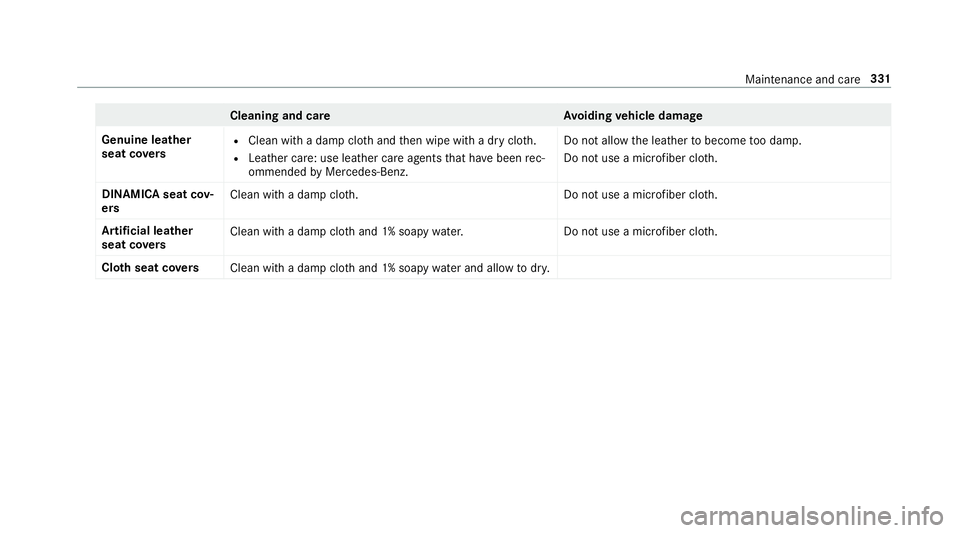
Genuine leather
seat co vers
RClean with a damp clo thand then wipe with a dry clo th.
RLeather care: use leath er care agentsthat ha vebeen rec‐
ommended byMercedes-Benz. Do not allow
the leather tobecome too damp.
Do not use a microfiber clo th.
DINAMIC Asea tcov‐
er s Clean wit
h adam pclo th.D o not use a microfiber cloth.
Ar tificial leather
seat co vers Clean
with a damp clo thand 1% soapy water. Do not use a microfiber clo th.
Clo thseat co vers
Cleanwith a damp clo thand 1% soapy water and all owtodry.
Maintenance and care 331
Page 359 of 498

Further related subjects:
RNo tes on tire pressure (→page 354)
RTire pressure table (→page 355)
RTire and Loading Info rmation placard
(→page 360)
Ti re pressure moni toring sy stem
Fu nction of the tire pressure moni toring sys‐
te m
0071
DANG ER Risk of accident due toincor‐
re ct tire pressure
Every tire, including the spare (if pr ovided),
should be checked when cold at least once a
month and inflated tothe pressure recom‐
mended bytheve hicle manufacturer (see
Ti re and Loading Info rmation placard on the
B-pillar on the driver ’sside or the tire pres‐
sure label on the inside of the fuel filler flap
of your vehicle). If your vehicle has tires of a
dif fere nt size than the size indicated on the
Ti re and Loading Info rmation placard or the
tire pressure table, you need todeterm ine
th e proper tire pressure forth ose tires.
As an added saf etyfe ature, your vehicle has
been equipped with a tire pressure monitor‐
ing sy stem (TPMS) that illuminates a low tire
pressure indicator lamp when one or more of
yo ur tires are signif icantly underinflated.
Ac cording ly, if the low tire pressure indicator
lamp lights up, you should stop and check
yo ur tires as soon as possible, and inflate
th em tothe proper pressure. Driving on a
significant lyunderinflated tire causes the tire
to ov erheat and can lead totire failure.
Un derinflation also increases fuel consump‐
tion and reduces tire tread life, and may
af fect theve hicle's handling and braking abil‐
ity. Please no tethat the TPMS is not a substi‐
tute for proper tire maintenance, and it is the
driver's responsibility tomaintain cor rect tire
pressure, even if underinflation has not
re ached the le velto trig ger illumination of
th e TPMS low tire pressure indicator lamp.
Yo ur vehicle has also been equipped with a
TPMS malfunction indicator toindicate whenthe sy stem is not operating proper ly. The
TPMS malfunction indica tor is combined with
th e low tire pressure indicator lamp. When
th e sy stem de tects a malfunction, the indica‐
to r lamp will flash for app roxima tely a minute
and then remain continuously illumina ted.
This sequence will continue upon subsequent
ve hicle start-ups as long as the malfunction
ex ists.
When the malfunction indicator is illumina‐
te d, the sy stem may not be able todetect or
signal low tire pressure as intended. TPMS
malfunctions may occur for a variet yof rea‐
sons, including the ins tallation of incompati‐
ble replacement or alternate tires or wheels
on theve hicle that pr eventthe TPMS from
functioning properly.
Alw aysch eck the TPMS malfunction warning
lamp af terre placing one or more tires or
wheels on your vehicle toensure that the
re placement or alternate tires and wheels
allow the TPMS tocontinue tofunction prop‐
erly.
Wheels and tires 357
Page 380 of 498

Aluminum hub cap
00BBToremo ve:position soc ket2 on hub cap
1.
00CE The soc ket can be found inthe tire-change
to ol kit.
00BBPo sition wheel spanner 3on soc ket2.
00BBUsing wheel spanner 3, turn hub cap1
counter-clo ckwise and remo veit.
00BBTo install: position hub cap 1and turn until
it is comple tely flush withth e wheel.
00BBPo sition soc ket2 on hub cap 1.
00BBAttach wheel spanner 3tosoc ket2 and
tighten the hub cap clockwise.
Specified tightening torq ue: 18lb-ft
(25 Nm).
00BBRa ise theve hicle (→page 378).
Ra ising theve hicle when changing a wheel
Re quirements:RThere are no persons in theve hicle.
RThe vehicle has been prepared for a wheel
ch ange (→page 377).
RThe hub caps ha vebeen remo ved
(→page 377).
Impor tant no tes on using the jack:
Ronly use theve hicle-specific jack that has
been tested and appr ovedby Mercedes-Benz
to raise theve hicle.
Rthe jack is only designed forra ising and hold‐
ing theve hicle for a short time while a wheel
is being changed and not for maintenance
wo rkunder theve hicle.
Rthe jack must be placed on a firm ,fl at and
non-slip sur face. If necessar y,use a lar ge,
load-bearing, non-slip underla y.
Rthefo ot ofthe jack must be positioned verti‐
cally under the jack support point.
Ru les of conduct when theve hicle is raised:
RNe ver place your hands or feet under the
ve hicle.
RDo not lie under theve hicle.
RDo not start the engine and do not release
th e electric parking brake.
RDo not open or close any doors or the trunk
lid.
37 8
Wheels and tires
Page 465 of 498

Ambient lighting ...................................... 116
Android Auto ............................................ 280
Connecting a mobile phone ................. 281
Ending ................................................. 281
No te .................................................... 280
Overview ............................................. 280
Sound settings ..................................... 281
Tr ans ferred vehicle data ......................2 82
Animals Pets in theve hicle ................................. 56
Anti-lock braking sy stem
see ABS (Anti-lock Brake Sy stem)
Anti-skid chains
see Snow chains
Anti-theft ala rmsystem
see ATA (anti-theft alarm sy stem)
Anti-theft pr otection
Immobilizer ............................................ 83
Anti- theft pr otection
see ATA (anti-theft alarm sy stem)
Anticipatory occupant pr otection
see PRE- SAFE
®(anticipatory occu‐
pant pr otection) see PRE-SAFE
®PLUS (anticipatory
occupant pr otection plus)
Apple CarPlay™ ....................................... 279
Connecting an iPhone
®.............. .........279
Ending ................................................. 280
No tes ................................................... 279
Overview ............................................. 279
Sound settings .................................... 280
Tr ans ferred vehicle data ......................2 82
Ashtr ay
Fr ont center console ........................... 106
Re ar passenger compartment ............ .107
Assistance graphic
Menu (on-board
comp
uter) .................. 204
Assistance sy stems
see Driving saf etysy stem
ASS YST PLUS ............................................ 314
Displ aying the service due date ........... 314
Fu nction/no tes .................................... 314
Non-operational times with the bat‐
te ry disconnec ted ................................ 315
Re gular maintenance work .................. 314
Special service requ irements .............. .314 ATA
(anti-theft alarm system) .................. 83
Deactivating the alarm .......................... 84
Fu nction ................................................ 83
AT TENTION ASSIST ..........................189, 190
Fu nction .............................................. 189
Setting ................................................. 190
Sy stem limitations ...............................1 89
At tention assistant
see ATTENTION ASSIST
Au dio mode
Ac tivating media mode ........................ 294
Connecting USB devices ..................... 296
Co pyright ............................................. 293
Information .......................................... 292
Inserting/ removing an SD card ...........2 94
Media sear ch....................................... 299
Overview ............................................. 295
Pa use and playback function .............. .296
Selecting a track ................................. 296
Selecting playba ckoptions .................. 296
Tr ack list .............................................. 296
Au thorized workshop
see Qualified specialist wo
rkshop
Index 463
Page 481 of 498

Luggage
Lu ggage net ......................................... 104
Securi ng ................................................ 99
Lu mbar support
see Lumbar support (4-w ay)
Lu mbar support (4-w ay).......................... .89
M
MAGIC VISION CONTROL Windshield wipe rs................................ 119
Maintenance Menu (on-board computer) .................. 203
Ve hicle ................................................... 21
Maintenance see ASS YST PLUS
Making a call via theove rhead con‐
trol panel
Mercedes-Benz mbrace
®(USA only) .. .282
Malfunction Restra int sy stem ................................... 32
Map .......................................... .261, 263, 264
Av oiding an area ..................................2 66
Av oiding an area (o verview) ................ .266 Changing an area ................................ 267
Deleting an area .................................. 267
Display
ingthe compass ....................... 268
Displaying the map version ................ .266
Display ingthe next intersecting
st re et ................................................... 266
Displaying the satellite map ............... .268
Display ingthe traf fic map .................... 261
Displaying traf fic signs ........................ 266
Displaying weather information .......... .268
Map data ............................................. 267
Moving ................................................ 264
Overview ............................................. 263
Selecting POI symbols ......................... 265
Selecting text information ................... 265
Selecting the map orientation ............ .265
Setting the map scale .......................... 264
Setting the map scale automaticall y ..
.
.268
Switching highwa yin fo rm ation
on/off ................................................ .265
Up dating .............................................. 267
Map and compass Overview .............................................2 63
Massage prog ram
Selecting the front seats ........................ 91Massage prog
rams
Overview ................................................ 91
Massage settings Resetting ............................................... 92
Matt finish (cleaning instructions) ........ 324
Maximum load rating .............................. 367
Maximum permissible load Calculation example ............................ 362
De term ining ........................................ .361
Maximum tire pressure ..........................367
Mechanical key
Inserting/removing ............................... 59
Locking a door ....................................... 65
Unlocking a door ................................... 65
Media Menu (on-board computer) .................. 208
Sear ching ............................................ 299
Media display Notes .................................................. 223
Media Inter face
Ac tivating ............................................ 300
Information .......................................... 299
Overview .............................................. 301
Index47
9