2018 MERCEDES-BENZ CLA trunk
[x] Cancel search: trunkPage 4 of 326
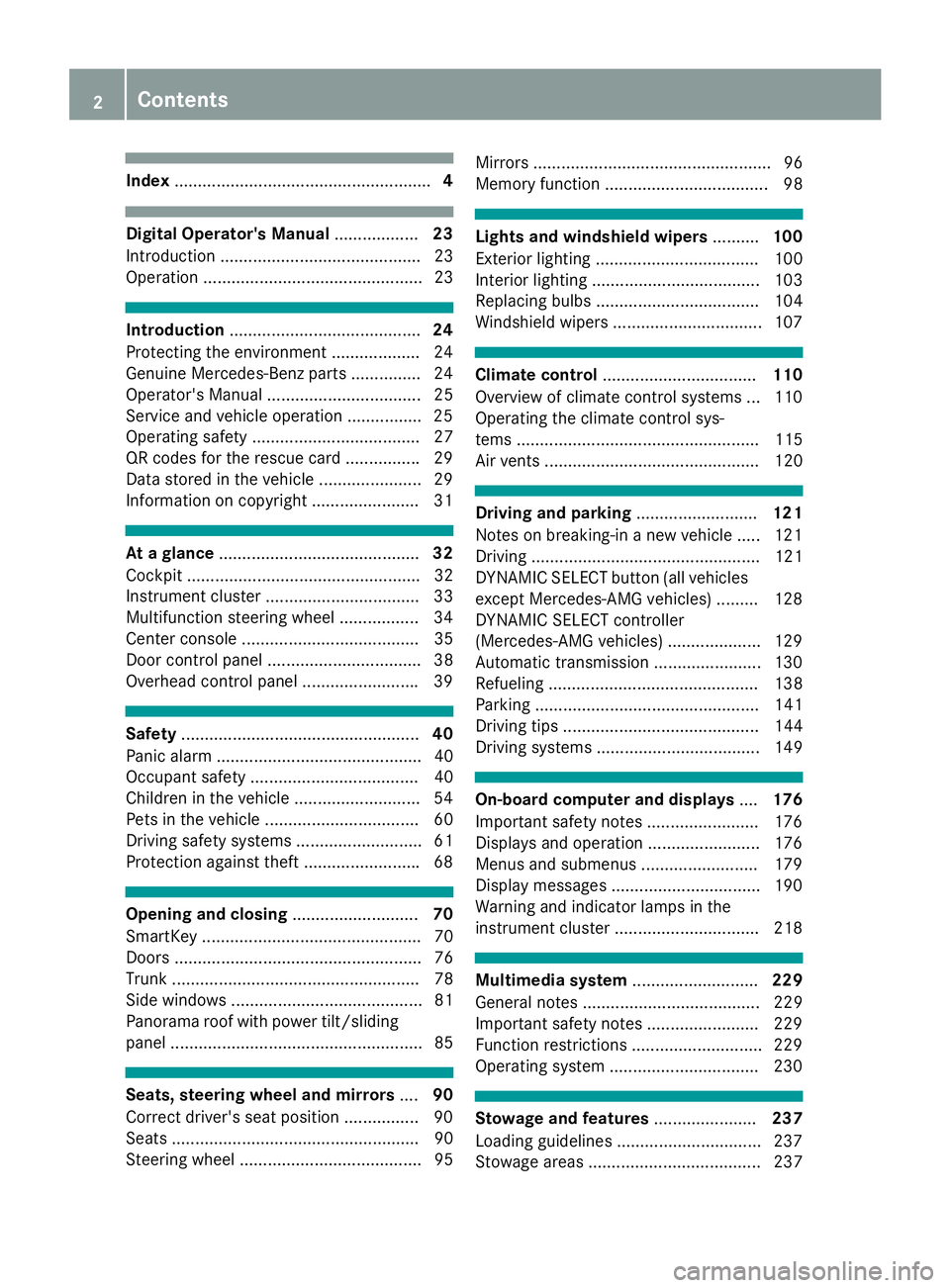
Index ....................................................... 4
Digital Operator's Manual .................. 23
Introductio n. .......................................... 23
Operation ............................................... 23
Introduction ......................................... 24
Protecting the environment .................. .2 4
Genuine Mercedes-Ben zp art s. .............. 24
Operator's Manual ................................. 25
Service and vehicle operation ............... .2 5
Operating safety .................................... 27
QR codes for the rescue card ............... .2 9
Data stored in the vehicl e. ..................... 29
Informatio nonc opyright ....................... 31
At ag la nce ........................................... 32
Cockpi t. ................................................. 32
Instrument cluste r. ................................ 33
Multifunctio ns teering whee l. ................ 34
Center consol e. ..................................... 35
Doo rc ontro lp an el ................................. 38
Overhead contro lp an el ........................ .3 9
Safety ................................................... 40
Panic alarm ............................................ 40
Occupant safety .................................... 40
Children in the vehicle ........................... 54
Pets in the vehicle ................................. 60
Driving safety systems ........................... 61
Protection against theft ........................ .6 8
Opening and closing ........................... 70
SmartKey ............................................... 70
Doors ..................................................... 76
Trunk ..................................................... 78
Side windows ......................................... 81
Panorama roof with power tilt/sliding
panel ...................................................... 85
Seats, steering wheel and mirrors .... 90
Correct driver's seat position ............... .9 0
Seats ..................................................... 90
Steering wheel ....................................... 95 Mirror s. .................................................. 96
Memory function ................................... 98
Lights and windshield wipers .......... 100
Exterior lighting ................................... 100
Interior lighting .................................... 103
Replacing bulb s. .................................. 104
Windshield wipers ................................ 107
Climate control ................................. 110
Overview of climate control systems ... 110
Operating the climate control sys-
tems .................................................... 115
Air vents .............................................. 120
Drivin ga nd parking .......................... 121
Note sonb reaking-in an ew vehicl e. .... 121
Driving ................................................. 121
DYNAMIC SELECT button (all vehicles
excep tM ercedes-AM Gv ehicles) ......... 128
DYNAMIC SELECT controller
(Mercedes-AM Gv ehicles) .................... 129
Automati ct ransmissio n. ...................... 130
Refueling ............................................. 138
Parking ................................................ 141
Driving tip s. ......................................... 144
Driving systems ................................... 149
On-board computer and displays .... 176
Important safety notes ........................ 176
Displays and operation ........................ 176
Menu sa nd submenus ......................... 179
Displa ym essages ................................ 190
Warning and indicator lamps in the
instrument cluster ............................... 218
Multimedi as ystem ........................... 229
Genera ln otes ...................................... 229
Important safety notes ........................ 229
Function restrictions ............................ 229
Operating system ................................ 230
Stowag ea nd features ...................... 237
Loading guideline s. .............................. 237
Stowag ea reas ..................................... 2372
Contents
Page 20 of 326
Start-off assist
Activating ....................................... 158
Important safety notes .................. 158
Start/Stop button
Removing ....................................... 123
Starting the engine ........................ 124
Start/stop function
see ECO start/stop function
Starting (engine) ................................ 123
STEER CONTROL ................................. .6 8
Steering
Display message ........................... .2 16
Steering assistant STEE RC ON-
TROL
see STEER CONTROL
Steering wheel
Adjusting (manually ). ....................... 95
Butto no verview ............................... 34
Buttons (on-board computer) ......... 177
Cleaning ......................................... 267
Important safety notes .................... 95
Paddle shifters ............................... 136
Steering whee lp addle shifters ........ 136
Stopwatch (RACETIMER) ................... 189
Stowag ec om partments
Armrest (front) ............................... 238
Armrest (under ). ............................ 239
Center console .............................. 238
Center console (rear) ..................... 239
Cu ph olders ................................... 242
Eyeglasses compartment ............... 238
Glove box ....................................... 238
Important safety information ......... 237
Ma pp ockets .................................. 239
Stowag en et ................................... 239
Stowag en et ....................................... 239
Stowag ew el lb enea th the trunk
floor .................................................... 241
Summe rt ires ..................................... 289
Sun visor ............................................ 243
Suspension setting
AMG adaptive sport suspension
system ........................................... 159
Switchin ga ir-recirculatio nm ode
on/off ................................................. 119
Switchin gonm edi am ode
Via the device list .......................... 235 T Tachometer ........................................ 176
Tail lamps
Displa ym essage ............................ 203
see Lights
Tank
see Fue lt ank
Tank content
Fue lg auge ....................................... 33
Technical data
Capacities ...................................... 315
Information .................................... 313
Tires/wheels ................................. 312
Vehicl ed at a. .................................. 320
Telephone
Accepting ac al l( multifunction
steering wheel) .............................. 184
Authorizing am obil ep hone (con-
necting) ......................................... 233
Authorizing am obil ep hone via the
device manager (connecting) ......... 234
Connecting am obil ep hone
(device manager ). .......................... 234
Connecting am obil ep hone (gen-
era li nformation) ............................ 233
Displa ym essage ............................ 216
Introduction ................................... 183
Menu (on-board computer) ............ 183
Numbe rf rom the phone boo k. ....... 184
Redialing ........................................ 184
Rejecting/ending ac al l. ................ 184
see also Digital Operator's Man-
ua l. ................................................. 229
Temperature
Coolant .......................................... 177
Coolant (on-board computer,
Mercedes-AM Gv ehicles) ............... 188
Engine oi l( on -board computer,
Mercedes-AM Gv ehicles) ............... 188
Outsid et emperature ...................... 176
Setting (climate control ). ............... 116
Transmission oi l( on -board com-
puter, Mercedes-AM Gv ehicles) ..... 188
Through-loadin gf eature ................... 239
Timing (RACETIMER) ......................... 189
Tire pressure
Calling up (on-board computer) ..... 29418
Index
Page 22 of 326
Traction (definition ). ...................... 307
Tread wear .................................... .3 01
Uniform Tire Quality Grading
Standard s. ..................................... 301
Uniform Tire Quality Grading
Standard s( definition) .................... 306
Wea ri ndicator (definition) ............. 307
Whee lr im (definition) .................... 306
see Flat tire
Top Tether ............................................ 57
Tow-starting
Emergency engine starting ............ 284
Important safety notes .................. 281
Installing the towing ey e. ............... 282
Removing the towing ey e. ............. .2 82
Towing at railer
ESP ®
(Electroni cS tability Pro-
gram) ............................................... 67
Towing away
Important safety guidelines ........... 281
Installing the towing ey e. ............... 282
Notes for 4MATIC vehicles ............ 284
Removing the towing ey e. ............. .2 82
Transporting the vehicle ................ 283
With both axle sont he ground ....... 283
With front axle raised ..................... 282
Towing eye ......................................... 270
Traffic reports
see also Digita lO perator's Man-
ua l. ................................................ .2 29
Transmission
see Automatic transmission
Transmission position display
(DIRECT SELEC Tl ever) ..................... .1 30
Transporting the vehicle .................. 283
Trim pieces (cleaning instruc-
tions) ................................................. .2 67
Trip computer (on-board com-
puter) ................................................. .1 80
Trip odometer
Calling up ....................................... 180
Resetting (on-board computer) ...... 181
Trunk
Emergency release .......................... 81
Emergency release button .............. .8 1
Important safety notes .................... 78 Opening (automaticall yf rom out-
side) ................................................ .7 9
Opening (from outside the vehi-
cle, HANDS-F REE ACCESS) ... ...........
79
Opening automaticall yf rom
inside ............................................... 80
Opening/closing (manually from
outside) ............................................ 78
Trunk lid
Display message ........................... .2 15
Opening dimensions ..................... .3 20
Trunk load (maximum) ..................... .3 20
Turn signals
Display message ............................ 202
Replacing bulbs (front) ................... 106
Switching on/off ........................... 101
Two-way radio
Frequencies ................................... 313
Installatio n. .................................... 313
Transmissio no utput (maximum ). ... 313
Type identification plate
see Vehicle identification plate
U Unlocking
Emergency unlocking ....................... 77
From insid et he vehicle (central
unlocking button) ............................ .7 6
Upshif ti ndicator (on-boar dc om-
puter, Mercedes-AMG vehicles) ...... .1 88
USB devices
Connecting to the Medi aI nter-
face ............................................... 236
V
Vanity mirror (in the sun visor) ....... .2 44
Vehicle
Correct use ...................................... 28
Data acquisition ............................... 29
Display message ............................ 213
Equipment ....................................... 25
Individua ls ettings .......................... 186
Limited Warranty ............................ .2 9
Loading .......................................... 298
Locking (in an emergency) ............... 77
Locking (SmartKey) .......................... 7020
Index
Page 23 of 326

Lowering ........................................ 311
Maintenance .................................... 26
Parking for al ong perio d. ............... 143
Pulling awa y. .................................. 125
Raising ........................................... 309
Reporting problems ......................... 28
Securing from rolling away ............ 309
Transporting .................................. 283
Unlocking (i nane mergency) ........... 77
Unlocking (SmartKey ). ..................... 70
Vehicl ed at a. .................................. 320
Vehicl ed ata
Roof load (maximum) ..................... 320
Trunk load (maximum) ................... 320
Vehicl ed imensions ........................... 320
Vehicl ee mergenc yl oc king ................ 77
Vehicl ei dentificatio nn umber
see VIN
Vehicl ei dentificatio np late .............. 314
Vehicl et oo lk it .................................. 270
Ventilation
Setting the vents ........................... 120
Video
Operating the DVD ......................... 183
see also Digital Operator's Man-
ua l. ................................................. 229
VIN
Sea t. .............................................. 315
Type plate ...................................... 314
W
Warning and indicator lamps
ABS ................................................ 220
Active Brake Assist ........................ 227
Brakes ........................................... 219
Check Engine ................................. 224
Coolant .......................................... 225
Distance warning ........................... 227
ESP ®
.............................................. 221
ESP ®
OFF ....................................... 222
Fue lt ank ........................................ 224
Overview .......................................... 33
PASSENGER AIR BAG ...................... 41
Reserve fue l. .................................. 224
Restraint system ............................ 224
Sea tb el t. ....................................... 218
SPOR Th an dling mod e. .................. 222 Tire pressure monitor .................... 228
Warning triangle ................................ 270
Warranty .............................................. 25
Washer fluid
Displa ym essage ............................ 216
Weather display (COMAND)
see also Digital Operator's Man-
ua l. ................................................. 229
Wheel and tire combinations
Tires ............................................... 312
Wheel bolt tightenin gt orque ........... 311
Wheel chock ...................................... 309
Wheels
Changing aw heel .......................... 307
Checking ........................................ 287
Cleaning ......................................... 264
Important safety notes .................. 287
Information on driving .................... 287
Interchanging/changing ................ 307
Mounting an ew whee l. .................. 310
Removing aw heel .......................... 310
Storing ........................................... 308
Tightening torque ........................... 311
Wheel size/tire size ....................... 312
Wheel sa nd tires
Changing aw heel .......................... 308
Window curtai na ir bag
Displa ym essage ............................ 199
Operation ......................................... 47
Windows
see Sid ew in dows
Windshield
Defrosting ...................................... 117
Windshiel dw asher system
Adding washe rf luid ....................... 260
Important safety notes .................. 319
Windshiel dw ip ers
Displa ym essage ............................ 216
Problem (malfunction) ................... 109
Replacing the wipe rb lade s. ........... 108
Switching on/of f. .......................... 107
Winter driving
Slippery roa ds ur faces ................... 148
Snow chains .................................. 290
Winter operation
Genera ln otes ................................ 289
Wi n
ter tires
M+S tire s. ...................................... 289Index 21
Page 72 of 326
SmartKey
Important safety notes
G WARNING
If children are left unsupervised in the vehicle,
they could: R
open the doors, thus endangering other
people or road users. R
get out and disrupt traffic. R
operate the vehicle's equipment.
Additionally, children could set the vehicle in
motion if, for example, they: R
release the parking brake. R
shifting the automatic transmission out of
park position PR
Start the engine.
There is ar isk of an accident and injury.
When leaving the vehicle, always take the
SmartKey with you and lock the vehicle. Never
leave children or animals unattended in the
vehicle. Always keep the SmartKey out of
reach of children.
G WARNING
If you attach heavy or large object stot he
SmartKey, the SmartKey could be uninten-
tionally turned in the ignition lock. This could
cause the engine to be switched off. There is a
risk of an accident.
Do not attach any heavy or large object stot he
SmartKey. Remove any bulky key rings before
insertin gt he SmartKey into the ignition lock.
! Keep the SmartKey away from stron gm ag-
netic fields. Otherwise, the remote control
function could be affected.
Strong magnetic fields can occur in the vicin-
ity of powerful electrical installations.
Do not keep the SmartKey: R
with electronic devices, e.g. am obile phone
or another SmartKey. R
with metallic objects, e.g. coins or metal foil. R
inside metallic objects, e.g. am etal case
Vehicles with KEYLESS-GO star tf unction: do
not keep the SmartKey in the trunk .O therwise, the SmartKey may not be detected, e.g. when
startin gt he engine using the Start/Stop button.
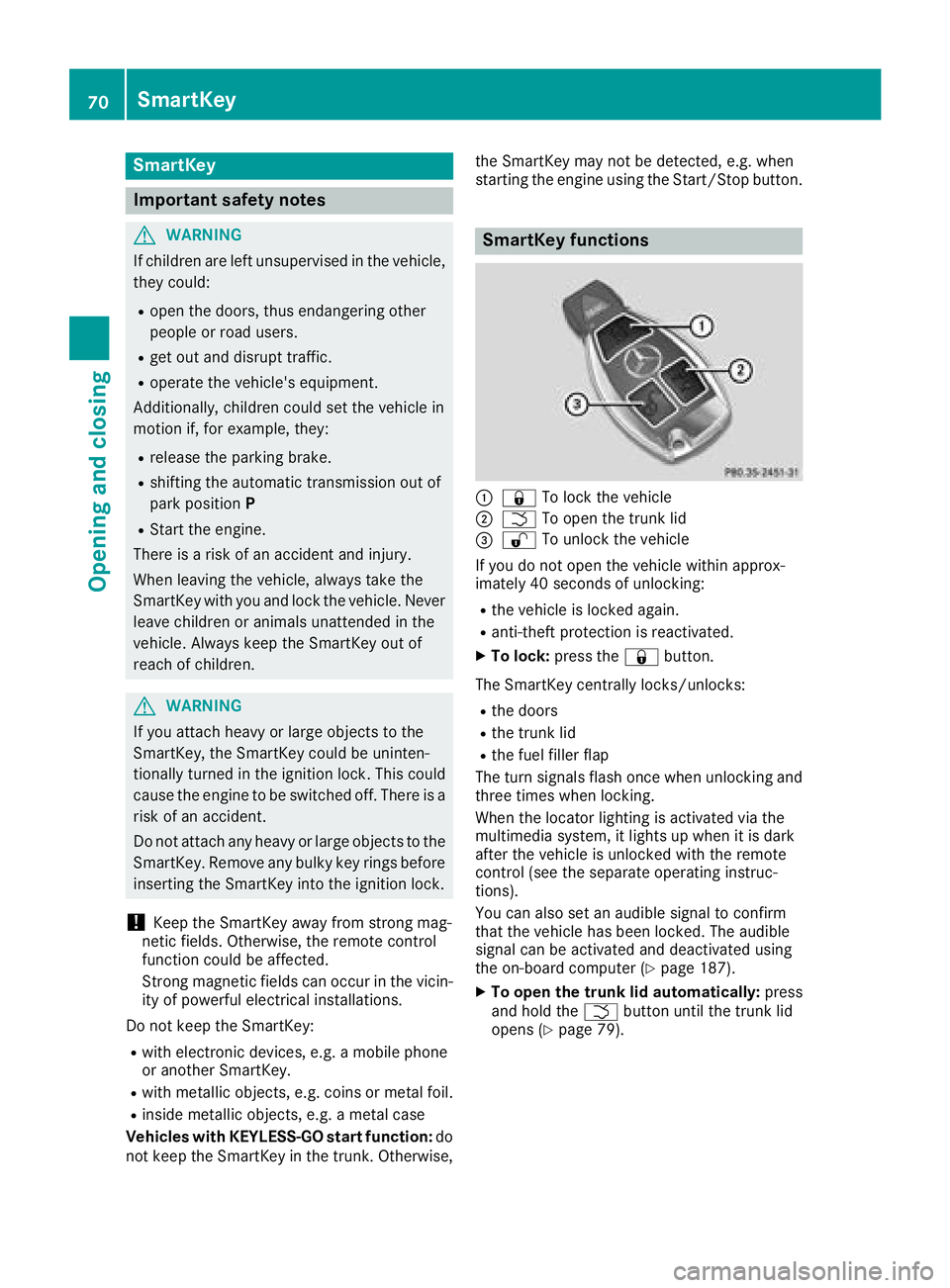
SmartKey functions
C
7 To lock the vehicleD
T To open the trunk lid
Page 73 of 326

KEYLESS- GO
Gene ra ln ot esBear in min dt ha tt he engin ec an be started by
any of th ev ehicl eo cc upant sift he re is aS ma rt -
Key in th ev ehicle.
Lockin ga nd unlockingYou can start ,l oc koru nloc kt he vehicl eu sin g
KEYLESS-GO .Todot hi s, you only need carry th e
SmartKey wit hy ou. You can combine th ef unc-
tion sofK EY LESS-GO wit ht ho se of ac onven-
tional SmartKey. Unloc kt he vehicl ebyu sin g
KEYLESS-GO ,f or instance ,a nd loc kitu sin gt he
7 butto nont he SmartKey.
The driver's door and th ed oor at whic ht he han -
dle is used ,m us tb ot hbec losed. The SmartKey
mus tbeo utside th ev ehicle. Whe nl ocking or
unlocking wit hK EY LESS-GO ,t he distanc e
between th eS ma rtKey and th ec orre sponding
door handle mus tn ot be greate rt ha nt hr ee fee t
(on em eter).
Ac heck whic hp eriodically establishes ar adi o
connection between th ev ehicl ea nd th eS ma rt -
Key determine sw hether av alid SmartKey is in
th ev ehicle. This occurs, for example: R
when starting th ee ng in eR
while drivin gR
when usin gH ANDS-F RE EA CCESSR
when th ee xternal door handles are touchedR
during convenience closin g
X
To unlock th ev ehicle: touch th ei nner sur -
fac eoft he door handle.X
To lock th ev ehicle: touch sensor surfac e C
or D . Mak es ur et ha ty ou do no tt ou ch th ei nner
surfac eoft he door handle. X
Convenienc ec losin gf eature: touch
recessed sensor surfac e D for an extended
period.
Further information on th ec onveni ence clos-
ing feature ( Y
page 83).
X
To unlock th et ru nk lid : pull trunk lid han -
dle C .
Deactivating and activating If you do no ti nten dtou se th ev ehicl ef or al on -
ger period of time, you can deactivat eK EY LESS -
GO. The SmartKey will then use ver yl ittl ep ower,
thereby conserving battery power. Fo rt he pur-
poses of activation/deactivation ,t he vehicl e
mus tn ot be nearby. X
To deactivate: press th e 7 butto nont he
SmartKey twice in rapi ds uccession .
The battery chec kl amp of th eS ma rtKey
flashes twice briefl ya nd lights up once ,t he n
KEYLESS-GO is deactivated ( Y
page 73).X
To activate: press any butto nont he Smart -
Key.
or X
Inser tt he SmartKey int ot he ignition lock.
KEYLESS-GO and all of it sa ssociated features
are available again .
KEYLESS- GO star tf un ction
Gene ra ln ot es
Bear in min dt ha tt he engin ec an be started by
any of th ev ehicl eo cc upant sift he re is aS ma rt -
Key in th ev ehicle.SmartKey 71
Opening and closing Z
Page 74 of 326

Changing th es ettings of th el ocking
system You can chang et he settings of th el ockin gs ys-
tem. This mean st ha to nl yt he driver' sd oor and
th ef uel fille rf lap are unlocked when th ev ehicle
is unlocked. This is useful if you frequently travel
on your own. X
To change th es etting: pres sa nd hold the
6 and 7 buttons simultaneousl yf or
approximately six seconds until th eb attery
indicator lamp flashes twice ( Y
page 73).
If th es ettin goft he lockin gs ystem is changed
within th es ignal range of th ev ehicle ,p ressing
the 7 or 6 button:R
locks or R
unlock st he vehicle
The SmartKey no wf unction sasf ollows:X
To unlock: pres st he 6 butto no nc e.X
To unlock centrally: pres st he 6 button
twice. X
To lock centrally: pres st he 7 button.
The KEYLESS-GO function is changed as fol-
lows: X
To unlock th ed ri ver's door: touch th ei nner
surface of th ed oor handle on th ed river's
door. X
To unlock centrally: touch th ei nner surface
of th ed oor handle on th ef ront-pa ssenger
door or th er ear door.X
To lock centrally: touch th eo uter sensor
surface on on eoft he door handles.X
To restor et he factor ys ettings: pres sa nd
hold the 6 and 7 buttons simultane-
ously for approximately six seconds until the
battery check lamp flashes twice
( Y
page 73).
Mechanica lk ey
General notes
If th ev ehicle can no longer be locke do r
unlocked wit ht he SmartKey or KEYLESS-GO,
use th em echanical key.
If you use th em echanical ke yt ou nlock and
open th ed river' sd oor or th et ru nk lid, th ea nti-
theft alarm system will be triggered ( Y
page 68). Ther ea re several ways to tur no ff th ea larm:X
To deactivat et he alarm with th ek ey: press
the 6 or 7 butto nont he key.
or X
Inser tt he SmartKey int ot he ignition lock.
or X
To deactivat et he alarm with KEYLESS-GO:
pres st he Start/Sto pb utto nint he ignition
lock. The SmartKey must be in th ev ehicle.
or X
Loc koru nlock th ev ehicle usin gK EY LESS-
GO. The SmartKey must be outside th ev ehi-
cle.
If you unlock th ev ehicle usin gt he mechanical
key, th ef uel fille rf lap will no tbeu nlocked auto-
matically. X
To unlock th ef ue lf ille rf lap: insert the
SmartKey int ot he ignition lock.
Removing th em echanica lk ey
X
Push release catch C in th ed irection of the
arrow and at th es ame tim er emove mechan-
ical key D from th eS ma rtKey.
For further informatio na bout:R
Unlockin gt he driver' sd oor ( Y
page 77)R
Unlockin gt he trunk ( Y
page 81)R
Lockin gt he vehicle ( Y
page 77)
Insertin gt he mechanica lk eyX
Push mechanical key D completely int ot he
SmartKey until it engages and release
catch C is back in its basic position.72
SmartKey
Opening and closing
Page 79 of 326
Meanwhile, the fuel filler flap will not be locked
or unlocked.
You cannot unlock the vehicle centrally from the
inside if the vehicle has been locked with the
SmartKey or KEYLESS-GO.
You can open ad oor from inside the vehicle
even if it has been locked. You can open the rear
doors from inside the vehicle unless they are
secured by the child-proof lock ( Y
page 60).
If the vehicle has previously been locked with
the SmartKey from the outside, opening ad oor
from the inside will trigger the anti-theft alarm
system. Switch off the alarm ( Y
page 68).
If al ocked door is opened from the inside, the
previous unlock status of the vehicle will be
taken into consideration if: R
the vehicle was locked using the locking but-
ton for the central locking, or R
if the vehicle was locked automatically
The vehicle will be fully unlocked if it had previ-
ously been fully unlocked. If only the driver's
door had been previously unlocked, only the
door which has been opened from the inside is
unlocked.
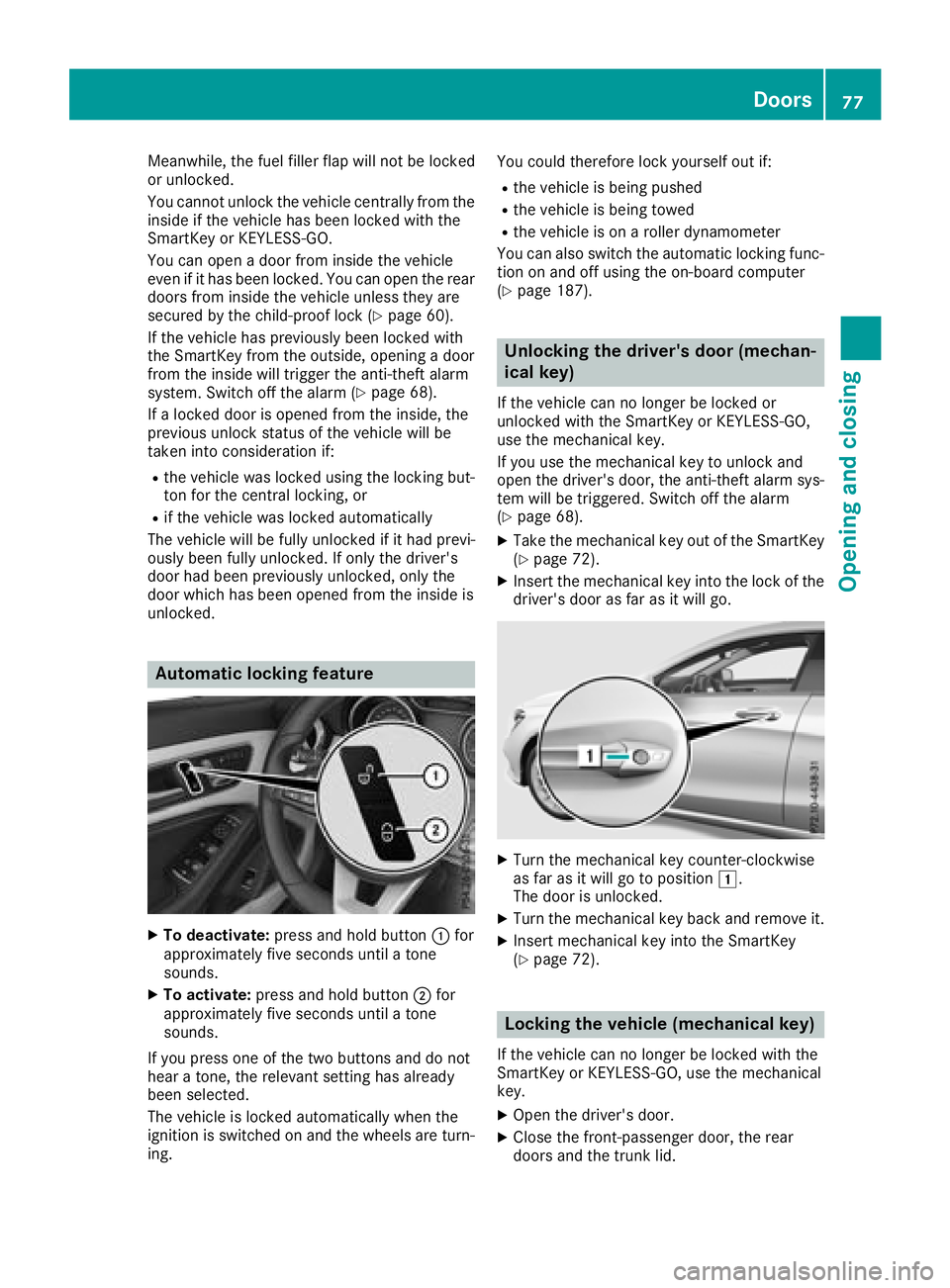
Automatic lockin gf eature
X
To deactivate: press and hold button C for
approximately five seconds until at one
sounds. X
To activate: press and hold button D for
approximately five seconds until at one
sounds.
If you press one of the two buttons and do not
hear at one, the relevant settin gh as already
been selected.
The vehicle is locked automatically when the
ignition is switched on and the wheels are turn-
ing. You could therefore lock yourself out if: R
the vehicle is being pushed R
the vehicle is being towed R
the vehicle is on ar oller dynamometer
You can also switch the automatic locking func-
tion on and off using the on-board computer
( Y
page 187).
Unlocking the driver's door (mechan-
ical key) If the vehicle can no longer be locked or
unlocked with the SmartKey or KEYLESS-GO,
use the mechanical key.
If you use the mechanical key to unlock and
open the driver's door, the anti-theft alarm sys-
tem will be triggered. Switch off the alarm
( Y
page 68). X
Take the mechanical key out of the SmartKey
( Y
page 72). X
Insert the mechanical key into the lock of the
driver's door as far as it will go.
X
Turn the mechanical key counter-clockwise
as far as it will go to position G .
The door is unlocked. X
Turn the mechanical key back and remove it. X
Insert mechanical key into the SmartKey
( Y
page 72).
Locking the vehicle (mechanical key)
If the vehicle can no longer be locked with the
SmartKey or KEYLESS-GO, use the mechanical
key. X
Open the driver's door. X
Close the front-passenger door, the rear
doors and the trunk lid. Doors 77
Opening and closing Z