2018 MERCEDES-BENZ CLA COUPE change time
[x] Cancel search: change timePage 156 of 326
acceleratesmoreg ently. This settin gisrecom-
mended in stop-and-start traffic.
Changing lanes
If when driving on multilane roads you wish to
chang etotheovertakin glane ,Distance Pilot
DISTRONIC support syou if:
Ryou are driving faster than 45 mph (70 km/h)
RDistance Pilo tDISTRONICi smaintaining the
distance to avehicl einf ront
Ryous witch on the appropriate tur nsignal
RDistance Pilo tDISTRONICd oesn ot currently
detect adangerofc ollision
If these conditions ar efulfilled ,you rv ehicl eis
accelerated .Acceleratio nwillbei nterrupte dif
changing lanes take stoo long or if the distance
between your vehicl eand the vehicl einfront
become stoo small.
Stopping
If Distance Pilo tDISTRONICd etects thatt he
vehicl einfront is stopping, it brakes your vehicle
unti litiss tationary.
Once your vehicl eisstationary, it remains sta-
tionar yand yo udon ot nee dtodepress the
brake.
iAfter atime ,the electri cparkin gb rake
secures the vehicl eand relieves the service
brake.
iDepending on the specifie dminimu mdis-
tance ,you rvehicl ewillc ome to astandstil lat
as ufficient distance behind the vehicl ein
front. The specifie dminimu mdistance is set
using the contro lonthe cruis ec
o
ntro llev er.
When Distance Pilo tDISTRONICi sactivated,
the transmission is shifted automaticall yto
position jif:
Rthe driver's sea tbeltisn ot fastened and the
driver's door is open.
Rthe engine is switched off ,unless it is auto-
maticall yswitched off by the ECO start/stop
function.
The electri cparkin gb rake secures the vehicle
automaticall yifDistance Pilo tDISTRONICi s
activated when the vehicl eisstationar yand:
Ras ystem malfunctio noccurs.
Rthe powe rsuppl yisi nsufficient.
If am alfunctio noccurs, the transmission may
also shift to position jautomatically.
Settin gaspeed
Keepinm indt hatitm aytake abrief moment
unti lthe vehicl ehasaccelerated or braked to
the spee dset.
XPress the cruis econtro llev er up :for a
highe rspeed or down ;for alower speed.
XTo adjustt he setspeed in 1mph incre-
ments (1 km/hi ncrements): brieflypress
the cruis econtro llev er up :or down ;to
the pressure point.
The last stored spee dincreases or decreases
in 1m ph (1 km/h )increments.
XTo adjustt he setspeed in 5mph incre-
ments (10k m/h increments): briefly press
the cruise control lever up :or down ;
beyond the pressure point.
The last stored speed increases or decreases in 5m ph (10 km/h) increments.
iDistance Pilot DISTRONIC is not deactivated
if you depress the accelerator pedal. If you
acceleratetoo vertake, Distance Pilot
DISTRONIC adjusts the vehicle's speed to the
last speed stored after you have finished over- taking.
Setting aspecified minimum distance
You can set the specified minimum distanc efor
Distance Pilot DISTRONIC by varying the time
span between one and two seconds. With this
function you can set the minimum distanc ethat
Distance Pilot DISTRONIC maintains to the vehi-
cle in front, dependen tonvehicle speed. You
can see this distanc einthe multifunction dis-
play (
Ypage 161).
The specified minimum distanc ecan be
changed while Distance Pilot DISTRONIC is
switched on or off.
iMake sure that you maintain the minimum
distanc etothe vehicle in frontasr equired by
law. Adjust the distanc etothe vehicle in front
if necessary.
154Driving systems
Driving and parking
Page 168 of 326
XLet go of the multifunction steering wheel.
XBack up the vehicle,being ready to brake at all
times. When backing up, drive at aspeed
belowa pproximately 6mph (10 km/h). Oth-
erwise, Parking Pilotisc anceled immediately.
Parking Pilotb rakes the vehicle to astandstill
when the vehicle approaches the rear border
of the parking space.
Maneuvering may be required in tight parking
spaces.
The Parking Pilot Active Select D
Observe Surroundingsmessagea ppears in
the multifunction display.
XShift the transmission to position hwhile
the vehicle is stationary.
Parking Piloti mmediately steers in the other
direction.
The Parking Pilot Active Accelerate
and BrakeObserve Surroundingsmes-
sage appears in the multifunction display.
iYou willa chieve the best results by waiting
for the steering procedure to complete before
pulling away.
XDrive forward sand be ready to brake at all
times.
Parking Pilotb rakes the vehicle to astandstill
when the vehicle approaches the front border
of the parking space.
Maneuvering may be required in tight parking spaces.
The Parking Pilot Active Select R
Observe Surroundingsmessagea ppears in
the multifunction display.
As soon as the parking procedure is complete,
the Parking Pilot Finished
message
appears and awarning tone sounds. The vehicle
is now parked.
The vehicle is kept stationary withoutt he driver
having to depresst he brake pedal. The braking
effect is canceled when you depresst he accel-
erator pedal.
Parking Pilotnol onger supports you with steer-
ing interventions and brake applications. When
Parking Pilotisf inished,you must steer and
brake again yourself. Parking Assist
PARKTRONIC is still available.
Parking tips:
RThe way you rvehicle is positioned in the park-
ing space after parking is dependent on vari-
ous factors. These include the positiona nd
shape of the vehiclesp arked in front and behind it and the conditions of the location. It
may be the case that Parking Pilotg
uides you
too far into aparking space, or not far enough
into it. In some cases, it may also leady ou
across or onto the curb. If necessary ,you
shoul dcancel the parking procedure with
Parking Pilot.
RYou can also preselect transmission position
h.T he vehicle redirects and does not drive
as far into the parking space. Should the
transmission change take place too early, the parking procedure is canceled. Asensible
parking positionc an no longer be achieved
from this position.
Exitingap arking space
In order for Parking Pilottos upport you when
exiting the parking space:
Ryou need to have parked using Parking Pilot.
Rthe border of the parking space must be high enough at the front and the rear. Acurb stone
is too small,f or example.
Rthe border of the parking space must not be
too wide, as the positionoft he vehicle must
not exceed an angle of 45° to the starting
positionasitism aneuvered into the parking
space.
Ram aneuvering distance of at least 3.3 ft
(1.0 m) must be available.
Parking Pilotc an assist you with exiting apark-
ing space only if you have parked the vehicle
parallel to the direction of travel using Parking
Pilot.
iIf Parking Assist PARKTRONIC detects
obstacles, Parking Pilotb rakes automatically
whilst the vehicle is exiting the parking space.
You are responsible for braking in good time.
XStart the engine.
XRelease the electric parking brake.
XSwitch on the turn signal in the direction you
willd rive out of the parking space.
XShift the transmission to position hork.
The Start Parking Pilot?Yes: OKNo:% messagea ppears in the multifunction
display.
XTo cancel the procedure: press the%
button on the multifunction steering wheelo r
pulla way.
or
166Driving systems
Driving and parking
Page 170 of 326
for safe maneuvering and parking. Make sure
that there are no persons, animals or objects in
the maneuvering area while maneuvering and
parking in parking spaces.
Under the following circumstances, the rear
view camera willnot function, or wil lfunction in
al imited manner:
Rif the trunk lid is open
Rin heavy rain, snow or fog
Rat night or in very dark places
Rif the camera is exposedtov ery bright light
Rif the area is lit by fluorescent bulbs or LED
lighting (the display may flicker)
Rif there isasudden change in temperature,
e.g. when driving into aheated garage in win-
ter
Rif the camera lens is dirty or obstructed.
Observe the notes on cleaning
(
Ypag e265)
Rif the rear of you rvehicleisd amaged. In this
case, have the camera position and setting
checked at aqualified specialist workshop
The fieldofv ision and other functions of the rear
view camera may be restricted due to additional
accessories on the rear of the vehicle( e.g.
license plate holder, rear bicycle rack).
Activating/deactivating the rear view
camera
XTo activate: make sure that the SmartKey is
in position 2in the ignition lock.
XMake sure that the Activation byRgearfunction is selected in the multimedias ystem;
see the Digita lOperator's Manual.
XEngage reverse gear.
The area behind the vehicleiss hownwith
guide lines in the multimedias ystem display.
The image from the rear view camera is avail-
abl ethroughoutt he maneuvering process.
To deactivate: the rear view camera deacti-
vates if you shift the transmission to jor after
driving forwards ashort distance.
Messages in the multimedia system dis-
play
The rear view camera may show adistorted view
of obstacles, show them incorrectly or not at all.
The rear view camera does not show objects in
the following positions:
Rvery close to the rear bumper
Runder the rear bumper
Rin close range above the handl eonthe trunk
lid
!Objects not at ground levelm ay appear to
be further away than they actually are, e.g.:
Rthe bumper of aparked vehicle
Rthe drawbar of atrailer
Rthe bal lcoupling of atrailer tow hitch
Rthe rear section of an HGV
Ras lanted post
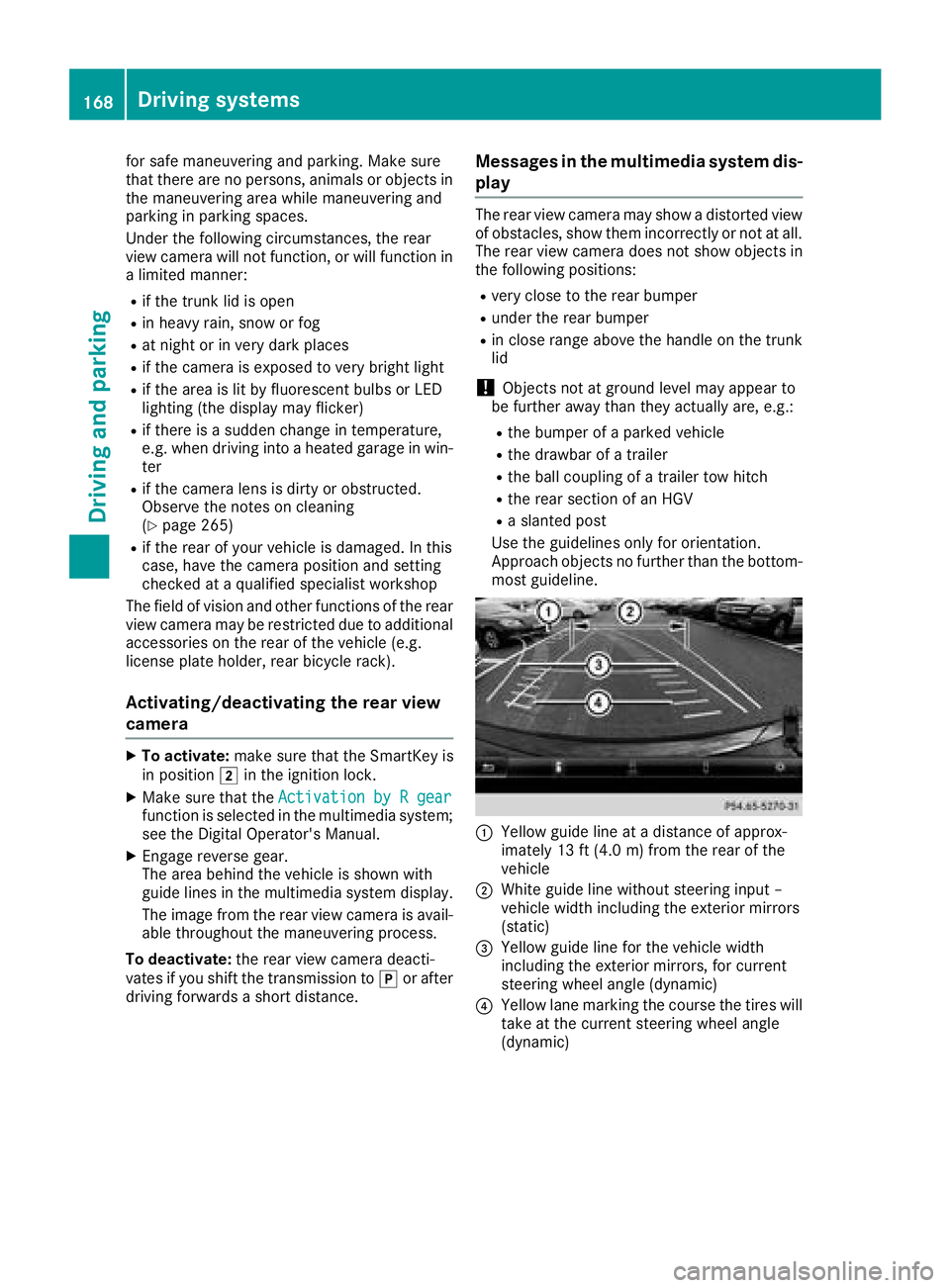
Use the guidelines only for orientation.
Approach objects no further than the bottom-
most guideline.
:Yellow guide line at adistance of approx-
imately 13 ft (4.0 m) from the rear of the
vehicle
;White guide line without steering input–
vehiclew idth including the exterior mirrors
(static)
=Yellow guide line for the vehiclew idth
including the exterior mirrors, for current
steering wheela ngle (dynamic)
?Yellow lane marking the course the tires will
take at the current steering wheela ngle
(dynamic)
168Driving systems
Driving and parking
Page 173 of 326
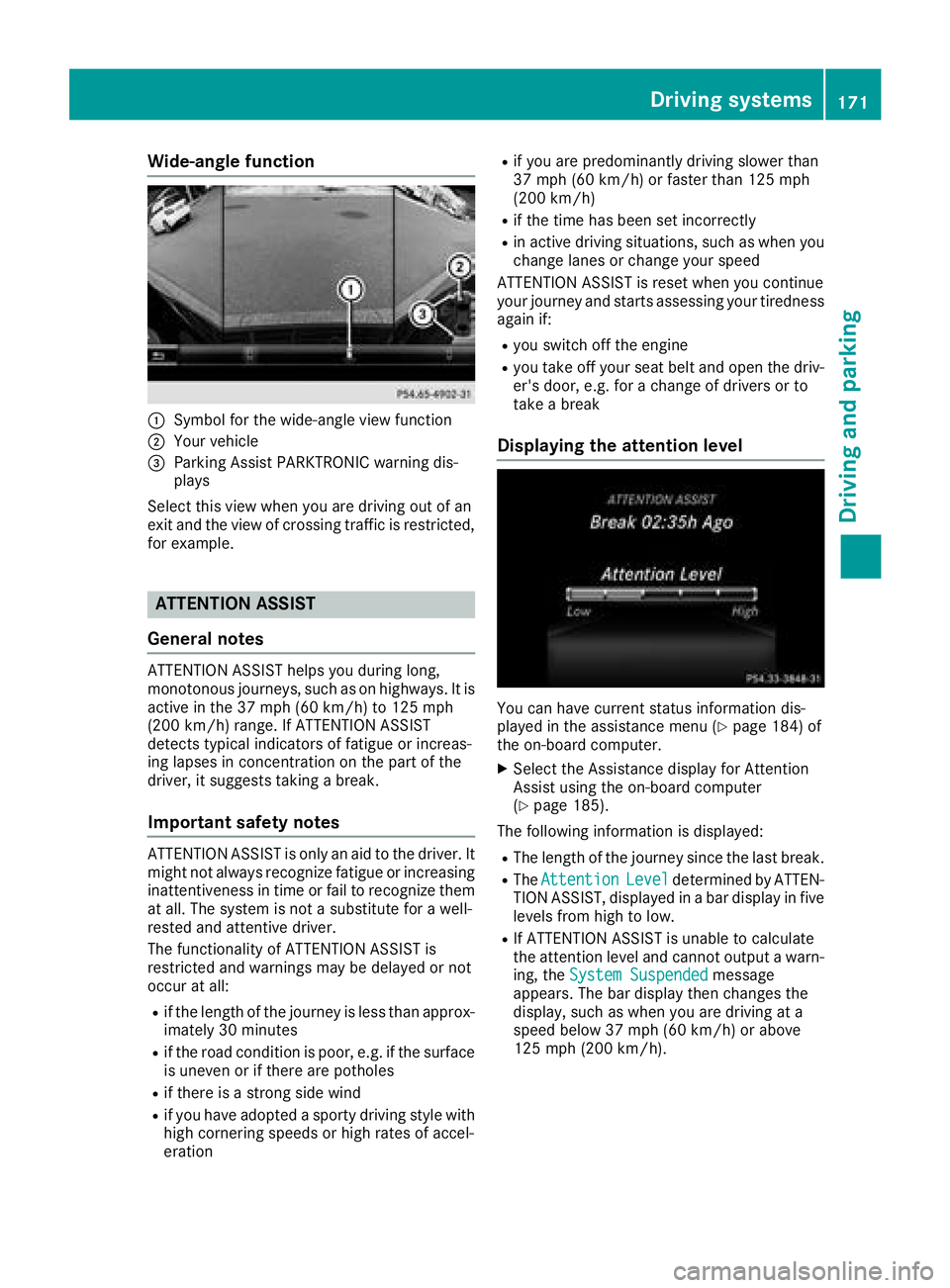
Wide-angle function
:Symbolfor the wide-angl eview function
;Yourv ehicle
=Parking Assist PARKTRONIC warning dis-
plays
Select this view when you are driving out of an
exit and the view of crossing traffic is restricted,
for example.
ATTENTION ASSIST
General notes
ATTENTION ASSIST helpsy ou during long,
monotonous journeys, such as on highways. It is
active in the 37 mph (60 km/h) to 125 mph
(200 km/h) range. If ATTENTION ASSIST
detects typical indicators of fatigu eorincreas-
ing lapses in concentration on the part of the
driver, it suggests taking abreak.
Important safety notes
ATTENTION ASSIST is only an aid to the driver. It
might not alway srecognize fatigu eorincreasing
inattentivenes sintime or fail to recognize them
at all .The syste misnotas ubstitute for awell-
rested and attentive driver.
The functionality of ATTENTION ASSIST is
restricted and warnings may be delayed or not
occur at all:
Rif the length of the journey is less than approx-
imately 30 minutes
Rif the road conditionisp oor, e.g. if the surface
is uneven or if there are potholes
Rif there is astrong side wind
Rif you have adopted asporty driving style with
high cornering speeds or high rates of accel-
eration
Rif you are predominantly driving slower than
37 mph (60 km/h) or faster than 125 mph
(200 km/h)
Rif the time has been set incorrectly
Rin active driving situations, such as wheny ou
change lane sorchange you rspeed
ATTENTION ASSIST is reset wheny ou continue
you rjourney and starts assessing you rtiredness
again if:
Ryou switch off the engine
Ryou take off you rseatb eltand open the driv-
er's door, e.g. for achange of drivers or to
take abreak
Displaying the attention level
You can have current status information dis-
played in the assistance menu (Ypag e184) of
the on-board computer.
XSelect the Assistance display for Attention
Assist using the on-board computer
(
Ypag e185).
The following information is displayed:
RThe length of the journey since the las tbreak.
RThe AttentionLeveldetermined by ATTEN-
TION ASSIST, displayed in abar display in five
levels from high to low.
RIf ATTENTION ASSIST is unable to calculate
the attention levela nd cannot outputawarn-
ing, the System Suspended
message
appears .The bar display then changes the
display ,such as wheny ou are driving at a
speedb elow 37 mph (60 km/h )orabove
125 mph (200 km/h).
Driving systems171
Driving and parking
Z
Page 176 of 326
Switching on Blind Spot Assist
XMake sure that Blind Spot Assist is activated
in the on-board computer (Ypage 186).
XTurn the SmartKey to position2in the igni-
tion lock.
Warning lamps :in the exterior mirrors light
up red for approximately 1.5 seconds and
then turn yellow.
Lane Keeping Assist
General notes
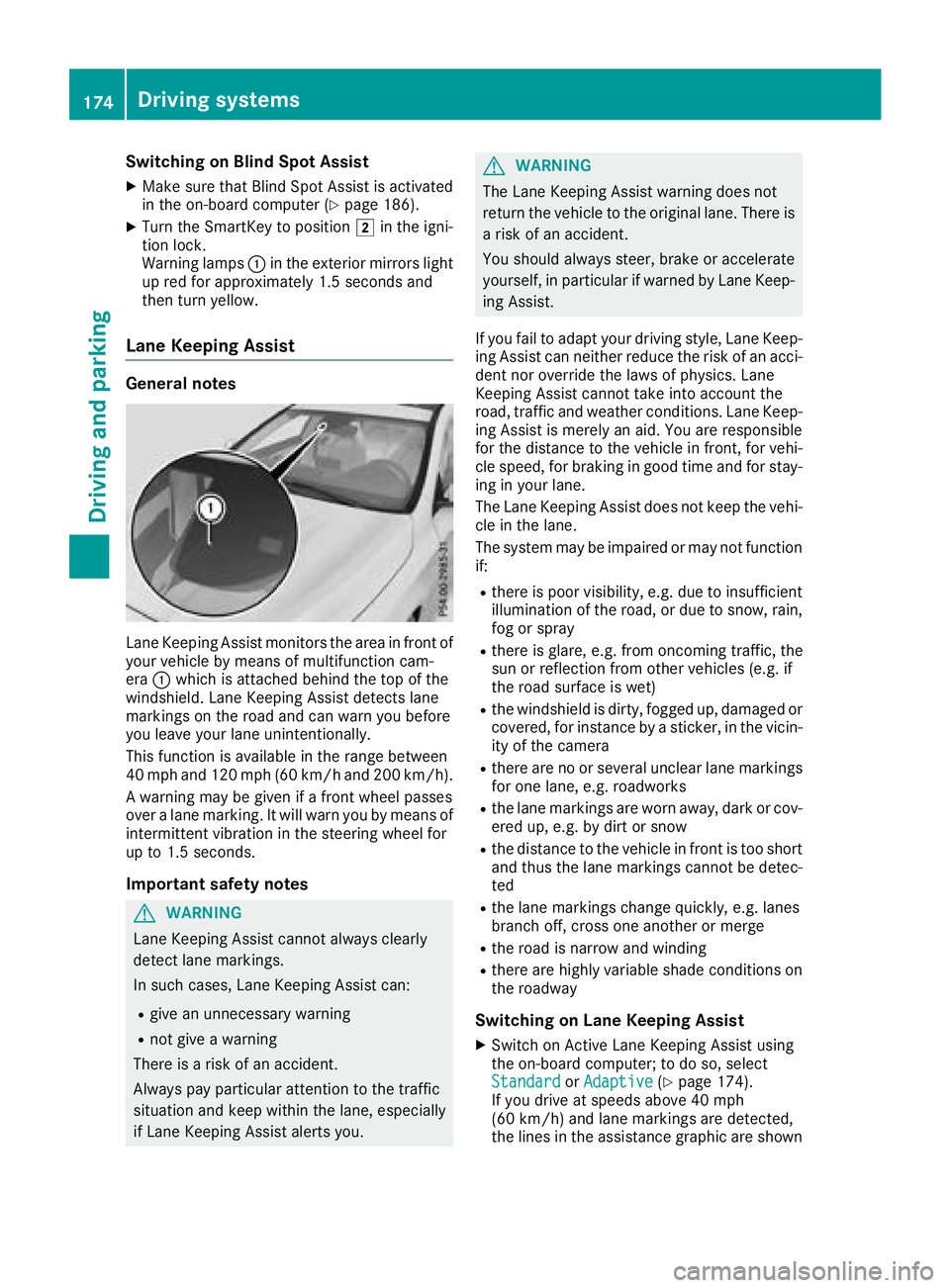
Lane Keeping Assist monitor sthe area in front of
your vehicle by means of multifunction cam-
era :which is attached behind the top of the
windshield. Lane Keeping Assist detectsl ane
markings on the road and can warn you before
you leave your lane unintentionally.
This function is available in the range between
40 mph and 120 mph (60 km/h and 200 km/h).
Aw arning may be given if afront wheel passes
over alane marking. It will warn you by means of
intermittent vibration in the steering wheel for
up to 1.5 seconds.
Important safety notes
GWARNING
Lane Keeping Assist cannot always clearly
detect lane markings.
In such cases, Lane Keeping Assist can:
Rgive an unnecessary warning
Rnot give awarning
There is arisk of an accident.
Always pay particular attention to the traffic
situation and keep within the lane, especially
if Lane Keeping Assist alerts you.
GWARNING
The Lane Keeping Assist warning does not
return the vehicle to the original lane. There is
ar isk of an accident.
You should always steer, brake or accelerate
yourself, in particular if warned by Lane Keep-
ing Assist.
If you fail to adapt your driving style, Lane Keep-
ing Assist can neither reduce the risk of an acci-
dent nor override the laws of physics. Lane
Keeping Assist cannot take into account the
road, traffic and weather conditions. Lane Keep- ing Assist is merely an aid. You are responsible
for the distance to the vehicle in front,f or vehi-
cle speed, for braking in good time and for stay-
ing in your lane.
The Lane Keeping Assist does not keep the vehi-
cle in the lane.
The system may be impaired or may not function
if:
Rthere is poor visibility, e.g. due to insufficient
illumination of the road, or due to snow, rain,
fog or spray
Rthere is glare, e.g. from oncomingt raffic, the
sun or reflection from other vehicles (e.g. if
the road surface is wet)
Rthe windshield is dirty, fogged up, damaged or
covered, for instancebyas ticker, in the vicin-
ity of the camera
Rthere are no or several unclear lane markings
for one lane, e.g. roadworks
Rthe lane markings are worn away,d ark or cov-
ered up, e.g. by dirt or snow
Rthe distance to the vehicle in front is too short
and thus the lane markings cannot be detec-
ted
Rthe lane markings change quickly, e.g. lanes
branch off, cross one another or merge
Rthe road is narrow and winding
Rthere are highly variable shade conditionso n
the roadway
Switching on Lane Keeping Assist
XSwitch on Active Lane Keeping Assist using
the on-board computer; to do so, select
Standard
or Adaptive(Ypage 174).
If you drive at speeds above 40 mph
(60 km/h) and lane markings are detected,
the lines in the assistance graphic are shown
174Driving systems
Driving and parking
Page 177 of 326
in green (Ypage 185). Lane KeepingAssist is
ready for use.
If Standard
is selected, no warnin gvibration
occurs if:
Ryou have switched on the turn signal. In this
event, the warnings are suppressed for acer-
tain period of time.
Rad rivings afetysystem intervenes ,e.g. ABS,
BA SorE SP®.
When Adaptive
is selected, no warnin gvibra-
tion occurs if:
Ryou have switched on the turn signal. In this
event, the warnings are suppressed for acer-
tain period of time.
Rad rivings afetysystem intervenes ,e.g. ABS,
BA SorE SP®.
Ryou accelerateh ard, e.g. kickdown.
Ryou brakehard.
Ryou steer actively, e.g. swervetoa void an
obstacle or change lanes quickly.
Ryou cut the corner on asharp bend.
In order that you are warne donly when neces-
sary and in good tim eifyou cross the lane mark-
ing, the system detect scertain condition sand
warns you accordingly.
The warnin gvibration occurs earlier if:
Ryou approacht he outer lane marking on a
bend
Rthe road has very wide lanes, e.g. afreeway
Rthe system detect ssolid lane markings
The warnin gvibration occurs later if:
Rthe road has narrow lanes.
Ryou cut the corner on abend
Driving systems175
Driving and parking
Z
Page 183 of 326
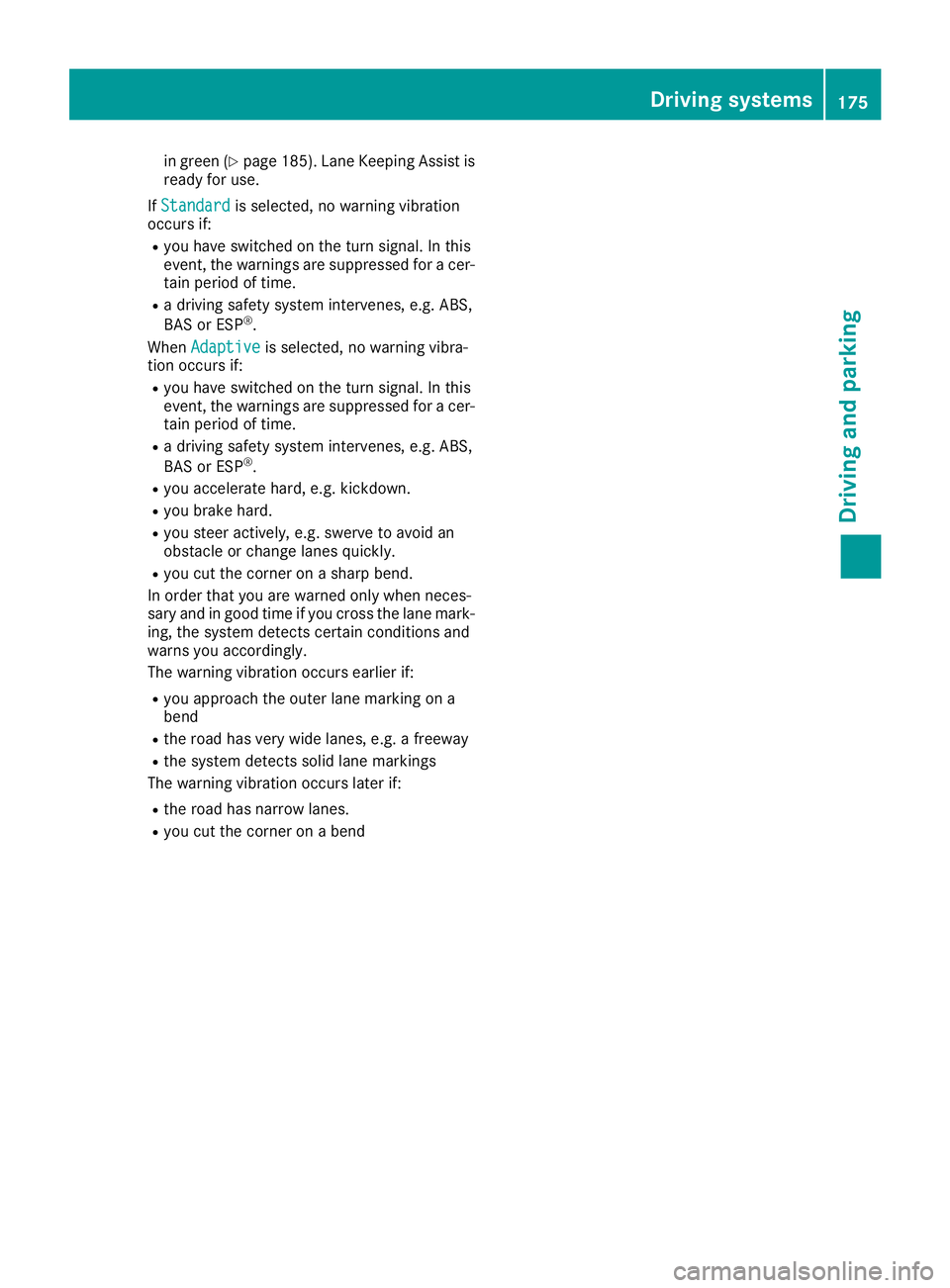
Digital speedometer
XPress the= or; buttononthesteerin g
whee ltos elec tthe Tri pmenu.
XPress th e9 or: buttontos electthe
digita lspeedometer ;.
Ag ear shift recommendation :Zcan also
follow .
Observ ethe information on gearshift recom -
mendation :when shiftin gmanually
(
Ypage 136).
Mercedes-AMG vehicles :agearshift recom -
mendation is shown in th estatu sbar of th e
multifunction display and no tinthedigita l
speedometer display.
Resetting value s
XPress the= or; buttononthesteerin g
whee ltos elec tthe Tri pmenu.
XPress th e9 or: buttontos electthe
function that you wish to reset .
XPressato confirm .
XPress:to selec tYesand press ato
confirm .
You can reset th evalues of th efollowin gfunc-
tions:
RTrip odometer
R"From Start "tripc om pute r
R"From Reset" trip compute r
RECOd isplay
If you reset th evalues in th eECO display, th e
values in th e"From Start "tripc om pute rare also
reset .Ifyou reset th evalues in th e"From Start "
trip computer, th evalues in th eECO display are
also reset .
Navigation syste mmenu
Displaying navigation instructions
In th eNav imenu, th emultifunction display
shows navigation instructions.
You can fin dfurther information on navigation in
th es eparat emultimedia system operatin g
instructions.
XSwitc hont hemultimedia system (se esepa-
rat eo peratin ginstructions) .
XPress the= or; buttononthesteerin g
whee ltos elec tthe Nav imenu.
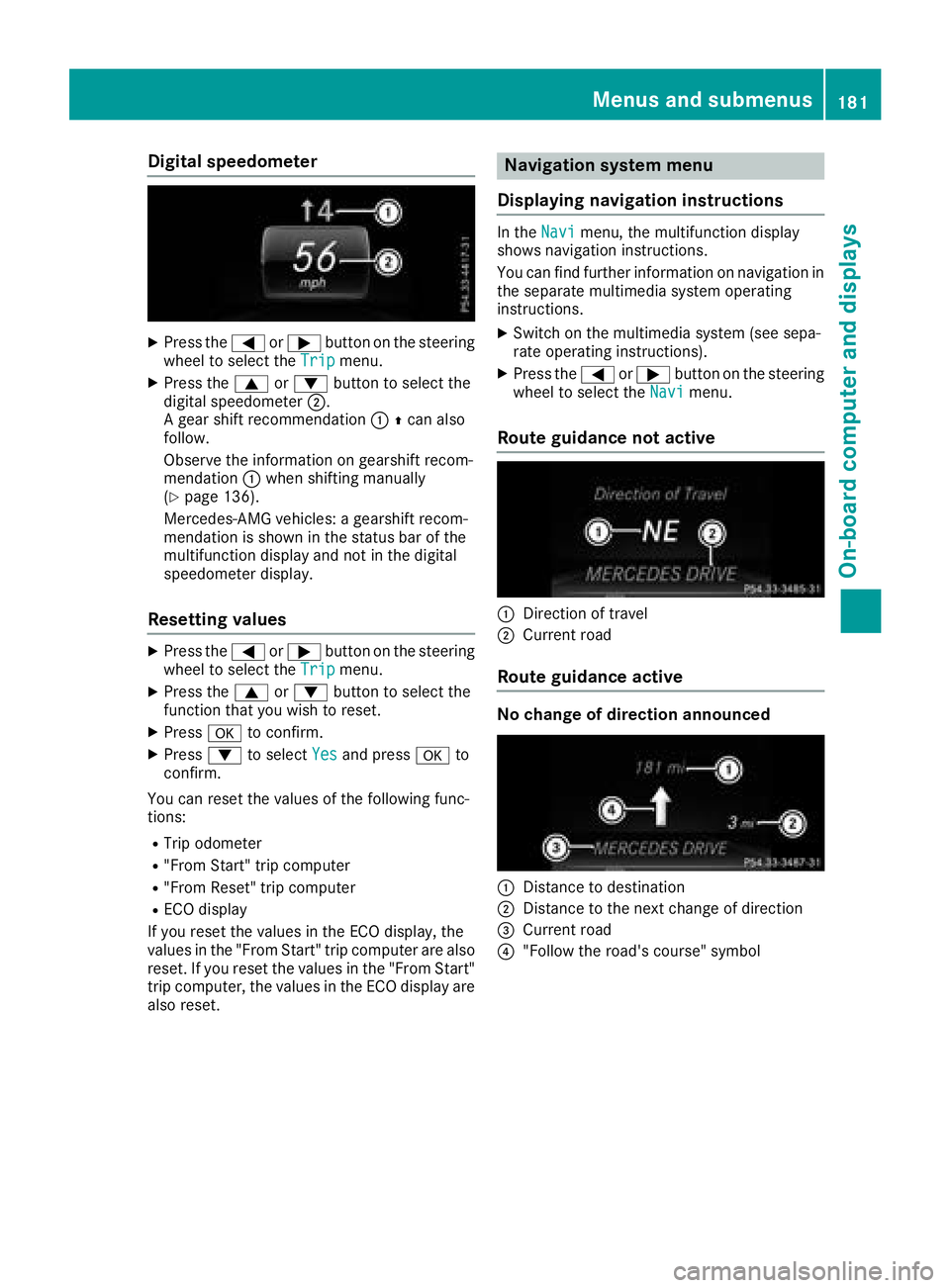
Route guidance not active
:Direction of trave l
;Currentroa d
Route guidance active
No change of direction announced
:Distanc etodestination
;Distanc etothenext chang eofdirection
=Curren troa d
?"Follow th eroad's course" symbol
Menus an dsubmenus181
On-board computera nd displays
Z
Page 184 of 326
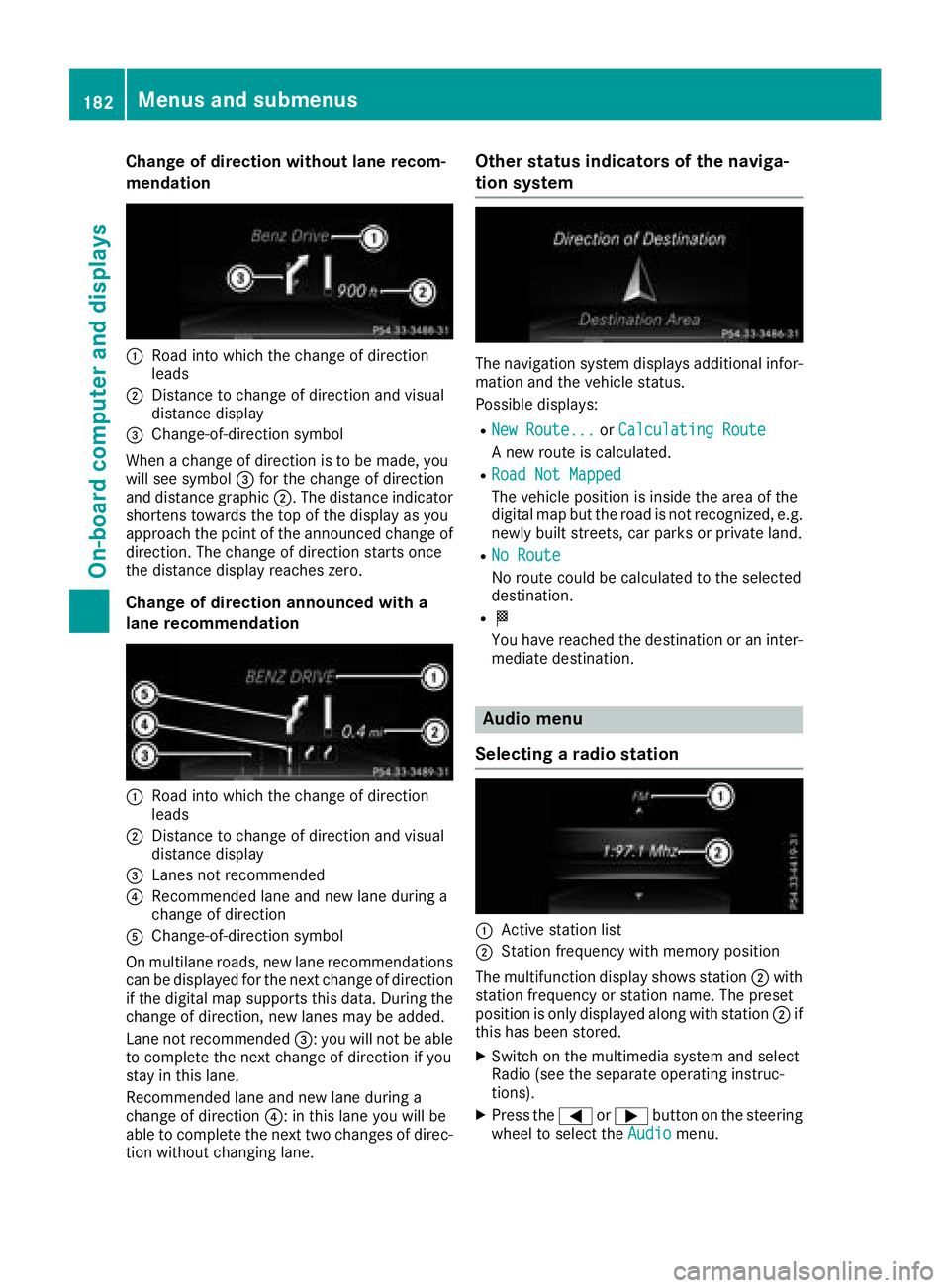
Change of direction without lane recom-
mendation
:Road intowhicht hechange of direction
leads
;Distance to change of direction and visual
distanc edisplay
=Change-of-direction symbol
When achange of direction is to be made, you
will see symbol =for th echange of direction
and distanc egraphic ;.The distanc eindicator
shortens towards th etop of th edisplay as you
approach th epointoft heannounced change of
direction.T he change of direction start sonce
th ed istanc edisplay reaches zero.
Change of direction announced with a
lane recommendation
:Road int owhicht hechange of direction
leads
;Distance to change of direction and visual
distanc edisplay
=Lanes no trecommended
?Recommende dlane and new lane durin ga
change of direction
AChange-of-direction symbol
On multilane roads ,new lane recommendations
can be displayedf or thenextc hange of direction
if th edigital map support sthisd ata. During the
change of direction,n ew lanesmay be added.
Lanen otrecommended =:you will no tbeable
to completet henex tchange of direction if you
stay in this lane.
Recommende dlane and new lane durin ga
change of direction ?:inthisl ane you will be
able to completet henex ttwo changes of direc-
tio nw ithout changingl ane.
Other status indicators of th enaviga-
tion system
The navigation system displays additional infor-
mation and th evehicle status.
Possible displays:
RNew Route...or Calculating Route
An ew rout eiscalculated.
RRoadN ot Mapped
The vehicle position is inside th earea of the
digital map but th eroad is no trecognized, e.g.
newly built streets, car park sorprivate land.
RNo Route
No rout ecoul dbec alculate dtotheselected
destination.
RO
You have reached th edestination or an inter-
mediate destination.
Audio menu
Selecting aradio station
:Activ estatio nlist
;Statio nfrequency with memory position
The multifunction display showss tation ;with
statio nfrequency or statio nname. The preset
position is only displayeda longwith station ;if
this has been stored.
XSwitch on th emultimedia system and select
Radio (see th eseparate operatin ginstruc-
tions).
XPres sthe = or; button on th esteering
wheel to selectt heAudiomenu.
182Menusa nd submenus
On-boardc omputer and displays