Page 16 of 473
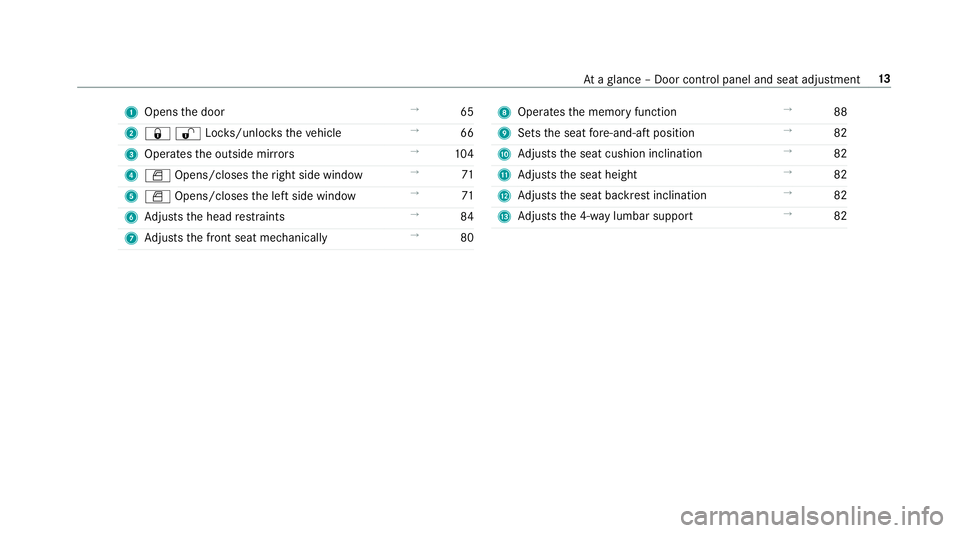
1
Opens the door →
65
2 &%Loc ks/unloc kstheve hicle →
66
3 Operates the outside mir rors →
104
4 W Opens/closes theright side window →
71
5 W Opens/closes the left side window →
71
6 Adjusts the head restra ints →
84
7 Adjusts the front seat mechanically →
80 8
Operates the memory function →
88
9 Sets the seat fore -and-aft position →
82
A Adjusts the seat cushion inclination →
82
B Adjusts the seat height →
82
C Adjusts the seat backrest inclination →
82
D Adjusts the 4-w aylumbar support →
82 At
aglance – Door control panel and seat adjustment 13
Page 85 of 473
#
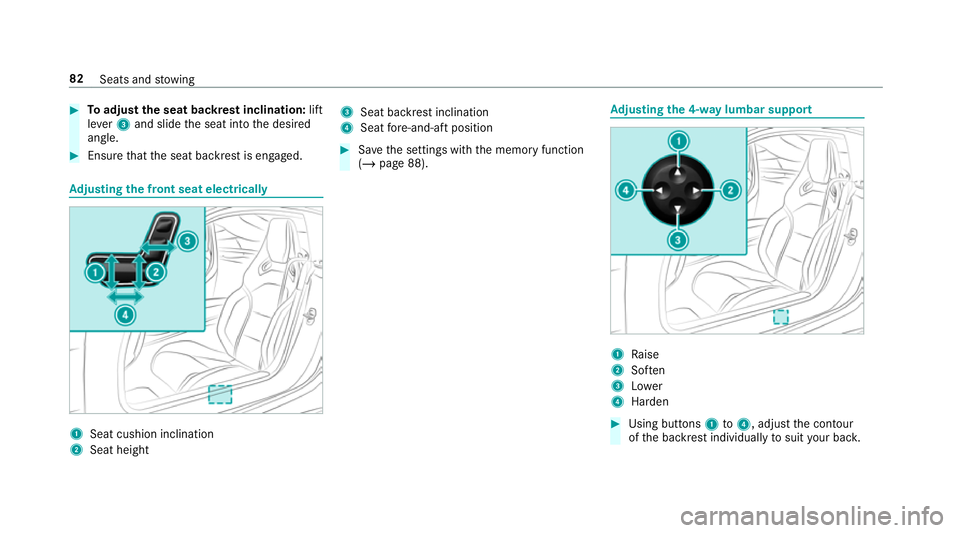
Toadjust the seat backrest inclination: lift
le ve r3 and slide the seat into the desired
angle. #
Ensure that the seat backrest is engaged. Ad
justing the front seat electrically 1
Seat cushion inclination
2 Seat height 3
Seat ba ckrest inclination
4 Seat fore -and-aft position #
Save the settings with the memory function
(/ page 88). Ad
justing the 4-w aylumbar support 1
Raise
2 Soften
3 Lower
4 Harden #
Using buttons 1to4 , adjust the conto ur
of the backrest individually tosuit your bac k. 82
Seats and stowing
Page 452 of 473
Operating saf
ety .................................. 182
Ra dio voice commands ........................ 189
Switch voice commands ...................... 184
Te lephone voice controls .................... .189
Te xt messa gevoice commands .......... .192
TV voice commands ............................ 189
Ty pes of voice commands .................. .183
Ve hicle voice commands .................... .193
Vo ice prom pting .................................. 182
Live Traf fic Information
Displaying subsc ript ion information .... 236
Displaying the tra ffic map .................. .237
Displ aying traf fic incidents .................. 238
Extending a subscription ..................... 236
Issuing hazard alerts ........................... 238
Re gis tering on Mercedes me ............... 236
Load co mpartment co ver
Extending/r etra cting ............................. 91
Loading Notes ..................................................... 89
Loading guidelines .................................... 89
Loads Securing ................................................ 89 Locator lighting
see Sur round lighting
Locking/unlocking Activating/deactivating the auto‐
matic locking feature ............................ .68
Ad ditional door lock .............................. 65
Emer gency key ...................................... 69
KEYLESS-GO .......................................... 66
Opening theta ilgate .............................. 69
Un locking/opening the doors from
th e inside ..............................................65
Low beam (symm etrical dipped beam) ................... 98
Switching on/off ................................... 98
Lu bricant additives
see Additives
Lu ggage
Securing ................................................ 89
Lu mbar support
see Lumbar support (4-w ay)
Lu mbar support (4-w ay).......................... .82 M
Maintenance see ASS YST PLUS
Malfunction Restra int sy stem ................................... 28
Map ...........................................2 37, 239, 24 0
Av oiding an area ..................................2 41
Av oiding an area (o verview) ................ .241
Changing an area ................................ .241
Del eting an area .................................. 24 2
Displ aying Qibla .................................. .243
Displ aying the compass ....................... 24 3
Displ aying the map version .................. 241
Displ aying the next intersecting
st re et ................................................... 241
Displ aying the satellite map ................. 24 4
Displ aying the tra ffic map .................. .237
Displ aying weather information .......... .244
Map data ............................................. 24 2
Moving .................................................2 40
Overview ............................................. 239
Selecting POI symbols ......................... 24 0
Selecting text information ................... 24 0
Selecting the map orientation .............2 40 Index
449
Page 459 of 473
Satellite map
............................................ 24 4
SD card Inserting/re moving ............................. 280
Seat ............................................................ 79
4-w aylumbar support .......................... .82
Ad justing (electrically) ........................... 82
Co rrect driver's seat position ................79
Operating the memory function ............ 88
Setting ................................................... 80
Setting options ...................................... 12
Seat belt ............................................... 29, 35
Ac tivating/deactivating seat belt
adjustment ............................................ 35
Ca re ..................................................... 321
Fa stening ............................................... 33
Pr otection ..............................................29
Re duced pr otection ...............................30
Re leasing .............................................. .35
Seat belt adjustment (function) ............. 34
Seat belt bu ckle (AMG sport buc ket
seat) ...................................................... 33
Wa rning lamp ........................................ 35
Seat belt adju stment
Ac tivating/deactivating ......................... 35 Fu
nction ................................................ 34
Seat belt buckle (AMG spo rtbuc ket
seat) ........................................................... 33
Seat belt tensioners
Ac tivation .............................................. 28
Seat belt warning
see Seat belt
Seat co ver (Care) ..................................... 321
Seat hea ter
Ac tivating/deactivating ......................... 84
Second telephone ............................ 248, 24 9
Connecting .......................................... 24 8
Fe atures .............................................. 24 9
Selecting a gear
see Changing gears
Selecting the sound profile
Burmes ter®
high-end 3D sur round
sound sy stem ...................................... 306
Selector le ver
see E-SELECT selector le verSelf-test
Automatic front passenger front air‐
bag shutoff ............................................ 40
Sensors (Care) ........................................ .320
Service Menu (on-boa rdcompu ter) .................. 173
Service see ASS YST PLUS
Service centre see Qualified specialist workshop
Service inter val display
see AS SYST PLUS
Service station sear ch
St arting automatic sear ch................... 230
Setting a speed see Cruise control
Setting summer time .............................. 205
Setting the date form at .......................... 205
Setting the distance unit ........................ 209
Setting the map scale
see Map 456
Index