2018 MERCEDES-BENZ AMG GT COUPE display
[x] Cancel search: displayPage 6 of 465

Driving and pa
rking ................................. 108
Driving ........................................................ 108
DY NA MIC SELECT switch ............................1 14
Au tomatic transmission .............................. 11 6
Re fuelling .................................................... 12 0
Pa rking ...................................................... .123
Driving and driving saf ety sy stems .............1 30
Ve hicle towing instructions ........................ .162 Instrument Display and on-board
comp uter.................................................. 16 3
Instrument display overview ...................... .163
Overview of the buttons on thesteering
wheel ..........................................................1 64
Operating the on-board computer .............. 16 4
Setting the design ....................................... 16 6
Setting the additional value range .............. 16 6
Overview of displa yson the multifunc‐
tion display .................................................1 67
Menus and submenus ................................. 167LINGU
ATRO NIC ......................................... 176
No tes on operating saf ety .......................... .176
Operation ....................................................1 76Using LINGU
ATRO NIC ef fectively ................ 178
Essential voice commands .......................... 178 Multimedia sy
stem .................................. 18 9
Overview and operation .............................. 189
Sy stem settings .......................................... 19 8
AMG TR ACKPA CE ...................................... 208
Na vigation ................................................... 213
Te lephone .................................................. .238
Online and Internet functions ..................... 264
Media ........................................................ .273
Ra dio .......................................................... 286
TV ............................................................... 289
Sound ......................................................... 297 Main
tenance and care ............................. 301
ASS YST PLUS service inter val display ........ .301
Engine compartment .................................. 302
Cleaning and care ....................................... 308 Breakdown assistance
.............................318
Emergency .................................................. 318
Flat tyre ...................................................... 319Battery (vehicle) ......................................... 325
To
w- starting or towing away ....................... 331
Electrical fuses ........................................... 335 Wheels and tyres
..................................... 338
No tes on noise or unusual handling char‐
acteristics .................................................. .338
No tes on regular lyinspecting wheels and
tyres .......................................................... .338
No tes on snow chains ................................ 338
Ty re pressure .............................................. 339
Wheel change ............................................ .346
Collapsible spa rewheel .............................. 356 Te
ch nical data .......................................... 359
No tes on tech nical da ta.............................. 359
On-board electronics .................................. 359
Ve hicle identification plate, VIN and
engine number ...........................................3 59
Operating fluids .......................................... 360
Ve hicle data ................................................ 366 Contents
3
Page 7 of 465

Display messages and
warning/indi‐
cator lamps .............................................. 369
Display messages ...................................... .369
Wa rning and indicator lamps ...................... .411 Index
......................................................... 4264
Contents
Page 8 of 465

In
this Owner's Manual, you will find thefo llow‐
ing symbols: &
DANG ER Dan ger due tonot observing
th ewa rning notices
Wa rning notices dr awyour attention tohaz‐
ards that may endanger your health or life, or
th e health or life of others. #
Obser vethewa rning notices. +
ENVIRONMENTAL
NOTEEnvironmental
dama gedue tofailure toobser veenvi‐
ro nmental no tes Environmental no
tes include information on
environmentally responsible behaviour or
environmentally responsible disposal. #
Obser veenvironmen tal no tes. *
NO
TEDama getoproperty due tofailure
to obser venotes on material damage No
tes on material damage inform you of
ri sks which may lead to yourvehicle being
damaged. #
Obser venotes on material damage. %
Useful instructions or fur ther information
th at could be helpful to you.
X In
stru ction
(Q page) Fu
rther information on a topic
Display Information on
the multifunction dis‐
play/media display
+ Highest menu le vel, which is tobe
selected in the multimedia sy stem
* Corresponding submenus, which are
to be selected in the multimedia sys‐
tem
*M arks a cause Symbols
5
Page 10 of 465
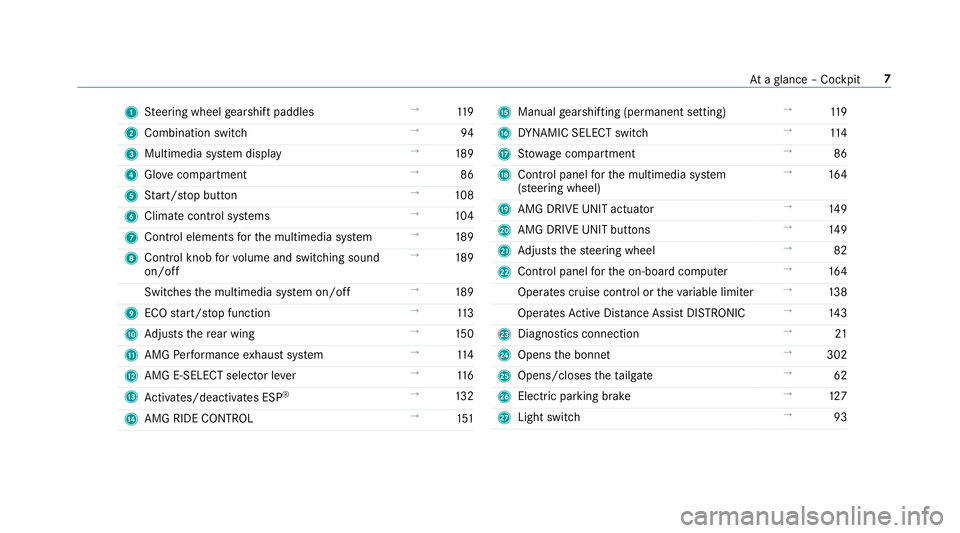
1
Steering wheel gearshift paddles →
11 9
2 Combination swit ch →
94
3 Multimedia sy stem display →
189
4 Glovecompa rtment →
86
5 Start/ stop button →
108
6 Climate cont rol sy stems →
104
7 Control elements forth e multimedia sy stem →
189
8 Control knob forvo lume and switching sound
on/off →
189
Switches the multimedia sy stem on/off →
189
9 ECO start/ stop function →
11 3
A Adjusts there ar wing →
15 0
B AMG Performance exhaust sy stem →
11 4
C AMG E-SELECT selector le ver→
11 6
D Activates/deacti vates ESP ®
→
13 2
E AMG RIDE CONTROL →
151 F
Manual gearshifting (permanent setting) →
11 9
G DYNA MIC SELECT switch →
11 4
H Stow age compartment →
86
I Control panel forth e multimedia sy stem
(s te ering wheel) →
16 4
J AMG DRIVE UNIT actuator →
14 9
K AMG DRIVE UNIT buttons →
14 9
L Adjusts thesteering wheel →
82
M Control panel forth e on-board computer →
16 4
Operates cruise contro l ortheva riable limiter →
13 8
Operates Active Dis tance Assi stDISTRONIC →
14 3
N Diagno stics connection →
21
O Opens the bonn et →
302
P Opens/closes theta ilgate →
62
Q Electric parking brake →
127
R Light switch →
93 At
aglance – Cockpit 7
Page 11 of 465
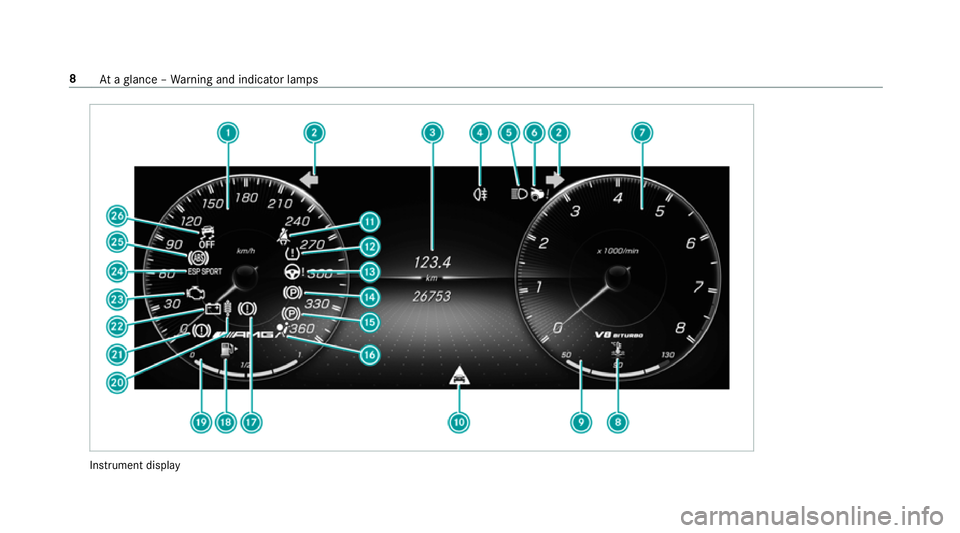
Instrument display8
Ataglance – Warning and indicator lamps
Page 12 of 465
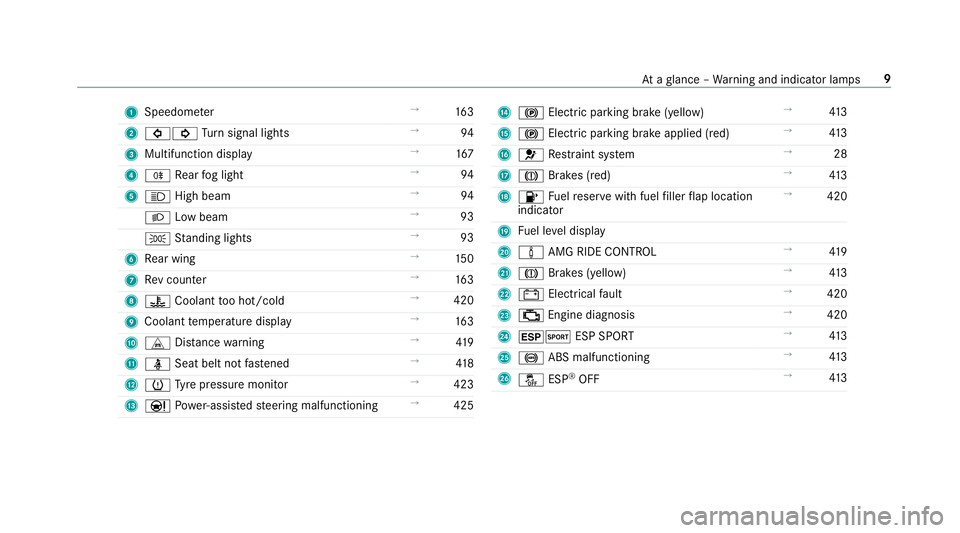
1
Speedom eter →
16 3
2 #! Turn signal lights →
94
3 Multifunction display →
167
4 R Rear fog light →
94
5 K High beam →
94
L Low beam →
93
T Standing lights →
93
6 Rear wing →
15 0
7 Rev counter →
16 3
8 ? Coolant too hot/cold →
420
9 Coolant temp erature display →
16 3
A L Distance warning →
419
B ü Seat belt not fastened →
41 8
C h Tyre pressure monitor →
423
D Ð Powe r-assis tedsteering malfunctioning →
425 E
! Electric pa rking brake (yellow) →
413
F ! Electric pa rking brake applied (red) →
413
G 6 Restra int sy stem →
28
H J Brakes (red) →
413
I 8 Fuelreser vewith fuel filler flap location
indicator →
420
J Fuel le vel display
K à AMG RIDE CONTROL →
419
L J Brakes (yell ow) →
413
M # Electrical fault →
420
N ; Engine diagnosis →
420
O ±M ESP SPORT →
413
P ! ABS malfunctioning →
413
Q å ESP®
OFF →
413 At
aglance – Warning and indicator lamps 9
Page 20 of 465
Pr
otection of the environment
+ ENVIRONMENTAL
NOTEEnvironmental
dama gedue tooperating conditions and
personal driving style The pollutant emission of
your vehicle is
directly related tothewa yyo u operate your
ve hicle.
Help toprotect the environment byoperating
yo ur vehicle in an environmentally responsi‐
ble manner. Please obser vethefo llowing rec‐
ommendations on ope rating conditions and
pe rsonal driving style.
Operating conditions: #
Make sure that the tyre pressure is cor‐
re ct. #
Do not car ryany unnecessary weight
(e.g. roof luggage rack s once you no
lon ger need them). #
Adhere tothe service inter vals.
A regularly serviced vehicle will contri b‐
ute toenvironmen tal pr otection. #
Alw ays ha vemaintenance workcar ried
out at a qualified specialist workshop.
Pe rsonal driving style: #
Do not depress the accelera tor pedal
when starting the engine. #
Do not warm upthe engine while the
ve hicle is stationar y. #
Drive carefully and maintain a suitable
di st ance from theve hicle in front. #
Avoid frequent, sudden acceleration
and braking. #
Change gear in good time and use each
ge ar on lyup toÔ of its maximum
engine speed. #
Switch off the engine in stationary traf‐
fi c, e.g. byusing the ECO start/ stop
function. #
Drive fuel-ef ficiently. Obser vethe ECO
display for a fuel-ef ficient driving style. Ta
ke -back of end-of-life vehicles
EU countries onl y:
Mercedes-Benz will take back your end-of-life
ve hicle for environment-friendly disposal in
accordance with the European Union(EU) End-
of-Life Vehicles Directive.
A network of vehicle take -ba ckpoints and dis‐
mantlers has been es tablished foryo uto return
yo ur vehicle. You can lea veit at any of these
points free of charge . This makes an impor tant
contribution toclosing there cycling circle and
conse rving resources.
Fo r fur ther information about there cycling and
disposal of end-of-li fevehicles, and theta ke-
back conditions, please visit the national
Mercedes-Benz website foryo ur count ry. Gene
ral no tes 17
Page 27 of 465

of an accident,
rescue services can use the QR
code toquickly find the appropriate rescue card
fo ryo ur vehicle. The cur rent rescue card con‐
ta ins the most impor tant information about your
ve hicle in a compact form , e.g. thero uting of the
electric lines.
Fu rther information can be obtained at http://
www.mercedes-benz.de/qr-code. Data
storage Electronic control units
Elect
ronic control units are fitted in your vehicle.
Some of these are necessary forth e safe opera‐
tion of your vehicle, while some assist you when
driving (driver assis tance sy stems). In addition,
yo ur vehicle pr ovides com fort and enter tainment
functions, which are also made possible byelec‐
tronic control units.
Elect ronic control units contain da tamemories
which can temp orarily or permanently store
te ch nical information about theve hicle's operat‐
ing state, component loads, main tenance
re qu irements and tech nical events or faults. In
general, this information documents thest ate
of a component part, a module, a sy stem or the
sur roundings such as:
R operating status of sy stem components (e.g.
fi ll le vels, battery status, tyre pressure)
R status messages concerning theve hicle or
its individual components (e.g. number of
wheel revo lutions/speed, longitudinal accel‐
eration, lateral acceleration, display of fas‐
te ned seat belts)
R malfunctions or faults in impor tant sy stem
components (e.g. lights, brakes)
R information on events leading tovehicle
damage
R system reactions in special driving situations
(e.g. airbag deployment, inter vention of sta‐
bility control sy stems)
R ambient conditions (e.g. temp erature, rain
sensor)
In addition toprov iding the actual control unit
function, this data assists the manufacturer in
de tecting and rectifying faults and optimising
ve hicle functions. The majority of this data is te
mp orary and is only processed in theve hicle
itself. Only a small portion of the data is stored
in theeve nt or fault memor y.
When your vehicle is serviced, tech nical da ta
from theve hicle can be read out byservice net‐
wo rkemplo yees (e.g. workshops, manufactur‐
ers) or third parties (e.g. breakdown services).
Services include repair services, maintenance
processes, warranty claims and quality assur‐
ance measures, forex ample. The read out is per‐
fo rm ed via the legally prescribed port forthe
diagnostics connection in theve hicle. The
re spective service network locations or third
parties collect, process and use the data. They
document tech nical statuses of theve hicle,
assist in finding faults and impr oving quality and
are transmitted tothe manufacturer, if neces‐
sar y.Fu rthermore, the manufacturer is subject
to product liability. Forth is, the manufacturer
requ irestech nical da tafrom vehicles.
Fa ult memories in theve hicle can be reset by a
service outlet as part of repair or maintenance
wo rk. 24
General no tes