2018 LINCOLN NAVIGATOR audio
[x] Cancel search: audioPage 127 of 649

INFO/TRIP/FUEL
TIRE PRESSURE
TRAILER INFORMATION
•NO CONTENT - Displays a blank area.
•TRIP 1 - Displays distance traveled,average fuel economy, and time spentfor trip. Press and hold OK to reset.
•TRIP 2 information is the same asTRIP 1.
•FUEL ECONOMY - Displays yourvehicle's average fuel economy. Pressand hold OK to reset.
•SEATBELTS - Displays a graphic of theconnection status of the rear seatbelts.
•TIRE PRESSURE - Displays a graphic ofcurrent vehicle tire pressures.
•TRAILER INFORMATION - Displays thetransmission temperature and trailer gain.
Head Up Display (If Equipped)
See Head Up Display (page 147).
Phone
See General Information (page 446).
Audio
See General Information (page 446).
Navigation (If Equipped)
See General Information (page 446).
INFORMATION MESSAGES
Note: Depending on your vehicle optionsand instrument cluster type, not all of themessages will display or be available. Certain messages may be abbreviated orshortened depending upon which clustertype you have.
Press the OK button to acknowledge andremove some messages from the informationdisplay. Other messages will be removedautomatically after a short time.
Certain messages need to be confirmedbefore you can access the menus.
124
Navigator (TB9) Canada/United States of America, enUSA, Edition date: 201708, Third-Printing-
Information DisplaysE222314
Page 139 of 649

MyKey
ActionMessage
MyKey cannot be programmed during key programming.MyKey not Created
When starting your vehicle, a MyKey is in use and the MyKey speed limit is on.Speed Limited to XX MPH/km/h
When a MyKey is in use, the MyKey speed limit is on and your vehicle speed is approaching80 mph (130 km/h).Near Vehicle Top Speed
Displays when MyKey is active.MyKey Active Drive Safely
Displays when MyKey is active.Check Speed Drive Safely
Displays when a MyKey is in use and the MyKey speed limit is reached.Vehicle at Top Speed of MyKey Setting
Displays when a MyKey is in use and Belt-Minder is activated.Buckle Up to Unmute Audio
Displays when a MyKey is in use and AdvanceTrac is activated.AdvanceTrac On - MyKey Setting
Displays when a MyKey is in use and park aid is activated.MyKey Park Aid Cannot be Deactivated
Displayed when the lane keeping aid is on per MyKey settings.Lane Keeping Alert On MyKey Setting
136
Navigator (TB9) Canada/United States of America, enUSA, Edition date: 201708, Third-Printing-
Information Displays
Page 192 of 649

CENTER CONSOLE
Stow items in the cup holder carefully asitems may become loose during hardbraking, acceleration or crashes, includinghot drinks which may spill.
Available console features include:
Front storage compartment withUSB ports, auxiliary power pointand wireless charger.
A
Cup holders with auxiliary storagebin.B
Storage compartment with auxiliarypower point.C
Rear audio controls/Rear windowshade controls.D
Rear climate controls.E
AC power point.F
Auxiliary power point or cigarlighter.G
Rear cup holders.H
Dual USB port.I
Terrain management switch andelectric parking brake.J
OVERHEAD CONSOLE
189
Navigator (TB9) Canada/United States of America, enUSA, Edition date: 201708, Third-Printing-
Storage CompartmentsE247439 E224352
Page 241 of 649

If a fault is present in the system, a warningmessage appears in the information displayand does not allow you to switch the systemon. See Information Messages (page 124).
If a sensor is blocked and cannot function,the system becomes disabled and a warningmessage appears in the information display.The system returns to a normal state oncethe blockage is cleared.
REAR PARKING AID
The rear sensors are only active when thetransmission is in reverse (R). As your vehiclemoves closer to the obstacle, the rate of theaudible warning increases. When theobstacle is less than 12 in (30 cm) away, thewarning sounds continuously. If the systemdetects a stationary or receding objectfarther than 12 in (30 cm) from the corners ofthe bumper, the tone sounds for only threeseconds. Once the system detects an objectapproaching, the warning sounds again.
Coverage area of up to 6 ft (1.8 m) from therear bumper. There may be decreasedcoverage area at the outer corners of thebumper.
The system detects certain objects while thetransmission is in reverse (R) :
•Your vehicle is moving toward astationary object at a speed of 3 mph(5 km/h) or less.
•Your vehicle is not moving, but a movingobject is approaching the rear of yourvehicle at a speed of 3 mph (5 km/h) orless.
•Your vehicle is moving at a speed of lessthan 3 mph (5 km/h) and a moving objectis approaching the rear of your vehicleat a speed of less than 3 mph (5 km/h).
The system provides audio warnings onlywhen your vehicle is moving or when yourvehicle is stationary and the detectedobstacle is less than 12 in (30 cm) away fromthe bumper.
Obstacle Distance Indicator (If Equipped)
The system provides obstacle distanceindication through the information display.The distance indicator displays when thetransmission is in reverse (R).
238
Navigator (TB9) Canada/United States of America, enUSA, Edition date: 201708, Third-Printing-
Parking AidsE130178
Page 242 of 649
The indicator displays:
•As the distance to the obstacledecreases the indicator blocks illuminateand move towards the vehicle icon.
•If there is no obstacle detected, thedistance indicator blocks are grayed out.
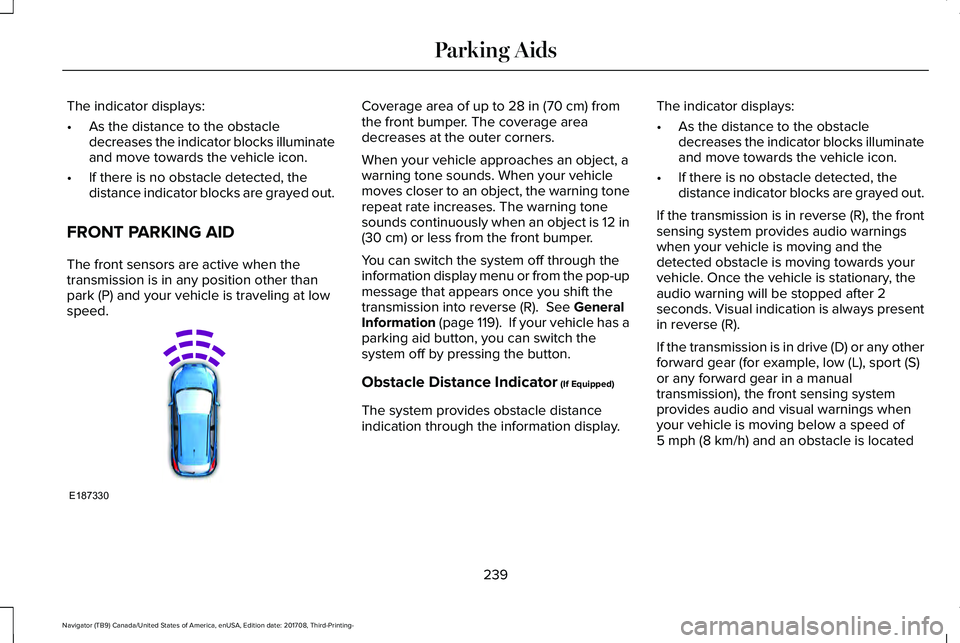
FRONT PARKING AID
The front sensors are active when thetransmission is in any position other thanpark (P) and your vehicle is traveling at lowspeed.
Coverage area of up to 28 in (70 cm) fromthe front bumper. The coverage areadecreases at the outer corners.
When your vehicle approaches an object, awarning tone sounds. When your vehiclemoves closer to an object, the warning tonerepeat rate increases. The warning tonesounds continuously when an object is 12 in(30 cm) or less from the front bumper.
You can switch the system off through theinformation display menu or from the pop-upmessage that appears once you shift thetransmission into reverse (R). See GeneralInformation (page 119). If your vehicle has aparking aid button, you can switch thesystem off by pressing the button.
Obstacle Distance Indicator (If Equipped)
The system provides obstacle distanceindication through the information display.
The indicator displays:
•As the distance to the obstacledecreases the indicator blocks illuminateand move towards the vehicle icon.
•If there is no obstacle detected, thedistance indicator blocks are grayed out.
If the transmission is in reverse (R), the frontsensing system provides audio warningswhen your vehicle is moving and thedetected obstacle is moving towards yourvehicle. Once the vehicle is stationary, theaudio warning will be stopped after 2seconds. Visual indication is always presentin reverse (R).
If the transmission is in drive (D) or any otherforward gear (for example, low (L), sport (S)or any forward gear in a manualtransmission), the front sensing systemprovides audio and visual warnings whenyour vehicle is moving below a speed of5 mph (8 km/h) and an obstacle is located
239
Navigator (TB9) Canada/United States of America, enUSA, Edition date: 201708, Third-Printing-
Parking AidsE187330
Page 243 of 649

inside the detection area. Once the vehicleis stationary, the audio warning will bestopped after 2 seconds and the visualindication stops after 4 seconds. If theobstacles detected are within 12 in (30 cm),the visual indication remains on.
If the transmission is in neutral (N), thesystem provides visual indication only whenyour vehicle is moving at 5 mph (8 km/h) orbelow and an obstacle is located inside thedetection area. Once your vehicle isstationary, the visual indication will stop after4 seconds.
SIDE SENSING SYSTEM (IF EQUIPPED)
The side sensing system uses the front andrear side sensors to detect and mapobstacles within the vehicle's driving path,located near the sides of your vehicle. Theside sensors are active when thetransmission is in any position other thanpark (P).
Note:Obstacles that enter the side detectionarea without being detected and mappedby the front or rear side sensors will not bedetected.
Coverage area is up to 24 in (60 cm) fromthe sides of your vehicle.
When the system detects an object close tothe side of your vehicle, an audible warningsounds. As your vehicle moves closer toobstacles within the driving path of yourvehicle, the rate of the audible warningincreases.
Obstacle Distance Indicator (If Equipped)
The system provides obstacle distanceindication through the information display.
As the distance to the obstacle decreases,the indicator blocks illuminate and movetoward the vehicle icon. If there is noobstacle detected, the distance indicatorblocks show greyed out.
240
Navigator (TB9) Canada/United States of America, enUSA, Edition date: 201708, Third-Printing-
Parking AidsE187810 E190459
Page 359 of 649

Protected ComponentFuse RatingFuse or Relay Number
Central lock relay.20A124Central unlock relay.
Left front door zone module (DZM).30A125
Right front door zone module (DZM).30A126
Moonroof - Tilt, Vent. Slide.30A127
Revel II Amp.20A128
Left rear door zone module (DZM).30A129
Right rear door zone module (DZM).30A130
Adjustable column and pedal memory module (CAPM).15A131
Accessory protocol interface module (APIM) (Media GatewayModule or SYNC).10A132
Drive mode switch module (DMSM) (if equipped).Radio frequency transceiver module (RTM).Rear heating, ventilation, and air conditioning (HVAC) control.
Audio control module (ACM).20A133Rear audio control module (RACM).Remote CD mechanism (if equipped).
356
Navigator (TB9) Canada/United States of America, enUSA, Edition date: 201708, Third-Printing-
Fuses
Page 377 of 649

WARNING: This vehicle may havemore than one battery. Removing thebattery cables from only one battery doesnot disconnect your vehicle electricalsystem. Make sure you disconnect thebattery cables from all batteries whendisconnecting power. Failure to do so maycause serious personal injury or propertydamage.
Your vehicle is fitted with a Motorcraftmaintenance-free battery which normallydoes not require additional water.
When a battery replacement is required, youmust use a recommended replacementbattery that matches the electricalrequirements of the vehicle.
Note:After cleaning or replacing the battery,make sure you reinstall the battery cover orshield.
Note:If you add electrical accessories orcomponents to the vehicle, it may adverselyaffect the low voltage battery performanceand durability. This may also affect theperformance of other electrical systems inthe vehicle.
For longer, trouble-free operation, keep thetop of the battery clean and dry.
If you see any corrosion on the battery orterminals, remove the cables from theterminals and clean with a wire brush. Youcan neutralize the acid with a solution ofbaking soda and water.
Because your vehicle’s engine iselectronically controlled by a computer, somecontrol conditions are maintained by powerfrom the battery. When the battery isdisconnected or a new battery is installed,the engine must relearn its idle and fuel trimstrategy for optimum driveability andperformance. Flexible fuel vehicles (FFV)must also relearn the ethanol content of thefuel for optimum driveability andperformance.
To restore the settings, do the following:
1. Apply the parking brake.
2. Shift into park (P) or neutral (N).
3. Switch off all accessories.
4. Press the brake pedal and start yourvehicle.
5. Run the engine until it reaches normaloperating temperature. While the engineis warming up, complete the following:Reset the clock. Reset the powerwindows bounce-back feature. SeeWindows and Mirrors (page 104). Resetthe radio station presets. See AudioSystem (page 434).
6. Allow the engine to idle for at least oneminute.
7.Drive the vehicle at least 10 mi (16 km) tocompletely relearn the idle trim and fueltrim strategy.
Note:If you do not allow the engine torelearn the idle and fuel trim strategy, theidle quality of your vehicle may be adverselyaffected until the engine computereventually relearns the idle trim and fuel trimstrategy.
374
Navigator (TB9) Canada/United States of America, enUSA, Edition date: 201708, Third-Printing-
Maintenance