2018 LINCOLN MKX reset
[x] Cancel search: resetPage 509 of 603

AppLink issues
Possible solution(s)Possible cause(s)Issue
Unplug the USB cable from the phone, wait amoment, and plug the USB cable back in tothe phone. After a few seconds, the appshould appear in SYNC 3's Mobile Apps Menu.If not, "Force Close" the application and restartit.
You may need to reset the USB connectionto SYNC 3.
My iPhone is connected, my app is running, Irestarted the app but I still cannot find it onSYNC 3.
Increase the Bluetooth volume of the deviceby using the device's volume control buttonswhich are most often found on the side of thedevice.
The Bluetooth volume on the phone may below.
I have an Android phone. I found and startedmy media app on SYNC 3, but there is nosound or the sound is very low.
Force close or uninstall the apps you do notwant SYNC 3 to find. If the app has a "FordSYNC" setting, disable that setting in the app'ssettings menu on the phone.
Some Android devices have a limited numberof Bluetooth ports that apps can use toconnect. If you have more AppLink apps onyour phone than the number of availableBluetooth ports, you will not see all of yourapps listed in the SYNC 3 mobile apps menu.
I can only see some of the AppLink appsrunning on my phone listed in the SYNC 3Mobile Apps Menu.
506
MKX (CD9) Canada/United States of America, enUSA, Edition date: 201707, First Printing
SYNC™ 3
Page 513 of 603

General
Possible solutionPossible causeIssue
SYNC 3 only supports four languages in a single module for textdisplay, voice control and voice prompts. The country where youbought your vehicle dictates the four languages based on the mostpopular languages spoken. If the selected language is not available,SYNC 3 remains in the current active language.SYNC 3 does not support the currentlyselected language for the instrumentcluster and information and entertainmentdisplay.
The language selected forthe instrument cluster andinformation and entertain-ment display does notmatch the SYNC 3language (phone, USB,Bluetooth audio, voicecontrol and voice prompts).
SYNC 3 offers several new voice control features for a wide range oflanguages. Dialing a contact name directly from the phonebookwithout pre-recording (for example, “call John Smith”) or selecting atrack, artist, album, genre or playlist directly from your media player(for example, "play artist Madonna").
SYNC 3 System Reset
The system has a System Reset feature that can be performed if the function of a SYNC 3 feature is lost. This reset is intended to restorefunctionality and will not erase any information previously stored in the system (such as paired devices, phonebook, call history, textmessages, or user settings). To perform a System Reset, press and hold the Seek Up (>>|) button while pressing and holding the RadioPower button. After approximately 5 seconds the screen will go black. Allow 1-2 minutes for the system reset to complete. You may thenresume using the SYNC 3 system.
510
MKX (CD9) Canada/United States of America, enUSA, Edition date: 201707, First Printing
SYNC™ 3
Page 521 of 603

Your vehicle is equipped with the IntelligentOil-Life Monitor system, which displays amessage in the information display at theproper oil change interval. This interval maybe up to one year or 10,000 mi (16,000 km).
When the oil change message appears inthe information display, it is time for an oilchange. Make sure you perform the oilchange within two weeks or 500 mi (800 km)of the message appearing. Make sure youreset the Intelligent Oil-Life Monitor aftereach oil change. See Oil Change IndicatorReset (page 315).
If your information display resets prematurelyor becomes inoperative, you should performthe oil change interval at six months or5,000 mi (8,000 km) from your last oilchange. Never exceed one year or 10,000 mi(16,000 km) between oil change intervals.
Your vehicle is very sophisticated and builtwith multiple, complex, performance systems.Every manufacturer develops these systemsusing different specifications andperformance features. That is why it isimportant to rely upon your dealership toproperly diagnose and repair your vehicle.
Ford Motor Company has recommendedmaintenance intervals for various parts andcomponent systems based upon engineeringtesting. Ford Motor Company relies upon thistesting to determine the most appropriatemileage for replacement of oils and fluids toprotect your vehicle at the lowest overall costto you and recommends againstmaintenance schedules that deviate fromthe scheduled maintenance information.
We strongly recommend the use of onlygenuine Ford, Motorcraft or Ford-authorizedre-manufactured replacement partsengineered for your vehicle.
Additives and Chemicals
This owner's manual and the Ford WorkshopManual list the recommended additives andchemicals for your vehicle. We do notrecommend using chemicals or additives notapproved by us as part of your vehicle’snormal maintenance. Please consult yourwarranty information.
Oils, Fluids and Flushing
In many cases, fluid discoloration is a normaloperating characteristic and, by itself, doesnot necessarily indicate a concern or that thefluid needs to be changed. However, aqualified expert, such as the factory-trainedtechnicians at your dealership, shouldinspect discolored fluids that also show signsof overheating or foreign materialcontamination immediately.
Make sure to change your vehicle’s oils andfluids at the specified intervals or inconjunction with a repair. Flushing is a viableway to change fluid for many vehiclesub-systems during scheduled maintenance.It is critical that systems are flushed only withnew fluid that is the same as that requiredto fill and operate the system or using aFord-approved flushing chemical.
Owner Checks and Services
Make sure you perform the following basicmaintenance checks and inspections everymonth or at six-month intervals.
518
MKX (CD9) Canada/United States of America, enUSA, Edition date: 201707, First Printing
Scheduled Maintenance
Page 526 of 603
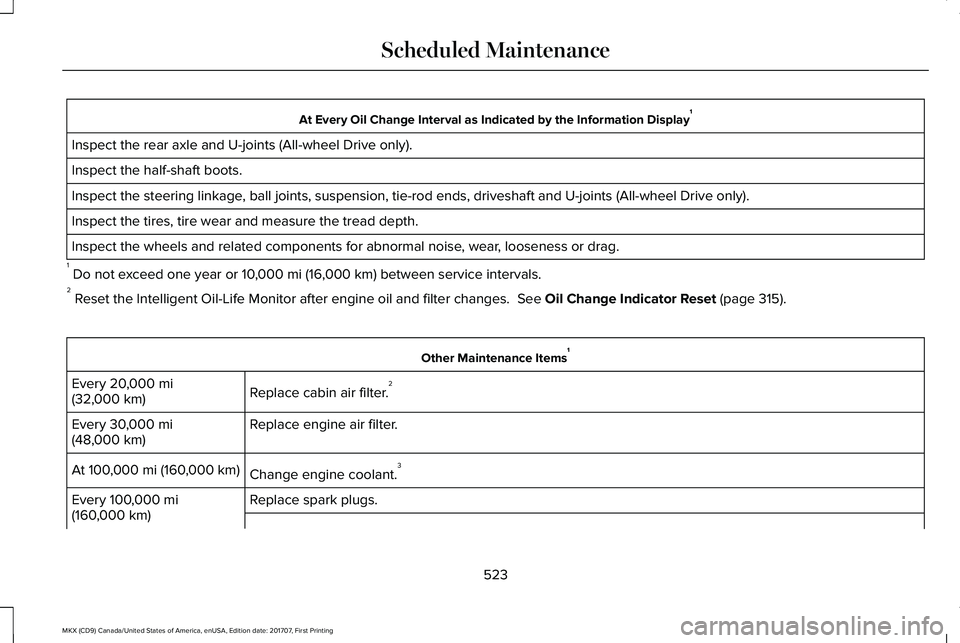
At Every Oil Change Interval as Indicated by the Information Display1
Inspect the rear axle and U-joints (All-wheel Drive only).
Inspect the half-shaft boots.
Inspect the steering linkage, ball joints, suspension, tie-rod ends, driveshaft and U-joints (All-wheel Drive only).
Inspect the tires, tire wear and measure the tread depth.
Inspect the wheels and related components for abnormal noise, wear, looseness or drag.
1 Do not exceed one year or 10,000 mi (16,000 km) between service intervals.2 Reset the Intelligent Oil-Life Monitor after engine oil and filter changes. See Oil Change Indicator Reset (page 315).
Other Maintenance Items1
Replace cabin air filter.2Every 20,000 mi(32,000 km)
Replace engine air filter.Every 30,000 mi(48,000 km)
Change engine coolant.3At 100,000 mi (160,000 km)
Replace spark plugs.Every 100,000 mi(160,000 km)
523
MKX (CD9) Canada/United States of America, enUSA, Edition date: 201707, First Printing
Scheduled Maintenance
Page 528 of 603

SPECIAL OPERATING CONDITIONS
SCHEDULED MAINTENANCE
If you operate your vehicle primarily in anyof the following conditions, you need toperform extra maintenance as indicated. Ifyou operate your vehicle occasionally underany of these conditions, it is not necessaryto perform the extra maintenance. Forspecific recommendations, see yourdealership service advisor or technician.
Perform the services shown in the followingtables when specified or within 3000 miles(4800 kilometers) of the message appearingin the information display prompting you tochange your oil.
•Example 1: The message comes on at28,750 mi (46,270 km). Perform the30,000 mi (48,000 km) automatictransmission fluid replacement.
•Example 2: The message has not comeon, but the odometer reads 30,000 mi(48,000 km) (for example, the IntelligentOil-Life Monitor was reset at 25,000 mi(40,000 km). Perform the engine air filterreplacement.
525
MKX (CD9) Canada/United States of America, enUSA, Edition date: 201707, First Printing
Scheduled Maintenance
Page 530 of 603

Operating in dusty or sandy conditions (such as unpaved or dusty roads)
Replace cabin air filter.Inspect frequently, serviceas requiredReplace engine air filter.
Inspect the wheels and related components for abnormal noise, wear, looseness or drag.Every 5,000 mi (8,000 km)
Rotate tires, inspect tires for wear and measure tread depth.
Change engine oil and filter.*Every 5,000 mi (8,000 km)or six months
Perform multi-point inspection.
Change automatic transmission fluid.Every 30,000 mi(48,000 km)
*Reset your Intelligent Oil-Life Monitor after engine oil and filter changes. See Oil Change Indicator Reset (page 315).
Exceptions
There are several exceptions to the NormalSchedule:
Axle and PTU Maintenance
The Power Transfer Unit (PTU) and rear axle(AWD only) in your vehicle does not requireany normal scheduled maintenance.Changing or checking the PTU lubricant isnot necessary unless the unit has beensubmerged in water or shows signs ofleakage. Contact your authorized dealer forservice.
527
MKX (CD9) Canada/United States of America, enUSA, Edition date: 201707, First Printing
Scheduled Maintenance
Page 598 of 603

Load CarriersSee: Roof Racks and Load Carriers...............258
Load Carrying................................................257Load Limit.......................................................259Special Loading Instructions for Owners ofPick-up Trucks and Utility-typeVehicles............................................................263Vehicle Loading - with and without aTrailer................................................................259
Locking and Unlocking..................................72Activating Intelligent Access..............................74Autolock..................................................................75Auto Relock............................................................75Autounlock..............................................................76Battery Saver..........................................................76Illuminated Entry....................................................76Illuminated Exit......................................................76Locking and Unlocking the Doors with theKey Blade............................................................73Power Door Locks................................................72Remote Control.....................................................72Smart Unlocks for Intelligent AccessKeys......................................................................75
Luggage Covers...........................................258Lug NutsSee: Changing a Road Wheel.........................373
M
Maintenance..................................................308General Information...........................................308
Manual Liftgate................................................80Closing the Liftgate...............................................81Opening the Liftgate............................................80
Memory Function...........................................157Easy Entry and Exit Feature..............................159Linking a PreSet Position to your RemoteControl or Intelligent Access Key Fob.......158Saving a PreSet Position...................................158
Message CenterSee: Information Displays..................................118
MirrorsSee: Heated Windows and Mirrors.................148See: Windows and Mirrors................................104
Mobile Communications Equipment...........14Moonroof.........................................................109Bounce-Back.........................................................110Opening and Closing the Moonroof...............110
Motorcraft Parts - 2.7L EcoBoost™............383Motorcraft Parts - 3.7L.................................384MyKey Troubleshooting................................70MyKey™..............................................................65Principle of Operation.........................................65
N
Navigation.......................................................461cityseeker.............................................................470Destination Mode...............................................462Map Mode.............................................................461Navigation Map Updates...................................471Navigation Menu.................................................467SiriusXM Traffic and Travel Link.......................471SYNC AppLink.....................................................470Waypoints.............................................................469
Normal Scheduled Maintenance..............521Intelligent Oil-Life Monitor™..............................521Normal Maintenance Intervals........................522
O
Oil Change Indicator Reset.........................315Oil CheckSee: Engine Oil Check.......................................314
Opening and Closing the Hood...............308Closing the Hood...............................................309Opening the Hood.............................................308
Ordering Additional Owner'sLiterature.....................................................286Obtaining a French Owner’s Manual............286
Overhead Console........................................170
595
MKX (CD9) Canada/United States of America, enUSA, Edition date: 201707, First Printing
Index