2018 LINCOLN CONTINENTAL remote control
[x] Cancel search: remote controlPage 155 of 615

Windshield Wiper De-icer (If Equipped)
The windshield wiper de-icer turns on in lowtemperatures or when you manually switchthe heated rear window on.
CABIN AIR FILTER
Your vehicle is equipped with a cabin airfilter, which gives you and your passengersthe following benefits:
•It improves your driving comfort byreducing particle and odor concentration.
•It improves the interior compartmentcleanliness.
•It protects the climate controlcomponents from particle deposits.
You can locate the cabin air filter behind theglove box.
Note:Make sure you have a cabin air filterinstalled at all times. This prevents foreignobjects from entering the system. Runningthe system without a filter in place couldresult in degradation or damage to thesystem.
Replace the filter at regular intervals. SeeScheduled Maintenance (page 523).
For additional cabin air filter information, orto replace the filter, see a qualifiedtechnician.
REMOTE START
The system adjusts the interior temperaturedepending on your chosen settings duringremote start.
You cannot adjust the climate control settingduring remote start operation. When youswitch the ignition on, the climate controlsystem returns to the previous settings. Youcan now make adjustments.
Some features may remain on if they turn onduring remote start:
•Driver heated seat.
•Driver ventilated seat.
•Heated steering wheel.
•Heated mirrors.
•Heated rear window.
•Windshield wiper de-icer.
Note:If the passenger heated or ventilatedseats are on when you switch the vehicleoff, they default to the driver setting whenyou switch the vehicle on.
You can adjust the default remote startsettings using the information displaycontrols. See Information Displays (page115).
Automatic Settings
In hot weather, the system sets to 72°F(22°C). The ventilated seats set to high (ifavailable, and if you select AUTO in theinformation display).
In moderate weather, the system heats orcools (based on pre-selected settings). Therear defroster, heated mirrors and heated orventilated seats do not turn on.
In cold weather, the system sets to 72°F(22°C). The heated seats and heated steeringwheel set to high (if available, and if youselect AUTO in the information display). Therear defroster and heated mirrors turn on.
152
Continental (CPL) Canada/United States of America, enUSA, Edition date: 201706, Second-Printing
Climate Control
Page 167 of 615
You can save up to three preset memorypositions. You can save a memory preset atany time.
Recalling a Preset Position
Press and release the preset buttonassociated with your desired driving position.The memory features move to the positionstored for that preset.
Note:You can only recall a preset memoryposition when the ignition is off, or when thetransmission is in park (P) or neutral (N) (andyour vehicle is not moving) if the ignition ison.
You can also recall a preset memory positionby:
•Pressing the unlock button on yourintelligent access key fob if it is linked toa preset position.
•Unlocking the intelligent driver doorhandle if a linked key fob is present.
Note:Using a linked key fob to recall yourmemory position when the ignition is offmoves the seat to the Easy Entry position.
Note:Pressing any active memory featureadjustment control, or any memory buttonduring a memory recall, cancels theoperation.
Linking a Preset Position to yourRemote Control or Intelligent AccessKey Fob
You can save preset memory positions forup to three remote controls or intelligentaccess (IA) keys.
1. With the ignition on, move the memoryfeatures to the desired positions.
2. Press and hold the preset button youdesire for about five seconds. A tonesounds after a few seconds. Continueholding until you hear a second tone.
3. Within three seconds, press the lockbutton on the remote control you arelinking.
To unlink a remote control, follow the sameprocedure – except in step 3, press theunlock button on the remote control.
Note:If more than one linked remote controlor intelligent access key is in range, thememory function moves to the settings ofthe first key to initiate a memory recall.
Easy Entry and Exit Feature
If you enable the easy entry and exit feature,it moves the driver seat position rearward upto 2 in (5 cm) when you switch the ignitionoff.
The driver seat returns to its previousposition when you switch the ignition on.
Note:If you press any adjustment or memorybutton when in easy exit mode, the systemcancels the operation.
You can enable or disable this featurethrough the information display. See GeneralInformation (page 115).
164
Continental (CPL) Canada/United States of America, enUSA, Edition date: 201706, Second-Printing
Seats
Page 171 of 615

Press the heated seat symbol to cyclethrough the various heat settings and off.More indicator lights indicate warmersettings.
The heated seat module resets at everyignition run cycle. While the ignition is on,press the high or low heated seat switch toenable heating mode. When activated, theywill turn off automatically when you turn theengine off.
CLIMATE CONTROLLED SEATS (If
Equipped)
Heated Seats
WARNING: People who are unable tofeel pain to their skin because of advancedage, chronic illness, diabetes, spinal cordinjury, medication, alcohol use, exhaustionor other physical conditions, must usecaution when using the heated seat. Theheated seat may cause burns even at lowtemperatures, especially if used for longperiods of time. Do not place anything on
the seat that may block the heat, such as ablanket or cushion. This can cause theheated seat to overheat. Do not puncturethe seat with pins, needles or other pointedobjects. This damages the heating elementand can cause the heated seat to overheat.An overheated seat may cause seriouspersonal injury.
Note:The heated seats switch on during aremote start if they are enabled through theinformation displays. See GeneralInformation (page 115).
Note:The heated seats may also switch onwhen you start your vehicle if they were onwhen you previously switched your vehicleoff.
Note:Do not do the following:
•Place heavy objects on the seat.
•Operate the seat heater if water or anyother liquid spills on the seat. Allow theseat to dry thoroughly.
Press this symbol to cycle through thevarious heat settings and off. More indicatorlights indicate warmer settings.
Ventilated Seats
Note:The ventilated seats switch on duringa remote start if they are enabled throughthe information displays. See GeneralInformation (page 115).
Note:The ventilated seats may also switchon when you start your vehicle if they wereon when you previously switched yourvehicle off.
Note:Do not do the following:
168
Continental (CPL) Canada/United States of America, enUSA, Edition date: 201706, Second-Printing
SeatsE146322
Page 174 of 615
HomeLink Wireless Control System
WARNING: Make sure that the garagedoor and security device are free fromobstruction when you are programming. Donot program the system with the vehicle inthe garage.
WARNING: Do not use the system withany garage door opener that does not havethe safety stop and reverse feature asrequired by U.S. Federal Safety Standards(this includes any garage door openermanufactured before April 1, 1982). A garagedoor opener which cannot detect an object,signaling the door to stop and reverse, doesnot meet current federal safety standards.Using a garage door opener without thesefeatures increases the risk of serious injuryor death.
Note:Make sure you keep the originalremote control transmitter for use in othervehicles as well as for future systemprogramming.
Note:We recommend that upon the sale orlease termination of your vehicle, you erasethe programmed function buttons for securityreasons. See Erasing the Function ButtonCodes later in this section.
Note:You can program a maximum of threedevices. To change or replace any of thethree devices after it has been initiallyprogrammed, you must first erase the currentsettings. See Erasing the Function ButtonCodes.
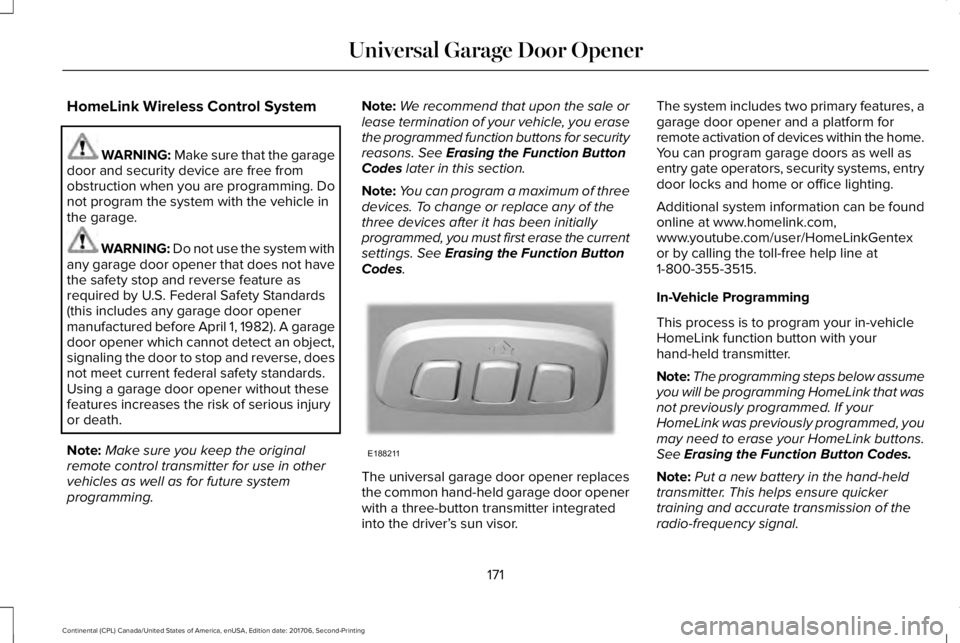
The universal garage door opener replacesthe common hand-held garage door openerwith a three-button transmitter integratedinto the driver’s sun visor.
The system includes two primary features, agarage door opener and a platform forremote activation of devices within the home.You can program garage doors as well asentry gate operators, security systems, entrydoor locks and home or office lighting.
Additional system information can be foundonline at www.homelink.com,www.youtube.com/user/HomeLinkGentexor by calling the toll-free help line at1-800-355-3515.
In-Vehicle Programming
This process is to program your in-vehicleHomeLink function button with yourhand-held transmitter.
Note:The programming steps below assumeyou will be programming HomeLink that wasnot previously programmed. If yourHomeLink was previously programmed, youmay need to erase your HomeLink buttons.See Erasing the Function Button Codes.
Note:Put a new battery in the hand-heldtransmitter. This helps ensure quickertraining and accurate transmission of theradio-frequency signal.
171
Continental (CPL) Canada/United States of America, enUSA, Edition date: 201706, Second-Printing
Universal Garage Door OpenerE188211
Page 248 of 615
ActionCause
Do not use the system in these conditions because it may not detectany vehicles ahead.Water, snow or ice on the surface of the road may interfere with theradar signals.
Wait a short time or switch to normal cruise control.You are in a desert or remote area with no other vehicles and noroadside objects.
Due to the nature of radar technology, it is possible to get a blockage warning with no actual block. This happens, for example, when drivingin sparse rural or desert environments. A false blocked condition either self clears, or clears after you restart your vehicle.
Switching to Normal Cruise Control
WARNING: Normal cruise control willnot brake when your vehicle is approachingslower vehicles. Always be aware of whichmode you have selected and apply thebrakes when necessary.
You can change from adaptive cruise controlto normal cruise control through theinformation display.
The cruise control indicator lightreplaces the adaptive cruisecontrol indicator light if you selectnormal cruise control. The gap setting doesnot display, and the system does not respondto lead vehicles. Automatic braking remainsactive to maintain set speed.
245
Continental (CPL) Canada/United States of America, enUSA, Edition date: 201706, Second-Printing
Cruise ControlE71340
Page 287 of 615
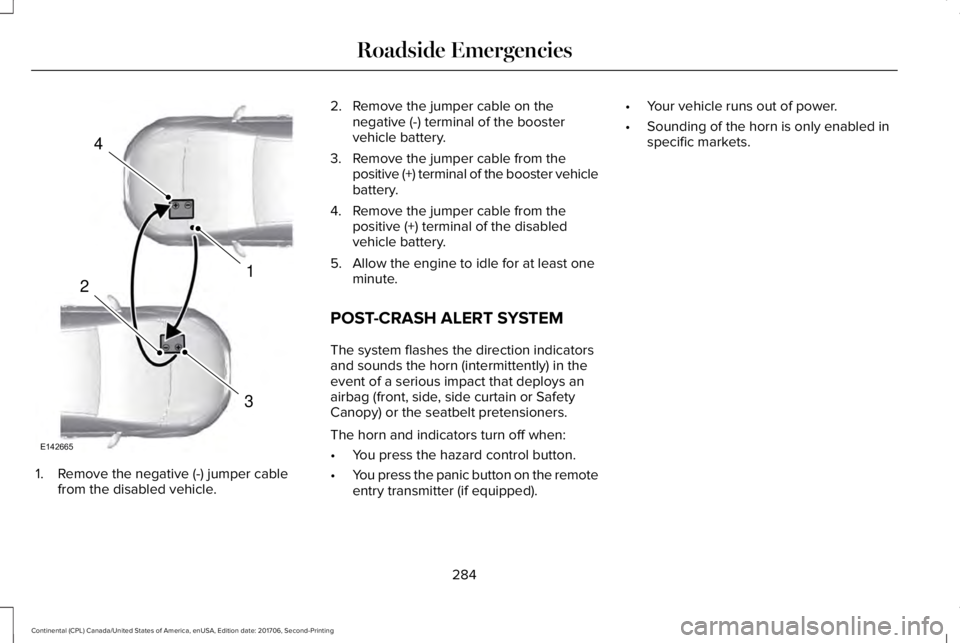
1. Remove the negative (-) jumper cablefrom the disabled vehicle.
2. Remove the jumper cable on thenegative (-) terminal of the boostervehicle battery.
3. Remove the jumper cable from thepositive (+) terminal of the booster vehiclebattery.
4. Remove the jumper cable from thepositive (+) terminal of the disabledvehicle battery.
5. Allow the engine to idle for at least oneminute.
POST-CRASH ALERT SYSTEM
The system flashes the direction indicatorsand sounds the horn (intermittently) in theevent of a serious impact that deploys anairbag (front, side, side curtain or SafetyCanopy) or the seatbelt pretensioners.
The horn and indicators turn off when:
•You press the hazard control button.
•You press the panic button on the remoteentry transmitter (if equipped).
•Your vehicle runs out of power.
•Sounding of the horn is only enabled inspecific markets.
284
Continental (CPL) Canada/United States of America, enUSA, Edition date: 201706, Second-Printing
Roadside Emergencies4
1
3
2
E142665
Page 609 of 615

Maintaining Your Head Up Display.................145
Heated Seats..................................................166Front Seats............................................................166Rear Seats.............................................................167
Heated Steering Wheel................................88Heated Windows and Mirrors.....................151Heated Exterior Mirrors......................................151Heated Rear Window..........................................151Windshield Wiper De-icer.................................152
HeatingSee: Climate Control..........................................146
Hill Start Assist...............................................213Switching the System On and Off...................213Using Hill Start Assist.........................................213
Hints on Controlling the InteriorClimate..........................................................149Defogging the Side Windows in ColdWeather.............................................................150General Hints........................................................149Quickly Cooling the Interior..............................149Quickly Heating the Interior.............................149Recommended Settings for Cooling..............149Recommended Settings for Heating..............149
Hints on Driving With Anti-LockBrakes...........................................................210Home Screen................................................428Hood LockSee: Opening and Closing the Hood.............312
I
In California (U.S. Only)...............................287Information Display Control.........................87Information Displays......................................115General Information.............................................115
Information Messages..................................123Active Park............................................................124Adaptive Cruise Control....................................124Adaptive Headlamps..........................................125Adaptive Steering...............................................125Airbag.....................................................................125Alarm......................................................................126Automatic Engine Shutdown............................126AWD........................................................................127Battery and Charging System..........................127Blind Spot Information and Cross Traffic AlertSystem...............................................................129Doors and Locks..................................................129Driver Alert............................................................130Fuel..........................................................................131Hill Start Assist......................................................131Keys and Intelligent Access...............................131Lane Keeping System.........................................133Maintenance.........................................................133MyKey.....................................................................135Park Aid..................................................................136Park Brake.............................................................136
Power Steering.....................................................137Pre-Collision Assist.............................................138Remote Start.........................................................138Seats.......................................................................138Stability Control....................................................139Starting System ...................................................139Tire Pressure Monitoring System....................140Transmission.........................................................140
Installing Child Restraints..............................21Inflatable Seatbelts...............................................24Standard Seatbelts...............................................22Using Lap and Shoulder Belts............................21Using Lower Anchors and Tethers forCHildren (LATCH).............................................27Using Tether Straps..............................................29
Instrument Cluster........................................109Instrument Lighting Dimmer........................94Instrument Panel Overview...........................17Interior Lamps..................................................98Front Interior Lamp...............................................98Rear Interior Lamp..............................................100
Interior Luggage CompartmentRelease...........................................................80Interior Mirror.................................................105Auto-Dimming Mirror..........................................105
Introduction.........................................................7
606
Continental (CPL) Canada/United States of America, enUSA, Edition date: 201706, Second-Printing
Index
Page 610 of 615

J
Jump Starting the Vehicle...........................281Connecting the Jumper Cables.....................282Jump Starting......................................................283Preparing Your Vehicle......................................281Removing the Jumper Cables.........................283
K
Keyless Entry....................................................78SECURICODE™ Keyless Entry Keypad.............78
Keyless Starting.............................................178Ignition Modes......................................................178
Keys and Remote Controls...........................57
L
Lane Keeping System..................................247Switching the System On and Off..................248
Lighting Control..............................................92Flashing the Headlamp High Beam.................93Headlamp High Beam.........................................93
Lighting..............................................................92General Information.............................................92
Lincoln Automotive Financial Services......12Lincoln Protect..............................................520Lincoln Protect (CANADA ONLY)....................521
Lincoln Protect Extended Service Plans (U.S.Only)..................................................................520
Load Carrying................................................266Load Limit.......................................................266Special Loading Instructions for Owners ofPick-up Trucks and Utility-typeVehicles............................................................270Vehicle Loading - with and without aTrailer................................................................266
Locking and Unlocking..................................67Activating Intelligent Access..............................67Autolock..................................................................72Battery Saver..........................................................73Door Lock Indicator..............................................67Door Lock Switch Inhibitor.................................67Emergency Locking..............................................70Illuminated Entry....................................................72Illuminated Exit......................................................72Locking and Unlocking the Doors FromInside...................................................................70Opening the Luggage Compartment...............73Remote Control.....................................................69Smart Unlocks for Intelligent AccessKeys.......................................................................71Unlocking the Driver Door with the KeyBlade.....................................................................71
Lug NutsSee: Changing a Road Wheel.........................364
M
Maintenance...................................................312General Information............................................312
Memory Function..........................................163Easy Entry and Exit Feature..............................164Linking a Preset Position to your RemoteControl or Intelligent Access Key Fob.......164Saving a Preset Position....................................163
Message CenterSee: Information Displays..................................115
MirrorsSee: Heated Windows and Mirrors..................151See: Windows and Mirrors.................................101
Mobile Communications Equipment...........14Moonroof.........................................................107Bounce-Back........................................................108Opening and Closing the Moonroof...............107
Motorcraft Parts - 2.7L..................................377Motorcraft Parts - 3.0L.................................378Motorcraft Parts - 3.7L.................................379MyKey Troubleshooting................................65MyKey™..............................................................62Principle of Operation.........................................62
607
Continental (CPL) Canada/United States of America, enUSA, Edition date: 201706, Second-Printing
Index