2018 LINCOLN CONTINENTAL remote control
[x] Cancel search: remote controlPage 64 of 615
Remote Starting your Vehicle
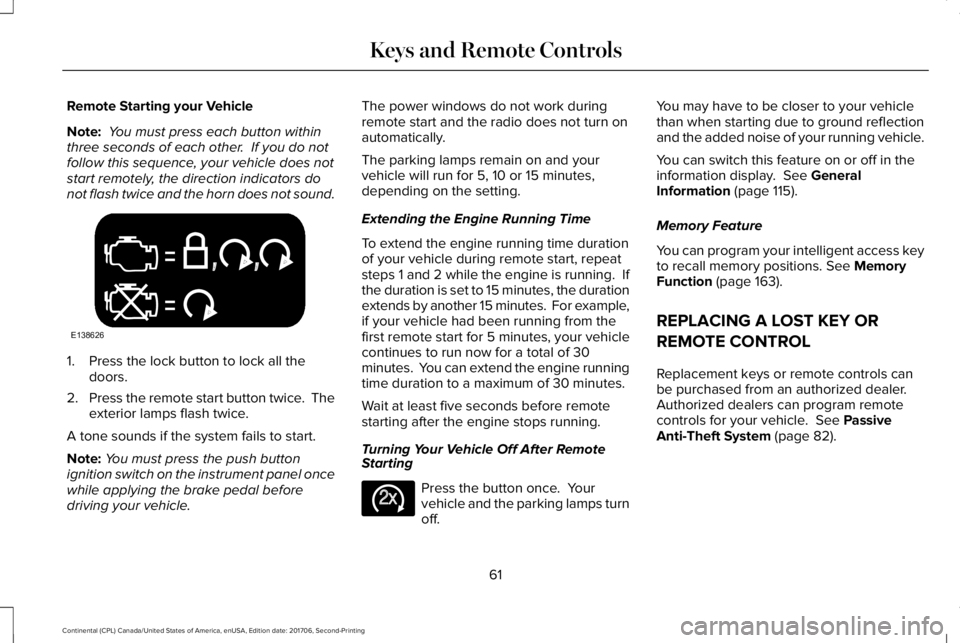
Note: You must press each button withinthree seconds of each other. If you do notfollow this sequence, your vehicle does notstart remotely, the direction indicators donot flash twice and the horn does not sound.
1. Press the lock button to lock all thedoors.
2.Press the remote start button twice. Theexterior lamps flash twice.
A tone sounds if the system fails to start.
Note:You must press the push buttonignition switch on the instrument panel oncewhile applying the brake pedal beforedriving your vehicle.
The power windows do not work duringremote start and the radio does not turn onautomatically.
The parking lamps remain on and yourvehicle will run for 5, 10 or 15 minutes,depending on the setting.
Extending the Engine Running Time
To extend the engine running time durationof your vehicle during remote start, repeatsteps 1 and 2 while the engine is running. Ifthe duration is set to 15 minutes, the durationextends by another 15 minutes. For example,if your vehicle had been running from thefirst remote start for 5 minutes, your vehiclecontinues to run now for a total of 30minutes. You can extend the engine runningtime duration to a maximum of 30 minutes.
Wait at least five seconds before remotestarting after the engine stops running.
Turning Your Vehicle Off After RemoteStarting
Press the button once. Yourvehicle and the parking lamps turnoff.
You may have to be closer to your vehiclethan when starting due to ground reflectionand the added noise of your running vehicle.
You can switch this feature on or off in theinformation display. See GeneralInformation (page 115).
Memory Feature
You can program your intelligent access keyto recall memory positions. See MemoryFunction (page 163).
REPLACING A LOST KEY OR
REMOTE CONTROL
Replacement keys or remote controls canbe purchased from an authorized dealer.Authorized dealers can program remotecontrols for your vehicle. See PassiveAnti-Theft System (page 82).
61
Continental (CPL) Canada/United States of America, enUSA, Edition date: 201706, Second-Printing
Keys and Remote ControlsE138626 E138625
Page 66 of 615
Note:Not every feature applies to everyvehicle in every market. When they areavailable for your vehicle, then they appearin your information display, providing choicesto switch them on or off, or to select a morespecific setting.
•Various vehicle speed limits so theMyKey driver cannot exceed certainspeeds. The information display showswarnings followed by an audible tonewhen the MyKey driver reaches the setspeed. You cannot override the setspeed by fully depressing the acceleratorpedal.
WARNING: Do not set MyKeymaximum speed limit to a limit that willprevent the driver from maintaining a safespeed considering posted speed limits andprevailing road conditions. The driver isalways responsible to drive in accordancewith local laws and prevailing conditions.Failure to do so could result in accident orinjury.
•Various vehicle speed reminders soMyKey drivers know when their vehiclespeed approaches the limits. Warningsappear in your information display and atone sounds when the MyKey driversexceed the set vehicle speed.
•The audio system's maximum volumelimits to 45% so MyKey drivers canconcentrate on the road. A messageappears in the information display whenMyKey drivers attempt to exceed thelimited volume. MyKey also disables theautomatic volume control. Note: If yourvehicle includes an AM/FM radio or avery basic audio system, then the radiomay not limit.
•Always on setting. This setting forcescertain features to remain on and activefor MyKey drivers. For example, E911 oremergency assistance and the do notdisturb features stay on even if a MyKeydriver uses the feature's control to switchit off. When you select, you will not beable to turn off Advance Trac or tractioncontrol (if your vehicle has this feature).
CREATING A MYKEY
Use the information display to create aMyKey:
1. Insert the key you want to program intothe ignition. See Starting a GasolineEngine (page 179). If your vehicle isequipped with a push-button start, placethe remote control into the backup slot.See Passive Anti-Theft System (page82).
2. Switch the ignition on.
3.Access the main menu in the informationdisplay and then scroll through themenus to change the settings of yourMyKey. From the MyKey menu select theoption Create MyKey. See InformationDisplays (page 115).
4.When prompted, hold the OK button untilyou see a message informing you to labelthis key as a MyKey. The programmedrestrictions apply when you key off, openand close the driver door and restart yourvehicle with the programmed key ortransmitter.
63
Continental (CPL) Canada/United States of America, enUSA, Edition date: 201706, Second-Printing
MyKey™
Page 70 of 615

LOCKING AND UNLOCKING
Your vehicle has an intelligent electronicallycontrolled door system that is in constantcommunication with overall vehicle systems.
When you lock your vehicle using the lockswitch on each door interior trim panel, orby using the keyless entry keypad or the locksensor on each door exterior trim panel, theexterior door handle switches do not releasethe doors. This helps to secure your vehicleand prevent unauthorized entry. Also, whenyour vehicle reaches a speed greater than12 mph (20 km/h) the exterior door handleswitches do not release the doors.
If the airbags deploy or the fuel pump shutoffswitch activates, all interior and exteriorunlock switches do not unlock your door forsix seconds. This helps to secure the doorsin the event of a crash. After six seconds, allswitches reset and you can open the doorsusing the interior and exterior unlatchswitches.
Door Lock Indicator
An LED on each front door window trimilluminates when you lock the doors. Itremains on for 2 to 5 seconds after youswitch the ignition off.
Door Lock Switch Inhibitor
When you electronically lock your vehicle,the door lock switches and the interiorluggage compartment release switch do notoperate after 20 seconds. You must unlockyour vehicle with the remote control orkeyless entry keypad, or switch the ignitionon, to restore function to these switches. You can switch this feature on or off in theinformation display. See GeneralInformation (page 115).
Activating Intelligent Access
The intelligent access key must be within 3 ft(1 m) of the door or luggage compartmentyou intend to lock or unlock.
At a Door
67
Continental (CPL) Canada/United States of America, enUSA, Edition date: 201706, Second-Printing
Doors and LocksE222428
Page 72 of 615

At the Luggage Compartment
Press the exterior release button.
Remote Control
You can use the remote control at any time.When you press the lock button on theremote control, all exterior door handleswitches do not release the doors. When youpress the unlock button, all exterior doorhandle switches release the doors.
Unlocking the Doors
Press the button. The directionindicators flash. You can then usethe exterior door handle switch tounlock the door.
Press and hold both the lock and unlockbuttons on the remote control for threeseconds to change between driver door orall doors unlock mode. The directionindicators flash twice to confirm the change. Driver door mode only unlocks the driverdoor when you press the unlock buttononce. All door mode unlocks all doors when
you press the unlock button once. Theunlocking mode applies to the remotecontrol, keyless entry keypad and intelligentaccess. You can also change between theunlocking modes using the informationdisplay. See General Information (page 115).
Locking the Doors
Press the button. The directionindicators flash. You can no longeruse the exterior door handle switchto release the door.
Press the button again within three secondsto confirm that all the doors are closed. Atone sounds and the direction indicatorsflash if all the doors and the luggagecompartment are closed.
Mislock
If any door is open, or if the luggagecompartment or hood is open, a tone soundsand the direction indicators do not flash. Theexterior lock status display also flashes if anydoor does not lock. You can switch thisfeature on or off in the information display. See General Information (page 115).
69
Continental (CPL) Canada/United States of America, enUSA, Edition date: 201706, Second-Printing
Doors and LocksE222426 E138629 E138623
Page 75 of 615
When you open one of the front doors andlock your vehicle using the power door lockcontrol, all doors will lock then unlock if:
•The ignition is on.
•The ignition is off and the transmissionis not in park (P).
Autolock (If Equipped)
Autolock locks all the doors when:
•All doors are closed.
•The ignition is on.
•You shift into any gear putting yourvehicle in motion.
•Your vehicle reaches a speed greaterthan 12 mph (20 km/h).
Autolock repeats when:
•You open then close any door while theignition is on and your vehicle speed is9 mph (15 km/h) or lower.
•Your vehicle reaches a speed greaterthan 12 mph (20 km/h).
Autounlock
Autounlock unlocks all the doors when:
•The ignition is on, all the doors areclosed, and your vehicle has beenmoving at a speed greater than 12 mph(20 km/h).
•Your vehicle comes to a stop and youswitch the ignition off or to the accessoryposition.
•You open the driver door within 10minutes of switching the ignition off or toaccessory.
Note:The doors do not autounlock if youelectronically lock your vehicle after youswitch the ignition off and before you openthe driver door.
Enabling or Disabling Autounlock
You can enable or disable the autounlockfeature in the information display or anauthorized dealer can do it for you. SeeGeneral Information (page 115).
Illuminated Entry
The interior lamps and some exterior lampsilluminate when you unlock the doors withthe remote control.
The illuminated entry system turns off thelights if:
•The ignition is on.
•You press the remote control lock button.
•After 25 seconds of illumination.
The lights do not turn off if:
•You turn them on with the lamp control.
•Any door is open.
Illuminated Exit
The interior lamps and some exterior lampsilluminate when all doors are closed and youswitch the ignition off.
The lamps turn off if all the doors remainclosed and:
•25 seconds have elapsed.
•You press the push button ignitionswitch.
72
Continental (CPL) Canada/United States of America, enUSA, Edition date: 201706, Second-Printing
Doors and Locks
Page 76 of 615

Battery Saver
If you leave the courtesy lamps, interiorlamps or headlamps on, the battery savershuts them off 10 minutes after you switchthe ignition off.
Battery Saver for Intelligent Access Keys
If you leave the ignition switched on, it shutsoff when it detects a certain amount ofbattery drain, or after 45 minutes.
Opening the Luggage Compartment
From Inside Your Vehicle
Press the button on the instrumentpanel to open the luggagecompartment.
With the Remote Control
Press twice within three secondsto open the luggage compartment.
From Outside Your VehiclePress the exterior release button. Yourvehicle must be unlocked or have anintelligent access key within 3 ft (1 m) of theluggage compartment.
To unlock and release the trunk using thekeypad, enter the factory-set code or yourpersonal code and then press 5-6 on thekeypad.
OPENING THE DOORS
Note: When your vehicle reaches a speedgreater than 2 mph (3 km/h), you will only beable to release the door by pressing theunlock button and then door release buttonwithin two seconds.
Front Doors
Press the door release button onthe arm rest to release the door.Push the door out to open thedoor.
73
Continental (CPL) Canada/United States of America, enUSA, Edition date: 201706, Second-Printing
Doors and LocksE159323 E138630 E222426 E232417
Page 78 of 615
WARNING: Keep keys out of the reachof children. Do not allow children to operateor play near an open or moving powerdecklid. You should supervise the operationof the power decklid at all times.
Note:Do not drive with the decklid openunless you switch off the power feature.Make sure you fully close the decklid beforeyou drive your vehicle.
You can switch the power decklid feature onor off in the information display. See GeneralInformation (page 115). The remote controland instrument panel button still operatesthe decklid regardless of the setting.
Opening and Closing the PowerDecklid
WARNING: Make sure all persons areclear of the power decklid area before usingthe power decklid control.
Note:You can reverse the decklidmovement. Press the instrument panel ordecklid button again, or press the remotecontrol button twice.
Note:Do not push or pull on the powerdecklid while it is under operation, as thismay cause damage to your vehicle.
The decklid only operates with thetransmission in park (P).
If the decklid starts to close after it has fullyopened, this indicates there may beexcessive weight on the decklid or a possiblestrut failure. A repetitive tone sounds andthe decklid closes under control. Removeany excessive weight from the decklid. If thedecklid continues to close after opening,have the system checked by an authorizeddealer.
From Inside Your Vehicle
Press the button on the instrumentpanel.
With the Remote Control
Press the button twice within threeseconds.
75
Continental (CPL) Canada/United States of America, enUSA, Edition date: 201706, Second-Printing
Doors and LocksE159323 E138630
Page 80 of 615

Stopping the Decklid Movement
Note:Do not apply sudden excessive forceto the decklid while it is in motion. This coulddamage the power decklid and itscomponents.
You can stop the decklid movement by doingany of the following:
•Pressing the decklid control button.
•Pressing the remote control button twice.
•Pressing the button on the instrumentpanel.
•Moving your foot under and away fromthe center rear bumper in a single-kickmotion.*
*This method only works for vehicles with the
hands-free decklid feature.
Resetting the Power Decklid
The decklid may not operate correctly andyou may need to reset it if:
•The vehicle battery charge is low.
•You disconnect the battery.
•You manually close the decklid and leaveit unlatched.
1. Disconnect the battery for 20 secondsthen reconnect the battery.
2. Manually close the decklid making sureit is fully closed.
3.Power open the decklid using the remotecontrol or instrument panel button.
Obstacle Detection
When Closing
The system stops when it detects anobstacle. A tone sounds and the systemreverses to open. Once you remove theobstacle, you can power close the decklid.
Note:Entering your vehicle while the decklidis closing can cause your vehicle to bounceand activate obstacle detection. To preventthis, let the power decklid close completelybefore you enter your vehicle. Before drivingyour vehicle, check the instrument clusterfor a trunk ajar or door ajar message orwarning indicator. Failure to do this couldresult in unintentionally leaving the decklidopen while driving.
When Opening
The system stops when it detects anobstacle and a tone sounds. Once youremove the obstacle, you can continue tooperate the decklid.
Hands-Free Feature (If Equipped)
The intelligent access key must be within 3 ft(1 m) of the decklid.
77
Continental (CPL) Canada/United States of America, enUSA, Edition date: 201706, Second-Printing
Doors and LocksE222494
2
1