2018 LINCOLN CONTINENTAL light
[x] Cancel search: lightPage 470 of 615

Mute: Press to mute the audionavigation guidance. Press thebutton again to un-mute theguidance.
Points of Interest (POI) groupingicon: You can choose up to threePOI icons to display on the map. Ifthe chosen POIs are located closetogether or are at the same location a box isused to display a single category icon
instead of repeating the same icon, in orderto reduce clutter. When you select the boxon the map, a pop-up appears indicating howmany POIs are in this location. Select the popup to see a list of the available POIs. You canscroll through and select POIs from this list.
If your vehicle is low on charge or fuel,station icons automatically display on themap.
If you have subscribed to SiriusXM Trafficand Travel Link (where available), traffic flowwill be indicated on the map by green (clear),yellow (slowing), and red (stopped) roadhighlights. Traffic flow is indicated where theinformation is available and varies across theUS.
You can choose to display traffic icons onthe map representing twelve different typesof incidents. See Settings (page 480).
You can set a destination by hovering abovea location and selecting:
Button
Start
Destination Mode
To set a destination, press:
DescriptionMenu Item
Destination
Enter a navigation destination in any of the following formats:
Street AddressSearch
467
Continental (CPL) Canada/United States of America, enUSA, Edition date: 201706, Second-Printing
SYNC™ 3E251780 E251779 E207754
Page 479 of 615
cityseeker, when available, is a service thatprovides more information about certainpoints of interest such as restaurants, hotelsand attractions.
When you have selected a point of interest,the location and information appear, such asaddress, phone number and a star rating.
Press More Information to see a photo, areview, a list of services and facilities, theaverage room or meal price and the webaddress. This screen displays the point ofinterest icons.
For restaurants, cityseeker can provideinformation such as star rating, average cost,review, handicap access, hours of operation,and website address.
For hotels, cityseeker can provideinformation such as star rating, pricecategory, review, check-in and checkouttimes, hotel service icons and websiteaddress. Hotel service icons include:
•Restaurant
•Business center
•Handicap facilities
•Laundry
•Refrigerator
•24 hour room service
•Fitness center
•Internet access
•Pool
•Wi-Fi
Attractions include nearby landmarks,amusement parks, historic buildings andmore. cityseeker can provide informationsuch as star rating, reviews, hour of operationand admission price.
SiriusXM Traffic and Travel Link (If
Equipped)
SiriusXM Traffic and Travel Link is availableon vehicles equipped with navigation andonly in select markets. You must activate andsubscribe to receive SiriusXM Traffic andTravel Link information. It helps you locatethe best gas prices, find movie listings, getcurrent traffic alerts, view the weather map,get accurate ski conditions and see currentsports scores. See Apps (page 477).
The system calculates a reasonable efficientroute based on available speed limits, traffic,and road conditions. You may know a localshort cut that is more efficient at a given timethan the route provided by SYNC 3, but youshould expect a slight difference in minutesor miles with the SYNC 3 route.
Navigation Map Updates
Annual navigation map updates are availablefor purchase through your dealership, bycalling 1-866-462-8837 in the United Statesand Canada or 01-800-557-5539 in Mexico.You can also visit:
Website
www.navigation.com/sync
You need to specify the make and model ofyour vehicle to determine if there is anupdate available.
476
Continental (CPL) Canada/United States of America, enUSA, Edition date: 201706, Second-Printing
SYNC™ 3
Page 500 of 615
Note:The Vehicle Wi-Fi Hotspot (VehicleHotspot) may be operational while ignitionis On and may remain operational while theignition is Off.
Note:Vehicle Hotspot services are providedby the vehicle network carrier, subject toyour vehicle network carrier agreement,coverage and availability.
Note:It is the account owner’s responsibilityto remove the vehicle from the vehiclenetwork carrier account when ownership ofthe vehicle is transferred. If the owner wouldlike to remove the vehicle from the accountfor any reason, please contact your vehiclenetwork carrier for more information.
Note:Data, such as the Vehicle IdentificationNumber (VIN), SIM Card ID, and data planusage, is shared between us and the vehiclenetwork carrier to provide the VehicleHotspot service in accordance with yourvehicle network carrier agreement, coverageand availability, and may be used to enablea seamless transition from an old to newembedded modem and to confirm anyupdates are successfully delivered.
Note:For your convenience data usage maybe available for monitoring under Settingsbut may not reflect actual or current usage.The vehicle network carrier is responsiblefor providing information about your account.Please contact the vehicle network carrierfor more information.
Note:We may need to update operatingsystem software on your vehicle, includingsecurity updates and bug fixes, to keepconnected services current, like VehicleHotspot, without prior notice to you.
Ambient Lighting (If Equipped)
Tap a color once to active ambient lighting.This sets the color to the highest intensity.
You can drag the colors up and down toincrease or decrease the intensity.
To switch ambient lighting off, press theactive color once or drag the active color allthe way down to zero intensity.
Vehicle
Note:Your vehicle may not have all of thesefeatures.
You can select the following features toupdate their settings.
Door Keypad Code
Select this button to add or erase a personaldoor keypad code. To add or erase apersonal code, you first need to enter thefive-digit factory set code. You can find thiscode on the owner's wallet card in the glovebox or from your authorized dealer.
497
Continental (CPL) Canada/United States of America, enUSA, Edition date: 201706, Second-Printing
SYNC™ 3
Page 502 of 615
Display
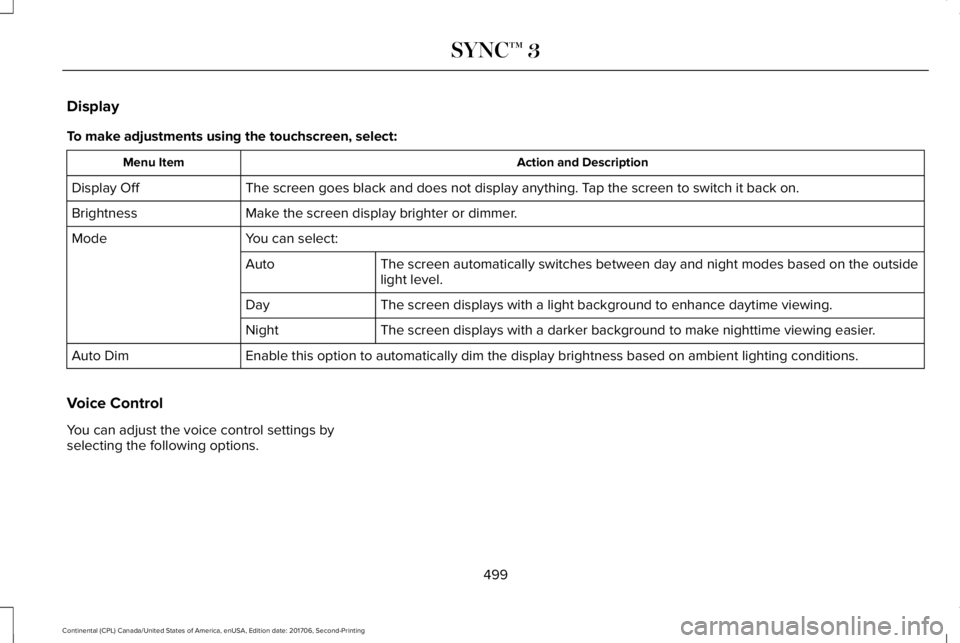
To make adjustments using the touchscreen, select:
Action and DescriptionMenu Item
The screen goes black and does not display anything. Tap the screen to switch it back on.Display Off
Make the screen display brighter or dimmer.Brightness
You can select:Mode
The screen automatically switches between day and night modes based on the outsidelight level.Auto
The screen displays with a light background to enhance daytime viewing.Day
The screen displays with a darker background to make nighttime viewing easier.Night
Enable this option to automatically dim the display brightness based on ambient lighting conditions.Auto Dim
Voice Control
You can adjust the voice control settings byselecting the following options.
499
Continental (CPL) Canada/United States of America, enUSA, Edition date: 201706, Second-Printing
SYNC™ 3
Page 504 of 615
Cell phone issues
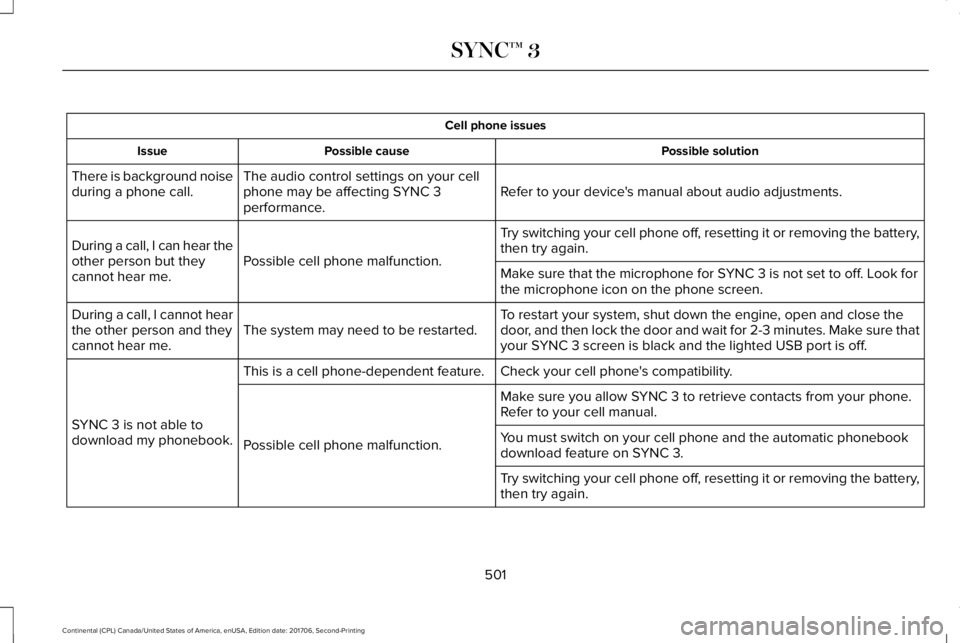
Possible solutionPossible causeIssue
Refer to your device's manual about audio adjustments.The audio control settings on your cellphone may be affecting SYNC 3performance.
There is background noiseduring a phone call.
Try switching your cell phone off, resetting it or removing the battery,then try again.Possible cell phone malfunction.During a call, I can hear theother person but theycannot hear me.Make sure that the microphone for SYNC 3 is not set to off. Look forthe microphone icon on the phone screen.
To restart your system, shut down the engine, open and close thedoor, and then lock the door and wait for 2-3 minutes. Make sure thatyour SYNC 3 screen is black and the lighted USB port is off.The system may need to be restarted.During a call, I cannot hearthe other person and theycannot hear me.
Check your cell phone's compatibility.This is a cell phone-dependent feature.
SYNC 3 is not able todownload my phonebook.
Make sure you allow SYNC 3 to retrieve contacts from your phone.Refer to your cell manual.
Possible cell phone malfunction.You must switch on your cell phone and the automatic phonebookdownload feature on SYNC 3.
Try switching your cell phone off, resetting it or removing the battery,then try again.
501
Continental (CPL) Canada/United States of America, enUSA, Edition date: 201706, Second-Printing
SYNC™ 3
Page 528 of 615
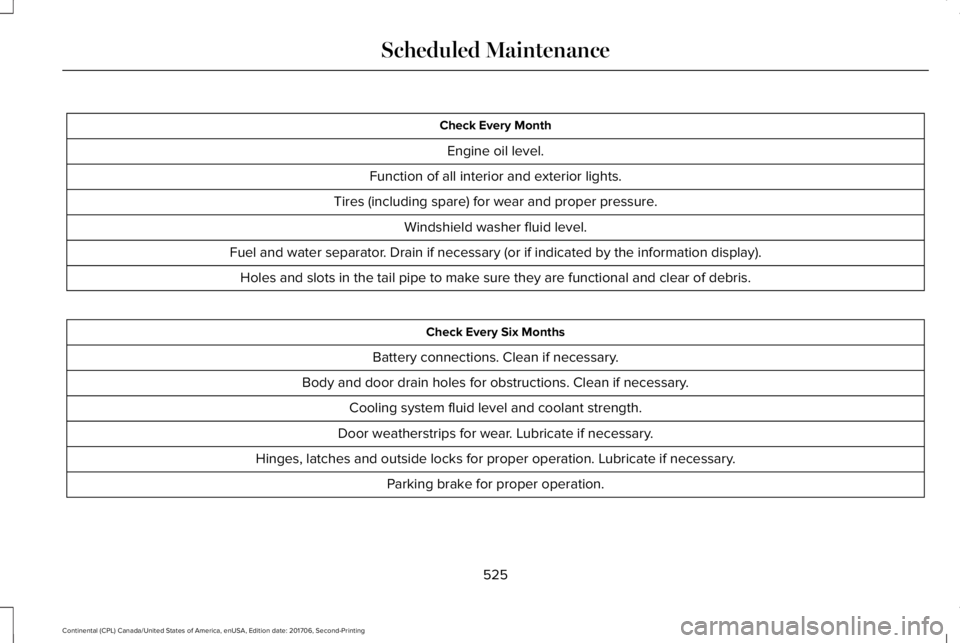
Check Every Month
Engine oil level.
Function of all interior and exterior lights.
Tires (including spare) for wear and proper pressure.
Windshield washer fluid level.
Fuel and water separator. Drain if necessary (or if indicated by the information display).
Holes and slots in the tail pipe to make sure they are functional and clear of debris.
Check Every Six Months
Battery connections. Clean if necessary.
Body and door drain holes for obstructions. Clean if necessary.
Cooling system fluid level and coolant strength.
Door weatherstrips for wear. Lubricate if necessary.
Hinges, latches and outside locks for proper operation. Lubricate if necessary.
Parking brake for proper operation.
525
Continental (CPL) Canada/United States of America, enUSA, Edition date: 201706, Second-Printing
Scheduled Maintenance
Page 593 of 615
SUNA Products and/or Services are intendedas an aid to personal motoring and travelplanning, and do not provide comprehensiveor accurate information on all occasions. Onoccasions, you may experience additionaldelay as a result of using SUNA Productsand/or Services. You acknowledge that it isnot intended, or suitable, for use inapplications where time of arrival or drivingdirections may impact the safety of the publicor yourself.
4. Use of SUNA Products and Serviceswhile driving
You, and other authorised drivers of thevehicle in which SUNA Products and/orServices are available or installed and active,remain at all times responsible for observingall relevant laws and codes of safe driving.In particular, you agree to only activelyoperate SUNA Products and/or Serviceswhen the Vehicle is at a complete stop andit is safe to do so.
5. Service Continuity and Reception of theSUNA Traffic Channel
We will use reasonable endeavours toprovide the SUNA Traffic Channel 24 hoursa day, 365 days a year. The SUNA TrafficChannel may occasionally be unavailable fortechnical reasons or for plannedmaintenance. We will try to performmaintenance at times when congestion islight. We reserve the right to withdraw SUNAProducts and/or Services at any time.
Also, we cannot assure the uninterruptedreception of the SUNA Traffic ChannelRDS-TMC signal at any particular location.
6. Limitation of Liability
Neither Intelematics (nor its suppliers or themanufacturer of your device (the“Suppliers”)) shall be liable to you or to anythird party for any damages either direct,indirect, incidental, consequential orotherwise arising out of the use of or inabilityto use SUNA Products and/or Services evenif Intelematics or a Supplier has been advisedof the possibility of such damages. You alsoacknowledge that the neither Intelematicsnor any Supplier guarantees nor make anywarranties that relate to the availability,accuracy or completeness of SUNA Products
and/or Services, and to the extent which itis lawful to do so, both Intelematics and eachSupplier excludes any warranties whichmight otherwise be implied by any State orFederal legislation in relation to SUNAProducts and/or Services.
7. Please Note
Great care has been taken in preparing thismanual. Constant product development maymean that some information is not entirelyup-to-date. The information in this documentis subject to change without notice.
TYPE APPROVALS
Radio Frequency Certification Logosfor Tire Pressure Monitoring Sensor(s)
590
Continental (CPL) Canada/United States of America, enUSA, Edition date: 201706, Second-Printing
AppendicesE207816
Page 604 of 615

3
360 Degree Camera...................................234Front Camera......................................................235Side Camera........................................................236Using the System...............................................235
A
A/CSee: Climate Control..........................................146
About This Manual............................................7ABSSee: Brakes..........................................................209
ABS driving hintsSee: Hints on Driving With Anti-LockBrakes................................................................210
Accessories....................................................518Exterior Style........................................................518Interior Style..........................................................518Lifestyle..................................................................518Peace of Mind......................................................518
AccessoriesSee: Replacement Parts Recommendation.....13
ACCSee: Using Adaptive Cruise Control.............238
Active Park Assist.........................................223Using Active Park Assist...................................224
Adaptive Headlamps.....................................96System Check........................................................97
Adjusting the Headlamps...........................328Horizontal Aim Adjustment..............................329Vertical Aim Adjustment...................................328
Adjusting the Steering Wheel.....................85End of Travel Position..........................................85Memory Feature....................................................85
AFSSee: Adaptive Headlamps..................................96
Airbag Disposal...............................................56Air ConditioningSee: Climate Control..........................................146
Air FilterSee: Changing the Engine Air Filter - 2.7LEcoBoost™/3.0L EcoBoost™.........................332See: Changing the Engine Air Filter - 3.7L....332
AlarmSee: Anti-Theft Alarm...........................................84
All-Wheel Drive.............................................200Ambient Lighting...........................................100Adjusting the Brightness...................................100Changing the Color............................................100Switching Ambient Lighting Off......................100Switching Ambient Lighting On.......................100
Anti-Theft Alarm..............................................84Arming the Alarm..................................................84Disarming the Alarm............................................84
Appendices...................................................555Apps.................................................................477.................................................................................477SiriusXM Traffic and Travel Link......................478
At a Glance........................................................17Audible Warnings and Indicators...............114Headlamps On Warning Chime........................114Key in Ignition Warning Chime..........................114Keyless Warning Alert.........................................114Parking Brake On Warning Chime...................114
Audio Control..................................................86Seek, Next or Previous........................................86
Audio System................................................403General Information...........................................403
Audio Unit......................................................405Rear Passenger Audio......................................408
Auto Hold........................................................213Using Auto Hold..................................................215
Autolamps.........................................................93Windshield Wiper Activated Headlamps........94
Automatic Climate Control..........................146A/C...........................................................................147Air Distribution Control.......................................147AUTO......................................................................148Automatic Fan Settings......................................148Driver Temperature Control..............................147DUAL.......................................................................149Fan Speed Control..............................................148
601
Continental (CPL) Canada/United States of America, enUSA, Edition date: 201706, Second-Printing
Index