Page 275 of 792
2754-4. Refueling
4
Driving
RX450h_RX450hL _U_OM48F85UWARNING ■
When refueling the vehicle
Observe the following precautions while refueling the vehicle. Failure to do so may
result in death or serious injury. ●
After exiting the vehicle and before opening the fuel door, touch an unpainted metal
surface to discharge any static electricity. It is important to discha rge static electricity
before refueling because sparks resulting fr om static electricity can cause fuel vapors
to ignite while refueling. ●
Always hold the grips on the fuel tank cap and turn it slowly to remove it.
A whooshing sound may be heard when the fu el tank cap is loosened. Wait until the
sound cannot be heard before fully removing the cap. In hot weather, pressurized fuel
may spray out of the filler neck and cause injury.●
Do not allow anyone that has not discharged static electricity from their body to come
close to an open fuel tank. ●
Do not inhale vaporized fuel.
Fuel contains substances th at are harmful if inhaled.●
Do not smoke while refueling the vehicle.
Doing so may cause the fuel to ignite and cause a fire. ●
Do not return to the vehicle or touch any pe rson or object that is statically charged.
This may cause static electricity to build up, resulting in a possible ignition hazard.■
When refueling
Observe the following precautions to prevent fuel overflowing from the fuel tank: ●
Securely insert the fuel nozz le into the fuel filler neck.●
Stop filling the tank after the fuel nozzle automatically clicks off.●
Do not top off the fuel tank.
NOTICE ■
Refueling ●
Finish refueling within 30 minutes. If more than 30 minutes passe s, the internal valve
closes. In this condition, fuel may overflow during the refueling process. Press the fuel
filler door opener switch again. ●
Do not spill fuel during refueling.
Doing so may damage the vehicle, such as causing the emission control system to
operate abnormally or damaging fuel syst em components or the vehicle’s painted
surface.
Page 276 of 792
276 4-4. Refueling
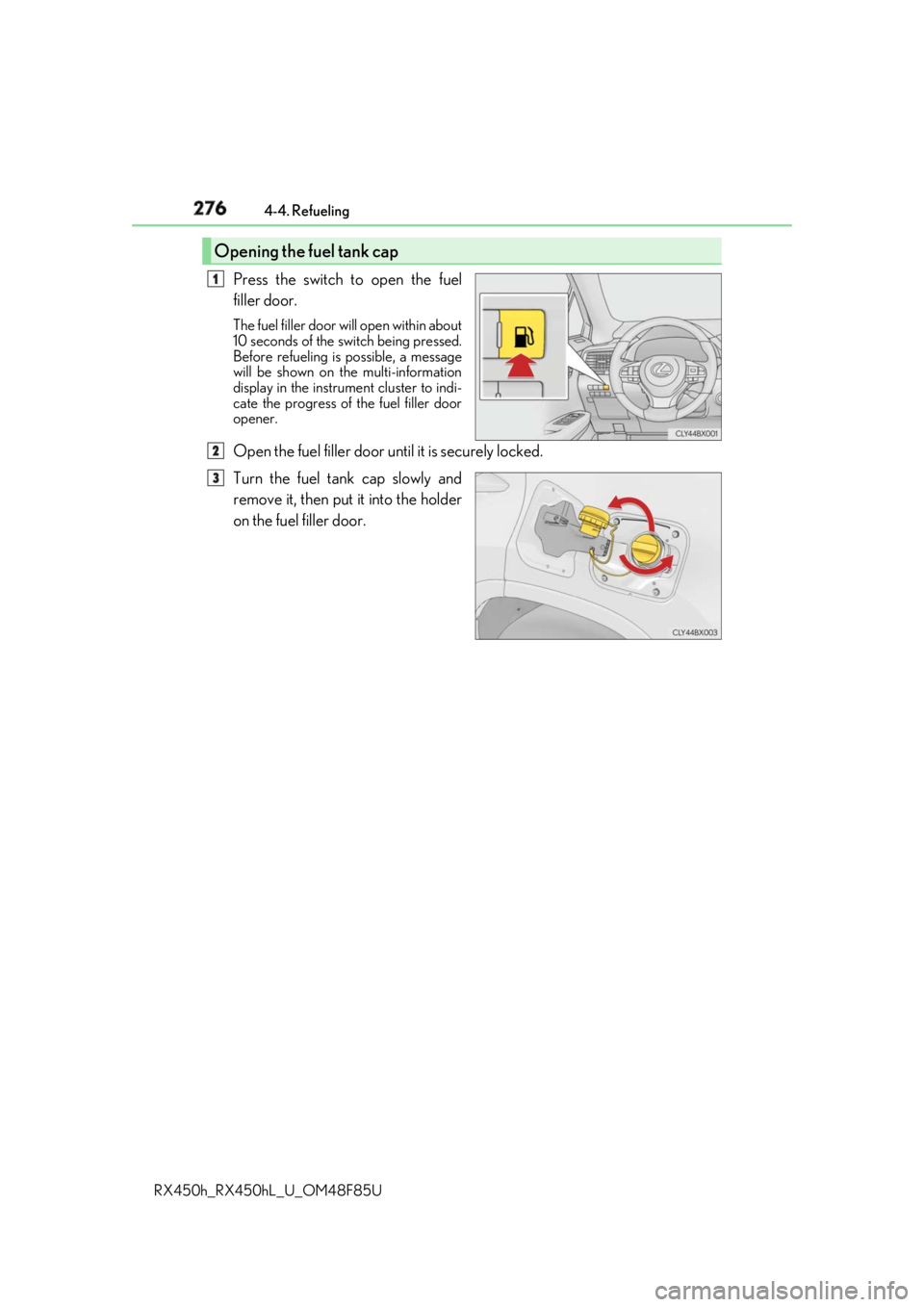
RX450h_RX450hL _U_OM48F85UPress the switch to open the fuel
filler door. The fuel filler door wi ll open within about
10 seconds of the sw itch being pressed.
Before refueling is possible, a message
will be shown on the multi-information
display in the instrument cluster to indi-
cate the progress of the fuel filler door
opener.
Open the fuel filler door until it is securely locked.
Turn the fuel tank cap slowly and
remove it, then put it into the holder
on the fuel filler door.Opening the fuel tank cap 1
2
3
Page 326 of 792

326 4-5. Using the driving support systems
RX450h_RX450hL _U_OM48F85U■
Conditions under which the BSM function may not function correctly ●
The BSM function may not detect vehicles correctly in the following situations:
• When the sensor is misaligned due to a stro ng impact to the sensor or its surround-
ing area
• When mud, snow, ice, a sticke r, etc. is covering the sensor or surrounding area on
the rear bumper
• When driving on a road surf ace that is wet with standi ng water during bad weather,
such as heavy rain, snow, or fog
• When multiple vehicles are approaching wi th only a small gap between each vehicle
• When the distance between your vehicle and a following vehicle is short
• When there is a significant difference in speed between your vehicle and the vehicle
that enters the detection area
• When the difference in speed between your vehicle and another vehicle is changing
• When a vehicle enters a detection area traveling at about the same speed as your
vehicle
• As your vehicle starts from a stop, a vehicle remains in the detection area
• When driving up and down cons ecutive steep inclines, such as hills, dips on the road,
etc.
• When driving on roads with sharp bends, consecutive curves, or uneven surfaces
• When vehicle lanes are wide, or when driving on the edge of a lane, and the vehicle
in an adjacent lane is far away from your vehicle
• When towing a trailer (vehicles with towing package)
• When items such as a bicycle carrier are installed on the rear of the vehicle
• When there is a significant difference in height between your vehicle and the vehicle
that enters the detection area
• Immediately after the BSM function is turned on ●
Instances of the BSM function unnecessarily detecting a vehicle and/or object may
increase in the following situations:
• When the sensor is misaligned due to a stro ng impact to the sensor or its surround-
ing area
• When the distance between your vehicle and a guardrail, wall, etc. that enters the
detection area is short
• When driving up and down cons ecutive steep inclines, such as hills, dips on the road,
etc.
• When vehicle lanes are narrow, or when driv ing on the edge of a lane, and a vehicle
traveling in a lane other than the ad jacent lanes enters the detection area
• When driving on roads with sharp bends, consecutive curves, or uneven surfaces
• When the tires are slipping or spinning
• When the distance between your vehicle and a following vehicle is short
• When a bicycle carrier or other accessory is installed to the rear of the vehicle
• When towing a trailer (vehicles with towing package)
Page 432 of 792
432 5-4. Using the radio
RX450h_RX450hL _U_OM48F85U■
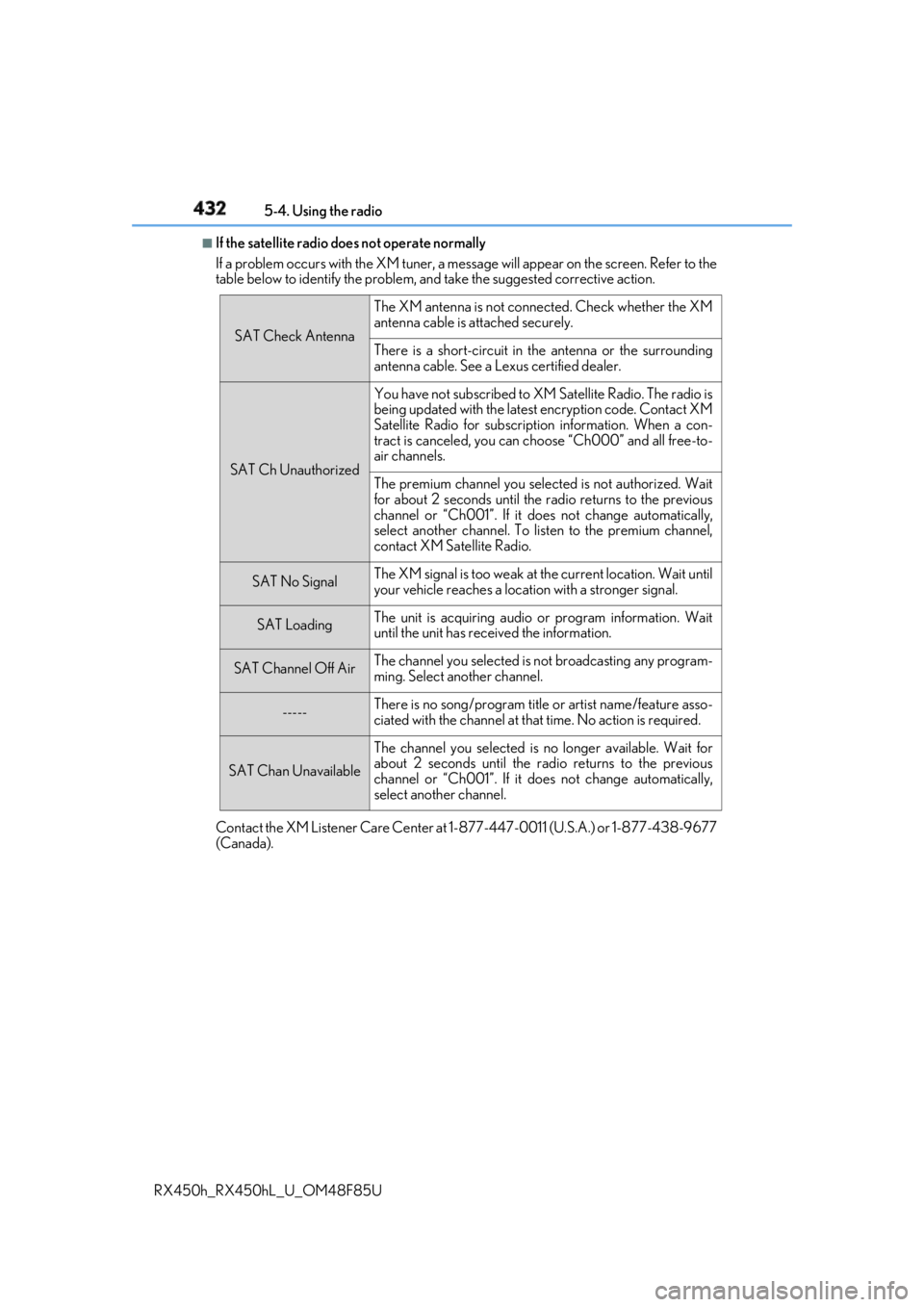
If the satellite radio does not operate normally
If a problem occurs with the XM tuner, a message will appear on the screen. Refer to the
table below to identify the problem, an d take the suggested corrective action.
Contact the XM Listener Care Center at 1-877-447-0011 (U.S.A.) or 1-877-438-9677
(Canada). SAT Check Antenna The XM antenna is not connected. Check whether the XM
antenna cable is attached securely.
There is a short-circuit in the antenna or the surrounding
antenna cable. See a Lexus certified dealer.
SAT Ch Unauthorized You have not subscribed to XM Satellite Radio. The radio is
being updated with the latest encryption code. Contact XM
Satellite Radio for subscripti on information. When a con-
tract is canceled, you can choose “Ch000” and all free-to-
air channels.
The premium channel you selected is not authorized. Wait
for about 2 seconds until the radio returns to the previous
channel or “Ch001”. If it does not change automatically,
select another channel. To listen to the premium channel,
contact XM Satellite Radio.
SAT No Signal The XM signal is too weak at the current location. Wait until
your vehicle reaches a location with a stronger signal.
SAT Loading The unit is acquiring audio or program information. Wait
until the unit has rece ived the information.
SAT Channel Off Air The channel you selected is not broadcasting any program-
ming. Select another channel.
----- There is no song/program title or artist name/feature asso-
ciated with the channel at that time. No action is required.
SAT Chan Unavailable The channel you selected is no longer available. Wait for
about 2 seconds until the radio returns to the previous
channel or “Ch001”. If it does not change automatically,
select another channel.
Page 451 of 792
4515-7. Connecting Bluetooth ®
5
Lexus Display Audio system
RX450h_RX450hL _U_OM48F85UTurn the Bluetooth ®
connection setting of your device set to on.
Go to “Bluetooth
* Setup”: “MENU” button → “Setup” → “Bluetooth
* ”
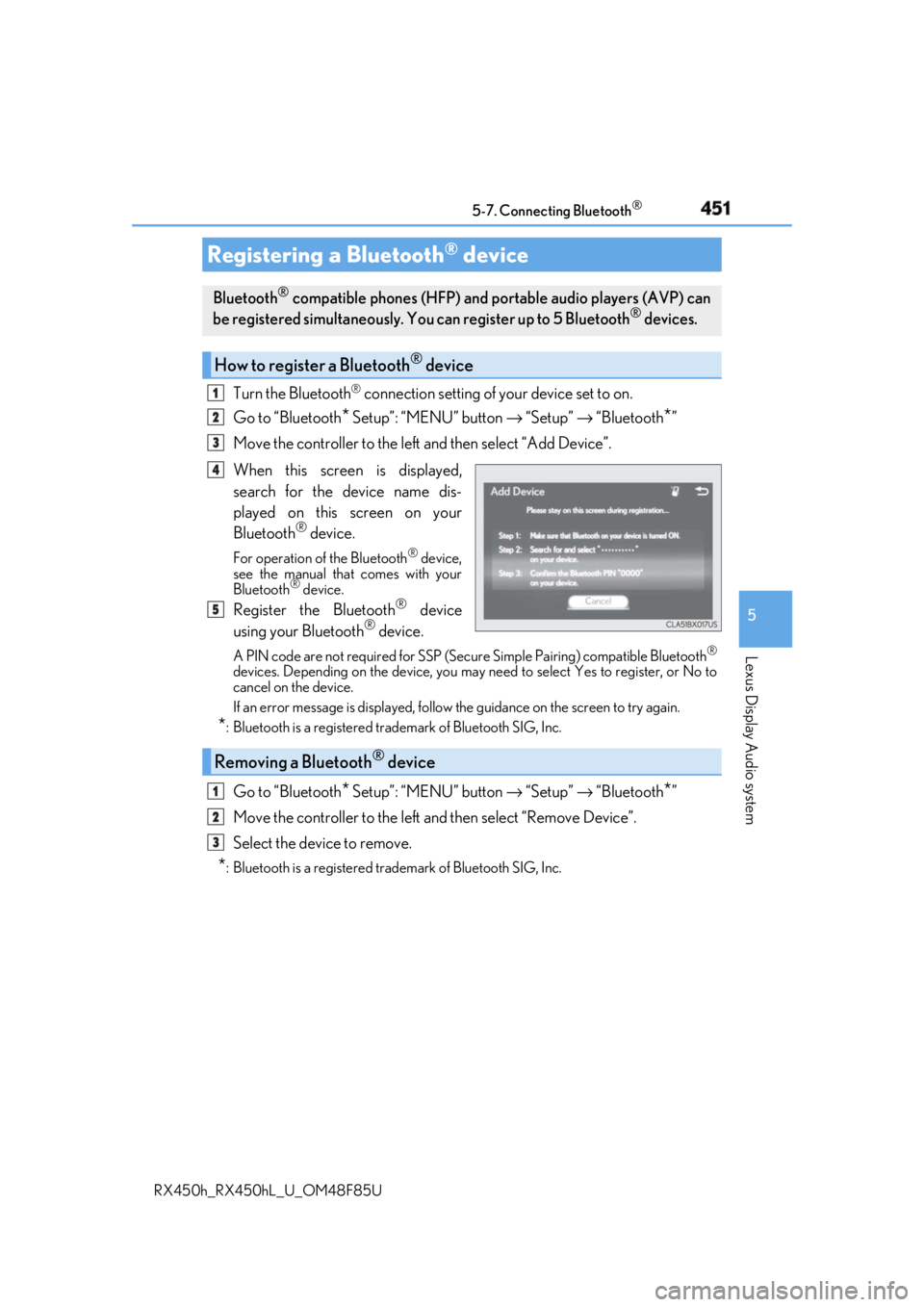
Move the controller to the left and then select “Add Device”.
When this screen is displayed,
search for the device name dis-
played on this screen on your
Bluetooth ®
device.For operation of the Bluetooth ®
device,
see the manual that comes with your
Bluetooth ®
device.
Register the Bluetooth ®
device
using your Bluetooth ®
device.A PIN code are not required for SSP (Secur e Simple Pairing) compatible Bluetooth ®
devices. Depending on the device, you may need to select Yes to register, or No to
cancel on the device.
If an error message is disp layed, follow the guidance on the screen to try again.
* : Bluetooth is a registered trademark of Bluetooth SIG, Inc.
Go to “Bluetooth
* Setup”: “MENU” button → “Setup” → “Bluetooth
* ”
Move the controller to the left and then select “Remove Device”.
Select the device to remove.
* : Bluetooth is a registered trademark of Bluetooth SIG, Inc.Registering a Bluetooth ®
deviceBluetooth ®
compatible phones (HFP) and portable audio players (AVP) can
be registered simultaneously. You can register up to 5 Bluetooth ®
devices.
How to register a Bluetooth ®
device1
2
3
4
5
Removing a Bluetooth ®
device 1
2
3
Page 481 of 792
4815-11. Bluetooth ®
5
Lexus Display Audio system
RX450h_RX450hL _U_OM48F85U
In other situations Even though all conceivable measures have been taken, the symptom status does not
change.
The cellular phone is not clos e enough to this system.
→ Bring the cellular phone closer to this system.
The cellular phone is the most likely cause of the symptom.
→ Turn the cellular phone off, remove and reinstall the battery pack, and then
restart the cellular phone.
→ Enable the cellular phone’s Bluetooth ®
connection.
→ Stop the cellular phone’s security software and close all applications.
→ Before using an application installed on the cellular phone, carefully check its
source and how its operation might affect this system.
Page 540 of 792
540 6-4. Using the storage features
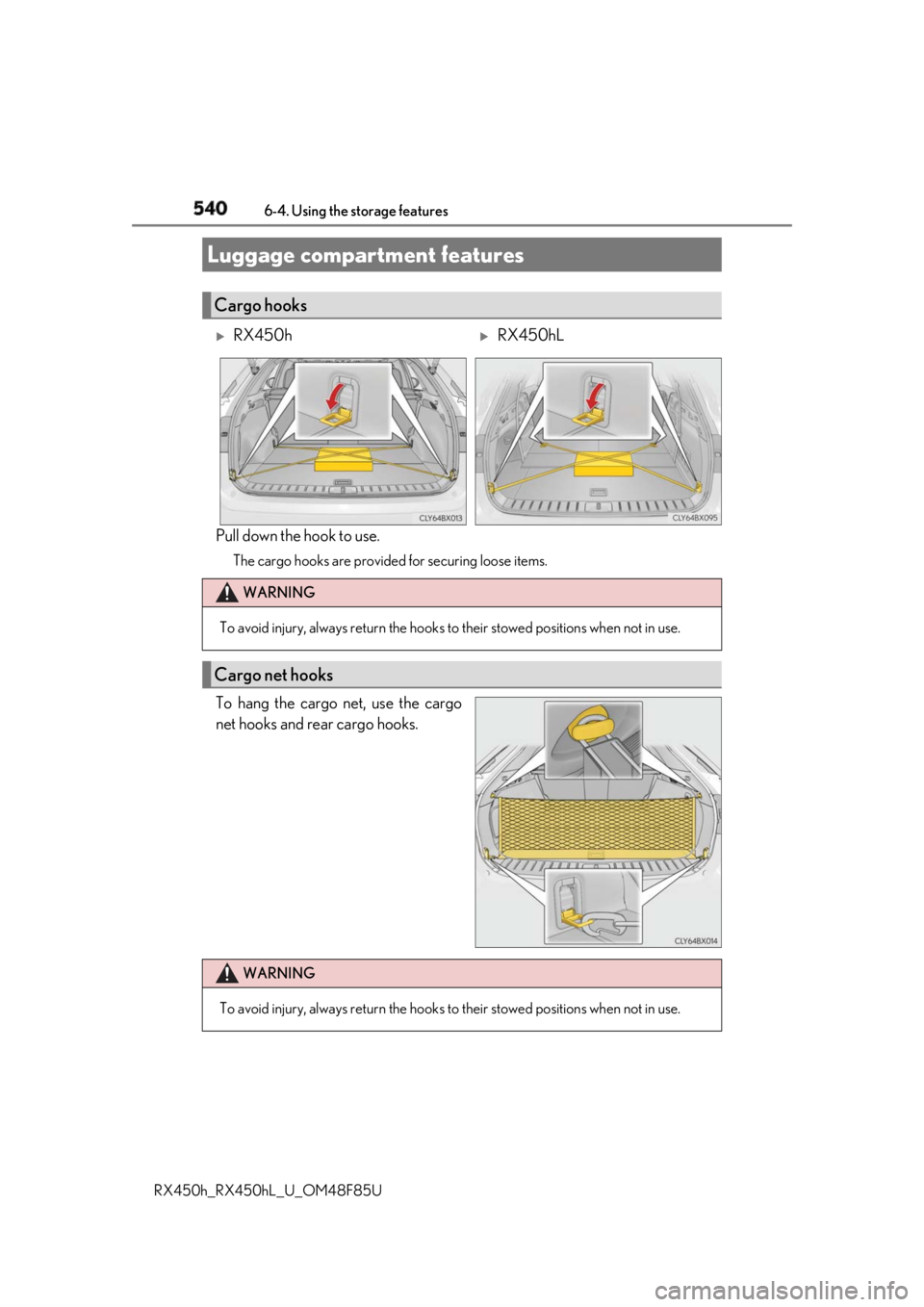
RX450h_RX450hL _U_OM48F85UPull down the hook to use. The cargo hooks are provided for securing loose items.
To hang the cargo net, use the cargo
net hooks and rear cargo hooks.Luggage compartment features Cargo hooks
RX450h
RX450hL
WARNING
To avoid injury, always return the hooks to their stowed positions when not in use.
Cargo net hooks
WARNING
To avoid injury, always return the hooks to their stowed positions when not in use.
Page 560 of 792

560 6-5. Using the other interior features
RX450h_RX450hL _U_OM48F85UThe HomeLink ®
wireless control system in your vehicle has 3 buttons which can
be programmed to operate 3 different de vices. Refer to the programming meth-
ods on the following pages to determine the method which is appropriate for the
device.
HomeLink ®
indicator light
Garage door operation indicators
HomeLink ®
iconIlluminates while HomeLink ®
is operat-
ing.
Buttons ■
Before programming HomeLink ®
●
During programming, it is possible that garage doors, gates, or other
devices may operate. For this reason, make sure that people and objects
are clear of the garage door or other devices. ( → P. 566)●
It is recommended that a new batter y be placed in the remote control
transmitter for more accurate programming. ●
Garage door opener motors manufa ctured after 1995 may be equipped
with rolling code protection. If this is the case, you may need a stepladder
or other sturdy, safe device to reach the “Learn” or “Smart” button on the
garage door opener motor.Garage door opener The garage door opener can be programmed to operate garage doors, gates,
entry doors, door locks, home lightin g systems, security systems, and other
devices.
Programming the HomeLink ®
1
2
3
4