Page 300 of 514

300 4-6. Driving tips
LS500_OM_OM50F54U_(U) Perform the following according to the
driving conditions:
Do not try to forcib ly open a window
or move a wiper that is frozen. Pour
warm water over the frozen area to
melt the ice. Wipe away the water
immediately to prevent it from
freezing.
To ensure proper operation of the
climate control system fan, remove
any snow that has accumulated on
the air inlet vents in front of the
windshield.
Check for and remove any excess
ice or snow that may have accumu-
lated on the exterior lights, vehicle’s
roof, chassis, around the tires or on
the brakes.
Remove any snow or mud from the
bottom of your shoes before getting
in the vehicle.
Accelerate the vehicle slowly, keep a
safe distance between you and the
vehicle ahead, and drive at a reduced
speed suitable to road conditions. Park the vehicle and shift the shift posi-
tion to P without setting the parking
brake. The parking brake may freeze
up, preventing it from being released. If
the vehicle is parked without setting
the parking brake, make sure to block
the wheels.
Failure to do so may be dangerous
because it may cause the vehicle to
move unexpectedly, possibly leading to
an accident.
Vehicles with front and rear tires of
the same size
Use the correct tire chain size when
mounting the tire chains.
Chain size is regulated for each tire
size.
Side chain (0.12 in. [3 mm] in diam-
eter)
Cross chain (0.16 in. [4 mm] in
diameter)
Vehicles with front and rear tires of
differing sizes
Tire chains cannot be mounted.
Snow tires should be used instead.NOTICE■
Repairing or replacing snow tires
Request repairs or replacement of snow
tires from Lexus dealers or legitimate tire
retailers.
This is because the removal and attach-
ment of snow tires affects the operation
of the tire pressure warning valves and
transmitters.
Before driving the vehicle
When driving the vehicle When parking the vehicle
Selecting tire chains
A
B
Page 303 of 514

303
LS500_OM_OM50F54U_(U) 5 5
Interior features Interior features .
5-1. Remote Touch/Display
Remote Touch ............................ 304
Center Display ........................... 306
Rear Multi Operation Panel
........................................................ 308
5-2. Lexus Climate Concierge
Lexus Climate Concierge ....... 311
5-3. Using the air conditioning system
and defogger
Front automatic air conditioning
system .......................................... 313
Rear air conditioning system
........................................................ 323
Heated steering wheel/seat heat-
ers/seat ventilators ................ 326
5-4. Using the interior lights
Interior lights list......................... 330
5-5. Using the storage features
List of storage features............ 334
Trunk features............................. 339
5-6. Using the other interior features
Other interior features ........... 342
Garage door opener............... 349
Lexus Enform Safety Connect
........................................................ 355
Page 330 of 514
330 5-4. Using the interior lights
LS500_OM_OM50F54U_(U) 5-4.Using the interior lights
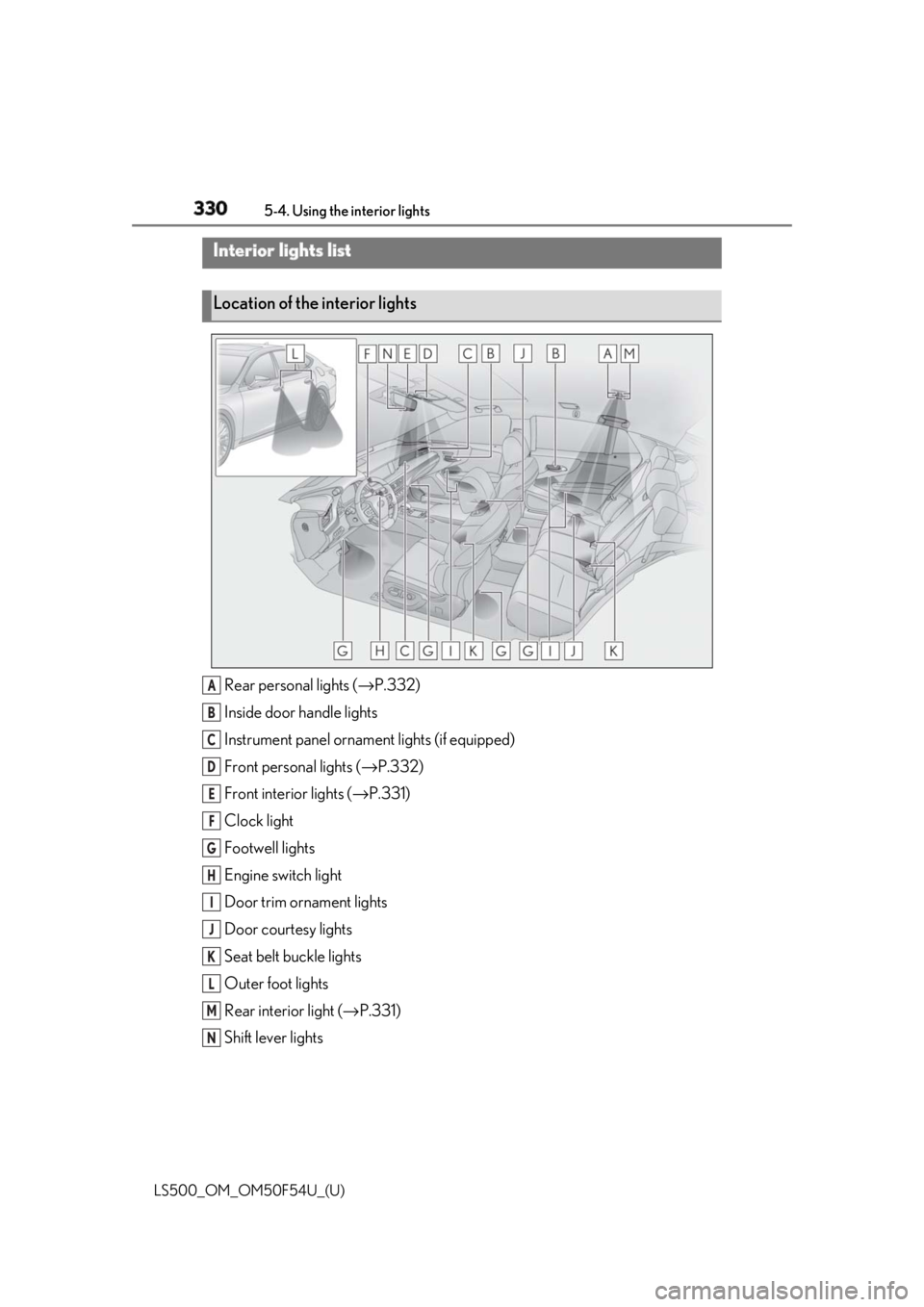
Rear personal lights ( → P.332)
Inside door handle lights
Instrument panel orname nt lights (if equipped)
Front personal lights ( → P.332)
Front interi or lights ( → P.331)
Clock light
Footwell lights
Engine switch light
Door trim ornament lights
Door courtesy lights
Seat belt buckle lights
Outer foot lights
Rear interior light ( → P.331)
Shift lever lightsInterior lights list
Location of the interior lights
A
B
C
D
E
F
G
H
I
J
K
L
M
N
Page 331 of 514

3315-4. Using the interior lights
LS500_OM_OM50F54U_(U) 5
Interior features ■
Turning the door position on
Press the door-linked interior light
switch The lights are turned on and off according
to whether the doors are opened/closed.
When the door position is on, the indicator
illuminates.
■
Turning the lights on/off
Front
Turns the lights on/off (touch the light) When a door is opened while the door
position is on, the lights turn on.
Rear (vehicles without a panoramic
moon roof)
On/off The rear interior light turns on/off together
the front interior lights.
When a door is opened while the door
position is on, the lights turn on.
Rear (vehicles with a panoramic
moon roof)
On/off The rear interior light turns on/off together
the front interior lights.
When a door is opened while the door
position is on, the lights turn on.
■
Using the Rear Multi Operation
Panel (if equipped)
1 Display the home screen and then
touch “Rear Shade/Lamp”.
( → P.308)Operating the interior lights A
Page 332 of 514
332 5-4. Using the interior lights
LS500_OM_OM50F54U_(U) 2 To turn on/off the rear interior
lights, touch the respective button.
■
Turning the lights on/off
Front
Turns the lights on/off (touch the light) When a door is opened while the door
position is on, the lights turn on.
Rear (vehicles without a panoramic
moon roof)
On/dimmed/off When a door is opened while the door
position is on, the lights turn on.
Rear (vehicles with a panoramic
moon roof)
On/dimmed/off When a door is opened while the door
position is on, the lights turn on.
■
Using the Rear Multi Operation
Panel (if equipped)
1 Display the home screen and then
touch “Rear Shade/Lamp”.
( → P.308)
2 To turn on/dimmed/off the rear per-
sonal lights, touch the respective
button.Operating the personal lights
Page 333 of 514
3335-4. Using the interior lights
LS500_OM_OM50F54U_(U) 5
Interior features ■
Illuminated entry system
The lights automatically turn on/off accord-
ing to the engine switch mode, the pres-
ence of the electronic key, whether the
doors are locked/unlocked, and whether
the doors are opened/closed. ■
To prevent the battery from being dis-
charged
If the interior lights remain on when the
engine switch is turned off, the lights will go
off automatically after 20 minutes. ■
When front interior light or front per-
sonal lights do not respond as normal●
When water, dirt, et c., have adhered to
the lens surface●
When operated with a wet hand●
When wearing gloves, etc.■
Customization
Some functions can be customized.
( → P.468)
NOTICE■
To prevent battery discharge
Do not leave the lights on longer than
necessary when the engine is not run-
ning.
■
Removing light lenses
Never remove the lens for the front inte-
rior light and front personal lights. Other-
wise, the lights will be damaged. If a lens
needs to be removed, contact your Lexus
dealer.
Page 336 of 514
336 5-5. Using the storage features
LS500_OM_OM50F54U_(U) ■
Glove box light
The glove box light turns on when the tail
lights are on. ■
Trunk opener main switch
The trunk opener main switch is located in
the glove box. ( → P.106)■
Removing the partition
The partition inside the glove box can be
removed by pulling it.
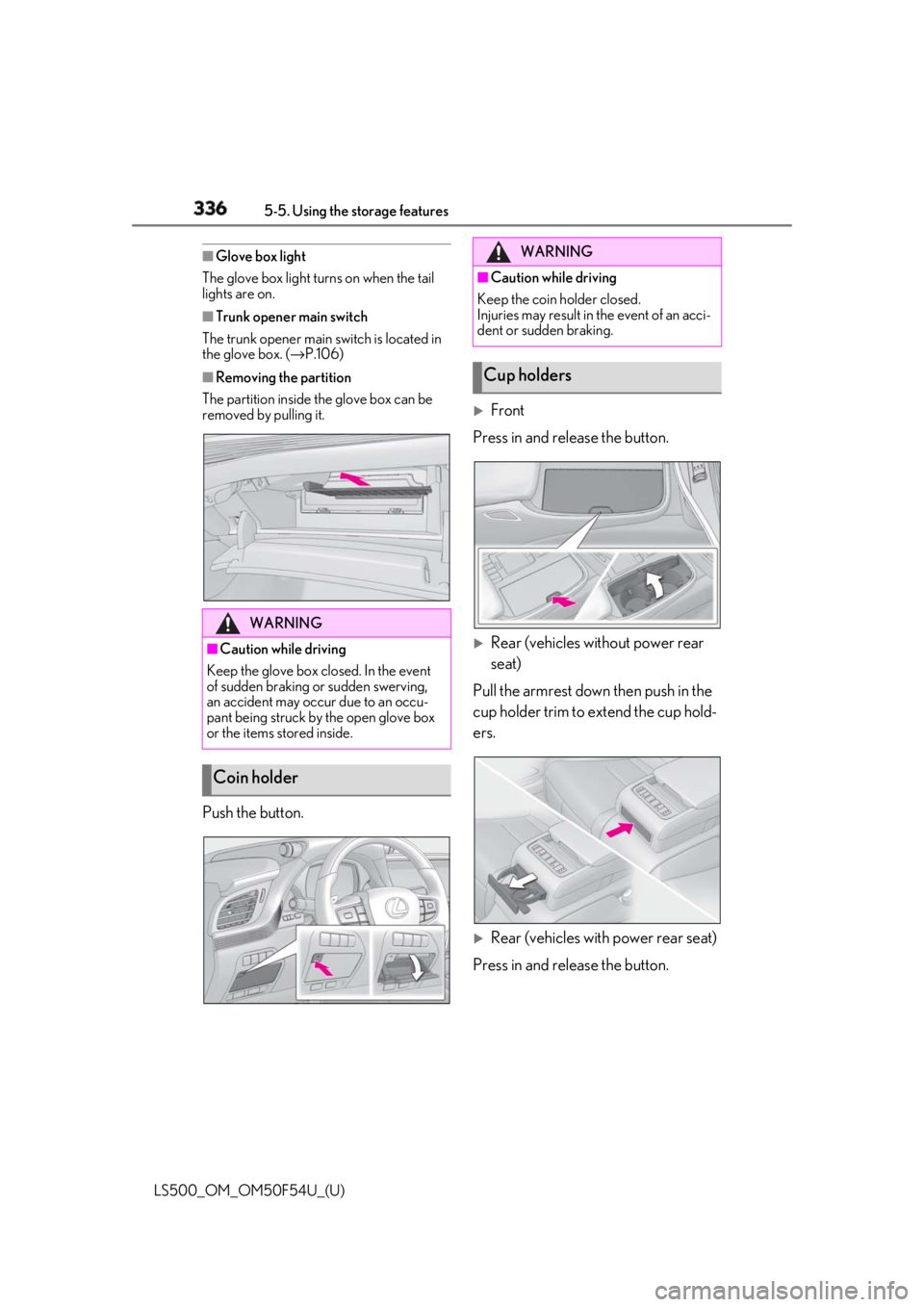
Push the button.
Front
Press in and release the button.
Rear (vehicles without power rear
seat)
Pull the armrest down then push in the
cup holder trim to extend the cup hold-
ers.
Rear (vehicles with power rear seat)
Press in and release the button.WARNING■
Caution while driving
Keep the glove box closed. In the event
of sudden braking or sudden swerving,
an accident may occur due to an occu-
pant being struck by the open glove box
or the items stored inside.
Coin holder WARNING■
Caution while driving
Keep the coin holder closed.
Injuries may result in the event of an acci-
dent or sudden braking.
Cup holders
Page 337 of 514
3375-5. Using the storage features
LS500_OM_OM50F54U_(U) 5
Interior features ■
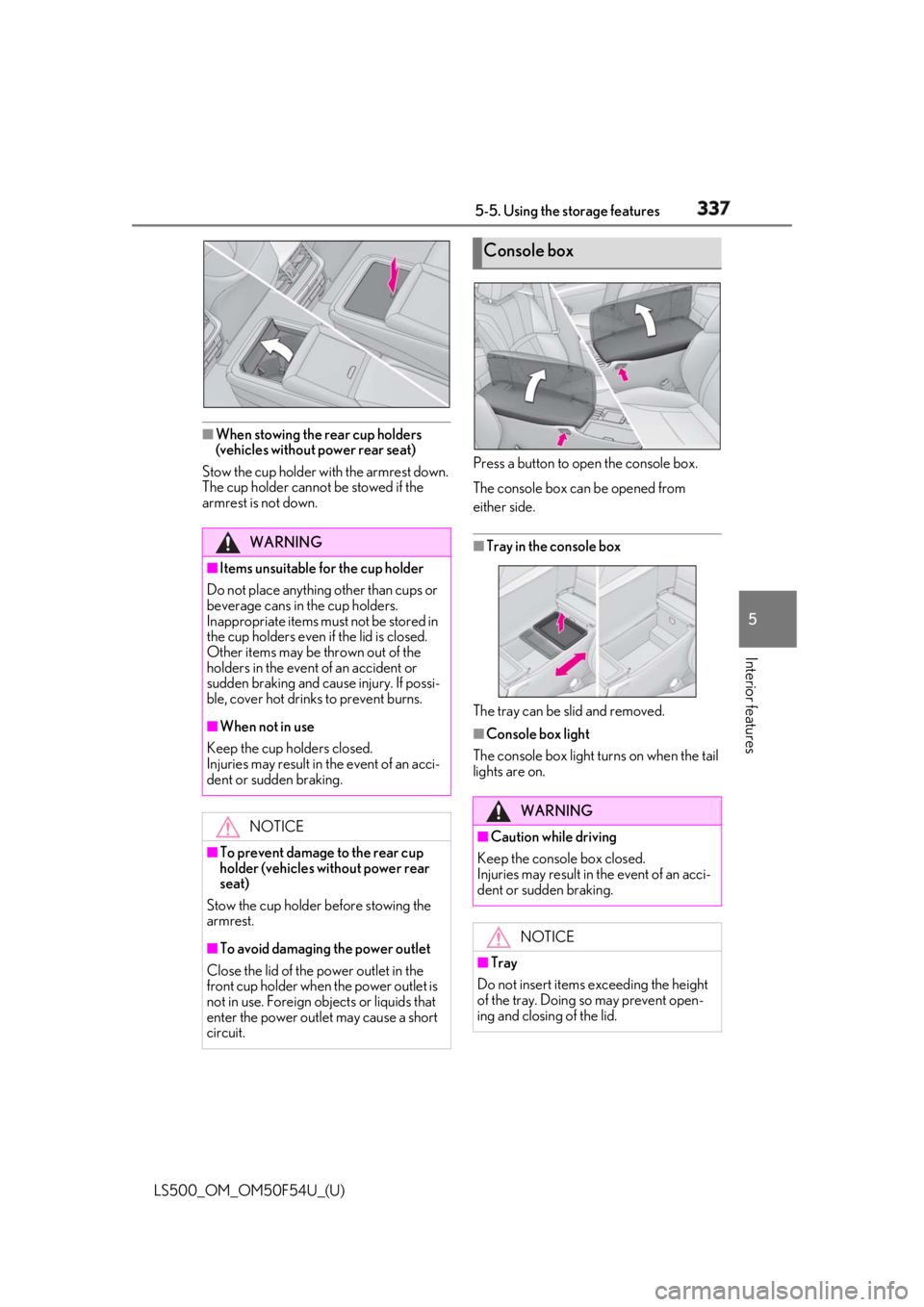
When stowing the rear cup holders
(vehicles without power rear seat)
Stow the cup holder with the armrest down.
The cup holder cannot be stowed if the
armrest is not down. Press a button to open the console box.
The console box can be opened from
either side.
■
Tray in the console box
The tray can be slid and removed. ■
Console box light
The console box light turns on when the tail
lights are on.WARNING■
Items unsuitable for the cup holder
Do not place anything other than cups or
beverage cans in the cup holders.
Inappropriate items must not be stored in
the cup holders even if the lid is closed.
Other items may be thrown out of the
holders in the event of an accident or
sudden braking and cause injury. If possi-
ble, cover hot drinks to prevent burns. ■
When not in use
Keep the cup holders closed.
Injuries may result in the event of an acci-
dent or sudden braking.
NOTICE
■
To prevent damage to the rear cup
holder (vehicles without power rear
seat)
Stow the cup holder before stowing the
armrest.
■
To avoid damaging the power outlet
Close the lid of the power outlet in the
front cup holder when the power outlet is
not in use. Foreign ob jects or liquids that
enter the power outlet may cause a short
circuit. Console box
WARNING
■
Caution while driving
Keep the console box closed.
Injuries may result in the event of an acci-
dent or sudden braking.
NOTICE
■
Tray
Do not insert items exceeding the height
of the tray. Doing so may prevent open-
ing and closing of the lid.