2018 LEXUS LS500 tow
[x] Cancel search: towPage 305 of 514
3055-1. Remote Touch/Display
LS500_OM_OM50F54U_(U) 5
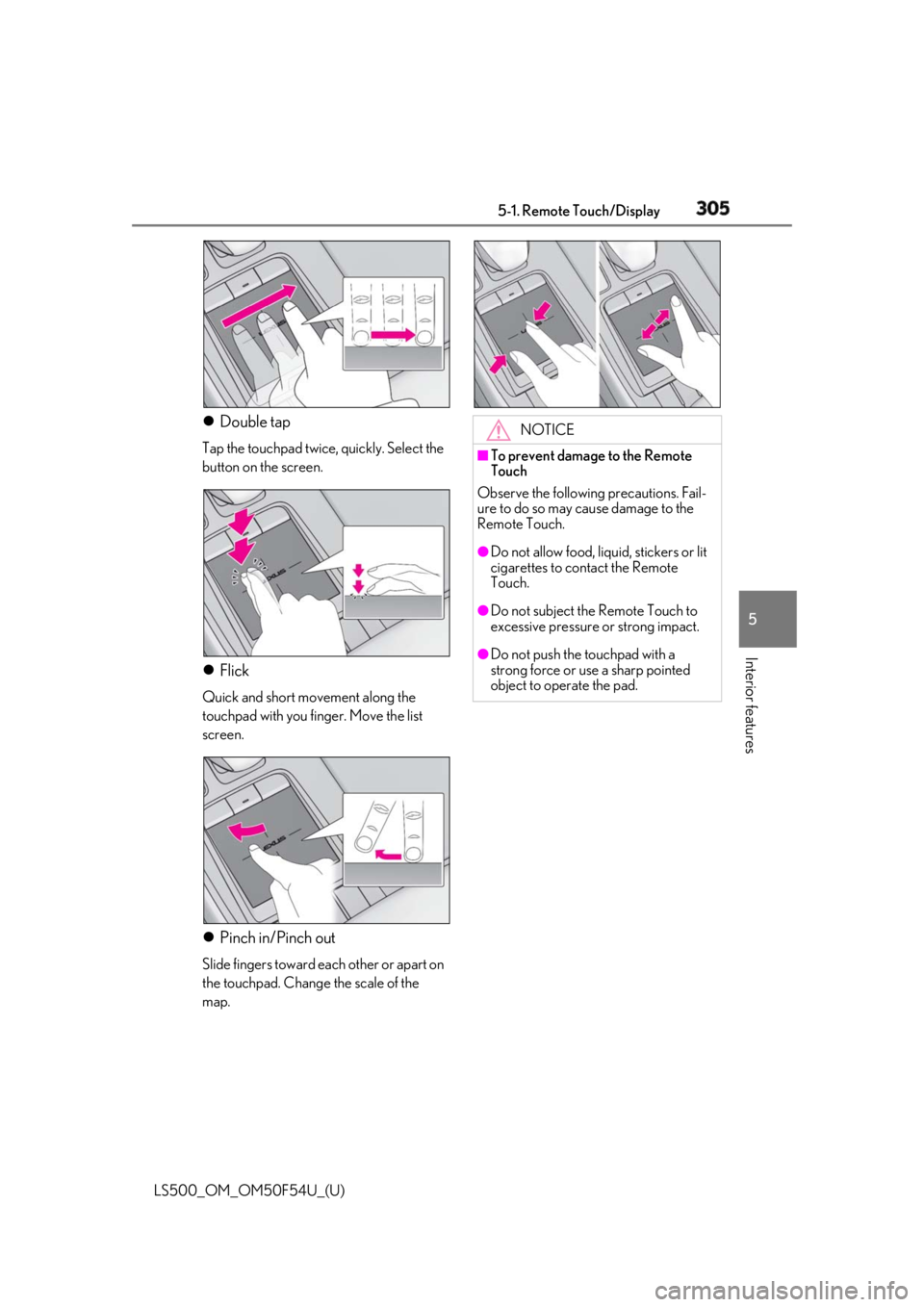
Interior features Double tap Tap the touchpad twice, quickly. Select the
button on the screen.
Flick Quick and short movement along the
touchpad with you finger. Move the list
screen.
Pinch in/Pinch out Slide fingers toward each other or apart on
the touchpad. Change the scale of the
map. NOTICE■
To prevent damage to the Remote
Touch
Observe the following precautions. Fail-
ure to do so may cause damage to the
Remote Touch. ●
Do not allow food, liquid, stickers or lit
cigarettes to contact the Remote
Touch. ●
Do not subject the Remote Touch to
excessive pressure or strong impact. ●
Do not push the touchpad with a
strong force or use a sharp pointed
object to operate the pad.
Page 337 of 514
3375-5. Using the storage features
LS500_OM_OM50F54U_(U) 5
Interior features ■
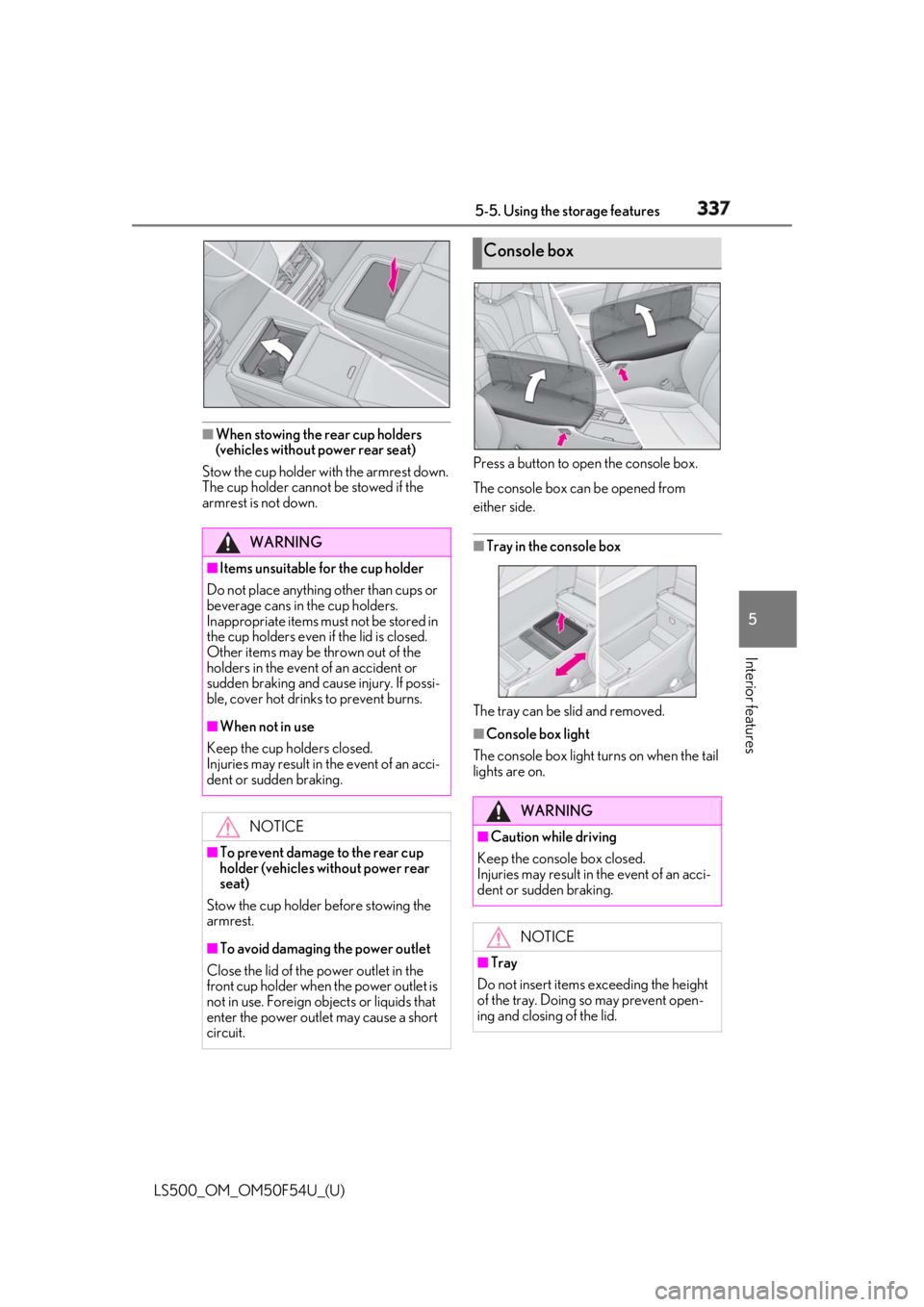
When stowing the rear cup holders
(vehicles without power rear seat)
Stow the cup holder with the armrest down.
The cup holder cannot be stowed if the
armrest is not down. Press a button to open the console box.
The console box can be opened from
either side.
■
Tray in the console box
The tray can be slid and removed. ■
Console box light
The console box light turns on when the tail
lights are on.WARNING■
Items unsuitable for the cup holder
Do not place anything other than cups or
beverage cans in the cup holders.
Inappropriate items must not be stored in
the cup holders even if the lid is closed.
Other items may be thrown out of the
holders in the event of an accident or
sudden braking and cause injury. If possi-
ble, cover hot drinks to prevent burns. ■
When not in use
Keep the cup holders closed.
Injuries may result in the event of an acci-
dent or sudden braking.
NOTICE
■
To prevent damage to the rear cup
holder (vehicles without power rear
seat)
Stow the cup holder before stowing the
armrest.
■
To avoid damaging the power outlet
Close the lid of the power outlet in the
front cup holder when the power outlet is
not in use. Foreign ob jects or liquids that
enter the power outlet may cause a short
circuit. Console box
WARNING
■
Caution while driving
Keep the console box closed.
Injuries may result in the event of an acci-
dent or sudden braking.
NOTICE
■
Tray
Do not insert items exceeding the height
of the tray. Doing so may prevent open-
ing and closing of the lid.
Page 339 of 514
3395-5. Using the storage features
LS500_OM_OM50F54U_(U) 5
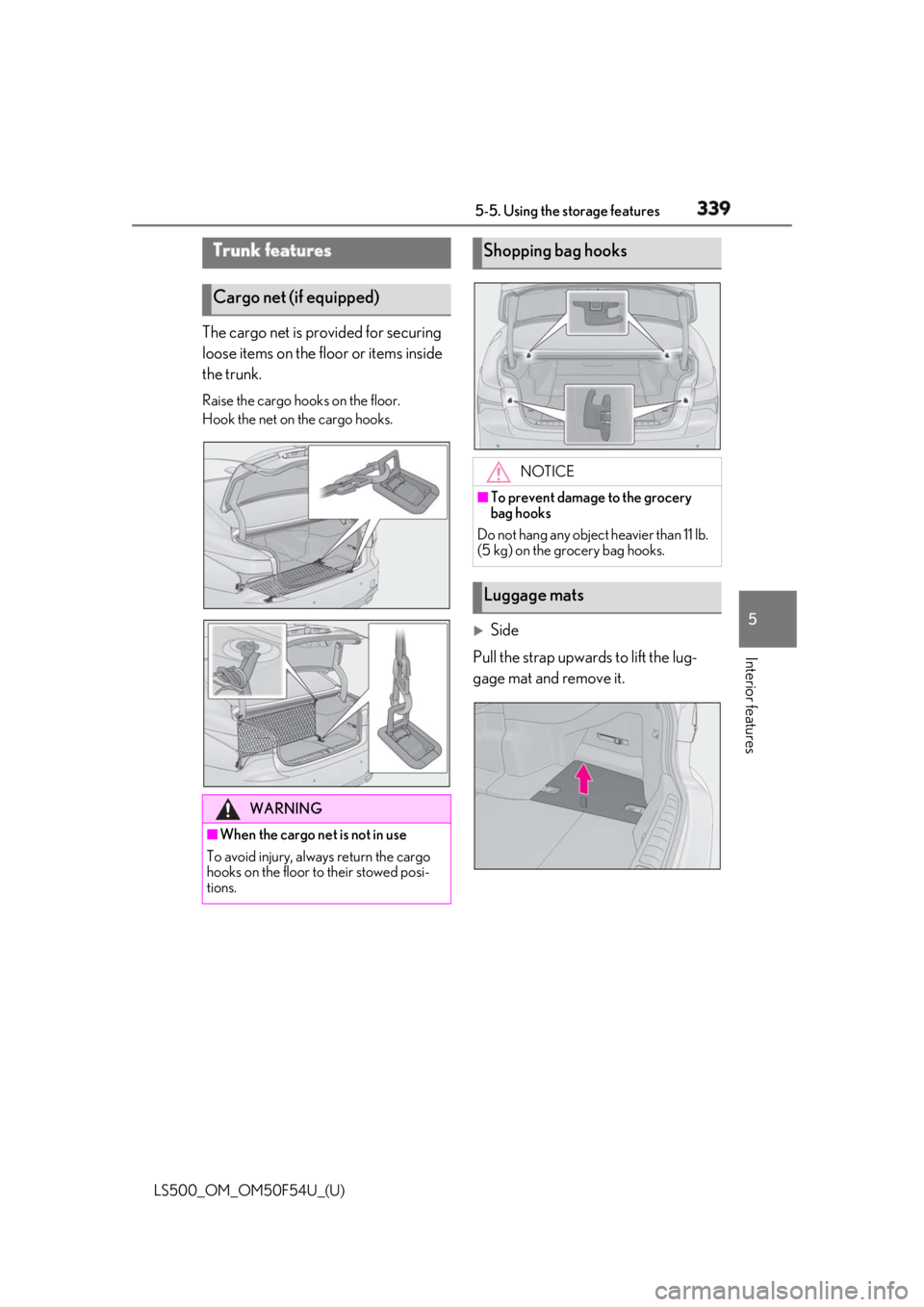
Interior features The cargo net is provided for securing
loose items on the floor or items inside
the trunk. Raise the cargo hooks on the floor.
Hook the net on the cargo hooks.
Side
Pull the strap upwards to lift the lug-
gage mat and remove it.Trunk features
Cargo net (if equipped)
WARNING
■
When the cargo net is not in use
To avoid injury, always return the cargo
hooks on the floor to their stowed posi-
tions. Shopping bag hooks
NOTICE■
To prevent damage to the grocery
bag hooks
Do not hang any object heavier than 11 lb.
(5 kg) on the grocery bag hooks.
Luggage mats
Page 341 of 514
3415-5. Using the storage features
LS500_OM_OM50F54U_(U) 5
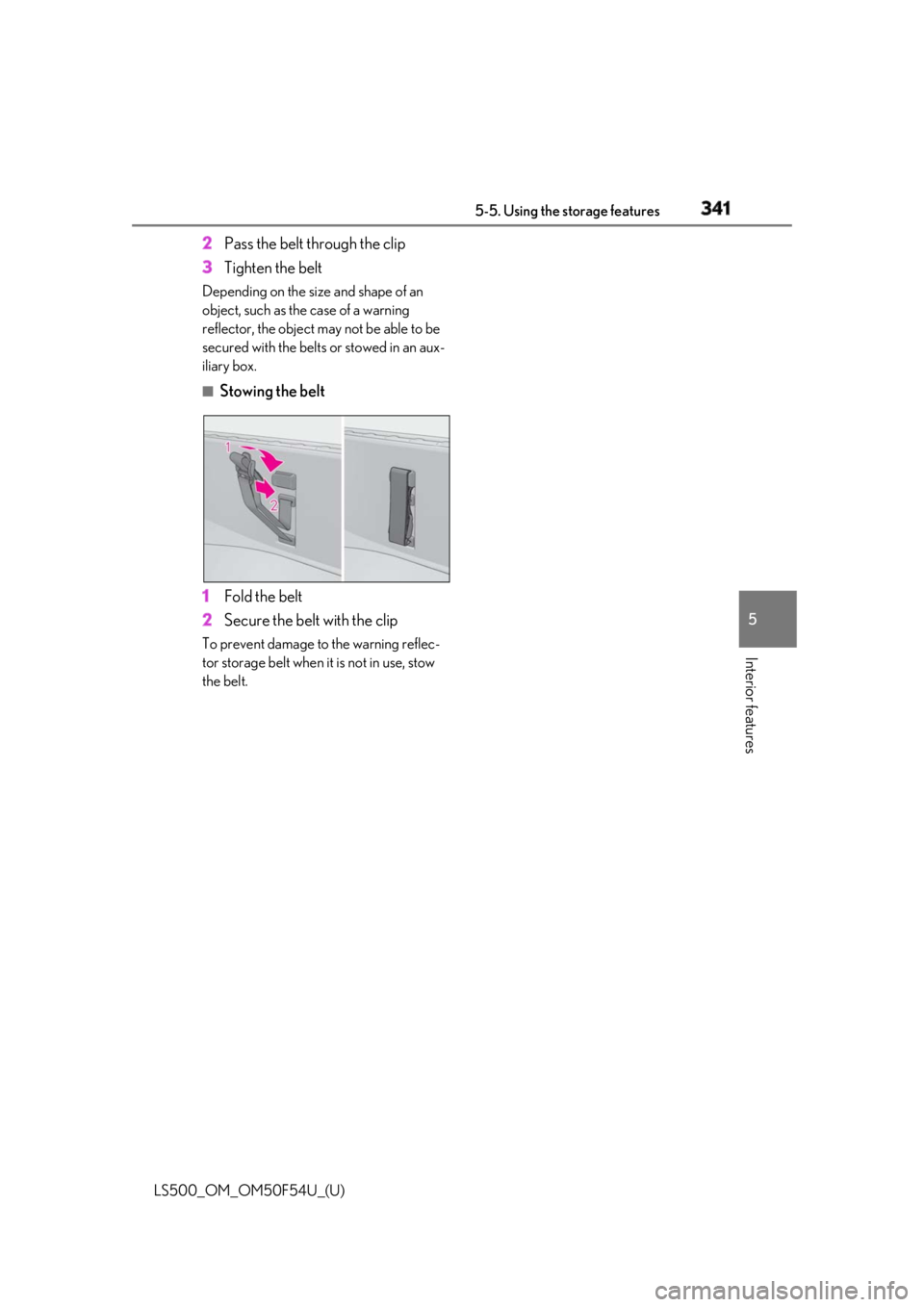
Interior features 2 Pass the belt through the clip
3 Tighten the beltDepending on the size and shape of an
object, such as the case of a warning
reflector, the object may not be able to be
secured with the belts or stowed in an aux-
iliary box. ■
Stowing the belt
1 Fold the belt
2 Secure the belt with the clipTo prevent damage to the warning reflec-
tor storage belt when it is not in use, stow
the belt.
Page 358 of 514

358 5-6. Using the other interior features
LS500_OM_OM50F54U_(U) The following indicator light patterns
indicate specific system usage condi-
tions:
Green indicator light on = Active
service
Green indicator light flashing =
Safety Connect call in process
Red indicator light (except at vehi-
cle start-up) = System malfunction
(contact your Lexus dealer)
No indicator light (off) = Safety
Connect service not active ■
Automatic Collision Notification
In case of either airbag deployment or
severe rear-end collision, the system is
designed to automatically call the
response center. The responding agent
receives the vehicle’s location and
attempts to speak with the vehicle
occupants to assess the level of emer-
gency. If the occupants are unable to
communicate, the ag ent automatically
treats the call as an emergency, con-
tacts the nearest emergency services
provider to describe the situation, and
requests that assistance be sent to the
location. ■
Stolen Vehicle Location
If your vehicle is stolen, Safety Connect
can work with local authorities to assist
them in locating and recovering the
vehicle. After filing a police report, call
the Safety Connect response center at
1-800-25-LEXUS
(1-800-255-3987) and follow the prompts for Safety Connect to initiate
this service.
In addition to assisting law enforce-
ment with recovery of a stolen vehicle,
Safety-Connect-equipped vehicle
location data may, under certain cir-
cumstances, be shared with third par-
ties to locate your vehicle. Further
information is available at Lexus.com. ■
Emergency Assistance Button
(“SOS”)
In the event of an emergency on the
road, push the “SOS” button to reach
the Safety Connect response center.
The answering agent will determine
your vehicle’s location, assess the
emergency, and dispatch the neces-
sary assistance required. If you accidentally press the “SOS” button,
tell the response-center agent that you are
not experiencing an emergency. ■
Enhanced Roadside Assistance
Enhanced Roadside Assistance adds
GPS data to the already included war-
ranty-based Lexus roadside service.
Subscribers can press the “SOS” but-
ton to reach a Safety Connect
response-center agent, who can help
with a wide range of needs, such as:
towing, flat tire, fuel delivery, etc. For a
description of the Roadside Assistance
services and their limitations, please
see the Safety Connect Terms and
Conditions, which are available at
Lexus.com.Safety Connect services
Page 373 of 514

3736-3. Do-it-yourself maintenance
LS500_OM_OM50F54U_(U) 6
Maintenance and care 6-3.Do-it-yourself maintenance
Do-it-yourself service pre-
cautions If you perform maintenance by
yourself, be sure to follow the cor-
rect procedure as given in these
sections.
Maintenance Items Parts and tools
Battery condition
( → P.384) •Grease
• Conventional
wrench (for terminal
clamp bolts)
Brake fluid level
( → P.383) • FMVSS No.116 DOT
3 or SAE J1703
brake fluid
FMVSS No.116 DOT
4 or SAE J1704
brake fluid
•Rag or paper towel
• Funnel (used only for
adding brake fluid) Engine/inter-
cooler coolant
level ( → P.381) •“Toyota Super Long
Life Coolant” or a
similar high quality
ethylene gly-
col-based non-sili-
cate, non-amine,
non-nitrite and
non-borate coolant
with long-life hybrid
organic acid tech-
nology
For the U.S.A.:
“Toyota Super Long
Life Coolant” is
pre-mixed with 50%
coolant and 50%
deionized water.
For Canada:
“Toyota Super Long
Life Coolant” is
pre-mixed with 55%
coolant and 45%
deionized water.
•Funnel (used only for
adding coolant)
Engine oil level
( → P.379) •“Toyota Genuine
Motor Oil” or equiv-
alent
• Rag or paper towel
•Funnel (used only for
adding engine oil)
Fuses ( → P.405) •Fuse with same
amperage rating as
original
Radiator, con-
denser, inter-
cooler radiator
and intercooler
sub radiator
( → P.382) ⎯Items Parts and tools
Page 389 of 514

3896-3. Do-it-yourself maintenance
LS500_OM_OM50F54U_(U) 6
Maintenance and care before serious problems arise.
The tire pressure detected by the
tire pressure warning system can be
displayed on the multi-information
display. ( → P.76)
If the tire pressure drops below a
predetermined level, the driver is
warned by a screen display and a
warning light. ( → P.422)
■
Routine tire inflation pressure checks
The tire pressure warning system does not
replace routine tire inflation pressure
checks. Make sure to check tire inflation
pressure as part of your routine of daily
vehicle checks.
■
Tire inflation pressure
●
It may take a few minutes to display the
tire inflation pressure after the engine
switch is turned to IGNITION ON mode.
It may also take a few minutes to display
the tire inflation pres sure after inflation
pressure has been adjusted.
●
Tire inflation pressu re changes with tem-
perature. The displayed values may also be different from the values measured
using a tire pressure gauge. ■
Situations in which the tire pressure
warning system may not operate prop-
erly ●
In the following cases, the tire pressure
warning system may not operate prop-
erly.
• If non-genuine Lexus wheels are used.
• If a tire has been replaced with a tire that
is not an OE (Original Equipment) tire.
• If a tire has been replaced with a tire that
is not of the specified size.
• If tire chains, etc. are installed.
• An auxiliary-supported run-flat tire is
equipped.
• If a window tint that affects the radio wave
signals is installed.
• If there is a lot of snow or ice on the vehi-
cle, particularly around the wheels or
wheel housings.
• If the tire inflation pressure is much higher
than the specified level.
• If wheels not equipped with tire pressure
warning valves and transmitter are used.
• If the ID code on the tire pressure warn-
ing valves and transmitters is not regis-
tered in the tire pressure warning
computer. ●
Performance may be af fected in the fol-
lowing situations.
• When driving near a TV tower, electric
power plant, gas stat ion, radio station,
large display, airport or other facility that
generates strong radi o waves or electri-
cal noise
• When carrying a portable radio, cellular
phone, cordless phone or other wireless
communication device
If tire position information is not correctly
displayed due to the radio wave conditions,
the display may be corrected by changing
the location of the vehicle as the radio wave
conditions may change.
●
When the vehicle is stopped, the time
taken for the warning to start or turn off
may be longer.
●
When the inflation pressure of a tire
drops rapidly, for example when a tire has
burst, the warning may not operate.
Page 409 of 514

409
LS500_OM_OM50F54U_(U) 7 7
When trouble arises When trouble arises .
7-1. Essential information
Emergency flashers................... 410
If your vehicle has to be stopped in
an emergency ........................... 410
7-2. Steps to take in an emergency
If your vehicle needs to be towed
......................................................... 412
If you think something is wrong
......................................................... 416
Fuel pump shut off system ...... 417
If a warning light turns on or a
warning buzzer sounds ........ 418
If a warning message is displayed
........................................................ 428
If you have a flat tire.................. 432
If the engine wi ll not start ....... 433
If you lose your keys ................. 435
If the fuel filler door cannot be
opened........................................ 435
If the electronic key does not
operate properly .................... 436
If the vehicle battery is discharged
........................................................ 438
If your vehicle overheats ........ 443
If the vehicle becomes stuck
........................................................ 446