Page 20 of 551
Safety features of your vehicle
43
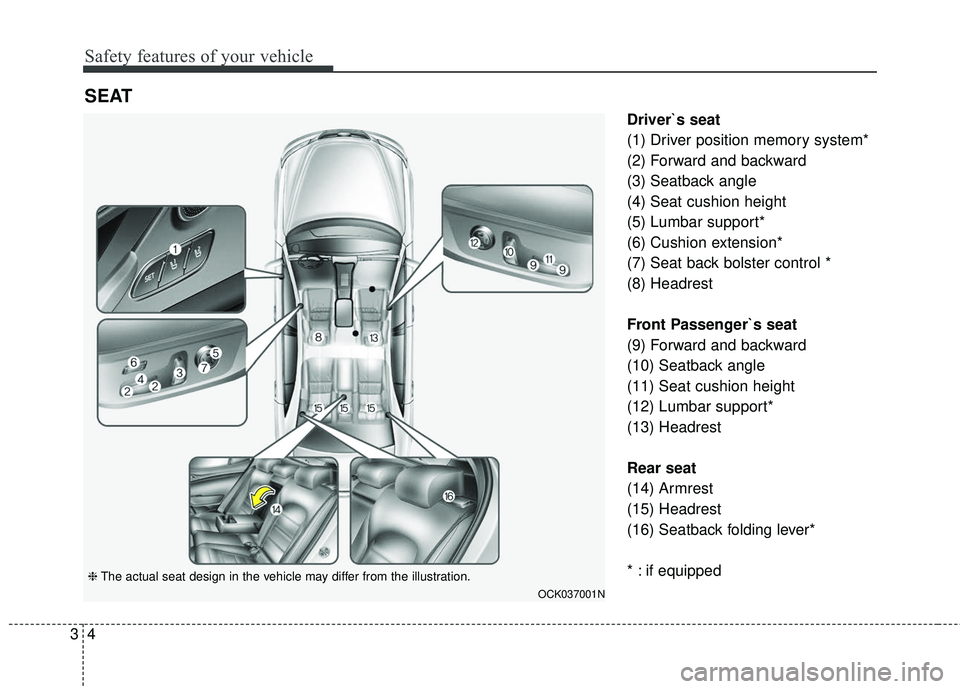
Driver`s seat
(1) Driver position memory system*
(2) Forward and backward
(3) Seatback angle
(4) Seat cushion height
(5) Lumbar support*
(6) Cushion extension*
(7) Seat back bolster control *
(8) Headrest
Front Passenger`s seat
(9) Forward and backward
(10) Seatback angle
(11) Seat cushion height
(12) Lumbar support*
(13) Headrest
Rear seat
(14) Armrest
(15) Headrest
(16) Seatback folding lever*
* : if equipped
SEAT
OCK037001N
❈The actual seat design in the vehicle may differ from the illustration.
Page 26 of 551
Safety features of your vehicle
10
3
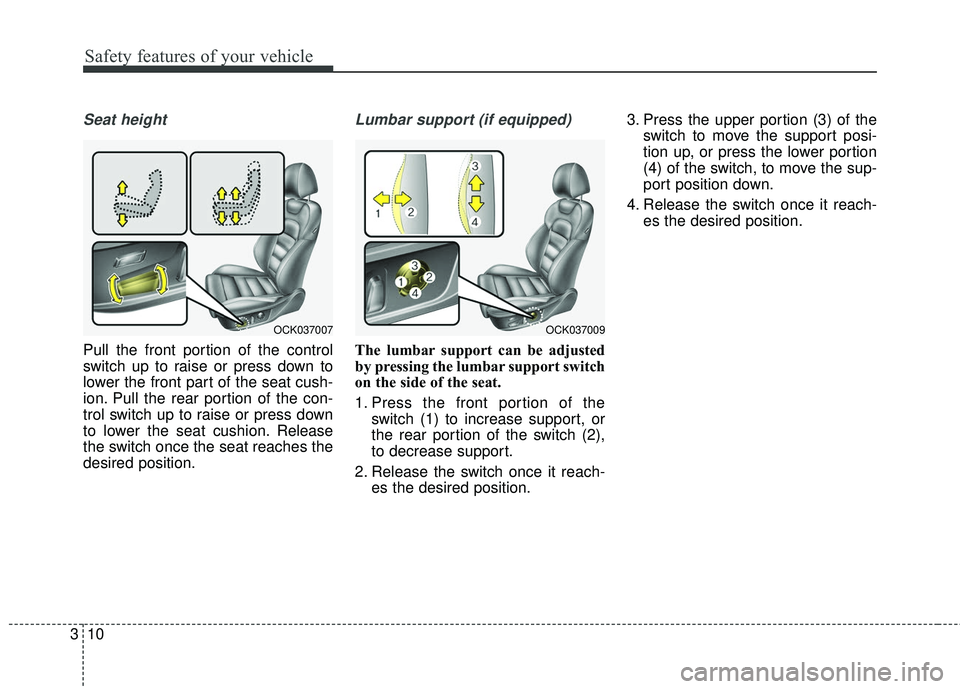
Seat height
Pull the front portion of the control
switch up to raise or press down to
lower the front part of the seat cush-
ion. Pull the rear portion of the con-
trol switch up to raise or press down
to lower the seat cushion. Release
the switch once the seat reaches the
desired position.
Lumbar support (if equipped)
The lumbar support can be adjusted
by pressing the lumbar support switch
on the side of the seat.
1. Press the front portion of the
switch (1) to increase support, or
the rear portion of the switch (2),
to decrease support.
2. Release the switch once it reach- es the desired position. 3. Press the upper portion (3) of the
switch to move the support posi-
tion up, or press the lower portion
(4) of the switch, to move the sup-
port position down.
4. Release the switch once it reach- es the desired position.
OCK037009OCK037007
Page 27 of 551

311
Safety features of your vehicle
Seat back bolster control(For driver seat, if equipped)
1. Turn the adjustment switch clock- wise, the right/left seatback bol-
sters will be adjusted inward. Turn
the switch counterclockwise, the
seatback bolster will be adjusted
outward. 2. To adjust the bolster height to its
maximum in the default state,
operate the switch for 8 seconds.
After that, release the switch
because there is no change in
height even if you continue to
operate the switch.
3. Once adjustment is done, leave the switch in place.
Driver position memory system
(if equipped, for power seat)
Driving Position Memory System is
the facility that enables driver’s seat,
steering wheel, exterior mirrors, clus-
ter and head-up display (HUD) to be
controlled with a simple button oper-
ation, which allows a driver to recall
memorized driving positions and
automatically control them. Driver’s
seat/ Steering Wheel/ Exterior mir-
rors: location Cluster: Brightness of
lighting
Head up Display (HUD): height, rota-
tion and brightness.
OCK037008OCK037021
Page 30 of 551

Safety features of your vehicle
14
3
Initialization in the process :
1. Initialization begins as the alarm
sounds.
2. The seat and seatback will auto- matically move backwards. The
alarm sound will continue while
the system is in operation.
3. Initialization will be all set after the seat and seatback move to the
center with alarm sound being
raised. If, however, cases as fol-
lows occur, the initialization
process will come to a stop and
the alarm sound will stop as well.
- When pushing driving position memory system button
- When pushing driver’s seat height adjustment switch
- When relocating the shift lever from P position to other positions
- When the driving speed exceeds 3 km/h (2mph)
- When the driver’s door is closedHeadrest (for front seat)
The driver's and front passenger's
seats are equipped with a headrest
for the occupant's safety and comfort.
The headrest not only provides com-
fort for the driver and front passenger,
but also helps protect the head and
neck in the event of a rear collision.
OMG038400
CAUTION
If alarm sound and driver seat adjustment stop while initial-ization is in process, re-startinitialization.
Make sure that there are no obstacles around the driverseat before proceeding withinitialization.
Once initialization is complet- ed, adjust seats conforming toyour idea driving position andsave the customized seat set-tings.
Page 31 of 551

315
Safety features of your vehicle
For maximum effectiveness in case
of an accident, the headrest should
be adjusted so the middle of the
headrest is at the same height of the
center of gravity of an occupant's
head.
Generally, the center of gravity of
most people's head is similar with
the height of the top of their eyes.
Also, adjust the headrest as close to
your head as possible. For this rea-
son, the use of a cushion that holds
the body away from the seatback is
not recommended.Adjusting the height up and down
To raise the headrest, pull it up to the
desired position (1). To lower the
headrest, push and hold the release
button (2) on the headrest support
and lower the headrest to the desired
position (3).
WARNING- Headrest
removal/adjustment
Do not operate the vehicle with the headrests removed.
Headrests can provide critical
neck and head support in a
crash.
Do not adjust the headrest height while the vehicle is in
motion. Driver may lose con-
trol of the vehicle.
CAUTION
Excessive pulling or pushingmay damage the headrest.
OCK037011
Page 33 of 551

317
Safety features of your vehicle
To reinstall the headrest :
1. Put the headrest poles (2) into theholes while pressing the release
button (1).
2. Recline the seatback (4) with the recline switch (3).
3. Adjust the headrest to the appro- priate height.
Seatback pocket
The seatback pocket is provided on
the back of the front passenger’s and
driver’s seatbacks.
Rear seat adjustment
Headrest
The rear seat is equipped with head-
rests in all the seating positions for
the occupant's safety and comfort.
The headrest not only provides com-
fort for passengers, but also helps
protect the head and neck in the
event of a collision.
OCK037016
WARNING- Seatback
pockets
Do not put heavy or sharp
objects in the seatback pockets.
In an accident they could come
loose from the pocket and
injure vehicle occupants.
OCK037073N
OCK037014
WARNING- Headrest Reinstallation
To reduce the risk of injury to
the head or neck, always make
sure the headrest is locked into
position and adjusted properly
after reinstalling.
Page 34 of 551
Safety features of your vehicle
18
3
For maximum effectiveness in case
of an accident, the headrest should
be adjusted so the middle of the
headrest is at the same height of the
center of gravity of an occupant's
head. Generally, the center of gravity
of most people's heads is similar with
the height as the top of their eyes.
Also, adjust the headrest as close to
your head as possible. For this rea-
son, the use of a cushion that holds
the body away from the seatback is
not recommended.
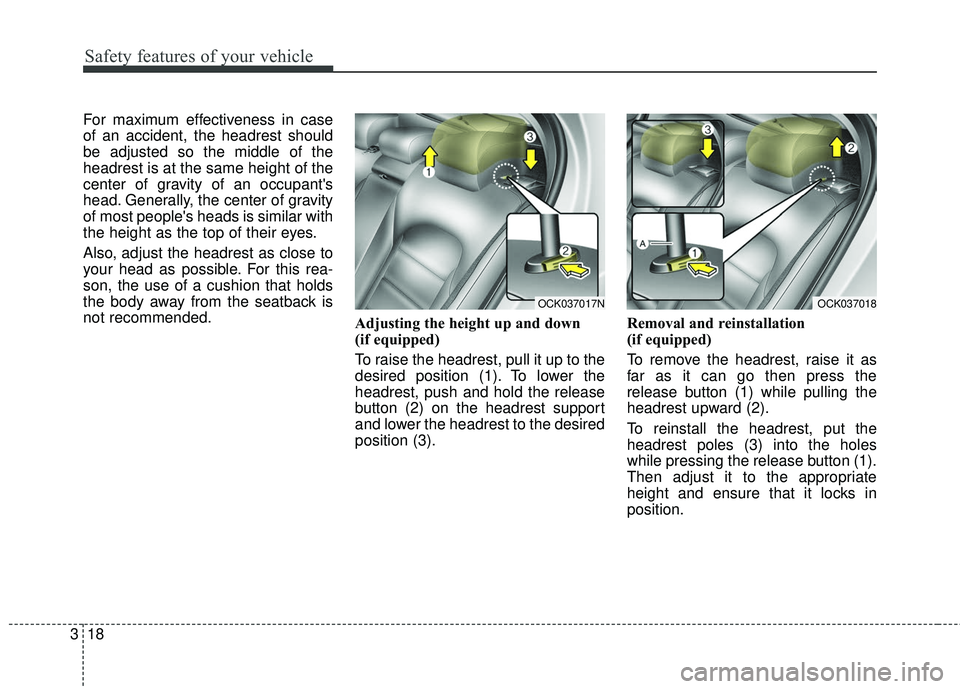
Adjusting the height up and down
(if equipped)
To raise the headrest, pull it up to the
desired position (1). To lower the
headrest, push and hold the release
button (2) on the headrest support
and lower the headrest to the desired
position (3).Removal and reinstallation
(if equipped)
To remove the headrest, raise it as
far as it can go then press the
release button (1) while pulling the
headrest upward (2).
To reinstall the headrest, put the
headrest poles (3) into the holes
while pressing the release button (1).
Then adjust it to the appropriate
height and ensure that it locks in
position.
OCK037018OCK037017N
Page 40 of 551

Safety features of your vehicle
24
3
Front passenger's seat belt warning
As a reminder to the front passenger,
the front passenger’s seat belt warn-
ing lights will illuminate for approxi-
mately 6 seconds each time you turn
the Engine start/stop button in ON
regardless of belt fastening.
If the front passenger continue not to
fasten the seat belt and drive 9 km/h
(5.6 mph) or more and less than 20
km/h (12 mph), the warning light will
stay illuminated. If the front passenger continue not to
fasten the seat belt while driving over
20 km/h (12 mph), the seat belt
warning chime will sound for approx-
imately 100 seconds and the corre-
sponding warning light will blink.
If the front passenger unfasten the
seat belt while driving below 20 km/h
(12 mph),the warning light will stay
illuminated.
If the front passenger unfasten the
seat belt while driving over 20 km/h
(12 mph),the seat belt warning chime
will sound for approximately 100 sec-
onds and the corresponding warning
light will blink.
Lap/shoulder belt
Height adjustment
You can adjust the height of the shoul-
der belt anchor to one of 4 positions
for maximum comfort and safety.
The height of the adjusting seat belt
should not be too close to your neck.
You will not be getting the most effec-
tive protection. The shoulder portion
should be adjusted so that it lies
across your chest and midway over
your shoulder near the door and not
your neck.
OYG036028
OCK037022