2018 KIA STINGER height
[x] Cancel search: heightPage 170 of 551
483
Features of your vehicle
Head-Up Display (HUD) (if equipped)
Enable Head-Up Display : If thisitem is checked, Head-Up Display
will be activated.
Display Height : Adjust the height of the HUD image on the wind-
shield glass.
Rotation : Adjust the degree of the HUD rotation.
Brightness : Adjust the intensity of the HUD brightness.
Contents Selection - Turn by Turn : If this item ischecked, Turn by Turn will be acti-
vated.
- Lane Keeping Assist : If this item is checked, LKA will be activated.
Speed size : Small/ Medium/Large
Speed color : White/Orange/Green Driving Assist (if equipped)
Smart Cruise Control with Stop &
Go Response (if equipped) :
- Choose the sensitivity (slow, nor-mal, fast) of the smart cruise con-
trol.
❈ For more details, refer to “Smart
Cruise Control with Stop & Go” in
chapter 5.
Driver Attention Warning : Cloose the alert stage (Off/Normal/Early
stage) of the Driver Attention
Warning.
Lane Keeping Assist (LKA, if equipped) :
- Lane Departure Warning : To acti-vate the lane departure warning
function.
- Standard LKA : To activate the standard LKA mode.
- Active LKA : To activate the active LKA mode.
❈ For more details, refer to “LKA
(Lane Keeping Assist)” in chapter 5. Forward Collision-avoidance Assist
(FCA, if equipped) :
- To activate or deactivate the FCAsystem.
❈ For more details, refer to “Forward
Collision-avoidance Assist(FCA)”
in chapter 5.
Forward Collision Warning (FCW, if equipped)
- Choose the sensitivity of the for-ward collision warning.
(Late/Normal/Early)
❈ For more details, refer to “Forward
Collision-avoidance Assist(FCA)”
in chapter 5.
equipped)
- If this item is checked, the blindspot collision warning function
will be activated.
❈ For more details, refer to “Blind-spot
Collision Warning” in chapter 5.
Page 192 of 551

4105
Features of your vehicle
Description
The head up display is a transparent
display which projects a shadow of
some information of the instrument
cluster and navigation on the wind-
shield glass. The head up display image on the
windshield glass may be invisible
when:
- Sitting posture is bad.
- Wearing a polarized sunglasses.
- There is an object on the cover ofthe head up display.
- Driving on a wet road.
- An inadequate lighting is turned on inside the vehicle.
- Any light comes from the outside.
- Wearing an inadequate glasses to your eyesight.
If the head up display image is not shown well, adjust the height, rota-
tion or illumination of the head up
display in the LCD window.
❈ For more details, refer to “LCD
window” in this chapter.
When the head up display needs inspection or repair, consult an
authorized Kia dealer.
Do not place any accessories on the clash pad or attach any objects
on the windshield glass.
✽ ✽ NOTICE
Installing window tint or any other
type of metallic coating on the wind-
shield can prevent the driver from
seeing the Head Up Display images.
✽ ✽NOTICE
When replacing the front wind-
shield glass of the vehicles equipped
with the head up display, replace it
with a windshield glass designed for
the head up display operation.
Otherwise, duplicated images may
be displayed on the windshield glass.
HEAD UP DISPLAY (HUD) (IF EQUIPPED)
OCK047467C
WARNING - Head up
display
The Head up display is a supple-
mental system. Do not solely
rely on the system, always drive
safely, and pay attention to the
driving conditions on the road.
Page 193 of 551
Features of your vehicle
106
4
Head Up Display ON/OFF
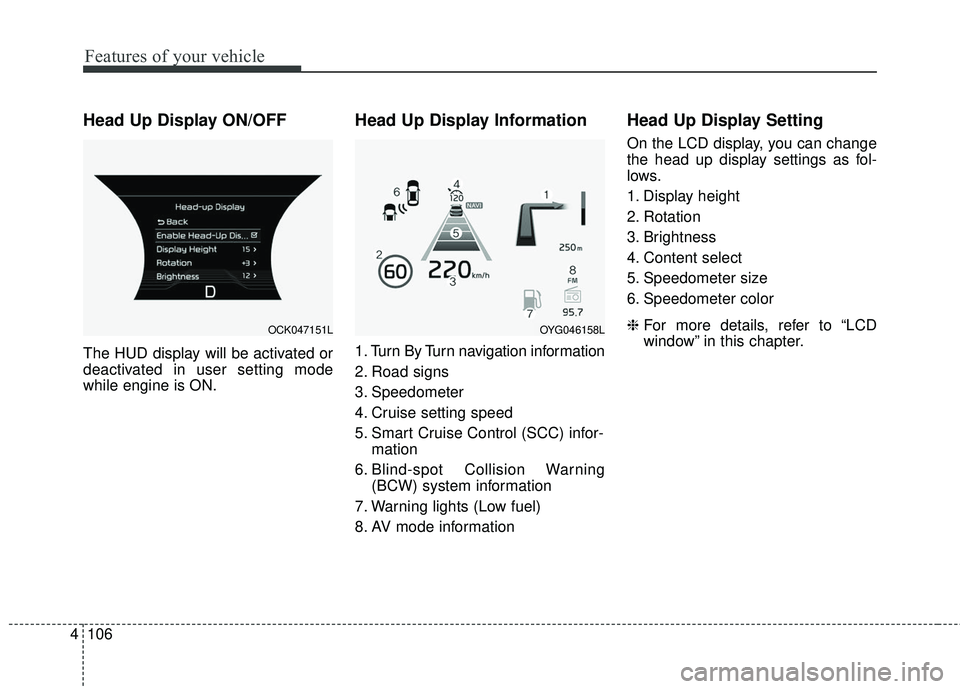
The HUD display will be activated or
deactivated in user setting mode
while engine is ON.
Head Up Display Information
1. Turn By Turn navigation information
2. Road signs
3. Speedometer
4. Cruise setting speed
5. Smart Cruise Control (SCC) infor-
mation
6. Blind-spot Collision Warning (BCW) system information
7. Warning lights (Low fuel)
8. AV mode information
Head Up Display Setting
On the LCD display, you can change
the head up display settings as fol-
lows.
1. Display height
2. Rotation
3. Brightness
4. Content select
5. Speedometer size
6. Speedometer color
❈ For more details, refer to “LCD
window” in this chapter.
OCK047151LOYG046158L
Page 197 of 551

Features of your vehicle
110
4
Detecting range may decrease
when:
1. Outside air temperature is extremely hot or cold.
2. Undetectable objects smaller than 1 m (4 in.) and narrower than 14
cm (5.5 in.) in diameter.
The following objects may not be
recognized by the sensor:
1. Sharp or slim objects such as ropes, chains or small poles.
2. Objects, which tend to absorb sen- sor frequency such as clothes,
spongy material or snow.
✽ ✽NOTICE
1. The warning may not sound
sequentially depending on the speed
and shapes of the objects detected.
2. The parking assist system may malfunction if the vehicle bumper
height or sensor installation has
been modified. Any non-factory
installed equipment or accessories
may also interfere with the sensor
performance.
3. Sensor may not recognize objects less than 30 cm (12 in.) from the
sensor, or it may sense an incor-
rect distance. Use with caution.
4. When the sensor is frozen or stained with snow or water, the sensor may
be inoperative until the stains are
removed using a soft cloth.
5. Do not push, scratch or strike the sensor with any hard objects that
could damage the surface of the
sensor. Sensor damage could occur.
✽ ✽NOTICE
This system can only sense objects
within the range and location of the
sensors, it can not detect objects in
other areas where sensors are not
installed. Also, small or slim objects,
or objects located between sensors
may not be detected.
Always visually check in front and
behind the vehicle when driving.
Be sure to inform any drivers in the
vehicle that may be unfamiliar with
the system regarding the systems
capabilities and limitations.
Page 307 of 551
![KIA STINGER 2018 Owners Manual Driving your vehicle
54
5
When you press the [AUTO HOLD]
switch, if the driver’s door, engine
hood are not closed or the driver’s
seat belt is unfastened, a warning
will sound and a message will
a](/manual-img/2/40391/w960_40391-306.png "KIA STINGER 2018 Owners Manual Driving your vehicle
54
5
When you press the [AUTO HOLD]
switch, if the driver’s door, engine
hood are not closed or the driver’s
seat belt is unfastened, a warning
will sound and a message will
a")
Driving your vehicle
54
5
When you press the [AUTO HOLD]
switch, if the driver’s door, engine
hood are not closed or the driver’s
seat belt is unfastened, a warning
will sound and a message will
appear on the LCD display. At this
moment, press the [AUTO HOLD]
button after closing the driver’s door,
engine hood and fastening the seat
belt.
Anti-lock brake system (ABS)
ABS (or ESC) will not prevent acci-
dents due to improper or dangerous
driving maneuvers. Even though
vehicle control is improved during
emergency braking, always maintain
a safe distance between you and
objects ahead. Vehicle speeds
should always be reduced during
extreme road conditions. The vehicle
should be driven at reduced speeds
in the following circumstances:
When driving on rough, gravel or
snow-covered roads
When driving on roads where the road surface is pitted or has differ-
ent surface heights.
Driving in these conditions increases
the stopping distance for your vehicle. The ABS continuously senses the
speed of the wheels. If the wheels
are going to lock, the ABS system
repeatedly modulates the hydraulic
brake pressure to the wheels.
When you apply your brakes under
conditions which may lock the
wheels, you may hear a “tik-tik’’
sound from the brakes, or feel a cor-
responding sensation in the brake
pedal. This is normal and it means
your ABS is active.
In order to obtain the maximum benefit
from your ABS in an emergency situa-
tion, do not attempt to modulate your
brake pressure and do not try to pump
your brakes. Press your brake pedal as
hard as possible or as hard as the sit-
uation allows the ABS to control the
force being delivered to the brakes.
✽ ✽
NOTICE
A click sound may be heard in the
engine compartment when the vehi-
cle begins to move after the engine is
started. These conditions are normal
and indicate that the anti-lock brake
system is functioning properly.
OCK057084L
Page 380 of 551

5127
Driving your vehicle
Non-operating condition
Outside rearview mirror may not
alert the driver when:
- The outside rearview mirror housingis damaged or covered with debris.
- The window is covered with debris.
- The windows are severely tinted.
Driver's Attention
The driver must be cautious in the
below situations, because the sys-
tem may not detect other vehicles
or objects in certain circumstances.
- The vehicle drives on a curved road or through a tollgate.
- The sensor is polluted with rain, snow, mud, etc.
- The rear bumper, in which the sensor is located, is covered or
blocked with a foreign matter
such as a sticker, a bumper
guard, a bicycle stand, etc.
- The rear bumper is damaged, or the sensor is out of the original
default position.
- The vehicle height gets lower or higher due to heavy loading in a
liftgate, abnormal tire pressure,
etc.
- The vehicle drives in a bad weather such as heavy rain or
snow.
(Continued)(Continued)
- There is a fixed object near the
vehicle, such as a guardrail,
pedestrian, animal, tunnel, etc.
- A big vehicle is near such as a bus or truck.
- A motorcycle or bicycle is near.
- A flat trailer is near.
- If the vehicle has started at the same time as the vehicle next to
you and has accelerated.
- When the other vehicle passes at a very fast speed.
- While changing lanes.
- When going down or up a steep road where the height of the lane
is different.
- When the other vehicle approaches very close.
- When a trailer or carrier is installed.
- When the temperature of the rear bumper is very high or low.
(Continued)
Page 381 of 551

Driving your vehicle
128
5
(Continued)
- When the sensors are blocked
by other vehicles, walls or park-
ing-lot pillars.
- When the detected vehicle also moves back, as your vehicle
drives back.
- If there are small things like Shopping cart, baby carriage and
pedestrians.
- If there is low height vehicle like sport vehicle.
- When other vehicles are close to your vehicle.
- When the vehicle in the next lane moves two lanes away from
you OR when the vehicle two
lanes away moves to the next
lane from you.
- When driving through a narrow road with many plants.
- When driving on wet surface. (Continued)(Continued)
- The vehicle is driven near areas
containing metal substances
such as a construction zone,
railroad, etc.
- When the surrounding vehicle or structure is driving in a wide
area (desert, field, suburb etc.) This device complies with
Industry Canada licence-exempt
RSS standard(s).
Operation is subject to the following
two conditions:
(1) This device may not cause inter-
ference, and
(2) This device must accept any interference, including interfer-
ence that may cause undesired
operation of the device.
Page 472 of 551
Maintenance
44
7
Wheel replacement
When replacing the metal wheels for
any reason, make sure the new
wheels are equivalent to the original
factory units in diameter, rim width
and offset.
A wheel that is not the correct size
may adversely affect wheel and
bearing life, braking and stopping
abilities, handling characteristics,
ground clearance, body-to-tire clear-
ance, snow chain clearance,
speedometer and odometer calibra-
tion, headlight aim and bumper
height.
Tire traction
Tire traction can be reduced if you
drive on worn tires, tires that are
improperly inflated or on slippery
road surfaces. Tires should be
replaced when tread wear indicators
appear. Slow down whenever there
is rain, snow or ice on the road, to
reduce the possibility of losing con-
trol of the vehicle.
Tire maintenance
In addition to proper inflation, correct
wheel alignment helps to decrease
tire wear. If you find a tire is worn
unevenly, have your dealer check the
wheel alignment.
When you have new tires installed,
make sure they are balanced. This
will increase vehicle ride comfort and
tire life. Additionally, a tire should
always be rebalanced if it is removed
from the wheel.
Tire sidewall labeling
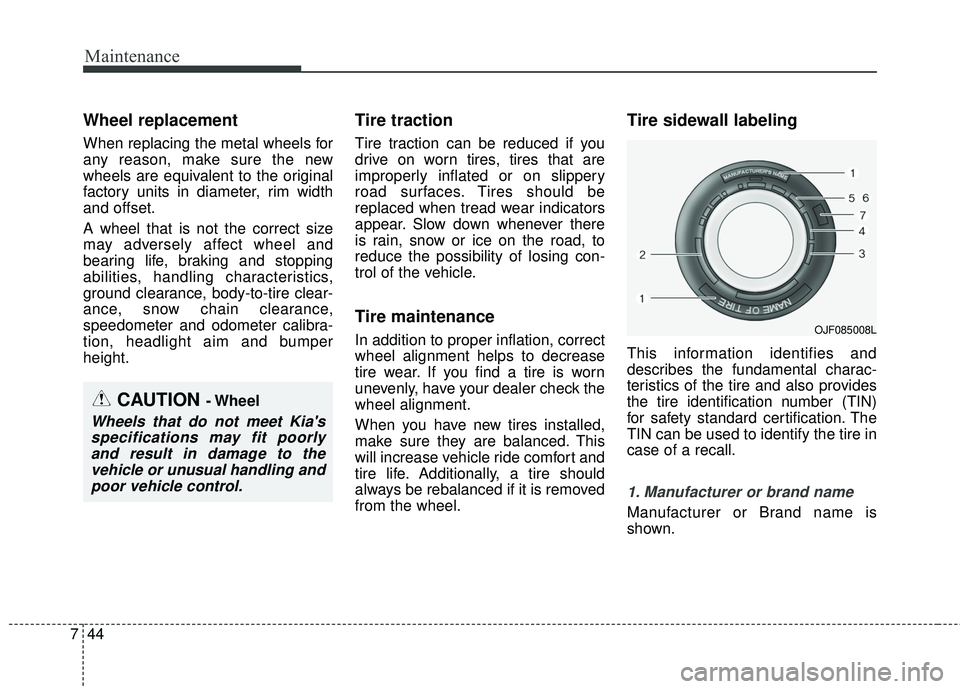
This information identifies and
describes the fundamental charac-
teristics of the tire and also provides
the tire identification number (TIN)
for safety standard certification. The
TIN can be used to identify the tire in
case of a recall.
1. Manufacturer or brand name
Manufacturer or Brand name is
shown.
CAUTION - Wheel
Wheels that do not meet Kia's
specifications may fit poorlyand result in damage to thevehicle or unusual handling andpoor vehicle control.
OJF085008L