2018 KIA STINGER alarm
[x] Cancel search: alarmPage 30 of 551

Safety features of your vehicle
14
3
Initialization in the process :
1. Initialization begins as the alarm
sounds.
2. The seat and seatback will auto- matically move backwards. The
alarm sound will continue while
the system is in operation.
3. Initialization will be all set after the seat and seatback move to the
center with alarm sound being
raised. If, however, cases as fol-
lows occur, the initialization
process will come to a stop and
the alarm sound will stop as well.
- When pushing driving position memory system button
- When pushing driver’s seat height adjustment switch
- When relocating the shift lever from P position to other positions
- When the driving speed exceeds 3 km/h (2mph)
- When the driver’s door is closedHeadrest (for front seat)
The driver's and front passenger's
seats are equipped with a headrest
for the occupant's safety and comfort.
The headrest not only provides com-
fort for the driver and front passenger,
but also helps protect the head and
neck in the event of a rear collision.
OMG038400
CAUTION
If alarm sound and driver seat adjustment stop while initial-ization is in process, re-startinitialization.
Make sure that there are no obstacles around the driverseat before proceeding withinitialization.
Once initialization is complet- ed, adjust seats conforming toyour idea driving position andsave the customized seat set-tings.
Page 88 of 551
Features of your vehicle
Smart key . . . . . . . . . . . . . . . . . . . . . . . . . . . . . . . . . 4-5
• Record your key number . . . . . . . . . . . . . . . . . . . . . . . 4-5
• Smart key functions . . . . . . . . . . . . . . . . . . . . . . . . . . . 4-5
• Remote keyless entry system operations . . . . . . . . . . . 4-8
• Transmitter precautions . . . . . . . . . . . . . . . . . . . . . . . 4-10
• This device complies with Industry Canada licence-exempt RSS standard (s) . . . . . . . . 4-10
• Battery replacement . . . . . . . . . . . . . . . . . . . . . . . . . . 4-11
• Mechanical key operations . . . . . . . . . . . . . . . . . . . . . 4-11
• Immobilizer system . . . . . . . . . . . . . . . . . . . . . . . . . . . 4-12
Theft-alarm system . . . . . . . . . . . . . . . . . . . . . . . . 4-14
• Armed stage . . . . . . . . . . . . . . . . . . . . . . . . . . . . . . . . . 4-14
• Theft-alarm stage . . . . . . . . . . . . . . . . . . . . . . . . . . . . 4-15
• Disarmed stage. . . . . . . . . . . . . . . . . . . . . . . . . . . . . . . 4-15
Door locks . . . . . . . . . . . . . . . . . . . . . . . . . . . . . . . . 4-16
• Operating door locks from outside the vehicle . . . . 4-16
• Operating door locks from inside the vehicle . . . . . . 4-17
• Door lock/unlock features. . . . . . . . . . . . . . . . . . . . . . 4-19
• Child-protector rear door lock. . . . . . . . . . . . . . . . . . 4-19
Liftgate . . . . . . . . . . . . . . . . . . . . . . . . . . . . . . . . . . 4-21\
• Non-Powered liftgate. . . . . . . . . . . . . . . . . . . . . . . . . . 4-21
• Power liftgate . . . . . . . . . . . . . . . . . . . . . . . . . . . . . . . . 4-23
• Emergency liftgate safety release. . . . . . . . . . . . . . . . 4-28
Smart liftgate . . . . . . . . . . . . . . . . . . . . . . . . . . . . . 4-30
Windows . . . . . . . . . . . . . . . . . . . . . . . . . . . . . . . . . 4-34
• Power windows . . . . . . . . . . . . . . . . . . . . . . . . . . . . . . 4-35
Hood. . . . . . . . . . . . . . . . . . . . . . . . . . . . . . . . . . . . \
. 4-39
• Opening the hood . . . . . . . . . . . . . . . . . . . . . . . . . . . . 4-39
• Closing the hood . . . . . . . . . . . . . . . . . . . . . . . . . . . . . 4-40
Fuel filler lid . . . . . . . . . . . . . . . . . . . . . . . . . . . . . . 4-41
• Opening the fuel filler lid . . . . . . . . . . . . . . . . . . . . . . 4-41
• Closing the fuel filler lid . . . . . . . . . . . . . . . . . . . . . . . 4-41
• Emergency fuel filler lid release . . . . . . . . . . . . . . . . 4-42
Wide sunroof. . . . . . . . . . . . . . . . . . . . . . . . . . . . . . 4-45
• Sunroof open warning. . . . . . . . . . . . . . . . . . . . . . . . . 4-46
• Sunshade . . . . . . . . . . . . . . . . . . . . . . . . . . . . . . . . . . . 4-\
47
• Sliding the sunroof . . . . . . . . . . . . . . . . . . . . . . . . . . . 4-47
• Tilting the sunroof . . . . . . . . . . . . . . . . . . . . . . . . . . . . 4-49
• Closing the sunroof . . . . . . . . . . . . . . . . . . . . . . . . . . . 4-49
• Resetting the sunroof . . . . . . . . . . . . . . . . . . . . . . . . . 4-50
Steering wheel . . . . . . . . . . . . . . . . . . . . . . . . . . . . . 4-51
• Electric Power Steering (EPS) . . . . . . . . . . . . . . . . . . 4-51
• Tilt and telescopic steering . . . . . . . . . . . . . . . . . . . . . 4-52
• Heated steering wheel . . . . . . . . . . . . . . . . . . . . . . . . . 4-53
• Horn . . . . . . . . . . . . . . . . . . . . . . . . . . . . . . . . . . . . \
. . . 4-54
4
Page 92 of 551
45
Features of your vehicle
Record your key number
The key code num-
ber is stamped on
the key code tag
attached to the key
set. Should you
lose your keys, this number will
enable an authorized Kia dealer to
duplicate the keys easily.
Remove the key code tag and store it
in a safe place. Also, record the key
code number and keep it in a safe
and handy place, but not in the vehi-
cle.
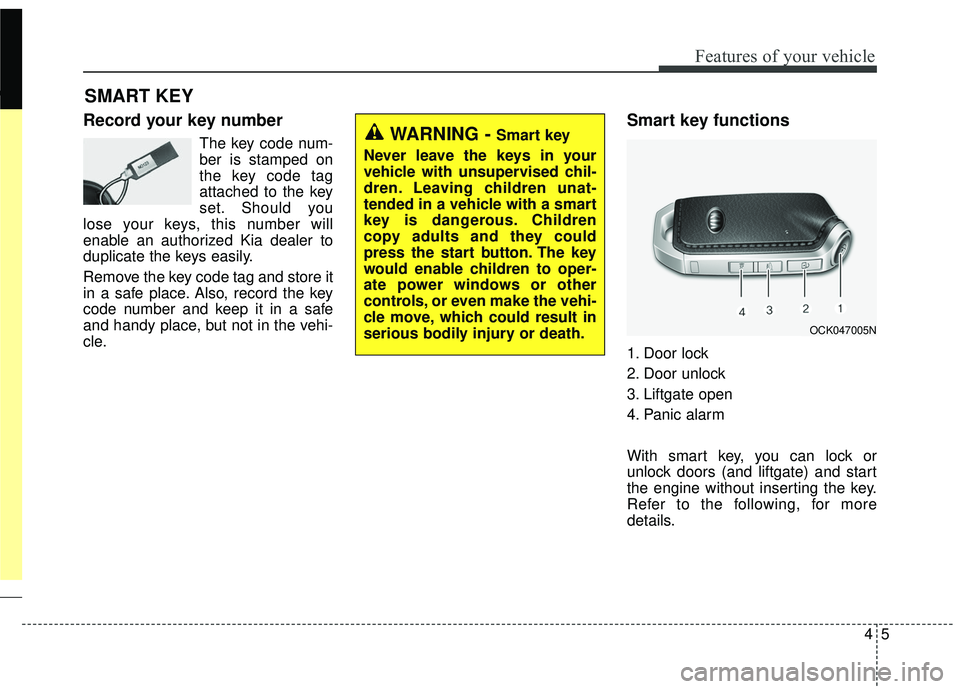
Smart key functions
1. Door lock
2. Door unlock
3. Liftgate open
4. Panic alarm
With smart key, you can lock or
unlock doors (and liftgate) and start
the engine without inserting the key.
Refer to the following, for more
details.
SMART KEY
WARNING - Smart key
Never leave the keys in your
vehicle with unsupervised chil-
dren. Leaving children unat-
tended in a vehicle with a smart
key is dangerous. Children
copy adults and they could
press the start button. The key
would enable children to oper-
ate power windows or other
controls, or even make the vehi-
cle move, which could result in
serious bodily injury or death.
OCK047005N
Page 96 of 551
49
Features of your vehicle
Unlock (2)
All doors (and liftgate) can be
unlocked if the unlock button is
pressed. The hazard warning lights
will blink twice again to indicate that
all doors (and liftgate) are unlocked.
After pressing this button, the doors
will lock automatically unless you
open any door within 30 seconds.
When Two press unlock function is
activated,
- If you press the Door Unlock but-ton(2) on the smart key, driver`s
door will unlock.
- If you press Door Unlock button(2) on the smart key within four sec-
onds again, then all the doors will
unlock.
✽ ✽ NOTICE
You can activate or deactivate the
Two Press Unlock function. Refer to
“User settings” in this chapter.
✽ ✽NOTICE
If the keyless entry system is inoper-
ative due to exposure to water or liq-
uids, it will not be covered by your
manufacturer's vehicle warranty.
Liftgate unlock (3)
The liftgate is unlocked if the button
is pressed for more than 1 second.
The hazard warning lights will blink
twice to indicate that the liftgate is
unlocked.
However, after pressing this button,
the liftgate will lock automatically
unless you open the liftgate within 30
seconds.
Also, once the liftgate is opened and
then closed, the liftgate will lock
automatically.
Panic alarm (4)
The horn sounds and the hazard
warning lights blink for about 30 sec-
onds if this button is pressed for
more than 0.5 seconds. To stop the
horn and lights, press any button on
the transmitter.
Page 101 of 551
Features of your vehicle
14
4
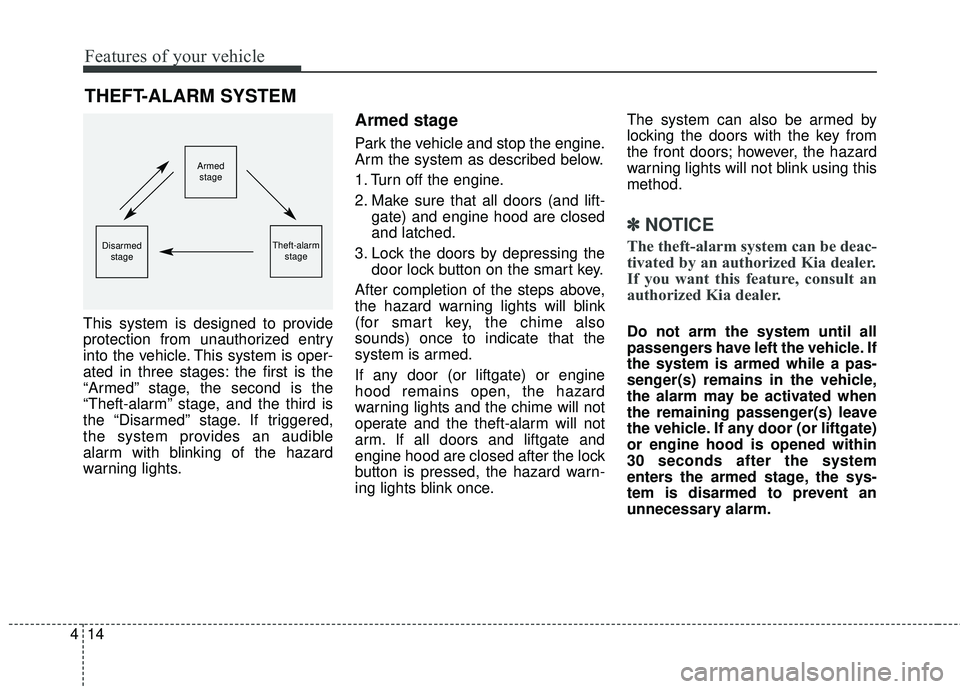
This system is designed to provide
protection from unauthorized entry
into the vehicle. This system is oper-
ated in three stages: the first is the
“Armed” stage, the second is the
“Theft-alarm” stage, and the third is
the “Disarmed” stage. If triggered,
the system provides an audible
alarm with blinking of the hazard
warning lights.
Armed stage
Park the vehicle and stop the engine.
Arm the system as described below.
1. Turn off the engine.
2. Make sure that all doors (and lift-
gate) and engine hood are closed
and latched.
3. Lock the doors by depressing the door lock button on the smart key.
After completion of the steps above,
the hazard warning lights will blink
(for smart key, the chime also
sounds) once to indicate that the
system is armed.
If any door (or liftgate) or engine
hood remains open, the hazard
warning lights and the chime will not
operate and the theft-alarm will not
arm. If all doors and liftgate and
engine hood are closed after the lock
button is pressed, the hazard warn-
ing lights blink once. The system can also be armed by
locking the doors with the key from
the front doors; however, the hazard
warning lights will not blink using this
method.
✽ ✽
NOTICE
The theft-alarm system can be deac-
tivated by an authorized Kia dealer.
If you want this feature, consult an
authorized Kia dealer.
Do not arm the system until all
passengers have left the vehicle. If
the system is armed while a pas-
senger(s) remains in the vehicle,
the alarm may be activated when
the remaining passenger(s) leave
the vehicle. If any door (or liftgate)
or engine hood is opened within
30 seconds after the system
enters the armed stage, the sys-
tem is disarmed to prevent an
unnecessary alarm.
THEFT-ALARM SYSTEM
Armed
stage
Theft-alarm stageDisarmedstage
Page 102 of 551
415
Features of your vehicle
Theft-alarm stage
The alarm will be activated if any of
the following occurs while the system
is armed.
A front or rear door is opened with-out using the smart key.
The liftgate is opened without using
the smart key.
The engine hood is opened.
The horn will sound and the hazard
warning lights will blink continuously
for approximately 30 seconds, and
repeat the horn 2 times unless the
system is disarmed. To turn off the
system, unlock the doors with the
smart key.
Disarmed stage
The system will be disarmed when
The doors (and liftgate) are unlocked with the smart key.
After depressing the unlock button,
the hazard warning lights will blink
and the chime will sound twice (in
smart key) to indicate that the sys-
tem is disarmed.
After depressing the unlock button, if
any door (or liftgate) is not opened
within 30 seconds, the system will be
rearmed.
Avoid trying to start the engine while the alarm is activated. The
vehicle starting motor is disabled
during the theft-alarm stage.
If the system is not disarmed with
the smart key, open the doors by
using the mechanical key and start
the engine by directly pressing the
engine Start/Stop button with the
smart key.
If you lose your keys, consult your authorized Kia dealer.
✽ ✽ NOTICE
Malfunctions caused by improper
alterations, adjustments or modifi-
cations to the theft-alarm system are
not covered by your vehicle manu-
facturer warranty.
CAUTION - Adjusting
alarm system
Do not change, alter or adjust
the theft-alarm system becauseit could cause the theft-alarmsystem to malfunction.
Page 155 of 551

Features of your vehicle
68
4
Instrument Cluster Control
Adjusting Instrument Cluster
Illumination
The brightness of the instrument
panel illumination is changed by
pressing the illumination control button
(“+” or “-”) when the Engine Start/Stop
button is ON, or the taillights are
turned on. If you hold the illumination control
button (“+” or “-”), the brightness
will be changed continuously.
If the brightness reaches to the maximum or minimum level, an
alarm will sound.
LCD Display Control
The LCD display modes can be
changed by using the control buttons
on the steering wheel.
OCK047047L
OCK047138LOCK047048L
OCK047049L
■Type A
■Type B
Page 167 of 551

Features of your vehicle
80
4
❈ For more details, refer to “Smart
Cruise Control with Stop & Go”
and “Lane Keeping Assist (LKA)”
in chapter 5.Service mode
When Service Required is set, the
remaining distance/period to drive
appears on the LCD screen.
From the point at which the remain-
ing distance to drive amounts to
1,500 km (900 mi.) or the remaining
period amounts to 3 days, Service
Required message automatically
displays and remained on LCD
screen for a number of seconds
every time the engine start/stop but-
ton is ON. With Service Required in place,
Service Required Alarm message
pops up when an aggregated
amount of kilometers/time driven
reaches a certain point.
With Service Required mode, press
OK button for more than 1 second.
The values will return to initial setting
values.
❈
See User Settings
Mode in this chapter for further
information about Service Required
Setting.
❈ Service Required Setting
Battery Cable Disconnection, Fuse
Switch OFF, or Service Required
Setting values (an amount of kilo-
meters/time driven) can be ran-
domly changed. In such cases, re-
enter Service Required Setting val-
ues.
OCK047117L