Page 355 of 551

Driving your vehicle
102
5
(Continued)
• If you move the transmission lever
from N to D (manual mode) or R
without depressing the brake
pedal after stopping engine auto-
matically, the engine does not
restart automatically and warning
chime alarms. When it happens,
press brake pedal for auto start.
Auto start
To restart the engine from idle
stop mode
Release the brake pedal.
or
Move the shift gear to the R (Reverse) position or the manual
mode while depressing the brake
pedal.
The engine will start and the green
AUTO STOP indicator ( ) on the
instrument cluster will go out.
The engine will also restart auto- matically without the driver’s anyactions if the following occurs:
- The fan speed of manual climate control system is set above the 3rd
position when the air conditioning is
on.
- The fan speed of automatic climate control system is set above the 6th
position when the air conditioning is
on.
- When a certain amount of time has passed with the climate control sys-
tem on.
- When the defroster is on.
- The brake vacuum pressure is low.
- The battery charging status is low.
- The vehicle speed exceeds 1 km/h (1 mph).
- Engine is turned off by Auto Stop for a long time.
- If you unfasten the seat belt or open the driver's door while depressing
the brake pedal.
OCK057096L
OCK057145
Page 364 of 551
5111
Driving your vehicle
Do not disassemble a front viewcamera temporarily for tinted win-
dow or attaching any types of coat-
ings and accessories. If you disas-
semble the camera and assemble
it again, take your vehicle to an
authorized Kia dealer and have the
system checked to need a calibra-
tion.
When you replace the windshield glass, front view camera or related
parts of the steering, take your
vehicle to an authorized Kia dealer
and have the system checked to
need a calibration.
The system detects lane markers and controls the steering wheel by
a front view camera, therefore, if
the lane markers are hard to
detect, the system may not work
properly. Always be cautious when
using the system. When the lane markers are hard to
detect, please refer to “Driver’s
Attention”.
Do not remove or damage the related parts of LKA SYSTEM.
Do not place objects on the crash pad that reflects light such as mir-
rors, white paper, etc. it may cause
malfunction of LKA SYSTEM if the
sunlight is reflected.
You may not hear warning sound of LKA SYSTEM because of the
excessive audio sound.
If you continue to drive with your hands off the steering wheel, the
LKA SYSTEM will stop controlling
the steering wheel after the hands
off alarm. After then, if you drive
with your hands on the steering
wheel, the control will be activated
again.✽ ✽
NOTICE
• If the vehicle speed is high, steer-
ing torque for assistance will not
be enough to keep your vehicle
within the lane. If so, the vehicle
may move out of its lane. Obey
speed limit when using LKA SYS-
TEM.
• If you attach objects to the steer- ing wheel, the system may not
assist steering.
• If you attach objects to the steer- ing wheel, hands off alarm may
not work properly.
Page 375 of 551
Driving your vehicle
122
5
Warning type
The system will activate when:
1. The system is on.
2. Vehicle speed is above 30 km/h
(20 mph).
3. Other vehicles are detected in the rear side.
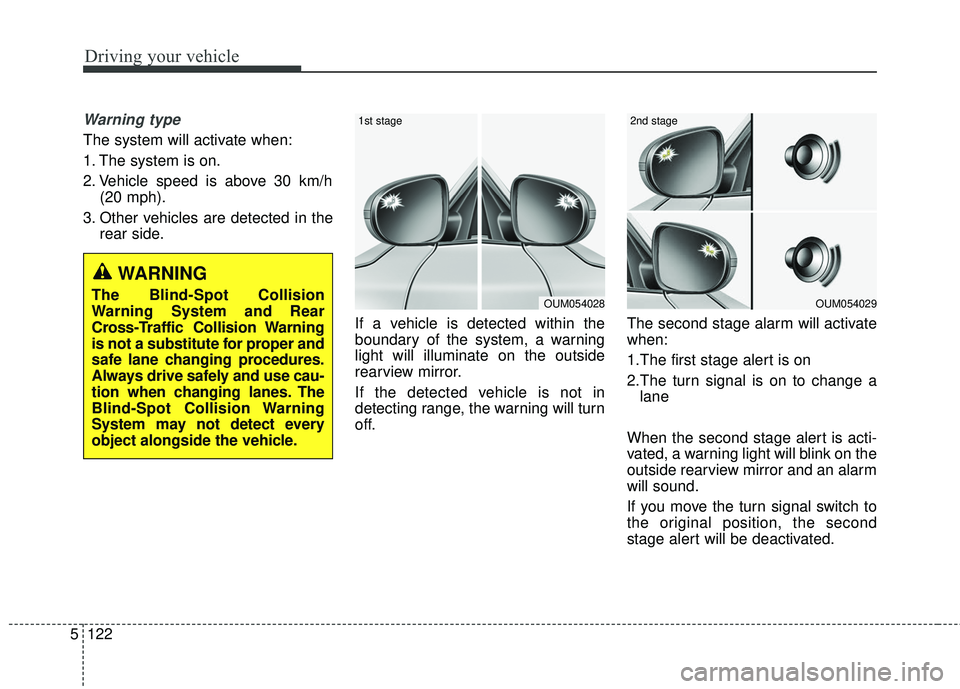
If a vehicle is detected within the
boundary of the system, a warning
light will illuminate on the outside
rearview mirror.
If the detected vehicle is not in
detecting range, the warning will turn
off. The second stage alarm will activate
when:
1.The first stage alert is on
2.The turn signal is on to change a
lane
When the second stage alert is acti-
vated, a warning light will blink on the
outside rearview mirror and an alarm
will sound.
If you move the turn signal switch to
the original position, the second
stage alert will be deactivated.
OUM054029
2nd stage
OUM054028
1st stage
WARNING
The Blind-Spot Collision
Warning System and Rear
Cross-Traffic Collision Warning
is not a substitute for proper and
safe lane changing procedures.
Always drive safely and use cau-
tion when changing lanes. The
Blind-Spot Collision Warning
System may not detect every
object alongside the vehicle.
Page 376 of 551
5123
Driving your vehicle
- The second stage alarm may bedeactivated.
To activate the alarm: Go to the User Settings Mode →
Driving Assist and select “BCW” on
the LCD display.
To deactivate the alarm: Go to the User Settings Mode →
Driving Assist and deselect “BCW”
on the LCD display.
✽ ✽
NOTICE
The alarm function helps alert the
driver. Deactivate this function only
when it is necessary
Detecting sensor
The sensors are located inside of the
rear bumper.
Always keep the rear bumper clean
for the system to work properly.
RCCW (Rear Cross-Traffic
Collision Warning)
When your vehicle moves backwards
from a parking position, the sensor
detects approaching vehicles to the
left or right side direction and gives
information to the driver.
OCK057051L
OYG056140
Page 484 of 551
Maintenance
56
7
✽ ✽
NOTICE- Remodeling
Prohibited
Do not rewire your vehicle in any
way as doing so may affect the per-
formance of several safety features
in your vehicle. Rewiring your vehi-
cle may also void your warranty and
cause you to be responsible for any
subsequent vehicle damage which
may result.
✽ ✽ NOTICE- Window tinting
precaution
Window tint(especially metallic
film) might cause communication
disorder or poor radio reception,
and malfunction of the automatic
lighting system due to excessive
change of illumination inside the
vehicle. The solution used might also
flow into electric, electronic devices
causing disorder and failure.
Inner panel fuse replacement
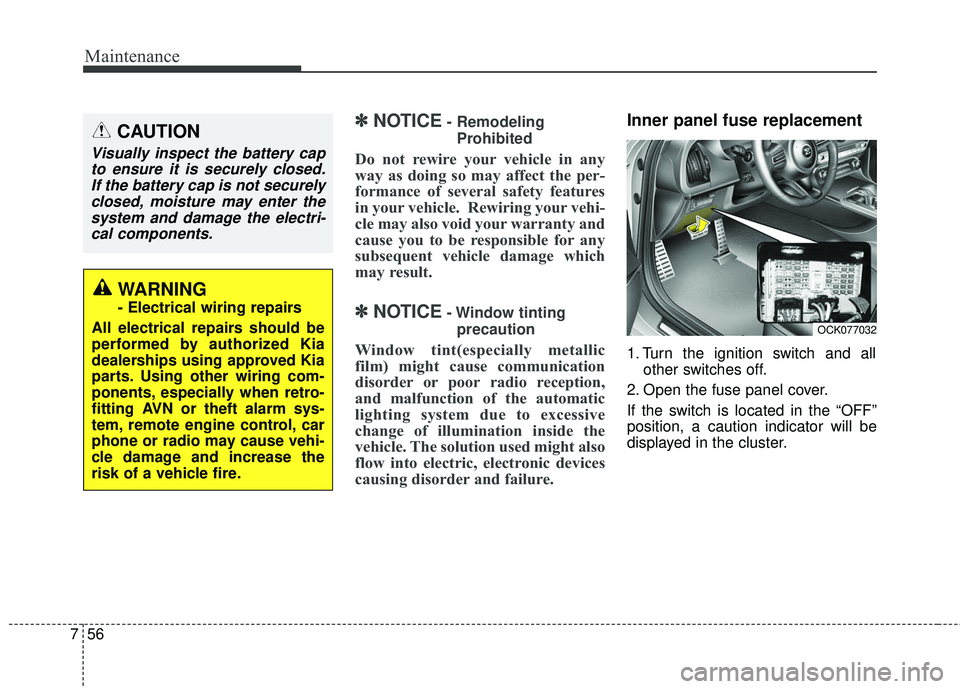
1. Turn the ignition switch and all other switches off.
2. Open the fuse panel cover.
If the switch is located in the “OFF”
position, a caution indicator will be
displayed in the cluster.
CAUTION
Visually inspect the battery cap to ensure it is securely closed.If the battery cap is not securelyclosed, moisture may enter thesystem and damage the electri-cal components.
WARNING
- Electrical wiring repairs
All electrical repairs should be
performed by authorized Kia
dealerships using approved Kia
parts. Using other wiring com-
ponents, especially when retro-
fitting AVN or theft alarm sys-
tem, remote engine control, car
phone or radio may cause vehi-
cle damage and increase the
risk of a vehicle fire.
OCK077032
Page 497 of 551
769
Maintenance
Fuse NameFuse ratingCircuit Protected
MDPS100AMDPS (Motor Driven Power Steering) Unit
B+660AEngine Control Relay, Fuse - HORN / WIPER1 / H/LAMP H / B/ALARM HORN)
B+160AInstrument Panel Junction Block (Fuse - IBU1 / IBU2)
B+250AInstrument Panel Junction Block (Fuse - E-SHIFTER1 / MODULE1)
E-CVVT 140A[THETA II 2.0L T-GDI Engine] E-CVVT Relay
VACUUM PUMP20AVacuum Pump Relay
AWD20AAWD (All Wheel Drive) ECM (Electronic Control Module)
IG 220AIG2 Relay
POWER OUTLET 210AFront / Rear USB Charger, Front Power Outlet #2,
POWER OUTLET 120AFront Power Outlet #1
A/C10AAir Conditioner Control Module
E-CVVT 320A[THETA II 2.0L T-GDI Engine] ECM (Engine Control Module)
Page 499 of 551
771
Maintenance
Fuse NameFuse ratingCircuit Protected
H/LAMP HI10AHead Lamp (High) Relay
ECU 120AECM (Engine Control Module)
SENSOR 315A[THETA II 2.0L T-GDI Engine] Oxygen Sensor (Up)
[Lambda II 3.3L T-GDI Engine] Oxygen Sensor #2/#4
SENSOR 210A
[THETA II 2.0L T-GDI Engine] Electronic Thermostat, Oil Control Valve, Purge Control Solenoid Valve,
RCV (Recirculation Valve Control) Control Solenoid Valve, Canister Close Valve
[Lambda II 3.3L T-GDI Engine] Electronic Thermostat, Oil Pressure Solenoid Valve, Oil Control Valve
#1/#2/#3/#4 (Intake/Exhaust), RCV (Recirculation Valve Control) Control Solenoid Valve, Purge Control
Solenoid Valve, Canister Close Valve
B/ALARM HORN10ABurglar Alarm Horn Relay
Page 500 of 551
Maintenance
72
7
Relay NameType
Vacuum Pump RelayISO HC MICRO
B/Alarm Horn RelayISO MICRO
Power Outlet RelayISO HC MICRO
Blower RelayISO HC MICRO
Start RelayISO HC MICRO
E-CVVT Relay (G4KL)ISO MICRO
Relay

![KIA STINGER 2018 Owners Manual 771
Maintenance
Fuse NameFuse ratingCircuit Protected
H/LAMP HI10AHead Lamp (High) Relay
ECU 120AECM (Engine Control Module)
SENSOR 315A[THETA II 2.0L T-GDI Engine] Oxygen Sensor (Up)
[Lambda II 3.3L](/manual-img/2/40391/w960_40391-498.png "KIA STINGER 2018 Owners Manual 771
Maintenance
Fuse NameFuse ratingCircuit Protected
H/LAMP HI10AHead Lamp (High) Relay
ECU 120AECM (Engine Control Module)
SENSOR 315A[THETA II 2.0L T-GDI Engine] Oxygen Sensor (Up)
[Lambda II 3.3L")
