Page 354 of 551

5101
Driving your vehicle
Your vehicle may be equipped with
the ISG system, which reduces fuel
consumption by automatically shut-
ting down the engine, when the vehi-
cle is at a standstill. (For example :
red light, stop sign and traffic jam)
The engine starts automatically as
soon as the starting conditions are
met.
The ISG system is ON whenever the
engine is running.
✽ ✽NOTICE
When the engine automatically
starts by the ISG system, some
warning lights (ABS, ESC, ESC
OFF, EPS or Parking brake warn-
ing light) may turn on for a few sec-
onds.
This happens because of low battery
voltage. It does not mean the system
has malfunctioned.
Auto stop
To stop the engine in idle stop
mode
Stop the vehicle completely by
pressing the brake pedal and the
shift lever is in the D(Drive) or
N(Neutral) position
The engine will stop and the green
AUTO STOP( ) indicator on the
instrument cluster will illuminate.
✽ ✽ NOTICE
If you open the engine hood in auto
stop mode, the following will hap-
pen:
• The ISG system will deactivate
(the light on the ISG OFF button
will illuminate).
• A message will appear on the LCD display. (Continued)
ISG (IDLE STOP AND GO) SYSTEM
OCK057144
OCK057095L
Page 355 of 551

Driving your vehicle
102
5
(Continued)
• If you move the transmission lever
from N to D (manual mode) or R
without depressing the brake
pedal after stopping engine auto-
matically, the engine does not
restart automatically and warning
chime alarms. When it happens,
press brake pedal for auto start.
Auto start
To restart the engine from idle
stop mode
Release the brake pedal.
or
Move the shift gear to the R (Reverse) position or the manual
mode while depressing the brake
pedal.
The engine will start and the green
AUTO STOP indicator ( ) on the
instrument cluster will go out.
The engine will also restart auto- matically without the driver’s anyactions if the following occurs:
- The fan speed of manual climate control system is set above the 3rd
position when the air conditioning is
on.
- The fan speed of automatic climate control system is set above the 6th
position when the air conditioning is
on.
- When a certain amount of time has passed with the climate control sys-
tem on.
- When the defroster is on.
- The brake vacuum pressure is low.
- The battery charging status is low.
- The vehicle speed exceeds 1 km/h (1 mph).
- Engine is turned off by Auto Stop for a long time.
- If you unfasten the seat belt or open the driver's door while depressing
the brake pedal.
OCK057096L
OCK057145
Page 357 of 551

Driving your vehicle
104
5
ISG system malfunction
The system may not operate when:
The ISG related sensors or system
error occurs.
The following will happen:
The yellow AUTO STOP ( ) indi-
cator on the instrument cluster will
stay on after blinking for 5 seconds.
The light on the ISG OFF button will illuminate.
✽ ✽ NOTICE
• If the ISG OFF button light is not
turned off by pressing the ISG
OFF button again or if the ISG
system continuously does not
work correctly, have your vehicle
inspected by a professional work-
shop as soon as possible.
Kia recommends to contact an
authorized Kia dealer/service
partner.
• When the ISG OFF button light comes on, it may stop illuminating
after driving your vehicle at
approximately 80 km/h for a max-
imum of two hours and setting the
fan speed control knob below the
2nd position. If the ISG OFF but-
ton light continues to be illuminat-
ed in spite of the procedure, have
your vehicle inspected by a profes-
sional workshop as soon as possi-
ble. Kia recommends to contact an
authorized Kia dealer/service
partner.
When the engine is in Idle Stop
mode, it's possible to restart the
engine without the driver taking any
action. Before leaving the car or
doing anything in the engine room
area, stop the engine by turning the
ignition switch to the LOCK/OFF
position or removing the ignition key.
✽ ✽ NOTICE
If the AGM battery is reconnected
or replaced, ISG function will not
operate immediately.
If you want to use the ISG function,
the battery sensor needs to be cali-
brated for approximately 4 hours
with the ignition off and then, turn
the engine on and off 2 or 3 times.
OCK057144
Page 365 of 551
Driving your vehicle
112
5
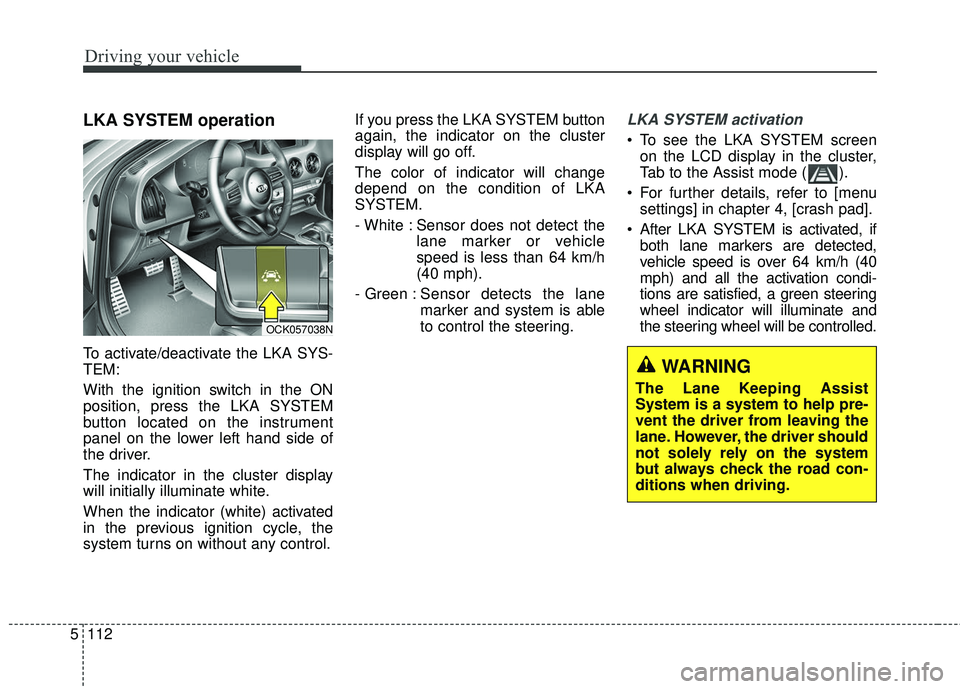
LKA SYSTEM operation
To activate/deactivate the LKA SYS-
TEM:
With the ignition switch in the ON
position, press the LKA SYSTEM
button located on the instrument
panel on the lower left hand side of
the driver.
The indicator in the cluster display
will initially illuminate white.
When the indicator (white) activated
in the previous ignition cycle, the
system turns on without any control. If you press the LKA SYSTEM button
again, the indicator on the cluster
display will go off.
The color of indicator will change
depend on the condition of LKA
SYSTEM.
- White : Sensor does not detect the
lane marker or vehicle
speed is less than 64 km/h
(40 mph).
- Green : Sensor detects the lane
marker and system is able
to control the steering.
LKA SYSTEM activation
To see the LKA SYSTEM screen
on the LCD display in the cluster,
Tab to the Assist mode ( ).
For further details, refer to [menu settings] in chapter 4, [crash pad].
After LKA SYSTEM is activated, if both lane markers are detected,
vehicle speed is over 64 km/h (40
mph) and all the activation condi-
tions are satisfied, a green steering
wheel indicator will illuminate and
the steering wheel will be controlled.
OCK057038N
WARNING
The Lane Keeping Assist
System is a system to help pre-
vent the driver from leaving the
lane. However, the driver should
not solely rely on the system
but always check the road con-
ditions when driving.
Page 377 of 551

Driving your vehicle
124
5
Operating conditions
Select RCCW (Rear Cross-Traffic
Collision Warning) in “User
Settings” under “Driving Assist” on
the instrument cluster. The system
will turn on and standby to activate.
Select RCCW again, to turn the system off.
If the vehicle is turned off, the RCCW system will remember the
last settings upon restart. Always
turn the RCCW system off when
not in use.
The system operates when the vehicle speed is below 10km/h (6
mph) with the shift lever in R
(Reverse).
The RCCW (Rear Cross-Traffic Collision Warning) detecting range
is 0.5 m ~ 20 m (1.6 feet ~ 65 feet)
based on the side direction. If the
approaching vehicle speed is
4 km/h (2.5 mph) ~ 36 km/h (22
mph) within sensing range, it is
detected. However, the system
sensing range can vary based on
conditions. Always pay attention to
your surroundings.
Warning type If the vehicle detected by sensorsapproaches your vehicle, the warn-
ing chime will sound and the warn-
ing light will blink on the outside
rearview mirror.
If the detected vehicle is out of detection range, moving away in the
opposite direction or moving slow,
or if the vehicle is right behind your
vehicle, if the direction of the other
vehicle is not heading towards your
vehicle, the warning is cancelled.
The system may not operate prop- erly due to other factors or circum-
stances. Always pay attention to
your surroundings.
OCK057048
OYG056144L
OCK057050
Page 485 of 551

757
Maintenance
3. Pull the suspected fuse straightout. Use the removal tool provided
on the engine compartment fuse
panel cover.
4. Check the removed fuse; replace it if it is blown.
Spare fuses are provided in theengine compartment fuse panel.
5. Push in a new fuse of the same rating, and make sure it fits tightly
in the clips.
If it fits loosely, consult an authorized
Kia dealer.
If you do not have a spare, use a fuse of the same rating from a circuityou may not need for operating thevehicle, such as the power outletfuse.
If the head lamp, turn signal lamp,
stop signal lamp, fog lamp, DRL, tail
lamp, HMSL do not work and the
fuses are OK, check the fuse panel
in the engine compartment. If a fuse
is blown, it must be replaced.
✽ ✽ NOTICE
If the headlamp, fog lamp, turn sig-
nal lamp, or tail lamp malfunction
even without any problem to the
lamps, have the vehicle checked by
an authorized Kia dealer for assis-
tance.
Fuse switch
Always set the fuse switch to the ON
position before using the vehicle.
If you move the switch to the OFF
position, some items such as audio
and digital clock must be reset and
transmitter (or smart key) may not
work properly. When the switch is
Off, the caution indicator will be dis-
played on the instrument cluster.
Always place the fuse switch in the
ON position while driving the vehicle.
If the switch is located in the “OFF”
position, a caution indicator will be
displayed in the cluster.
OCK077033
OCK077034
Page 491 of 551
763
Maintenance
Fuse NameFuse ratingCircuit Protected
MULTI MEDIA 125ALow DC-DC Converter (Audio)
AIR BAG15ASRS (Supplemental Restraint System) Control Module
INTERIOR LAMP10AOverhead Console Lamp, Center Room Lamp, Room Lamp, Vanity Lamp Switch Left Handle side/Right
Handle side, Luggage Lamp Left Handle side/Right Handle side, Glove Box Lamp, Driver/Passenger Door
Mood Lamp, Driver/Passenger Door Lamp, Driver/Passenger Foot Lamp
STOP LAMP10AIBU, Stop Lamp Switch
CLUSTER10AInstrument Cluster, Head-Up Display
E-SHIFTER 210AElectronic Auto Transmission Shift Lever (IG1)
IBU 410AIBU (IG1)
MULTI MEDIA 310AInstrument Cluster, Head-Up Display, Air Conditioner Switch
MULTI MEDIA 215AAudio
MEMORY 110AAir Conditioner Control Module, Air Conditioner Switch, Security Indicator, Head-Up Display
IBU 310AIBU (B+)
Instrument panel (Driver’s side fuse panel)
Page 492 of 551
Maintenance
64
7
Fuse NameFuse ratingCircuit Protected
E-SHIFTER 110AElectronic Auto Transmission Shift Lever (B+)
A/BAG IND.10AInstrument Cluster, Passenger Air Bag IND.
IBU 115AIBU (B+)
DAU10ADriver Door Module, Driver/Passenger Power Outside Mirror
MODULE 210AIBU (IG2)
MODULE 310AAuto Transmission Shift Lever Switch, Driver Door Module, Stop Lamp Switch
DOOR LOCK20ADoor Lock Relay, Door Unlock Relay, Two Turn Unlock Relay
S/HEATER
DRV/PASS25AFront Air Ventilation Seat Control Module, Front Seat Warmer Control Module
TAIL GATE10ATail Gate Lid Relay, Fuel Lid Relay, Crash Pad Switch
IBU 210ARain Sensor
POWER OUTLET 120AFront Power Outlet #2

