Page 120 of 551
433
Features of your vehicle
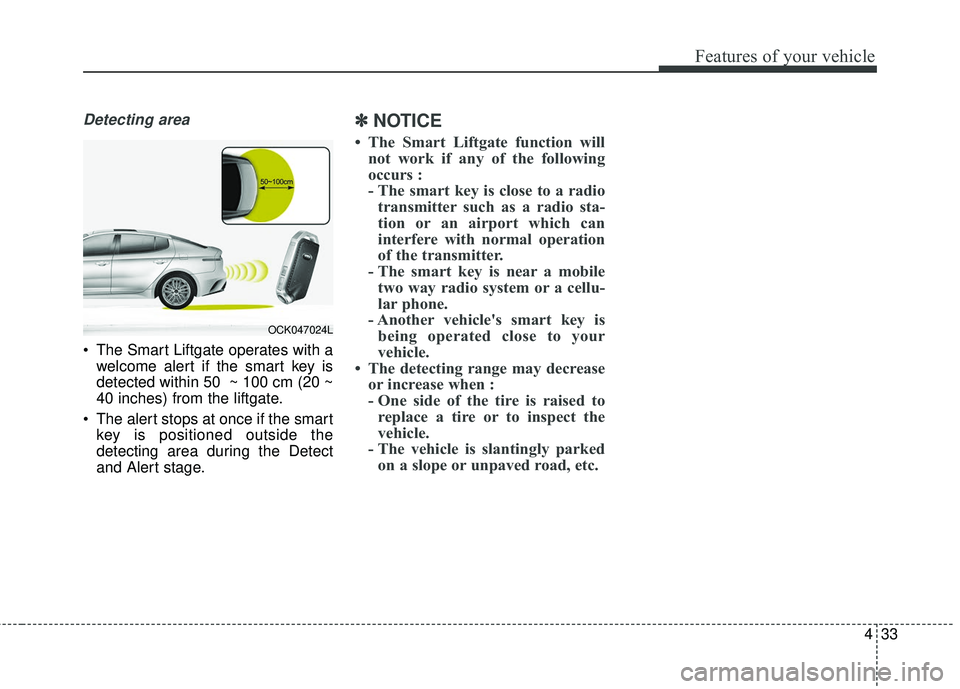
Detecting area
The Smart Liftgate operates with awelcome alert if the smart key is
detected within 50 ~ 100 cm (20 ~
40 inches) from the liftgate.
The alert stops at once if the smart key is positioned outside the
detecting area during the Detect
and Alert stage.
✽ ✽ NOTICE
• The Smart Liftgate function will
not work if any of the following
occurs :
- The smart key is close to a radiotransmitter such as a radio sta-
tion or an airport which can
interfere with normal operation
of the transmitter.
- The smart key is near a mobile two way radio system or a cellu-
lar phone.
- Another vehicle's smart key is being operated close to your
vehicle.
• The detecting range may decrease or increase when :
- One side of the tire is raised toreplace a tire or to inspect the
vehicle.
- The vehicle is slantingly parked on a slope or unpaved road, etc.
OCK047024L
Page 165 of 551
Features of your vehicle
78
4
(3) Turn by Turn mode (if equipped)
This mode displays the state of the
navigation.
(4) LKA/SCC mode (if equipped)
This mode displays the state of the
Smart Cruise Control (SCC) and
Lane keeping Assist (LKA).
❈ For more details, refer to “Smart
Cruise Control (SCC)” and “Lane
keeping Assist (LKA)” in chapter 5.
(5) User Settings mode
On this mode, you can change set-
tings of the doors, lamps and so on.
(6) Master warning mode
This mode informs of warning mes-
sages related to Low tire pressure or
malfunction of Blind-spot Collision
Warning and so on.
❈ For controlling the LCD modes,
refer to “LCD window Control” in
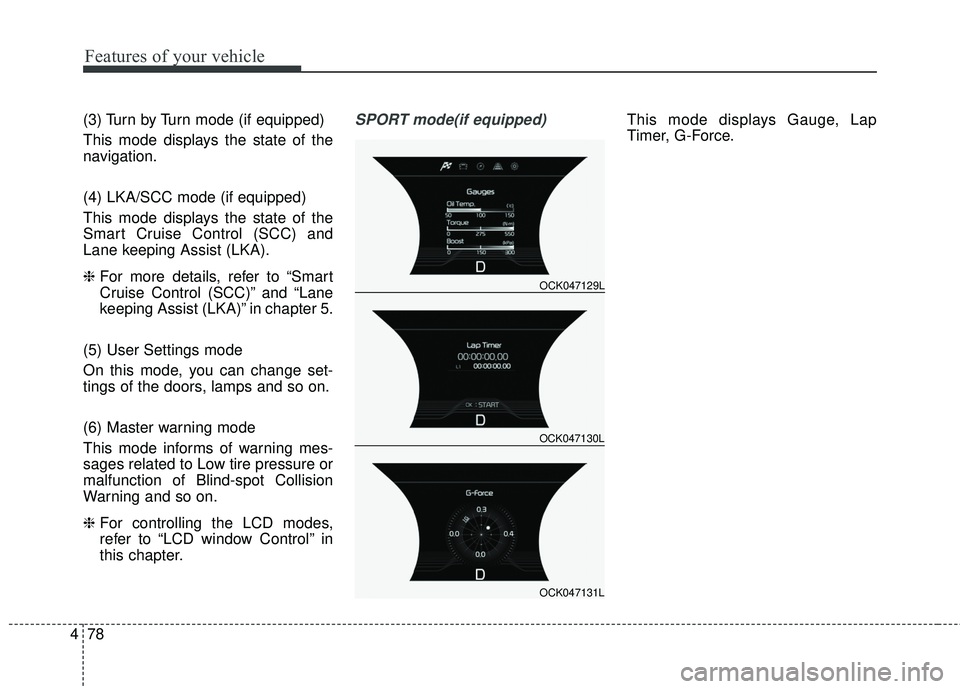
this chapter.SPORT mode(if equipped)This mode displays Gauge, Lap
Timer, G-Force.
OCK047129L
OCK047130L
OCK047131L
Page 174 of 551

487
Features of your vehicle
Tire Pressure Unit (if equipped)- Choose the tire pressure unit.(psi, kPa, bar)
Torque Unit(if equipped) - Choose the torque unit. (N·m,lb·ft)
Language
Choose the language
Reset
You can reset the menus in the User
Settings Mode. All menus in the User
Settings Mode are initialized, except
language and service interval.Warning Messages (if equipped)
Shift to P
This warning message illuminates if you try to turn off the engine without
the transmission in P (Park) posi-
tion.
At this time, the Engine Start/Stop Button turns to the ACC position (If
you press the Engine Start/Stop
Button once more, it will turn to the
ON position).
Low Key Battery
This warning message illuminatesif the battery of the smart key is
discharged when the Engine
Start/Stop Button changes to the
OFF position.
Press brake pedal to start engine
This warning message illuminatesif the Engine Start/Stop Button
changes to the ACC position twice
by pressing the button repeatedly
without depressing the brake pedal.
It means that you should depress the brake pedal to start the engine.
Key not in vehicle
This warning message will illumi-nates when a door is opened or
closed with the ignition in ACC
position and the smart key is not in
the vehicle.
Particularly when a door is closed
and the smart key is not in the
vehicle, alarm sound will beep.
If so, turn off the ignition or carry
the smart key in your pocket.
It means that you should always have the smart key with you.
Page 185 of 551

Features of your vehicle
98
4
Low Tire Pressure
Warning Light (if equipped)
This warning light illuminates:
Once you set the Engine Start/Stop Button to the ON position.
- It illuminates for approximately 3seconds and then goes off.
When one or more of your tires are significantly underinflated (The
location of the underinflated tires
are displayed on the LCD display).
❈ For more details, refer to “Tire
Pressure Monitoring System
(TPMS)” in chapter 6. This warning light remains on after
blinking for approximately 60 seconds
or repeats blinking and off at the
intervals of approximately 3 seconds:
When there is a malfunction with
the TPMS.
In this case, have the vehicle
inspected by an authorized Kia
dealer.
❈ For more details, refer to “Tire
Pressure Monitoring System
(TPMS)” in chapter 6.
LED Headlamp Warning
Light (if equipped)
This warning light illuminates:
Once you set the Engine Start/Stop Button to the ON position.
- It illuminates for approximately 3seconds and then goes off.
When there is a malfunction with the LED headlamp.
In this case, have the vehicle inspect-
ed by an authorized Kia dealer.
This warning light blinks:
When there is a malfunction with a LED headlamp related part.
In this case, have the vehicle inspect-
ed by an authorized Kia dealer.
✽ ✽ NOTICE
Continuous driving with the LED
Headlamp Warning Light on or
blinking can reduce LED headlamp
(low beam) life.
WARNING - Low tire
pressure
Significantly low tire pressure makes the vehicle unstable
and can contribute to loss of
vehicle control and increased
braking distances.
Continued driving or low pres- sure tires will cause the tires to
overheat and fail.
Page 205 of 551

Features of your vehicle
118
4
The high beam switches to low beam
in the below conditions.
- When the High Beam Assist is off.
- When the light switch is not in the
AUTO position.
- When the headlamp is detected from the on-coming vehicle.
- When the tail lamp is detected from the front vehicle.
- When the surrounding is bright enough high beams are not need-
ed.
- When streetlights or other lights are detected.
- When vehicle speed is below 24 km/h (15 mph).
- When headlamp / taillamp of bicy- cle/motorcycle is detected The system may not operate normal-
ly in the below conditions.
When the light from the on-coming
or front vehicle is not detected
because of lamp damage, hidden
from sight, etc.
When the lamp of the on-coming or front vehicle is covered with dust,
snow or water.
When the light from the on-coming or front vehicle is not detected
because of exhaust fume, smoke,
fog, snow, etc.
When the front window is covered with foreign matters such as ice,
dust, fog, or is damaged.
When there is a similar shape lamp with the front vehicle’s lamps.
When it is hard to see because of fog, heavy rain or snow.
When the headlamp is not repaired or replaced at an authorized deal-
er.
When headlamp aiming is not properly adjusted.
When driving on a narrow curved road or rough road. When driving downhill or uphill.
When only part of the vehicle in
front is visible on a crossroad or
curved road.
When there is a traffic light, reflect- ing sign, flashing sign or mirror.
When the road conditions are bad such as being wet or covered with
snow.
When the front vehicle’s head- lamps are off but the fog lamps on.
When a vehicle suddenly appears from a curve.
When the vehicle is tilted from a flat tire or being towed.
When the LKA (Lane Keeping Assist) system warning light illumi-
nates. (if equipped)
Page 258 of 551

55
Driving your vehicle
Before entering vehicle
• Be sure that all windows, outsidemirror(s), and outside lights are
clean.
Check the condition of the tires.
Check under the vehicle for any sign of leaks.
Be sure there are no obstacles behind you if you intend to back up.
Necessary inspections
Fluid levels, such as engine oil,
engine coolant, brake fluid, and
washer fluid should be checked on a
regular basis, at the exact interval
depending on the fluid. Further
details are provided in chapter 7,
“Maintenance”.
Before starting
Close and lock all doors.
Position the seat so that all con-trols are easily reached.
Buckle your seat belt.
Adjust the inside and outside rearview mirrors.
Be sure that all lights work.
Check all gauges.
Check the operation of warning lights when the ignition switch is
turned to the ON position.
Release the parking brake and make sure the brake warning light
goes out.
For safe operation, be sure you are
familiar with your vehicle and its
equipment.
BEFORE DRIVING
WARNING - Distracted driving
Focus on the road while driving.
The driver's primary responsi-
bility is in the safe and legal
operation of the vehicle. Use of
any handled devices, other
equipment or vehicle systems
that distract the drive should
not be used during vehicle
operation.
Page 272 of 551
519
Driving your vehicle
Do not operate both brake andaccelerate pedals simultaneously
for longer than 4 seconds without
leaving the vehicle.
When re-using Launch Control, a driver should have the vehicle cool
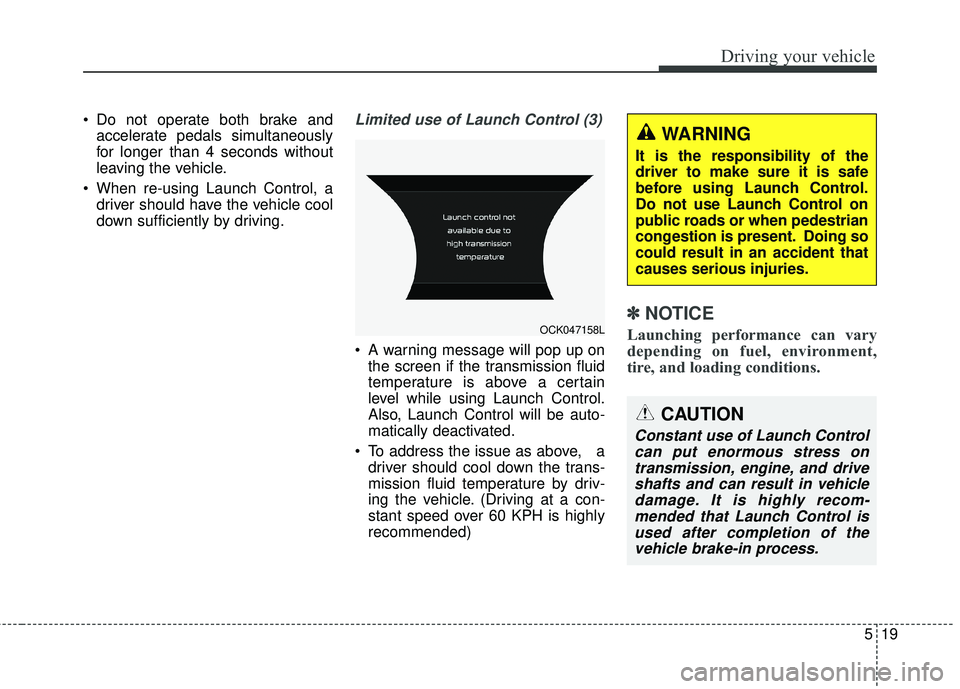
down sufficiently by driving.Limited use of Launch Control (3)
A warning message will pop up onthe screen if the transmission fluid
temperature is above a certain
level while using Launch Control.
Also, Launch Control will be auto-
matically deactivated.
To address the issue as above, a driver should cool down the trans-
mission fluid temperature by driv-
ing the vehicle. (Driving at a con-
stant speed over 60 KPH is highly
recommended)
✽ ✽ NOTICE
Launching performance can vary
depending on fuel, environment,
tire, and loading conditions.
CAUTION
Constant use of Launch Control
can put enormous stress ontransmission, engine, and driveshafts and can result in vehicledamage. It is highly recom-mended that Launch Control isused after completion of thevehicle brake-in process.
OCK047158L
WARNING
It is the responsibility of the
driver to make sure it is safe
before using Launch Control.
Do not use Launch Control on
public roads or when pedestrian
congestion is present. Doing so
could result in an accident that
causes serious injuries.
Page 287 of 551
Driving your vehicle
34
5
✽ ✽
NOTICE
Launching performance can vary
depending on fuel, environment,
tire, and loading conditions.
CAUTION
Constant use of Launch Control
can put enormous stress ontransmission, engine, and driveshafts and can result in vehicledamage. It is highly recom-mended that Launch Control isused after completion of thevehicle brake-in process.
WARNING
It is the responsibility of the
driver to make sure it is safe
before using Launch Control.
Do not use Launch Control on
public roads or when pedestrian
congestion is present. Doing so
could result in an accident that
causes serious injuries.