Page 126 of 551
439
Features of your vehicle
Opening the hood
1. Pull the release lever to unlatchthe hood. The hood should pop
open slightly.
Open the hood after turning off the
engine on a flat surface, press the P
(Parking) button to parking position
and setting the parking brake. 2. Go to the front of the vehicle, raise
the hood slightly, push the second-
ary latch (1) left side of the hood
center and lift the hood (2).
3. Raise the hood. It will completely rise by itself after it has been
raised about halfway.
Hood open warning
The warning message will appear on
the LCD display when hood is open.
The warning chime will operate when
the vehicle is being driven at or
above 3 km/h (2 mph) with the hood
open.
HOOD
OCK047029
OCK047030
OCK047110L
Page 169 of 551
Features of your vehicle
82
4
If the estimated distance is below
1 km (1 mi.), the trip computer will
display “---” as distance to empty.
✽ ✽ NOTICE
• If the vehicle is not on level ground
or the battery power has been
interrupted, the distance to empty
function may not operate correct-
ly.
• The distance to empty may differ from the actual driving distance as
it is an estimate of the available
driving distance.
• The trip computer may not regis- ter additional fuel if less than 6
liters (1.6 gallons) of fuel are
added to the vehicle.
• The fuel economy and distance to empty may vary significantly
based on driving conditions, driv-
ing habits, and condition of the
vehicle.
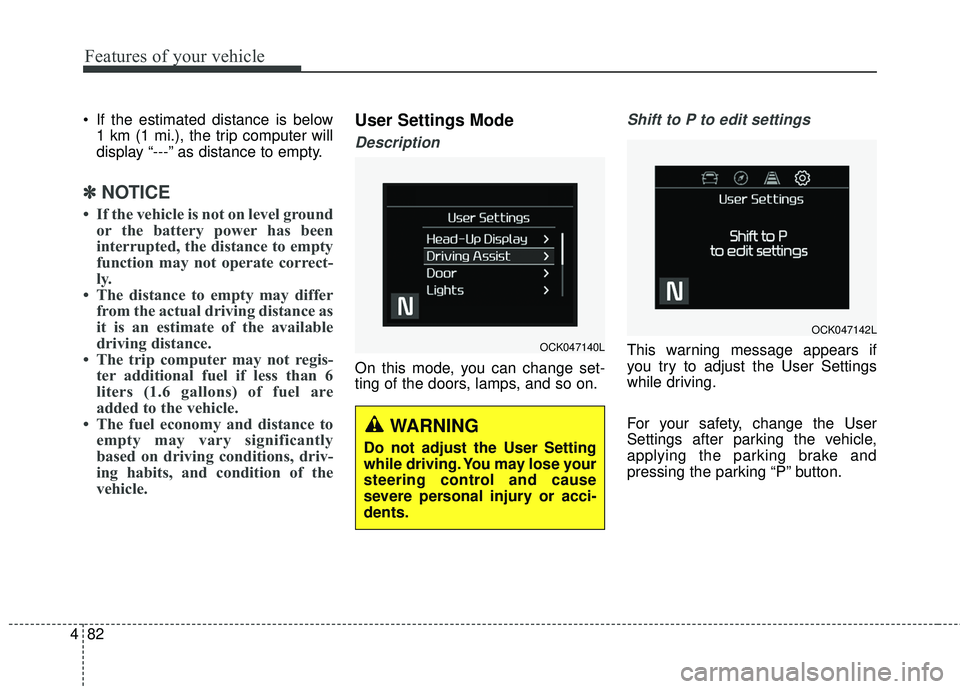
User Settings Mode
Description
On this mode, you can change set-
ting of the doors, lamps, and so on.
Shift to P to edit settings
This warning message appears if
you try to adjust the User Settings
while driving.
For your safety, change the User
Settings after parking the vehicle,
applying the parking brake and
pressing the parking “P” button.OCK047140L
WARNING
Do not adjust the User Setting
while driving. You may lose your
steering control and cause
severe personal injury or acci-
dents.
OCK047142L
Page 174 of 551

487
Features of your vehicle
Tire Pressure Unit (if equipped)- Choose the tire pressure unit.(psi, kPa, bar)
Torque Unit(if equipped) - Choose the torque unit. (N·m,lb·ft)
Language
Choose the language
Reset
You can reset the menus in the User
Settings Mode. All menus in the User
Settings Mode are initialized, except
language and service interval.Warning Messages (if equipped)
Shift to P
This warning message illuminates if you try to turn off the engine without
the transmission in P (Park) posi-
tion.
At this time, the Engine Start/Stop Button turns to the ACC position (If
you press the Engine Start/Stop
Button once more, it will turn to the
ON position).
Low Key Battery
This warning message illuminatesif the battery of the smart key is
discharged when the Engine
Start/Stop Button changes to the
OFF position.
Press brake pedal to start engine
This warning message illuminatesif the Engine Start/Stop Button
changes to the ACC position twice
by pressing the button repeatedly
without depressing the brake pedal.
It means that you should depress the brake pedal to start the engine.
Key not in vehicle
This warning message will illumi-nates when a door is opened or
closed with the ignition in ACC
position and the smart key is not in
the vehicle.
Particularly when a door is closed
and the smart key is not in the
vehicle, alarm sound will beep.
If so, turn off the ignition or carry
the smart key in your pocket.
It means that you should always have the smart key with you.
Page 175 of 551

Features of your vehicle
88
4
Key not detected
This warning message illuminates
if the smart key is not detected
when you press the Engine
Start/Stop Button.
Press start button again
This warning message illuminatesif you can not operate the Engine
Start/Stop Button when there is a
problem with the Engine Start/Stop
Button system.
It means that you could start the engine by pressing the Engine
Start/ Stop Button once more.
If the warning illuminates each time you press the Engine Start/Stop
Button, have the vehicle inspected
by an authorized Kia dealer.
Press start button with key
This warning message illuminatesif you press the Engine Start/Stop
Button while the warning message
“Key not detected” is illuminating.
At this time, the immobilizer indica- tor light blinks.
Check BRAKE SWITCH fuse
This warning message illuminatesif the brake switch fuse is discon-
nected.
It means that you should replace the fuse with a new one. If that is
not possible, you can start the
engine by pressing the Engine
Start/Stop Button for 10 seconds in
the ACC position.
Shift to P or N to start engine
This warning message illuminatesif you try to start the engine with
the transmission not in the P (Park)
or N (Neutral) position.
✽ ✽ NOTICE
You can start the engine with the
transmission in the N (Neutral) posi-
tion. But, for your safety, we recom-
mend that you start the engine with
the transmission in the P (Park) posi-
tion.
Page 180 of 551

493
Features of your vehicle
Parking Brake & BrakeFluid Warning Light
This warning light illuminates:
Once you set the Engine Start/Stop Button to the ON position.
- It illuminates for approximately 3seconds
- It remains on if the parking brake is applied.
When the parking brake is applied.
When the brake fluid level in the reservoir is low.
- If the warning light illuminateswith the parking brake released, it
indicates the brake fluid level in
reservoir is low. If the brake fluid level in the reservoir
is low:
1. Drive carefully to the nearest safe
location and stop your vehicle.
2. With the engine stopped, check the brake fluid level immediately
and add fluid as required (For
more details, refer to “Brake Fluid”
in chapter 7). Then check all brake
components for fluid leaks. If any
leak on the brake system is still
found, the warning light remains
on, or the brakes do not operate
properly, do not drive the vehicle.
In this case, have your vehicle
towed to an authorized Kia dealer
and inspected. Dual-diagonal braking system
Your vehicle is equipped with dual-
diagonal braking systems. This
means you still have braking on two
wheels even if one of the dual sys-
tems should fail.
With only one of the dual systems
working, more than normal pedal
travel and greater pedal pressure are
required to stop the vehicle.
Also, the vehicle will not stop in as
short a distance with only a portion
of the brake system working.
If the brakes fail while you are driv-
ing, shift to a lower gear for addition-
al engine braking and stop the vehi-
cle as soon as it is safe to do so.
Page 181 of 551

Features of your vehicle
94
4
Anti-lock Brake System
(ABS) Warning Light
This warning light illuminates:
Once you set the Engine Start/Stop Button to the ON position.
- It illuminates for approximately 3seconds and then goes off.
When there is a malfunction with the ABS (The normal braking sys-
tem will still be operational without
the assistance of the anti-lock
brake system).
In this case, have the vehicle
inspected by an authorized Kia
dealer.
Electronic
Brake forceDistribution(EBD) System Warning Light
These two warning lights illuminate at
the same time while driving:
When the ABS and regular brake system may not work normally.
In this case, have the vehicle
inspected by an authorized Kia
dealer.
WARNING - Electronic
Brake force Distribution
(EBD) System Warning Light
When both ABS and Parking
Brake & Brake Fluid Warning
Lights are on, the brake system
will not work normally and you
may experience an unexpected
and dangerous situation during
sudden braking.
In this case, avoid high speed
driving and abrupt braking.
Have your vehicle inspected by
an authorized Kia dealer as
soon as possible.
Page 182 of 551

495
Features of your vehicle
✽ ✽NOTICE- Electronic Brake
force Distribution (EBD)
System Warning Light
When the ABS Warning Light is on
or both ABS and Parking Brake &
Brake Fluid Warning Lights are on,
the speedometer, odometer, or trip-
meter may not work. Also, the EPS
Warning Light may illuminate and
the steering effort may increase or
decrease.
In this case, have the vehicle inspect-
ed by an authorized Kia dealer.
Electronic Power Steering (EPS) WarningLight (if equipped)
This warning light illuminates:
Once you set the Engine Start/Stop Button to the ON position.
- It remains on until the engine isstarted.
When there is a malfunction with the EPS.
In this case, have the vehicle
inspected by an authorized Kia
dealer.
Malfunction Indicator
Lamp (MIL)
This warning light illuminates:
Once you set the Engine Start/Stop Button to the ON position.
- It remains on until the engine isstarted.
When there is a malfunction with the emission control system.
In this case, have the vehicle
inspected by an authorized Kia
dealer.
Page 187 of 551

Features of your vehicle
100
4
Dynamic Bending Light
(DBL) Warning Light(if equipped)
This warning light blinks:
When there is a malfunction with the Dynamic Bending Light (DBL).
If there is a malfunction with the
Dynamic Bending Light (DBL):
1. Drive carefully to the nearest safe location and stop your vehicle.
2. Turn the engine off and restart the engine. If the warning light
remains on, have the vehicle
inspected by an authorized Kia
dealer.
Electronic Parking Brake
(EPB) Warning Light (if equipped)
This warning light illuminates:
Once you set the Engine Start/Stop Button to the ON position.
- It illuminates for approximately 3seconds and then goes off.
When there is a malfunction with the EPB.
In this case, have the vehicle
inspected by an authorized Kia
dealer.
✽ ✽ NOTICE-Electronic Parking
Brake (EPB) Warning Light
The Electronic Parking Brake
(EPB) Warning Light may illumi-
nates when the Electronic Stability
control (ESC) Indicator Light comes
on to indicates that the ESC is not
working properly (This does not
indicate malfunction of the EPB).
Indicator Lights
Electronic Stability Control (ESC) IndicatorLight (if equipped)
This indicator light illuminates:
Once you set the Engine Start/Stop Button to the ON position.
- It illuminates for approximately 3seconds and then goes off.
When there is a malfunction with the ESC system.
In this case, have the vehicle
inspected by an authorized Kia
dealer.
This indicator light blinks:
While the ESC is operating.
❈ For more details, refer to
“Electronic Stability Control (ESC)”
in chapter 5.
EPB
