2018 KIA STINGER brake
[x] Cancel search: brakePage 327 of 551
Driving your vehicle
74
5
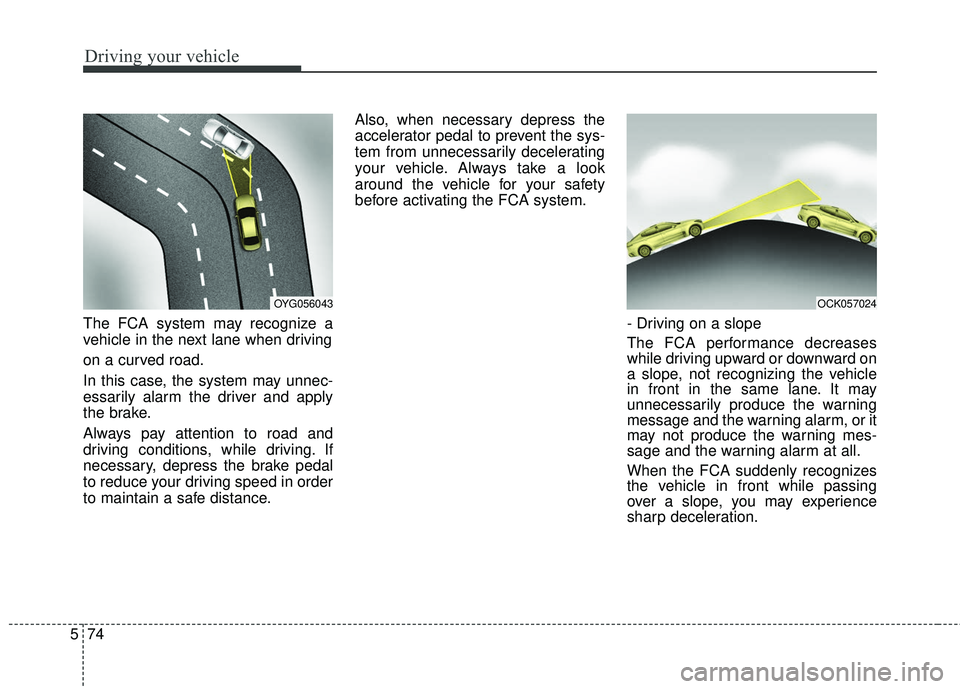
The FCA system may recognize a
vehicle in the next lane when driving
on a curved road.
In this case, the system may unnec-
essarily alarm the driver and apply
the brake.
Always pay attention to road and
driving conditions, while driving. If
necessary, depress the brake pedal
to reduce your driving speed in order
to maintain a safe distance. Also, when necessary depress the
accelerator pedal to prevent the sys-
tem from unnecessarily decelerating
your vehicle. Always take a look
around the vehicle for your safety
before activating the FCA system.
- Driving on a slope
The FCA performance decreases
while driving upward or downward on
a slope, not recognizing the vehicle
in front in the same lane. It may
unnecessarily produce the warning
message and the warning alarm, or it
may not produce the warning mes-
sage and the warning alarm at all.
When the FCA suddenly recognizes
the vehicle in front while passing
over a slope, you may experience
sharp deceleration.
OYG056043OCK057024
Page 328 of 551
575
Driving your vehicle
Always keep your eyes forward while
driving upward or downward on a
slope, and, if necessary, depress the
brake pedal to reduce your driving
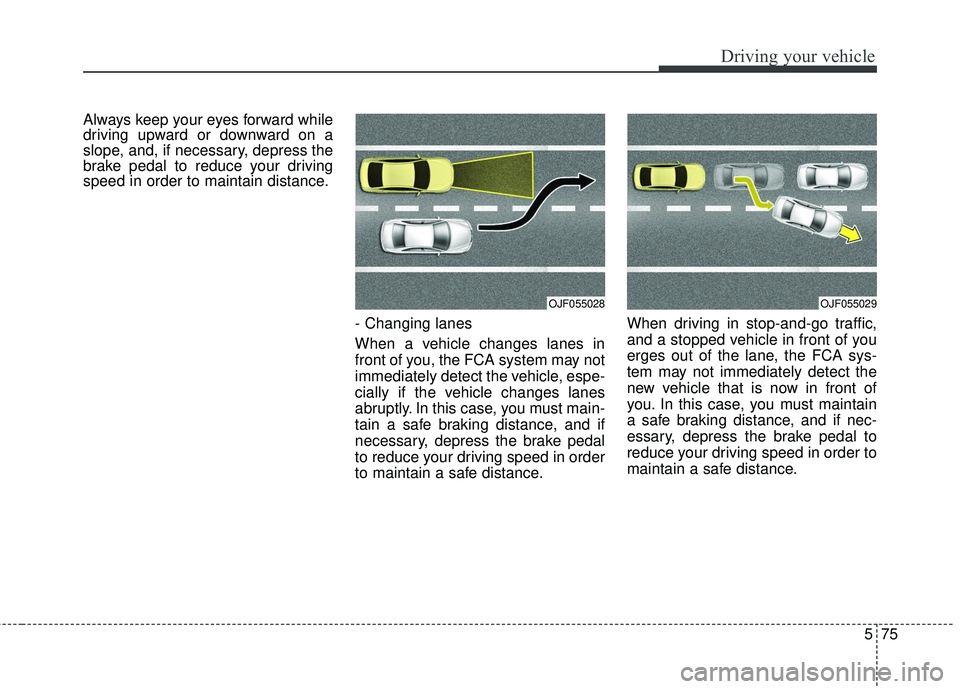
speed in order to maintain distance.- Changing lanes
When a vehicle changes lanes in
front of you, the FCA system may not
immediately detect the vehicle, espe-
cially if the vehicle changes lanes
abruptly. In this case, you must main-
tain a safe braking distance, and if
necessary, depress the brake pedal
to reduce your driving speed in order
to maintain a safe distance.When driving in stop-and-go traffic,
and a stopped vehicle in front of you
erges out of the lane, the FCA sys-
tem may not immediately detect the
new vehicle that is now in front of
you. In this case, you must maintain
a safe braking distance, and if nec-
essary, depress the brake pedal to
reduce your driving speed in order to
maintain a safe distance.
OJF055028OJF055029
Page 329 of 551

Driving your vehicle
76
5
- Recognizing the vehicle
Detecting the vehicle in front of you If
the vehicle in front of you has cargo
that extends rearward from the cab,
or when the vehicle in front of you
has higher ground clearance, addi-
tional special attention is required.
The FCA system may not be able to
detect the cargo extending from the
vehicle. In these instances, you must
maintain a safe braking distance
from the rearmost object, and if nec-
essary, depress the brake pedal to
reduce your driving speed in order to
maintain distance.
Recognizing pedestrians
The sensor may be limited when:
- The pedestrian is not fully detected
by the camera recognition system,
for example, if the pedestrian is
leaning over or is not fully walking
upright
- The pedestrian is moving very quickly or appears abruptly in the
camera detection area
- The pedestrian is wearing clothing that easily blends into the back-
ground, making it difficult to be
detected by the camera recogni-
tion system
- The outside lighting is too bright (e.g. when driving in bright sunlight
or in sun glare) or too dark (e.g.
when driving on a dark rural road
at night) - There is an item similar to a per-
son's body structure
- The pedestrian is small
- The pedestrian has impaired mobility
- The sensor recognition is limited
- It is difficult to detect and distin- guish the pedestrian from other
objects in the surroundings, for
example, when there is a group of
pedestrians or a large crowd
- If a sudden change in the sensor recognition takes place while driv-
ing over the speed bump,
- When the vehicle is severely shak- en,
- When driving around circular inter- section after the vehicle in front,
- If the front of the camera lens is contaminated by front glass tinting,
film, water repellent coating, dam-
age on glass, foreign matter (stick-
er, insect, etc.)
OCK057025
Page 330 of 551

577
Driving your vehicle
- The radar or camera or cameralens is damaged.
- If the headlights of the vehicle are not used at night or in the tunnel
section, or the light is too weak
- If street light or the light of the vehi- cle coming from the opposite is
reflected or when sunlight is
reflected by the water on the road
surface
- When the back light is projected in the direction of the vehicle's motion
(including the headlights of vehi-
cles)
- Road sign, shadow on the road, tunnel entrance, toll gate, partial
pavement
- If the moist on the front windshield is not entirely removed or it is
frozen
- The weather is foggy
- The radar/camera sensor recogni- tion is limited.
✽ ✽ NOTICE
The system may temporarily cancel
due to the strong electric waves.
Pay great caution to the vehicle in
front, when it has heavy loading
extended rearward, or when it has
higher ground clearance.
The FCA system is designed to detect and monitor the vehicle
ahead or detect a pedestrian in the
roadway through radar signals and
camera recognition. It is not
designed to detect bicycles, motor-
cycles, or smaller wheeled objects
such as lug- gage bags, shopping
carts, or strollers.
The FCA does not operate in a cer- tain situation. Thus, never test-
operate the FCA against a person
or an object. It may cause a severe
injury or even death.
When replacing or reinstalling the windshield, front bumper or
radar/camera after removal, have
the vehicle inspected by a profes-
sional workshop. Kia recommends
to visit an authorized Kia
dealer/service partner.
WARNING - Testing the
FCA
The FCA does not operate in
certain situations. Thus, never
test-operate the FCA against a
person or an object. It may
cause a severe injury or even
death.
WARNING - FCA and
Towing
Cancel the FCA in the User
Settings on the LCD display,
before towing another vehicle.
While towing, the brake applica-
tion may adversely affect your
vehicle safety.
Page 331 of 551

Driving your vehicle
78
5
The cruise control system allows you
to program the vehicle to maintain a
constant speed without depressing
the accelerator pedal.
This system is designed to function
above approximately 30 km/h (20
mph ). If the cruise control is left on,
(cruise indicator light is illuminat-
ed), the cruise control can be
switched on accidentally. Keep the
cruise control system off when the
cruise control is not in use, to avoid
inadvertently setting a speed.
Use the cruise control system only when traveling on open highways
in good weather.
Do not use the cruise control when it may not be safe to keep the vehi-
cle at a constant speed, for
instance, driving in heavy or vary-
ing traffic, or on slippery (rainy, icy
or snow- covered) or winding roads
or over 6% up-hill or down-hill
roads.
Pay particular attention to the driv- ing conditions whenever using the
cruise control system.
Be careful when driving downhill using the cruise control system,
which may increase the vehicle
speed.
✽ ✽ NOTICE
• During normal cruise control oper-
ation, when the SET switch is acti-
vated or reactivated after applying
the brakes, the cruise control will
energize after approximately 3 sec-
onds. This delay is normal.
• To activate cruise control, depress the brake pedal at least once after
turning the ignition switch to the
ON position or starting the engine.
This is to check if the brake switch
which is important part to cancel
cruise control is in normal condi-
tion.
CRUISE CONTROL SYSTEM
WARNING - Misuse of
Cruise Control
Do not use cruise control if the
traffic situation does not allow
you to drive safely at a constant
speed and with sufficient dis-
tance to the vehicle in front.
OCK057027L
Page 333 of 551
Driving your vehicle
80
5
To decrease the cruising
speed:
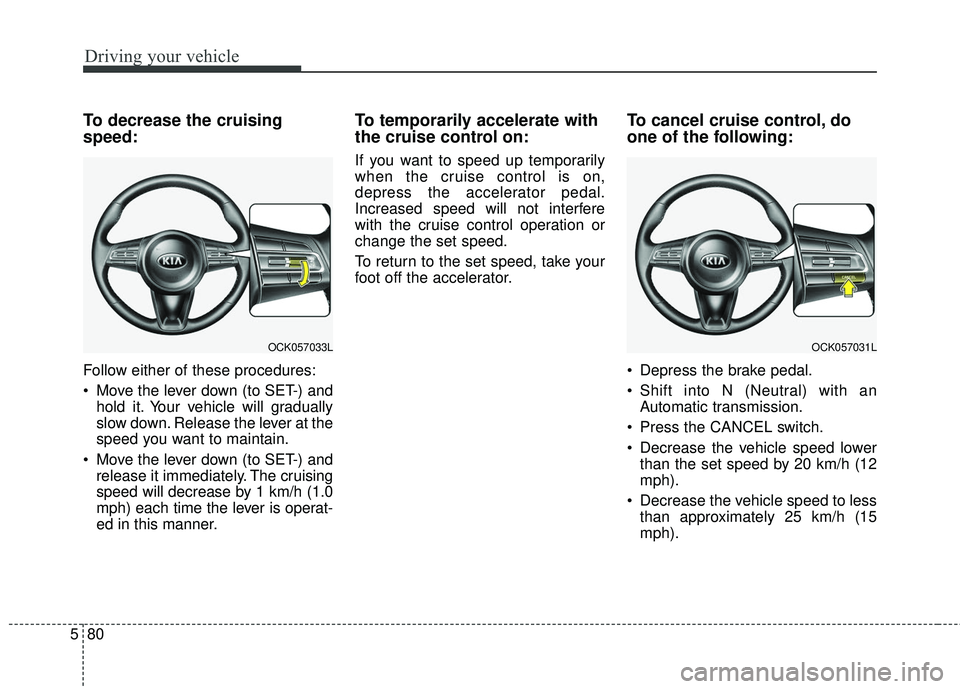
Follow either of these procedures:
Move the lever down (to SET-) and
hold it. Your vehicle will gradually
slow down. Release the lever at the
speed you want to maintain.
Move the lever down (to SET-) and release it immediately. The cruising
speed will decrease by 1 km/h (1.0
mph) each time the lever is operat-
ed in this manner.
To temporarily accelerate with
the cruise control on:
If you want to speed up temporarily
when the cruise control is on,
depress the accelerator pedal.
Increased speed will not interfere
with the cruise control operation or
change the set speed.
To return to the set speed, take your
foot off the accelerator.
To cancel cruise control, do
one of the following:
Depress the brake pedal.
Shift into N (Neutral) with an Automatic transmission.
Press the CANCEL switch.
Decrease the vehicle speed lower than the set speed by 20 km/h (12
mph).
Decrease the vehicle speed to less than approximately 25 km/h (15
mph).
OCK057033LOCK057031L
Page 335 of 551
Driving your vehicle
82
5
SMART CRUISE CONTROL WITH STOP & GO SYSTEM (IF EQUIPPED)
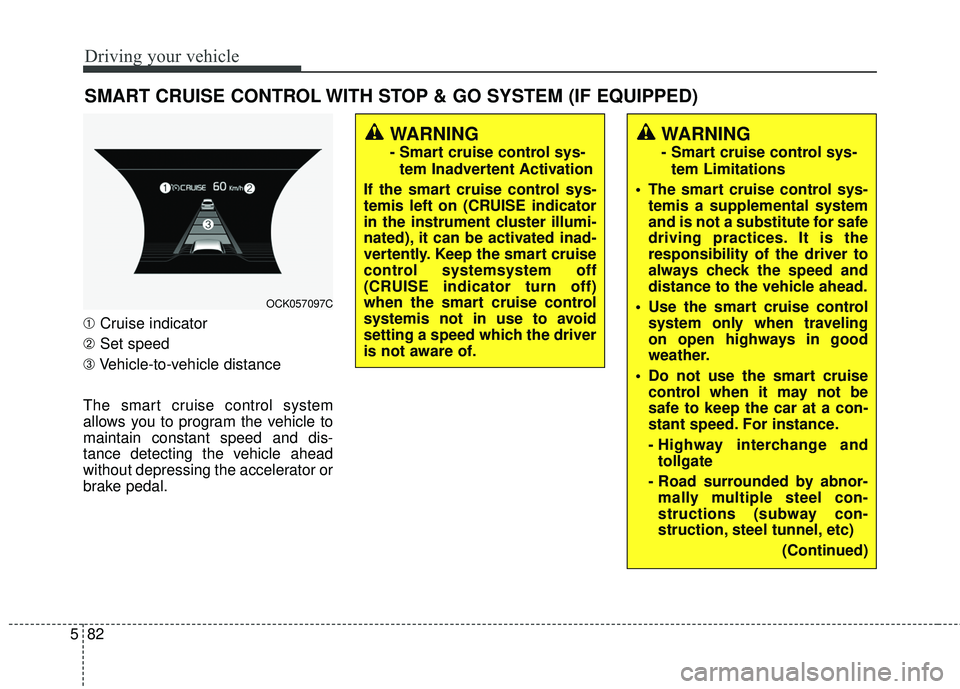
➀ Cruise indicator
➁ Set speed
➂ Vehicle-to-vehicle distance
The smart cruise control system
allows you to program the vehicle to
maintain constant speed and dis-
tance detecting the vehicle ahead
without depressing the accelerator or
brake pedal.
WARNING
- Smart cruise control sys- tem Inadvertent Activation
If the smart cruise control sys-
temis left on (CRUISE indicator
in the instrument cluster illumi-
nated), it can be activated inad-
vertently. Keep the smart cruise
control systemsystem off
(CRUISE indicator turn off)
when the smart cruise control
systemis not in use to avoid
setting a speed which the driver
is not aware of.
WARNING
- Smart cruise control sys- tem Limitations
The smart cruise control sys- temis a supplemental system
and is not a substitute for safe
driving practices. It is the
responsibility of the driver to
always check the speed and
distance to the vehicle ahead.
Use the smart cruise control system only when traveling
on open highways in good
weather.
control when it may not be
safe to keep the car at a con-
stant speed. For instance.
- Highway interchange andtollgate
- Road surrounded by abnor- mally multiple steel con-
structions (subway con-
struction, steel tunnel, etc)
(Continued)
OCK057097C
Page 339 of 551

Driving your vehicle
86
5
To temporarily accelerate with the
cruise control on:
If you want to speed up temporarily
when the cruise control is on,
depress the accelerator pedal.
Increased speed will not interfere
with cruise control operation or
change the set speed.
To return to the set speed, take your
foot off the accelerator.
If you move the lever down (to SET-)
at increased speed, the cruising
speed will be set again.
✽ ✽ NOTICE
Be careful when accelerating tem-
porarily, because the speed is not
regulated automatically at this time
even if there is a vehicle in front of
you.
Smart cruise control system will
be temporarily canceled when:
Cancelled manually
The smart cruise control systemis
temporarily canceled when the brake
pedal is depressed or the CANCEL
button is pressed. The speed and
vehicle to vehicle distance indicator
on the cluster will disappear and the
CRUISE indicator is illuminated con-
tinuously. Cancelled automatically
The driver's door is opened.
The shift lever is shifted to N
(Neutral), R (Reverse) or P (Parking).
The EPB (electronic parking brake) is applied.
The vehicle speed is over 210 km/h (130 mph)
The ESC, ABS or TCS is operating.
The ESC is turned off.
The sensor or the cover is dirty or blocked with foreign matter.
When the vehicle is stopped for over 5 minutes.
The driver starts driving by pushing the lever up (RES +) or down
(SET -) or depressing the acceler-
ator pedal approximately 3 sec-
onds after the vehicle is stopped by
the smart cruise control
systemSystem with no other vehi-
cle ahead or a vehicle stopped far
away in front.
The engine speed is in dangerous range.
OCK057035N