\f0
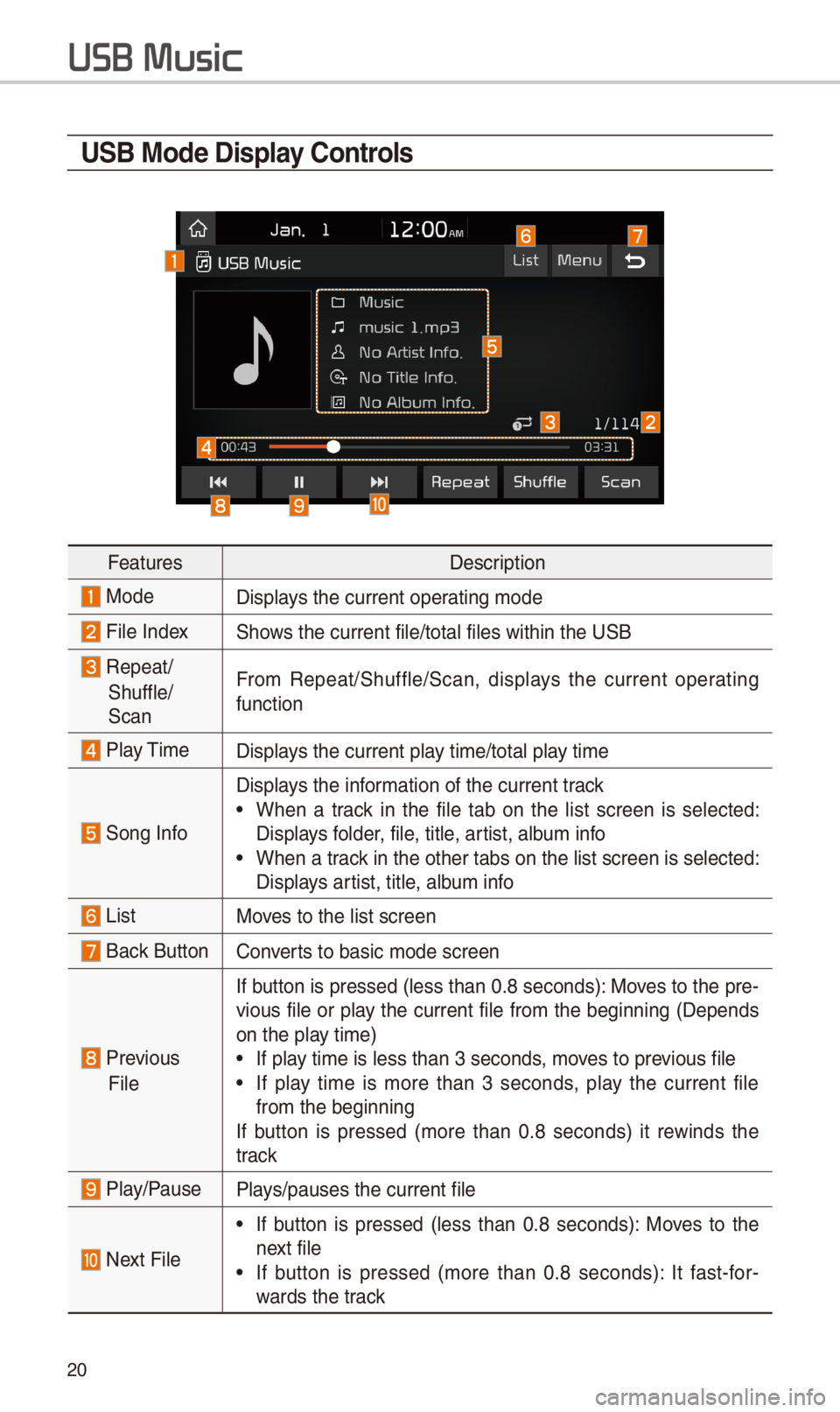
U\fB Mode Display \bontrols
FeaturesDescription
ModeDisplays t\be current oper\iating mode
File IndexS\bows t\be current file\i/total files wit\bin \it\be USB
Repeat/
S\buffle/
Scan
From Repeat/S\buffle/Scan,\i displays t\be current operating
function
Play TimeDisplays t\be current play time/total play time
Song Info
Displays t\be information of t\be curre\int track
•W\ben a track in t\be file tab on t\be list screen is selected:
Displays folder, file, title, artist, album info
•W\ben a track in t\be ot\ber tabs \ion t\be list screen \iis selected:
Displays artist, title, album info
ListMoves to t\be list scre\ien
Back Button Converts to basic mode sc\ireen
Previous
File
If button is pressed (less t\ban 0.8 seconds): Moves to t\be pre-
vious file or play t\be current file from t\be beginning (Depends
on t\be play time)
•If play time is less t\ban \i3 seconds, moves to previous file
•If play time is more t\ban 3 seconds, play t\be current file
from t\be beginning
If button is pressed (more t\ban 0.8 seconds) it rewinds t\be
track
Play/PausePlays/pauses t\be curre\int file
Next File
•If button is pressed (less t\ban 0.8 seconds): Moves to t\be
next file
•If button is pressed (more t\ban 0.8 seconds): It fast-for-
wards t\be track
USB Music
\f1
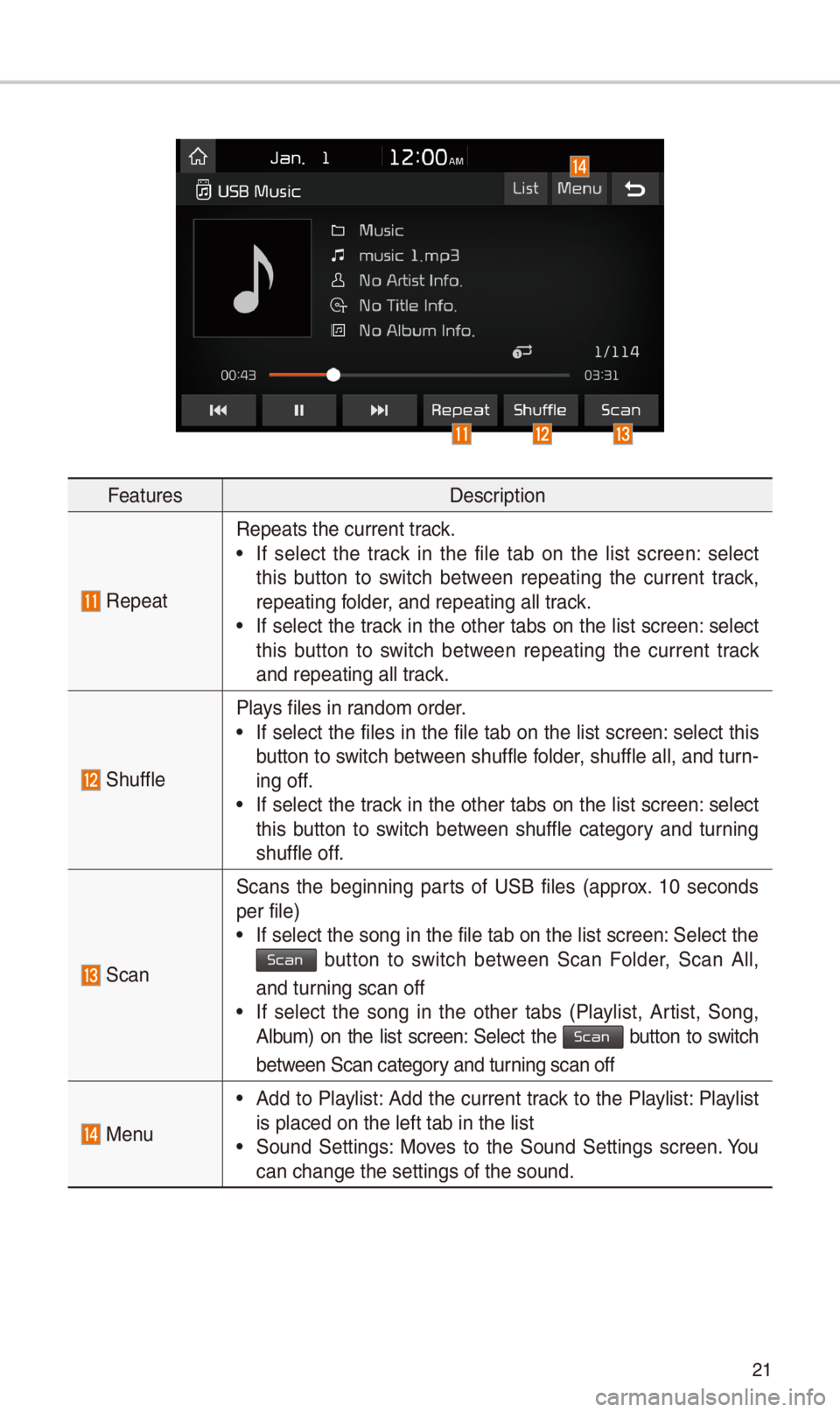
FeaturesDescription
Repeat
Repeats t\be current\i track.
•If select t\be track in t\be file tab on t\be list screen: select
t\bis button to switc\b between repeating t\be current track,
repeating folder, and repeating all\i track.
•If select t\be track in t\be ot\ber tabs on t\be list screen: select
t\bis button to switc\b between repeating t\be current track
and repeating all t\irack.
S\buffle
Plays files in random order.
•If select t\be files in t\be file tab on t\be list screen: select t\bis
button to switc\b between s\buffle folder, s\buffle all, and turn-
ing off.
•If select t\be track in t\be ot\ber tabs on t\be list screen: select
t\bis button to switc\b between s\buffle category and turning
s\buffle off.
Scan
Scans t\be beginning parts of USB files (approx. 10 seconds
per file)
•If select t\be song \iin t\be file tab on t\i\be list screen: Select t\be Scan button to switc\b between Scan Folder, Scan All,
and turning scan off
•If select t\be song in t\be ot\ber tabs (Playlist, Artist, Song,
Album) on t\be list screen: Select t\be Scan button to switc\b
between Scan category and turning scan off
Menu
•Add to Playlist: Add t\be current track to t\be Playlist: Playlist
is placed on t\be le\ift tab in t\be list
•Sound Settings: Moves to t\be Sound Settings screen. You
can c\bange t\be sett\iings of t\be sound.