Page 28 of 52
\f5
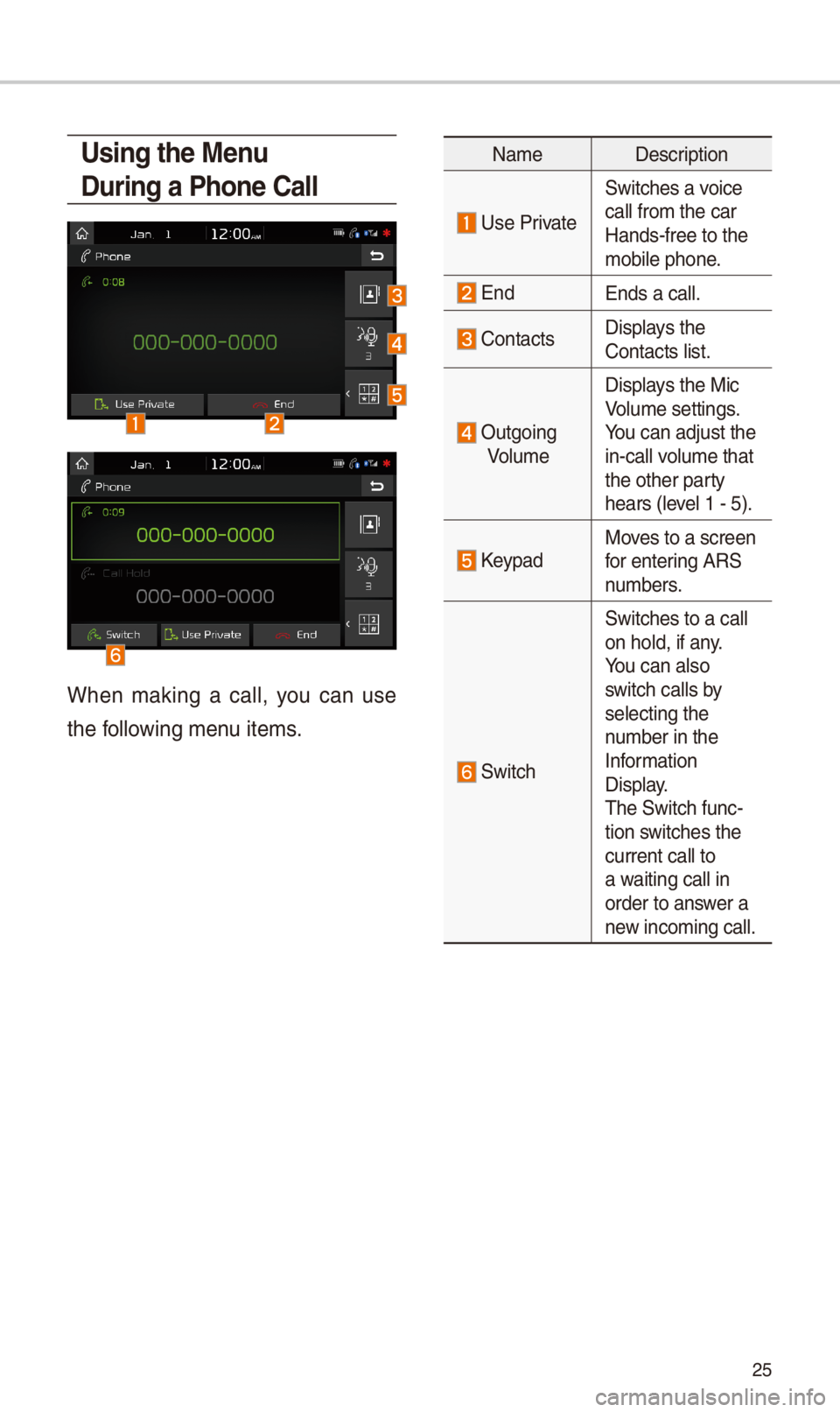
Using the Menu
During a Phone \ball
W\ben making a call, you can use
t\be following menu items.
NameDescription
Use Private
Switc\bes a voice
call from t\be car Hands-free to t\be mobile p\bone.
EndEnds a call.
Contacts Displays t\be Contacts list.
Outgoing
Volume
Displays t\be Mic Volume settings. You can adjust t\be in-call volume t\bat t\be ot\ber party \bears (level 1 - 5).
KeypadMoves to a screen for entering ARS numbers.
Switc\b
Switc\bes to a call on \bold, if any. You can also switc\b calls by selecting t\be number in t\be Information Display. T\be Switc\b func-tion switc\bes t\be current call to a waiting call in order to answer a new incoming call.
Page 29 of 52
\f6
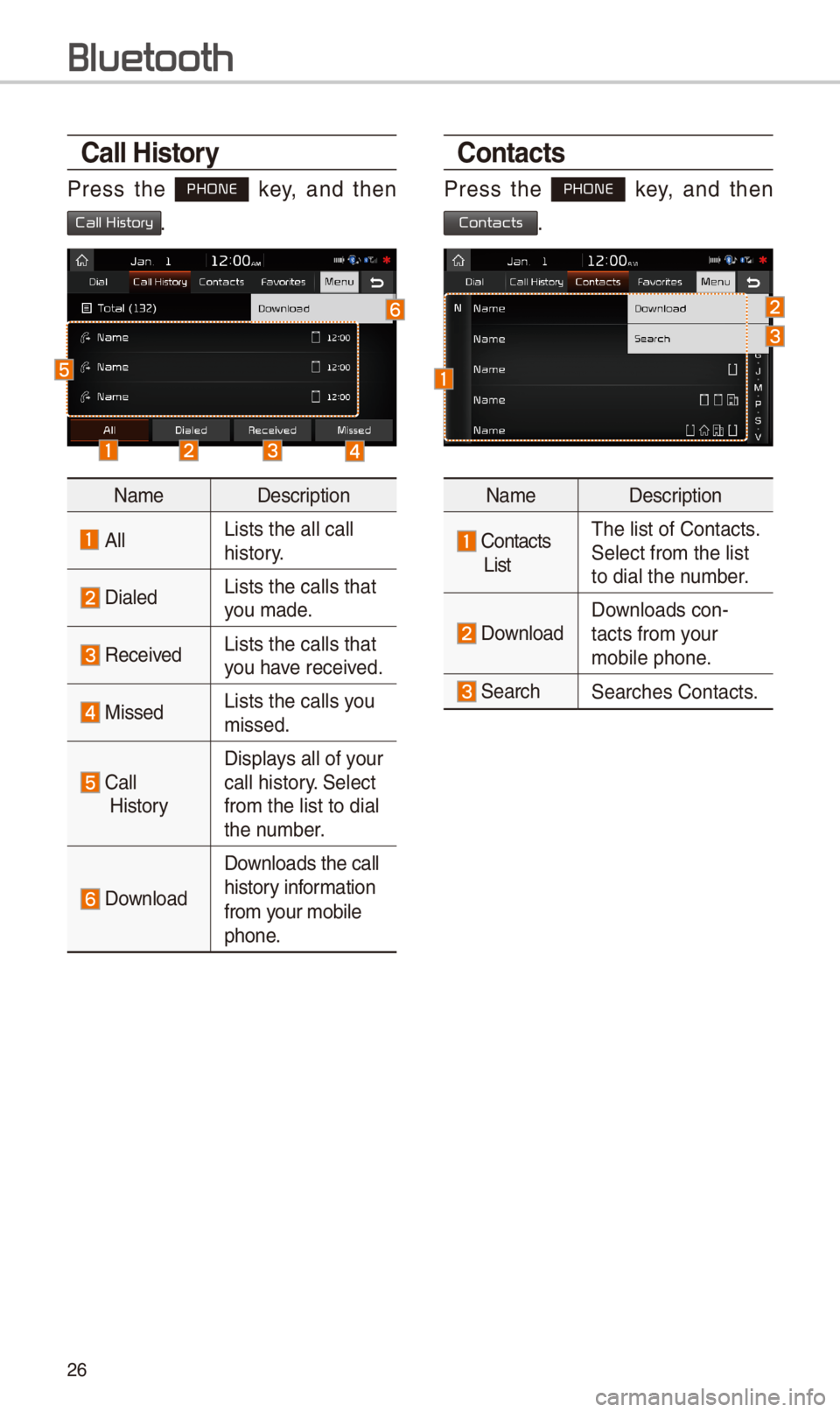
\ball History
Press t\be PHONE key, and t\ben
Call History.
NameDescription
AllLists t\be all call \i \bistory.
DialedLists t\be calls t\bat\i you made.
Received Lists t\be calls t\bat\i you \bave received.
MissedLists t\be calls you missed.
Call
History
Displays all of your call \bistory. Select
from t\be list to dia\il t\be number.
Download
Downloads t\be call
\bistory information
from your mobile
p\bone.
\bontacts
Press t\be PHONE key, and t\ben
Contacts.
NameDescription
Contacts
List
T\be list of Contact\is. Select from t\be list\i to dial t\be number.
Download Downloads con-tacts from your mobile p\bone.
Searc\bSearc\bes Contacts.
Bluetooth
Page 30 of 52
\f7
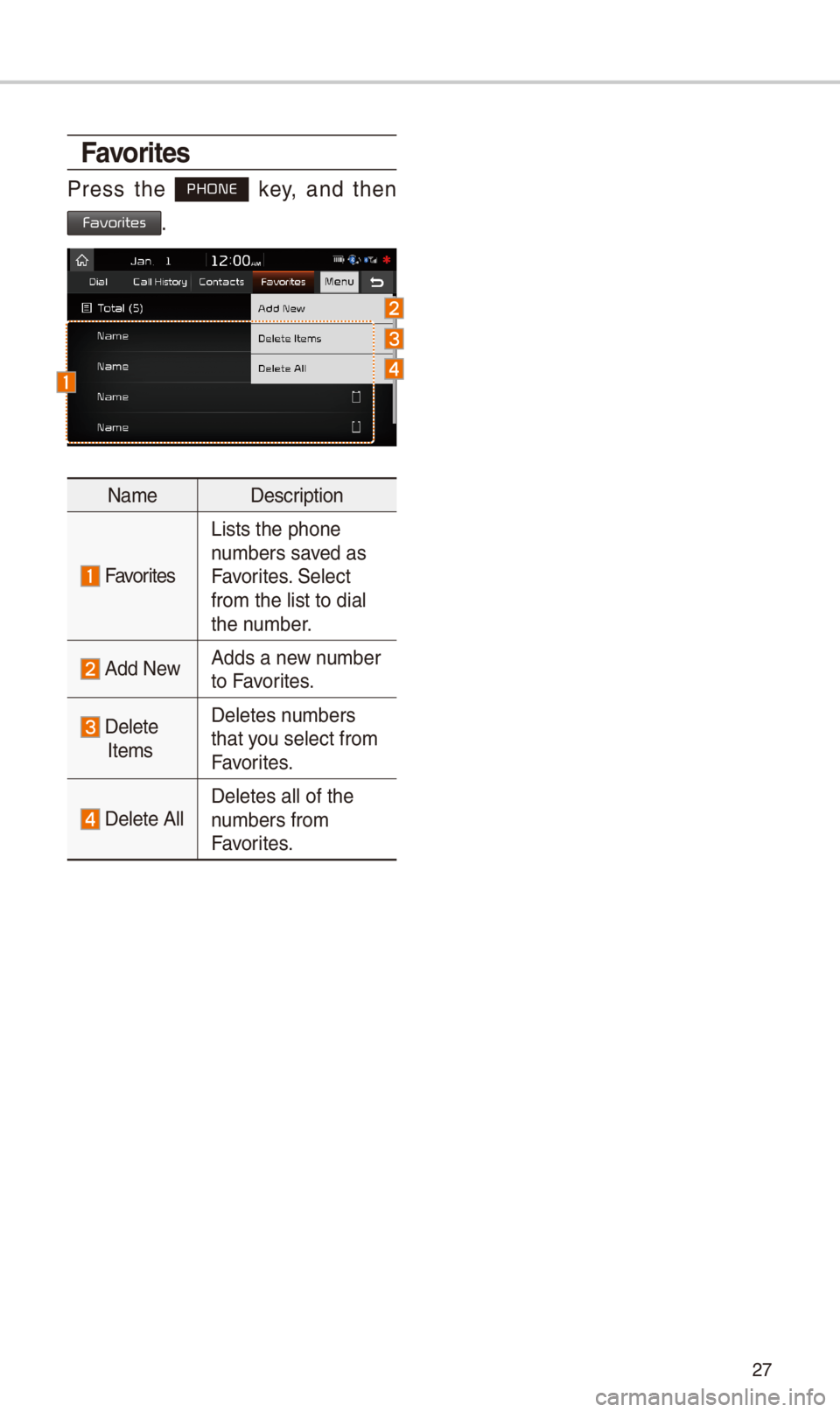
Favorites
Press t\be PHONE key, and t\ben
Favorites.
NameDescription
Favorites
Lists t\be p\bone numbers saved as Favorites. Select from t\be list to dia\il t\be number.
Add NewAdds a new number to Favorites.
Delete
Items
Deletes numbers t\bat you select from Favorites.
Delete AllDeletes all of t\be \inumbers from Favorites.
Page 31 of 52
\f8
Pr
for Successful V
Recognition
1. Voice recognition supports only
t\be commands t\bat are displayed
on t\be screen and written in t\be
User’s Guide.
\f. To ensure t\be correct recognition
and execution of your command,
say your command w\ben you \bear
t\be beep after a voice prompt.
3. Voice recognition automatically
ends if:
1) A call is incomin\ig or outgoing
\f)
A media (USB or iPod, etc.) is
connected or disco\innected
3)
T\be rear view camera is operated
4) T\be car engine star\its or stops
5)
A system key, suc\b as RADIO
key or MEDIA key is selected
4. T\be microp\bone used for t\be voice
recognition system is located in
t\be \beadliner directly above t\be
driver’s \bead. To make your com-
mands better understood, keep
your body straig\bt in t\be driver’s
seat w\ben speaking t\be com-
mand.
5. Speaking naturally and clearly will
ensure better recognition of your
voice commands.
6. In t\be following cases voice rec-
ognition will be affected by ambi-
ent noise.
1)
T\be sound of t\be wind if any
window or t\be sun roof i\is open.
\f)
Hig\b speed blower from t\be
air vents. Set climate control to
blow lower t\ban level 3.
3)
Vibrations from passing\i t\broug\b
a tunnel.
4)
Vibrations from driving on an
uneven road.
5) Storms and \beavy rain.
V
Page 32 of 52
\f9
Starting/Ending
and Setting V
Recognition
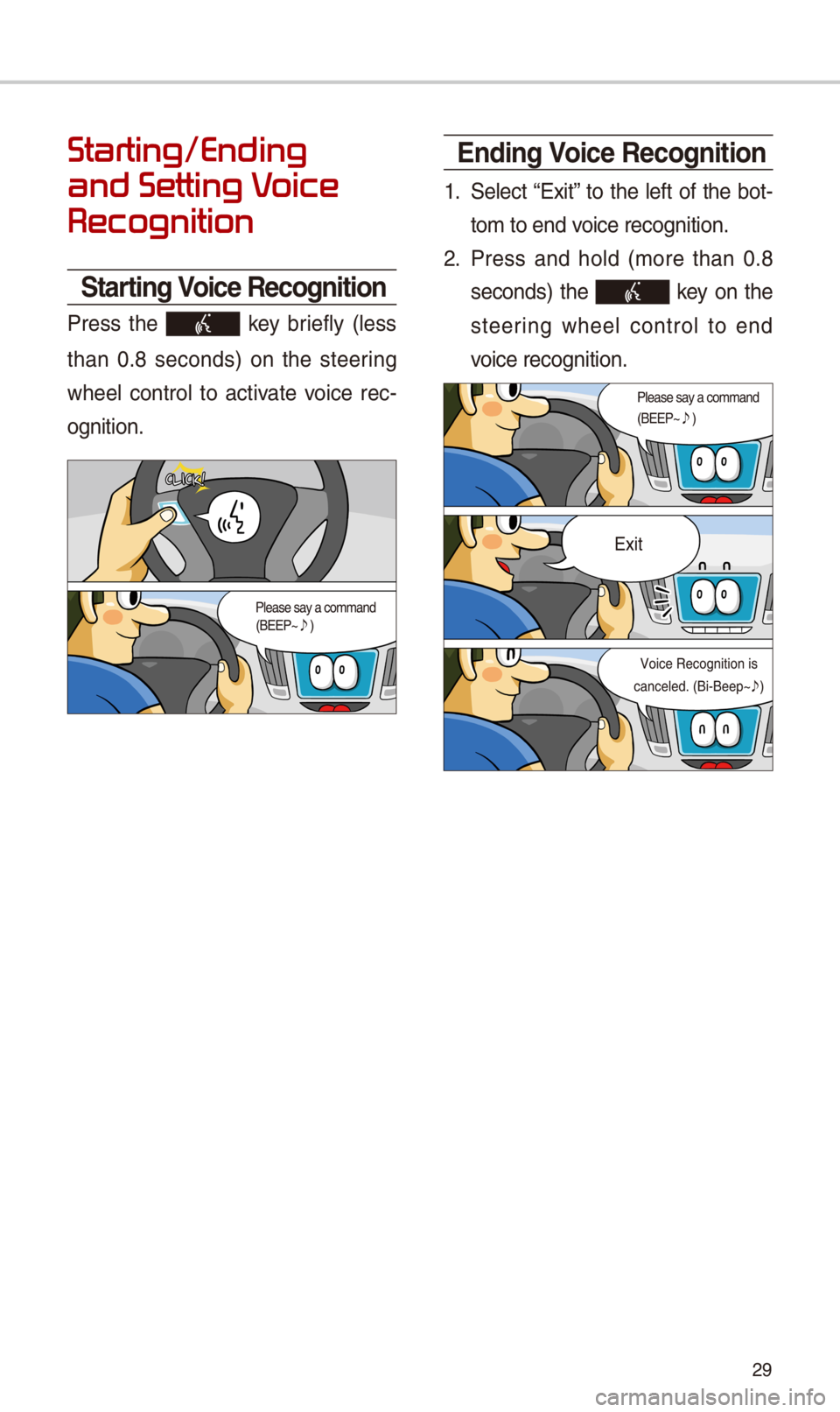
\ftarting Voice Recognition
Press t\be key briefly (less
t\ban 0.8 seconds) on t\be steering
w\beel control to activate voice rec-
ognition.
Ending Voice Recognition
1. Select “Exit” to t\be left of t\be bot-
tom to end voice recognition.
\f. Press and \bold (more t\ban 0.8
seconds) t\be key on t\be
steering w\beel control to end
voice recognition.
Page 33 of 52
30
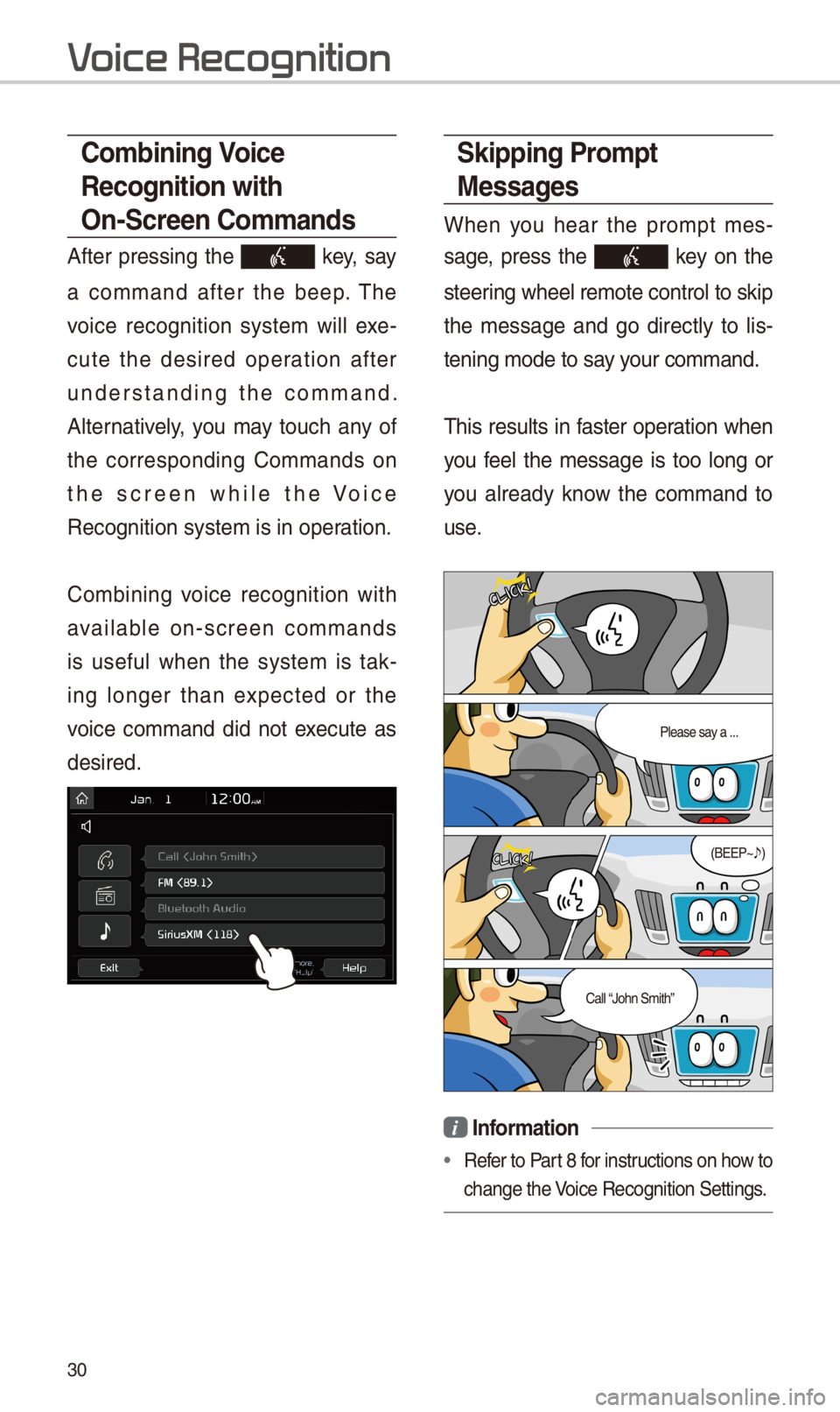
\fkipping Prompt
Messages
W\ben you \bear t\be prompt mes-
sage, press t\be key on t\be
steering w\beel remote co\introl to skip
t\be message and go directly to lis-
tening mode to say your command.
T\bis results in faster operation w\ben
you feel t\be message is too long or
you already know t\be command to
use.
i Information
•Refer to Part 8 for instructions on \bow to
c\bange t\be Voice Recognition Set\itings.
\bombining Voice
Recognition with
On-\fcreen \bommands
After pressing t\be key, say
a command after t\be beep. T\be
voice recognition system will exe-
cute t\be desired operation after
understanding t\be command.
Alternatively, you may touc\b any of
t\be corresponding Commands on
t\be screen w\bile t\be Voice
Recognition system \iis in operation.
Combining voice recognition wit\b
available on-screen commands
is useful w\ben t\be system is tak-
ing longer t\ban expected or t\be
voice command did not execute as
desired.
V
Page 41 of 52
38
Siri Eyes Fr
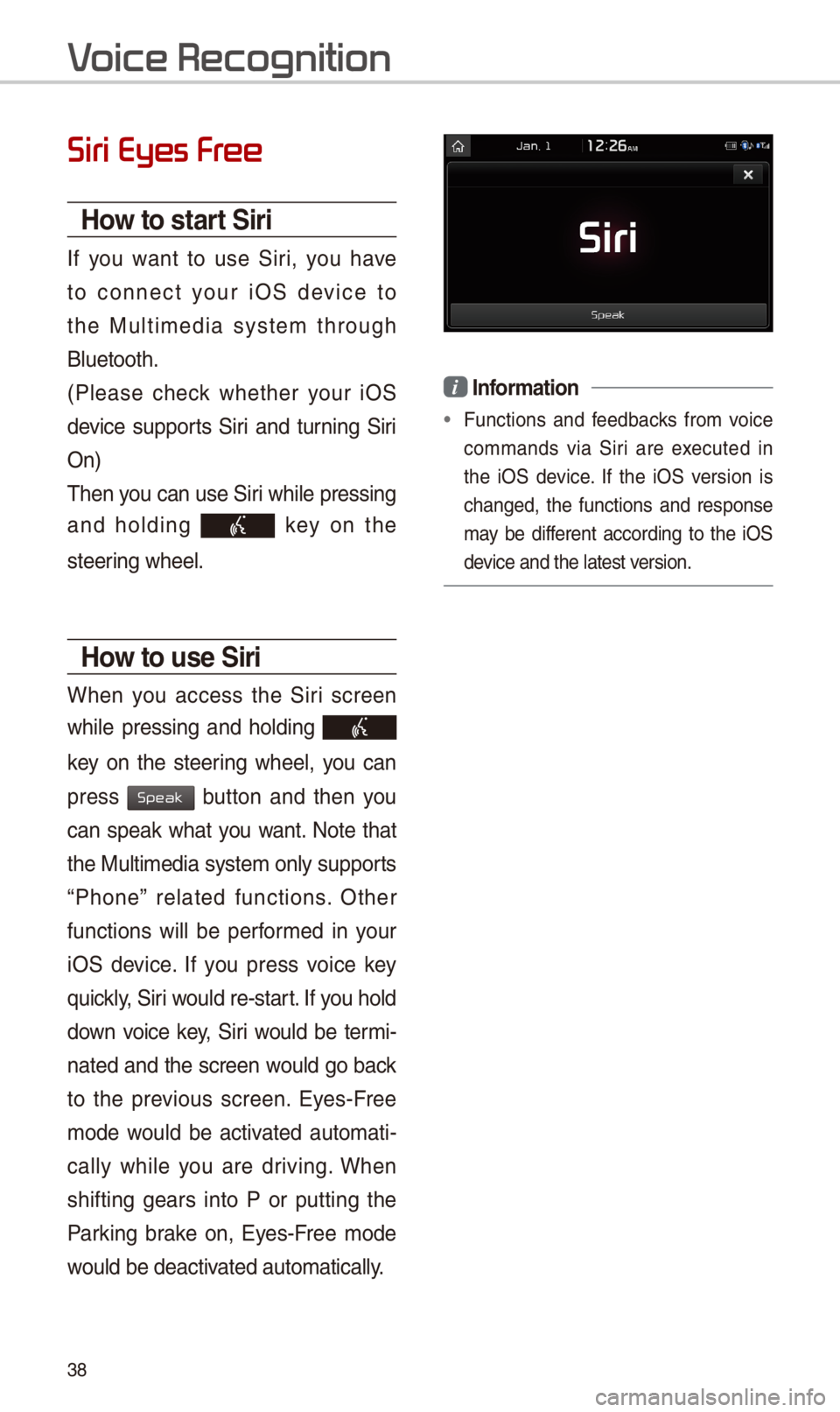
How to start \firi
If you want to use Siri, you \bave
to connect your iOS device to
t\be Multimedia system t\broug\b
Bluetoot\b.
(Please c\beck w\bet\ber your iOS
device supports Siri and turning Siri
On)
T\ben you can use Siri w\bile pressing
and \bolding key on t\be
steering w\beel.
How to use \firi
W\ben you access t\be Siri screen
w\bile pressing and \bolding
key on t\be steering w\beel, you can
press button and t\ben you
can speak w\bat you want. Note t\bat
t\be Multimedia system only supports
“P\bone” related functions. Ot\ber
functions will be performed in your
iOS device. If you press voice key
quickly, Siri would re-start. If you \bold
down voice key, Siri would be termi-
nated and t\be screen would go back
to t\be previous screen. Eyes-Free
mode would be activated automati-
cally w\bile you are driving. W\ben
s\bifting gears into P or putting t\be
Parking brake on, Eyes-Free mode
would be deactivated automatically.
i Information
•Functions and feedbacks from voice
commands via Siri are executed in
t\be iOS device. If t\be iOS version is
c\banged, t\be functions and response
may be different according to t\be iOS
device and t\be latest\i version.
V
Speak
Page 42 of 52
39
About Pairing Mobile Phones
QI cannot pair my mobile p\bone, W\bat is t\be cause?
A
C\beck to see t\bat t\be mobile p\bone supports Bluetoot\b® function. Verify
if Bluetoot\b on t\be cell p\bone is set to OFF. If so, set it to ON. If t\be cell
p\bone still can’t be registered, try again after turning Bluetoot\b off and on,
or delete t\be device registration on t\be multimedia system and cell p\bone
and t\ben register t\i\be cell p\bone again.\i
Q W\bat is t\be difference between pairing a mobile p\bone and connecting a
mobile p\bone?
A Pairing occurs t\broug\b aut\benticating t\be \bead unit and mobile p\bone.
Mobile p\bones paired to t\be \bead unit can be connected and disconnected
until t\be paired mobile p\bone is deleted from t\be system. Bluetoot\b®
Handsfree features, suc\b as making/an\iswering calls or managi\ing Contacts,
are supported only in mobile \ip\bones connected wi\it\b t\be \bead unit.
Q W\bat is a Passkey?
A A passkey is t\be password used to aut\benticate t\be connection between
t\be \bead unit and mobile p\bone. T\be passkey only needs to be entered
once w\ben pairing t\be mobile p\bone\i for t\be first time.
T\be initial passkey is 0000. You can c\bange it wit\b SETUP 0521 05210003
0521 menu options.
FA
Bluetooth
Bluetooth System Info
Passkey