Page 54 of 496
![KIA SOUL EV 2018 Owners Manual 49
State of charge (SOC) gauge
for high voltage battery
It shows the charging status of thehigh voltage battery.
[MIN] position on the indicator
indicates that there is not enough
energy in the high](/manual-img/2/55107/w960_55107-53.png "KIA SOUL EV 2018 Owners Manual 49
State of charge (SOC) gauge
for high voltage battery
It shows the charging status of thehigh voltage battery.
[MIN] position on the indicator
indicates that there is not enough
energy in the high")
49
State of charge (SOC) gauge
for high voltage battery
It shows the charging status of thehigh voltage battery.
[MIN] position on the indicator
indicates that there is not enough
energy in the high voltage battery.
[MAX] position indicates that the
driving battery is fully charged.
When driving on highways or motorways, make sure to check in
advance if the driving battery is
charged enough. When there are 3 gauge bars (near
the "MIN" area) on the high voltage
charge indicator, the warning lamp
turns ON to alert you of the battery
level.
When the warning lamp turns ON, the
vehicle can drive an additional 14~28
miles (22~45 km) (depending on the
driving speed, heater/air conditioner,
weather, driving style, and other fac-
tors). Charging is required. When there are 1-2 gauge bars left
for the high voltage battery, the vehi-
cle speed is limited and then eventu-
ally the vehicle will be turned OFF.
Charge the vehicle immediately.
OPSE044305
DRIVING ELECTRIC VEHICLE
OPSE044303
Page 56 of 496
51
■
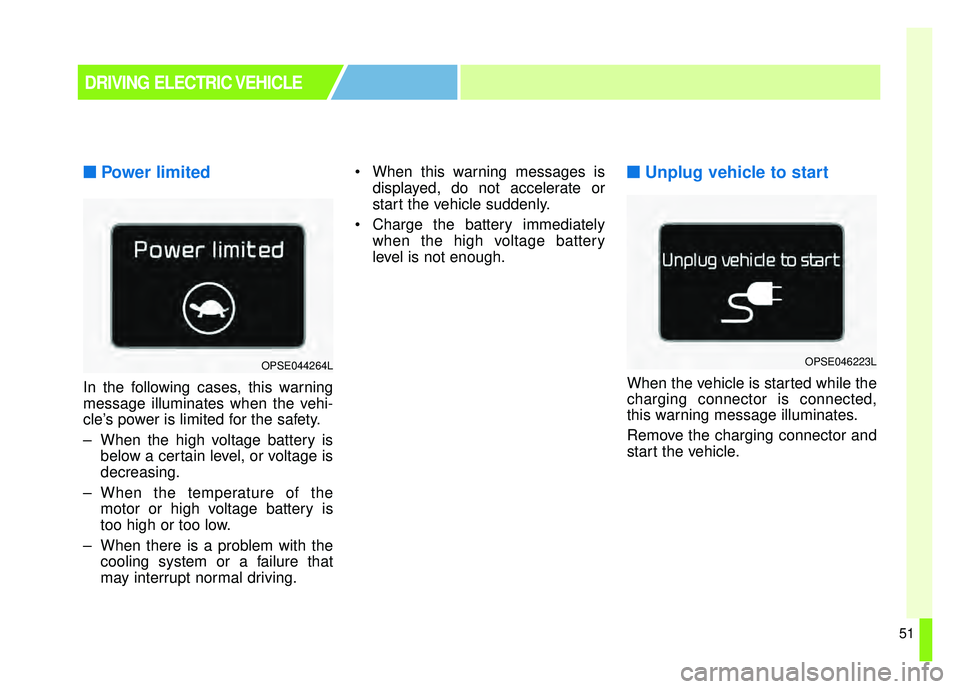
■Power limited
In the following cases, this warning
message illuminates when the vehi-
cle’s power is limited for the safety.
– When the high voltage battery is
below a certain level, or voltage is
decreasing.
– When the temperature of the motor or high voltage battery is
too high or too low.
– When there is a problem with the cooling system or a failure that
may interrupt normal driving. When this warning messages is
displayed, do not accelerate or
start the vehicle suddenly.
Charge the battery immediately when the high voltage battery
level is not enough.
■ ■Unplug vehicle to start
When the vehicle is started while the
charging connector is connected,
this warning message illuminates.
Remove the charging connector and
start the vehicle.
DRIVING ELECTRIC VEHICLE
OPSE044264LOPSE046223L
Page 57 of 496
52
■
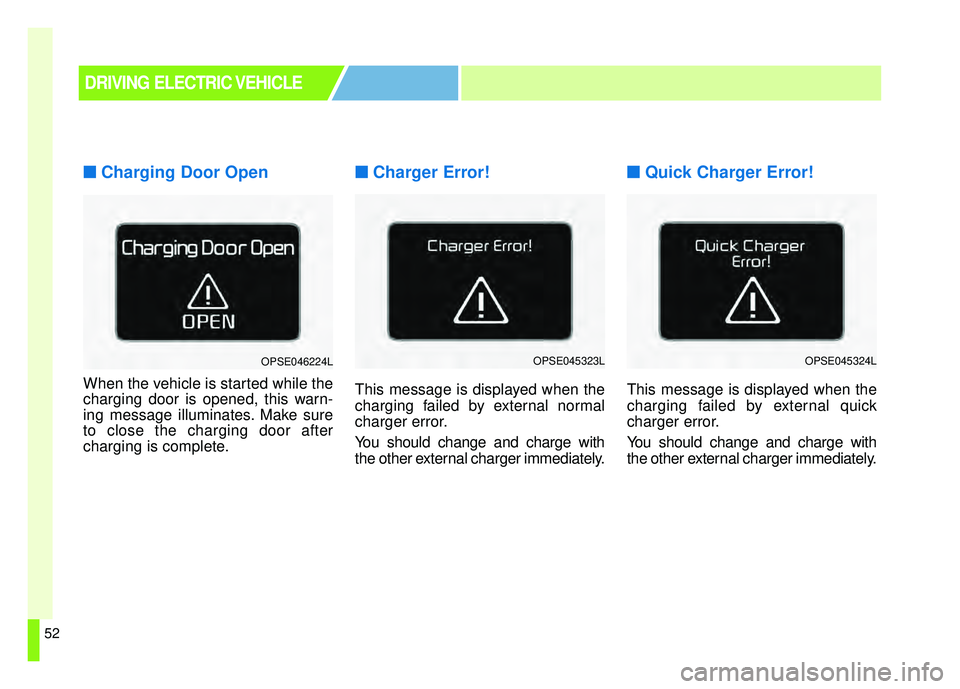
■Charging Door Open
When the vehicle is started while the
charging door is opened, this warn-
ing message illuminates. Make sure
to close the charging door after
charging is complete.
■ ■Charger Error!
This message is displayed when the
charging failed by external normal
charger error.
You should change and charge with
the other external charger immediately.
■ ■Quick Charger Error!
This message is displayed when the
charging failed by external quick
charger error.
You should change and charge with
the other external charger immediately.
DRIVING ELECTRIC VEHICLE
OPSE046224LOPSE045323LOPSE045324L
Page 59 of 496
54
■
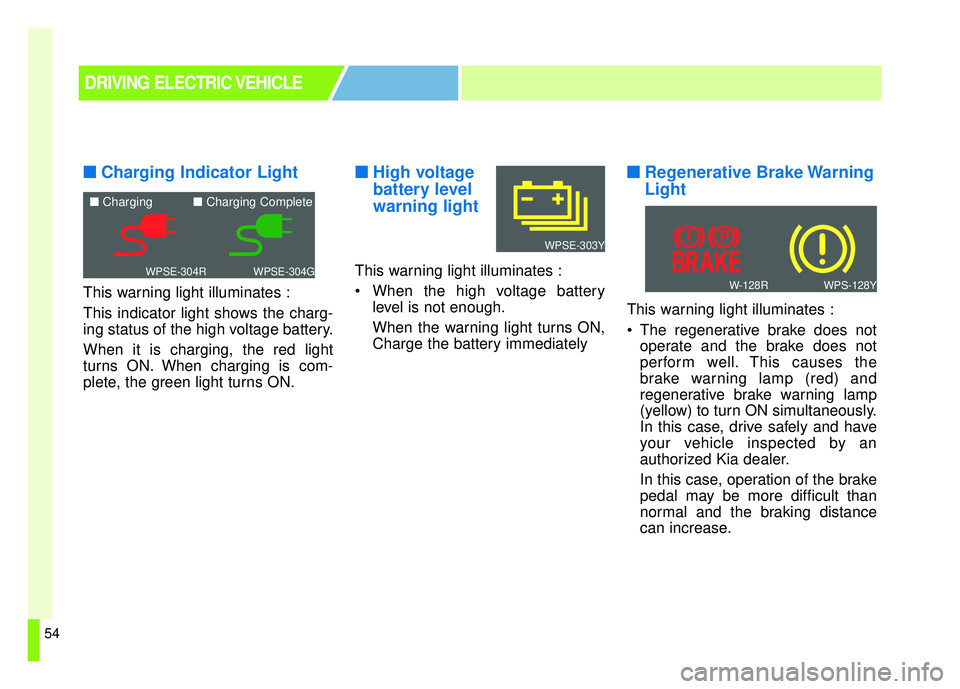
■Charging Indicator Light
This warning light illuminates :
This indicator light shows the charg-
ing status of the high voltage battery.
When it is charging, the red light
turns ON. When charging is com-
plete, the green light turns ON.
■ ■High voltage
battery level
warning light
This warning light illuminates :
When the high voltage battery
level is not enough.
When the warning light turns ON,
Charge the battery immediately
■ ■Regenerative Brake Warning
Light
This warning light illuminates :
The regenerative brake does not
operate and the brake does not
perform well. This causes the
brake warning lamp (red) and
regenerative brake warning lamp
(yellow) to turn ON simultaneously.
In this case, drive safely and have
your vehicle inspected by an
authorized Kia dealer.
In this case, operation of the brake
pedal may be more difficult than
normal and the braking distance
can increase.
DRIVING ELECTRIC VEHICLE
WPSE-304GWPSE-304R
■ Charging ■ Charging Complete
WPS-128YW-128R
WPSE-303Y
Page 69 of 496
Your vehicle at a glance
22
EXTERIOR OVERVIEW
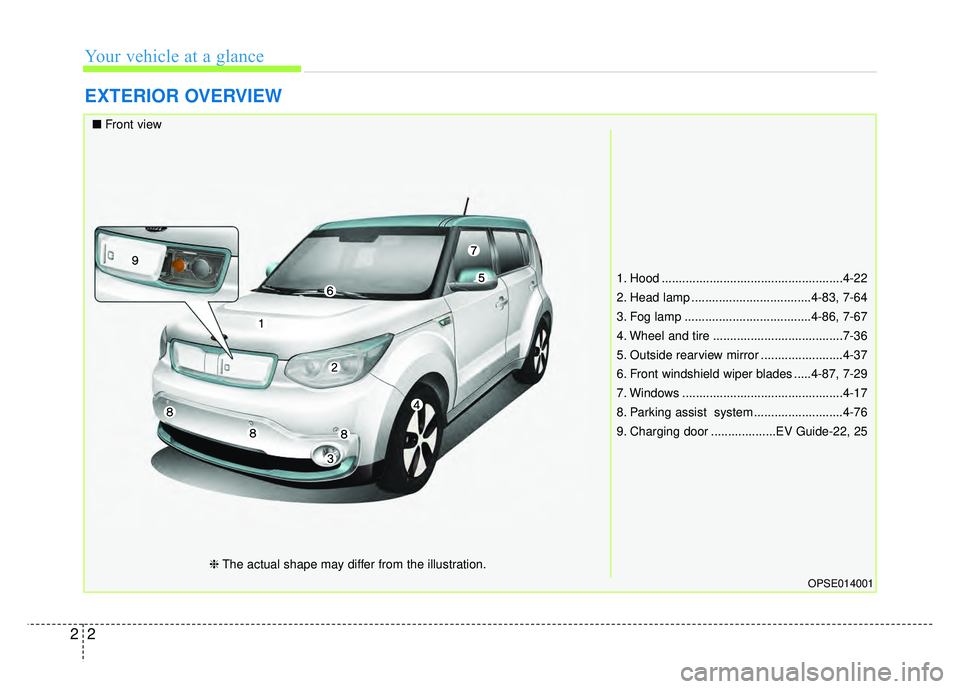
1. Hood .....................................................4-22
2. Head lamp ...................................4-83, 7-64
3. Fog lamp .....................................4-86, 7-67
4. Wheel and tire ......................................7-36
5. Outside rearview mirror ........................4-37
6. Front windshield wiper blades .....4-87, 7-29
7. Windows ...............................................4-17
8. Parking assist system ..........................4-76
9. Charging door ...................EV Guide-22, 25
OPSE014001
■Front view
❈The actual shape may differ from the illustration.
Page 71 of 496
Your vehicle at a glance
42
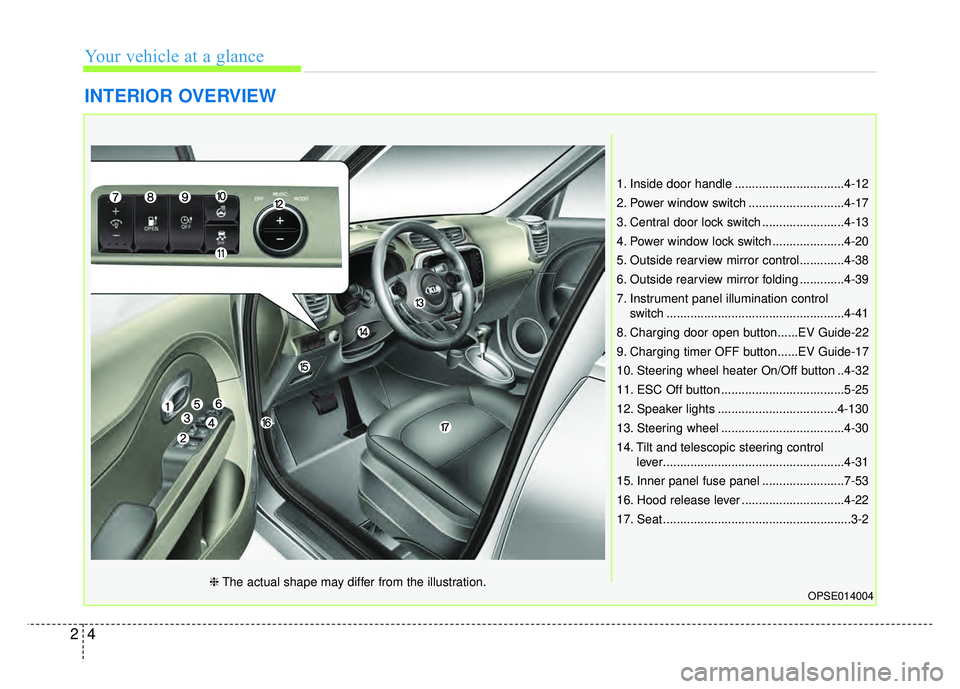
INTERIOR OVERVIEW
1. Inside door handle ................................4-12
2. Power window switch ............................4-17
3. Central door lock switch ........................4-13
4. Power window lock switch .....................4-20
5. Outside rearview mirror control.............4-38
6. Outside rearview mirror folding .............4-39
7. Instrument panel illumination controlswitch ....................................................4-41
8. Charging door open button......EV Guide-22
9. Charging timer OFF button......EV Guide-17
10. Steering wheel heater On/Off button ..4-32
11. ESC Off button ....................................5-25
12. Speaker lights ...................................4-130
13. Steering wheel ....................................4-30
14. Tilt and telescopic steering control lever.....................................................4-31
15. Inner panel fuse panel ........................7-53
16. Hood release lever ..............................4-22
17. Seat .......................................................3-2
OPSE014004❈ The actual shape may differ from the illustration.
Page 162 of 496
431
Features of your vehicle
(Continued)
• When you operate the steeringwheel in low temperature, abnor-
mal noise may occur. If tempera-
ture rises, the noise will likely dis-
appear. This is a normal condition.
• When the charging system warn- ing light comes on due to the low
voltage (When the alternator or
battery) does not operate normal-
ly or it malfunctions), the steering
wheel may require increased
steering effort.Tilt and telescopic steering
Tilt and telescopic steering allows
you to adjust the steering wheel
before you drive. You can also raise it
to give your legs more room when
you exit and enter the vehicle.
The steering wheel should be posi-
tioned so that it is comfortable for
you to drive, while permitting you to
see the instrument panel warning
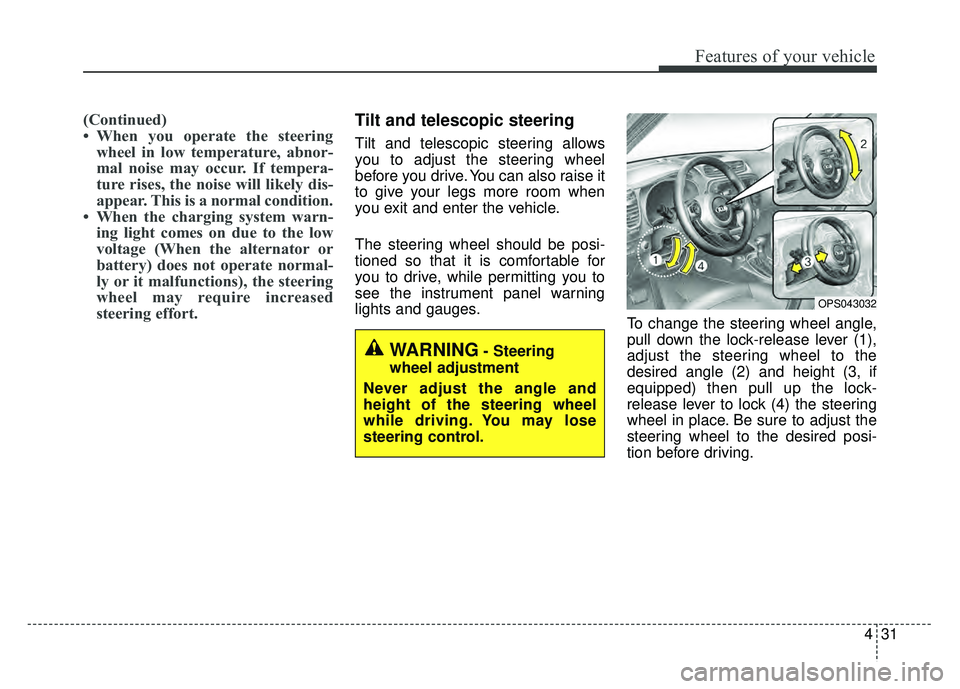
lights and gauges. To change the steering wheel angle,
pull down the lock-release lever (1),
adjust the steering wheel to the
desired angle (2) and height (3, if
equipped) then pull up the lock-
release lever to lock (4) the steering
wheel in place. Be sure to adjust the
steering wheel to the desired posi-
tion before driving.
OPS043032
WARNING- Steering
wheel adjustment
Never adjust the angle and
height of the steering wheel
while driving. You may lose
steering control.
Page 173 of 496
Features of your vehicle
42
4
Gauges
Speedometer
The speedometer indicates the
speed of the vehicle and is calibrated
in miles per hour (mph) or kilometers
per hour (km/h).
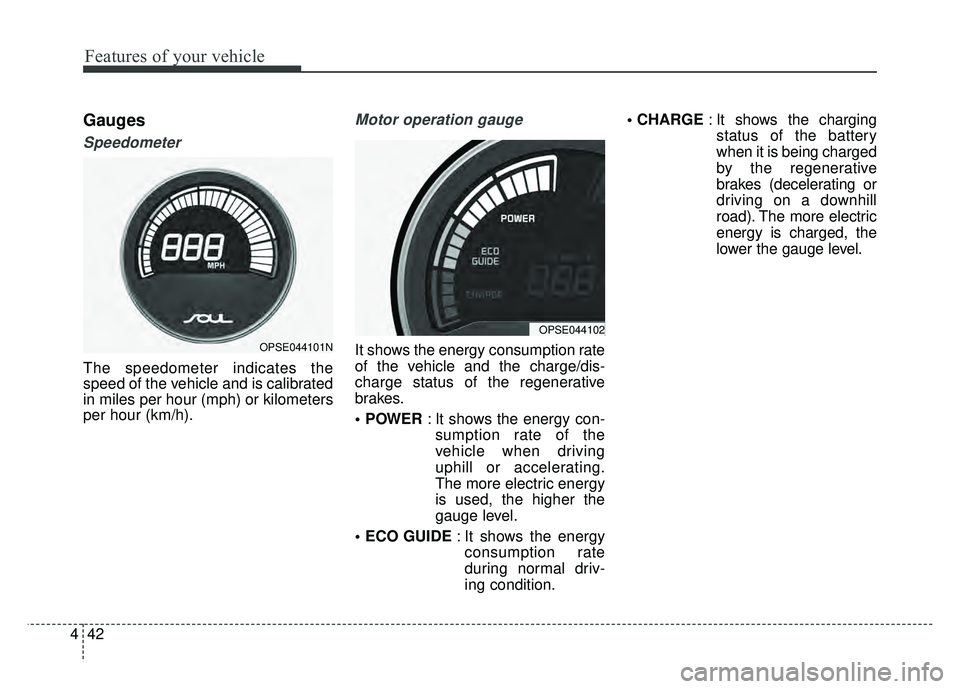
Motor operation gauge
It shows the energy consumption rate
of the vehicle and the charge/dis-
charge status of the regenerative
brakes.
: It shows the energy con-
sumption rate of the
vehicle when driving
uphill or accelerating.
The more electric energy
is used, the higher the
gauge level.
: It shows the energy
consumption rate
during normal driv-
ing condition.
: It shows the charging
status of the battery
when it is being charged
by the regenerative
brakes (decelerating or
driving on a downhill
road). The more electric
energy is charged, the
lower the gauge level.OPSE044101N
OPSE044102