Page 43 of 496
38
Depending on the condition and
durability of the high voltage battery,
charger specifications, and ambient
temperature, the time required for
charging the battery may vary.14.You may prevent possible charg-
ing cable theft by taking the fol-
lowing steps. Lock the door after
the charging cable is connected,
by pressing the lock button on the
smart key or on the central door
lock switch.
When the door is locked, the
charging connector will become
locked and this will prevent possi-
ble theft.
So, after charging is complete,
you must release the door lock in
order to disconnect the charging
connector.
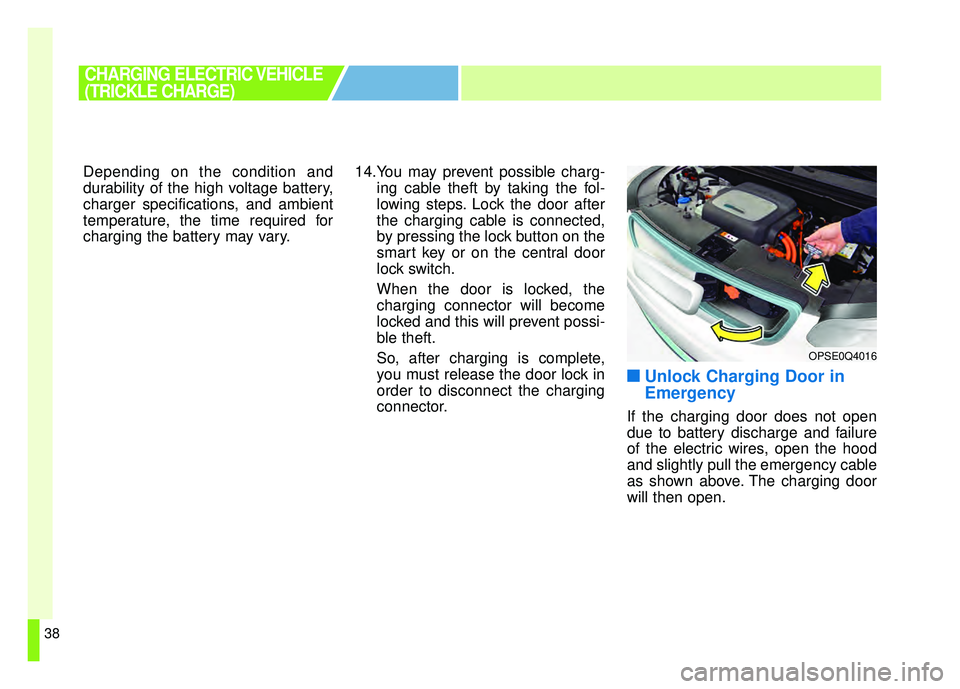
■ ■Unlock Charging Door in
Emergency
If the charging door does not open
due to battery discharge and failure
of the electric wires, open the hood
and slightly pull the emergency cable
as shown above. The charging door
will then open.
CHARGING ELECTRIC VEHICLE
(TRICKLE CHARGE)
OPSE0Q4016
Page 44 of 496
39
■
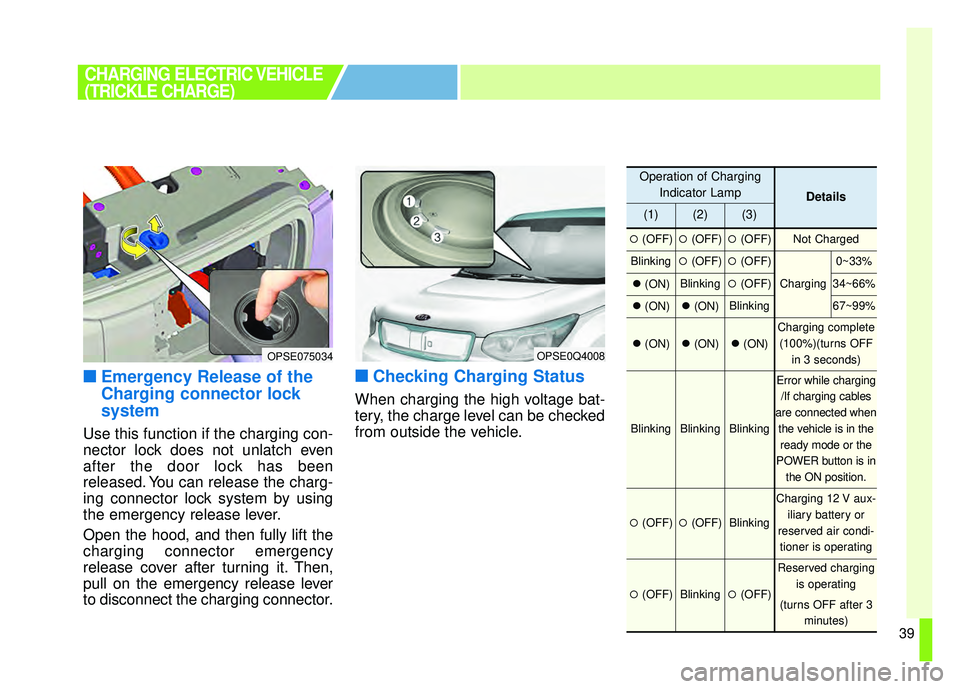
■Emergency Release of the
Charging connector lock
system
Use this function if the charging con-
nector lock does not unlatch even
after the door lock has been
released. You can release the charg-
ing connector lock system by using
the emergency release lever.
Open the hood, and then fully lift the
charging connector emergency
release cover after turning it. Then,
pull on the emergency release lever
to disconnect the charging connector.
■ ■Checking Charging Status
When charging the high voltage bat-
tery, the charge level can be checked
from outside the vehicle.
CHARGING ELECTRIC VEHICLE
(TRICKLE CHARGE)
OPSE0Q4008
Operation of Charging
Indicator Lamp
Details
(1)(2)(3)
�(OFF)�(OFF)�(OFF)Not Charged
Blinking�(OFF)�(OFF)
Charging
0~33%
�(ON)Blinking�(OFF)34~66%
�(ON)�(ON)Blinking67~99%
�(ON)�(ON)�(ON)
Charging complete
(100%)(turns OFF in 3 seconds)
BlinkingBlinkingBlinking
Error while charging/If charging cables
are connected when the vehicle is in theready mode or the
POWER button is in the ON position.
�(OFF)�(OFF)Blinking
Charging 12 V aux- iliary battery or
reserved air condi- tioner is operating
�(OFF)Blinking�(OFF)
Reserved charging is operating
(turns OFF after 3 minutes)
OPSE075034
Page 45 of 496
40
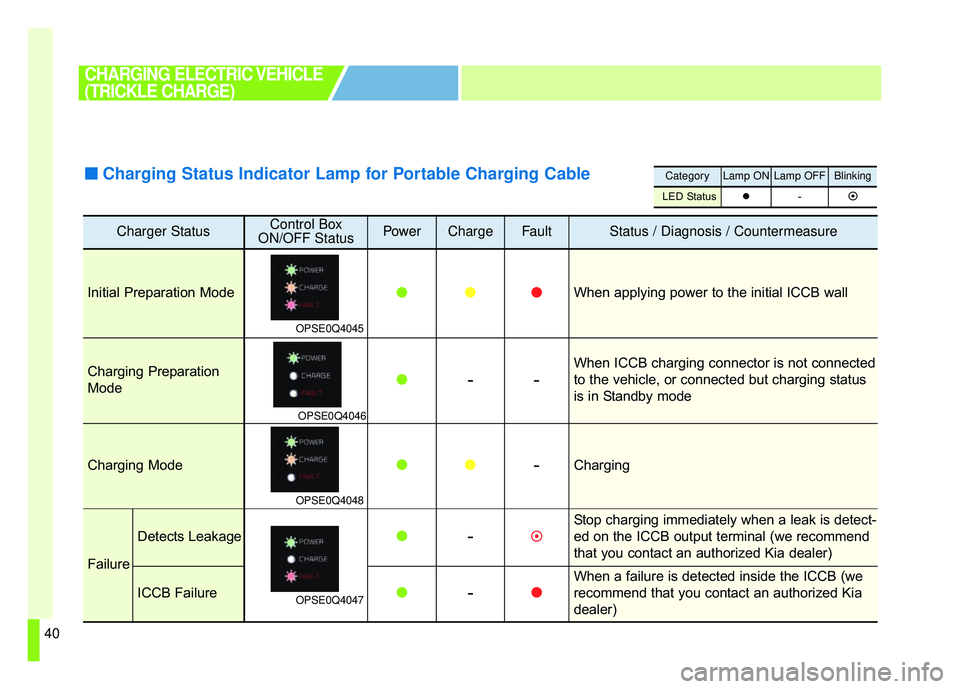
Charger StatusControl Box
ON/OFF StatusPowerChargeFaultStatus / Diagnosis / Countermeasure
Initial Preparation Mode
OPSE0Q4045
� ��When applying power to the initial ICCB wall
Charging Preparation
Mode
OPSE0Q4046
� --
When ICCB charging connector is not connected
to the vehicle, or connected but charging status
is in Standby mode
Charging Mode
OPSE0Q4048
�
� -Charging
Failure
Detects Leakage
OPSE0Q4047
� -�
Stop charging immediately when a leak is detect-
ed on the ICCB output terminal (we recommend
that you contact an authorized Kia dealer)
ICCB Failure�-
�
When a failure is detected inside the ICCB (we
recommend that you contact an authorized Kia
dealer)
CategoryLamp ONLamp OFFBlinking
LED Status �-�
CHARGING ELECTRIC VEHICLE
(TRICKLE CHARGE)
■ ■
Charging Status Indicator Lamp for Portable Charging Cable
Page 46 of 496
41
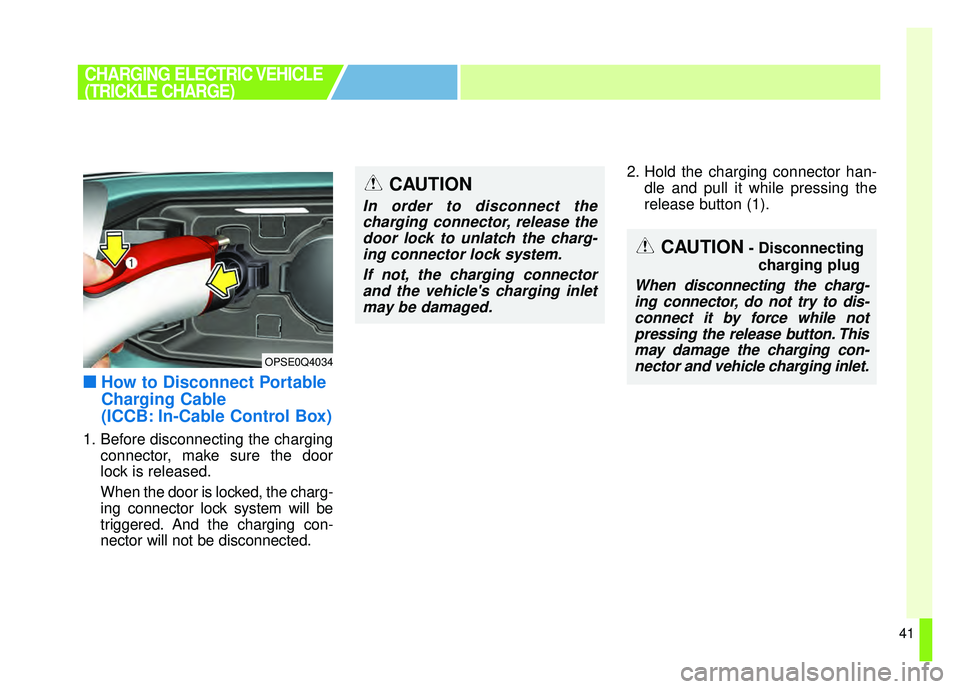
■
■How to Disconnect Portable
Charging Cable
(ICCB: In-Cable Control Box)
1. Before disconnecting the charging
connector, make sure the door
lock is released.
When the door is locked, the charg-
ing connector lock system will be
triggered. And the charging con-
nector will not be disconnected. 2. Hold the charging connector han-
dle and pull it while pressing the
release button (1).
CHARGING ELECTRIC VEHICLE
(TRICKLE CHARGE)
OPSE0Q4034
CAUTION- Disconnecting
charging plug
When disconnecting the charg-ing connector, do not try to dis-connect it by force while notpressing the release button. Thismay damage the charging con-nector and vehicle charging inlet.
CAUTION
In order to disconnect thecharging connector, release thedoor lock to unlatch the charg-ing connector lock system.
If not, the charging connectorand the vehicle's charging inletmay be damaged.
Page 47 of 496
42
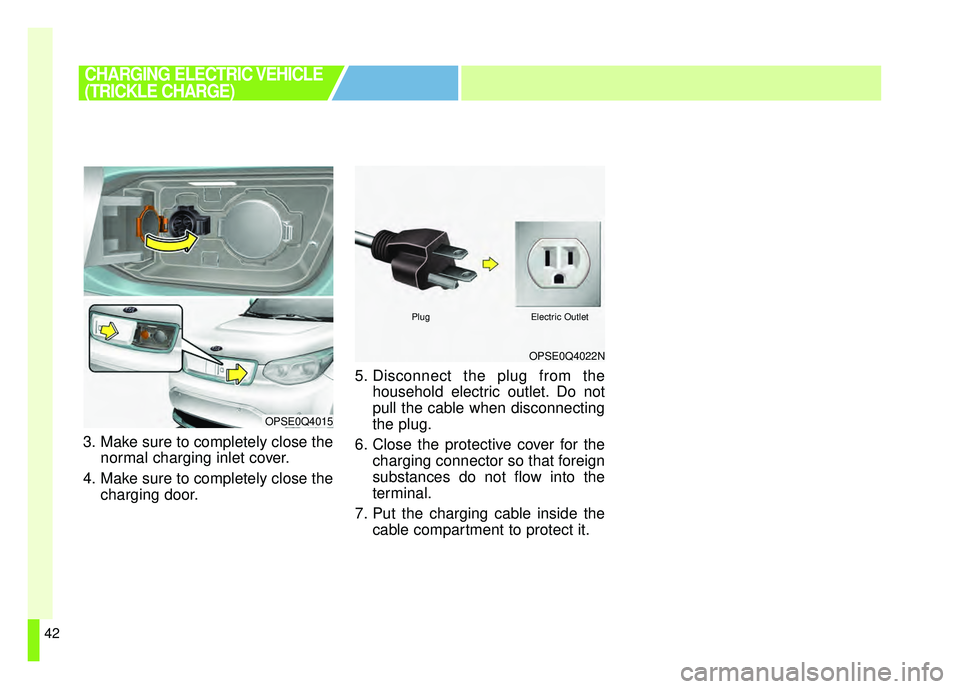
3. Make sure to completely close thenormal charging inlet cover.
4. Make sure to completely close the charging door. 5. Disconnect the plug from the
household electric outlet. Do not
pull the cable when disconnecting
the plug.
6. Close the protective cover for the charging connector so that foreign
substances do not flow into the
terminal.
7. Put the charging cable inside the cable compartment to protect it.
CHARGING ELECTRIC VEHICLE
(TRICKLE CHARGE)
OPSE0Q4022N
PlugElectric Outlet
OPSE0Q4015
Page 48 of 496
43
■
■Precautions for Portable
Charging Cable
(ICCB: In-Cable Control Box)
Use the portable charging cable
that is certified by Kia Motors.
Do not try to repair, disassemble, or adjust the portable charging
cable.
Do not use an extension cord or adapter.
Stop using immediately when fail- ure occurs.
Do not touch the plug and charg- ing connector with wet hands.
Do not touch the terminal part of the normal charging connector
and the normal charging inlet on
the vehicle.
Do not connect the charging con- nector to voltage that does not
comply with regulations. Do not use the portable charging
cable if it is worn out, exposed, or
there exists any type of damage
on the portable charging cable.
If the ICCB case and normal charging connector is damaged,
cracked, or the wires are exposed
in any way, do not use the portable
charging cable.
Do not let kids operate or touch the portable charging cable.
Keep the control box free of water.
Keep the normal charging connec- tor or plug terminal free of foreign
substances.
Do not step on the cable or cord. Do not pull the cable or cord and
do not twist or bend it.
Do not charge when there is light- ning.
Do not drop the control box or place a heavy object on the con-
trol box. Do not place an object that can
generate high temperatures near
the charger when charging.
Charging with the worn out or damaged household electric outlet
can result in a risk of electric
shock. If you are in doubt to the
household electric outlet condi-
tion, have it checked by licensed
electrician and charge again.
Stop using the portable charging cable immediately if the house-
hold electric outlet or any compo-
nents is overheated or you notice
burnt odors.
CHARGING ELECTRIC VEHICLE
(TRICKLE CHARGE)
Page 50 of 496
45
❈For vehicles with Shift Lock, you
have to press the POWER button
to the ON position, press and
hold the brake pedal, then press
the unlock button on the shift
lever while it is placed in P (Park)
in order to move the shift lever to
R (Reverse).
While the charging cable is con- nected, you cannot use the shift
lever for safety reasons.
11.Release the parking brake and slowly release the brake pedal.
Check if the vehicle slowly moves
forward, then press the accelera-
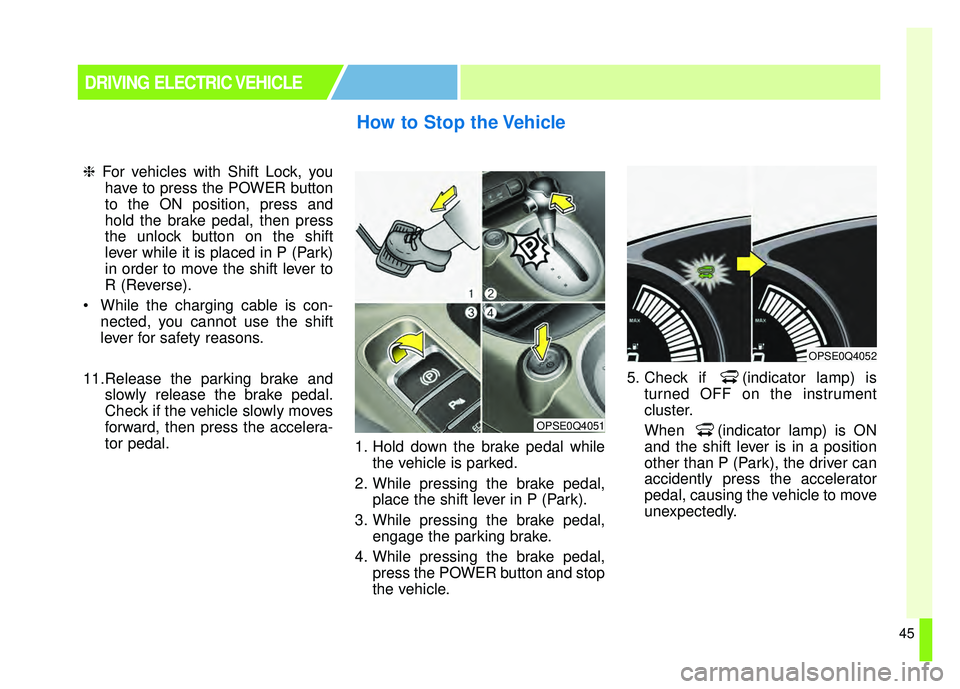
tor pedal. 1. Hold down the brake pedal while
the vehicle is parked.
2. While pressing the brake pedal, place the shift lever in P (Park).
3. While pressing the brake pedal, engage the parking brake.
4. While pressing the brake pedal, press the POWER button and stop
the vehicle. 5. Check if (indicator lamp) is
turned OFF on the instrument
cluster.
When (indicator lamp) is ON
and the shift lever is in a position
other than P (Park), the driver can
accidently press the accelerator
pedal, causing the vehicle to move
unexpectedly.
How to Stop the Vehicle
DRIVING ELECTRIC VEHICLE
OPSE0Q4051
OPSE0Q4052
Page 53 of 496
48
If you operate the air conditioner/heater too much, the driving battery
uses too much electricity. This may
reduce the distance to empty.
Therefore, it is recommended that
you set the cabin temperature to
(73°F (23°C)) AUTO. This setting
that has been certified by various
assessment tests to maintain opti-
mal energy consumption rates while
keeping the temperature fresh.
Turn OFF the heater and air con-
ditioner if you do not need them.
Press and hold the accelerator pedal to maintain speed and drive
economically.
Gradually press and release the accelerator pedal when accelerat-
ing or decelerating.
Always maintain specified tire pressures.
Do not use unnecessary electrical components while driving.
Do not load unnecessary items in the vehicle trunk.
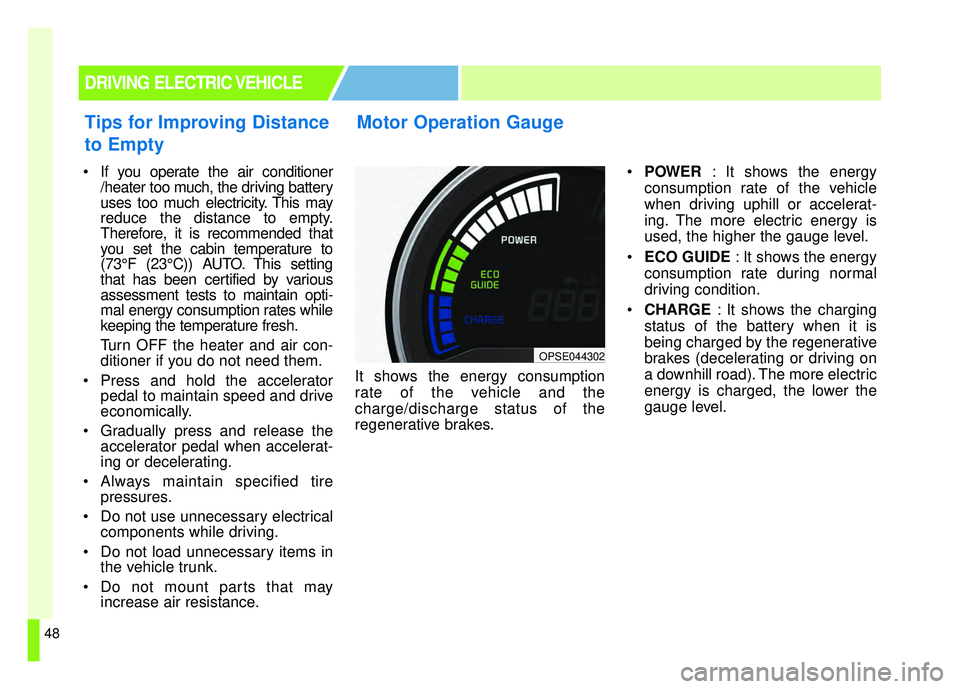
Do not mount parts that may increase air resistance. It shows the energy consumption
rate of the vehicle and the
charge/discharge status of the
regenerative brakes.
POWER : It shows the energy
consumption rate of the vehicle
when driving uphill or accelerat-
ing. The more electric energy is
used, the higher the gauge level.
ECO GUIDE : It shows the energy
consumption rate during normal
driving condition.
CHARGE : It shows the charging
status of the battery when it is
being charged by the regenerative
brakes (decelerating or driving on
a downhill road). The more electric
energy is charged, the lower the
gauge level.
Motor Operation Gauge
DRIVING ELECTRIC VEHICLE
OPSE044302
Tips for Improving Distance
to Empty