Page 14 of 496
9
■
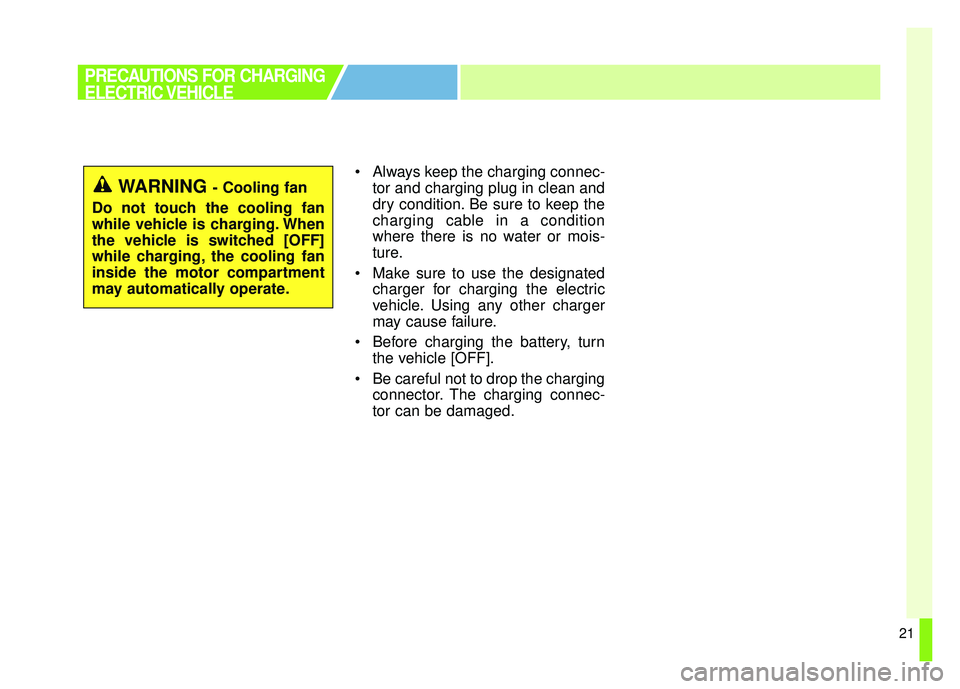
■ECO Driving
You can check ECO level information
and ECO driving history.
� � ECO Level
A total of 8 ECO levels and the
average energy consumption are
displayed depending on vehicle
driving style.
� �Driving History
You can check the driving date ,
driving distance , and the aver-
age energy consumption rating
for previous 30 driving trips. The
date with the highest ECO level is
marked with a star shaped icon.
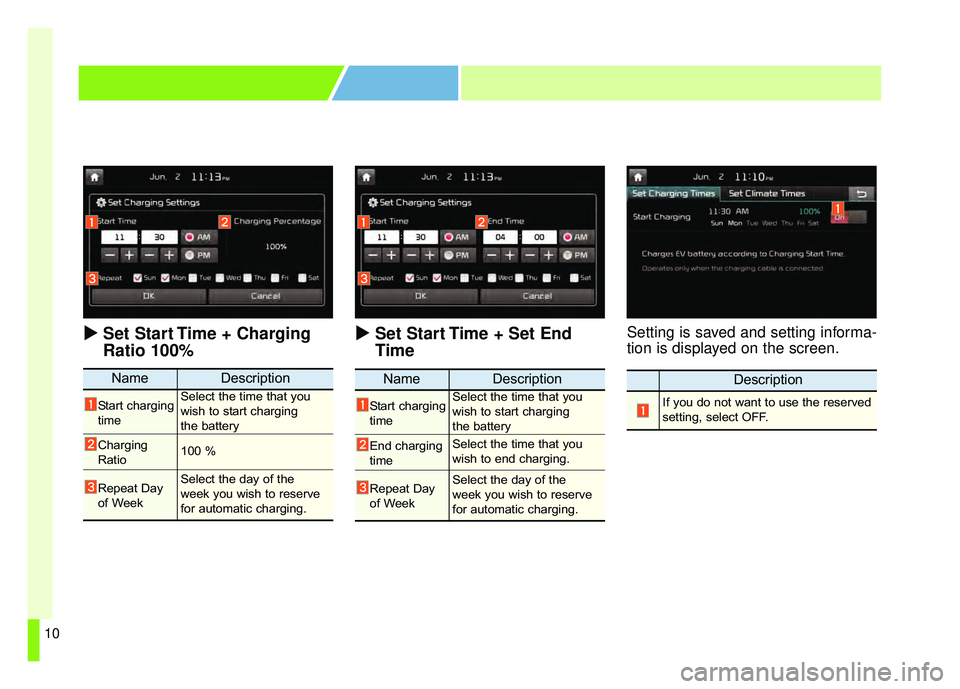
■ ■Set Charging Times
This is a feature that starts charging
the battery on the date and time that
is designated by the user. One reser-
vation can be set between 2 options.
NameDescription
Set Start Time
+ Charging
Ratio 100% You can set start charging
time and ratio is set 100
automatically by days of
the week.
Set Start Time
+ Set End
TimeYou can set charging time
from start to end by days of
the week.
EV MODE
Page 15 of 496
10
�
�Set Start Time + Charging
Ratio 100% � �
Set Start Time + Set End
TimeSetting is saved and setting informa-
tion is displayed on the screen.
NameDescription
Start charging
timeSelect the time that you
wish to start charging
the battery
Charging
Ratio100 %
Repeat Day
of WeekSelect the day of the
week you wish to reserve
for automatic charging.
NameDescription
Start charging
timeSelect the time that you
wish to start charging
the battery
End charging
timeSelect the time that you
wish to end charging.
Repeat Day
of WeekSelect the day of the
week you wish to reserve
for automatic charging.
Description
If you do not want to use the reserved
setting, select OFF.
Page 16 of 496
11
■
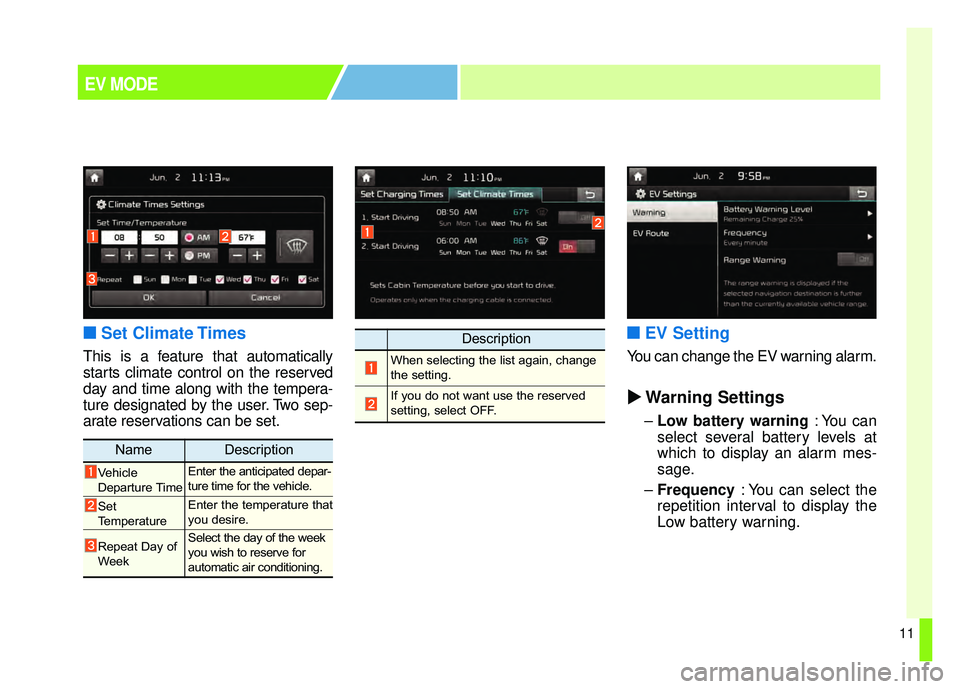
■Set Climate Times
This is a feature that automatically
starts climate control on the reserved
day and time along with the tempera-
ture designated by the user. Two sep-
arate reservations can be set.
■ ■EV Setting
You can change the EV warning alarm.
�
� Warning Settings
–Low battery warning : You can
select several battery levels at
which to display an alarm mes-
sage.
– Frequency : You can select the
repetition interval to display the
Low battery warning.
Description
When selecting the list again, change
the setting.
If you do not want use the reserved
setting, select OFF.
NameDescription
Vehicle
Departure TimeEnter the anticipated depar-
ture time for the vehicle.
Set
TemperatureEnter the temperature that
you desire.
Repeat Day of
WeekSelect the day of the week
you wish to reserve for
automatic air conditioning.
EV MODE
Page 18 of 496
13
Normal Charge :We recommend using normal
charging for usual charging of the
vehicle.
(Refer to “Normal Charge.“ in this
chapter)
Quick Charge (if equipped) : You can charge at high speeds at
public charging stations. Refer to
the respective company's manual
that is provided for each quick
charger type.
Battery performance and durability
can deteriorate if the quick charger
is used constantly.
Use of quick charge should be
minimized in order to help prolong
high voltage battery life.
Trickle Charge : Trickle Charge can be used when
Normal Charge or Quick Charge
is not available by using house-
hold electricity. Normal Charge :
Takes about 5-6 hours at room
temperature (depending on charg-
er ) for a full charge (208V : about
6 hours, 240V : about 5h 10min.)
(Can be charged to 100%.)
Quick Charge (if equipped) : Takes about 33 minutes at room
temperature to 80% of SOC.
(50kw charger) (Can be charged
directly to 94%)
DC cable shorter than 10m.
Trickle Charge : Takes about 33 hours at room
temperature. (120V-12A : about 33
hours) (Can be charged to 100%.)
Depending on the condition and dura-
bility of the high voltage battery, charg-
er specifications, and ambient temper-
ature, the time required for charging
the high voltage battery may vary.
CHARGE TYPES FOR ELECTRIC
VEHICLE
Charging Information Charging Time Information
Page 19 of 496

14
CHARGE TYPES FOR ELECTRIC
VEHICLE
Charging Types
CategoryCharging Inlet(Vehicle)Charging ConnectorCharging OutletHow to ChargeCharging Time
Normal
Charge
Use the normal
charger that is
installed in your
home or public
charging stationApprox. 5-6 hours
(208V : Approx. 6
hours, 240V : about
5h 10min. room tem-
perature) (Can be
charged to 100%)
Quick
Charge
(if equipped)Use the quick
charger at public
charging station
Approx. 33min to
80% of SOC (50kw,
room temperature)
(Can be charged
directly to 94%)
Trickle
ChargeUse household
electricity
Approx. 33hours
(120V-12A :
Approx.33hours, room
temperature) (Can be
charged to 100%)
OPSE0Q4035
OPSE0Q4036
OPSE0Q4035
OPSE0Q4005
OPSE0Q4006
OPSE0Q4005
OPSE0Q4057N
OPSE0Q4004
OPSE0Q4007
❈Shape of charger and how to use the charger may be different for each manufacturer.
❈ Depending on the condition and durability of the high voltage battery, charger specifications, and ambient temper-
ature, the time required for charging the high voltage battery may vary.
Page 20 of 496
15
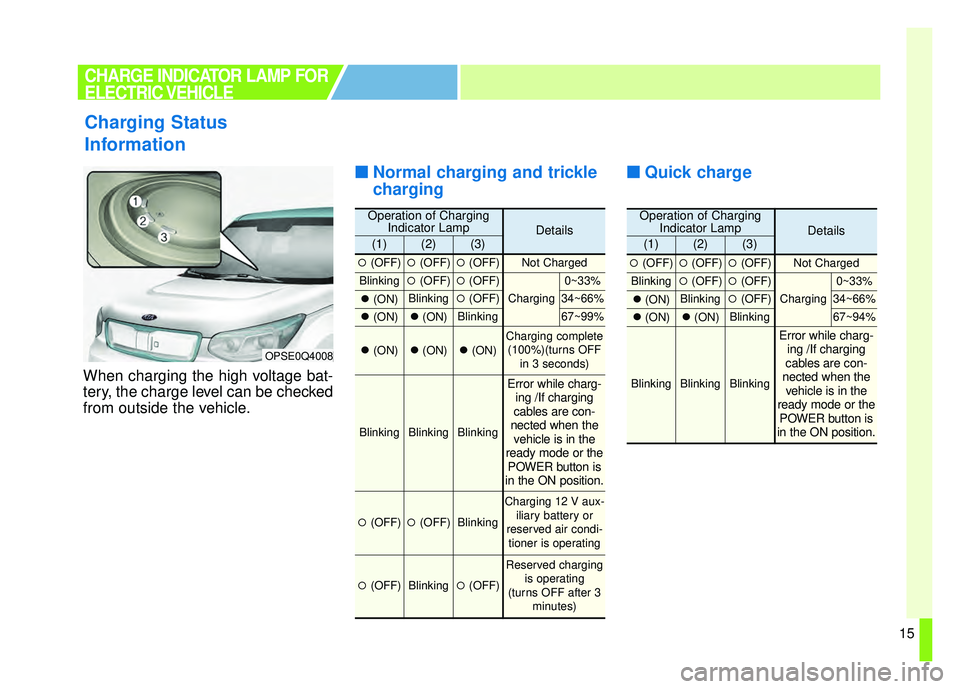
When charging the high voltage bat-
tery, the charge level can be checked
from outside the vehicle.
■ ■Normal charging and trickle
charging ■ ■
Quick charge
Charging Status
Information
OPSE0Q4008
CHARGE INDICATOR LAMP FOR
ELECTRIC VEHICLE
Operation of Charging
Indicator LampDetails(1)(2)(3)
�(OFF)�(OFF)�(OFF)Not Charged
Blinking�(OFF)�(OFF)
Charging
0~33%
�(ON)Blinking�(OFF)34~66%
�(ON)�(ON)Blinking67~99%
�(ON)�(ON)�(ON)Charging complete
(100%)(turns OFF in 3 seconds)
BlinkingBlinkingBlinking
Error while charg-ing /If charging
cables are con-
nected when the vehicle is in the
ready mode or the POWER button is
in the ON position.
�(OFF)�(OFF)Blinking
Charging 12 V aux-
iliary battery or
reserved air condi- tioner is operating
�(OFF)Blinking�(OFF)
Reserved charging is operating
(turns OFF after 3 minutes)
Operation of ChargingIndicator LampDetails(1)(2)(3)
�(OFF)�(OFF)�(OFF)Not Charged
Blinking�(OFF)�(OFF)
Charging
0~33%
�(ON)Blinking�(OFF)34~66%
�(ON)�(ON)Blinking67~94%
BlinkingBlinkingBlinking
Error while charg-
ing /If charging
cables are con-
nected when the vehicle is in the
ready mode or the POWER button is
in the ON position.
Page 22 of 496
17
RESERVED CHARGING
To immediately charge the battery
(not at reserved time only) first con-
nect the charging cables. Then, the
Deactivate Reserved Charge button
[ ] should be pressed within three
minutes after the cable connection.
If the battery does not charge after
the Deactivate Reserved Charge
button [ ] has been pressed,
remove the charging cable and
reconnect it.After the Deactivate Reserved
Charge button [ ] has been pressed
(pressed position), you can charge
the battery at any given time.
To change the status to reserved
charging, please press the
Deactivate Reserved Charge button
[ ] again (not pressed position).
❈
Refer to "Normal Charge, Trickle
Charge" for details about connect-
ing the normal charger and the
portable charging cable (ICCB: In-
Cable Control Box).
OPSE0Q40013
Page 26 of 496
21
Always keep the charging connec-tor and charging plug in clean and
dry condition. Be sure to keep the
charging cable in a condition
where there is no water or mois-
ture.
Make sure to use the designated charger for charging the electric
vehicle. Using any other charger
may cause failure.
Before charging the battery, turn the vehicle [OFF].
Be careful not to drop the charging connector. The charging connec-
tor can be damaged.
PRECAUTIONS FOR CHARGING
ELECTRIC VEHICLE
WARNING - Cooling fan
Do not touch the cooling fan
while vehicle is charging. When
the vehicle is switched [OFF]
while charging, the cooling fan
inside the motor compartment
may automatically operate.
![KIA SOUL EV 2018 Owners Manual 17
RESERVED CHARGING
To immediately charge the battery
(not at reserved time only) first con-
nect the charging cables. Then, the
Deactivate Reserved Charge button
[ ] should be pressed within three
m](/manual-img/2/55107/w960_55107-21.png "KIA SOUL EV 2018 Owners Manual 17
RESERVED CHARGING
To immediately charge the battery
(not at reserved time only) first con-
nect the charging cables. Then, the
Deactivate Reserved Charge button
[ ] should be pressed within three
m")