2018 KIA SORENTO lane change warning
[x] Cancel search: lane change warningPage 356 of 536

Driving your vehicle
86
5
If a vehicle is detected within the
boundary of the system, a warning
light will illuminate on the outside
rearview mirror.
If the detected vehicle is not in
detecting range, the warning will turn
off according to driving conditions. The second stage alarm will activate
when:
1.The first stage alert is on
2.The turn signal is on to change a
lane
When the second stage alert is acti-
vated, a warning light will blink on the
outside rearview mirror and an alarm
will sound.
If you move the turn signal switch to
the original position, the second
stage alert will be deactivated. - The second stage alarm may be
deactivated.
To activate the alarm: Go to the User Settings Mode →
Sound and select "BSD" on the
LCD display.
To deactivate the alarm: Go to the User Settings Mode →
Sound and deselect "BSD" on the
LCD display.✽ ✽
NOTICE
The alarm function helps alert the
driver. Deactivate this function only
when it is necessary.
OUM054029
2nd stage
OUM054028
1st stage
Page 359 of 536

589
Driving your vehicle
The system operates when thevehicle speed is below 10 km/h
(6.2 mph) with the shift lever in R
(Reverse).
The RCTA (Rear Cross Traffic Alert) detecting range is 0.5m ~
20m based on the side direction. If
the approaching vehicle speed is
4 km/h (2.5 mph) ~ 36 km/h (22
mph) within sensing range, it is
detected. However, the system
sensing range is different based on
conditions. Always pay attention to
your surroundings.Warning type
If the vehicle detected by sensorsapproaches your vehicle, the warn-
ing chime will sound and the warn-
ing light will blink on the outside
rearview mirror.
If the detected vehicle is out of the sensing range of your vehicle,
move the vehicle away from the
detected object slowly; the warning
will be cancelled.
The system may not operate prop- erly due to other factors or circum-
stances. Always pay attention to
your surroundings. \b
If your vehicle's left or right side
bumper is blinded by barrier or
vehicles, the system sensing abili-
ty may be deteriorated.
OYP054027K
WARNING
The Blind Spot Detection
System with Lane Change
Assist and Rear Cross Traffic
Alert is not a substitute for
proper and safe lane changing
procedures. Always drive safely
and use caution when changing
lanes. The Blind Spot Detection
System may not detect every
object alongside the vehicle.
Page 362 of 536
Driving your vehicle
92
5
LANE DEPARTURE WARNING SYSTEM (LDWS) (IF EQUIPPED)
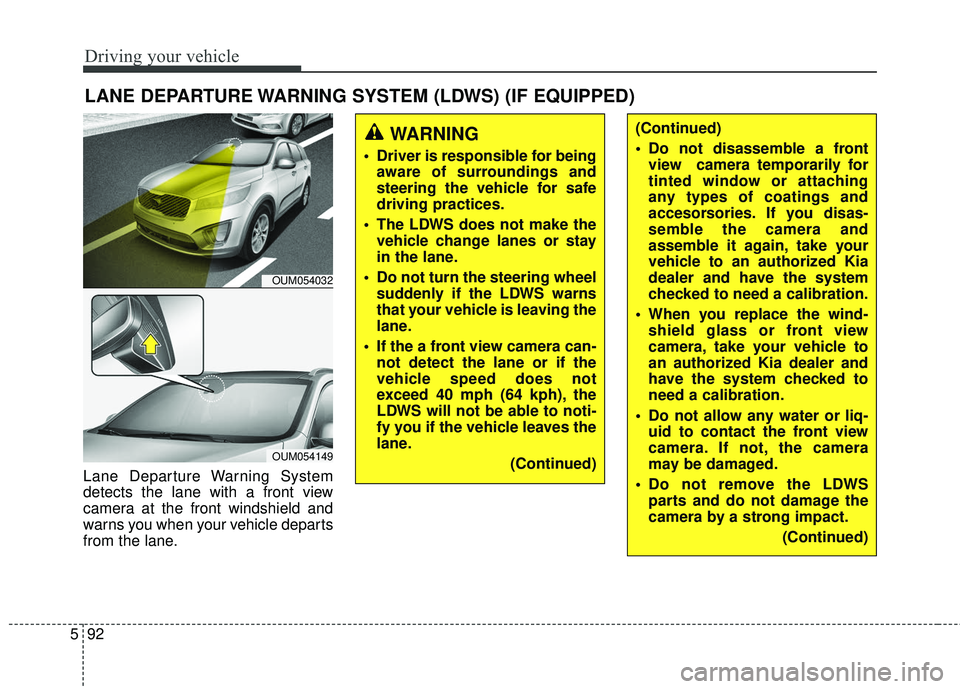
Lane Departure Warning System
detects the lane with a front view
camera at the front windshield and
warns you when your vehicle departs
from the lane.
OUM054032
OUM054149
WARNING
Driver is responsible for being
aware of surroundings and
steering the vehicle for safe
driving practices.
The LDWS does not make the vehicle change lanes or stay
in the lane.
Do not turn the steering wheel suddenly if the LDWS warns
that your vehicle is leaving the
lane.
If the a front view camera can- not detect the lane or if the
vehicle speed does not
exceed 40 mph (64 kph), the
LDWS will not be able to noti-
fy you if the vehicle leaves the
lane.
(Continued)
(Continued)
Do not disassemble a frontview camera temporarily for
tinted window or attaching
any types of coatings and
accesorsories. If you disas-
semble the camera and
assemble it again, take your
vehicle to an authorized Kia
dealer and have the system
checked to need a calibration.
When you replace the wind- shield glass or front view
camera, take your vehicle to
an authorized Kia dealer and
have the system checked to
need a calibration.
Do not allow any water or liq- uid to contact the front view
camera. If not, the camera
may be damaged.
Do not remove the LDWS parts and do not damage the
camera by a strong impact.
(Continued)
Page 363 of 536

593
Driving your vehicle
LDWS operation
To activate/deactivate the LDWS:
With the ignition switch in the ON
position, press the LDWS button
located on the instrument panel on
the lower left hand side of the driver.The indicator in the cluster display
will initially illuminate white. If the
indicator(white) activated in the pre-
vious ignition cycle, the system turns
on without any control. If you press
the LDWS button again, the indicator
on the cluster display will go off. The
color of indicator will change depend
on the condition of LDWS.
- White : Sensor does not detect the
lane marker or vehicle
speed is less than 40mph
(64kph).
- Green : S ensor detects the lane
marker.
(Continued)
Do not put objects that reflect light on the crash pad.
You may not hear warning sound of LDWS because of
the excessive audio sound.
OUMA054031
OUM054133L
Page 365 of 536
595
Driving your vehicle
Warning light and message
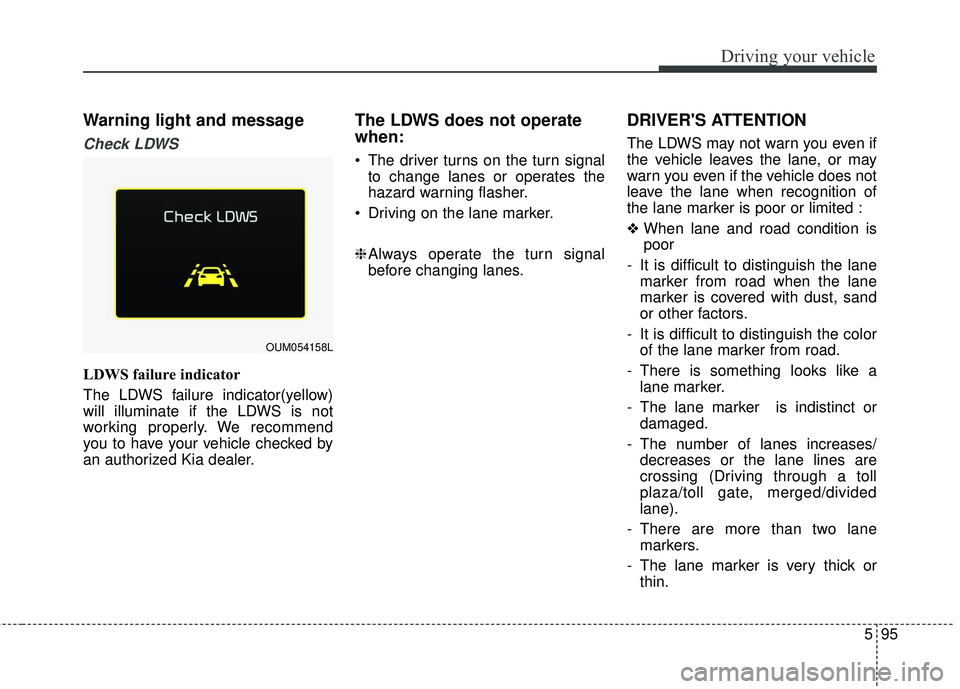
Check LDWS
LDWS failure indicator
The LDWS failure indicator(yellow)
will illuminate if the LDWS is not
working properly. We recommend
you to have your vehicle checked by
an authorized Kia dealer.
The LDWS does not operate
when:
The driver turns on the turn signalto change lanes or operates the
hazard warning flasher.
Driving on the lane marker.
\b Always operate the turn signal
before changing lanes.
DRIVER'S ATTENTION
The LDWS may not warn you even if
the vehicle leaves the lane, or may
warn you even if the vehicle does not
leave the lane when recognition of
the lane marker is poor or limited :
❖ When lane and road condition is
poor
- It is difficult to distinguish the lane marker from road when the lane
marker is covered with dust, sand
or other factors.
- It is difficult to distinguish the color of the lane marker from road.
- There is something looks like a lane marker.
- The lane marker is indistinct or damaged.
- The number of lanes increases/ decreases or the lane lines are
crossing (Driving through a toll
plaza/toll gate, merged/divided
lane).
- There are more than two lane markers.
- The lane marker is very thick or thin.
OUM054158L
Page 400 of 536
What to do in an emergency
86
IF YOU HAVE A FLAT TIRE
Jack and tools
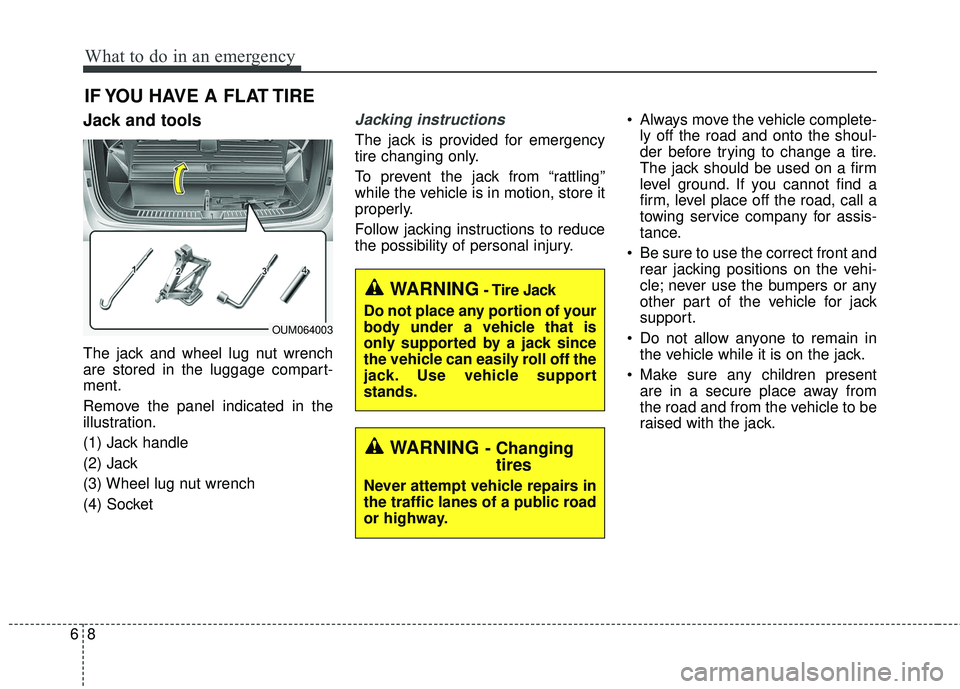
The jack and wheel lug nut wrench
are stored in the luggage compart-
ment.
Remove the panel indicated in the
illustration.
(1) Jack handle
(2) Jack
(3) Wheel lug nut wrench
(4) Socket
Jacking instructions
The jack is provided for emergency
tire changing only.
To prevent the jack from “rattling”
while the vehicle is in motion, store it
properly.
Follow jacking instructions to reduce
the possibility of personal injury. Always move the vehicle complete-
ly off the road and onto the shoul-
der before trying to change a tire.
The jack should be used on a firm
level ground. If you cannot find a
firm, level place off the road, call a
towing service company for assis-
tance.
Be sure to use the correct front and rear jacking positions on the vehi-
cle; never use the bumpers or any
other part of the vehicle for jack
support.
Do not allow anyone to remain in the vehicle while it is on the jack.
Make sure any children present are in a secure place away from
the road and from the vehicle to be
raised with the jack.
WARNING- Changingtires
Never attempt vehicle repairs in
the traffic lanes of a public road
or highway.
OUM064003
WARNING- Tire Jack
Do not place any portion of your
body under a vehicle that is
only supported by a jack since
the vehicle can easily roll off the
jack. Use vehicle support
stands.
Page 532 of 536

Index
6I
Glove box lamp . . . . . . . . . . . . . . . . . . . . . . . . . . . 4-127
Luggage lamp . . . . . . . . . . . . . . . . . . . . . . . . . . . . . 4-127
Map lamp . . . . . . . . . . . . . . . . . . . . . . . . . . . . . . . 4-126
Room lamp . . . . . . . . . . . . . . . . . . . . . . . . . . . . . . . 4-125
Vanity mirror lamp . . . . . . . . . . . . . . . . . . . . . . . . . 4-127
Interior overview . . . . . . . . . . . . . . . . . . . . . . . . . . . . . . 2-4
Key positions . . . . . . . . . . . . . . . . . . . . . . . . . . . . . . . . . 5-6 Ignition switch position . . . . . . . . . . . . . . . . . . . . . . . 5-6
Illuminated ignition switch . . . . . . . . . . . . . . . . . . . . 5-6
Starting the engine . . . . . . . . . . . . . . . . . . . . . . . . . . . 5-7
Lane departure warning system (LDWS) . . . . . . . . . . . 5-92 Driver's attention . . . . . . . . . . . . . . . . . . . . . . . . . . . 5-95
LDWS operation . . . . . . . . . . . . . . . . . . . . . . . . . . . 5-93
The LDWS does not operate when . . . . . . . . . . . . . 5-95
Warning light and message . . . . . . . . . . . . . . . . . . . 5-95
LCD display . . . . . . . . . . . . . . . . . . . . . . . . . . . . . . . . . 4-79 LCD modes . . . . . . . . . . . . . . . . . . . . . . . . . . . . . . . 4-79
Liftgate (for manual liftgate) . . . . . . . . . . . . . . . . . . . . 4-26 Closing the liftgate . . . . . . . . . . . . . . . . . . . . . . . . . . 4-26
Emergency liftgate safety release . . . . . . . . . . . . . . 4-27
Opening the liftgate . . . . . . . . . . . . . . . . . . . . . . . . . 4-26 Light bulbs . . . . . . . . . . . . . . . . . . . . . . . . . . . . . . . . . . 7-82\
Front lamp bulb replacement . . . . . . . . . . . . . . . . . . 7-83
High mounted stop lamp replacement . . . . . . . . . . . 7-90
Interior lamp bulb replacement . . . . . . . . . . . . . . . . 7-92
License plate light bulb replacement . . . . . . . . . . . . 7-91
Rear combination lamp bulb replacement . . . . . . . . 7-88
Side repeater lamp replacement . . . . . . . . . . . . . . . . 7-87
Lighting . . . . . . . . . . . . . . . . . . . . . . . . . . . . . . . . . . . . \
4-115 Battery saver function . . . . . . . . . . . . . . . . . . . . . . 4-115
Check headlight . . . . . . . . . . . . . . . . . . . . . . . . . . . 4-119
Daytime running light . . . . . . . . . . . . . . . . . . . . . . 4-115
Front fog light . . . . . . . . . . . . . . . . . . . . . . . . . . . . 4-118
High beam operation . . . . . . . . . . . . . . . . . . . . . . . 4-117
Lighting control . . . . . . . . . . . . . . . . . . . . . . . . . . . 4-115
Turn signals and lane change signals . . . . . . . . . . . 4-118
Luggage volume . . . . . . . . . . . . . . . . . . . . . . . . . . . . . . . 8-6
Maintenance services . . . . . . . . . . . . . . . . . . . . . . . . . . . 7-6 Owner maintenance precautions . . . . . . . . . . . . . . . . 7-7
Owner’s responsibility . . . . . . . . . . . . . . . . . . . . . . . . 7-6
Manual climate control system. . . . . . . . . . . . . . . . . . 4-130 3rd row air conditioning. . . . . . . . . . . . . . . . . . . . . 4-136
Checking the amount of air conditioner refrigerantand compressor lubricant . . . . . . . . . . . . . . . . . . . 4-139
Climate control air filter. . . . . . . . . . . . . . . . . . . . . 4-139
M
L
K