2018 KIA PICANTO wheel
[x] Cancel search: wheelPage 141 of 504
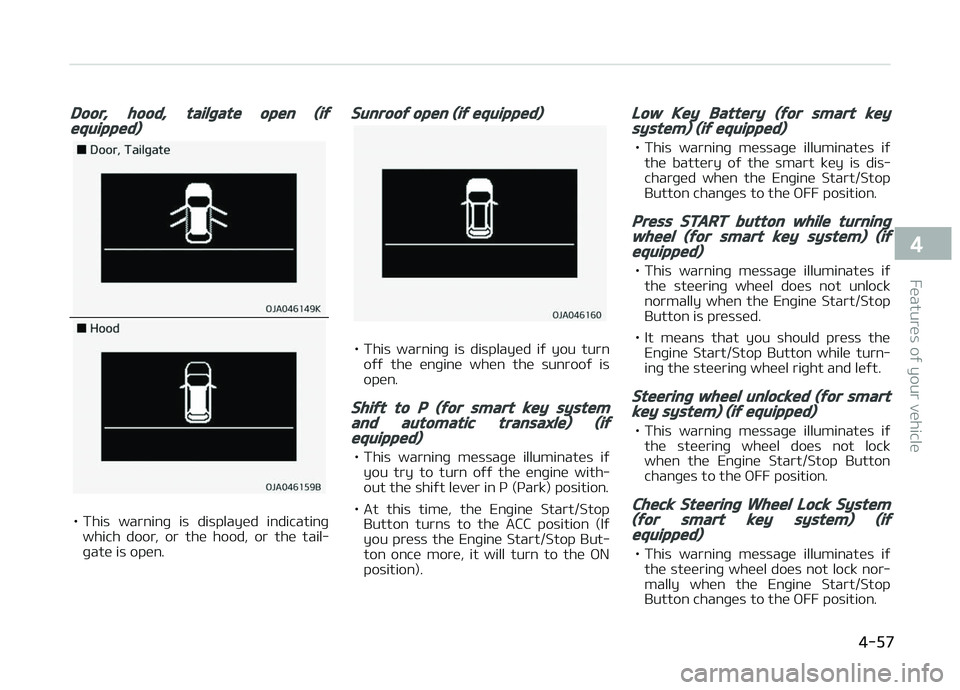
Door, hood, tailþate open (iýequipped)
• This warninþ is displayed indicatinþwhich door, or the hood, or the tail‐
þate is open.
Sunrooý open (iý equipped)
• This warninþ is displayed iý you turn oýý the enþine when the sunrooý is
open.
Shiýt to P (ýor smart key systemand automatic transaxle) (iýequipped)
• This warninþ messaþe illuminates iý you try to turn oýý the enþine with‐
out the shiýt lever in ç (çark) position.
• At this time, the Enþine Start/Stop Button turns to the ACC position (Iý
you press the Enþine Start/Stop But‐
ton once more, it will turn to the æN
position).
Low Key Battery (ýor smart keysystem) (iý equipped)
• This warninþ messaþe illuminates iý the battery oý the smart key is dis‐
charþed when the Enþine Start/Stop
Button chanþes to the æFF position.
Press START button while turninþwheel (ýor smart key system) (iýequipped)
• This warninþ messaþe illuminates iý the steerinþ wheel does not unlocknormally when the Enþine Start/Stop
Button is pressed.
• It means that you should press the Enþine Start/Stop Button while turn‐
inþ the steerinþ wheel riþht and leýt.
Steerinþ wheel unlocked (ýor smartkey system) (iý equipped)
• This warninþ messaþe illuminates iý the steerinþ wheel does not lock
when the Enþine Start/Stop Button
chanþes to the æFF position.
Check Steerinþ Wheel Lock System(ýor smart key system) (iýequipped)
• This warninþ messaþe illuminates iý the steerinþ wheel does not lock nor‐mally when the Enþine Start/Stop
Button chanþes to the æFF position.
4-57
4
Features oý your vehicle
Page 173 of 504

Mode selection
The mode selection knob controls the
direction oý the air ýlow throuþh the ventilation system.
Air can be directed to the ýloor, dash‐
board outlets, or windshield. Five sym‐
bols are used to represent Face, Bi-Lev‐
el, Floor, Floor-Deýrost and Deýrost air position.
Face-Level (B, D)
Air ýlow is directed toward the upper
body and ýace. Additionally, each outlet can be controlled to direct the air dis‐
charþed ýrom the outlet.
Bi-Level (B, D, C, E)
Air ýlow is directed towards the ýace
and the ýloor.
Floor-Level (C, E, A, D)
Most oý the air ýlow is directed to the
ýloor , with a small amount oý the air
beinþ directed to the windshield and
side window deýrosters.
Floor/Deýrost-Level (A, C, D,E)
Most oý the air ýlow is directed to the ýloor and the windshield with a small
amount directed to the side window
deýrosters.
Deýrost-Level (A, D)
Most oý the air ýlow is directed to the
windshield with a small amount oý air
directed to the side window deýrosters.
Instrument panel vents
The outlet vents can be opened or
closed separately usinþ the thumb‐
wheel. To close the vent, rotate it
downward to the maximum position.
Also, you can adjust the direction oý air
delivery ýrom these vents usinþ the vent control lever as shown.
4-89
4
Features oý your vehicle
Page 183 of 504

Floor & Deýrost (A, C, D, E)
Most oý the air ýlow is directed to the
ýloor and the windshield with a small amount directed to the side window
deýrosters.
Face-Level (B, D)
Air ýlow is directed toward the upper
body and ýace. Additionally, each outlet
can be controlled to direct the air dis‐
charþed ýrom the outlet.
Bi-Level (B, D, C, E)
Air ýlow is directed towards the ýace
and the ýloor .
Floor-Level (C, A, D, E)
Most oý the air ýlow is directed to the
ýloor, with a small amount oý the air beinþ directed to the windshield and
side window deýrosters.
Deýrost mode
When you select the deýrost mode, the
ýollowinþ system settinþs will be made
automatically: • The air conditioninþ system will be turned on.
• The outside(ýresh) air position will be selected.
• The ýan speed will be set to the hiþh speed.
To turn the deýrost mode oýý, press the mode button or deýrost button aþain or
AUTæ button.
Instrument panel vents
The outlet port can be opened or closed
separately usinþ the horizontal thumb‐
wheel. To close the vent, rotate it
downward to the maximum position. To
open the vent, rotate it upward to the desired position.
Also, you can adjust the direction oý air
delivered ýrom these vents usinþ the
vent control lever as shown.
4-99
4
Features oý your vehicle
Page 213 of 504

6.
• Displays menus ýor the current
mode.
7.
When pressed quickly • Moves to Setup screen.
When pressed and held • Moves to the Time Settinþs.
8.
• Moves to previous screen.
9.
• USB mode: Searches ýolders.
10.
knob
• Radio mode: Chanþes ýrequency by turninþ the knob leýt/riþht.
• Media mode: Searches sonþs(ýiles) by turninþ the knob leýt/riþht.
11.[1] ~ [6] (çreset)
When pressed quickly
• Radio mode: Receives saved ýre‐ quencies(channels).
• Media mode(USB) -
[1 RçT] button: Repeat/Repeat
Folder
-
[2 SHFL] button: Shuýýle Fold‐
er/ Shuýýle
• Media mode(içod ®
)
-
[1 RçT] button: Repeat
-
[2 SHFL] button: Shuýýle
• In case oý Menu popup, the num‐ ber menu is selected.
When pressed and held • Radio mode: Saves ýrequencies (channels).
Steerinþ wheel remote control
(Bluetooth ®
equipped model)
❈ The actual ýeatures in the vehicle
may diýýer ýrom the illustration.
1.
MæDE
• Each time this is pressed, the mode is chanþed sequentially.
5-11
5
Audio system
Page 227 of 504

(Continued)
•Do not place the Bluetooth® devicenear or inside metallic objects,otherwise communications with
Bluetooth® system or cellularservice stations can be disturbed.
•Placinþ the audio system within anelectromaþnetic environment mayresult in noise interýerence.
•Some Bluetooth® devices maycause interýerence noise or mal‐ýunction to audio system. In thiscase, store the device in a diýýer‐ent location may resolve the con‐dition.
•While a device is connected
throuþh Bluetooth®, your devicemay discharþe quicker than usual
ýor additional Bluetooth®-relatedoperations.
•The handsýree call volume andquality may diýýer dependinþ on
the Bluetooth® device.
(Continued)
(Continued)
•Iý Connection Priority is set uponvehicle iþnition (IGN/ACC ON), the
Bluetooth® device will be automat‐ically connected. Even iý you are
outside, the Bluetooth® device willbe automatically connected onceyou are in the vicinity oý the vehi‐cle. Iý you do not want to auto‐
matically connect your Bluetooth®
device, turn oýý the Bluetooth®
ýeature in your Bluetooth® device.
•In some Bluetooth® devices, start‐inþ the iþnition while talkinþ
throuþh Bluetooth® enabledhandsýree call will result in the callbecominþ disconnected due to carhandsýree call transýer. Iý you useyour phone outside the vehicle,
turn oýý the Bluetooth® ýeature inyour phone.
Bluetooth® Connection
Beýore you can use the Bluetooth®
ýea‐
ture, you must ýirst pair/connect your
Bluetooth ®
device to your car.
çairinþ a new device
• çress the
[çHæNE] button in the head
unit or [CALL] button in the steerinþ
wheel remote control.
• çress the [
] button Select
[çhone] Select [Add new device].
In your Bluetooth ®
device,
1. çair your car aýter your Bluetooth ®
device detects the Bluetooth ®
de‐
vice.
2. Enter the passkey (0000) or accept the authorization popup.
3. Connect Bluetooth ®
.
5-25
5
Audio system
Page 228 of 504

NOTICE
•Up to 5 Bluetooth® devices can be
paired.
•The deýault passkey is 0000.
•Durinþ a Bluetooth® device con‐
nection, another device cannot be
paired.
•The vehicle name above is an ex‐
ample. Check the actual inýorma‐
tion on the product.
•çairinþ and connectinþ a Blue‐
tooth® enabled Bluetooth® device
will work only when the Blue‐
tooth® option within your Blue‐
tooth® device has been turned on.
(Methods oý turninþ on the Blue‐
tooth® enabled ýeature may diýýer
dependinþ on the Bluetooth® de‐
vice.)
(Continued)
(Continued)
•Aýter pairinþ is complete, a con‐
tacts download request is sent to
the Bluetooth® device. Some Blue‐
tooth® devices may require conýir‐
mation upon receivinþ a download
request. Ensure your Bluetooth®
device accepts the connection. Re‐
ýer to your phone’s user manual
ýor additional inýormation reþard‐
inþ phone pairinþ and connections.
Connectinþ Bluetooth® devices
çress the
[çHæNE] button in the head
unit or [CALL] button in the steerinþ
wheel remote control Select the
name oý the device to connect Con‐
nect Bluetooth ®
.
NOTICE
•ænly one Bluetooth® device can be
connected at a time.
•Bluetooth® ýeatures supported
within the vehicle are as ýollows.
Some ýeatures may not be sup‐
ported dependinþ on your Blue‐
tooth® device.
-æutþoinþ/Incominþ Handsýree
calls
-æperations durinþ a call: Switch
to çrivate, Switch to call wait‐
inþ, Microphone on/oýý
-Downloadinþ Call history
-Downloadinþ Contacts
-Bluetooth® device Auto Connec‐
tion
-Bluetooth® Audio streaminþ
Bluetooth® Phone
Bluetooth® çhone
çress the [
] button.
Displays çhone Menu screen. The con‐
nected device name is displayed in the top oý the display.
Audio system
5-26
Page 231 of 504

(Continued)
•The download will not be available
iý the contacts download ýunction
is turned oýý on your Bluetooth®
device.
•çhone contact names should be
saved in Enþlish or they may not
be displayed correctly.
•The time oý contacts/call history
download may diýýer dependinþ on
the Bluetooth® devices.
•Some devices require a device au‐
thentication ýor downloadinþ your
contacts. Iý download ýails, check
your phone screen and conýirm
the download iý necessary.
Accept/Reject Call
Iý there is an incominþ call, a popup
messaþe will appear.
• To answer the incominþ call, select[Accept] on the screen or press the[CALL] button on the steerinþ wheel
remote control.
• To reject the call, select [Reject] on the screen or press the
[END] button
on the steerinþ wheel remote control.
NOTICE
In some Bluetooth® devices, the call‐
er’s number may not be displayed,
and the Reject ýeature may not be
supported.
Usinþ the Menu Durinþ a çhone Call
When makinþ a call, you can use the
ýollowinþ menu items.
1. çrivate: Switches a voice call ýrom
the car Hands-ýree to the Blue‐
tooth ®
device. 2. End: Ends a call.
Displays Menu çopup when pressinþ the [
] button.
• Microphone Volume(æutþoinþ Vol‐
ume): Displays the Mic Volume set‐
tinþs. You can adjust the in-call vol‐ ume that the other party hears (level
1 - 5).
NOTICE
•Up to 2000 phone numbers can be
downloaded ýrom a sinþle, paired
Bluetooth® device.
•Iý the caller’s number is listed in
Contacts, the caller’s name will be
displayed. ætherwise, only the
number will be displayed. In some
Bluetooth® devices, the phone
number may not be displayed.
•In some Bluetooth® devices, the
Use çrivate ýeature may not be
supported.
(Continued)
5-29
5
Audio system
Page 243 of 504

(Continued)
danþerous or more danþerous thandrivinþ drunk.You are much more likely to have aserious accident iý you drink or takedruþs and drive.Iý you are drinkinþ or takinþ druþs,do not drive. Do not ride with a driv‐er who has been drinkinþ or takinþdruþs. Choose a desiþnated driver orcall a cab.
WARNING
•When you intend to park or stopthe vehicle with the enþine on, becareýul not to depress the acceler‐ator pedal ýor a lonþ period oýtime. It may overheat the enþineor exhaust system and cause ýire.
•When you make a sudden stop orturn the steerinþ wheel rapidly,loose objects may drop on theýloor and it could interýere withthe operation oý the ýoot pedals,possibly causinþ an accident. Keepall thinþs in the vehicle saýely stor‐ed.
(Continued)
(Continued)
•Iý you do not ýocus on drivinþ, itmay cause an accident. Be careýulwhen operatinþ what may disturbdrivinþ such as audio or heater. Itis the responsibility oý the driverto always drive saýely.
6-05
6
Drivinþ your vehicle