Page 200 of 616
467
Features of your vehicle
✽
✽NOTICE
• The average vehicle speed is not
displayed if the driving distance
has been less than 0.03 miles(500
meters) or the driving time has
been less than 10 seconds since the
ignition switch or Engine
Start/Stop button was turned to
ON.
• Even if the vehicle is not in motion, the average vehicle speed
keeps going while the engine is
running.
Elapsed Time (3)
The elapsed time is the total driv-
ing time since the last elapsed time
reset.
- Time range (hh:mm): 00:00 ~99:59
To reset the elapsed time, press the OK button (reset) on the steer-
ing wheel for more than 1 second
when the elapsed time is dis-
played.
✽ ✽ NOTICE
Even if the vehicle is not in motion,
the elapsed time keeps going while
the engine is running.
Digital speedometer
This mode displays the current
speed of the vehicle.
ODE047229N
Page 201 of 616
Features of your vehicle
68
4
Driving style
The driving style is displayed when
you are driving in ECO mode.
When you drive in SPORT mode,
each driving category will be dis-
played with “---”
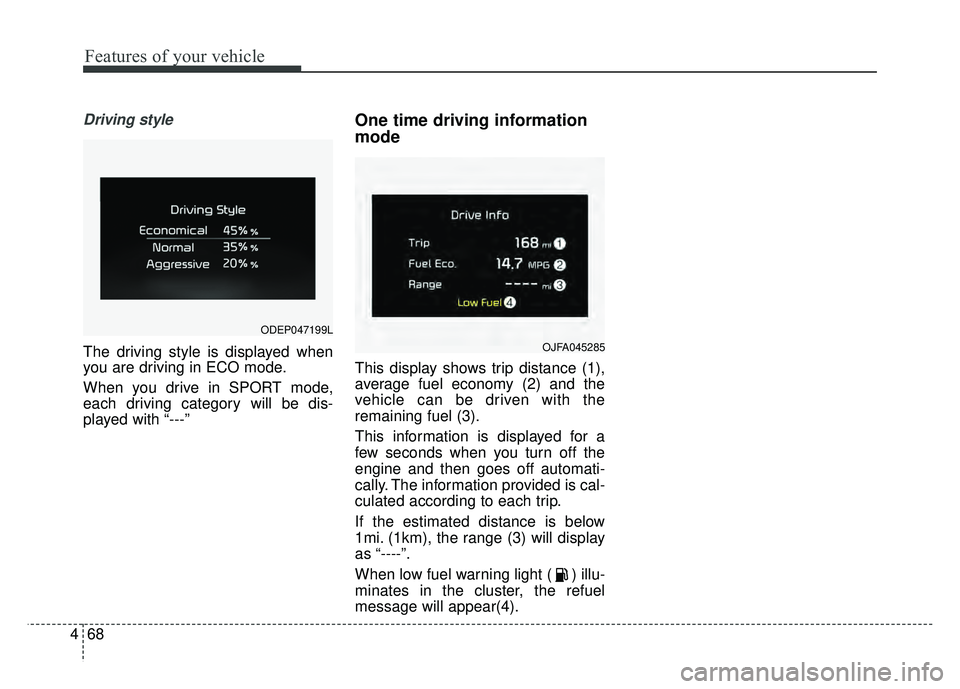
One time driving information
mode
This display shows trip distance (1),
average fuel economy (2) and the
vehicle can be driven with the
remaining fuel (3).
This information is displayed for a
few seconds when you turn off the
engine and then goes off automati-
cally. The information provided is cal-
culated according to each trip.
If the estimated distance is below
1mi. (1km), the range (3) will display
as “----”.
When low fuel warning light ( ) illu-
minates in the cluster, the refuel
message will appear(4).
OJFA045285
ODEP047199L
Page 204 of 616
471
Features of your vehicle
Trip information (Trip computer,
for Plug-in Hybrid)
The trip computer is a microcomput-
er-controlled driver information sys-
tem that displays information related
to driving.
✽ ✽NOTICE
Some driving information stored in
the trip computer (for example
Average Vehicle Speed) resets if the
battery is disconnected.
Trip Modes Fuel Economy
Average Fuel Economy (1)
The average fuel economy is calcu-
lated by the total driving distance
and fuel consumption since the last
average fuel economy reset.
- Fuel economy range : 0 ~ 99.9,100 ~ 999 MPG, km/L or
L/100km
The average fuel economy can be reset both manually and automati-
cally.
ODEP047196N
[A/B]
TRIP A/B
Digital Speedometer
Driving style
Energy flow
FUEL ECONOMY
Engine temperature
Page 216 of 616

483
Features of your vehicle
Lights
One Touch Turn Signal- Off : The one touch turn signalfunction will be deactivated.
- 3, 5, 7 Flashes : The lane change signals will blink 3, 5, or 7 times
when the turn signal lever is
moved slightly.
❈ For more details, refer to “Light” in
this chapter.
Head Lamp Delay (if equipped) If this item checked, the head lamp
delay function will be activated.
Welcome Light (if equipped) If this item checked, the welcome
light function will be activated.
Sound
Park Assist System Vol. (if equipped) : Adjust the Park Assist
System volume. (Level 1 ~ 3) Convenience
Seat Easy Access (if equipped)
- None : The seat easy accessfunction will be deactivated.
- Normal/Extended : When you turn off the engine, the driver's
seat will automatically move rear-
ward short (Normal) or long
(Extended) for you to enter or exit
the vehicle more comfortably.
❈ For more details, refer to “Driver
Position Memory System” in chap-
ter 3.
Wireless charging system (if equipped) : If this item checked,
the Wireless smart phone will be
activated.
Wiper/Light Display (if equipped) : If this item checked, the Wiper/
Light Display will be activated.
: To activate or deactivate the gear
position pop-up. When activated,
the gear position will be displayed
on the LCD display. Service interval
Service Interval
To activate or deactivate the serv-
ice interval function.
Adjust Interval If the service interval menu is acti-
vated, you may adjust the time and
distance.
Reset : To reset the service interval func-tion.
If the service interval is activated
and the time and distance is
adjusted, messages are displayed
in the following situations each
time the vehicle is turned on.
- Service in : Displayed to informthe driver the remaining mileage
and days to service.
- Service required : Displayed when the mileage and days to
service has been reached or
passed.
Page 224 of 616

491
Features of your vehicle
Stop vehicle to charge battery
This warning message illuminates
when the hybrid battery power
(SOC) level is low.
In this case, park the vehicle in a
safe location and wait until the hybrid
battery is charged.
Refuel to prevent Hybrid battery dam-
age
This warning message illuminates
when the fuel tank is nearly empty.
You should refill the fuel tank to pre-
vent hybrid battery damage.
Refill inverter coolant
This warning message illuminates
when the inverter coolant is nearly
empty.
You should refill the inverter coolant.Check brakes
This warning message illuminates
when the brake performance is low
or the regenerative brake does not
work properly due to a failure in the
brake system.
In this case, it may take longer for the
brake pedal to operate and the brak-
ing distance may become longer.
Stop vehicle and check brakes
This warning message is displayed
when a failure occurs in the brake
system.
In this case, park the vehicle in a
safe location and tow your vehicle to
the nearest professional workshop
and have the vehicle inspected. Kia
recommends to visit an authorized
Kia dealer/service partner.
Unplug vehicle to start (Plug-in hybrid)
The message is displayed when you
start the engine without unplugging
the charging cable. Unplug the
charging cable, and then start the
vehicle.
Remaining charge time
(Plug-in hybrid)
The message is displayed to notify
the remaining time to fully charge the
battery.
Shift to P to charge (Plug-in hybrid)
The message is displayed when the
charging connector is plugged with
the shift lever in R (Reverse), N
(Neutral) or D (Drive). Move the shift
lever to P (Park) and re-start the
charging process.
Page 228 of 616

495
Features of your vehicle
Parking Brake & BrakeFluid Warning Light
This warning light illuminates:
Once you set the Engine Start/Stop Button to the ON posi-
tion.
- It illuminates for approximately 3seconds
- It remains on if the parking brake is applied.
When the parking brake is applied.
When the brake fluid level in the reservoir is low.
- If the warning light illuminateswith the parking brake released, it
indicates the brake fluid level in
reservoir is low. If the brake fluid level in the reservoir
is low:
1. Drive carefully to the nearest safe
location and stop your vehicle.
2. With the engine stopped, check the brake fluid level immediately
and add fluid as required (For
more details, refer to “Brake Fluid”
in chapter 8).
Then check all brake components
for fluid leaks. If any leaks in the
brake system are still found, the
warning light remains on, or the
brakes do not operate properly, do
not drive the vehicle.
In this case, have your vehicle
towed to an authorized Kia dealer
and inspected. Dual-diagonal braking system
Your vehicle is equipped with dual-
diagonal braking systems. This
means you still have braking on two
wheels even if one of the dual sys-
tems should fail.
With only one of the dual systems
working, more than normal pedal
travel and greater pedal pressure are
required to stop the vehicle.
Also, the vehicle will not stop in as
short a distance with only a portion
of the brake system working.
If the brakes fail while you are driv-
ing, shift to a lower gear for addition-
al engine braking and stop the vehi-
cle as soon as it is safe to do so.
Driving the vehicle with a warning
light ON is dangerous. If the Parking
Brake & Brake Fluid Warning Light
illuminate with the parking brake
released, it indicates that the brake
fluid level is low.
In this case, have your vehicle
inspected by an authorized Kia deal-
er.
Page 233 of 616

Features of your vehicle
100
4
This warning light remains on after
blinking for approximately 60 seconds
or repeats blinking and off at the
intervals of approximately 3 seconds:
When there is a malfunction with
the TPMS.
In this case, have your vehicle
inspected by an authorized Kia
dealer as soon as possible.
❈ For more details, refer to “Tire
Pressure Monitoring System
(TPMS)” in chapter 7. The TPMS cannot alert you to
severe and sudden tire damage
caused by external factors.
If you notice any vehicle instability, immediately take your foot off the
accelerator pedal, apply the brakes
gradually with light force, and slow-
ly move to a safe position off the
road.Master Warning light
(if equipped)
This warning light informs the driv- er of the following situations
- LED headlamp failure
- Blind Spot Detection failure
- Smart Cruise Control System fail-ure
- Blind Spot Detection blockage
- Smart Cruise Control Radar fail- ure
- Lamp failure
- Virtual Engine Sound System malfunction
The Master Warning Light illumi-
nates when more than one of the
above warning situations occur. At
this time, the LCD Modes Icon will
change from ( ) to ( ).
If the warning situation is solved, the
master warning light will be turned off
and the LCD Modes Icon will be
changed back to its previous icon ( ).
WARNING - Low tire pressure
Significantly low tire pressure makes the vehicle unstable
and can contribute to loss of
vehicle control and increased
braking distances.
Continued driving or low pres- sure tires will cause the tires to
overheat and fail.
Page 240 of 616

4107
Features of your vehicle
The rear parking assist system
assists the driver during backward
movement of the vehicle by chiming if
any object is sensed within a distance
of 47 in. (120 cm) behind the vehicle.
This system is a supplemental system
and it is not intended to nor does it
replace the need for extreme care and
attention of the driver. The sensing
range and objects detectable by the
back sensors (➀) are limited.
Whenever backing-up, pay as much
attention to what is behind you as you
would in a vehicle without a rear park-
ing assist system.
Operation of the rear parking
assist system
Operating condition
This system will activate when backing up with the ignition switch
ON.
If the vehicle is moving at a speed
over 3 mph (5 km/h), the system
may not be activated correctly.
The sensing distance while the back-up warning system is in oper-
ation is approximately 47 in. (120
cm) at the rear bumper center
area, 23.5 in. (60 cm) at the rear
bumper both side area.
When more than two objects are sensed at the same time, the clos-
est one will be recognized first.
REAR PARKING ASSIST SYSTEM (IF EQUIPPED)
WARNING - Rear parking
assist system
Never rely solely on the rear
parking assist system. Always
perform a visual inspection to
make sure the vehicle is clear of
all obstructions before moving
the vehicle in any direction. Stop
immediately if you are aware of
a child anywhere near your vehi-
cle. Some objects may not be
detected by the sensors, due to
the object's size or material.
ODE046400L