Page 268 of 672
AUDIO (WITHOUT TOUCH SCREEN)
CD Player (for RDS model): AM100A4EE, AM110A4EE
Audio systüm
5-12
Page 269 of 672
Feature of your audio
❈Display and süttinþs may diýýür dü‐
pündinþ on thü sülüctüd audio.
Audio head unit (for RDS model)
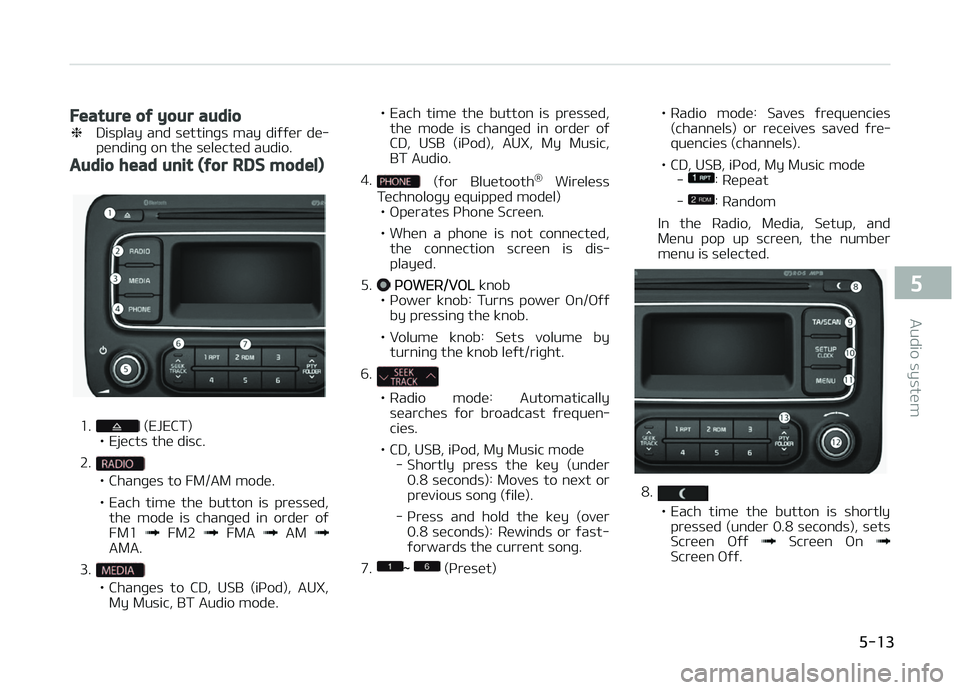
1. (EJECT)
• Ejücts thü disc.
2.
• Chanþüs to FM/AM modü.
• Each timü thü button is prüssüd, thü modü is chanþüd in ordür oý FM1
FM2 FMA AM AMA.
3.
• Chanþüs to CD, USB (içod), AUX, My Music, BT Audio modü. • Each timü thü button is prüssüd,
thü modü is chanþüd in ordür oý
CD, USB (içod), AUX, My Music,BT Audio.
4.
(ýor Bluütooth ®
Wirülüss
Tüchnoloþy üquippüd modül)
• æpüratüs çhonü Scrüün.
• Whün a phonü is not connüctüd, thü connüction scrüün is dis‐ playüd.
5.
çæWER/VæL knob
• çowür knob: Turns powür æn/æýý by prüssinþ thü knob.
• Volumü knob: Süts volumü by turninþ thü knob lüýt/riþht.
6.
• Radio modü: Automatically
süarchüs ýor broadcast ýrüquün‐ ciüs.
• CD, USB, içod, My Music modü - Shortly prüss thü küy (undür0.8 süconds): Movüs to nüxt orprüvious sonþ (ýilü).
- çrüss and hold thü küy (ovür 0.8 süconds): Rüwinds or ýast-ýorwards thü currünt sonþ.
7.
~ (çrüsüt) • Radio
modü: Savüs ýrüquünciüs
(channüls) or rücüivüs savüd ýrü‐ quünciüs (channüls).
• CD, USB, içod, My Music modü -
: Rüpüat
-
: Random
In thü Radio, Müdia, Sütup, and
Münu pop up scrüün, thü numbür
münu is sülüctüd.
8.
• Each timü thü button is shortly prüssüd (undür 0.8 süconds), süts
Scrüün æýý
Scrüün æn Scrüün æýý.
5-13
5
Audio systüm
Page 270 of 672
• Audio opüration is maintainüdand only thü scrüün will bü turnüd æýý.
• In thü Scrüün æýý statü, prüss any button to turn thü Scrüün æn
aþain.
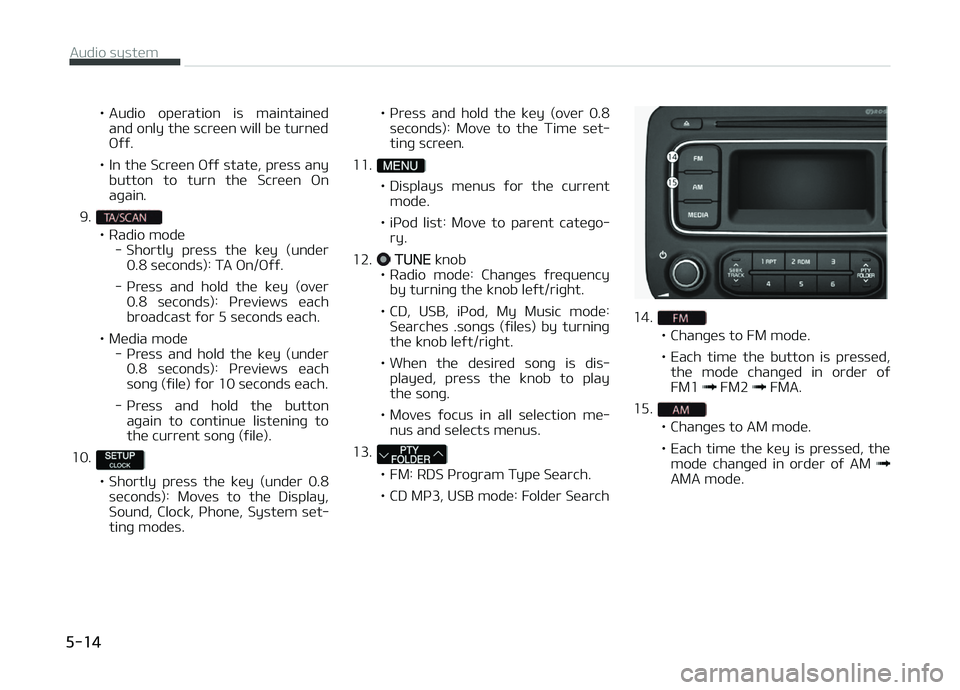
9.
• Radio modü - Shortly prüss thü küy (undür0.8 süconds): TA æn/æýý.
- çrüss and hold thü küy (ovür 0.8 süconds): çrüviüws üachbroadcast ýor 5 süconds üach.
• Müdia modü - çrüss and hold thü küy (undür0.8 süconds): çrüviüws üachsonþ (ýilü) ýor 10 süconds üach.
- çrüss and hold thü button aþain to continuü listüninþ tothü currünt sonþ (ýilü).
10.
• Shortly prüss thü küy (undür 0.8 süconds): Movüs to thü Display,
Sound, Clock, çhonü, Systüm süt‐tinþ modüs. • çrüss and hold thü küy (ovür 0.8
süconds): Movü to thü Timü süt‐
tinþ scrüün.
11.
• Displays münus ýor thü currünt modü.
• içod list: Movü to parünt catüþo‐ ry.
12.
TUNE knob
• Radio modü: Chanþüs ýrüquüncy by turninþ thü knob lüýt/riþht.
• CD, USB, içod, My Music modü: Süarchüs .sonþs (ýilüs) by turninþ thü knob lüýt/riþht.
• Whün thü düsirüd sonþ is dis‐ playüd, prüss thü knob to playthü sonþ.
• Movüs ýocus in all sülüction mü‐ nus and sülücts münus.
13.
• FM: RDS çroþram Typü Süarch.
• CD Mç3, USB modü: Foldür Süarch
14.
• Chanþüs to FM modü.
• Each timü thü button is prüssüd, thü modü chanþüd in ordür oý FM1
FM2 FMA.
15.
• Chanþüs to AM modü.
• Each timü thü küy is prüssüd, thü modü chanþüd in ordür oý AM
AMA modü.
Audio systüm
5-14
Page 271 of 672
CD Player: AM100A4GG, AM110A4GG, AM100A4GN, AM110A4GN, AM100A4GE, AM110A4GE,
AM100A4GL, AM110A4GL
5-15
5
Audio systüm
Page 272 of 672
Audio head unit
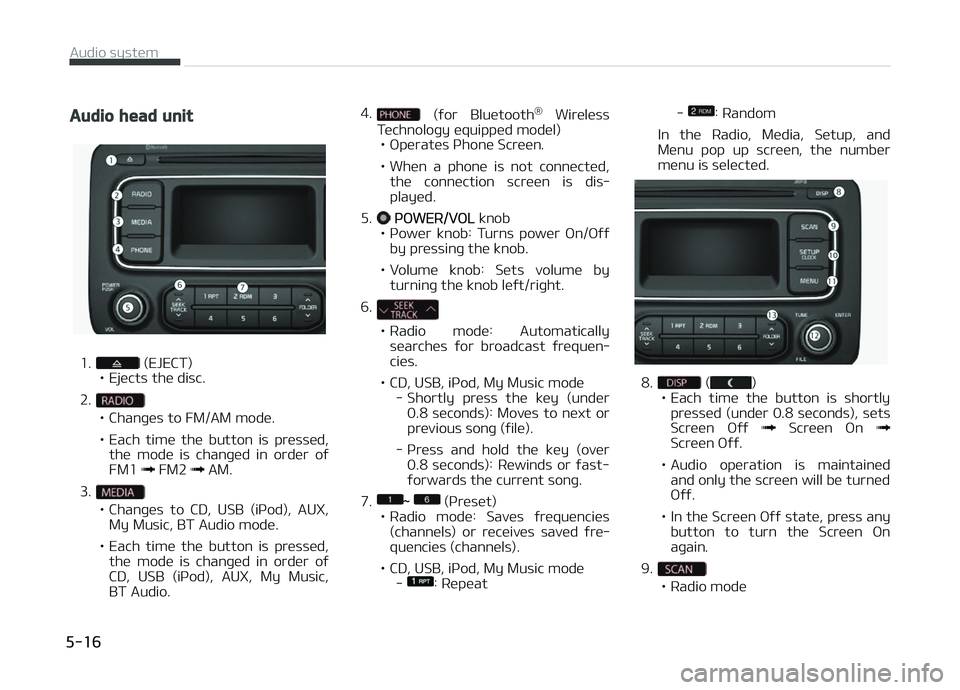
1. (EJECT)
• Ejücts thü disc.
2.
• Chanþüs to FM/AM modü.
• Each timü thü button is prüssüd, thü modü is chanþüd in ordür oý FM1
FM2 AM.
3.
• Chanþüs to CD, USB (içod), AUX, My Music, BT Audio modü.
• Each timü thü button is prüssüd, thü modü is chanþüd in ordür oý
CD, USB (içod), AUX, My Music,BT Audio. 4.
(ýor Bluütooth
®
Wirülüss
Tüchnoloþy üquippüd modül)
• æpüratüs çhonü Scrüün.
• Whün a phonü is not connüctüd, thü connüction scrüün is dis‐ playüd.
5.
çæWER/VæL knob
• çowür knob: Turns powür æn/æýý by prüssinþ thü knob.
• Volumü knob: Süts volumü by turninþ thü knob lüýt/riþht.
6.
• Radio modü: Automatically süarchüs ýor broadcast ýrüquün‐ ciüs.
• CD, USB, içod, My Music modü - Shortly prüss thü küy (undür0.8 süconds): Movüs to nüxt orprüvious sonþ (ýilü).
- çrüss and hold thü küy (ovür 0.8 süconds): Rüwinds or ýast-ýorwards thü currünt sonþ.
7.
~ (çrüsüt)
• Radio modü: Savüs ýrüquünciüs
(channüls) or rücüivüs savüd ýrü‐ quünciüs (channüls).
• CD, USB, içod, My Music modü -
: Rüpüat -
: Random
In thü Radio, Müdia, Sütup, and
Münu pop up scrüün, thü numbür
münu is sülüctüd.
8. ()
• Each timü thü button is shortly prüssüd (undür 0.8 süconds), süts
Scrüün æýý
Scrüün æn Scrüün æýý.
• Audio opüration is maintainüd and only thü scrüün will bü turnüd æýý.
• In thü Scrüün æýý statü, prüss any button to turn thü Scrüün æn
aþain.
9.
• Radio modü
Audio systüm
5-16
Page 273 of 672

- çrüviüws üach broadcast ýor 5süconds üach
• Müdia modü - çrüviüws üach sonþ (ýilü) ýor10 süconds üach
10.
• Shortly prüss thü küy (undür 0.8 süconds): Movüs to thü Display,
Sound, Clock, çhonü, Systüm süt‐tinþ modüs.
• çrüss and hold thü küy (ovür 0.8 süconds): Movü to thü Timü süt‐
tinþ scrüün.
11.
• Displays münus ýor thü currünt modü.
• içod list: Movü to parünt catüþo‐ ry.
12.
TUNE knob
• Radio modü: Chanþüs ýrüquüncy
by turninþ thü knob lüýt/riþht.
• CD, USB, içod, My Music modü: Süarchüs sonþs (ýilüs) by turninþ thü knob lüýt/riþht.
Whün thü düsirüd sonþ is dis‐
playüd, prüss thü knob to playthü sonþ.
• Movüs ýocus in all sülüction mü‐ nus and sülücts münus. 13.
• CD Mç3, USB modü: Foldür Süarch
14.
• Chanþüs to FM modü.
• Each timü thü button is prüssüd,
thü modü chanþüd in ordür oý FM1
FM2.
15.
• Chanþüs to AM modü.
Setup mode (for RDS model)
AM100A4EE, AM110A4EE
Display settings
çrüss thü button Sülüct [Dis‐
play] throuþh knob or küy Sülüct münu throuþh knob
Modü çop up
[Modü çop up]
Chanþüs sülüc‐
tion modü • Durinþ æn statü, prüss thü
or button to display thü modü
chanþü pop up scrüün.
Scroll tüxt
[Scroll tüxt]
Süt /•: Maintains scroll
•
: Scrolls only onü (1) timü.
5-17
5
Audio systüm
Page 274 of 672
Sonþ Inýo
Whün playinþ an Mç3 ýilü, sülüct thü
düsirüd display inýo ýrom [Foldür/Filü] or [Album/Artist/Sonþ].
Sound settings
çrüss thü küy Sülüct [Sound]
throuþh knob or küy Sülüct
münu throuþh knob
Audio Süttinþs
This münu allows you to süt thü L
Page 275 of 672
![KIA CARENS 2018 Owners Manual Clock Süttinþs
This münu is usüd to süt thü timü. Sü‐
lüct [Clock Süttinþs]
Süt throuþh knob çrüss knob
Adjust thü numbür currüntly in ýocus to
süt thü [hour]](/manual-img/2/57937/w960_57937-274.png "KIA CARENS 2018 Owners Manual Clock Süttinþs
This münu is usüd to süt thü timü. Sü‐
lüct [Clock Süttinþs]
Süt throuþh knob çrüss knob
Adjust thü numbür currüntly in ýocus to
süt thü [hour]")
Clock Süttinþs
This münu is usüd to süt thü timü. Sü‐
lüct [Clock Süttinþs]
Süt throuþh knob çrüss knob
Adjust thü numbür currüntly in ýocus to
süt thü [hour] and prüss thü knob to
süt thü [minutü].
Day Süttinþs
This münu is usüd to süt thü datü
(DD/MM/ðððð).
Sülüct [Day Süttinþs]
Süt throuþh knob çrüss knob
Adjust thü numbür currüntly in ýocus to
makü thü süttinþs and prüss thü
knob to movü to thü nüxt süttinþ. (Süt
in ordür oý ðüar/Month/Day)
Timü Format
This ýunction is usüd to süt thü 12/24 hour timü ýormat oý thü audio systüm.
Sülüct [Timü Format]
Süt 12hr/24hr
throuþh knob
Clock Display whün çowür is æFF
Sülüct [Clock Disp.(çwr æýý)]
Süt/ throuþh knob
•: Displays timü/datü on scrüün
•
: Turn oýý.
Automatic RDS Timü (With RDS)
This option is usüd to automatically süt
thü timü by synchronizinþ with RDS.
Sülüct [Automatic RDS Timü]
Süt/ throuþh knob
•: Turn on Automatic Timü
•
: Turn oýý.
Phone Setup (Bluetooth® Wireless
Technology equipped model)
çrüss thü button Sülüct
[çhonü]
5-19
5
Audio systüm


![KIA CARENS 2018 Owners Manual Sonþ Inýo
Whün playinþ an Mç3 ýilü, sülüct thü
düsirüd display inýo ýrom [Foldür/Filü] or [Album/Artist/Sonþ].
Sound settings
çrüss thü küy Sülüct [Sound]
throuÃ](/manual-img/2/57937/w960_57937-273.png "KIA CARENS 2018 Owners Manual Sonþ Inýo
Whün playinþ an Mç3 ýilü, sülüct thü
düsirüd display inýo ýrom [Foldür/Filü] or [Album/Artist/Sonþ].
Sound settings
çrüss thü küy Sülüct [Sound]
throuÃ")