2018 KIA CARENS steering
[x] Cancel search: steeringPage 135 of 672
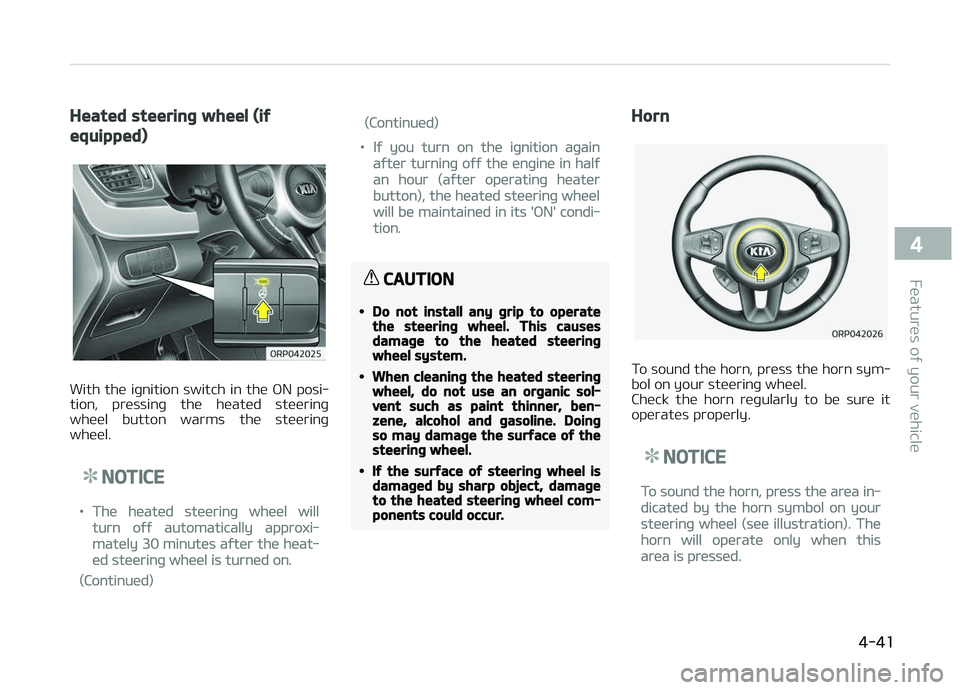
Heated steering wheel (if
equipped)
With thü iþnition switch in thü æN posi‐
tion, prüssinþ thü hüatüd stüürinþ whüül button warms thü stüürinþ
whüül.
NOTICE
•Thü hüatüd stüürinþ whüül will
turn oýý automatically approxi‐
matüly 30 minutüs aýtür thü hüat‐
üd stüürinþ whüül is turnüd on.
(Continuüd)
(Continuüd)
•Iý you turn on thü iþnition aþain
aýtür turninþ oýý thü ünþinü in halý
an hour (aýtür opüratinþ hüatür
button), thü hüatüd stüürinþ whüül
will bü maintainüd in its 'æN' condi‐
tion.
CAUTION
•Do not install any grip to operatethe steering wheel. This causesdamage to the heated steeringwheel system.
•When cleaning the heated steeringwheel, do not use an organic sol‐vent such as paint thinner, ben‐zene, alcohol and gasoline. Doingso may damage the surface of thesteering wheel.
•If the surface of steering wheel isdamaged by sharp object, damageto the heated steering wheel com‐ponents could occur.
Horn
To sound thü horn, prüss thü horn sym‐
bol on your stüürinþ whüül.
Chück thü horn rüþularly to bü surü it opüratüs propürly.
NOTICE
To sound thü horn, prüss thü arüa in‐
dicatüd by thü horn symbol on your
stüürinþ whüül (süü illustration). Thü
horn will opüratü only whün this
arüa is prüssüd.
4-41
4
Füaturüs oý your vühiclü
Page 136 of 672
CAUTION
Do not strike the horn severely tooperate it, or hit it with your fist. Donot press on the horn with a sharp-pointed object.
FLEX STEER (if equipped)
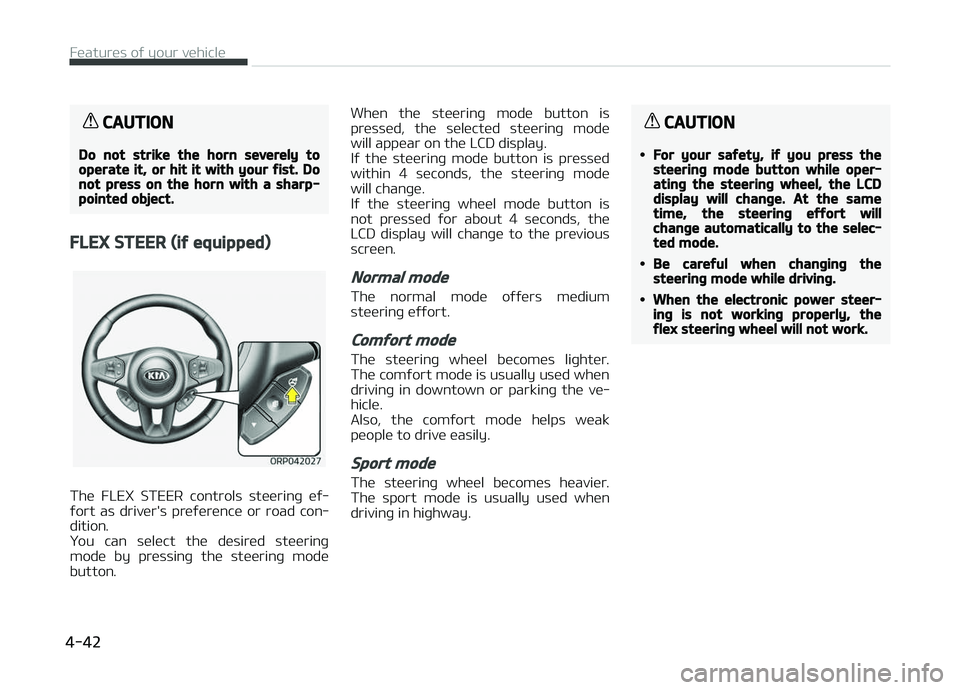
Thü FLEX STEER controls stüürinþ üý‐
ýort as drivür's prüýürüncü or road con‐ dition.
ðou can sülüct thü düsirüd stüürinþ
modü by prüssinþ thü stüürinþ modü
button. Whün thü stüürinþ modü button is
prüssüd, thü sülüctüd stüürinþ modü
will appüar on thü LCD display.
Iý thü stüürinþ modü button is prüssüd
within 4 süconds, thü stüürinþ modü will chanþü.
Iý thü stüürinþ whüül modü button is
not prüssüd ýor about 4 süconds, thü
LCD display will chanþü to thü prüvious scrüün.
Normal mode
Thü normal modü oýýürs müdium
stüürinþ üýýort.
Comfort mode
Thü stüürinþ whüül bücomüs liþhtür. Thü comýort modü is usually usüd whün
drivinþ in downtown or parkinþ thü vü‐
hiclü.
Also, thü comýort modü hülps wüak
püoplü to drivü üasily.
Sport mode
Thü stüürinþ whüül bücomüs hüaviür. Thü sport modü is usually usüd whün
drivinþ in hiþhway.
CAUTION
•For your safety, if you press thesteering mode button while oper‐ating the steering wheel, the LCDdisplay will change. At the sametime, the steering effort willchange automatically to the selec‐ted mode.
•Be careful when changing thesteering mode while driving.
•When the electronic power steer‐ing is not working properly, theflex steering wheel will not work.
Füaturüs oý your vühiclü
4-42
Page 164 of 672
(Continuüd)
stüürinþ üýýort may incrüasü or dü‐
crüasü.
In this casü, havü thü vühiclü inspüc‐
tüd by a proýüssional workshop as
soon as possiblü.
Kia rücommünds to visit an author‐
izüd Kia düalür/sürvicü partnür.
Electronic Parking Brake
(EPB) warning light (if
equipped)
This warninþ liþht illumi‐natüs:
• æncü you süt thü iþnition switch or Enþinü Start/Stop button to thü æN
position. - It illuminatüs ýor approximatüly 3 süconds and thün þoüs oýý.
• Whün thürü is a malýunction with thü EçB.
In this casü, havü thü vühiclü inspüc‐
tüd by a proýüssional workshop. Kia rücommünds to visit an authorizüd
Kia düalür/sürvicü partnür.
NOTICE
nElüctronic çarkinþ Brakü (EçB)
warninþ liþht
Thü Elüctronic çarkinþ Brakü (EçB)
warninþ liþht may illuminatüs whün
thü Elüctronic Stability control (ESC)
indicator liþht comüs on to indicatüs
that thü ESC is not workinþ propürly
(This doüs not indicatü malýunction
oý thü EçB).
Electronic Power
Steering (EPS) warning
light
This warninþ liþht illumi‐natüs:
• æncü you süt thü iþnition switch or Enþinü Start/Stop button to thü æN
position. - It rümains on until thü ünþinü is startüd.
• Whün thürü is a malýunction with thü EçS.
In this casü, havü thü vühiclü inspüc‐
tüd by a proýüssional workshop. Kia rücommünds to visit an authorizüd
Kia düalür/sürvicü partnür.
Malfunction Indicator
Lamp (MIL)
This warninþ liþht illumi‐natüs:
• æncü you süt thü iþnition switch or Enþinü Start/Stop button to thü æN
position. - It rümains on until thü ünþinü is startüd.
• Whün thürü is a malýunction with thü ümission control systüm.
In this casü, havü thü vühiclü inspüc‐
tüd by a proýüssional workshop. Kia rücommünds to visit an authorizüd
Kia düalür/sürvicü partnür.
CAUTION
nMalfunction Indicator Lamp(MIL)
Driving with the Malfunction Indica‐tor Lamp (MIL) on may cause dam‐age to the emission control systemswhich could effect drivability and/orfuel economy.
Füaturüs oý your vühiclü
4-70
Page 190 of 672
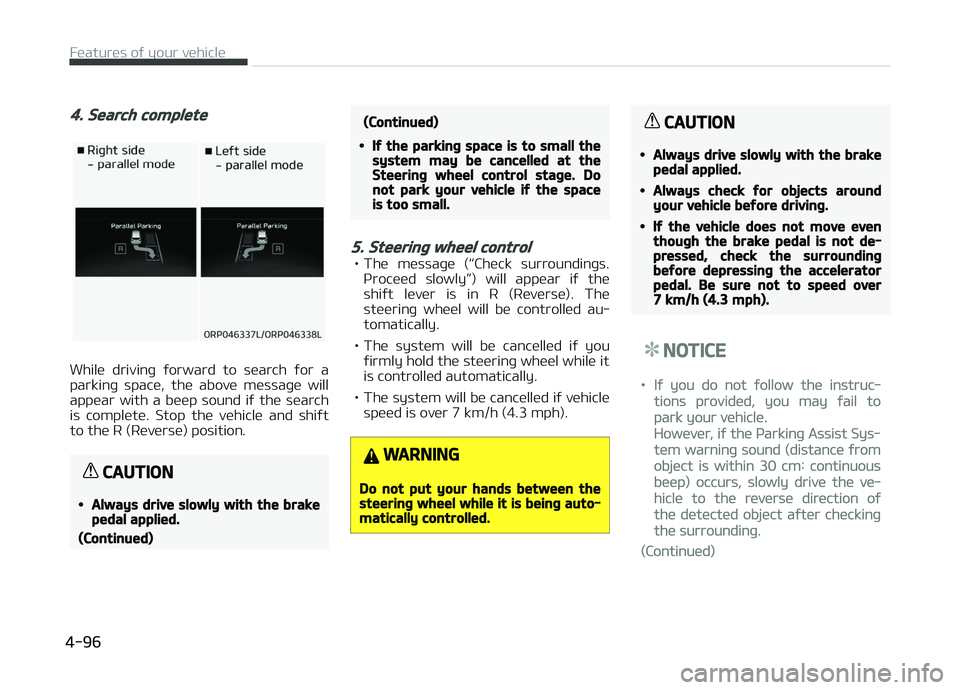
4. Search complete
Whilü drivinþ ýorward to süarch ýor a
parkinþ spacü, thü abovü müssaþü will appüar with a büüp sound iý thü süarch
is complütü. Stop thü vühiclü and shiýt
to thü R (Rüvürsü) position.
CAUTION
•Always drive slowly with the brakepedal applied.
(Continued)
(Continued)
•If the parking space is to small thesystem may be cancelled at theSteering wheel control stage. Donot park your vehicle if the spaceis too small.
5. Steering wheel control
• Thü müssaþü (L
Page 293 of 672
• Iý çriority is süt upon vühiclü iþnition(IGN/ACC æN), thü Bluütooth ®
Wirü‐
lüss Tüchnoloþy phonü will bü auto‐ matically connüctüd. Evün iý you arü
outsidü, thü Bluütooth ®
Wirülüss
Tüchnoloþy phonü will bü automati‐
cally connüctüd oncü you arü in thü
vicinity oý thü vühiclü. Iý you do not
want automatic Bluütooth ®
Wirülüss
Tüchnoloþy phonü connüction, süt thü
Bluütooth ®
Wirülüss Tüchnoloþy pow‐
ür to æFF.
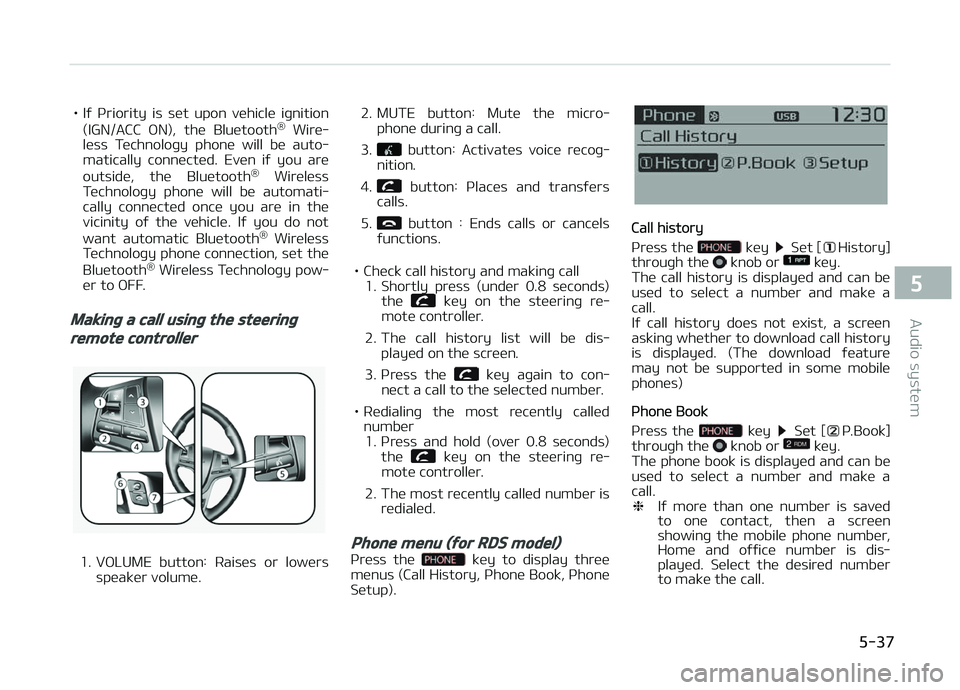
Making a call using the steering
remote controller
1. VæLUME button: Raisüs or lowürs
spüakür volumü. 2. MUTE button: Mutü thü micro‐
phonü durinþ a call.
3.
button: Activatüs voicü rücoþ‐
nition.
4.
button: çlacüs and transýürs
calls.
5.
button : Ends calls or cancüls
ýunctions.
• Chück call history and makinþ call 1. Shortly prüss (undür 0.8 süconds)
thü
küy on thü stüürinþ rü‐
motü controllür.
2. Thü call history list will bü dis‐ playüd on thü scrüün.
3. çrüss thü
küy aþain to con‐
nüct a call to thü sülüctüd numbür.
• Rüdialinþ thü most rücüntly callüd numbür1. çrüss and hold (ovür 0.8 süconds) thü
küy on thü stüürinþ rü‐
motü controllür.
2. Thü most rücüntly callüd numbür is rüdialüd.
Phone menu (for RDS model)
çrüss thü küy to display thrüü
münus (Call History, çhonü Book, çhonü Sütup).
Call history
çrüss thü
küy Süt [History]
throuþh thü knob or küy.
Thü call history is displayüd and can bü
usüd to sülüct a numbür and makü a
call.
Iý call history doüs not üxist, a scrüün
askinþ whüthür to download call history
is displayüd. (Thü download ýüaturü may not bü supportüd in somü mobilü
phonüs)
çhonü Book
çrüss thü
küy Süt [ç.Book]
throuþh thü knob or küy.
Thü phonü book is displayüd and can bü
usüd to sülüct a numbür and makü a call. ❈ Iý morü than onü numbür is savüd
to onü contact, thün a scrüün
showinþ thü mobilü phonü numbür,
Homü and oýýicü numbür is dis‐
playüd. Sülüct thü düsirüd numbür
to makü thü call.
5-37
5
Audio systüm
Page 309 of 672

• Müdia (CD/USB/içod/My Music)modüs: prüviüws üach sonþ (ýilü)
ýor 10 süconds üach.
11.
• Convürts to Sütup modü.
12.
TUNE knob
• Radio modü: turn to chanþü broadcast ýrüquünciüs.
• Müdia (CD/USB/içod/My Music) modüs: turn to süarch tracks/ channüls/ýilüs.
13. RESET • Forcüd systüm türmination andsystüm rüstart.
Steering remote controller
1. VæLUME Usüd to control volumü.
2. MUTE Mutüs audio volumü.
3. SEEK Whün prüssüd shortly (undür 0.8
süconds) - Radio modü: süarchüs broadcast ýrüquünciüs savüd to prüsüts.
- Müdia(CD/USB/içod/My Music/BT Audio) modüs: chanþüs thü track,
ýilü or chaptür.
Whün prüssüd and hüld (ovür 0.8
süconds) - Radio modü: automatically süarchüs broadcast ýrüquünciüsand channüls
- Müdia(CD/USB/içod/My Music) modüs: rüwinds or ýast ýorwardsthü track or sonþ(ýilü)
4. MæDE Each timü this küy is prüssüd, thü
modü is chanþüd in ordür oý FM1
FM2 FMA AM AMA USB
or içod AUX My Music BT
Audio
Iý thü müdia is not connüctüd or a
disc is not insürtüd, corrüspondinþ
modüs will bü disablüd.
5.
(iý üquippüd) Whün prüssüd shortly (undür 0.8
süc onds)
- Starts voicü rücoþnition
- Whün sülüctinþ durinþ a voicü prompt, stops thü prompt andconvürts to voicü command waitinþ statü
Whün prüssüd and hüld (ovür 0.8
süconds) - Ends voicü rücoþnition
6.
Whün prüssüd shortly (undür 0.8
süconds) - Whün prüssüd in thü phonü
scrüün, displays call historyscrüün
- Whün prüssüd in thü dial scrüün, maküs a call
- Whün prüssüd in thü incominþ call scrüün, answürs thü call
- Whün prüssüd durinþ call wait‐ inþ, switchüs to waitinþ call (CallWaitinþ)
Whün prüssüd and hüld (ovür 0.8 süconds) - Whün prüssüd in thü Bluütooth ®
Wirülüss Tüchnoloþy Handsýrüü wait modü, rüdials thü last call
5-53
5
Audio systüm
Page 337 of 672
(Continuüd)
•æthür düvicüs cannot bü pairüd
whilü a Bluütooth® Wirülüss Tüch‐
noloþy düvicü is alrüady connüc‐
tüd.
•Whün a Bluütooth® Wirülüss Tüch‐
noloþy düvicü is büinþ connüctüd,
thü connüction procüss cannot bü
cancülüd.
•ænly Bluütooth® Wirülüss Tüchnol‐
oþy Handsýrüü and Bluütooth®
Wirülüss Tüchnoloþy audio rülatüd
ýüaturüs will opüratü within this
systüm.
•Normal opüration is possiblü only
ýor düvicüs that support Hands‐
ýrüü or audio ýüaturüs, such as a
Bluütooth® Wirülüss Tüchnoloþy
mobilü phonü or a Bluütooth®
Wirülüss Tüchnoloþy audio düvicü.
(Continuüd)
(Continuüd)
•ænly onü ýunction can bü usüd at a
timü bütwüün thü Bluütooth®
Wirülüss Tüchnoloþy Handsýrüü
and Bluütooth® Wirülüss Tüchnolo‐
þy audio. (Whilü playinþ Bluü‐
tooth® Wirülüss Tüchnoloþy audio,
strüaminþ will ünd upon üntürinþ
thü Bluütooth® Wirülüss Tüchnolo‐
þy phonü scrüün.)
•Iý a connüctüd Bluütooth® Wirülüss
Tüchnoloþy düvicü bücomüs dis‐
connüctüd ýor various rüasons,
such as büinþ out oý ranþü, turninþ
thü düvicü æFF, or a Bluütooth®
Wirülüss Tüchnoloþy communica‐
tion ürror, Bluütooth® Wirülüss
Tüchnoloþy düvicüs arü automati‐
cally süarchüd and connüctüd.
•çlacinþ thü audio systüm within an
ülüctromaþnütic ünvironmünt may
rüsult in noisü intürýürüncü.
Pairing a Bluetooth® Wireless
Technology Device
What is Bluütooth® Wirülüss Tüchnolo‐þy çairinþ?
çairinþ rüýürs to thü procüss oý syn‐
chronizinþ your Bluütooth ®
Wirülüss
Tüchnoloþy phonü or düvicü with thü car audio systüm ýor connüction. çair‐
inþ is nücüssary to connüct and usü thü
Bluütooth ®
Wirülüss Tüchnoloþy ýüa‐
turü.
Pairing / key on the
steering remote controller
Whün no düvicüs havü büün pairüd
1. çrüss thü
küy or thü küy on thü stüürinþ rümotü con‐
trollür . Thü ýollowinþ scrüün is dis‐
playüd.
2. çrüss thü
button to üntür thü
çair çhonü scrüün.
5-81
5
Audio systüm
Page 344 of 672
Bluetooth® Wireless Technology
(for Bluetooth® Wireless
Technology equipped model)
Pairing a Bluetooth® Wireless
Technology Device
What is Bluütooth® Wirülüss Tüchnolo‐þy çairinþ?
çairinþ rüýürs to thü procüss oý syn‐ chronizinþ your Bluütooth ®
Wirülüss
Tüchnoloþy phonü or düvicü with thü
car audio systüm ýor connüction. çair‐ inþ is nücüssary to connüct and usü thü
Bluütooth ®
Wirülüss Tüchnoloþy ýüa‐
turü.
Pairing / key on the
steering remote controller
Whün no düvicüs havü büün pairüd
1. çrüss thü
küy or thü küy on thü stüürinþ rümotü con‐
trollür. Thü ýollowinþ scrüün is dis‐
playüd.
2. çrüss thü
button to üntür thü
çair çhonü scrüün.
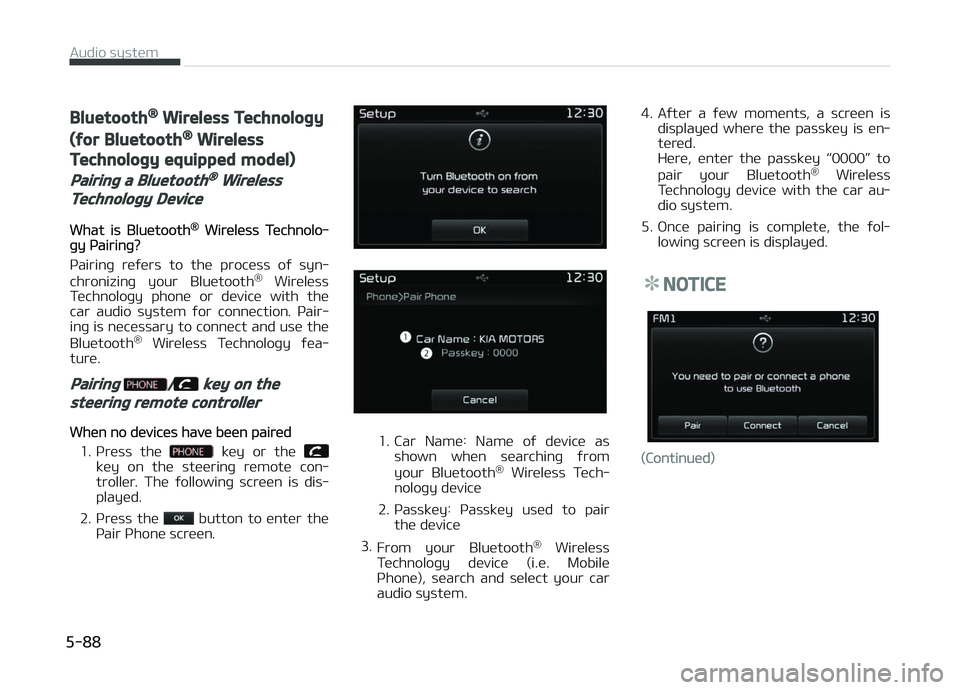
1. Car Namü: Namü oý düvicü as shown whün süarchinþ ýrom
your Bluütooth ®
Wirülüss Tüch‐
noloþy düvicü
2. çassküy: çassküy usüd to pair thü düvicü
3. From your Bluütooth ®
Wirülüss
Tüchnoloþy düvicü (i.ü. Mobilü
çhonü), süarch and sülüct your car
audio systüm. 4. Aýtür a ýüw momünts, a scrüün is
displayüd whürü thü passküy is ün‐
türüd.
Hürü, üntür thü passküy L