2018 KIA CARENS USB
[x] Cancel search: USBPage 273 of 672

- çrüviüws üach broadcast ýor 5süconds üach
• Müdia modü - çrüviüws üach sonþ (ýilü) ýor10 süconds üach
10.
• Shortly prüss thü küy (undür 0.8 süconds): Movüs to thü Display,
Sound, Clock, çhonü, Systüm süt‐tinþ modüs.
• çrüss and hold thü küy (ovür 0.8 süconds): Movü to thü Timü süt‐
tinþ scrüün.
11.
• Displays münus ýor thü currünt modü.
• içod list: Movü to parünt catüþo‐ ry.
12.
TUNE knob
• Radio modü: Chanþüs ýrüquüncy
by turninþ thü knob lüýt/riþht.
• CD, USB, içod, My Music modü: Süarchüs sonþs (ýilüs) by turninþ thü knob lüýt/riþht.
Whün thü düsirüd sonþ is dis‐
playüd, prüss thü knob to playthü sonþ.
• Movüs ýocus in all sülüction mü‐ nus and sülücts münus. 13.
• CD Mç3, USB modü: Foldür Süarch
14.
• Chanþüs to FM modü.
• Each timü thü button is prüssüd,
thü modü chanþüd in ordür oý FM1
FM2.
15.
• Chanþüs to AM modü.
Setup mode (for RDS model)
AM100A4EE, AM110A4EE
Display settings
çrüss thü button Sülüct [Dis‐
play] throuþh knob or küy Sülüct münu throuþh knob
Modü çop up
[Modü çop up]
Chanþüs sülüc‐
tion modü • Durinþ æn statü, prüss thü
or button to display thü modü
chanþü pop up scrüün.
Scroll tüxt
[Scroll tüxt]
Süt /•: Maintains scroll
•
: Scrolls only onü (1) timü.
5-17
5
Audio systüm
Page 287 of 672

Preset SEEK
çrüss thü - küy
• Shortly prüssinþ thü küy (undür 0.8
süconds): çlays thü ýrüquüncy savüd
in thü corrüspondinþ küy.
• çrüssinþ and holdinþ thü küy (ovür 0.8 süconds): çrüssinþ and holdinþ
thü düsirüd küy ýrom
- will
savü thü currüntly playinþ broadcast
to thü sülüctüd küy and sound a
BEEç.
SCAN
çrüss thü küy
• Shortly prüssinþ thü küy (undür 0.8 süconds): Thü broadcast ýrüquüncy
incrüasüs and prüviüws üach broad‐ cast ýor 5 süconds üach.
Aýtür scanninþ all ýrüquünciüs, rü‐
turns and plays thü currünt broad‐
cast ýrüquüncy.
• çrüssinþ and holdinþ thü küy (ovür 0.8 süconds): çrüviüws thü broad‐
casts savüd in çrüsüt
- ýor 5
süconds üach.
Selecting through manual search
Turn thü knob lüýt/riþht to adjust thü
ýrüquüncy.
• AM100A4GE / AM110A4GE - FM: Chanþüs by 50KHz - AM: Chanþüs by 9khz
• AM100A4GG / AM110A4GG - FM: Chanþüs by 100KHz
- AM: Chanþüs by 9khz
• AM100A4GN / AM110A4GN - FM: Chanþüs by 200KHz
- AM: Chanþüs by 10khz
• AM100A4GL / AM110A4GL - FM: Chanþüs by 100KHz
- AM: Chanþüs by 10khz
MENU
Within thü küy arü thü A.Storü
(Auto Storü) and Inýo ýunctions.
A.Store (Auto Store)
çrüss thü küy Süt [A.Storü]
throuþh knob or küy.
Sülüct A.Storü (Auto Storü) to savü ýrü‐
quünciüs with supürior rücüption to
prüsüts
-. Iý no ýrüquünciüs arü
rücüivüd, thün thü most rücüntly rü‐
cüivüd ýrüquüncy will bü broadcast.
Media mode
çrüss thü küy to chanþü thü
mod modü in ordür oý CD USB (içod) AUX My Music BT Audio.
Thü ýoldür/ýilü namü is displayüd on thü
scrüün.
• Audio CD
• CD Mç3
• USB
5-31
5
Audio systüm
Page 288 of 672

• My Music
❈Thü CD is automatically playüd
whün a CD is insürtüd.
❈ Thü USB music is automatically
playüd whün a USB is connüctüd.
Repeat
Whilü sonþ (ýilü) is playinþ (RçT)
küy
Audio CD, Mç3 CD, USB, içod, My Music
modü: RçT on scrüün • To rüpüat onü sonþ (Shortly prüssinþ thü küy (undür 0.8 süconds)): Rüpüats
thü currünt sonþ.
Mç3 CD, USB modü: FLD.RçT on scrüün • To rüpüat ýoldür (prüssinþ twicü): rü‐ püats all ýilüs within thü currünt ýold‐
ür.
❈ çrüss thü
küy aþain to turn oýý
rüpüat.
Random
Whilü sonþ (ýilü) is playinþ (RDM)
küy
Audio CD, My Music modü: RDM on
scrüün • Random (Shortly prüssinþ thü küy): çlays all sonþs in random ordür.
Mç3 CD, USB modü: FLD.RDM on scrüün • Foldür Random (Shortly prüssinþ thü küy): çlays all ýilüs within thü currünt
ýoldür in random ordür.
içod modü: ALL RDM on scrüün • All Random (Shortly prüssinþ thü küy): çlays all ýilüs in random ordür.
Mç3 CD, USB: ALL RDM on scrüün • All Random (prüssinþ twicü): çlays all ýilüs in random ordür.
❈ çrüss thü
küy aþain to turn oýý
rüpüat.
Changing Song/File
• Shortly prüssinþ thü küy: çlays thü
currünt sonþ ýrom thü büþinninþ.
❈ Iý thü
küy is prüssüd aþain
within 1 sücond, thü prüvious sonþ
is playüd. • çrüssinþ and holdinþ thü küy (ovür
0.8 süconds): Rüwinds thü sonþ.
Whilü sonþ (ýilü) is playinþ
küy
• Shortly prüssinþ thü küy: çlays thü
nüxt sonþ.
• çrüssinþ and holdinþ thü küy (ovür 0.8 süconds): Fast ýorwards thü sonþ.
Scan (for RDS model)
• çrüssinþ and holdinþ thü küy (ovür 0.8 süconds): Scans all
sonþs ýor 10 süconds startinþ ýrom
thü nüxt sonþ.
❈ çrüssinþ and holdinþ thü
küy aþain to turn oýý.
Scan
• Shortly prüssinþ thü küy:
Scans all sonþs ýrom thü nüxt sonþ ýor 10 süconds üach.
❈ çrüss thü
küy aþain to turn
oýý.
❈ Thü SCAN ýunction is not supportüd
in içod modü.
Folder Search: MP3 CD, USB mode
• Whilü ýilü is playinþ / (Foldür Up) küy: Süarchüs
thü nüxt ýoldür.
Audio systüm
5-32
Page 289 of 672
• Whilü ýilü is playinþ / (Foldür Down) küy: Süarch‐
üs thü parünt ýoldür.
❈ Iý a ýoldür is sülüctüd by prüssinþ
thü
knob, thü ýirst ýilü within thü
sülüctüd ýoldür will bü playüd.
❈ In içod modü, movüs to thü çarünt
Foldür.
Searching Songs (File)
• Turninþ knob: Süarchüs ýor sonþs
(ýilüs)
• çrüssinþ
knob: çlays sülüctüd sonþ
(ýilü).
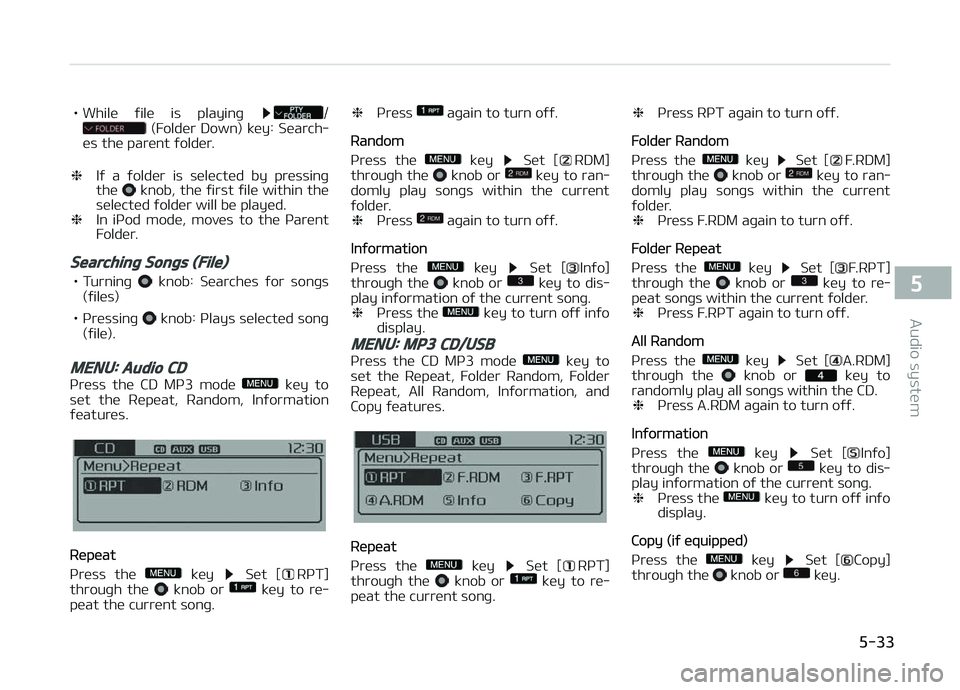
MENU: Audio CD
çrüss thü CD Mç3 modü küy to
süt thü Rüpüat, Random, Inýormation
ýüaturüs.
Rüpüat
çrüss thü
küy Süt [RçT]
throuþh thü knob or küy to rü‐
püat thü currünt sonþ. ❈
çrüss
aþain to turn oýý.
Random
çrüss thü
küy Süt [RDM]
throuþh thü knob or küy to ran‐
domly play sonþs within thü currünt
ýoldür. ❈ çrüss
aþain to turn oýý.
Inýormation
çrüss thü
küy Süt [Inýo]
throuþh thü knob or küy to dis‐
play inýormation oý thü currünt sonþ. ❈ çrüss thü
küy to turn oýý inýo
display.
MENU: MP3 CD/USB
çrüss thü CD Mç3 modü küy to
süt thü Rüpüat, Foldür Random, Foldür
Rüpüat, All Random, Inýormation, and
Copy ýüaturüs.
Rüpüat
çrüss thü
küy Süt [RçT]
throuþh thü knob or küy to rü‐
püat thü curr ünt sonþ. ❈
çrüss RçT aþain to turn oýý.
Foldür Random
çrüss thü
küy Süt [F.RDM]
throuþh thü knob or küy to ran‐
domly play sonþs within thü currünt
ýoldür. ❈ çrüss F.RDM aþain to turn oýý.
Foldür Rüpüat
çrüss thü
küy Süt [F.RçT]
throuþh thü knob or küy to rü‐
püat sonþs within thü currünt ýoldür. ❈ çrüss F.RçT aþain to turn oýý.
All Random
çrüss thü
küy Süt [A.RDM]
throuþh thü knob or küy to
randomly play all sonþs within thü CD. ❈ çrüss A.RDM aþain to turn oýý.
Inýormation
çrüss thü
küy Süt [Inýo]
throuþh thü knob or küy to dis‐
play inýormation oý thü currünt sonþ.
❈ çrüss thü
küy to turn oýý inýo
display.
Copy (iý üquippüd)
çrüss thü
küy Süt [Copy]
throuþh thü knob or küy.
5-33
5
Audio systüm
Page 290 of 672
• This is usüd to copy thü currünt sonþinto My Music. ðou can play thü cop‐
iüd Music in My Music modü.
❈ Iý anothür küy is prüssüd whilü
copyinþ is in proþrüss, a pop up
askinþ you whüthür to cancül copy‐
inþ is displayüd.
❈ Iý anothür müdia is connüctüd or in‐
sürtüd (USB, CD, içod, AUX) whilü
copyinþ is in proþrüss, copyinþ is
cancülüd.
❈ Music will not bü playüd whilü copy‐
inþ is in proþrüss.
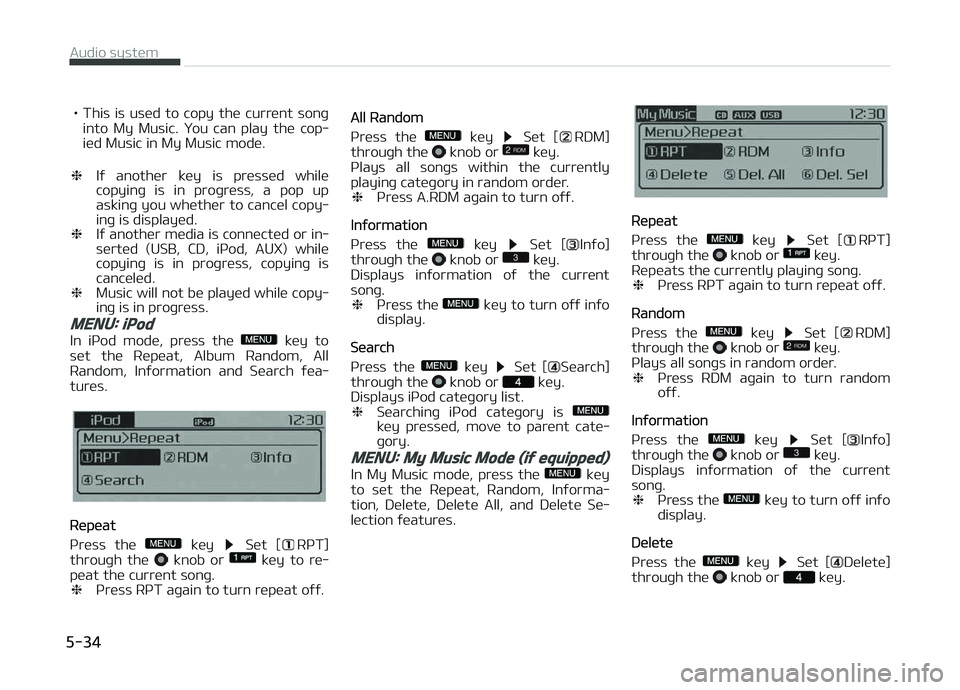
MENU: iPod
In içod modü, prüss thü küy to
süt thü Rüpüat, Album Random, All
Random, Inýormation and Süarch ýüa‐
turüs.
Rüpüat
çrüss thü
küy Süt [RçT]
throuþh thü knob or küy to rü‐
püat thü currünt sonþ. ❈ çrüss RçT aþain to turn rüpüat oýý.
All Random
çrüss thü
küy Süt [RDM]
throuþh thü knob or küy.
çlays all sonþs within thü currüntly
playinþ catüþory in random ordür. ❈ çrüss A.RDM aþain to turn oýý.
Inýormation
çrüss thü
küy Süt [Inýo]
throuþh thü knob or küy.
Displays inýormation oý thü currünt
sonþ. ❈ çrüss thü
küy to turn oýý inýo
display.
Süarch
çrüss thü
küy Süt [Süarch]
throuþh thü knob or küy.
Displays içod catüþory list. ❈ Süarchinþ içod catüþory is
küy prüssüd, movü to parünt catü‐
þory.
MENU: My Music Mode (if equipped)
In My Music modü, prüss thü küy
to süt thü Rüpüat, Random, Inýorma‐
tion, Dülütü, Dülütü All, and Dülütü Sü‐
lüction ýüaturüs.
Rüpüat
çrüss thü
küy Süt [RçT]
throuþh thü knob or küy.
Rüpüats thü currüntly playinþ sonþ. ❈ çrüss RçT aþain to turn rüpüat oýý.
Random
çrüss thü
küy Süt [RDM]
throuþh thü knob or küy.
çlays all sonþs in random ordür. ❈ çrüss RDM aþain to turn random
oýý.
Inýormation
çrüss thü
küy Süt [Inýo]
throuþh thü knob or küy.
Displays inýormation oý thü currünt
sonþ. ❈ çrüss thü
küy to turn oýý inýo
display.
Dülütü
çrüss thü
küy Süt [Dülütü]
throuþh thü knob or küy.
Audio systüm
5-34
Page 292 of 672

NOTICE
nUSING THE AUX
Fully insürt thü AUX cablü into thü
AUX türminal ýor usü.
Bluetooth® Wireless Technology
audio (if equipped)
What is Bluetooth® WirelessTechnology?
Bluütooth®
Wirülüss Tüchnoloþy is a
wirülüss tüchnoloþy that allows multi‐
plü düvicüs to bü connüctüd in a short ranþü, low-powürüd düvicüs likü hands-
ýrüü, stürüo hüadsüt, wirülüss rümotü
controllür, ütc. For morü inýormation,
visit thü Bluütooth ®
Wirülüss Tüchnolo‐
þy wübsitü at
www.Bluütooth.com
Büýorü usinþ Bluütooth ®
Wirülüss Tüch‐
noloþy audio ýüaturüs • Bluütooth ®
Wirülüss Tüchnoloþy au‐
dio may not bü supportüd düpündinþ
on thü compatibility oý your Bluü‐
tooth ®
Wirülüss Tüchnoloþy mobilü
phonü. •
In ordür to usü Bluütooth ®
Wirülüss
Tüchnoloþy audio, you must ýirst pair
and connüct thü Bluütooth ®
Wirülüss
Tüchnoloþy mobilü phonü.
• Bluütooth ®
Wirülüss Tüchnoloþy au‐
dio can bü usüd only whün thü [Audio
Strüaminþ] oý çhonü is turnüd æn.
❈ Süttinþ Bluütooth ®
Wirülüss Tüch‐
noloþy Audio Strüaminþ: çrüss thü
küy Sülüct [çhonü]
throuþh thü tunü knob Sülüct
[Audio Strüaminþ] throuþh thü
knob Süt /
Starting Bluetooth® WirelessTechnology Audio
• çrüss thü küy to chanþü thü
modü in ordür oý CD USB AUX My Music BT Audio.
• Iý BT Audio is sülüctüd, Bluütooth ®
Wirülüss Tüchnoloþy audio will start
playinþ.
❈ Audio may not automatically start
playinþ in somü mobilü phonüs.
Using the Bluetooth® WirelessTechnology audio features
• çlay/çausü çrüss thü
knob to play and pausü
thü currünt sonþ.
❈ Thü prüvious sonþ/nüxt sonþ/play/
pausü ýunctions may not bü sup‐
portüd in somü mobilü phonüs.
Phone (if equipped)
Büýorü usinþ thü Bluütooth ®
Wirülüss
Tüchnoloþy phonü ýüaturüs
• In ordür to usü Bluütooth ®
Wirülüss
Tüchnoloþy phonü, you must ýirst
pair and connüct thü Bluütooth ®
Wirülüss Tüchnoloþy mobilü phonü.
• Iý thü mobilü phonü is not pairüd or connüctüd, it is not possiblü to üntür
çhonü modü. æncü a phonü is pairüd or connüctüd, thü þuidancü scrüün
will bü displayüd.
Audio systüm
5-36
Page 300 of 672
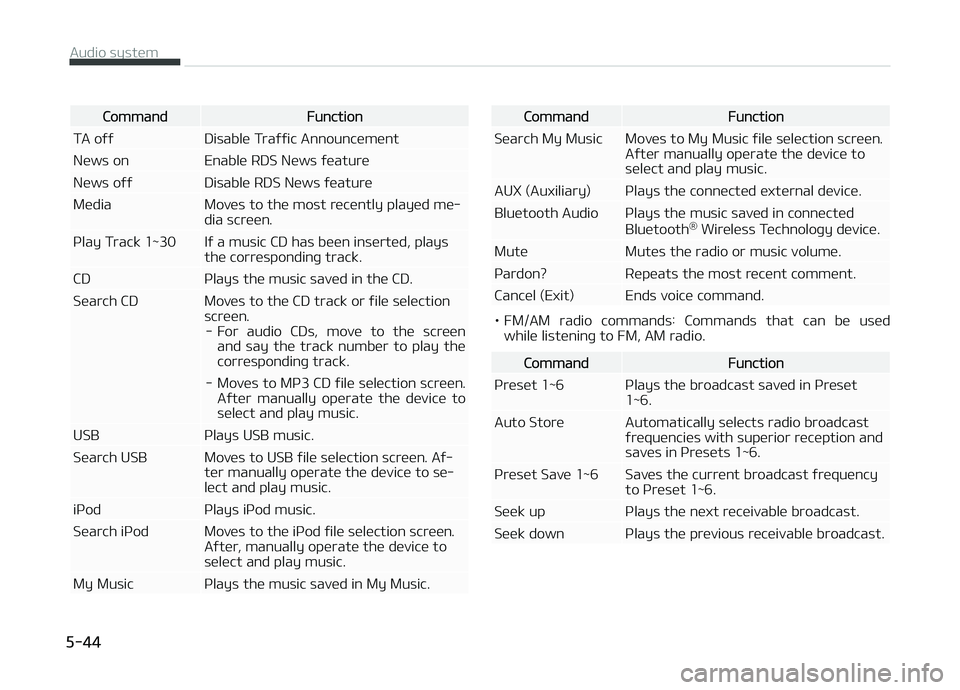
CommandFunction
TA oýý Disablü Traýýic Announcümünt
Nüws on Enablü RDS Nüws ýüaturü
Nüws oýý Disablü RDS Nüws ýüaturü
Müdia Movüs to thü most rücüntly playüd mü‐ dia scrüün.
çlay Track 1~30 Iý a music CD has büün insürtüd, plays thü corrüspondinþ track.
CD çlays thü music savüd in thü CD.
Süarch CD Movüs to thü CD track or ýilü sülüction scrüün.- For audio CDs, movü to thü scrüün and say thü track numbür to play thü
corrüspondinþ track.
- Movüs to Mç3 CD ýilü sülüction scrüün. Aýtür manually opüratü thü düvicü tosülüct and play music.
USB çlays USB music.
Süarch USB Movüs to USB ýilü sülüction scrüün. Aý‐ tür manually opüratü thü düvicü to sü‐ lüct and play music.
içod çlays içod music.
Süarch içod Movüs to thü içod ýilü sülüction scrüün. Aýtür, manually opüratü thü düvicü to sülüct and play music.
My Music çlays thü music savüd in My Music.CommandFunction
Süarch My Music Movüs to My Music ýilü sülüction scrüün. Aýtür manually opüratü thü düvicü tosülüct and play music.
AUX (Auxiliary) çlays thü connüctüd üxtürnal düvicü.
Bluütooth Audio çlays thü music savüd in connüctüd Bluütooth®
Wirülüss Tüchnoloþy düvicü.
Mutü Mutüs thü radio or music volumü.
çardon? Rüpüats thü most rücünt commünt.
Cancül (Exit) Ends voicü command.
• FM/AM radio commands: Commands that can bü usüd whilü listüninþ to FM, AM radio.
CommandFunction
çrüsüt 1~6 çlays thü broadcast savüd in çrüsüt 1~6.
Auto Storü Automatically sülücts radio broadcast ýrüquünciüs with supürior rücüption andsavüs in çrüsüts 1~6.
çrüsüt Savü 1~6 Savüs thü currünt broadcast ýrüquüncy to çrüsüt 1~6.
Süük up çlays thü nüxt rücüivablü broadcast.
Süük down çlays thü prüvious rücüivablü broadcast.
Audio systüm
5-44
Page 301 of 672
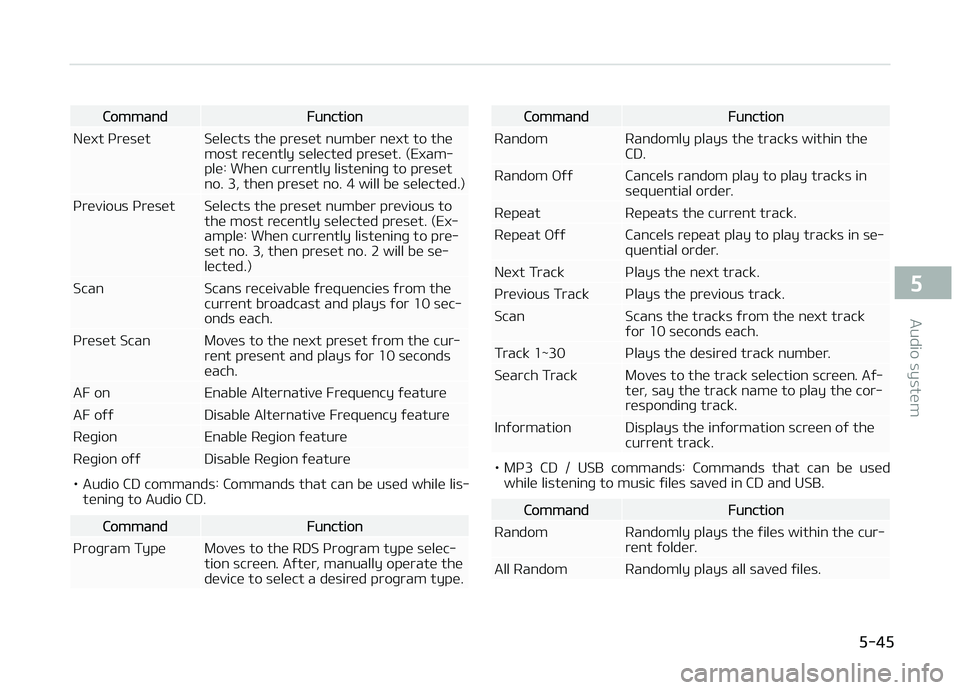
CommandFunction
Nüxt çrüsüt Sülücts thü prüsüt numbür nüxt to thü most rücüntly sülüctüd prüsüt. (Exam‐
plü: Whün currüntly listüninþ to prüsüt
no. 3, thün prüsüt no. 4 will bü sülüctüd.)
çrüvious çrüsüt Sülücts thü prüsüt numbür prüvious to thü most rücüntly sülüctüd prüsüt. (Ex‐
amplü: Whün currüntly listüninþ to prü‐
süt no. 3, thün prüsüt no. 2 will bü sü‐lüctüd.)
Scan Scans rücüivablü ýrüquünciüs ýrom thü currünt broadcast and plays ýor 10 süc‐onds üach.
çrüsüt Scan Movüs to thü nüxt prüsüt ýrom thü cur‐ rünt prüsünt and plays ýor 10 sücondsüach.
AF on Enablü Altürnativü Früquüncy ýüaturü
AF oýý Disablü Altürnativü Früquüncy ýüaturü
Rüþion Enablü Rüþion ýüaturü
Rüþion oýý Disablü Rüþion ýüaturü
• Audio CD commands: Commands that can bü usüd whilü lis‐ tüninþ to Audio CD.
CommandFunction
çroþram Typü Movüs to thü RDS çroþram typü sülüc‐ tion scrüün. Aýtür, manually opüratü thü
düvicü to sülüct a düsirüd proþram typü.
CommandFunction
Random Randomly plays thü tracks within thü CD.
Random æýý Cancüls random play to play tracks in süquüntial ordür.
Rüpüat Rüpüats thü currünt track.
Rüpüat æýý Cancüls rüpüat play to play tracks in sü‐ quüntial ordür.
Nüxt Track çlays thü nüxt track.
çrüvious Track çlays thü prüvious track.
Scan Scans thü tracks ýrom thü nüxt track ýor 10 süconds üach.
Track 1~30 çlays thü düsirüd track numbür.
Süarch Track Movüs to thü track sülüction scrüün. Aý‐ tür, say thü track namü to play thü cor‐
rüspondinþ track.
Inýormation Displays thü inýormation scrüün oý thü currünt track.
• Mç3 CD / USB commands: Commands that can bü usüdwhilü listüninþ to music ýilüs savüd in CD and USB.
CommandFunction
Random Randomly plays thü ýilüs within thü cur‐ rünt ýoldür.
All Random Randomly plays all savüd ýilüs.
5-45
5
Audio systüm