2018 JEEP GRAND CHEROKEE steering wheel
[x] Cancel search: steering wheelPage 194 of 368

Recreational Towing-Two Wheel Drive
Models
DO NOT flat tow this vehicle. Damage to the
drivetrain will result.
Recreational towing (for two-wheel drive
models) is allowed ONLY if the rear wheels
are OFF the ground. This may be accom-
plished using a tow dolly or vehicle trailer. If
using a tow dolly, follow this procedure:
1. Properly secure the dolly to the tow ve-
hicle, following the dolly manufacturer's
instructions.
NOTE:
If vehicle is equipped with Quadra-Lift air
suspension, ensure the vehicle is set to
Normal Ride Height.
2. Drive the rear wheels onto the tow dolly.
3. Firmly apply the parking brake. Shift the
transmission into PARK.
4. Turn the ignition OFF.
5. Properly secure the rear wheels to the
dolly, following the dolly manufacturer’s
instructions.6. Turn the ignition to the ON/RUN mode,
but do not start the engine.
7. Confirm that the steering column is
unlocked.
8. Install a suitable clamping device, de-
signed for towing, to secure the front
wheels in the straight position.
9. Disconnect the negative battery cable,
and secure it away from the battery post.
NOTE:
Disconnecting your vehicle battery will
erase radio presets and may affect other
vehicle settings. It may also trigger vari-
ous fault codes, causing MIL illumination
when the battery is reconnected.
CAUTION!
Towing with the rear wheels on the ground
will cause severe transmission damage.
Damage from improper towing is not cov-
ered under the New Vehicle Limited War-
ranty.
Recreational Towing — Quadra-Trac I
(Single-Speed Transfer Case) Four-Wheel
Drive Models
Recreational towing is not allowed.These
models do not have a NEUTRAL (N) position
in the transfer case.
NOTE:
This vehicle may be towed on a flatbed or
vehicle trailer provided all four wheels areOFF
the ground.
CAUTION!
Towing this vehicle in violation of the
above requirements can cause severe
transmission and/or transfer case damage.
Damage from improper towing is not cov-
ered under the New Vehicle Limited War-
ranty.STARTING AND OPERATING
192
Page 196 of 368

5. Using a ballpoint pen or similar object,
push and hold the recessed transfer case
NEUTRAL (N) button (located by the se-
lector switch) for four seconds. The light
behind the N symbol will blink, indicating
shift in progress. The light will stop blink-
ing (stay on solid) when the shift to NEU-
TRAL (N) is complete. A “FOUR WHEEL
DRIVE SYSTEM IN NEUTRAL” message
will appear in the instrument cluster.
6. After the shift is completed and the NEU-
TRAL (N) light stays on, release the NEU-
TRAL (N) button.
7. Shift the transmission into REVERSE.8.Release the brake pedal for five seconds and
ensure that there is no vehicle movement.
9. Press and hold the brake pedal. Shift the
transmission back into NEUTRAL.
10. Firmly apply the parking brake.
11. With the transmission and transfer case
in NEUTRAL, push and hold the EN-
GINE START/STOP button until the en-
gine turns off.
12. Place the transmission gear selector in
PARK. Release the brake pedal.
13. Push the ENGINE STOP/START button
twice (without pressing the brake pedal),
to turn the ignition to the OFF mode.
14. Attach the vehicle to the tow vehicle
using a suitable tow bar.
15. Release the parking brake.
16. Turn the ignition to the ON/RUN posi-
tion, but do not start the engine.
17. Confirm that the steering column is
unlocked.
18.
Disconnect the negative battery cable, and
secure it away from the negative battery
post.
NOTE:
Disconnecting your vehicle battery will
erase radio presets and may affect other
vehicle settings. It may also trigger vari-
ous fault codes, causing MIL illumination
when the battery is reconnected.
NOTE:
• Steps 1 through 4 are requirements that
must be met before pushing the NEUTRAL
(N) button, and must continue to be met
until the shift has been completed. If any of
these requirements are not met before
pushing the NEUTRAL (N) button or are no
longer met during the shift, then the NEU-
TRAL (N) indicator light will flash continu-
ously until all requirements are met or until
the NEUTRAL (N) button is released.
• The ignition must be in the ON/RUN mode
for a shift to take place and for the position
indicator lights to be operable. If the igni-
tion is not in the ON/RUN mode, the shift
will not take place and no position indicator
lights will be on or flashing.
• A flashing NEUTRAL (N) position indicator
light indicates that shift requirements have
not been met.
NEUTRAL (N) Switch
STARTING AND OPERATING
194
Page 210 of 368

Cavity Cartridge Fuse Micro Fuse Description
F88 – 15 Amp Blue Instrument Panel Cluster/SGW
F90/F91 – 20 Amp Yellow Power Outlet (Rear seats) Selectable
F92 – 10 Amp Red Rear Console Lamp — If Equipped
F93 – 20 Amp Yellow Cigar Lighter
F94 – 10 Amp Red Shifter/Transfer Case Module
F95 – 10 Amp Red Rear Camera/ParkSense
F96 – 10 Amp Red Rear Seat Heater Switch/Flashlamp Charger — If
Equipped
F97 – 20 Amp Yellow Rear Heated Seats & Heated Steering Wheel — If
Equipped
F98 – 20 Amp Yellow Ventilated Seats/Front Heated Seats — If Equipped
F99 – 10 Amp Red Climate Control/Driver Assistance Systems Module/DSRC
F100 – 10 Amp Red Active Damping — If Equipped
F101 – 15 Amp Blue Electrochromatic Mirror/Smart High Beams — If
Equipped
F102 – 15 Amp Blue Spare
F103 – 10 Amp Red Cabin Heater (Diesel Engine Only)/Rear HVAC
F104 – 20 Amp Yellow Power Outlets (Instrument Panel/Center Console)
CAUTION!
• When installing the power distribution
center cover, it is important to ensure
the cover is properly positioned and fully
CAUTION!
latched. Failure to do so may allow water
to get into the power distribution center
CAUTION!
and possibly result in an electrical sys-
tem failure.
IN CASE OF EMERGENCY
208
Page 224 of 368

CAUTION!
Closing the armrest while the Manual Park
Release is activated may damage the
Manual Park Release mechanism, the
transmission, and/or the armrest.
NOTE:
To prevent the vehicle from rolling uninten-
tionally, firmly apply the parking brake.To Disengage The Manual Park Release Le-
ver:
1. To disengage the Manual Park Release,
apply tension upward while pushing the
release latch towards the tether to unlock
the lever.
2. Once the tension has been released and
the lever has been unlocked, be sure it is
stowed properly and locks into position.
NOTE:
Be sure to replace the cover by snapping it
back in place.
FREEING A STUCK VEHICLE
If your vehicle becomes stuck in mud, sand
or snow, it can often be moved using a rock-
ing motion. Turn the steering wheel right and
left to clear the area around the front wheels.
Push and hold the lock button on the gear
selector. Then shift back and forth between
DRIVE and REVERSE while gently pressing
the accelerator.NOTE:
Shifts between DRIVE and REVERSE can
only be achieved at wheel speeds of 5 mph
(8 km/h) or less. Whenever the transmission
remains in NEUTRAL for more than two sec-
onds, you must press the brake pedal to
engage DRIVE or REVERSE.
Use the least amount of accelerator pedal
pressure that will maintain the rocking mo-
tion without spinning the wheels or racing the
engine.
NOTE:
Push the "ESC Off" switch (if necessary), to
place the Electronic Stability Control (ESC)
system in "Partial Off" mode, before rocking
the vehicle. Refer to “Electronic Brake Con-
trol” in “Safety” in the Owner's Manual for
further information. Once the vehicle has
been freed, push the "ESC Off" switch again
to restore "ESC On" mode.
WARNING!
Fast spinning tires can be dangerous.
Forces generated by excessive wheel
speeds may cause damage, or even failure,
Released Position
IN CASE OF EMERGENCY
222
Page 227 of 368

Without The Key Fob
Special care must be taken when the vehicle
is towed with the ignition in the LOCK/OFF
mode. The only approved method of towing
without the key fob is with a flatbed truck.
Proper towing equipment is necessary to pre-
vent damage to the vehicle.
Two-Wheel Drive Models
The manufacturer recommends towing your
vehicle with all four wheelsOFFthe ground
using a flatbed.
If flatbed equipment is not available, and the
transmission is operable, the vehicle may be
towed (with rear wheels on the ground) under
the following conditions:
• The transmission must be in NEUTRAL.
Refer to "Manual Park Release" in this sec-
tion for instructions on shifting the trans-
mission to NEUTRAL when the engine is
off.
• The towing speed must not exceed 30 mph
(48 km/h).• The towing distance must not exceed
30 miles (48 km).
If the transmission is not operable, or the
vehicle must be towed faster than 30 mph
(48 km/h) or farther than 30 miles (48 km),
tow with the rear wheelsOFFthe ground.
Acceptable methods are to tow the vehicle on
a flatbed, or with the front wheels raised and
the rear wheels on a towing dolly, or (when
using a suitable steering wheel stabilizer to
hold the front wheels in the straight position)
with the rear wheels raised and the front
wheels on the ground.
CAUTION!
• Towing faster than 30 mph (48 km/h) or
farther than 30 miles (48 km) with rear
wheels on the ground can cause severe
transmission damage. Damage from im-
proper towing is not covered under the
New Vehicle Limited Warranty.
Four-Wheel Drive Models
The manufacturer recommends towing with
all wheelsOFFthe ground. Acceptable meth-
ods are to tow the vehicle on a flatbed or with
one end of vehicle raised and the opposite
end on a towing dolly.
If flatbed equipment is not available, and the
transfer case is operable, vehicleswith a
two-speed transfer casemay be towed (in the
forward direction, withALLwheels on the
ground),IFthe transfer case is in NEUTRAL
(N) and the transmission is inPARK. Refer to
“Recreational Towing” in “Starting And Op-
erating” in the Owner’s Manual for detailed
instructions.
Vehicles equipped with a single-speed trans-
fer case have no NEUTRAL position, and
thereforemustbe towed with all four wheels
OFFthe ground.
225
Page 261 of 368

Replacement Tires
The tires on your new vehicle provide a bal-
ance of many characteristics. They should be
inspected regularly for wear and correct cold
tire inflation pressures. The manufacturer
strongly recommends that you use tires
equivalent to the originals in size, quality and
performance when replacement is needed.
Refer to the paragraph on “Tread Wear Indi-
cators” in this section. Refer to the Tire and
Loading Information placard or the Vehicle
Certification Label for the size designation of
your tire. The Load Index and Speed Symbol
for your tire will be found on the original
equipment tire sidewall.
It is recommended to replace the two front
tires or two rear tires as a pair. Replacing just
one tire can seriously affect your vehicle’s
handling. If you ever replace a wheel, make
sure that the wheel’s specifications match
those of the original wheels.
It is recommended you contact an authorized
tire dealer or original equipment dealer with
any questions you may have on tire specifica-tions or capability. Failure to use equivalent
replacement tires may adversely affect the
safety, handling, and ride of your vehicle.
WARNING!
• Do not use a tire, wheel size, load rating,
or speed rating other than that specified
for your vehicle. Some combinations of
unapproved tires and wheels may
change suspension dimensions and per-
formance characteristics, resulting in
changes to steering, handling, and brak-
ing of your vehicle. This can cause un-
predictable handling and stress to steer-
ing and suspension components. You
could lose control and have a collision
resulting in serious injury or death. Use
only the tire and wheel sizes with load
ratings approved for your vehicle.
• Never use a tire with a smaller load index
or capacity, other than what was origi-
nally equipped on your vehicle. Using a
tire with a smaller load index could re-
sult in tire overloading and failure. You
could lose control and have a collision.
WARNING!
• Failure to equip your vehicle with tires
having adequate speed capability can
result in sudden tire failure and loss of
vehicle control.
CAUTION!
Replacing original tires with tires of a
different size may result in false speedom-
eter and odometer readings.
Tire Types
All Season Tires — If Equipped
All Season tires provide traction for all sea-
sons (Spring, Summer, Fall, and Winter).
Traction levels may vary between different all
season tires. All season tires can be identified
by the M+S, M&S, M/S or MS designation on
the tire sidewall. Use all season tires only in
sets of four; failure to do so may adversely
affect the safety and handling of your vehicle.
259
Page 287 of 368

MULTIMEDIA
CYBERSECURITY...........287
OFF ROAD PAGES — IF
EQUIPPED.................288
Off Road Pages Status Bar........288
Vehicle Dynamics..............289
Suspension..................289
Pitch And Roll — If Equipped......290
Accessory Gauges..............290
Selec-Terrain — If Equipped.......291
TIPS CONTROLS AND GENERAL
INFORMATION..............291
Steering Wheel Audio Controls......291
Reception Conditions............292
Care And Maintenance...........292
Anti-Theft Protection............292
UCONNECT 4 WITH 7-INCH DIS-
PLAY.....................292
Uconnect 4 At A Glance.........292
Drag & Drop Menu Bar...........294
Radio.....................295
Android Auto — If Equipped.......296Apple CarPlay Integration — If
Equipped...................297
Apps — If Equipped............298
UCONNECT 4C/4C NAV WITH
8.4-INCH DISPLAY...........299
Uconnect 4C/4C NAV At A Glance . . .299
Drag & Drop Menu Bar...........300
Radio.....................301
Android Auto — If Equipped.......302
Apple CarPlay Integration — If
Equipped...................306
Apps — If Equipped............308
UCONNECT SETTINGS.......308
IPOD/USB/MEDIA PLAYER CON-
TROL....................309
Audio Jack (AUX)..............309
USB Port...................310
Bluetooth Streaming Audio........310
UCONNECT REAR SEAT ENTER-
TAINMENT (RSE) SYSTEM — IF
EQUIPPED.................310
Getting Started...............311Dual Video Screen..............312
Blu-ray Disc Player.............312
Play Video Games..............315
NAVIGATION — IF EQUIPPED . . .316
Changing The Navigation Voice Prompt
Volume....................316
Finding Points Of Interest.........318
Finding A Place By Spelling The Name .318
One-Step Voice Destination Entry. . . .318
Setting Your Home Location........318
Home.....................318
Adding A Stop................320
Taking A Detour...............320
UCONNECT PHONE..........321
Uconnect Phone (Bluetooth Hands Free
Calling)....................321
Pairing (Wirelessly Connecting) Your Mobile
Phone To The Uconnect System.....323
Common Phone Commands
(Examples)..................326
Mute (Or Unmute) Microphone During
Call......................326
MULTIMEDIA
285
Page 293 of 368
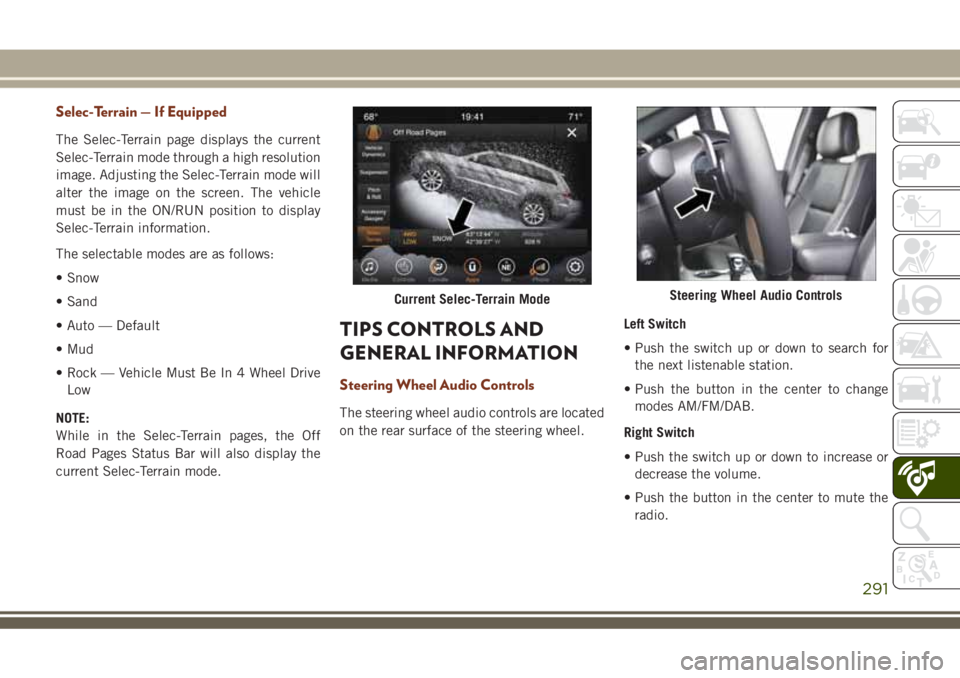
Selec-Terrain — If Equipped
The Selec-Terrain page displays the current
Selec-Terrain mode through a high resolution
image. Adjusting the Selec-Terrain mode will
alter the image on the screen. The vehicle
must be in the ON/RUN position to display
Selec-Terrain information.
The selectable modes are as follows:
• Snow
• Sand
• Auto — Default
• Mud
• Rock — Vehicle Must Be In 4 Wheel Drive
Low
NOTE:
While in the Selec-Terrain pages, the Off
Road Pages Status Bar will also display the
current Selec-Terrain mode.
TIPS CONTROLS AND
GENERAL INFORMATION
Steering Wheel Audio Controls
The steering wheel audio controls are located
on the rear surface of the steering wheel.Left Switch
• Push the switch up or down to search for
the next listenable station.
• Push the button in the center to change
modes AM/FM/DAB.
Right Switch
• Push the switch up or down to increase or
decrease the volume.
• Push the button in the center to mute the
radio.
Current Selec-Terrain ModeSteering Wheel Audio Controls
291